


 Video Converter Ultimate
 Εγγραφή οθόνης
 Επισκευή βίντεο
Απλά βήματα που πρέπει να ακολουθήσετε για τη μετατροπή 3GP σε MOV
Οι χρήστες μπορούν να αποθηκεύουν βίντεο, ήχο, εφέ ή κείμενο στο αρχείο MOV, ένα αρχείο πολυμεσικού περιέκτη (π.χ. υπότιτλους). Ωστόσο, το 3GP, που δημιουργήθηκε από το Third Generation Partnership Project (3GPP), προορίζεται για τη μετάδοση δεδομένων ήχου και βίντεο μεταξύ κινητών τηλεφώνων 3ης γενιάς και μέσω του διαδικτύου. Αυτές οι δύο μορφές βίντεο έχουν τις διαφορές τους, αλλά για να μάθετε περισσότερα σχετικά με τη σύγκρισή τους και τους μετατροπείς που μπορούν να μετατρέψουν 3GP σε MOV, διαβάστε προσεκτικά αυτό το άρθρο. Συγκεντρώστε τις σκέψεις σας και ας ξεκινήσουμε!

Μέρος 1. Εισαγωγή για το 3GP και το MOV
Third Generation Partnership Project (3GPP) Το 3GP είναι μια μορφή αρχείου βίντεο που οι χρήστες μπορούν να αναπαράγουν σε συσκευές που υποστηρίζουν 3G. Σε αυτό το πακέτο περιλαμβάνονται κωδικοποιητές H.263 ή H.264 και ροές ήχου που βασίζονται σε AMR ή AAC, οι οποίες είναι ιδανικές για συμπίεση δεδομένων βίντεο με απώλειες. Για δίκτυα 3G και συσκευές πολυμέσων, αυτή η τυπική μορφή βίντεο ISO έχει μικρότερο μέγεθος αρχείου που την καθιστά ιδανική για κοινή χρήση βίντεο. Παρόλο που αρχικά σχεδιάστηκε και προοριζόταν για συσκευές 3G, εξακολουθεί να λειτουργεί ομαλά σε σύγχρονες συσκευές και λειτουργικά συστήματα 4G.
Ωστόσο, το MOV είναι μια μορφή βίντεο που δημιουργήθηκε από την Apple. Οι χρήστες μπορούν να αποθηκεύουν αρχεία βίντεο και πολυμέσων σε αυτόν τον τύπο κοντέινερ αρχείων. Επειδή το ανέπτυξε η Apple, είναι συμβατό μόνο με προϊόντα Apple ή προγράμματα αναπαραγωγής βίντεο Quicktime. Δεδομένα βίντεο που αποθηκεύονται σε αρχεία MOV με υψηλούς ρυθμούς bit με ελάχιστη ή καθόλου συμπίεση. Λόγω των μεγάλων μεγεθών αρχείων, ωστόσο, είναι εξαιρετικής ποιότητας.
Αυτές είναι απλώς μια σύντομη περιγραφή αυτών των δύο μορφών βίντεο. Θα συναντήσετε όλους τους μετατροπείς, είτε λογισμικό είτε ηλεκτρονικά εργαλεία, που μπορούν να σας βοηθήσουν να μετατρέψετε τη μορφή βίντεο 3GP σε MOV για περαιτέρω ανάγνωση.
Μέρος 2. Ο καλύτερος μετατροπέας που βοηθά στη μετατροπή 3GP σε MOV σε Mac
Αυτό το άρθρο θα σας παρουσιάσει το καλύτερο λογισμικό που μπορείτε να εξετάσετε για τη μετατροπή αρχείων βίντεο 3GP σε MOV. Το Video Converter Ultimate είναι ένα εργαλείο με δωρεάν λήψη για Windows και Mac, το οποίο μπορεί να μετατρέψει 3GP σε MOV μέσα σε ένα λεπτό. Εκτός από τις εξαιρετικές δυνατότητες που διαθέτει, αυτό το λογισμικό υποστηρίζει επίσης τεράστιο αριθμό μορφών βίντεο που άλλο λογισμικό ή online μετατροπείς δεν υποστηρίζουν.
Είστε τυχεροί γιατί εκτός από αυτές τις δυνατότητες, διαθέτει επίσης εργαλεία βελτίωσης βίντεο που μπορούν να βελτιώσουν την ποιότητα του βίντεό σας με τους προσβάσιμους τρόπους. Τώρα που μάθατε μια σύντομη περιγραφή αυτού του λογισμικού, μπορείτε τώρα να προχωρήσετε στην εκμάθηση όλων των διαδικασιών που πρέπει να ακολουθήσετε για να εκτελέσετε σωστά τη διαδικασία μετατροπής.
Βήμα 1. Πρώτα, πρέπει να κάνετε κλικ στο κουμπί Free Download παρακάτω από αυτό το βήμα για να κατεβάσετε το λογισμικό. Αυτό το λογισμικό είναι διαθέσιμο τόσο σε Windows όσο και σε Mac, επομένως δεν χρειάζεται να ανησυχείτε για τη χρήση του και στα δύο λειτουργικά συστήματα. Αφού κατεβάσετε το λογισμικό, μπορείτε πλέον να το εγκαταστήσετε και να κάνετε κλικ στο Start Now για να το εκτελέσετε στον υπολογιστή σας.
Δωρεάν ΛήψηΓια Windows 7 ή νεότεραΑσφαλής λήψη
Δωρεάν ΛήψηΓια MacOS 10.7 ή νεότεροΑσφαλής λήψη
Βήμα 2. Αφού εκτελέσετε το λογισμικό, η διεπαφή του θα εμφανιστεί στην οθόνη σας, παρουσιάζοντας τη λειτουργία μετατροπής μαζί με τις υπόλοιπες δυνατότητες που είναι διαθέσιμες σε αυτό το πρόγραμμα.
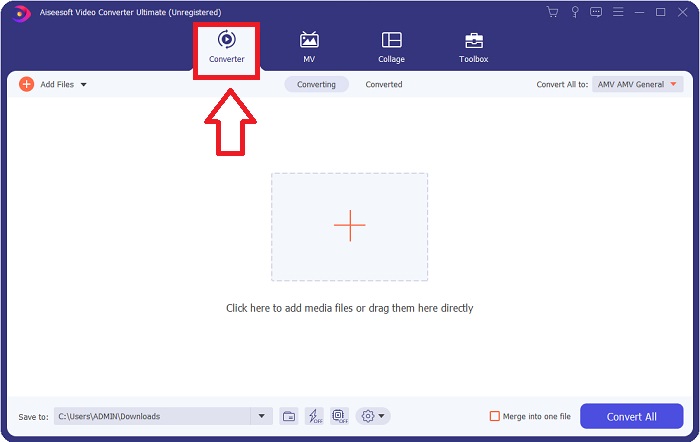
Βήμα 3. Τώρα μπορείτε να αρχίσετε να ανεβάζετε το αρχείο βίντεο που θέλετε να μετατρέψετε σε αυτό το λογισμικό κάνοντας κλικ στο εικονίδιο + ή μπορείτε επίσης να σύρετε τα αρχεία σας από την επιφάνεια εργασίας.

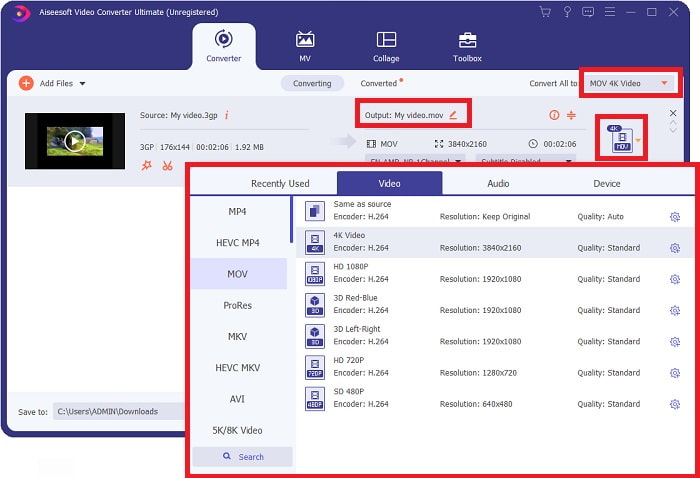
Βήμα 4: Κάντε κλικ στο εικονίδιο επιλογής μορφής στη δεξιά γωνία της διεπαφής. Στη συνέχεια, εντοπίστε και κάντε κλικ στη μορφή MOV και προχωρήστε στην επιλογή της προτιμώμενης ανάλυσης που θέλετε να εφαρμόσετε στο μετατρεπόμενο αρχείο βίντεο. Επιπλέον, μπορείτε επίσης να προσαρμόσετε την ποιότητα ή το τελικό αποτέλεσμα του βίντεο κάνοντας κλικ στο εικονίδιο του γραναζιού.
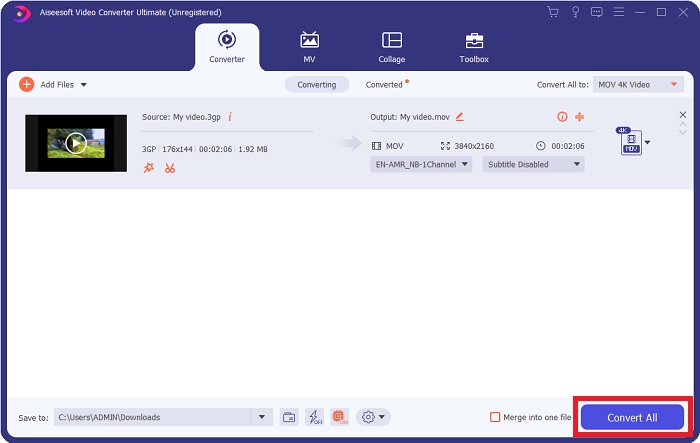
Βήμα 5. Αφού ολοκληρώσετε την προσαρμογή όλων των λεπτομερειών που επηρεάζουν την ποιότητα βίντεο του αρχείου που θέλετε να μετατρέψετε, μπορείτε πλέον να μετατρέψετε το αρχείο κάνοντας κλικ στο κουμπί Convert All.
Μέρος 3. Άλλες συμβουλές! Πώς να μετατρέψετε 3GP σε MOV Online
Εδώ υπάρχει μία ακόμη επιλογή που πρέπει επίσης να σκεφτείτε να χρησιμοποιείτε κάθε φορά που βιάζεστε να μετατρέψετε ένα βίντεο και δεν έχετε χρόνο να κατεβάσετε λογισμικό μόνο και μόνο για να μετατρέψετε ένα αρχείο. Σας παρουσιάζουμε το Free Video Converter Online, τον καλύτερο online μετατροπέα διαθέσιμο στο διαδίκτυο, που έχει τις ίδιες δυνατότητες με το Video Converter Ultimate. Για παράδειγμα, είναι σε θέση να μετατρέπει ένα αρχείο ταχύτερα από οποιοδήποτε άλλο online εργαλείο και υποστηρίζει επίσης πολυάριθμες μορφές βίντεο. Εφόσον αυτό το εργαλείο είναι εύχρηστο, δεν χρειάζεται καμία αναλυτική εκμάθηση για να το χρησιμοποιήσετε, αλλά για ορισμένους αρχάριους χρήστες, εδώ είναι οδηγίες της διαδικασίας που πρέπει να ακολουθήσετε:
Βήμα 1: Κάντε κλικ σε αυτόν τον σύνδεσμο για να μεταβείτε στην κύρια ιστοσελίδα του Free Video Converter Online.
Βήμα 2: Όταν βρεθείτε στην κύρια ιστοσελίδα του Free Video Converter Online, μπορείτε πλέον να ανεβάσετε αρχεία από τον υπολογιστή σας κάνοντας κλικ στο Add Files to Convert.
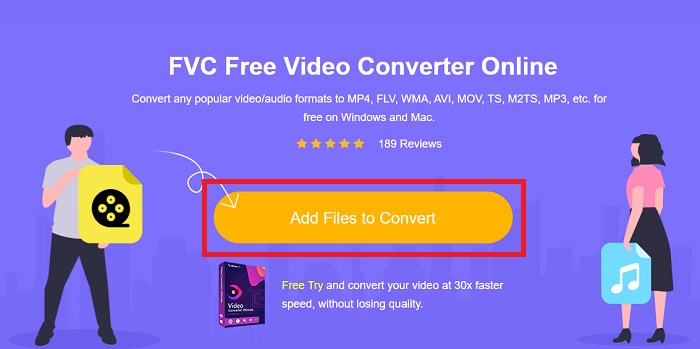
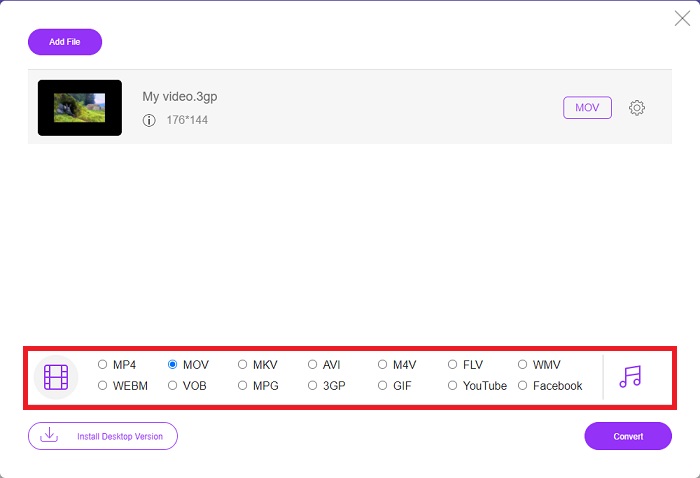
Βήμα 3: Αφού επιλέξετε ένα αρχείο που θέλετε να μετατρέψετε, ένα ακόμη παράθυρο θα εμφανιστεί στην οθόνη σας, όπου θα φαίνεται το αρχείο σας και όλες οι διαθέσιμες μορφές από κάτω. Επιλέξτε MOV από την επιλογή μορφής βίντεο.
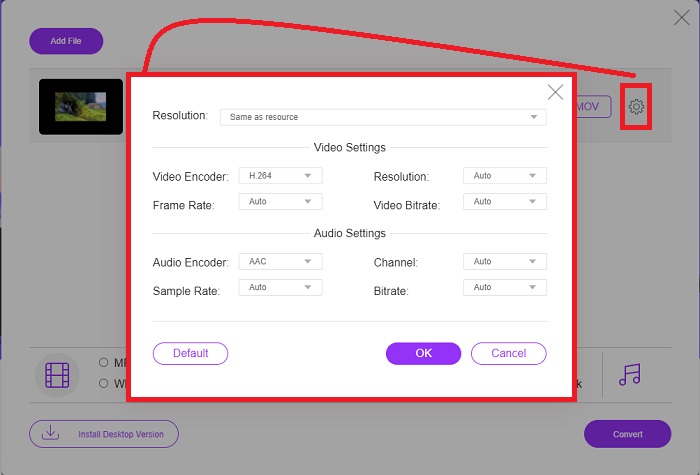
Βήμα 4: Μπορείτε επίσης να προσαρμόσετε το βίντεό σας κάνοντας κλικ στο εικονίδιο του γραναζιού και ρυθμίζοντας την ανάλυση, τον κωδικοποιητή βίντεο και το frame rate του τελικού σας βίντεο.
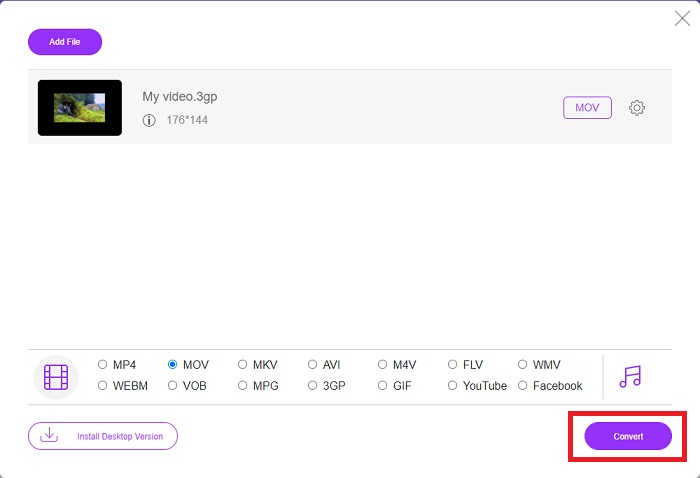
Βήμα 5: Αφού ρυθμίσετε και προσαρμόσετε όλες τις λεπτομέρειες του τελικού βίντεο, μπορείτε πλέον να μετατρέψετε το αρχείο κάνοντας κλικ στο Convert.
Μέρος 4. Συχνές ερωτήσεις σχετικά με τη μετατροπή 3GP σε MOV
Ποια είναι τα πλεονεκτήματα και τα μειονεκτήματα του MOV;
Μια μορφή αρχείου βίντεο που αναπτύχθηκε από την Apple, το MOV χρησιμοποιείται ευρέως. Τα αρχεία MOV περιέχουν μια ποικιλία ειδών πολυμέσων, συμπεριλαμβανομένων βίντεο, ήχου, υπότιτλων, κωδικών χρόνου και πολλά άλλα. Υποστηρίζονται τόσο οι εκδόσεις Mac όσο και Windows του QuickTimePlayer. Τα αρχεία MOV καταλαμβάνουν πολύ χώρο στον υπολογιστή επειδή είναι βίντεο υψηλής ποιότητας.
Είναι το 3GP η κατάλληλη μορφή βίντεο;
Η μορφή MP4 προτιμάται για ροή βίντεο στον επιτραπέζιο υπολογιστή του υπολογιστή σας ή στη φορητή συσκευή αναπαραγωγής πολυμέσων, επειδή μπορεί να υποστηρίξει βίντεο υψηλότερης ανάλυσης. Το 3GP, από την άλλη πλευρά, θα πρέπει να χρησιμοποιείται μόνο σε τηλέφωνα δικτύου που έχουν σχεδιαστεί με 3G για αυτήν τη συσκευή.
Είναι το 3GP με απώλειες ή χωρίς απώλειες;
Το 3GP, που σημαίνει Third Generation Partnership Project (3GPP), είναι μια μορφή αρχείου βίντεο που υποστηρίζεται από συσκευές με δυνατότητα 3G και πήρε το όνομά της από τον δημιουργό της. Περιέχει ροές βίντεο κωδικοποιημένες με τους κωδικοποιητές H.263 ή H.264 και ροές ήχου κωδικοποιημένες με τους AMR ή AAC, γεγονός που το καθιστά ιδανικό για απωλεστική συμπίεση βίντεο. Αν τα αρχεία 3GP σας είναι υπερβολικά μεγάλα, μπορείτε να συνεχίσετε να διαβάζετε και να μάθετε πώς να συμπιέσετε αρχεία 3GP χωρίς καμία δυσκολία.
συμπέρασμα
Καθώς η συζήτηση τελειώνει, υπάρχουν διάφορες επιλογές που αναφέρονται παραπάνω είτε για τη μετατροπή 3GP σε MOV εκτός σύνδεσης είτε online. Αυτές οι δύο είναι η καλύτερη επιλογή που μπορείτε να εξετάσετε για τη μετατροπή ενός αρχείου, διαφέρουν μόνο στην πλατφόρμα που θα χρησιμοποιηθεί, αλλά σας δίνουν σχεδόν μια εύκολη αίσθηση στην επαναφορά ενός αρχείου.
-
 Κορυφαίοι 4 πιο αποτελεσματικοί τρόποι για τη μετατροπή 3GP σε μορφή AVI [2025]
 Μπορώ να μετατρέψω τα αρχεία 3GP σε AVI; Λοιπόν, μπορείτε να το μετατρέψετε εύκολα εάν δοκιμάσετε αυτά τα διαθέσιμα εργαλεία, καθώς συγκεντρώσαμε όλες τις πιθανές λύσεις για το πρόβλημα μετατροπής 3GP σε AVI.
-
 Καλύτερος μετατροπέας GIF για μετατροπή κινούμενων GIF σε μορφή MOV [2025]
 Μετατρέψτε το GIF σας σε μορφή MOV με εύκολο τρόπο χωρίς να επηρεαστεί η ποιότητα του αρχείου βίντεο. Με βήματα και διαφορετικά εργαλεία επίσης.
-
 Πώς να μετατρέψετε AVI σε MOV με εύκολα βήματα και εργαλεία
 Θέλετε να μάθετε πώς να μετατρέψετε το AVI σε ένα MOV με δυνατότητα αναπαραγωγής; Πρέπει να ακολουθήσετε αυτό το άρθρο για να μάθετε πώς να το κάνετε και συμβουλές για να έχετε μια επιτυχημένη μετατροπή.
