


 Video Converter Ultimate
 Εγγραφή οθόνης
 Επισκευή βίντεο
Μάθετε πώς να μετατρέπετε AMV σε MOV χωρίς να υποβαθμίζετε την ποιότητα
Το AMV είναι μια ιδιόκτητη μορφή βίντεο που χρησιμοποιείται για την αποθήκευση αναπαραγωγών βίντεο σε φορητά media players τύπου S1 MP3 και MP4. Η επέκταση αρχείου .amv έχει χαμηλή ανάλυση και είναι συμπιεσμένη, ώστε το αρχείο να χωράει σε αυτήν τη φορητή συσκευή αναπαραγωγής πολυμέσων. Αν και η μορφή εξακολουθεί να υπάρχει, η εύρεση media player που να είναι συμβατός με τη χρήση σε τηλέφωνο είναι δύσκολη γιατί αυτή η μορφή είναι παλιά. Αντί να ψάχνετε για έναν συμβατό media player, γιατί να μην μετατρέψετε τα αρχεία AMV σε μια πιο σύγχρονη μορφή που υποστηρίζεται ευρέως, όπως το MOV; Επομένως, αν θέλετε να μάθετε τον καλύτερο τρόπο για να μετατρέψετε AMV σε MOV, ας ξεκινήσουμε την έρευνα.

Μέρος 1. Σύντομη εισαγωγή για τα AMV και MOV
Η ιδέα του Action Media Video ή AMV είναι να αντικαταστήσει το MP4 ως καθολική μορφή, επειδή αυτή η μορφή είναι καλύτερη και πολύ πιο συμπιεσμένη. Επίσης, αυτή η μορφή είναι η καλύτερη έκδοση της μορφής AVI. Ωστόσο, η μορφή έχει αγνοηθεί σε αυτή τη νέα εποχή, επειδή δεν λαμβάνει καμία ενημέρωση για τη βελτίωση της ποιότητας ανάλυσης. Και τώρα, εάν αποθηκεύσετε αυτήν τη μορφή στις κινητές συσκευές μας και την παίξετε, περιμένετε ότι δεν μπορείτε να την παίξετε επειδή η μορφή δεν υποστηρίζεται. Επομένως, εάν θέλετε να αναπαράγετε ένα βίντεο με αυτήν τη μορφή, πρέπει να κάνετε λήψη ενός προγράμματος αναπαραγωγής πολυμέσων τρίτου κατασκευαστή για AMV. Ενώ το MOV, αυτή η μορφή κερδίζει μεγάλη υποστήριξη επειδή είναι η εγγενής μορφή αρχείου που αναπτύσσει το QuickTime.
Μέρος 2. Μετατροπή AMV σε MOV με το Ultimate Desktop Software
FVC Video Converter Ultimate
Μετατρέψτε AMV σε MOV με τη βοήθεια αυτού του επαγγελματικού μετατροπέα βίντεο που παράγει εντυπωσιακό αποτέλεσμα που κανείς δεν μπορεί να ανταγωνιστεί, του FVC Video Converter Ultimate. Αυτός ο μετατροπέας είναι διαθέσιμος σε PC και Mac, και στις δύο πλατφόρμες προσφέρει τα ίδια προηγμένα χαρακτηριστικά. Επιπλέον, η γρήγορη μετατροπή και η επιτάχυνση μέσω υλικού (hardware acceleration) που είναι διαθέσιμες στα PC, είναι ανοιχτές και στο Mac. Πολλοί χρήστες έχουν ήδη επιλέξει αυτό το λογισμικό ως την πρώτη τους επιλογή για να λύσουν τα προβλήματά τους με τη μετατροπή. Ακόμη, πριν χρησιμοποιήσετε αυτό το εργαλείο, θα χρειαστεί να το αγοράσετε από την FVC. Αν και είναι επί πληρωμή, δεν θα χρειαστεί να ξοδέψετε εκατοντάδες δολάρια, και η τιμή θα αξίζει. Χωρίς άλλη καθυστέρηση, ας δοκιμάσουμε αυτό το εργαλείο για να δούμε αν μπορούμε να πετύχουμε την απόλυτη μετατροπή, όπως υπόσχεται και το όνομά του.
Βήματα για το πώς να μετατρέψετε AMV σε MOV με το FVC Video Converter Ultimate:
Βήμα 1. Κατεβάστε το FVC Video Converter Ultimate στον υπολογιστή σας κάνοντας κλικ στο παρακάτω κουμπί· εγκαταστήστε το λογισμικό μετά την ολοκλήρωση της λήψης.
Δωρεάν ΛήψηΓια Windows 7 ή νεότεραΑσφαλής λήψη
Δωρεάν ΛήψηΓια MacOS 10.7 ή νεότεροΑσφαλής λήψη
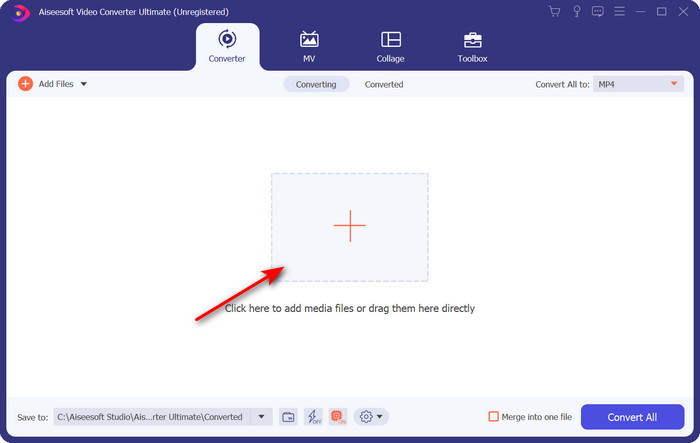
Βήμα 2. Ανοίξτε το λογισμικό για να το χρησιμοποιήσετε και, για να ανεβάσετε το .amv, κάντε κλικ στο σύμβολο +. Βρείτε το αρχείο στον φάκελο και πατήστε Open για εισαγωγή.
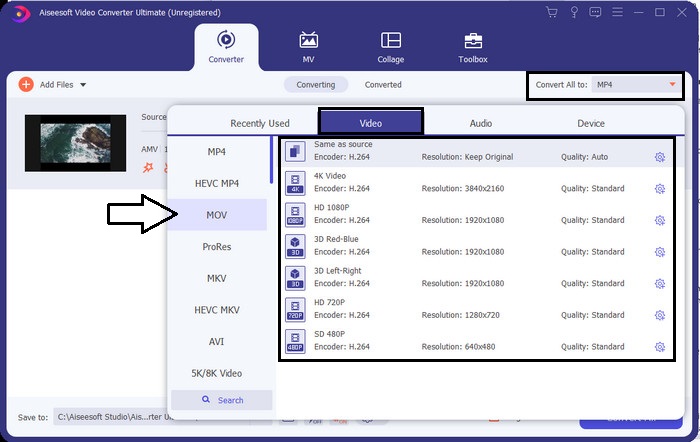
Βήμα 3. Για να αλλάξετε τη μορφή σε MOV, κάντε κλικ στο Convert All to: και επιλέξτε MOV ή όποια μορφή επιθυμείτε.
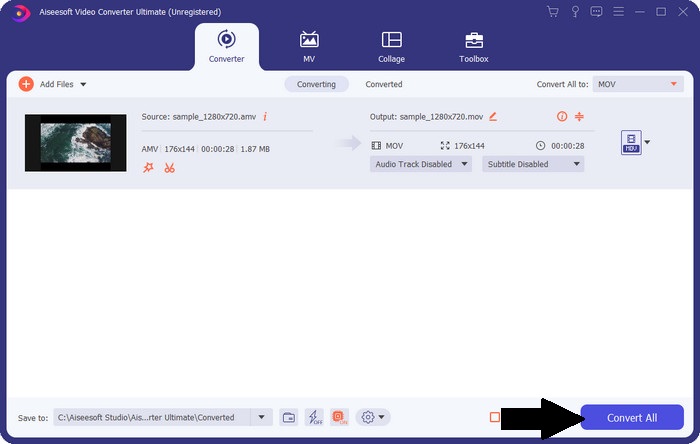
Βήμα 4. Για να μετατρέψετε το αρχείο AMV σε MOV, κάντε κλικ στο Convert All για να ξεκινήσει η διαδικασία μετατροπής.
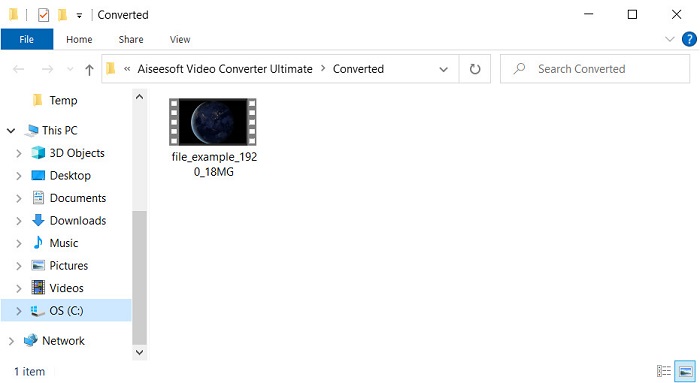
Βήμα 5. Η μετατροπή του αρχείου θα πάρει μόνο λίγα δευτερόλεπτα. Έπειτα περιμένετε να εμφανιστεί ο φάκελος με το αρχείο .mov που δημιουργήσατε προηγουμένως· κάντε κλικ στο αρχείο για να το παρακολουθήσετε στον προεπιλεγμένο media player σας.
Μέρος 3. Μετατρέψτε το AMV σε MOV με το 2 Online Service Converter που είναι διαθέσιμο
1. ConvertFiles
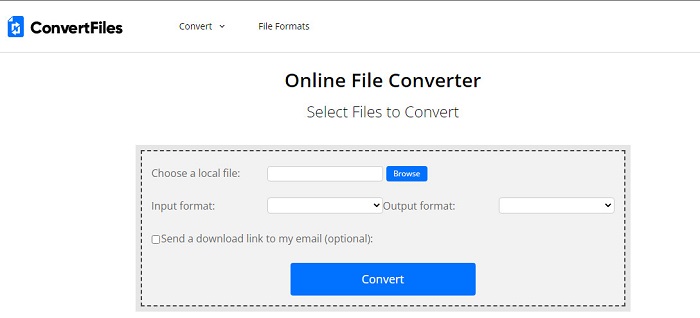
Ένας από τους καλύτερους online μετατροπείς που μπορείτε να έχετε πρόσβαση από τον αγαπημένο σας browser είναι το ConvertFiles. Αυτό το online εργαλείο μπορεί να μετατρέψει τη μορφή του αρχείου σας σε μια νέα χωρίς κανένα πρόβλημα. Επιπλέον, αυτό το εργαλείο υποστηρίζει ένα μικρό σύνολο μορφών από τις οποίες μπορείτε να επιλέξετε. Ωστόσο, η λήψη του μετατρεμμένου αρχείου εδώ παίρνει αρκετό χρόνο, επειδή δεν προσφέρει γρήγορη μετατροπή. Ένα ακόμη αρνητικό είναι οι διαφημίσεις· υπάρχουν πολλές στην επιφάνεια εργασίας του εργαλείου. Παρά τα προβλήματα με τη διαδικασία λήψης και τις διαφημίσεις, αυτό το εργαλείο αποδίδει καλά ως ένα δωρεάν online εργαλείο.
Βήματα για το πώς να μετατρέψετε AMV σε MOV με το ConvertFiles:
Βήμα 1. Ανοίξτε τον αγαπημένο σας browser και αναζητήστε το ConvertFiles.
Βήμα 2. Μόλις ανοίξει ο ιστότοπος, κάντε κλικ στο Browse για να εντοπίσετε το αρχείο στον φάκελο· στο Output Format, βρείτε το MOV και κάντε κλικ στο Convert.
Βήμα 3. Όταν ολοκληρωθεί η μετατροπή, κάντε κλικ στο μπλε επισημασμένο σύνδεσμο για να κατεβάσετε το αρχείο στον υπολογιστή σας.
2. MCconverter
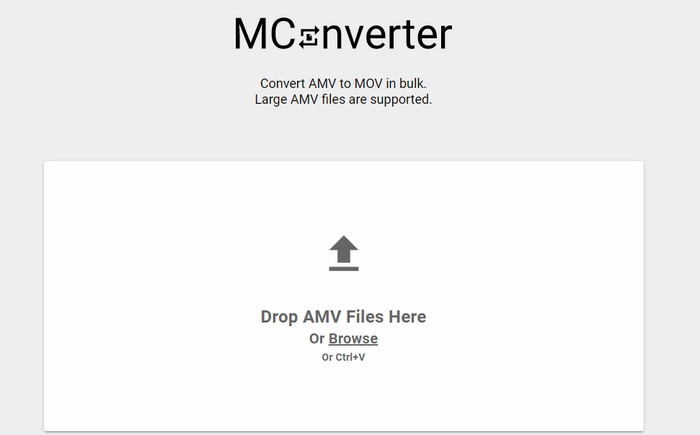
Δεν θέλετε διαφημίσεις στην οθόνη, ώστε να μετατρέπετε ήσυχα AMV σε MOV; Τότε δοκιμάστε να χρησιμοποιήσετε το MConverter, που είναι διαθέσιμο στον browser σας. Επίσης, αυτό το εργαλείο υποστηρίζει ομαδική μετατροπή (batch conversion) για να κάνει τη διαδικασία πιο αποδοτική, όπως και το FVC Video Converter Ultimate. Ωστόσο, το μειονέκτημα αυτού του online εργαλείου είναι ότι δεν μπορείτε να ξεπεράσετε το μέγεθος αρχείου των 200 MB. Οπότε, αν θέλετε να μετατρέψετε ένα μεγάλο βίντεο και το μέγεθος του αρχείου υπερβαίνει το υποστηριζόμενο όριο, τότε δεν είναι η κατάλληλη επιλογή για εσάς. Αλλά αν θέλετε να ζήσετε μια εμπειρία μετατροπής καλύτερη από αυτή του ConvertFiles, ακολουθήστε τα παρακάτω βήματα.
Βήματα για το πώς να μετατρέψετε AMV σε MOV με το MConverter:
Βήμα 1. Αναζητήστε το MConverter στη μηχανή αναζήτησής σας και ανοίξτε το.
Βήμα 2. Κάντε κλικ στο κουμπί Upload για να εισαγάγετε το αρχείο, περιμένετε λίγο μέχρι να φορτώσει το web εργαλείο, βρείτε το MOV και κάντε κλικ σε αυτό. Η μετατροπή του αρχείου θα ξεκινήσει αφού κάνετε κλικ στη μορφή MOV.
Βήμα 3. Πατήστε Download All για να αποθηκεύσετε το αρχείο.
Μέρος 4. Συχνές ερωτήσεις σχετικά με το AMV και το MOV
Μπορώ να μετατρέψω το MP4 μου σε AMV;
Μπορείτε να μετατρέψετε το MP4 σε AMV για να μεταφέρετε το αρχείο γρηγορότερα online. Ειδικά αν το βίντεο διαρκεί μία ώρα, σας προτείνουμε να μετατρέψετε τα αρχεία .mp4 σε .amv, επειδή έχουν πολύ μικρότερο μέγεθος σε σύγκριση με τις δύο μορφές.
Το VLC υποστηρίζει AMV;
Ευτυχώς, μπορείτε να χρησιμοποιήσετε το VLC Media Player για να αναπαράγετε τα αρχεία .amv σε αυτόν τον media player, παρόλο που είναι παρωχημένα. Αλλά γνωρίζατε ότι υπάρχουν media players που ξεπερνούν αυτό το πρόγραμμα; Αν λοιπόν θέλετε να μάθετε ποιοι media players είναι αυτοί, πρέπει να κάνετε κλικ σε αυτόν τον σύνδεσμο για να μάθετε τις 5 εναλλακτικές λύσεις media player για το VLC.
Πώς μπορώ να μετατρέψω το AMV μου σε AVI;
Το AMV είναι η βελτιωμένη έκδοση του AVI· ωστόσο, αν μιλήσουμε για την ποιότητα, το AVI προσφέρει εντυπωσιακή απόδοση σε σύγκριση με αυτήν την παλιά μορφή. Επίσης, το AVI είναι πολύ συμβατό με όλες τις πλατφόρμες. Έτσι τώρα, αν θέλετε να παρακολουθήσετε το AMV σας σε μια καλύτερη εκδοχή και σε όλες τις πλατφόρμες, πρέπει να μάθετε πώς να μετατρέψετε AMV σε AVI.
συμπέρασμα
Η συζήτηση πρέπει να τελειώσει εδώ. παρόλο που θέλουμε να αποθηκεύσουμε ένα αρχείο AMV στο δίσκο μας, το ζήτημα της συμβατότητας είναι ένας λόγος που πρέπει να το μετατρέψουμε. Εξάλλου, το AMV λέγεται ότι ήταν δημοφιλές στο παρελθόν λόγω του τρόπου με τον οποίο αυτό το κοντέινερ συμπιέζει το αρχείο. Ωστόσο, σήμερα πρέπει να σκεφτείτε να το μετατρέψετε σε νέα μορφή για να το χρησιμοποιήσετε ακόμα. Επιπλέον, οι λύσεις που παρέχονται εδώ μετατρέπονται αποτελεσματικά. Ωστόσο, το FVC Video Converter Ultimate αποδίδει εκπληκτικά σε σύγκριση με τα άλλα δύο εργαλεία. Επομένως, εάν θέλετε να δοκιμάσετε το καλύτερο εργαλείο, τότε είναι απαραίτητο να το κατεβάσετε στον υπολογιστή σας και να αντιγράψετε τα βήματα που παρέχονται παραπάνω.
-
 4 βέλτιστες μέθοδοι για να μετατρέψετε εύκολα το MOV σε MP3 σε Windows και Mac
 Όταν θέλετε να εξαγάγετε τα αρχεία ήχου MP3 από αρχεία MOV, μπορείτε να μάθετε περισσότερα σχετικά με τους 4 πιο αποτελεσματικούς μετατροπείς MOV σε MP3 για να λάβετε τα επιθυμητά αρχεία από το άρθρο.
-
 MKV σε MOV - Πώς να μετατρέψετε το MKV σε MOV
 Πώς μπορώ να μετατρέψω το MKV σε MOV σε Mac; Μπορεί το iMovie να διαβάσει το MKV; Τι σημαίνει η μορφή MOV; Αυτή η ανάρτηση περιγράφει 2 απλούς τρόπους για να σας βοηθήσει να μετατρέψετε MKV σε MOV με δωρεάν online και επαγγελματικούς μετατροπείς βίντεο.
-
 FLV σε MOV - Πώς να μετατρέψετε FLV σε MOV σε Mac / PC / Online δωρεάν
 Πώς να μετατρέψετε FLV σε MOV; Πώς μπορώ να μετατρέψω το FLV σε MOV σε Mac; Υπάρχει δωρεάν τρόπος μετατροπής του YouTube FLV σε MOV στο διαδίκτυο; Αυτή η ανάρτηση μοιράζεται 3 μετατροπείς FLV σε MOV για να αλλάξει αρχεία FLV σε MOV.
