


 Video Converter Ultimate
 Εγγραφή οθόνης
 Επισκευή βίντεο
Κορυφαίοι δωρεάν και εύχρηστοι μετατροπείς που μετατρέπουν WMV σε MOV που δεν πρέπει να χάσετε
Το Microsoft Windows Media Audio (WMA) και το Microsoft Windows Media Video (WMV) είναι συμπιεσμένες μορφές ήχου και βίντεο που αναπτύχθηκαν από τη Microsoft μέσα στο δοχείο ASF. Μόλις τα αρχεία WMV ή WMA κωδικοποιηθούν με τους κωδικοποιητές Windows Media Video και Windows Media Audio, εμφανίζονται με την επέκταση .asf. Αυτές οι δύο μορφές βίντεο που έχει δημιουργήσει η Microsoft είναι διαθέσιμες για αναπαραγωγή μόνο σε επιλεγμένους video players ή μπορούν να μετατραπούν μέσω περιορισμένου λογισμικού ή online converters. Αλλά αν αναζητάτε αξιόπιστους και ασφαλείς μετατροπείς για να μετατρέψετε WMV σε MOV, αυτό είναι το ιδανικό άρθρο για εσάς. Συνεχίστε την ανάγνωση για να μάθετε περισσότερα.

Μέρος 1. Σύντομη εισαγωγή των WMV και MOV
Η επέκταση αρχείου WMV αντιπροσωπεύει αρχεία βίντεο Windows Media, συμπιεσμένα χρησιμοποιώντας μία ή περισσότερες μορφές συμπίεσης βίντεο της Microsoft. Για παράδειγμα, ορισμένα προγράμματα τρίτων το χρησιμοποιούν για την αποθήκευση σύντομων κινούμενων εικόνων επειδή είναι μια τυπική μορφή για την αποθήκευση του βίντεο στα Windows. Αν και είναι παρόμοια στην εμφάνιση με τα αρχεία βίντεο Windows Media, τα αρχεία ήχου Windows Media περιλαμβάνουν μόνο δεδομένα ήχου και δεν περιέχουν βίντεο. Η επέκταση WMA χρησιμοποιείται για αυτά τα αρχεία.
Ωστόσο, το QuickTime File Format (QTFF) είναι μια μορφή αρχείου κοντέινερ πολυμέσων και ένα αρχείο MOV είναι ένα αρχείο ταινίας που αποθηκεύεται σε μορφή QuickTime File Format (QTFF). Αποθηκεύονται ένα ή περισσότερα tracks, καθένα από τα οποία περιέχει διαφορετικά δεδομένα πολυμέσων (όπως βίντεο, ήχο και κείμενο) (υπότιτλους). Τα αρχεία MOV χρησιμοποιούνται συχνά για την αποθήκευση ταινιών και άλλων αρχείων βίντεο και είναι εύκολο να τα βρει κανείς.
Μέρος 2. Καλύτερος τρόπος μετατροπής WMV σε MOV σε Mac και Windows
Αυτό το άρθρο προτείνει το Video Converter Ultimate για χρήστες Mac που θέλουν να μετατρέψουν WMV σε MOV. Και οι δύο εκδόσεις, για Windows και Mac, είναι διαθέσιμες για δωρεάν λήψη. Είναι λογισμικό που μπορεί να χρησιμοποιηθεί από ένα ευρύ φάσμα χρηστών, χάρη στο φιλικό προς τον χρήστη περιβάλλον και τα εύχρηστα εργαλεία του. Το λογισμικό αυτό περιλαμβάνει έναν μετατροπέα βίντεο που υποστηρίζει μεγάλη ποικιλία μορφών βίντεο και μπορεί να μετατρέπει αρχεία σε λιγότερο από ένα λεπτό, σε αντίθεση με άλλες εφαρμογές και διαδικτυακές υπηρεσίες. Επιπλέον, αυτό το λογισμικό διαθέτει αρκετές πρόσθετες λειτουργίες που μπορούν να σας βοηθήσουν να βελτιώσετε ακόμη περισσότερο το βίντεό σας. Υποθέτοντας ότι έχετε διαβάσει την περιγραφή του λογισμικού, ας ξεκινήσουμε:
Βήμα 1. Για να ξεκινήσει η λήψη, κάντε δεξί κλικ στο εικονίδιο Free Download που παρέχεται παρακάτω. Το λογισμικό μπορεί να τρέξει τόσο σε υπολογιστές Windows όσο και σε Macintosh. Μπορείτε να το εγκαταστήσετε και να αρχίσετε να το χρησιμοποιείτε αμέσως μετά τη λήψη του, κάνοντας κλικ στην επιλογή Start Now.
Δωρεάν ΛήψηΓια Windows 7 ή νεότεραΑσφαλής λήψη
Δωρεάν ΛήψηΓια MacOS 10.7 ή νεότεροΑσφαλής λήψη
Βήμα 2. Αφού κατεβάσετε το λογισμικό, θα πρέπει να το εκκινήσετε. Αυτές οι πληροφορίες θα εμφανιστούν σε ένα παράθυρο όταν το λογισμικό ανοίξει για πρώτη φορά. Εισαγάγετε το αρχείο βίντεο που θέλετε να μετατρέψετε για να ξεκινήσει η διαδικασία μετατροπής.
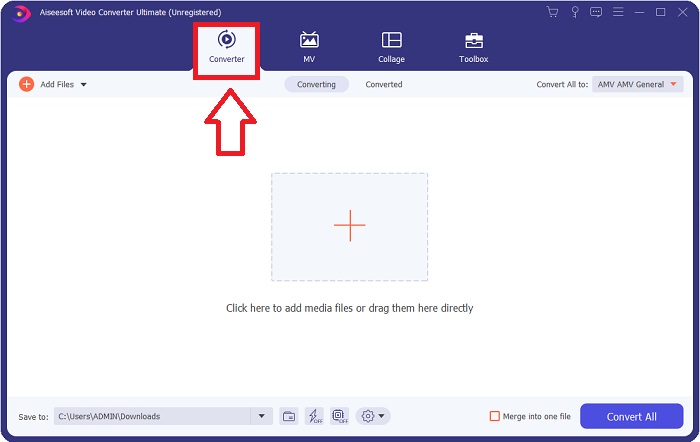
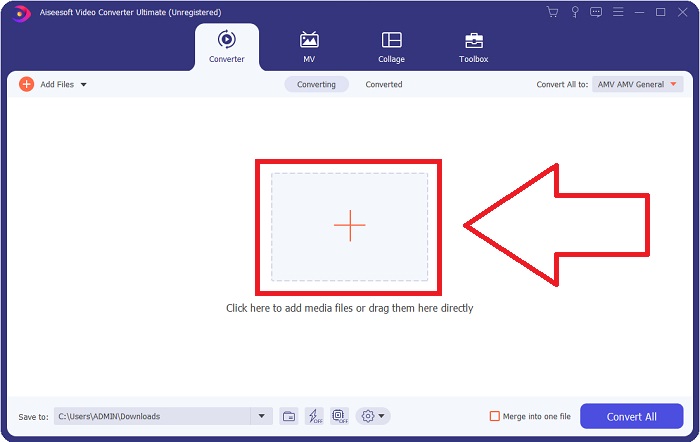
Βήμα 3. Ξεκινώντας από τη φόρτωση των αρχείων που θέλετε να μετατρέψετε στον μετατροπέα, σύρετε και αφήστε το αρχείο βίντεο που θέλετε να μετατρέψετε πάνω στο σύμβολο + για να αρχίσει η διαδικασία μετατροπής.
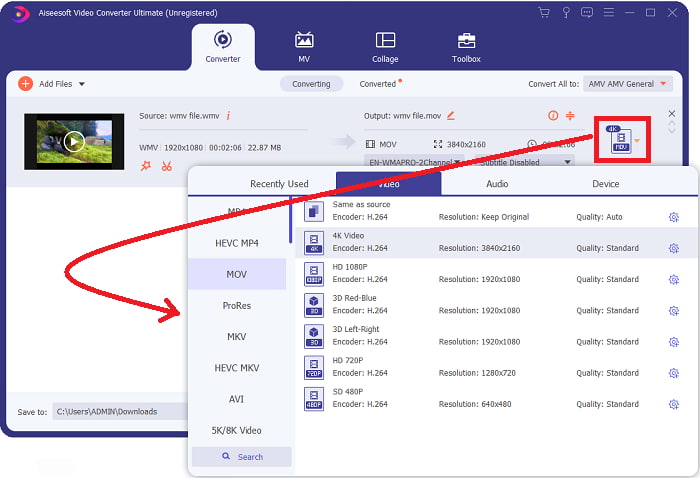
Βήμα 4: Εμφανίζεται ένα μενού επιλογών στο πάνω δεξί μέρος της οθόνης, από το οποίο μπορείτε να επιλέξετε μορφή βίντεο για αναπαραγωγή. Επιλέξτε MOV ως μορφή βίντεο από το αναπτυσσόμενο μενού που εμφανίζεται. Μπορείτε να επιλέξετε ανάμεσα σε διάφορα επίπεδα ποιότητας βίντεο, ανάλογα με το αρχείο MOV που έχετε επιλέξει. Αν το επιθυμητό video output δεν είναι διαθέσιμο, μπορείτε να ρυθμίσετε τις παραμέτρους ποιότητας στα Windows. Μπορείτε να προσαρμόσετε το frame rate της εικόνας και την ποιότητα του ήχου, επιλέγοντας το εικονίδιο με το γρανάζι στην πάνω δεξιά γωνία. Χρησιμοποιήστε το κουμπί Create New για να αποθηκεύσετε τις αλλαγές αφού τις πραγματοποιήσετε.
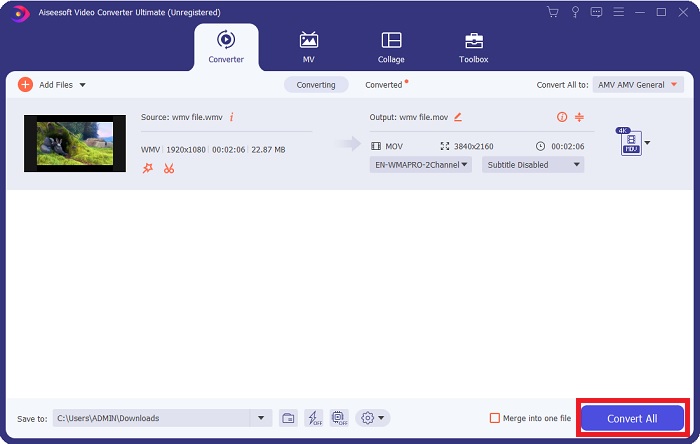
Βήμα 5. Όταν ολοκληρώσετε την επεξεργασία του βίντεο και είναι έτοιμο για μετατροπή, κάντε κλικ στο Convert All για να ξεκινήσει η διαδικασία μεταφοράς των αρχείων.
Μέρος 3. Άλλος αποτελεσματικός τρόπος μετατροπής WMV σε MOV σε Mac και Windows
Μέθοδος 1. Χρησιμοποιήστε το Free Video Converter Online
Χρησιμοποιώντας το FVC Free Video Converter Online, μπορείτε να μετατρέψετε δωρεάν μεγάλη ποικιλία αρχείων πολυμέσων. Αν έχετε βίντεο υψηλής ευκρίνειας, μπορείτε εύκολα να το μετατρέψετε σε μορφές όπως MP4, FLV και WMV χωρίς απώλεια ποιότητας. Χωρίς απώλεια ποιότητας, είναι δυνατό να μετατρέψετε ταυτόχρονα μεγάλο αριθμό αρχείων βίντεο ή ήχου. Χρησιμοποιώντας αυτό το δωρεάν εργαλείο μετατροπής βίντεο, οι χρήστες έχουν πρόσβαση σε ολοκληρωμένες επιλογές επεξεργασίας, που τους επιτρέπουν να ρυθμίσουν με ακρίβεια τα βίντεό τους. Ας προετοιμαστούμε, λοιπόν, να δούμε όλα τα βήματα:
Βήμα 1: Κάντε κλικ σε αυτόν τον σύνδεσμο για να μεταβείτε στην αρχική σελίδα του converter FVC. Και ξεκινήστε να μετατρέπετε τα αρχεία σας online.
Βήμα 2: Για να λάβετε τον launcher για τον υπολογιστή σας, κάντε κλικ στο κουμπί Add Files to Convert στα δεξιά της οθόνης. Θα ξεκινήσει αμέσως μόλις το κατεβάσετε ξανά. Ανοίξτε το αρχείο στον φάκελό σας και ξεκινήστε πάλι τη διαδικασία λήψης.
Κατεβάστε την έκδοση για υπολογιστή για μαζική μετατροπή αρχείων.
Βήμα 3: Για να ξεκινήσει η διαδικασία μετατροπής πριν αρχίσει, επιλέξτε τη μορφή MOV παρακάτω.
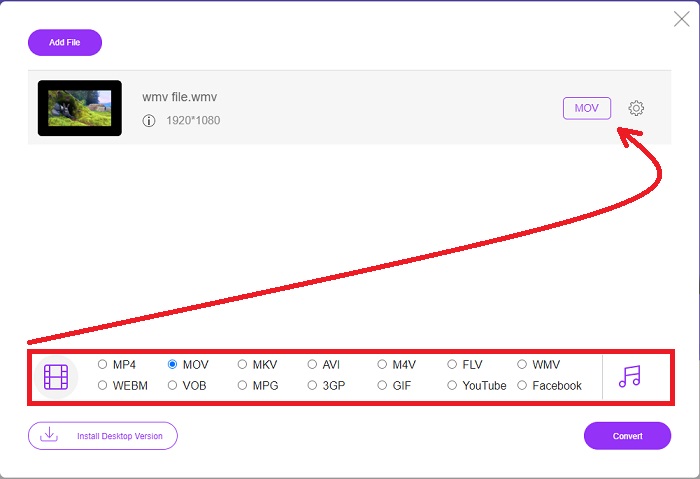
Βήμα 4: Αφού αποφασίσετε σε ποια μορφή θα μετατρέψετε, κάντε κλικ στο Convert για να ξεκινήσει η διαδικασία μετατροπής.
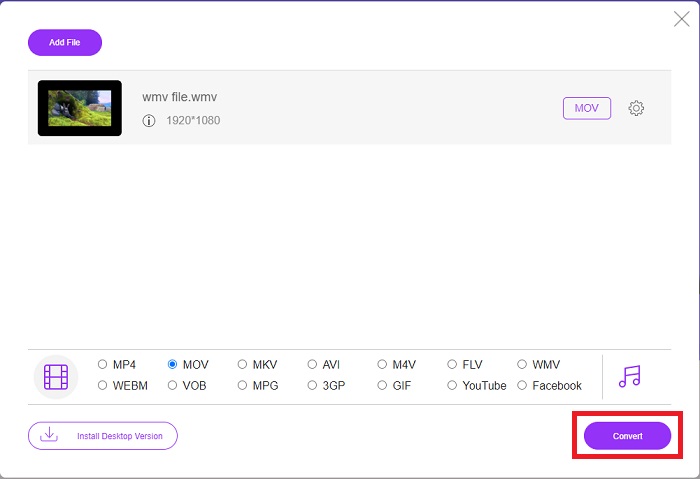
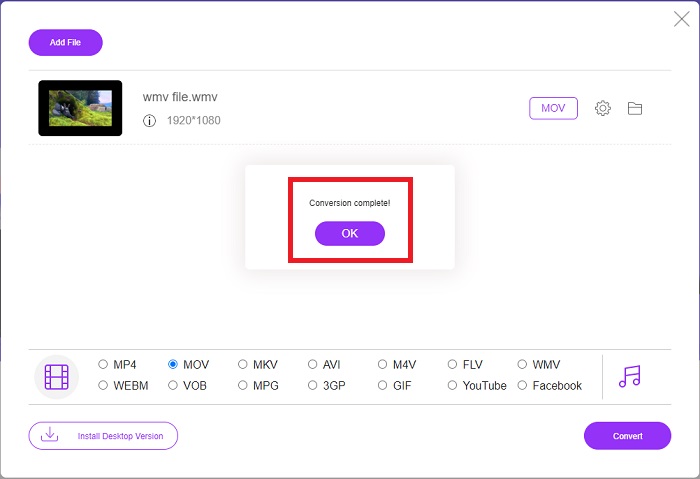
Βήμα 5: Μετά από λίγα λεπτά, θα πρέπει να δείτε έναν φάκελο που περιέχει το μετατρεπμένο αρχείο, τον οποίο μπορείτε στη συνέχεια να ανοίξετε και να αρχίσετε να τον χρησιμοποιείτε.
Μέθοδος 2. Χρησιμοποιήστε το Video Converter
Προσπαθείτε να βρείτε έναν δωρεάν μετατροπέα WMV σε MOV; Η πιο γρήγορη μέθοδος είναι να χρησιμοποιήσετε μια υπηρεσία web για να μετατρέψετε τα αρχεία WMV σας σε μορφή MOV. Όταν τελειώσετε με τα βίντεό σας, μπορείτε να τα μεταφέρετε σε οποιαδήποτε συσκευή και να τα απολαύσετε αργότερα με τη βοήθεια αυτού του διαδικτυακού εργαλείου μετατροπής πολυμέσων! Να πώς γίνεται.
Βήμα 1: Κάνοντας κλικ στο κουμπί Add Your Media, μπορείτε να εισαγάγετε το αρχείο WMV από τον υπολογιστή σας, το Dropbox ή το Google Drive για να το μετατρέψετε σε MOV.
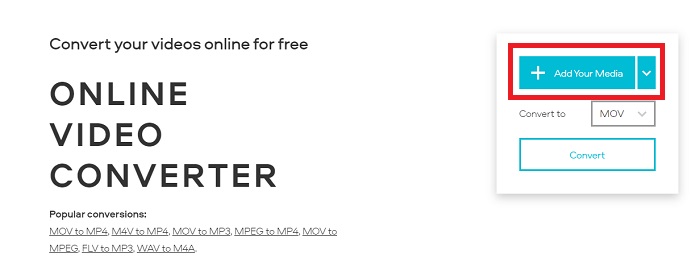
Βήμα 2: Επιλέξτε MOV ως επιθυμητή μορφή εξόδου. Χρησιμοποιήστε τις αναβαθμισμένες ρυθμίσεις για να βελτιώσετε τη συνολική ποιότητα του βίντεό σας.
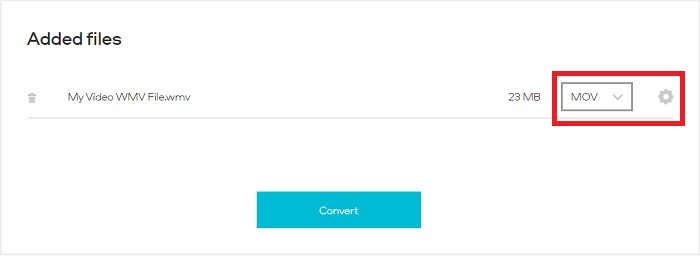
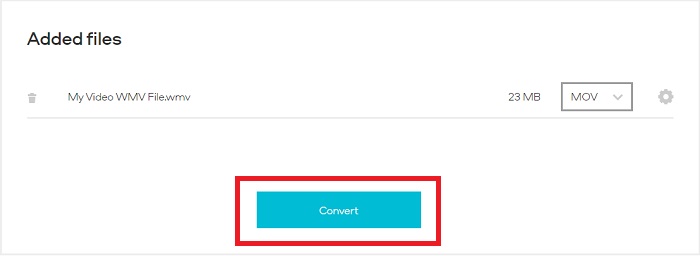
Βήμα 3: Αφού γίνουν όλες οι ρυθμίσεις, μπορείτε τώρα να κάνετε κλικ στο κουμπί Convert.
WMV εναντίον MOV
Κατασκευασμένο από τη Microsoft, το WMV ήταν μια από τις πιο κοινές μορφές βίντεο τη δεκαετία του 2000. Μπορεί να είναι ορατό στον Ιστό και να αναπαραχθεί από διάφορες συσκευές αναπαραγωγής πολυμέσων στα Windows. Και είναι επίσης η προεπιλεγμένη μορφή αρχείου βίντεο του Windows Media Player. Αλλά το έχουν καταλάβει και άλλες μορφές πρόσφατα.
Η μορφή MOV μπορεί να χρησιμοποιηθεί για την αποθήκευση ταινίας, τηλεοπτικής εκπομπής, σύντομου βίντεο κλιπ ή οικιακής ταινίας. Στην πραγματικότητα αποθηκεύεται στη μορφή αρχείου QuickTime (QTFF), η οποία εισήχθη από την Apple το 1991. Τα αρχεία MOV χρησιμοποιούνται συχνά όταν οι άνθρωποι θέλουν να αποθηκεύσουν ένα βίντεο με υψηλή ποιότητα.
Μέρος 4. Συχνές ερωτήσεις σχετικά με τη μετατροπή WMV σε MOV
Είναι το MOV και το WMV το ίδιο;
Τα αρχεία MOV χρησιμοποιούν κωδικοποίηση MPEG-4 για αναπαραγωγή με το QuickTime για Windows, που αναπτύχθηκε από την Apple για το QuickTime Player. Εκτός από την υποστήριξη από το Facebook και το YouTube, το MOV λειτουργεί καλά για παρακολούθηση τηλεόρασης. Τα αρχεία WMV (Windows Media Viewer) είναι συγκρίσιμα με το MOV (μορφή βίντεο του Mozilla) σε ποιότητα και μέγεθος. Η Microsoft δημιούργησε το WMV για χρήση στο Windows Media Player.
Ποια είναι τα πλεονεκτήματα και τα μειονεκτήματα του MOV;
Τα αρχεία MOV χρησιμοποιούνται κυρίως για επεξεργασία και όχι τόσο για πρακτική, καθημερινή χρήση. Εκτός από το QuickTime Player, η μορφή υποστηρίζεται από περιορισμένο αριθμό εφαρμογών αναπαραγωγής πολυμέσων. Οι επαγγελματίες μοντέρ εκμεταλλεύονται αυτό το πλεονέκτημα. Μειονέκτημα είναι η περιορισμένη υιοθέτηση από πραγματικές συσκευές.
Το WMV χρησιμοποιείται ακόμα;
Αναπτύχθηκε από τη Microsoft και χρησιμοποιείται συνήθως στους Windows Media Players. Η μορφή βίντεο WMV προσφέρει αρχεία WMV μικρότερου μεγέθους και με μεγαλύτερη συμπίεση από τα αρχεία MP4. Ως αποτέλεσμα, η online ροή βίντεο είναι μια δημοφιλής χρήση της. Το Windows Media Player μπορεί να τρέξει σε iPhone και Mac, αλλά είναι ασύμβατος με τις συσκευές Apple.
συμπέρασμα
Όπως φαίνεται παραπάνω, υπάρχουν πολλοί πιθανοί μετατροπείς διαθέσιμοι για λήψη ή για χρήση στο διαδίκτυο οποιαδήποτε στιγμή. Αλλά όσον αφορά την αποδοτικότητα και την επιλογή των καλύτερων μετατροπέων, ανάμεσα σε άλλους, το Video Converter Ultimate είναι αυτό στο οποίο καταλήγει το παρόν συμπέρασμα. Με τη δυνατότητά του να μετατρέπει μορφές βίντεο και ήχου με γρήγορο ρυθμό και να υποστηρίζει μεγάλη ποικιλία μορφών δωρεάν, ενώ είναι διαθέσιμο για Windows και Mac. Τι περιμένετε; Κατεβάστε το τώρα!
Δωρεάν ΛήψηΓια Windows 7 ή νεότεραΑσφαλής λήψη
Δωρεάν ΛήψηΓια MacOS 10.7 ή νεότεροΑσφαλής λήψη
-
 Κορυφαίοι 3 τρόποι μετατροπής FLV σε WMV σε Windows και Mac
 Ψάχνετε τον καλύτερο τρόπο για να μετατρέψετε FLV σε WMV χωρίς να χάσετε την ποιότητα σε υπολογιστή ή Mac; Είστε τυχεροί, καθώς εδώ μοιραζόμαστε τρεις μεθόδους για να κάνετε τη δουλειά εύκολα.
-
 2 ευκολότεροι τρόποι μετατροπής αρχείων WMV σε FLV σε υπολογιστή / Mac
 Πώς μπορείτε να μετατρέψετε WMV σε FLV; Πρώτον, πρέπει να διαβάσετε την πρότασή μας και να βρείτε την αγαπημένη σας μέθοδο και, στη συνέχεια, ακολουθήστε τον οδηγό μας για να κάνετε τη δουλειά γρήγορα.
-
 [2 Λύσεις] Πώς να μετατρέψετε τα βίντεο WMV σε αρχεία GIF δωρεάν
 Αν θέλετε να αποκόψετε τα υπέροχα μέρη των βίντεο WMV και να δημιουργήσετε GIF από αυτά, μπορείτε να μάθετε για 2 εύκολες μεθόδους για τη μεταφορά βίντεο WMV σε GIF σε αυτό το άρθρο.

