


 Video Converter Ultimate
 Εγγραφή οθόνης
 Επισκευή βίντεο
 Ασφαλές κατέβασμα
Πώς να εξαγάγετε MP3 από το M4V με 4 εξαιρετικές μεθόδους που πρέπει να γνωρίζετε
Εάν έχετε ήδη αγοράσει κάποια βίντεο M4V από το κατάστημα iTunes, πώς μπορείτε να μετατρέψετε εύκολα το M4V σε MP3; Διαφορετικά από τις άλλες μορφές βίντεο, το M4V είναι μια DRM Fair-Play προστατευμένη μορφή βίντεο. Όταν πρέπει να εξαγάγετε τα αρχεία MP3 από το M4V, πρέπει να αποκρυπτογραφήσετε την προστασία εκ των προτέρων. Απλώς μάθετε περισσότερες λεπτομέρειες σχετικά με τους 4 καλύτερους μετατροπείς M4V σε MP3 και επιλέξτε τον επιθυμητό ανάλογα με τις απαιτήσεις σας.

Μέρος 1: Η απόλυτη μέθοδος μετατροπής M4V σε MP3
Το FVC Video Converter Ultimate είναι ένας επιθυμητός μετατροπέας M4V σε MP3, που όχι μόνο μετατρέπει βίντεο M4V σε MP3 με την επιθυμητή ποιότητα, αλλά σας επιτρέπει επίσης να αφαιρέσετε την προστασία DRM. Σας δίνει επίσης τη δυνατότητα να προσαρμόσετε τις ρυθμίσεις βίντεο και ήχου ή ακόμη και να μετατρέψετε τα αρχεία βίντεο με προηγμένη επιτάχυνση υλικού.
- 1. Εξαγάγετε τα αρχεία ήχου MP3 από M4V, MP4 και άλλες άλλες μορφές βίντεο.
- 2. Προσαρμόστε τον ρυθμό καρέ, την ποιότητα βίντεο, τον κωδικοποιητή βίντεο, τις ρυθμίσεις ήχου και άλλα.
- 3. Προηγμένη επιτάχυνση υλικού για τη μετατροπή του βίντεο με γρήγορη ταχύτητα.
Δωρεάν ΛήψηΓια Windows 7 ή νεότεραΑσφαλής λήψη
Δωρεάν ΛήψηΓια MacOS 10.7 ή νεότεροΑσφαλής λήψη
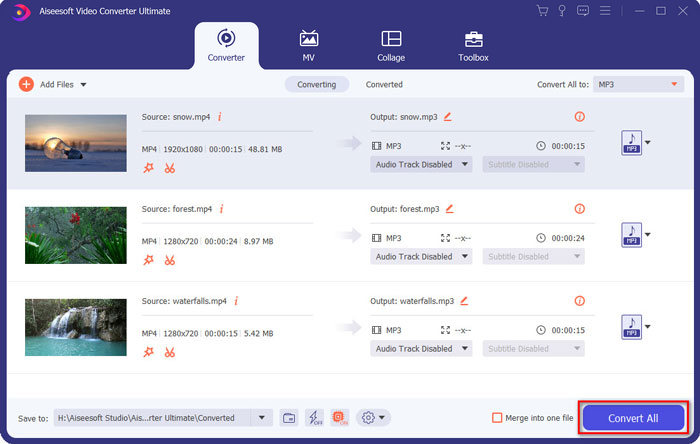
Βήμα 1. Κατεβάστε και εγκαταστήστε τον μετατροπέα M4V σε MP3 και εκκινήστε το πρόγραμμα στον υπολογιστή σας. Κάντε κλικ στο μενού Add Files ή σύρετε απευθείας πολλά βίντεο M4V μέσα σε αυτό το πρόγραμμα.

Βήμα 2. Αφού εισαγάγετε τα βίντεο M4V, επιλέξτε MP3 ως μορφή εξόδου. Φυσικά, μπορείτε να κάνετε κλικ στο εικονίδιο με το Gear για να προσαρμόσετε τις ρυθμίσεις βίντεο και ήχου, όπως τον ρυθμό δειγματοληψίας, το κανάλι ήχου κ.λπ.

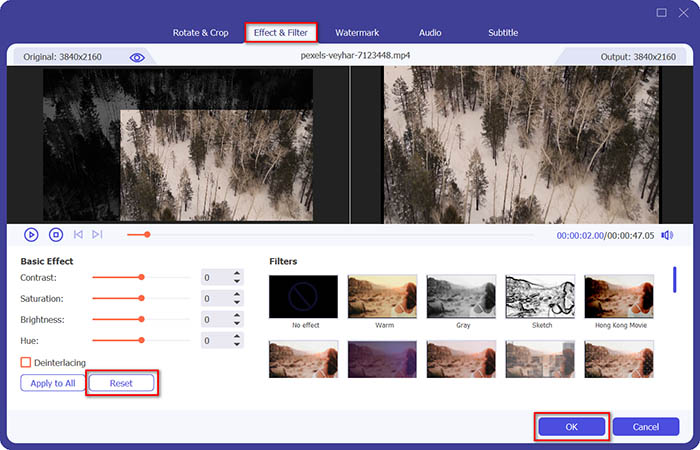
Βήμα 3. Επιπλέον, μπορείτε επίσης να κάνετε κλικ στο κουμπί Edit ή στο κουμπί Clip για να επεξεργαστείτε τα βίντεο εξόδου. Σας επιτρέπει επίσης να ρυθμίσετε τη φωτεινότητα, την αντίθεση, τον κορεσμό, την απόχρωση και να επιλέξετε αποπλεξίδωση (de-interlacing) ανάλογα με τις ανάγκες σας.
Βήμα 4. Αν είστε ικανοποιημένοι με το αρχείο MP3 ή αν χρειάζεται να συγχωνεύσετε αρχεία MP3, μπορείτε να επιλέξετε το πλαίσιο Merge into one file και να κάνετε κλικ στο κουμπί Convert για να ξεκινήσετε εύκολα τη μετατροπή MP4 σε MP3.
Μέρος 2: 3 Μέθοδοι εξαγωγής MP3 από το M4V με ευκολία
Μέθοδος 1: Πώς να μετατρέψετε M4V σε MP3 online
Το FVC Free Online Video Converter είναι ένας ευέλικτος διαδικτυακός μετατροπέας M4V σε MP3 που σας επιτρέπει να εξάγετε το MP3 από το MP4 με ευκολία. Επιπλέον, μπορείτε επίσης να προσαρμόσετε το bitrate βίντεο, τον ρυθμό δειγματοληψίας, τον ρυθμό καρέ, την ανάλυση κ.λπ.
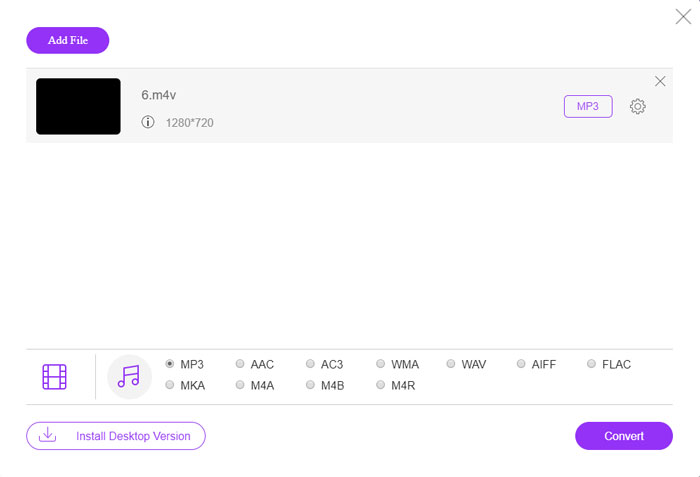
Βήμα 1. Μεταβείτε στον διαδικτυακό μετατροπέα M4V σε MP3· μπορείτε να κάνετε κλικ στο κουμπί Add Files to Convert για να φορτώσετε τα αρχεία M4V στο πρόγραμμα. Την πρώτη φορά θα πρέπει να κατεβάσετε εκ των προτέρων το πρόγραμμα εγκατάστασης.

Βήμα 2. Αφού φορτώσετε τα αρχεία M4V, μπορείτε να επιλέξετε την επιλογή MP3 από το μενού Audio. Σας επιτρέπει επίσης να προσαρμόσετε τις ρυθμίσεις ήχου, όπως τον ρυθμό δειγματοληψίας, τον κωδικοποιητή ήχου και άλλα.

Βήμα 3. Στη συνέχεια, μπορείτε να κάνετε κλικ στο κουμπί Convert για να ξεκινήσει η μετατροπή από M4V σε MP3. Δεν θα χαθούν δεδομένα κατά τη διάρκεια της διαδικασίας μετατροπής. Μπορείτε να αποθηκεύσετε τον ήχο εξόδου στον σκληρό σας δίσκο.
Μέθοδος 2: Τρόπος μετατροπής M4V σε MP3 μέσω HandBrake
Το HandBrake είναι ένας μετατροπέας M4V σε MP3 ανοιχτού κώδικα που σας επιτρέπει να προσαρμόσετε τη διαδικασία μετατροπής. Έχει ορισμένες προηγμένες παραμέτρους που μπορείτε να προσαρμόσετε την ανάλυση βίντεο, το ρυθμό καρέ και άλλα.
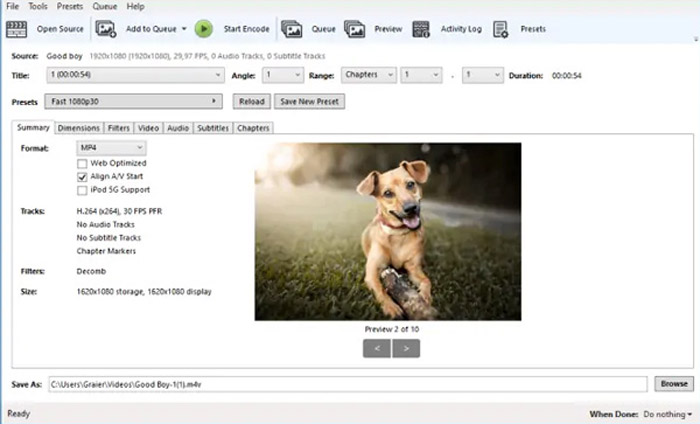
Βήμα 1. Κατεβάστε και εγκαταστήστε το πρόγραμμα στον υπολογιστή σας· στη συνέχεια εκκινήστε το και εντοπίστε το αρχείο M4V που θέλετε να μετατρέψετε. Έπειτα μπορείτε να βρείτε το βίντεο μέσα στη διεπαφή χρήστη.
Βήμα 2. Στη συνέχεια, μπορείτε να κάνετε κλικ στο κουμπί Browse στο κάτω μέρος και να εισαγάγετε το νέο όνομα αρχείου και τον φάκελο προορισμού. Κατόπιν μπορείτε να επιλέξετε το MP3 ως μορφή εξόδου και να προσαρμόσετε τις ρυθμίσεις.
Βήμα 3. Όταν είστε ικανοποιημένοι με το αρχείο MP3 εξόδου, μπορείτε να κάνετε κλικ στο κουμπί Start Encode στο επάνω μενού για να μετατρέψετε αναλόγως το M4V σε MP3. Η μετατροπή μπορεί να διαρκέσει κάποιο χρονικό διάστημα.
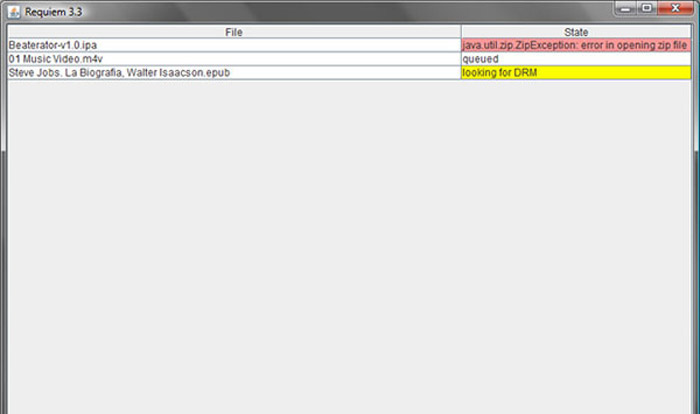
Μέθοδος 3: Πώς να μετατρέψετε M4V σε MP3 μέσω Requiem
Υπάρχουν δεκάδες μετατροπείς M4V σε MP3 σε απευθείας σύνδεση, όταν πρέπει να απαλλαγείτε από την προστασία DRM των αρχείων M4V. Το Requiem είναι ένα από τα καλύτερα δωρεάν λογισμικά που μπορείτε να λάβετε υπόψη.
Βήμα 1. Αφού εγκαταστήσετε το εργαλείο αποκρυπτογράφησης DRM, μπορείτε να εκκινήσετε το πρόγραμμα ώστε να ανιχνεύσει τα αρχεία με προστασία DRM, συμπεριλαμβανομένης μουσικής, βίντεο ή audiobooks στη βιβλιοθήκη iTunes σας.
Βήμα 2. Στη συνέχεια, μπορείτε να ξεκινήσετε την αφαίρεση του DRM από αυτά τα αρχεία M4V. Τα αρχικά σας αρχεία θα μεταφερθούν στον κάδο απορριμμάτων και πλέον τα αρχεία σας στη βιβλιοθήκη iTunes είναι χωρίς DRM.
Βήμα 3. Όταν αποκτήσετε τα επιθυμητά αρχεία M4V χωρίς προστασία DRM, μπορείτε απλώς να μετατρέψετε το βίντεο με τους διαδικτυακούς μετατροπείς M4V σε MP3 ή να το μεταφέρετε απευθείας σε ένα smartphone. (Δείτε πώς να μετατρέψετε FLV σε MP3)
Μέρος 2: Συχνές ερωτήσεις σχετικά με τη μετατροπή M4V σε MP3
1. Τι είναι η μορφή αρχείου M4V;
Η επέκταση αρχείου M4V είναι ένα βίντεο MPEG-4, το οποίο είναι επίσης γνωστό ως αρχείο βίντεο iTunes. Όταν αγοράζετε ή ενοικιάζετε αρχεία βίντεο από το iTunes Store, μπορείτε να λάβετε τα βίντεο στο M4V με προστασία DRM. Αλλά το αρχείο βίντεο είναι εφαρμόσιμο για τις εξουσιοδοτημένες συσκευές. Όταν μετατρέπετε το M4V σε MP3, μπορείτε να χρησιμοποιήσετε το αρχείο ήχου για άλλες συσκευές.
2. Τι είναι μια μέθοδος 100% που μπορεί να εφαρμοστεί για να μετατρέψετε το M4V σε MP3;
Εάν δεν μπορείτε να μετατρέψετε απευθείας το M4V σε MP3, το οποίο περιορίζεται από την προστασία DRM, μπορείτε να χρησιμοποιήσετε τη συσκευή εγγραφής οθόνης για να καταγράψετε το βίντεο M4V ως ήχο MP3. Το FVC Free Screen Recorder είναι μια ευέλικτη διαδικτυακή λύση που σας επιτρέπει να λάβετε το ικανοποιημένο αρχείο ήχου χωρίς καμία χρέωση.
3. Πώς να μετατρέψετε M4V σε MP3 με προστασία DRM μέσω HandBrake;
Όταν πρέπει να μετατρέψετε M4V σε MP3 με προστασία DRM, μπορείτε να χρησιμοποιήσετε το HandBrake για να αποκρυπτογραφήσετε τα βίντεο; Ναι, μπορείτε να εγκαταστήσετε μερικά πρόσθετα για να αποκρυπτογραφήσετε τα βίντεο πριν από τη μετατροπή.
συμπέρασμα
Όταν πρέπει να μετατρέψετε το M4V σε MP3, θα πρέπει να μάθετε περισσότερα τους σημαντικούς παράγοντες για να αποκτήσετε εύκολα τα επιθυμητά αρχεία. Εάν έχετε απλά μερικά απλά αρχεία M4V χωρίς προστασία DRM, μπορείτε να επιλέξετε οποιοδήποτε online μετατροπέα βίντεο M4V σε MP3 ή δωρεάν λογισμικό. Το FVC Video Converter Ultimate είναι ο απόλυτος μετατροπέας που επιτρέπει τη μετατροπή των βίντεο και την αποκρυπτογράφηση της προστασίας DRM με ευκολία.
-
 Πώς να μετατρέψετε MP4 σε MP3 σε Windows / Mac / iPhone / Android / Online
 Εάν θέλετε να εξαγάγετε ήχο MP3 από βίντεο MP4, μπορείτε να δείτε αυτό το άρθρο και να λάβετε 8 λύσεις. Υπάρχουν διαδικτυακοί και offline τρόποι για να μετατρέψετε MP4 σε MP3 στο τηλέφωνο ή τον υπολογιστή σας με ευκολία.
-
 Πώς να μετατρέψετε αρχεία M2TS σε MP3 δωρεάν
 Μπορεί ένα αρχείο M2TS να μετατραπεί σε MP3; Σε αυτήν την ανάρτηση, παραθέτουμε τους 6 καλύτερους δωρεάν και διαδικτυακούς τρόπους για να σας βοηθήσουμε να μετατρέψετε M2TS σε MP3, AAC, AIFF και περισσότερες μορφές ήχου.
-
 Ποια είναι η διαφορά μεταξύ MP3 και MP4
 MP3 ή MP4, ποιο είναι καλύτερο; Ποια είναι η διαφορά μεταξύ MP3 και MP4; Αυτό το άρθρο θα συγκρίνει MP3 με MP4 από όλες τις πτυχές που μπορείτε να εικόνα.
