


 Video Converter Ultimate
 Εγγραφή οθόνης
 Επισκευή βίντεο
Οι πιο βολικοί τρόποι για τη μετατροπή MP3 σε M4R για συσκευές Apple
Have you ever thought of turning your favorite music into your ringtone on your iPhone? Would that be even possible? Definitely, it is. You just need to convert the file to do so. Why do we need to convert it first? Because we can set it up as a ringtone? Mainly because to set a specific file as a song ringtone, it must be in M4R format. That said you need to find the best MP3 to M4R iTunes converter that works for you. This article offers different methods on how you can convert your MP3 file, more so do batch convert MP3 to M4R by reading through the content below.

Μέρος 1. Ο πιο εφικτός τρόπος για να μετατρέψετε MP3 σε M4R
Το Video Converter Ultimate είναι μακράν το πιο πειστικό εργαλείο που μπορείτε να χρησιμοποιήσετε για να μετατρέψετε MP3 σε M4R. Όχι μόνο ένα αρχείο, αλλά μπορεί επίσης να κάνει μαζική μετατροπή από MP3 σε MP4 Είναι ένας μετατροπέας που μπορεί να παράγει βίντεο HD και ήχο χωρίς απώλειες. Στην πραγματικότητα, είναι ιδανικό και συνιστάται να μετατρέπει το αρχείο χωρίς να χάνει την αρχική του ποιότητα. Η ταχύτητα είναι 30 φορές μεγαλύτερη από τον κανονικό μετατροπέα εκεί έξω. Επιπλέον, εάν μετατρέπετε μια λίστα αναπαραγωγής για αποθήκευση στο τηλέφωνό σας, σίγουρα αυτό το εργαλείο μπορεί να κάνει τη δουλειά για εσάς. Αβίαστο και χωρίς ιδρώτα. Εν τω μεταξύ, εδώ είναι μερικές από τις άλλες δυνατότητες που μπορείτε επίσης να απολαύσετε εκτός από τη μετατροπή ήχου. Επίσης, ένας οδηγός βήμα προς βήμα γράφτηκε παρακάτω για την αναφορά σας εάν αποφασίσετε να τον χρησιμοποιήσετε.
◆ Επεξεργασία μεταδεδομένων.
◆ Επιτάχυνση GPU υψηλής ταχύτητας.
◆ Τεχνική υποστήριξη σε πραγματικό χρόνο.
◆ Υποστηρίζεται η συμπίεση βίντεο.
Step 1. To use it, get the app by clicking the download button below. Once the app is downloaded on your Windows or Mac, launch it.
Δωρεάν ΛήψηΓια Windows 7 ή νεότεραΑσφαλής λήψη
Δωρεάν ΛήψηΓια MacOS 10.7 ή νεότεροΑσφαλής λήψη
Step 2. From the main interface of the tool, you will see two options to upload the file. Either you click the Plus Sign icon from the center or click the Add Files button from the upper left side. Choose the target file and upload it.
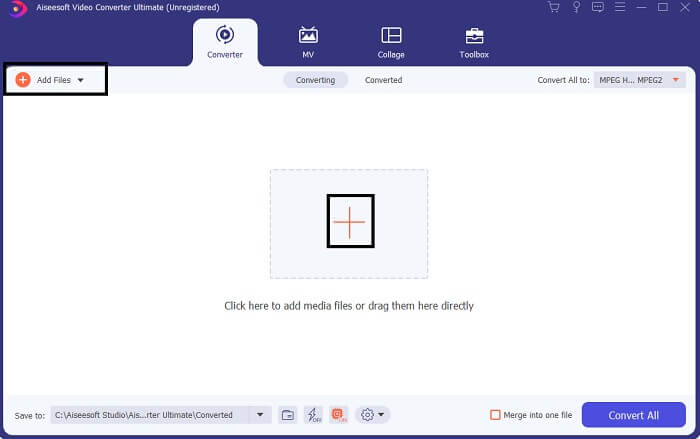
Step 3. To get your desired output, change the format by clicking the drop-down menu located at the upper right side of the interface.
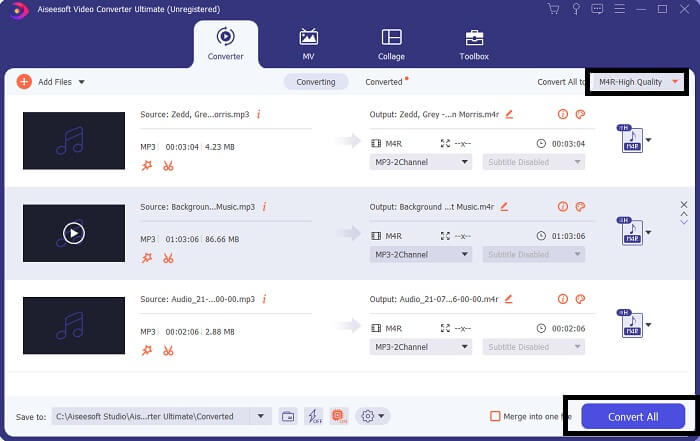
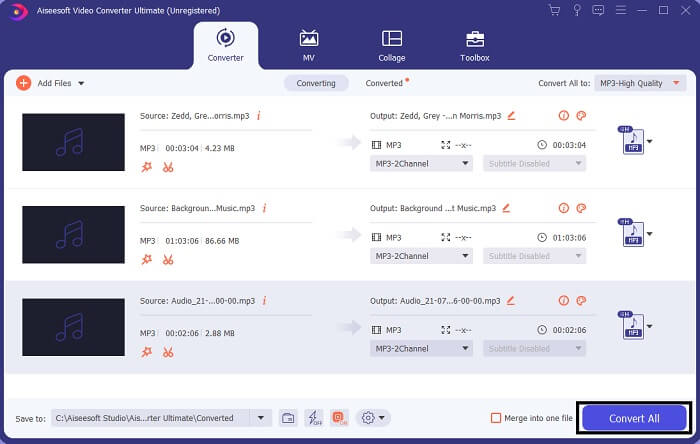
Step 4. Finally, click the Convert All button at the bottom right side of the main interface. Then wait until the file is converted.
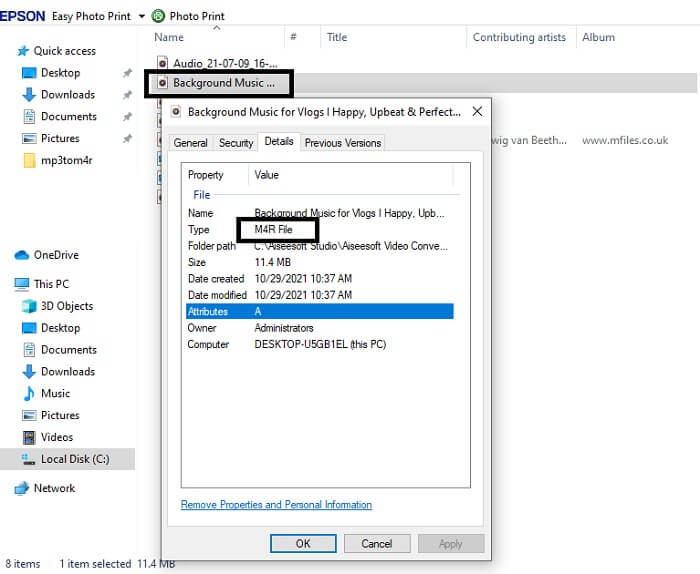
Step 5. Finally, open the folder where the audio output is saved and transfer it to your iPhone. You can use a transfer tool or app to do so. You can find recommendations over the internet. You just need to search and the process of making it as the ringtone of your iPhone.
Μέρος 2. Μερικά από τα καλύτερα εργαλεία για τη μετατροπή MP3 σε M4R Online
Δωρεάν διαδικτυακός μετατροπέας ήχου FVC
A premium tool to convert is good but nothing beats a practical tool. Considering your need, FVC created a free version of the tool. FVC Free Audio Converter is your free access tool anytime and anywhere. All you need is a working internet and a supported browser. This MP3 to M4R iPhone ringtone converter is able to produce high-quality lossless audio. The output is satisfying and without having to spend money on it. Wait, there is more, did you know this can also do batch conversion? Yes, you can! Also here are some notable features you will also get if you use it. On the other hand, a guide is also written for your convenience.
◆ Το αρχείο που μετατράπηκε έχει παρόμοια ποιότητα με το αρχικό.
◆ 100% δωρεάν και ασφαλές στη χρήση.
◆ Χωρίς όριο μεγέθους κατά τη μετατροπή.
◆ Υποστηρίζεται η μετατροπή παρτίδων.
Step 1. To access the tool, visit the official website of the FVC Free Audio Converter.
Step 2. From there, click on Add Files to Convert. For a first user, you have to allow access by clicking Open FVC Launcher. Then a window will appear on your screen allowing you to locate the file that you want to convert.
Κατεβάστε την έκδοση για υπολογιστή για μαζική μετατροπή αρχείων.
Step 3. After uploading the file, you will see another window pop. At the bottom part change the file format of the output file by ticking M4R.
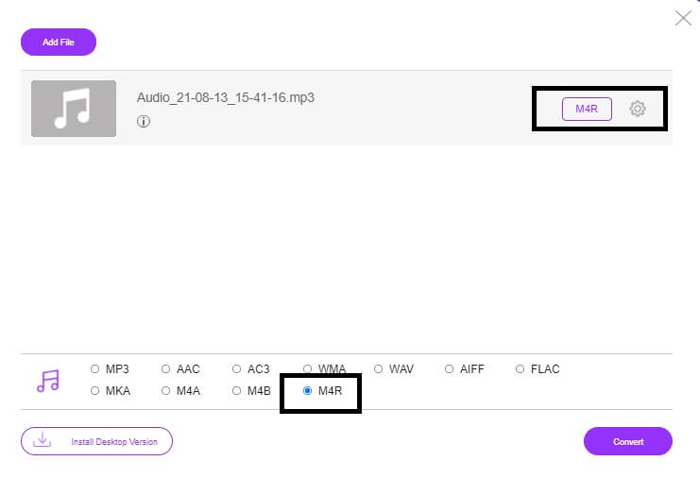
Step 4. Then click on the Convert button to begin the conversion.
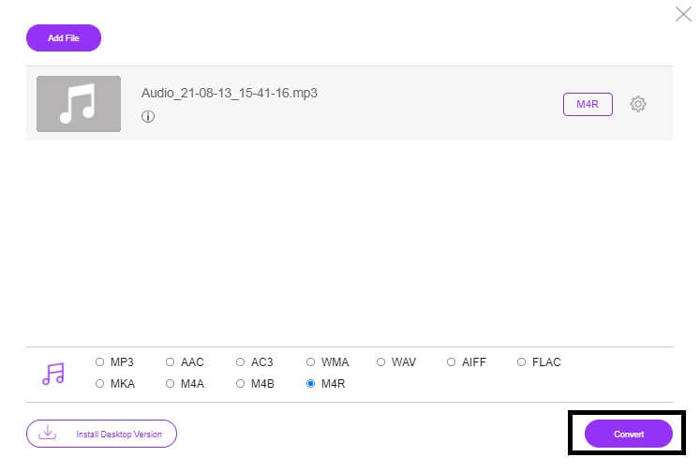
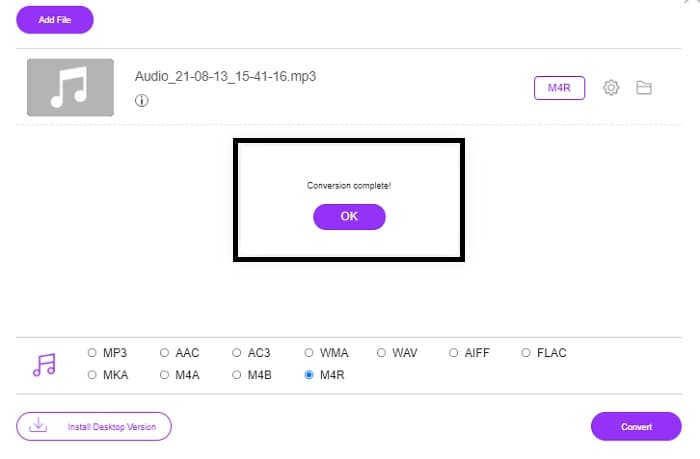
Step 5. Finally, select a folder where you can save the file, and automatically the file will be saved. Then transfer it to your iPhone. Know that you can do batch convert so do not limit yourself.
Σχετικά:
M4ROnline από το File Converter
Simple yet reliable, that is how its users describe this online tool. By default, this is specifically made to convert Mp3 to M4R. As the name implies it this is what this tool is made for. It works from different web browsers so you won't have to download or purchase it. If you visit the website, you will notice the simplicity of the tool interface. It is very straightforward where you just have to click the Browse button to begin the uploading and converting process. If you want to try it, it is recommended to visit the official website and experience it. Hence, this tool is a good alternative. You can also check the step by steps below to know the process of using the tool.
Step 1. The first thing you gotta do is go to the official page M4R Online then click on Browse.
Step 2. Choose the file from your folder and click the Upload File button.
Step 3. Once you see the completed message, click the file to download it.
Online-convert.com
This is a tool providing service for quite some time now. It is safe to say that many found this online tool very helpful for their converting needs. Or else it will not be existing until this very moment if it's not proven helpful. Upon visiting the home page of the site, you will see all tools available to use. From Audio converter, video converter, image converter, document converter, Ebook converter all together from the home page. Compiling them makes it easier for the user to find the necessary tools he/she needs. It then deserves to be added to this list of MP3 to M4R iTunes converters. On the other hand, here is how you can use the tool for your reference.
Step 1. Visit the official site of the tool and choose Audio Converter.
Step 2. Click the drop Drop down and choose the format output then click on GO.
Step 3. A new window will then appear. From there click the Choose Files button and upload the file. To start the conversion process click the Start Conversion. Once the file is ready, the file is automatically downloaded on your PC.
MP3 εναντίον M4R
Η μορφή MP3 κυκλοφόρησε το 1993 από την Moving Picture Experts Group (MPEG). Ήταν το πρότυπο για την αποθήκευση μουσικής, καθώς μπορούσε να συμπιέσει τον ήχο σε πολύ μικρότερο μέγεθος από άλλες μη συμπιεσμένες μορφές. Εξακολουθεί να χρησιμοποιείται ευρέως στις μέρες μας, ειδικά για τη διανομή ήχου στο διαδίκτυο.
Ένα αρχείο M4R χρησιμοποιείται για την αποθήκευση ενός προσαρμοσμένου ήχου κλήσης iPhone που δημιουργήθηκε με το Apple iTunes. Κανονικά, μπορείτε να δείτε αυτήν τη μορφή όταν μεταφέρετε ένα κομμάτι ήχου κλήσης από τον υπολογιστή σε μια συσκευή iOS. Τα αρχεία M4R που δημιουργούνται με το iTunes συνήθως περιλαμβάνουν προστασία πνευματικών δικαιωμάτων.
Μέρος 3. Συχνές ερωτήσεις σχετικά με τη μετατροπή MP3 σε M4R
Τι είναι το M4R;
Είναι μια επέκταση αρχείου που δημιουργήθηκε ειδικά από την Apple και χρησιμοποιείται αυστηρά ως ήχος κλήσης για iPhone και άλλες συσκευές Apple. Αυτό είναι τόσο καλό όσο το M4A και το MP4 όσον αφορά την ποιότητα.
Υπάρχει μετατροπέας MP3 σε M4R εκτός από το iTunes;
Σίγουρα, υπάρχουν. Μπορείτε να επιλέξετε από τα παραπάνω εργαλεία ή να χρησιμοποιήσετε το Windows Media Player με αντιγραφή. Εάν δεν θέλετε να περάσετε από όλες τις διαδικασίες, μπορείτε απλώς να χρησιμοποιήσετε τα δωρεάν εργαλεία που είναι διαθέσιμα στο διαδίκτυο. Μετατρέπουν απευθείας τον ήχο στην επιθυμητή μορφή σας αντί να περάσουν από τη μακρά διαδικασία αντιγραφής.
Γιατί πρέπει να μετατρέψω το αρχείο μου από MP3 σε M4R για να το χρησιμοποιήσω ως ήχο κλήσης;
Είναι απαραίτητο. Για να θεωρηθεί ένα αρχείο ως ήχος κλήσης, το αρχείο πρέπει να είναι από προεπιλογή σε μορφή M4R για να αναπαραχθεί ως ήχος κλήσης.
συμπέρασμα
Με όλα αυτά, σίγουρα μπορείτε να βασιστείτε στα εργαλεία που αναφέρονται παραπάνω. Απλώς πρέπει να αποκτήσετε πρόσβαση σε ποιο εργαλείο μπορεί να είναι χρήσιμο για εσάς ανάλογα με τις ανάγκες σας. Εάν είστε φοιτητής και κανονικός πολίτης που θέλετε να κάνετε μετατροπή και θέλετε να μετατρέψετε MP3 σε M4R σε Mac δωρεάν ή οποιαδήποτε συσκευή χρησιμοποιείτε, μπορείτε να ανατρέξετε στα δωρεάν εργαλεία. Για επαγγελματική χρήση, συνιστάται η χρήση του Video Converter Ultimate. Μπορείτε πάντα να επιστρέψετε σε αυτήν τη σελίδα εάν θέλετε να μάθετε περισσότερα σχετικά με περισσότερα εργαλεία για μετατροπή.
-
 [Δωρεάν & Διαδικτυακά] 3 Μέθοδοι Μετατροπής MP3 σε MP4 με Εικόνα
 Πώς να μετατρέψετε MP3 σε MP4 σε υψηλή ποιότητα; Αυτή η ανάρτηση δείχνει 3 αποτελεσματικές και δωρεάν μεθόδους για να αλλάξετε MP3 σε MP4 με εικόνες σε Windows και Mac.
-
 Μάθετε πώς μπορείτε να μετατρέψετε MP3 σε μορφή WAV
 Θέλετε να μάθετε πώς να μετατρέψετε MP3 σε WAV; Προσδιορίστε ποιο από τα εργαλεία παράγει την καλύτερη ποιότητα μετατροπής που μπορείτε να λάβετε.
-
 Οδηγίες σχετικά με τον τρόπο μετατροπής M4A σε WAV [PC και Mac]
 Μάθετε περισσότερα σχετικά με τον τρόπο μετατροπής M4A σε WAV με λεπτομερή βήματα και διαφορετικά εργαλεία από τα οποία μπορείτε να επιλέξετε.

