


 Video Converter Ultimate
 Εγγραφή οθόνης
 Επισκευή βίντεο
Ποιος είναι ο καλύτερος μετατροπέας για χρήση στη μετατροπή MP3 σε WAV
Το MP3 είναι η πιο γνωστή μορφή ήχου σε όλον τον κόσμο. Στην πραγματικότητα, είναι η προεπιλεγμένη μορφή για αποθήκευση και ηχογράφηση αρχείων ήχου. Αν και αυτή η μορφή χρησιμοποιείται από πολλούς, υπάρχουν ακόμη πολλές άλλες μορφές που παράγουν ήχο υψηλότερης ποιότητας από το MP3, όπως το WAV. Έτσι, αν θέλετε να μάθετε πώς να μετατρέψετε MP3 σε WAV ώστε να απολαύσετε τη μουσική ή τις ηχογραφήσεις σας, τότε πρέπει να κρατήσετε τον ρυθμό, γιατί μπορεί να είναι μια «μεγάλη κούρσα». Χωρίς άλλη καθυστέρηση, ας ξεκινήσουμε τον αγώνα.

Μέρος 1. Πώς να μετατρέψετε MP3 σε WAV σε Windows & Mac με λεπτομερή βήματα
1. FVC Video Converter Ultimate
Θέλετε να μάθετε πώς να μετατρέψετε MP3 σε WAV σε Mac και PC με ήχο υψηλής ποιότητας; Τότε το FVC Video Converter Ultimate είναι η λύση. Επιπλέον, η μετατροπή του είναι ταχύτατη, σαν το SSC Tuatara, και ταυτόχρονα ασφαλής. Μετατρέψτε όσα αρχεία θέλετε ταυτόχρονα, γιατί δεν υπάρχει όριο στον αριθμό των αρχείων πολυμέσων που μπορείτε να μετατρέψετε εδώ. Όχι μόνο αυτό, μπορείτε επίσης να χρησιμοποιήσετε αυτό το εργαλείο για να δημιουργήσετε MV, κολάζ και άλλες λειτουργίες. Αν, λοιπόν, θέλετε να μάθετε πώς να το χρησιμοποιήσετε, ακολουθήστε αυτά τα βήματα και ας ξεκινήσουμε τη διαδικασία μετατροπής.
Βήμα 1. Επιλέξτε ανάμεσα σε PC ή Mac και κάντε κλικ στο κουμπί λήψης. Εγκαταστήστε το εργαλείο, ακολουθήστε τον οδηγό εγκατάστασης και στη συνέχεια κάντε κλικ στο Finish για να αποθηκεύσετε τις αλλαγές.
Δωρεάν ΛήψηΓια Windows 7 ή νεότεραΑσφαλής λήψη
Δωρεάν ΛήψηΓια MacOS 10.7 ή νεότεροΑσφαλής λήψη
Βήμα 2. Μετά την εγκατάσταση, κάντε κλικ στο Add Files για να εισαγάγετε το αρχείο MP3 που θέλετε να μετατρέψετε. Αν τα αρχεία ήχου είναι περισσότερα από δύο, είναι καλύτερο να τα σύρετε και να τα αποθέσετε στην επιφάνεια εργασίας του προγράμματος.
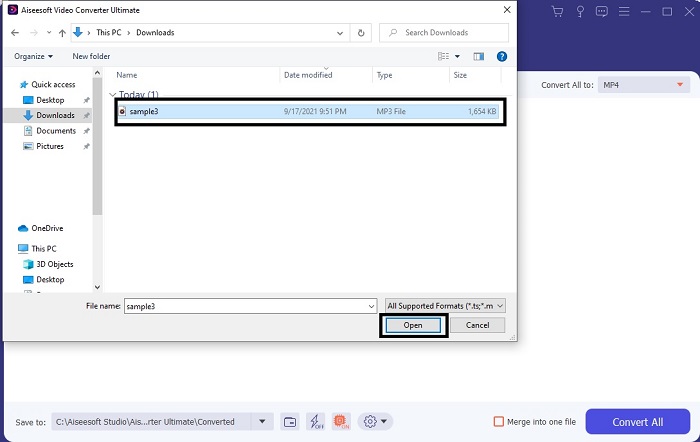
Βήμα 3. Αλλάξτε από MP3 σε WAV ή σε οποιαδήποτε άλλη μορφή ήχου θέλετε στο υπομενού.
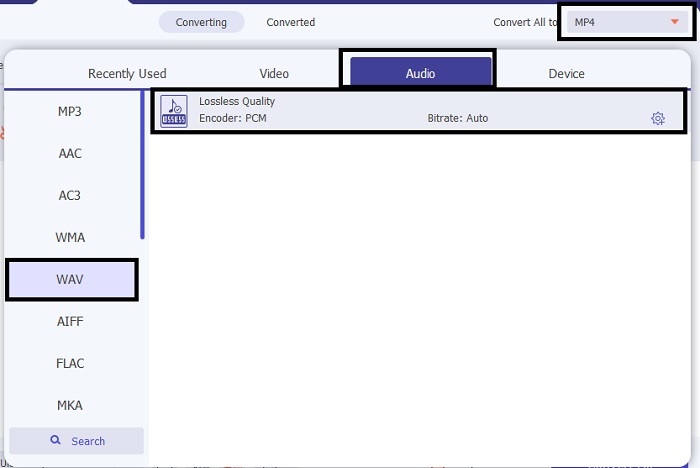
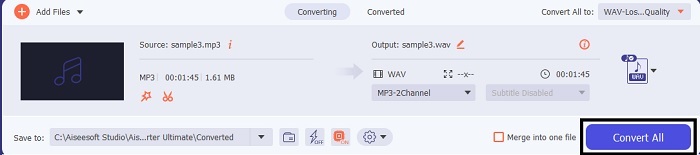
Βήμα 4. Αν όλα έχουν ρυθμιστεί, κάντε κλικ στο Convert All για να ξεκινήσει η μετατροπή.
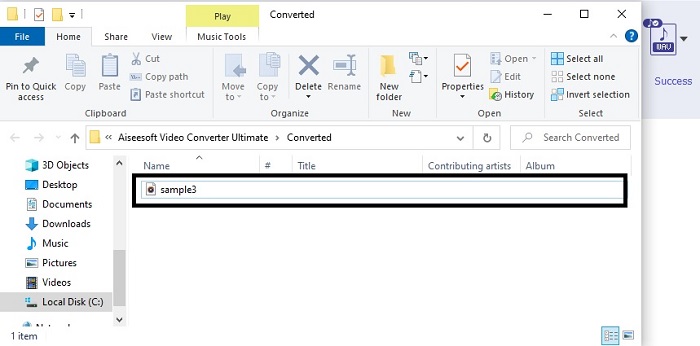
Βήμα 5. Αφού ολοκληρωθεί η μετατροπή, ένας διαχειριστής αρχείων θα ανοίξει αυτόματα στην οθόνη σας. Κάντε κλικ στο μετατραπέν αρχείο ήχου και απολαύστε την πιο πρόσφατη εκδοχή του. Επιπλέον, αν ο ήχος είναι λίγο χαμηλός για εσάς, μεταβείτε στη γραμμή εργαλείων και εντοπίστε το Audio Booster για πιο καθαρό και καλύτερο ήχο.
2. iTunes
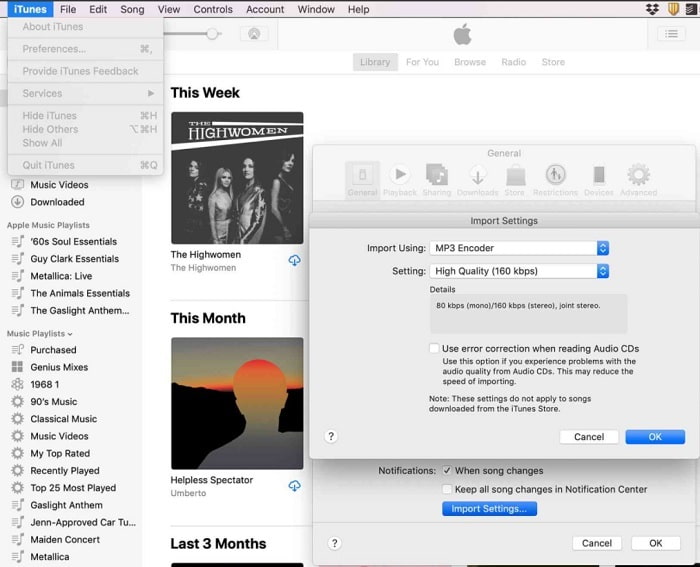
Το iTunes χρησιμοποιείται ευρέως για αναπαραγωγή μουσικής σε Mac και προϊόντα iOS. Ξέρατε όμως ότι μπορείτε να μετατρέψετε MP3 σε WAV στο iTunes; Η απάντηση είναι ναι. Αναπαραγωγή και μετατροπή σε ένα μόνο εργαλείο, αλλά δεν είναι προσβάσιμο σε Android και Windows, επειδή είναι η προεπιλεγμένη εφαρμογή αναπαραγωγής πολυμέσων της Apple για τα προϊόντα της. Αν, λοιπόν, δεν έχετε συσκευή Apple, μπορείτε πάλι να κάνετε τη μετατροπή με τη βοήθεια του FVC Video Converter Ultimate. Αν όμως έχετε, τότε είναι ιδανικό να χρησιμοποιήσετε το iTunes και να ακολουθήσετε τα παρακάτω βήματα.
Βήμα 1. Ανοίξτε το λογισμικό στη συσκευή σας.
Βήμα 2. Επιλέξτε το αρχείο MP3 που θέλετε να μετατρέψετε.
Βήμα 3. Έπειτα κάντε κλικ στο Convert και περιμένετε μέχρι να ολοκληρωθεί η διαδικασία.
Μέρος 2. Κορυφαίοι 5 καλύτεροι δωρεάν διαδικτυακοί μετατροπείς MP3 σε WAV στον Ιστό
1. Δωρεάν μετατροπέας ήχου FVC
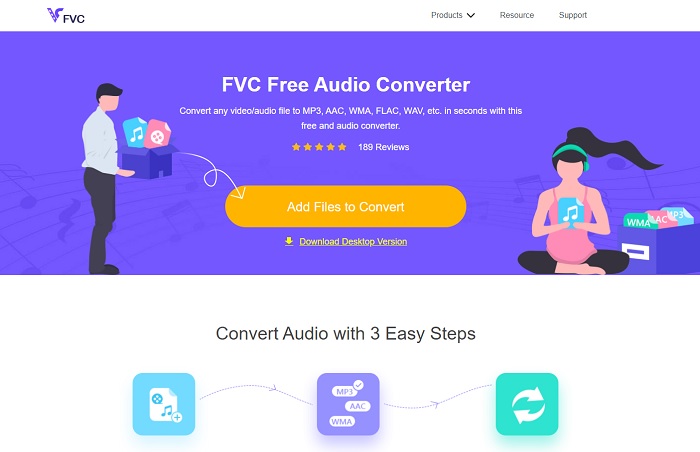
Το FVC Free Audio Converter είναι ο καλύτερος online μετατροπέας MP3 σε WAV. Γιατί διαθέτει τα ίδια δευτερεύοντα χαρακτηριστικά που μπορεί να σας προσφέρει το FVC Video Converter Ultimate. Οπότε, μην περιμένετε τίποτα λιγότερο χρησιμοποιώντας αυτό το εργαλείο, παρόλο που τα βασικά στοιχεία της έκδοσης premium δεν περιλαμβάνονται εδώ, επειδή είναι εντελώς δωρεάν. Αν θέλετε να το δοκιμάσετε, μπορείτε να κάνετε κλικ στον υπερσύνδεσμο που παρέχεται αποκλειστικά για εσάς. Λοιπόν, πριν από οτιδήποτε άλλο, ας ξεκινήσουμε με το πώς θα χρησιμοποιήσετε αυτόν τον web-based μετατροπέα.
Βήμα 1. Για να αποκτήσετε πρόσβαση στο εργαλείο, πρέπει να κάνετε κλικ σε αυτό το link.
Βήμα 2. Κάντε κλικ στο Add Files to Convert για να εκκινήσετε το εργαλείο.
Κατεβάστε την έκδοση για υπολογιστή για μαζική μετατροπή αρχείων.
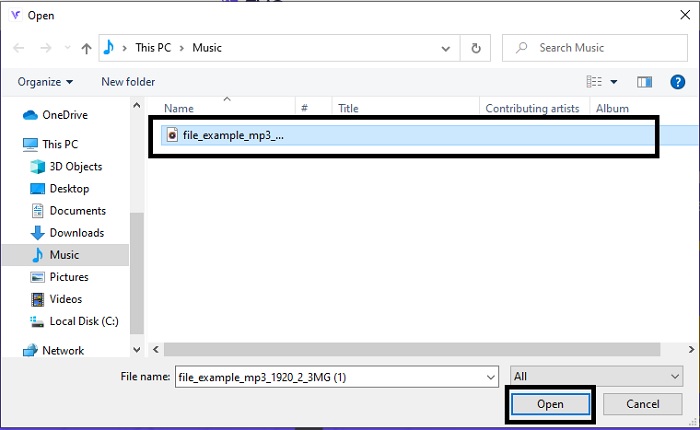
Βήμα 3. Αφού εκκινήσετε το εργαλείο, επιλέξτε το αρχείο MP3 που θέλετε να μετατρέψετε και κάντε κλικ στο open.
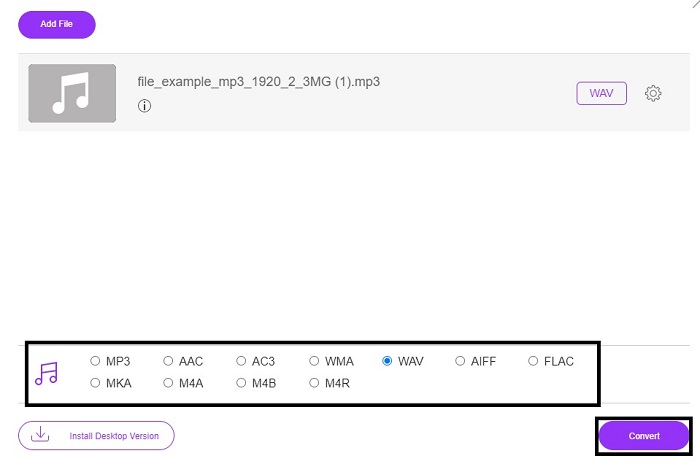
Βήμα 4. Επιλέξτε τη μορφή από την επιλογή στο κάτω μέρος και στη συνέχεια κάντε κλικ στο Convert για να ξεκινήσει η διαδικασία.
Βήμα 5. Θα χρειαστούν μόνο λίγα λεπτά και, αφού ολοκληρωθεί η μετατροπή, κάντε κλικ στο folder για να εντοπίσετε το αρχείο που μόλις μετατρέψατε.
2. Cloud Convert
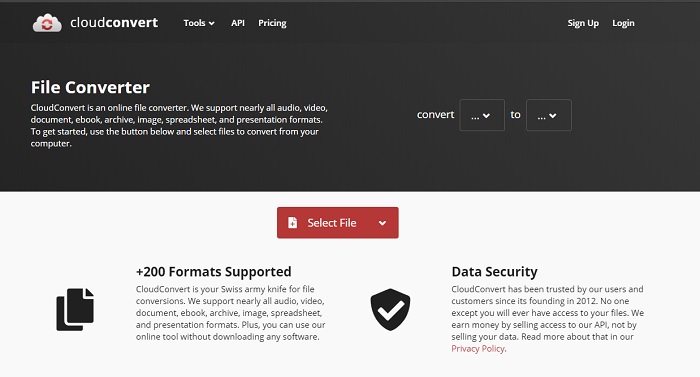
Ένα ακόμη εργαλείο που μπορείτε να χρησιμοποιήσετε διαδικτυακά είναι το Cloud Convert για μετατροπή σε νέα μορφή. Είναι από τα καλύτερα στην αγορά όταν μιλάμε για μετατροπές, αλλά δεν μπορείτε να ρυθμίσετε ή να αλλάξετε το bitrate, τα fps ή τα codecs. Ωστόσο, αν θέλετε να μετατρέψετε αρχεία κειμένου σε νέα μορφή, τότε αυτό το εργαλείο αξίζει να το δοκιμάσετε.
3. Μετατροπή
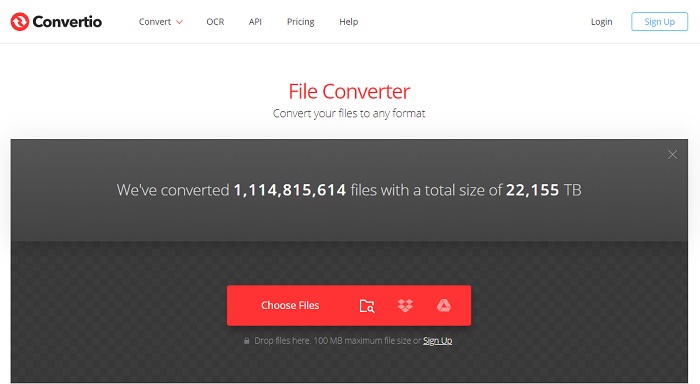
Όπως και το Cloud Convert, το Convertio δημιουργήθηκε επίσης για να είναι δωρεάν. Όσον αφορά τη μετατροπή, προσφέρει επίσης ισχυρή συμπίεση και μετατροπή. Αυτό το εργαλείο χρησιμοποιείται από πολλούς χρήστες για μετατροπή, χάρη στις σαφείς οδηγίες και την απλότητά του. Αν και μπορείτε να έχετε πρόσβαση στο εργαλείο στο διαδίκτυο, η κύρια ιστοσελίδα έχει πολλές διαφημίσεις στη διεπαφή, κάτι που είναι λίγο ενοχλητικό, ειδικά αν δεν θέλετε περισπασμούς κατά τη μετατροπή.
4. Online-Μετατροπή
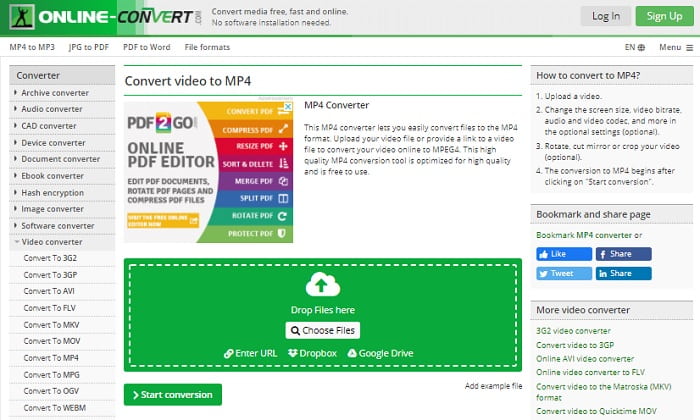
Αυτό το εργαλείο έχει πολλά να προσφέρει στις μετατροπές και είναι επίσης πολύ ενημερωτικό. Το Online-Convert παρέχει προηγμένες λειτουργίες με τις οποίες μπορείτε να τροποποιήσετε το bitrate, την ανάλυση και τα κανάλια. Αν είστε αρχάριοι στη μετατροπή αρχείων, αυτό το εργαλείο μπορεί να σας φανεί λίγο απαιτητικό. Επίσης, όταν ανεβάσετε το αρχείο στη διαδικτυακή διεπαφή, πρέπει να περιμένετε να επεξεργαστεί. Επιπλέον, υπάρχει όριο μετατροπής στα 100 MB, οπότε αν θέλετε να μετατρέψετε περισσότερα αρχεία, θα χρειαστεί να αγοράσετε την premium έκδοση για να αφαιρέσετε και τις διαφημίσεις.
5. 123 Εφαρμογές- Μετατροπέας ήχου
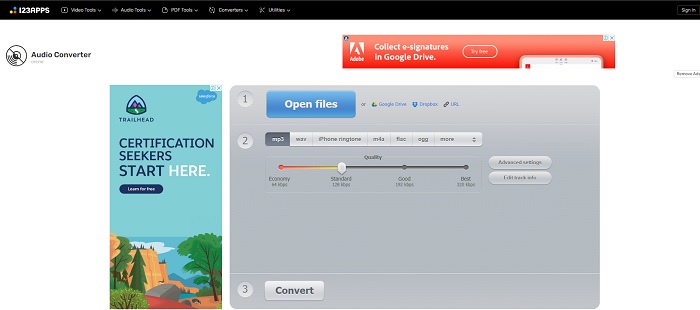
Σε αυτό το διαδικτυακό εργαλείο μπορείτε να κάνετε μετατροπές αποτελεσματικά και αποδοτικά. Αν και υποστηρίζει μόνο τρεις μορφές ήχου, το 123 Apps - Audio Converter είναι ένα από τα πιο εύχρηστα εργαλεία. Απλώς ανοίγετε το εργαλείο, εισάγετε το αρχείο, επιλέγετε τη μορφή και μετατρέπετε – τόσο απλά. Ωστόσο, το μειονέκτημα είναι ότι υπάρχουν αναφορές πως, μετά τη μετατροπή, η ποιότητα του ήχου γίνεται χαμηλότερη.
Μέρος 3. Διάγραμμα σύγκρισης των μετατροπέων στη λίστα
Μάθετε τις διαφορές κάθε εργαλείου και ας τις συγκρίνουμε ανάλογα.
| Χαρακτηριστικά | FVC Video Converter Ultimate | iTunes | Δωρεάν μετατροπέας ήχου FVC | Cloud Convert | Μετατροπή | Online-Μετατροπή | 123 Εφαρμογές- Μετατροπέας ήχου |
| Μετατροπέας ήχου |  | | | | | | |
| Λειτουργίες επεξεργασίας | |  | | | | | |
| Τροποποίηση bitrate, fps, ανάλυση ή παρόμοια | | | | | | | |
| Υποστηρίζεται πρόγραμμα | Εργαλείο που βασίζεται στην επιφάνεια εργασίας | Προεπιλεγμένο εργαλείο που βασίζεται στην επιφάνεια εργασίας | Εργαλείο που βασίζεται στο Web | Εργαλείο που βασίζεται στο Web | Εργαλείο που βασίζεται στο Web | Εργαλείο που βασίζεται στο Web | Εργαλείο που βασίζεται στο Web |
| Υποστηρίζεται λειτουργικό σύστημα | Διαθέσιμο σε όλα τα λειτουργικά συστήματα | Μόνο το υποστηριζόμενο προϊόν της Apple | Διαθέσιμο σε όλα τα λειτουργικά συστήματα | Διαθέσιμο σε όλα τα λειτουργικά συστήματα | Διαθέσιμο σε όλα τα λειτουργικά συστήματα | Διαθέσιμο σε όλα τα λειτουργικά συστήματα | Διαθέσιμο σε όλα τα λειτουργικά συστήματα |
| Εύρος τιμών | Για 1 μήνα: $25.00 Για ένα έτος: $31.20 Για άδεια ζωής: $55.20 | Για να αφαιρέσετε διαφημίσεις: $10 το μήνα $15 το μήνα για μια εξαμελή οικογένεια $5 το μήνα για φοιτητές | Δωρεάν | Δωρεάν | Δωρεάν | Για τα επιπλέον 8gb: Μηνιαία συνδρομή $70 USD μηνιαίως Ετήσια συνδρομή $672 USD | Δωρεάν |
MP3 εναντίον WAV
Η μορφή MP3 κυκλοφόρησε το 1993 από την Moving Picture Experts Group (MPEG). Ήταν το πρότυπο για την αποθήκευση μουσικής, καθώς μπορούσε να συμπιέσει τον ήχο σε πολύ μικρότερο μέγεθος από άλλες μη συμπιεσμένες μορφές. Εξακολουθεί να χρησιμοποιείται ευρέως στις μέρες μας, ειδικά για τη διανομή ήχου στο διαδίκτυο.
Το WAV, γνωστό και ως μορφή WAVE, βασίζεται στη μορφή αρχείου ανταλλαγής πόρων (RIFF). Αναπτύχθηκε από τη Microsoft και την IBM μαζί στις αρχές της δεκαετίας του 1990. Είναι μια επιλογή για αποθήκευση ακατέργαστου, ασυμπίεστου ήχου στα Microsoft Windows. Έτσι, τα αρχεία WAV αναπαράγονται συχνότερα σε υπολογιστές με Windows.
Μέρος 4. Συχνές ερωτήσεις σχετικά με MP3 σε WAV
Ποια είναι η έννοια του WAV;
WAV σημαίνει αρχεία ήχου κυματομορφής. είναι μια ασυμπίεστη μορφή χωρίς απώλειες.
Ποιο είναι μεγαλύτερο σε μέγεθος αρχείου; MP3 ή WAV;
Παρόλο που και οι δύο μορφές αποθηκεύουν αρχεία ήχου, το WAV είναι πολύ μεγαλύτερο από το MP3. Σε ορισμένες περιπτώσεις μπορεί να φτάσει έως και 15 φορές μεγαλύτερο μέγεθος από ένα MP3, επειδή είναι ασυμπίεστο. Μπορείτε να κάνετε κλικ εδώ για να μάθετε πώς να μετατρέψετε WAV σε MP3.
Πού μπορώ να εγγράψω WAV;
Για ηχογράφηση πρέπει να χρησιμοποιήσετε το απαράμιλλο εργαλείο στο διαδίκτυο. Ειδικά επειδή αυτή η μορφή είναι ασυμπίεστη, πρέπει να είστε προσεκτικοί ώστε να μην χάσετε δεδομένα κατά την εγγραφή. Κι έτσι, το FVC Screen Recorder είναι το αξεπέραστο WAV recorder. Μπορεί να καταγράψει και να επεξεργαστεί, ώστε το τελικό αποτέλεσμα να είναι καλύτερο τόσο σε εικόνα όσο και σε ήχο. Για να μάθετε περισσότερα, πρέπει να κατεβάσετε το λογισμικό στον υπολογιστή σας.
συμπέρασμα
Καθώς ο αγώνας φτάνει στο τέλος του, γίνεται πλέον σαφές ότι υπάρχει ένας νικητής. Μόλις αποκτήσετε αυτό το εργαλείο, θα αισθάνεστε σαν «βασιλιάς του κόσμου» στις ηχογραφήσεις. Το FVC Video Converter Ultimate κάνει τη μεγαλύτερη δουλειά, σε σύγκριση με ό,τι μπορούν να κάνουν άλλα προγράμματα εγγραφής. Αν έχετε πρόβλημα με την εγγραφή βίντεο, ήχου ή παιχνιδιού, θα έχετε το πάνω χέρι αν κάνετε τη σωστή επιλογή. Ποντάρετε τα πάντα στο FVC Video Converter Ultimate και κερδίστε εύκολα στη διαδρομή.
Δωρεάν ΛήψηΓια Windows 7 ή νεότεραΑσφαλής λήψη
Δωρεάν ΛήψηΓια MacOS 10.7 ή νεότεροΑσφαλής λήψη
-
 Πώς να μετατρέψετε δωρεάν MP4 σε WAV στην επιφάνεια εργασίας ή στο Διαδίκτυο [2021]
 Προσπαθείτε σκληρά να μετατρέψετε MP4 σε WAV; Δεν ξέρετε ποιος μετατροπέας μπορεί να σας βοηθήσει με αυτό τέλεια χωρίς να πληρώσετε ούτε μια δεκάρα; Διαβάστε αυτήν την ανάρτηση και θα λυθούν όλες οι ερωτήσεις σας.
-
 WAV Player - Κορυφαίες 5 εφαρμογές WAV Player για Android, iPhone, PC και Mac
 Πώς να παίξετε αρχεία WAV σε τηλέφωνο Android; Ποιος παίκτης μπορεί να παίξει WAV; Αυτή η ανάρτηση μοιράζεται 5 καλύτερες δωρεάν συσκευές αναπαραγωγής WAV για Android, iPhone, Mac και PC.
-
 FLV σε WAV - Μετατροπή FLV σε WAV Online δωρεάν και σε Mac / PC
 Πώς μπορώ να μετατρέψω ένα αρχείο FLV; Μπορεί το VLC να μετατρέψει το YouTube FLV σε WAV; Αυτή η ανάρτηση περιγράφει 3 δωρεάν τρόπους μετατροπής FLV σε WAV χωρίς απώλεια ποιότητας.

