


 Video Converter Ultimate
 Εγγραφή οθόνης
 Επισκευή βίντεο
 Ασφαλές κατέβασμα
3 τρόποι αναπαραγωγής αρχείων MKV στο Windows Media Player
Δεν μπορείτε να ανοίξετε αρχείο MKV στο Windows Media Player;
Το MKV είναι ένας δημοφιλής τύπος μορφής βίντεο. Μπορεί να έχετε πολλές ταινίες υψηλής ποιότητας, τηλεοπτικές σειρές ή άλλα βίντεο αποθηκευμένα σε MKV. Ωστόσο, ως χρήστης Windows, το προεπιλεγμένο πρόγραμμα αναπαραγωγής βίντεο, το Windows Media Player, δεν υποστηρίζει εγγενώς το διαχωρισμό (άνοιγμα) των δοχείων MKV. Επιστρέφουμε λοιπόν στο ερώτημα, πώς να αναπαράγετε αρχεία MKV στο Windows Media Center;

Ακόμη και μετά την αναβάθμιση του Windows Media Player στην πιο πρόσφατη έκδοση, δεν υπάρχει καμία εγγύηση ότι δεν θα αντιμετωπίσετε προβλήματα αναπαραγωγής MKV. Λαμβάνοντας υπόψη αυτό, αυτή η ανάρτηση θέλει να μοιραστεί 3 αποτελεσματικούς τρόπους για να σας βοηθήσει να αναπαράγετε αρχεία MKV στον υπολογιστή σας με Windows.
Μέρος 1. Πώς να ανοίξετε το αρχείο MKV στο Windows Media Player
Το Windows Media Player δεν μπορεί να αναπαράγει αρχεία MKV κυρίως λόγω ασυμβατότητας codec. Πρέπει να γνωρίζετε ότι το MKV είναι στην πραγματικότητα ένα κοντέινερ πολυμέσων για ροές βίντεο, ροές ήχου, υπότιτλους και άλλα. Πρέπει να δώσετε στο WMP τον σωστό splitter για MKV, καθώς και τα κατάλληλα codecs και φίλτρα για τα αρχεία βίντεο και ήχου. Σε αυτό το μέρος θα δείτε πώς να αναπαράγετε αρχείο MKV στο Windows Media Player.
Βήμα 1. Ανοίξτε το Windows Media Player και ανοίξτε το αρχείο MKV με αυτό. Μπορείτε επίσης να κάνετε δεξί κλικ στο αρχείο MKV και να επιλέξετε Άνοιγμα με WMP.
Βήμα 2. Τώρα θα δείτε ένα μήνυμα σφάλματος που αναφέρει ότι Το Windows Media Player δεν είναι δυνατό να αναπαράγει το αρχείο. Κάντε κλικ στην επιλογή Βοήθεια από το Web στο παράθυρο διαλόγου.
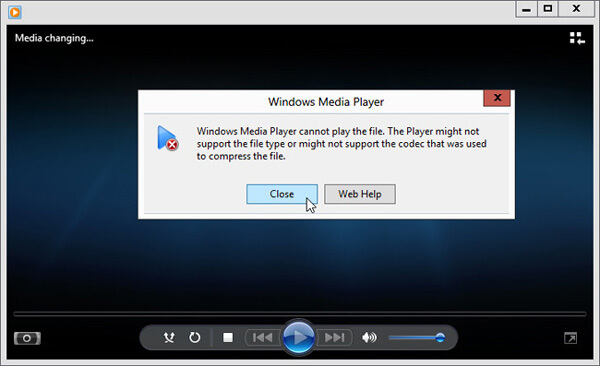
Βήμα 3. Κάντε κλικ στον σύνδεσμο codec κάτω από την ένδειξη Codec is Missing. Αντιγράψτε και επικολλήστε τον σύνδεσμο στο πρόγραμμα περιήγησής σας. Αυτό θα σας καθοδηγήσει να αποκτήσετε το σωστό MKV codec για το Windows Media Player. Αφού γίνει η λήψη, πρέπει να ακολουθήσετε τις οδηγίες για να ολοκληρώσετε τη διαδικασία ρύθμισης του MKV στο Windows Media Player.
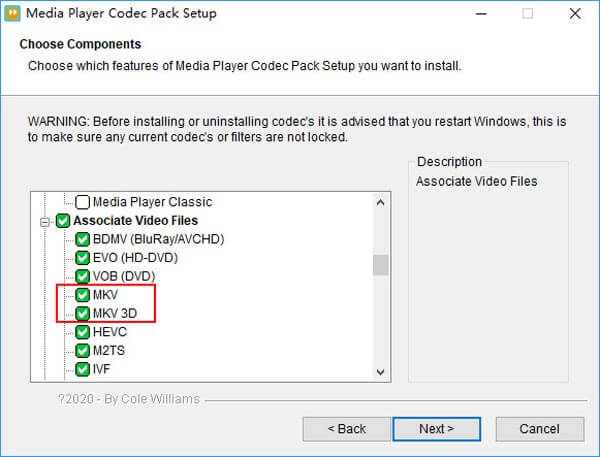
Βήμα 4. Επανεκκινήστε το Windows Media Player και προσπαθήστε ξανά να αναπαράγετε το αρχείο MKV.

Μέρος 2. Καλύτερος τρόπος αναπαραγωγής αρχείων MKV στο Windows Media Player
Με τον σωστό κωδικοποιητή MKV, μπορείτε εύκολα να ανοίξετε το αρχείο MKV στο Windows Media Player. Ωστόσο, πολλοί χρήστες ανέφεραν ότι εξακολουθούν να υπάρχουν κάποια άλλα προβλήματα αναπαραγωγής ενώ παίζουν MKV με WMP. Σε αυτήν την περίπτωση, μπορείτε να επιλέξετε μια εναλλακτική λύση του Windows Media Player για να σας βοηθήσει να αναπαράγετε αρχεία MKV.
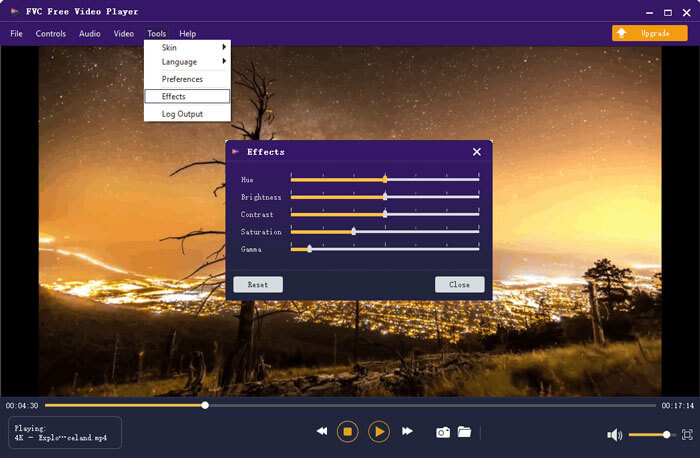
Το FVC Free MKV Player είναι ένα εξαιρετικό εναλλακτικό εργαλείο αντί του Windows Media Player. Υποστηρίζει εγγενώς όλες τις συχνά χρησιμοποιούμενες μορφές βίντεο και ήχου, όπως MKV, MOV, MP4, FLV, AVI, RMVB, MPEG, AAC, MP3, M4A, WMA και άλλες. Μπορείτε να βασιστείτε σε αυτό για να παρακολουθείτε ταινίες MKV με υψηλή ποιότητα.

Βήμα 1. Ανοίξτε το πρόγραμμα περιήγησής σας και μεταβείτε στον ιστότοπο αυτού του δωρεάν προγράμματος αναπαραγωγής MKV. Κάντε κλικ στο κουμπί Play Now για να εγκαταστήσετε ένα μικρού μεγέθους αρχείο εκκίνησης για την αναπαραγωγή MKV. Μετά από αυτό, το κύριο παράθυρο αναπαραγωγής MKV θα εμφανιστεί στην οθόνη.
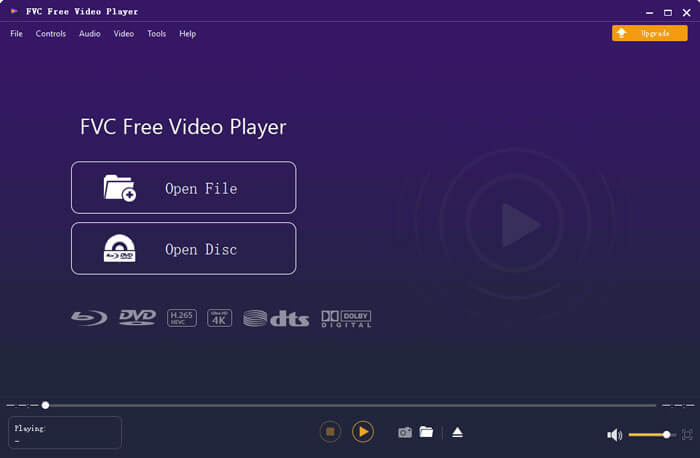
Βήμα 2. Κάντε κλικ στο κουμπί Open File για να περιηγηθείτε και να εισαγάγετε το αρχείο MKV σε αυτό. Στη συνέχεια, το βίντεο θα αναπαραχθεί αυτόματα. Με την υιοθέτηση προηγμένης τεχνολογίας κωδικοποίησης βίντεο, μπορεί να αναπαράγει αρχεία MKV ομαλά και με υψηλή ποιότητα. Επιπλέον, υποστηρίζει DTS-HD και Dolby TrueHD.
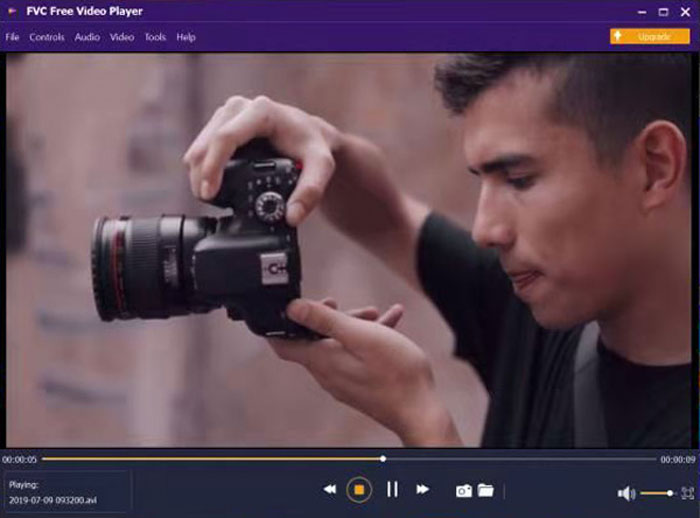
Σας παρέχονται όλα τα στοιχεία ελέγχου της αναπαραγωγής MKV. Εκτός από τις βασικές λειτουργίες όπως αναπαραγωγή, παύση, πίσω, εμπρός, ρύθμιση έντασης και πολλά άλλα, σας επιτρέπει επίσης να προσαρμόσετε εφέ, να αλλάξετε κομμάτι ήχου και υπότιτλους και να προσαρμόσετε άλλες ρυθμίσεις
Μέρος 3. Μετατροπή MKV για αναπαραγωγή στο Windows Media Player
Για να αναπαράγετε αρχείο MKV στο Windows Media Player, μπορείτε επίσης να επιλέξετε να μετατρέψετε το MKV σε μια υποστηριζόμενη μορφή βίντεο, όπως MP4. Εδώ σας παρουσιάζουμε το Free Online Video Converter για να σας βοηθήσει να μετατρέψετε MKV σε MP4 χωρίς απώλεια ποιότητας.
Βήμα 1. Μεταβείτε σε αυτή τη διαδικτυακή σελίδα δωρεάν μετατροπής MKV σε MP4 από το πρόγραμμα περιήγησής σας. Είναι συμβατή με κάθε δημοφιλές πρόγραμμα περιήγησης, συμπεριλαμβανομένων των Chrome, IE, Safari και Firefox.
Βήμα 2. Όταν φτάσετε εκεί, κάντε κλικ στο κουμπί Add File to Convert. Κατά τη διάρκεια αυτού του βήματος, πρέπει να εγκαταστήσετε έναν μικρό launcher για τη μετατροπή MKV. Στη συνέχεια, θα εμφανιστεί στην οθόνη ένα αναδυόμενο παράθυρο για να επιλέξετε το αρχείο MKV.
Βήμα 3. Θα δείτε ότι πολλές δημοφιλείς μορφές βίντεο όπως MP4, MOV, AVI, MKV, FLV κ.λπ. εμφανίζονται εκεί. Βεβαιωθείτε ότι η μορφή εξόδου είναι MP4 και έπειτα κάντε κλικ στο κουμπί Convert.
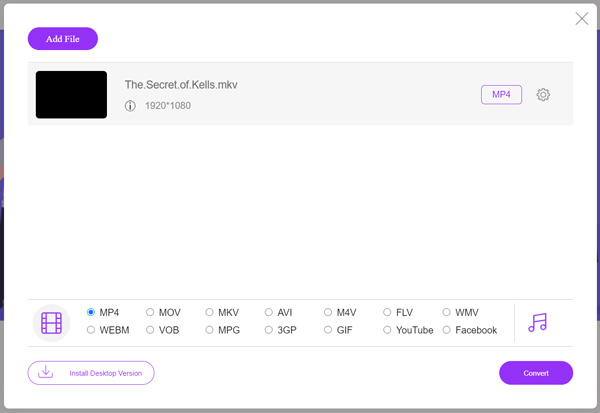
Μετά τη μετατροπή MKV σε MP4, μπορείτε να το αναπαράγετε με το Windows Media Player. Δεν θα υπάρξει καμία απώλεια ποιότητας εικόνας ή ήχου κατά τη διάρκεια της μετατροπής.
Μέρος 4. Συνήθεις ερωτήσεις σχετικά με την αναπαραγωγή MKV στο Windows Media Player
Ερώτηση 1. Πώς μπορώ να αλλάξω τη μορφή ενός βίντεο στο Windows Media Player;
Ανοίξτε το Windows Media Player και φορτώστε το αρχείο βίντεο που θέλετε να μετατρέψετε. Κάντε κλικ στο μικρό βέλος στην καρτέλα Rip στο επάνω μενού. Επιλέξτε Περισσότερες επιλογές και, στη συνέχεια, κάντε κλικ στο αναπτυσσόμενο μενού με την ένδειξη Μορφή. Εδώ μπορείτε να επιλέξετε μια κατάλληλη μορφή εξόδου και να ξεκινήσετε τη μετατροπή.
Ερώτηση 2. Ποια μορφή βίντεο είναι το Windows Media Player;
Η προεπιλεγμένη μορφή αρχείου του Windows Media Player είναι WMV, Windows Media Video και WMA, Windows Media Audio. Επίσης, υποστηρίζει το Advanced Systems Format και τη δική του μορφή playlist με βάση XML, Windows Playlist.
Ερώτηση 3. Μπορούν τα Windows 10 να αναπαράγουν αρχεία MKV;
Όχι. Το ενσωματωμένο Windows Media Player 12 στα Windows 10 δεν μπορεί να αναπαράγει αρχεία MKV. Πρέπει να εγκαταστήσετε τον κωδικοποιητή MKV για να λάβετε την αναπαραγωγή.
συμπέρασμα
Όταν το Windows Media Player δεν μπορεί να αναγνωρίσει το MKV codec, απλώς εμφανίζει ένα σφάλμα. Για να αναπαράγετε αρχείο MKV στο Windows Media Player, πρέπει να εγκαταστήσετε το σωστό codec. Επίσης, μπορείτε να χρησιμοποιήσετε ένα πρόγραμμα αναπαραγωγής τρίτου κατασκευαστή ή να μετατρέψετε τη μορφή MKV για την αναπαραγωγή. Αν εξακολουθείτε να έχετε απορίες σχετικά με το πώς να ανοίξετε αρχείο MKV στο Windows Media Player, μην διστάσετε να μας αφήσετε ένα μήνυμα.
-
 Κορυφαίοι 8 MKV παίκτες για αναπαραγωγή αρχείων MKV με τον επιθυμητό υπότιτλο
 Όταν θέλετε να αναπαράγετε το βίντεο MKV με τον επιθυμητό υπότιτλο, μπορείτε να μάθετε περισσότερα σχετικά με τις κορυφαίες 8 συσκευές αναπαραγωγής αρχείων MKV για PC / Mac και να επιλέξετε το επιθυμητό ανάλογα με τις απαιτήσεις σας.
-
 MKV σε MOV - Πώς να μετατρέψετε το MKV σε MOV
 Πώς μπορώ να μετατρέψω το MKV σε MOV σε Mac; Μπορεί το iMovie να διαβάσει το MKV; Τι σημαίνει η μορφή MOV; Αυτή η ανάρτηση περιγράφει 2 απλούς τρόπους για να σας βοηθήσει να μετατρέψετε MKV σε MOV με δωρεάν online και επαγγελματικούς μετατροπείς βίντεο.
-
 AC3 Player - Κριτική για 10 καλύτερους παίκτες AC3 του 2021
 Ποια είναι η καλύτερη συσκευή αναπαραγωγής AC3; Μπορεί το MX Player να ανοίξει το AC3; Αυτή η ανάρτηση περιέχει μια λίστα με 10 δωρεάν συσκευές αναπαραγωγής AC3 για συσκευές Mac, Windows PC, iOS και Android.
