


 Video Converter Ultimate
 Εγγραφή οθόνης
 Επισκευή βίντεο
Εξαντλητική ανασκόπηση για λογισμικό εγγραφής ήχου για αποτελεσματική εγγραφή ήχου
Είτε είστε επαγγελματίας είτε ερασιτέχνης, είναι απαραίτητο να διαθέτετε λογισμικό ηχογράφησης ήχου για να επεξεργάζεστε και να “γυαλίζετε” το ηχητικό υλικό για μια συγκεκριμένη χρήση. Επιπλέον, η επιλογή ενός κατάλληλου καταγραφέα ήχου στη συσκευή σας μπορεί να είναι δύσκολη, αφού στην αγορά υπάρχουν πάρα πολλές επιλογές. Αντί να δοκιμάζετε πολλά διαφορετικά προγράμματα ηχογράφησης, σας παρουσιάζουμε τις τέσσερις εφαρμογές που θεωρήσαμε πιο κατάλληλες για τις ανάγκες σας, ώστε να αποφύγετε τη λήψη ή πρόσβαση σε κακόβουλο λογισμικό. Η παρακάτω λίστα καταγραφέων ήχου έχει φιλτραριστεί προσεκτικά, ώστε να σας προσφέρουμε μόνο τα καλύτερα εργαλεία και όχι προγράμματα καταγραφής με χαμηλές επιδόσεις.

Μέρος 1. 4 Καλύτερο λογισμικό εγγραφής ήχου σε Windows και macOS
1. Εγγραφή οθόνης FVC
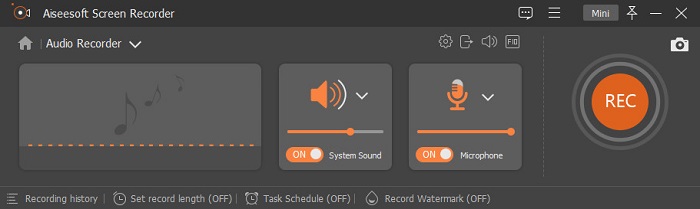
Χρειάζεται να ηχογραφήσετε ήχο από τον υπολογιστή, αλλά δεν ξέρετε τι να χρησιμοποιήσετε; Αν ισχύει αυτό, σας παρουσιάζουμε το καλύτερο και μακράν το πιο δημοφιλές πρόγραμμα καταγραφής στην αγορά, το FVC Screen Recorder. Διαθέτει ένα εξαιρετικό περιβάλλον χρήστη που επιτρέπει στους χρήστες να αλληλεπιδρούν με το λογισμικό χωρίς να κάνουν περίπλοκες ρυθμίσεις. Επιπλέον, οι χρήστες συχνά αντιμετωπίζουν πρόβλημα με τους θορύβους του περιβάλλοντος, οπότε με τη βοήθεια της νέας πρόσθετης λειτουργίας ακύρωσης θορύβου μπορείτε να ηχογραφείτε χωρίς να σας ενοχλούν οι μικροί θόρυβοι του φόντου. Επιπλέον, διαθέτει πολλές λειτουργίες που θα σας βοηθήσουν να ηχογραφείτε αποτελεσματικά. Θέλετε να μάθετε ποιες είναι; Τότε ας κάνουμε μια αναλυτική παρουσίαση των βασικών δυνατοτήτων του FVC Screen Recorder.

Εγγραφή οθόνης
4.988.518+ λήψεις- Καταγράφει ήχους με εξαιρετικά υψηλή ποιότητα ήχου.
- Εγγραφή ήχου 24/7, εφόσον έχετε αρκετό χώρο αποθήκευσης στη μονάδα δίσκου του υπολογιστή σας.
- Μπορείτε να εγγράψετε τον ήχο του συστήματος ταυτόχρονα με ένα μικρόφωνο.
- Η βελτίωση μικροφώνου είναι διαθέσιμη για μια πολύ καλύτερη εμπειρία εγγραφής της φωνής σας.
- Μπορείτε να ελέγξετε τον ήχο του μικροφώνου εάν χρειάζεται.
Δωρεάν ΛήψηΓια Windows 7 ή νεότεραΑσφαλής Λήψη
Δωρεάν ΛήψηΓια MacOS 10.7 ή νεότεροΑσφαλής Λήψη
Πλεονεκτήματα
- Το πρόγραμμα επιτρέπει στους χρήστες να βιώνουν μια συναρπαστική εμπειρία εγγραφής ήχου σε Mac ή Windows.
- Διατίθενται βασικές λειτουργίες επεξεργασίας, όπως η κοπή ή η περικοπή του ήχου.
- Διαθέτει ενσωματωμένο ιστορικό εγγραφής για να βρίσκετε εύκολα τον εγγεγραμμένο ήχο.
Μειονεκτήματα
- Δεν υποστηρίζει την προσθήκη εφέ στον ήχο κατά την εγγραφή.
- Αγοράστε πριν τη χρησιμοποιήσετε.
2. Θράσος
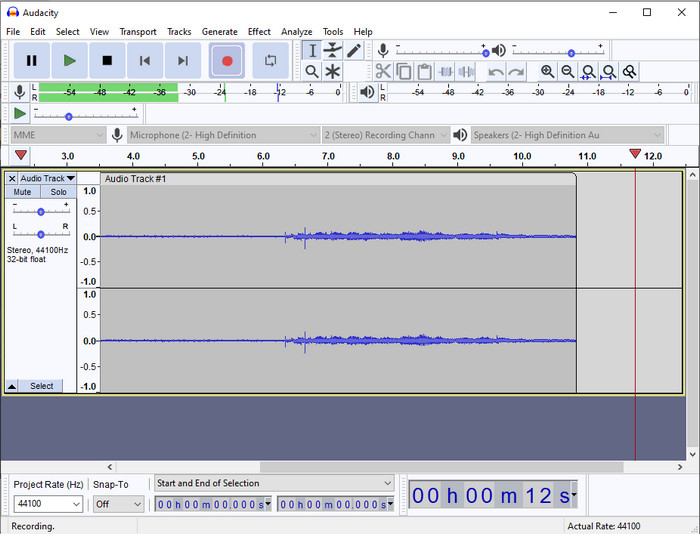
Αν χρειάζεστε ένα επαγγελματικό εργαλείο για να διαχειριστείτε τις ηχογραφήσεις σας, τότε το Audacity είναι μια χρήσιμη λύση. Αυτός ο επαγγελματικός καταγραφέας ήχου έχει ήδη βοηθήσει εκατομμύρια podcasters στο ταξίδι τους στην ηχογράφηση. Αν χρειάζεστε προηγμένο καταγραφέα δωρεάν, αυτό το πρόγραμμα είναι μία από τις καλύτερες επιλογές. Παρόλο που προσφέρει επαγγελματικές δυνατότητες ηχογράφησης, παραμένει δύσκολο να το συνηθίσει κανείς λόγω του όχι ιδιαίτερα φιλικού γραφικού περιβάλλοντος. Αν και ανταποκρίνεται σε επαγγελματικές ανάγκες ηχογράφησης, ορισμένες λειτουργίες του, όπως η ακύρωση θορύβου, χρειάζονται ακόμη αναβάθμιση. Παρ’ όλα αυτά, το Audacity καταγράφει τον ήχο του υπολογιστή με επαγγελματικό τρόπο, που δεν μπορούν να προσφέρουν όλα τα προγράμματα καταγραφής.
Πλεονεκτήματα
- Δωρεάν λήψη σε όλες τις πλατφόρμες υπολογιστών.
- Προσφέρει ειδικές δυνατότητες επεξεργασίας για τον επαγγελματία.
- Έχει κάποιες προηγμένες λειτουργίες που θα χρειαστείτε για να δημιουργήσετε ένα podcast.
Μειονεκτήματα
- Το GUI του λογισμικού είναι ξεπερασμένο.
- Χρειάζεται αναβάθμιση σε ορισμένα χαρακτηριστικά του.
- Δεν είναι η καλύτερη επιλογή για ερασιτέχνες και όσους δεν ξέρουν να ηχογραφούν.
3. QuickTime Player
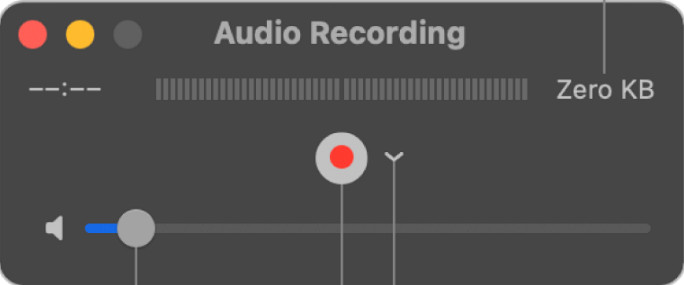
Το QuickTime Player μπορεί επίσης να χρησιμοποιηθεί ως καταγραφέας ήχου σε Mac, αν χρειαστεί. Αν και το πρόγραμμα αναπαραγωγής δεν είναι τόσο επαρκές και αποτελεσματικό για ηχογράφηση, με αποτέλεσμα να παρατηρούνται καθυστερήσεις και χαμηλότερη ποιότητα στο τελικό αρχείο ήχου, αν χρειάζεστε μια γρήγορη ηχογράφηση στο Mac σας, αποτελεί μια επιλογή, καθώς δεν απαιτείται λήψη και είναι αναμφίβολα ασφαλές στη χρήση. Ωστόσο, αν είστε επαγγελματίας που αναζητά το καλύτερο λογισμικό ηχογράφησης, αυτό δεν είναι το ιδανικό εργαλείο.
Πλεονεκτήματα
- Είναι ήδη διαθέσιμο σε κάθε macOS.
- Δωρεάν, ασφαλές και εύκολο στη χρήση.
Μειονεκτήματα
- Δεν είναι τόσο αποτελεσματική όσο η άλλη συσκευή εγγραφής ήχου σε αυτήν τη λίστα.
- Η τελική ποιότητα εξόδου του ήχου είναι χαμηλή.
- Δεν είναι η καλύτερη επιλογή για επαγγελματική εγγραφή και επεξεργασία.
Σχετικά:
Πώς να καταγράψετε την οθόνη με ήχο σε Mac χρησιμοποιώντας το QuickTime
Πώς να μετατρέψετε QuickTime σε MP4
4. Ocenaudio
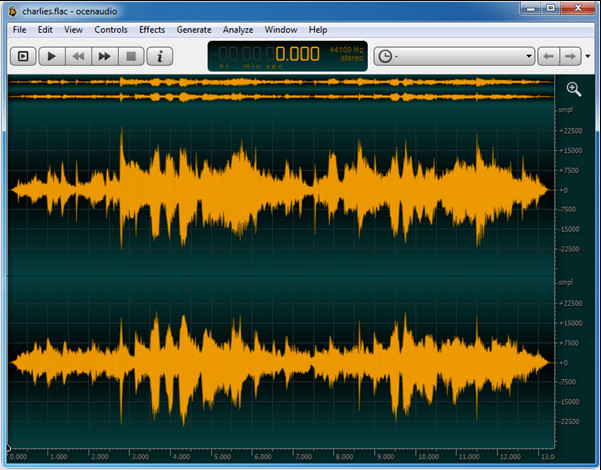
Αν χρειάζεστε έναν πολυλειτουργικό καταγραφέα για να ηχογραφείτε σε Windows 10 ή νεότερα, τότε το Oceanaudio θα σας βοηθήσει. Αυτό το εργαλείο διαθέτει περιβάλλον χρήστη σχεδόν παρόμοιο με του Audacity, αλλά η διεπαφή του είναι πιο εύκολη στην κατανόηση. Πιο συγκεκριμένα, αυτός ο καταγραφέας προσφέρει πολυπλοκότητα και λειτουργίες που θα χρειαστείτε για την επεξεργασία και ηχογράφηση ήχου. Αν και είναι κάπως δύσχρηστος και πιθανόν να χρειαστεί να παρακολουθήσετε κάποιο εκπαιδευτικό βίντεο για να τον χρησιμοποιήσετε, στο τέλος της ημέρας αξίζει τον κόπο. Επομένως, αν χρειάζεστε έναν επεξεργαστή με καλύτερο περιβάλλον από το Audacity, αυτό πρέπει να είναι η επιλογή σας.
Πλεονεκτήματα
- Χρησιμοποιεί προηγμένη τεχνολογία για εγγραφή.
- Είναι μια επιλογή ειδικού να κάνετε ηχογράφηση.
- Μπορείτε να ακούσετε τη φωνή σας κατά την εγγραφή.
Μειονεκτήματα
- Δεν είναι φιλικό προς το χρήστη.
- Οι αρχάριοι μπορεί να μπερδευτούν κατά τη χρήση αυτού του εργαλείου.
Μέρος 2. Διάγραμμα σύγκρισης σχετικά με το λογισμικό εγγραφής ήχου
| Χαρακτηριστικά | FVC Screen Recorder | Θράσος | QuickTime Player | Ocenaudio |
| Εγγραφή ήχου συστήματος και μικροφώνου |  | | | |
| Επεξεργαστείτε την εγγραφή | | |  | |
| Επιτάχυνση υλικού | | | | |
| Προ-ακρόαση σε πραγματικό χρόνο | | | | |
| Αποθηκεύστε την αρχική ποιότητα | | | | |
| Καλύτερη διεπαφή χρήστη | | | | |
Μέρος 3. Συχνές ερωτήσεις σχετικά με το λογισμικό εγγραφής ήχου
Είναι η Cinch Audio Recorder η καλύτερη συσκευή εγγραφής ήχου;
Έχουμε κάνει πρόσφατα μια αναλυτική κριτική για το Cinch Audio Recorder. Αν, λοιπόν, θέλετε να μάθετε περισσότερα για αυτόν τον καταγραφέα ήχου, κάντε κλικ σε αυτόν τον σύνδεσμο και διαβάστε πιο λεπτομερείς πληροφορίες σχετικά με το πρόγραμμα.
Ποιες είναι οι ιδιότητες μιας καλής συσκευής εγγραφής ήχου;
Θα πρέπει να γνωρίζετε βασικά πρότυπα πριν επιλέξετε μια καλή συσκευή εγγραφής ήχου. Πρώτον, θα πρέπει να μπορεί να καταγράψει τον ήχο στο μικρόφωνό σας άνετα. Δεύτερον, είναι ασφαλές και χωρίς κακόβουλο λογισμικό. Τρίτον, εάν χρειαστεί να αγοράσετε το εργαλείο, το ίδιο το εργαλείο θα πρέπει να παρέχει αριστεία στους χρήστες. Τέταρτον, το ποσοστό αποτελεσματικότητας σημαίνει ότι το εργαλείο πρέπει να είναι πολύ αποτελεσματικό σε μια εγγραφή. Πέμπτον, βασικές ή προηγμένες λειτουργίες πρέπει να είναι διαθέσιμες για να βοηθήσουν τους χρήστες να κάνουν εγγραφή. Πριν επιλέξετε μια συσκευή εγγραφής ήχου που θα σας βοηθήσει, μπορείτε να βασιστείτε σε αυτά τα πρότυπα.
Πώς να εγγράψετε ήχο στα Windows 10;
Πριν ξεκινήσετε την ηχογράφηση στα Windows 10, πρέπει να επιλέξετε τον καλύτερο καταγραφέα, όπως το FVC Video Recorder, πραγματοποιώντας λήψη στον υπολογιστή σας, εγκαθιστώντας το εργαλείο και εκκινώντας το. Στη συνέχεια, επιλέξτε την επιλογή Audio Recorder και κάντε κλικ σε αυτή. Μπορείτε πλέον εύκολα να προσθέσετε τον ήχο του συστήματος ή το μικρόφωνο στην ηχογράφησή σας, ενεργοποιώντας τα από την πλωτή γραμμή εργαλείων. Όταν είστε έτοιμοι να ξεκινήσετε την ηχογράφηση, κάντε κλικ στο κόκκινο στρογγυλό κουμπί. Αν θέλετε να τερματίσετε την ηχογράφηση, κάντε κλικ στο τετράγωνο κουμπί για διακοπή· στη συνέχεια, θα εμφανιστεί ένα νέο παράθυρο με τη λίστα των ηχογραφήσεων που έχετε πραγματοποιήσει.
συμπέρασμα
Σήμερα γνωρίζουμε ποιο λογισμικό ηχογράφησης είναι διαθέσιμο στον υπολογιστή σας. Όλα αυτά τα εργαλεία που παρουσιάστηκαν εδώ θα σας βοηθήσουν στις ηχογραφήσεις σας. Ωστόσο, αν αναζητάτε έναν καταγραφέα που υπερτερεί των υπολοίπων, το FVC Screen Recorder είναι πιθανότατα για εσάς. Αμφιβάλλετε ακόμα για τον καταγραφέα ήχου; Τότε, η λήψη του είναι ο μόνος τρόπος να τον δοκιμάσετε και να διαπιστώσετε αν λειτουργεί όπως περιγράφουμε σε αυτό το άρθρο.
-
 Κορυφαία 4 δωρεάν ηχογραφήσεις AIFF που παράγουν ήχο υψηλής ποιότητας
 Αυτό το άρθρο μιλά για το AIFF και μερικά από τα πιο δημοφιλή εργαλεία που μπορείτε να χρησιμοποιήσετε για να δημιουργήσετε μορφή AIFF υψηλής ποιότητας.
-
 3 από τις καλύτερες τεχνικές για την εγγραφή ήχου στο iPhone
 Αντιμετωπίζετε δυσκολίες επειδή δεν μπορείτε να κάνετε σωστά την εγγραφή ήχου στο iPhone; Στη συνέχεια, διαβάστε αυτό το άρθρο για να μάθετε πώς να εγγράφετε ήχο στο iPhone και ποια είναι τα διαθέσιμα εργαλεία.
-
 7 του Magnificent Voice Recorder προσβάσιμο σε όλες τις πλατφόρμες
 Θέλετε να μάθετε πώς να κάνετε ηχογράφηση; Στη συνέχεια, μεταβείτε σε αυτό το άρθρο καθώς μιλάμε για την καλύτερη συσκευή εγγραφής ήχου που μπορεί να ταιριάζει στις ανάγκες σας.
