


 Video Converter Ultimate
 Εγγραφή οθόνης
 Επισκευή βίντεο
 Ασφαλές κατέβασμα
FLAC εναντίον MP3: Εισαγωγή και σύγκριση μορφών ήχου
Η συζήτηση σχετικά με τις μορφές αρχείων FLAC vs. MP3 συνεχίζεται εδώ και χρόνια. Παρότι το MP3 είναι μία από τις παλαιότερες και πιο ευρέως χρησιμοποιούμενες μορφές, το FLAC έχει κερδίσει δημοτικότητα μεταξύ των φίλων του ποιοτικού ήχου λόγω της ασυμπίεστης (lossless) συμπίεσης ήχου που προσφέρει. Αλλά ποιο είναι καλύτερο; Σε αυτόν τον οδηγό, θα εξετάσουμε πιο προσεκτικά τις διαφορές μεταξύ FLAC και MP3, συμπεριλαμβανομένης της ποιότητας ήχου, του μεγέθους αρχείου, της συμβατότητας και άλλων παραγόντων, ώστε να σας βοηθήσουμε να αποφασίσετε ποια μορφή να επιλέξετε για τη μουσική σας συλλογή.

Μέρος 1. FLAC εναντίον MP3: Εισαγωγή μορφών ήχου
Ανέκδοτο για MP3
Το MP3 είναι μια δημοφιλής μορφή για ψηφιακά αρχεία ήχου που έχει χρησιμοποιηθεί ευρέως από την εισαγωγή του στη δεκαετία του 1990. Χρησιμοποιεί μια μορφή συμπίεσης με απώλειες για να μειώσει το μέγεθος των αρχείων ήχου διατηρώντας παράλληλα καλή ποιότητα ήχου. Τα αρχεία MP3 μπορούν εύκολα να κοινοποιηθούν, να ληφθούν και να αναπαραχθούν σε διάφορες συσκευές, καθιστώντας το μια βολική επιλογή για τους λάτρεις της ψηφιακής μουσικής. Το ερώτημα είναι, είναι το FLAC καλύτερο από το MP3; Ας το μάθουμε διαβάζοντας την περιγραφή του FLAC.
Ανέκδοτο για FLAC
Το FLAC (Free Lossless Audio Codec) είναι μια μορφή αρχείου ήχου υψηλής ποιότητας που χρησιμοποιεί συμπίεση χωρίς απώλειες για τη διατήρηση των αρχικών δεδομένων ήχου χωρίς να θυσιάζει την ποιότητα. Αυτό σημαίνει ότι τα αρχεία FLAC είναι πολύ μεγαλύτερα από τα αρχεία MP3, αλλά διατηρούν το ίδιο επίπεδο πιστότητας ήχου με το αρχικό υλικό πηγής.
Μέρος 2. Υποστηριζόμενες συσκευές/πλατφόρμες FLAC και MP3
Τώρα, ας δούμε τη σύγκριση MP3 με FLAC για να δούμε πώς αποδίδουν σε σχέση με τις πλατφόρμες ή τις συσκευές που υποστηρίζουν.
Το MP3 είναι μια ευρέως υποστηριζόμενη μορφή αρχείου ήχου που μπορεί να αναπαραχθεί σε διαφορετικές πλατφόρμες, όπως:
◆ Υπολογιστές με λειτουργικά συστήματα Windows, macOS και Linux.
◆ Φορητά media players, όπως τα iPod και άλλοι MP3 players.
◆ Smartphone και tablet με iOS, Android και άλλα λειτουργικά συστήματα για κινητά.
◆ Στερεοφωνικά αυτοκινήτου με USB ή βοηθητικές εισόδους.
◆ Συστήματα οικιακού κινηματογράφου και στερεοφωνικοί δέκτες με σύνδεση USB ή δικτύου.
◆ Οι υπηρεσίες ροής μουσικής, όπως το Spotify και η Apple Music, χρησιμοποιούν συχνά MP3 ως προεπιλεγμένη μορφή για ροή και λήψη μουσικής.
Το FLAC δεν υποστηρίζεται τόσο ευρέως όσο το MP3, αλλά εξακολουθεί να μπορεί να αναπαραχθεί σε διάφορες πλατφόρμες, όπως:
◆ Υπολογιστές με λειτουργικά συστήματα Windows, macOS και Linux.
◆ Ορισμένες φορητές συσκευές αναπαραγωγής πολυμέσων, όπως το Astell&Kern AK Jr και το PonoPlayer.
◆ Ορισμένα smartphone και tablet με Android και άλλα λειτουργικά συστήματα για κινητά.
◆ Ορισμένα στερεοφωνικά αυτοκινήτου και συστήματα οικιακού κινηματογράφου με σύνδεση USB ή δικτύου.
◆ Ορισμένες υπηρεσίες ροής μουσικής, όπως το Tidal, που προσφέρουν επιλογές ροής και λήψης FLAC υψηλής πιστότητας.
Μέρος 3. Είναι το FLAC καλύτερο από το MP3;
Αυτή τη φορά, επιτρέψτε μας να απαριθμήσουμε τη διαφορά μεταξύ FLAC και MP3 συγκρίνοντας αναλυτικά αυτές τις μορφές ήχου.
Ακολουθεί μια ολοκληρωμένη σύγκριση του FLAC και του MP3 με βάση διάφορους παράγοντες:
Ποιότητα ήχου: Το FLAC προσφέρει καλύτερη ποιότητα ήχου από το MP3, καθώς είναι μια ασυμπίεστη (lossless) μορφή που διατηρεί όλα τα δεδομένα ήχου από το αρχικό υλικό. Αντίθετα, το MP3 είναι μια μορφή με απώλειες (lossy) που απορρίπτει μέρος των δεδομένων ήχου κατά τη συμπίεση, κάτι που μπορεί να οδηγήσει σε απώλεια ποιότητας ήχου.
Μέγεθος αρχείου: Τα αρχεία MP3 είναι πολύ μικρότερα από τα αρχεία FLAC, καθώς το MP3 χρησιμοποιεί συμπίεση με απώλειες για να μειώσει το μέγεθος του αρχείου. Αυτό καθιστά το MP3 πιο πρακτική επιλογή για όσους έχουν περιορισμένο χώρο αποθήκευσης ή χρειάζεται να μοιράζονται ή να κατεβάζουν μουσικά αρχεία γρήγορα μέσω διαδικτύου.
Συμβατότητα: Το MP3 είναι ευρέως συμβατό με διάφορες συσκευές και λογισμικά, συμπεριλαμβανομένων επιτραπέζιων και φορητών υπολογιστών, φορητών media players, smartphones, car stereos και υπηρεσιών μουσικού streaming. Το FLAC, από την άλλη, ενδέχεται να μην είναι συμβατό με ορισμένες συσκευές και λογισμικά λόγω του μεγαλύτερου μεγέθους αρχείων και της ασυμπίεστης μορφής του.
Ρυθμός μετάδοσης (bitrate): Τα αρχεία MP3 μπορούν να κωδικοποιηθούν σε χαμηλότερο bitrate για περαιτέρω μείωση του μεγέθους, αλλά αυτό έχει ως αποτέλεσμα επιπλέον απώλεια ποιότητας ήχου. Τα αρχεία FLAC, αντίθετα, διατηρούν πάντα το ίδιο bitrate με το αρχικό υλικό.
Επεξεργασία: Το FLAC είναι καλύτερη επιλογή για επεξεργασία ήχου, καθώς προσφέρει υψηλότερο επίπεδο πιστότητας και δεν εισάγει πρόσθετα τεχνουργήματα συμπίεσης. Τα αρχεία MP3, αντίθετα, μπορεί να εισαγάγουν επιπλέον τεχνουργήματα συμπίεσης κατά την επεξεργασία λόγω της συμπίεσης με απώλειες.
Τιμή: Τόσο το FLAC όσο και το MP3 είναι δωρεάν και ανοικτού κώδικα μορφές, επομένως δεν υπάρχει κόστος που να σχετίζεται με τη χρήση οποιασδήποτε από τις δύο.
Μέρος 4. Μετατροπή FLAC σε MP3 ή MP3 σε FLAC
Τώρα που τελειώσαμε με τη διαδικασία σύγκρισης FLAC με MP3, ας προχωρήσουμε στη διαδικασία μετατροπής MP3 σε FLAC ή αντίστροφα.
Το Video Converter Ultimate είναι ένα ισχυρό λογισμικό που σας επιτρέπει να μετατρέπετε εύκολα αρχεία ήχου και βίντεο από μία μορφή σε άλλη. Μία από τις πολλές μορφές που υποστηρίζει το FVC Video Converter Ultimate είναι το FLAC, μια υψηλής ποιότητας, ασυμπίεστη μορφή ήχου που χρησιμοποιείται συχνά από audiophiles και λάτρεις της μουσικής. Μπορείτε γρήγορα και εύκολα να μετατρέψετε τα αρχεία FLAC σε MP3, ώστε να εξοικονομήσετε χώρο στη συσκευή σας και να κάνετε τη μουσική σας πιο εύκολα διαμοιράσιμη. Το Video Converter Ultimate προσφέρει ένα φιλικό προς τον χρήστη περιβάλλον εργασίας και μια σειρά από επιλογές παραμετροποίησης, αποτελώντας ένα χρήσιμο και πρακτικό εργαλείο για όποιον χρειάζεται να μετατρέπει αρχεία ήχου και βίντεο.
Για να μετατρέψετε αρχεία ήχου μεταξύ μορφών FLAC και MP3 χρησιμοποιώντας αυτό το εργαλείο, πρέπει να ακολουθήσετε μερικά απλά βήματα.
Βήμα 1. Πρώτα, κάντε λήψη και εγκαταστήστε το πρόγραμμα στον υπολογιστή σας κάνοντας κλικ σε ένα από τα κουμπιά Free Download και ακολουθώντας τον οδηγό εγκατάστασης. Στη συνέχεια, εκκινήστε το πρόγραμμα για να αποκτήσετε πρόσβαση στο φιλικό προς τον χρήστη περιβάλλον εργασίας.
Δωρεάν λήψηΓια Windows 7 ή νεότεραΑσφαλής λήψη
Δωρεάν λήψηΓια MacOS 10.7 ή νεότεροΑσφαλής λήψη
Βήμα 2. Έπειτα, προσθέστε το αρχείο ήχου που θέλετε να μετατρέψετε, κάνοντας κλικ στο κουμπί με το σύμβολο συν στην κύρια διεπαφή. Μόλις προστεθεί, θα δείτε μια μικρογραφία (thumbnail) για κάθε αρχείο στη διεπαφή.
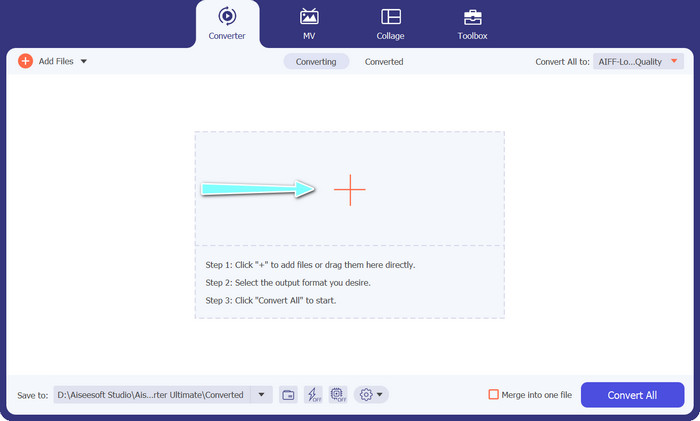
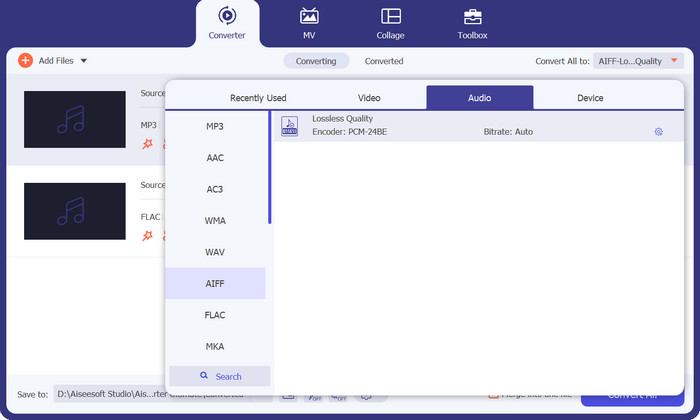
Βήμα 3. Καθορίστε τη μορφή εξόδου επιλέγοντας την καρτέλα Audio από το μενού Profile στο επάνω δεξί μέρος του εργαλείου. Επιλέξτε είτε MP3 είτε FLAC, ανάλογα με την κατεύθυνση της μετατροπής.
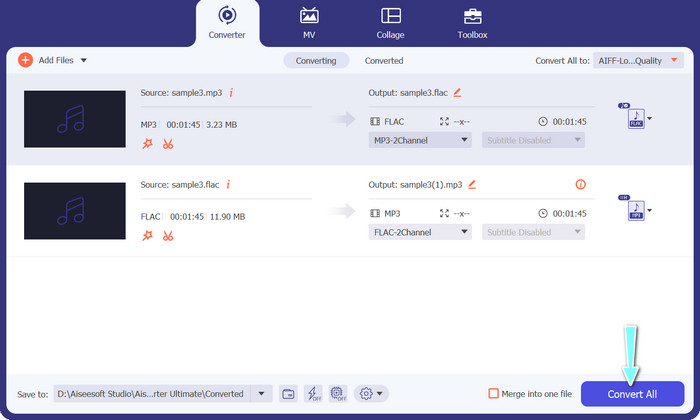
Βήμα 4. Ορίστε το φάκελο εξόδου όπου θέλετε να αποθηκευτούν τα μετατρεπόμενα αρχεία, επιλέγοντας την κατάλληλη τοποθεσία στο κάτω μέρος της διεπαφής. Τέλος, πατήστε το κουμπί Convert All για να ξεκινήσει η διαδικασία μετατροπής.
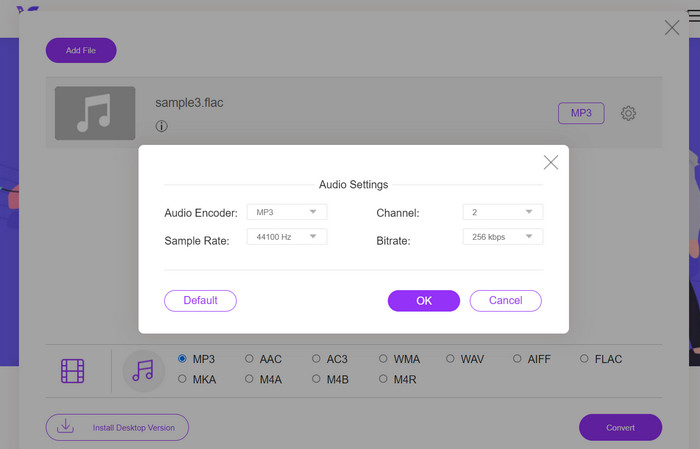
Αν χρειάζεστε ένα δωρεάν online εργαλείο για να μετατρέψετε FLAC σε MP3, το Free Video Converter Online είναι ό,τι χρειάζεστε. Αυτό το πρακτικό πρόγραμμα επιτρέπει στους χρήστες να μετατρέπουν αρχεία βίντεο και ήχου χωρίς κανένα κόστος και προσφέρει επίσης τη δυνατότητα προσαρμογής των ρυθμίσεων εξόδου σύμφωνα με τις προτιμήσεις σας. Η ταχύτητα μετατροπής είναι επίσης αξιόπιστη, εφόσον διαθέτετε σύνδεση στο διαδίκτυο. Για να ξεκινήσετε, ακολουθήστε αυτά τα βήματα:
Βήμα 1. Ανοίξτε τον προτιμώμενο φυλλομετρητή (browser) σας και μεταβείτε στον ιστότοπο του Free Video Converter Online.
Βήμα 2. Κάντε κλικ στο κουμπί Add Files to Convert για να ανεβάσετε το αρχείο FLAC που θέλετε να μετατρέψετε σε MP3.
Βήμα 3. Επιλέξτε MP3 ως μορφή εξόδου από τη λίστα διαθέσιμων μορφών στο μενού μορφών Audio. Μπορείτε επίσης να επιλέξετε το επιθυμητό bitrate ή την ποιότητα εξόδου για το αρχείο MP3.
Βήμα 4. Κάντε κλικ στο κουμπί Convert για να ξεκινήσει η διαδικασία μετατροπής.
Μέρος 5. Συχνές ερωτήσεις σχετικά με το FLAC έναντι του MP3
Ποιο είναι καλύτερο μεταξύ, FLAC 16-bit έναντι MP3 320 Kbps;
Η επιλογή μεταξύ FLAC 16 bit και MP3 320 kbps εξαρτάται από την προσωπική προτίμηση και την προβλεπόμενη χρήση του αρχείου ήχου. Εάν δίνετε προτεραιότητα στην ποιότητα ήχου και έχετε αρκετό αποθηκευτικό χώρο, το FLAC 16 bit μπορεί να είναι η καλύτερη επιλογή. Εάν χρειάζεστε μικρότερο μέγεθος αρχείου χωρίς να διακινδυνεύσετε πάρα πολύ την ποιότητα του ήχου, το MP3 320 kbps μπορεί να είναι μια καλή επιλογή.
Τα αρχεία FLAC είναι μεγαλύτερα από τα αρχεία MP3;
Ναι, τα αρχεία FLAC είναι συνήθως μεγαλύτερα από τα αρχεία MP3 λόγω της φύσης τους χωρίς απώλειες.
Υποστηρίζουν όλες οι συσκευές αναπαραγωγής πολυμέσων FLAC;
Όχι, δεν υποστηρίζουν όλες οι συσκευές αναπαραγωγής πολυμέσων FLAC. Ωστόσο, πολλές σύγχρονες συσκευές αναπαραγωγής πολυμέσων και λογισμικό υποστηρίζουν την αναπαραγωγή FLAC, συμπεριλαμβανομένων των VLC, Foobar2000 και Winamp.
συμπέρασμα
Η επιλογή μεταξύ MP3 και FLAC εξαρτάται από τις προσωπικές σας προτιμήσεις και τις συγκεκριμένες ανάγκες σας. Ως εκ τούτου, η σύγκριση FLAC vs. MP3 είναι απαραίτητη για τη διαδικασία λήψης της απόφασής σας. Τελικά, η απόφαση σχετικά με το ποια μορφή θα χρησιμοποιήσετε εξαρτάται από τις προτεραιότητές σας όσον αφορά την ποιότητα ήχου, το μέγεθος αρχείου και τη συμβατότητα.
-
 4 βέλτιστες μέθοδοι για να μετατρέψετε εύκολα το MOV σε MP3 σε Windows και Mac
 Όταν θέλετε να εξαγάγετε τα αρχεία ήχου MP3 από αρχεία MOV, μπορείτε να μάθετε περισσότερα σχετικά με τους 4 πιο αποτελεσματικούς μετατροπείς MOV σε MP3 για να λάβετε τα επιθυμητά αρχεία από το άρθρο.
-
 Οι καλύτεροι μετατροπείς MP3 για να μετατρέψουν εύκολα αρχεία ήχου σε MP3
 Μετατρέψτε εύκολα οποιαδήποτε μορφή ήχου σε MP3 με τους φιλικούς προς το χρήστη online και offline μετατροπείς MP3. Λάβετε αποτελέσματα υψηλής ποιότητας με λίγα μόνο κλικ.
-
 Οι 3 κορυφαίοι επεξεργαστές μεταδεδομένων FLAC σε Mac και Windows [Ενημερώθηκε 2023]
 Θέλετε να αλλάξετε τα μεταδεδομένα FLAC; Σε αυτήν την περίπτωση, πρέπει να διαβάσετε αυτό το άρθρο, καθώς παρέχουμε επαρκείς γνώσεις σχετικά με τον πιο πρόσφατο επεξεργαστή μεταδεδομένων FLAC που μπορείτε να χρησιμοποιήσετε.
