


 Video Converter Ultimate
 Εγγραφή οθόνης
 Επισκευή βίντεο
 Ασφαλές κατέβασμα
M4A έναντι MP3 Σε βάθος επισκόπηση και σύγκριση δύο μορφών ήχου
Λόγω του πολλαπλασιασμού της ψηφιακής μουσικής, η επιλογή της κατάλληλης μορφής ήχου είναι πλέον πιο σημαντική από ποτέ. Ενώ τα M4A και MP3 χρησιμοποιούνται ευρέως, υπάρχουν σημαντικές διακρίσεις μεταξύ των δύο. Ενώ το MP3 είναι το de facto πρότυπο για αρχεία μουσικής, το M4A χρησιμοποιείται συχνά για ανώτερη ποιότητα ήχου.
Στη σύγκριση M4A vs. MP3 θα εξετάσουμε τις λεπτομέρειες ανάμεσα στις μορφές αρχείων M4A και MP3 ώστε να μπορείτε να πάρετε μια τεκμηριωμένη απόφαση. Θα παρουσιάσουμε επίσης μια ολοκληρωμένη ανάλυση των διαφορών και ομοιοτήτων ανάμεσα στους δύο τύπους αρχείων όσον αφορά την ποιότητα ήχου, τη συμβατότητα, το μέγεθος αρχείου και άλλα. Αν αγαπάτε τη μουσική ή είστε επαγγελματίας μουσικός, αξίζει να συνεχίσετε την ανάγνωση για να μάθετε ποια μορφή είναι η ιδανική για εσάς.

Μέρος 1. M4A έναντι MP3
Εδώ είναι ένας απλός πίνακας που συγκρίνει αυτές τις μορφές σε διάφορες σημαντικές πτυχές για μια τεκμηριωμένη απόφαση. Δείτε τον παρακάτω πίνακα.
| Μ4Α | MP3 | |
| Ποιότητα ήχου | Υψηλός | Καλός |
| Μέγεθος αρχείου | Μεγάλο | Μικρό |
| Συμβατότητα | Περιορισμένος | Ευρέως συμβατό |
| Μεταδεδομένα | Υποστηρίζεται | Περιορισμένος |
| Προστασία DRM | Ναί | Οχι |
| Δημοφιλείς χρήσεις | Μουσική, ηχητικά βιβλία, podcast | Μουσική, podcast, ήχοι κλήσης |
Μέρος 2. Εισαγωγή M4A και MP3
Αρκετά με τη μάχη MP3 εναντίον M4A. Ας σταματήσουμε για λίγο και ας μάθουμε περισσότερα για αυτές τις μορφές μέσα από μια σύντομη εισαγωγή για καθεμία από αυτές.
Εισαγωγή στο M4A
Η αποκλειστική μορφή ψηφιακού ήχου της Apple είναι MPEG-4 Audio (ή M4A για συντομία). Είναι μια εξαιρετική μορφή ήχου για μουσική, ηχητικά βιβλία και podcast, επειδή μπορεί να φιλοξενήσει πολλούς ρυθμούς bit και ρυθμούς δειγματοληψίας. Τα αρχεία M4A μπορούν να ανοίξουν στο iTunes, το QuickTime και άλλες συσκευές αναπαραγωγής πολυμέσων, καθιστώντας τα ιδανικά για συσκευές Apple.
Εισαγωγή στο MP3
Το MP3, το οποίο σημαίνει «MPEG-1 Audio Layer 3», είναι μια μορφή ψηφιακού ήχου που έχει γίνει το πρότυπο για συμπιεσμένο ήχο λόγω της ευρείας υιοθέτησής του και της συμπίεσης χαμηλού ρυθμού bit. Τα αρχεία MP3 είναι εξαιρετικά για μουσική, podcast και ήχους κλήσης λόγω του μικρού μεγέθους τους σε σύγκριση με άλλες μορφές ήχου. Μπορούν να αναπαραχθούν σε πολλές διαφορετικές συσκευές και να ληφθούν γρήγορα και εύκολα από το διαδίκτυο. Τα αρχεία MP3, από την άλλη πλευρά, έχουν συχνά χαμηλότερη ποιότητα ήχου από εναλλακτικές μορφές όπως το M4A.
Μέρος 3. Είναι το M4A καλύτερο από το MP3;
Το M4A και το MP3 έχουν διαφορετικά πλεονεκτήματα και αδυναμίες. Το M4A είναι γνωστό για την ανώτερη ποιότητα ήχου του και προτιμάται από τους λάτρεις της μουσικής και τους επαγγελματίες. Το MP3, από την άλλη πλευρά, έχει μικρότερο μέγεθος αρχείου και είναι ευρέως συμβατό με διάφορες συσκευές και συσκευές αναπαραγωγής πολυμέσων.
Η επιλογή μεταξύ M4A και MP3 εξαρτάται από το τι είναι πιο σημαντικό για εσάς: υψηλή ποιότητα ήχου ή μικρότερο μέγεθος αρχείου και συμβατότητα.
Μέρος 4. Η διαφορά μεταξύ MP3 και M4A
Οι δημοφιλείς μορφές ψηφιακής μουσικής MP3 και M4A έχουν ξεχωριστά χαρακτηριστικά. Ακολουθεί μια λεπτομερής εξήγηση των διακρίσεων μεταξύ MP3 και M4A:
Ποιότητα Ήχου: Το M4A είναι γνωστό για την ανώτερη ποιότητα ήχου σε σύγκριση με το MP3. Το M4A χρησιμοποιεί καλύτερο αλγόριθμο συμπίεσης και υποστηρίζει ευρύτερο εύρος bitrates και ρυθμών δειγματοληψίας. Το M4A υποστηρίζει επίσης ασυμπίεστη (lossless) συμπίεση, η οποία διατηρεί την αρχική ποιότητα ήχου, ενώ το MP3 χρησιμοποιεί απωλεστική (lossy) συμπίεση, που μειώνει το μέγεθος του αρχείου αλλά και την ποιότητα του ήχου.
Μέγεθος Αρχείου: Τα αρχεία MP3 είναι μικρότερα σε μέγεθος σε σύγκριση με τα αρχεία M4A. Αυτό συμβαίνει επειδή το MP3 χρησιμοποιεί πιο αποδοτικό αλγόριθμο συμπίεσης που μειώνει το μέγεθος του αρχείου χωρίς να επηρεάζει σημαντικά την ποιότητα του ήχου. Το M4A, από την άλλη, χρησιμοποιεί λιγότερο αποδοτικό αλγόριθμο συμπίεσης, με αποτέλεσμα μεγαλύτερα αρχεία αλλά καλύτερη ποιότητα ήχου.
Συμβατότητα: Το MP3 αναγνωρίζεται ευρέως ως το βιομηχανικό πρότυπο για ψηφιακό ήχο και είναι συμβατό με μεγάλη γκάμα συσκευών και media players, όπως smartphones, tablets και υπολογιστές. Το M4A, από την άλλη, είναι λιγότερο διαδεδομένο ως προς τη συμβατότητα και χρησιμοποιείται κυρίως σε συσκευές και λογισμικό της Apple, όπως το iTunes και το QuickTime.
Μεταδεδομένα: Το M4A υποστηρίζει ευρύτερο φάσμα μεταδεδομένων σε σύγκριση με το MP3. Αυτό σημαίνει ότι τα αρχεία M4A μπορούν να αποθηκεύουν περισσότερες πληροφορίες για τον ήχο, όπως εξώφυλλα άλμπουμ, στίχους και πληροφορίες κομματιού.
Προστασία DRM: Το M4A υποστηρίζει προστασία Digital Rights Management (DRM), που επιτρέπει στους κατόχους πνευματικών δικαιωμάτων να ελέγχουν τη χρήση και τη διανομή των ηχητικών τους αρχείων. Το MP3, αντίθετα, δεν υποστηρίζει προστασία DRM.
Μέρος 5. Πώς να μετατρέψετε M4A σε MP3 ή MP3 σε M4A
Περισσότερο από τη σύγκριση και την αναθεώρηση αυτών των δύο μορφών ήχου, είναι επίσης σημαντικό να μάθετε πώς να μετατρέπετε από M4A σε MP3 ή το αντίστροφο. Εδώ είναι μερικά από τα προγράμματα που μπορείτε να χρησιμοποιήσετε:
Είτε είστε συνδεδεμένοι στο διαδίκτυο είτε εκτός σύνδεσης, το Video Converter Ultimate είναι ένα εξαιρετικό εργαλείο που μπορείτε να χρησιμοποιήσετε για μετατροπή μεταξύ M4A και MP3. Αυτό το πρόγραμμα συνοδεύεται από πολλές λειτουργίες που μπορείτε να αξιοποιήσετε. Το εργαλείο προσφέρει τη δυνατότητα μαζικής μετατροπής πολλών αρχείων, πράγμα που σημαίνει ότι μπορείτε να μετατρέψετε ολόκληρες συλλογές μουσικών αρχείων. Το ενδιαφέρον είναι ότι σας δίνει πρόσβαση στις ρυθμίσεις εξόδου των ηχητικών σας αρχείων. Μάθετε πώς λειτουργεί αυτό το εργαλείο ακολουθώντας τα παρακάτω βήματα.
Βήμα 1. Ξεκινήστε τη λήψη κάνοντας κλικ σε ένα από τα κουμπιά Free Download και στη συνέχεια ακολουθήστε τις οδηγίες στην οθόνη. Το επόμενο βήμα είναι να εκκινήσετε την εφαρμογή και να εξοικειωθείτε με το απλό περιβάλλον εργασίας της.
Δωρεάν λήψηΓια Windows 7 ή νεότεραΑσφαλής λήψη
Δωρεάν λήψηΓια MacOS 10.7 ή νεότεροΑσφαλής λήψη
Βήμα 2. Κάντε κλικ στο κουμπί add στην κύρια οθόνη και στη συνέχεια βρείτε το ηχητικό αρχείο που θέλετε να μετατρέψετε. Μια προεπισκόπηση του αρχείου που ανεβάσατε θα εμφανιστεί στο περιβάλλον εργασίας λίγο μετά τη μεταφόρτωση. Μπορείτε να μετατρέψετε πολλά αρχεία M4A ταυτόχρονα σε MP3 ανεβάζοντας έναν ολόκληρο φάκελο.
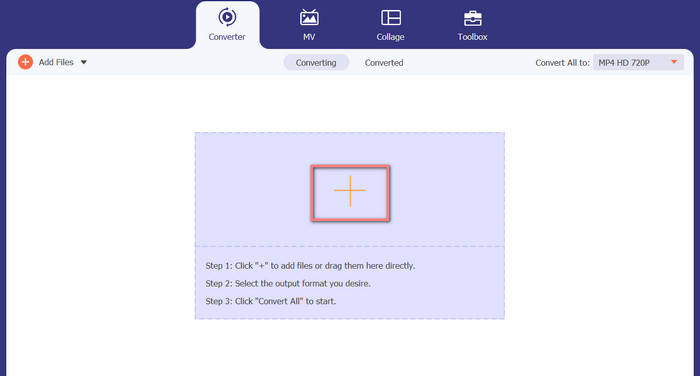
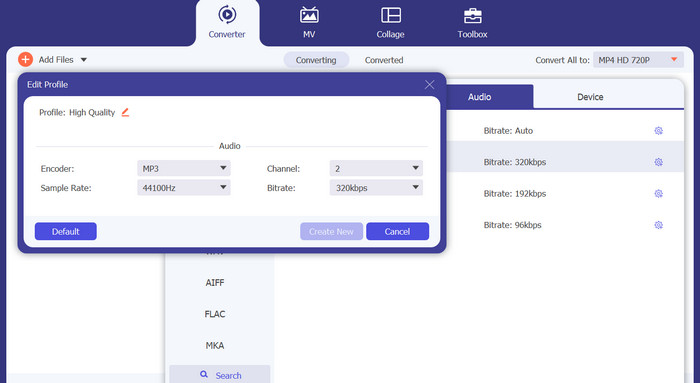
Βήμα 3. Για να αλλάξετε τη μορφή εξόδου του εργαλείου, μεταβείτε στην καρτέλα Audio του μενού Profile (βρίσκεται επάνω δεξιά στο εργαλείο). Μπορείτε να μετατρέψετε ένα αρχείο M4A σε MP3 και το αντίστροφο.
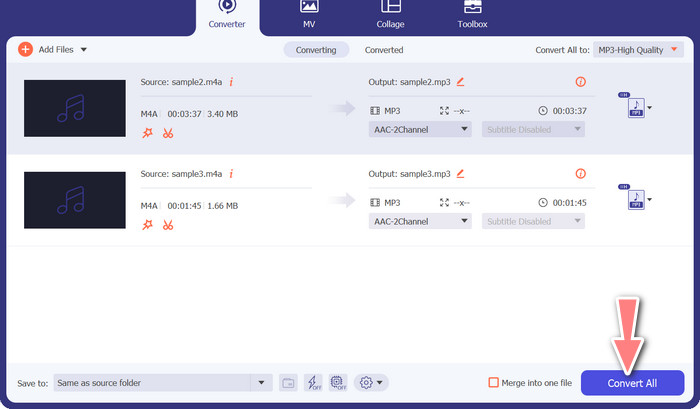
Βήμα 4. Επιλέξτε την επιθυμητή τοποθεσία στο κάτω μέρος της οθόνης. Για να ξεκινήσετε τη μετατροπή, επιλέξτε Convert All.
Δωρεάν Online Video Converter (Διαδικτυακός)
Δεν υπάρχει χώρος για άλλη εκπομπή στο πρόγραμμα; Τα καλά νέα είναι ότι η χρήση ενός διαδικτυακού μετατροπέα μπορεί να σας γλιτώσει εντελώς από τη λήψη λογισμικού. Το διαδικτυακό εργαλείο Free Video Converter Online επιτρέπει μετατροπές απευθείας μέσω browser. Υποστηρίζει επίσης μεγάλη ποικιλία τύπων αρχείων μουσικής και βίντεο. Επιπλέον, αυτό το web εργαλείο υποστηρίζει μαζικές μετατροπές. Ο χρήστης μπορεί επίσης να τροποποιήσει τις ρυθμίσεις του τελικού ηχητικού αρχείου. Δείτε πώς να μετατρέψετε MP3 σε M4A online.
Βήμα 1. Αρχικά, ανοίξτε τον προτιμώμενο browser σας και μεταβείτε στον ιστότοπο του Free Video Converter Online.
Βήμα 2. Κάντε κλικ στην επιλογή Add Files to Convert, στη συνέχεια εντοπίστε το αρχείο M4A που θέλετε να μετατρέψετε και επιλέξτε το.
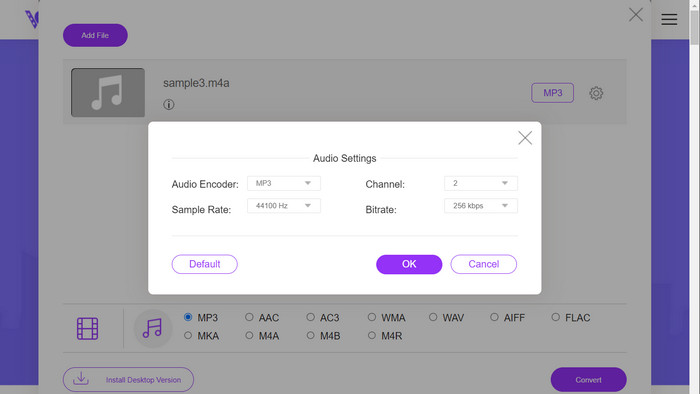
Βήμα 3. Επιλέξτε MP3 ως μορφή αρχείου εξόδου από το μενού μορφών Audio. Μπορείτε επίσης να ρυθμίσετε το bitrate, δηλαδή την ποιότητα εξόδου, του αρχείου MP3.
Βήμα 4. Για να ξεκινήσει η διαδικασία μετατροπής, κάντε κλικ στο κουμπί Convert. Αυτή είναι η διαδικασία για να μετατρέψετε M4A σε MP3 μέσω web.
Περαιτέρω ανάγνωση:
Οδηγίες για το πώς να μετατρέψετε M4A σε WAV [PC και Mac]
Καλύτερα εργαλεία που μπορείτε να χρησιμοποιήσετε για μαζική μετατροπή MP3 σε αρχεία M4R
Μέρος 6. Συχνές ερωτήσεις σχετικά με το M4A και το MP3
Τι είναι το MP3 έναντι του M4A όσον αφορά τα μεταδεδομένα;
Το M4A υποστηρίζει ένα ευρύτερο φάσμα μεταδεδομένων από το MP3, πράγμα που σημαίνει ότι τα αρχεία M4A μπορούν να αποθηκεύσουν περισσότερες πληροφορίες σχετικά με τον ήχο.
Μπορώ να επεξεργαστώ αρχεία MP3 ή M4A;
Μπορείτε να επεξεργαστείτε αρχεία MP3 και M4A χρησιμοποιώντας διάφορα λογισμικά επεξεργασίας ήχου.
Ποιο είναι καλύτερο για podcast, MP3 ή M4A;
Το MP3 είναι καλύτερο για podcast λόγω του μικρότερου μεγέθους αρχείου και της ευρύτερης συμβατότητάς του.
συμπέρασμα
Η κατανόηση της σύγκρισης MP3 vs. M4A μπορεί να σας βοηθήσει να επιλέξετε την καλύτερη μορφή ψηφιακού ήχου. Είτε κάνετε streaming μουσικής είτε την παράγετε, η επιλογή της κατάλληλης μορφής είναι κρίσιμη για να εξασφαλίσετε την καλύτερη δυνατή ποιότητα ήχου και συμβατότητα.
-
 MP3 VS MP4: Ποια δεν είναι η διαφορά μεταξύ MP3 και MP4
 MP3 ή MP4, ποιο είναι καλύτερο; Ποια είναι η διαφορά μεταξύ MP3 και MP4; Αυτό το άρθρο θα συγκρίνει MP3 με MP4 από όλες τις πτυχές που μπορείτε να εικόνα.
-
 M4A Player - Κορυφαίες 5 συσκευές αναπαραγωγής M4A για Android και υπολογιστή
 Πώς να παίξετε αρχεία M4A σε τηλέφωνο Android; Ποιος παίκτης μπορεί να παίξει M4A; Αυτή η ανάρτηση μοιράζεται 5 καλύτερες δωρεάν συσκευές αναπαραγωγής M4A για Android, Mac και PC.
-
 4 καλύτερες μέθοδοι για τη διόρθωση και την επεξεργασία των μεταδεδομένων MP3 σε Windows και Mac
 Θέλετε να μάθετε τα μυστικά της εύκολης επεξεργασίας μεταδεδομένων MP3; Αυτό το ιστολόγιο θα σας διδάξει διαφορετικές τεχνικές με τα διαφορετικά εργαλεία στα οποία έχετε εύκολη πρόσβαση.
