


 Video Converter Ultimate
 Εγγραφή οθόνης
 Επισκευή βίντεο
Πώς να μετατρέψετε 3GP σε WMV με επαγγελματικό τρόπο [Online & Offline]
Το 3GP είναι μια δημοφιλής μορφή για κινητά που μεταφέρει δεδομένα μέσω κινητών τηλεφώνων χωρίς να καταναλώνει ιδιαίτερο εύρος ζώνης, ενώ παράλληλα εξοικονομεί χώρο. Επίσης, αυτή η μορφή είναι τυποποιημένη για λήψη βίντεο σε κινητά τηλέφωνα τρίτης γενιάς, αλλά να είστε βέβαιοι ότι μπορείτε να αναπαράγετε το βίντεο και σε συσκευές δεύτερης και τέταρτης γενιάς. Παρόλο που αποδίδει εξαιρετικά στα τηλέφωνα, περιορίζεται ουσιαστικά στα smartphones. Έτσι, δεν αποτελεί έκπληξη αν το αρχείο .3gp δεν λειτουργεί ιδανικά σε έναν επιτραπέζιο υπολογιστή. Παρ’ όλα αυτά, μπορείτε να μάθετε πώς να μετατρέψετε το 3GP σε μια μορφή που έχει πολύ ευρύτερη υποστήριξη στους υπολογιστές, όπως το WMV. Θέλετε να μάθετε πώς να μετατρέψετε 3GP σε WMV με επαγγελματικό τρόπο; Σε αυτή την περίπτωση, ας ρίξουμε μια ματιά στη διαδικασία χωρίς να χάνουμε χρόνο.

Μέρος 1. Τι είναι το 3GP
Είναι μια μορφή βασισμένη σε ISO που αποθηκεύει ροές πολυμέσων όπως H.263 ή H.264 για βίντεο και AMR ή AAC για ήχο, ιδανική για συμπίεση με απώλειες. Επιπλέον, αυτή η μορφή 3ης γενιάς είναι φιλική προς την αποθήκευση για την αποθήκευση δεδομένων σε φορητές μονάδες δίσκου στα τηλέφωνά μας, ακόμη και σε IOS. Παρόλο που το 3GP είναι ακόμα διαθέσιμο, το ποσοστό αποτελεσματικότητας αυτής της μορφής άρχισε να πέφτει και για αυτόν τον λόγο, το 3GPP μπήκε στη σκηνή και έγινε καλύτερη εκδοχή του.
Μέρος 2. Τι είναι το WMV
Είναι μια ιδιόκτητη μορφή πολυμέσων που αναπτύχθηκε από τα Windows για ροή βίντεο στο διαδίκτυο. Σε αντίθεση με οποιαδήποτε άλλη μορφή, όπως το 3GP, το WMV χρησιμοποιεί έναν πολλαπλό κωδικοποιητή για να κάνει το αρχείο ακόμα πιο συμπιεσμένο. Λόγω της δυνατότητας χρήσης πολλών κωδικοποιητών, είναι πιο προσιτή η αποτελεσματική κοινή χρήση βίντεο σε αυτήν τη μορφή. Ωστόσο, υπάρχει ένα μειονέκτημα της χρήσης πολλών κωδικοποιητών, ειδικά κατά την επεξεργασία και την αναπαραγωγή, επειδή δεν υποστηρίζουν όλα τα προγράμματα αναπαραγωγής πολυμέσων και οι επεξεργαστές ένα ευρύ φάσμα κωδικοποιητών. Αν και η μορφή χρησιμοποιεί συμπιεστή, η ποιότητα των μέσων δεν θα αλλάξει ή θα μειωθεί.
Μέρος 3. Επαγγελματικός τρόπος μετατροπής 3GP σε WMV με το Video Converter Ultimate
Θέλετε να αποκτήσετε έναν επαγγελματικό μετατροπέα 3GP σε WMV με δωρεάν λήψη για την πλατφόρμα σας; Το FVC Video Converter Ultimate προσφέρει μια εξειδικευμένη διαδικασία μετατροπής χωρίς να απαιτείται ιδιαίτερη προσπάθεια. Αυτός ο μετατροπέας σας ανεβάζει σε άλλο επίπεδο μετατροπής, το οποίο κανένας άλλος online ή offline μετατροπέας δεν μπορεί να σας προσφέρει. Επιπλέον, αυτό το κορυφαίο εργαλείο υποστηρίζει πάνω από 200 μορφές πολυμέσων για να διαλέξετε, σε αντίθεση με τα περισσότερα άλλα εργαλεία.
Εφόσον έχετε αυτόν τον μετατροπέα, να περιμένετε πάντα μια επαγγελματική έξοδο στη μορφή πολυμέσων που έχετε μετατρέψει. Θέλετε να χρησιμοποιήσετε τον επαγγελματικό μετατροπέα για να μετατρέψετε τα αρχεία σας 3GP; Εάν συμβαίνει αυτό, μπορείτε να ακολουθήσετε τα παρακάτω βήματα για επιτυχή μετατροπή με το απόλυτο εργαλείο.
Βήματα για το πώς να μετατρέψετε αρχείο 3GP σε WMV με το FVC Video Converter Ultimate
Βήμα 1. Παρακάτω παρουσιάζονται τα κουμπιά λήψης· επιλέξτε αντίστοιχα την πλατφόρμα που χρησιμοποιείτε. Για παράδειγμα, κάντε κλικ στο κουμπί λήψης για Windows αν είστε χρήστης Windows. Αντίστοιχα, αν χρησιμοποιείτε Mac, κάντε κλικ στο άλλο κουμπί. Μετά τη διαδικασία λήψης, εγκαταστήστε τον μετατροπέα και εκτελέστε τον κάνοντας κλικ στο Start Now. Το πιο σημαντικό είναι ότι, αφού τον εκκινήσετε, θα χρειαστεί να εξοικειωθείτε με τη διεπαφή του προτού προχωρήσετε στα επόμενα βήματα.
Δωρεάν ΛήψηΓια Windows 7 ή νεότεραΑσφαλής λήψη
Δωρεάν ΛήψηΓια MacOS 10.7 ή νεότεροΑσφαλής λήψη
Βήμα 2. Θα δείτε την επιλογή Add Files στο επάνω αριστερό μέρος της διεπαφής· κάντε κλικ εκεί και θα εμφανιστεί ένας φάκελος. Περιηγηθείτε στο αρχείο .3gp στον δίσκο του υπολογιστή σας και στη συνέχεια ανεβάστε το πατώντας Open.
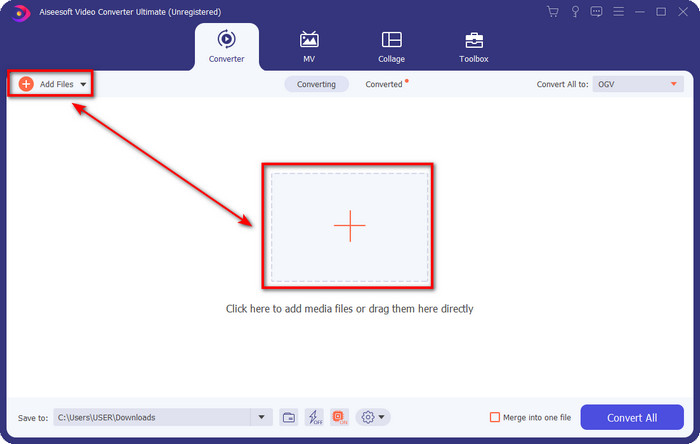
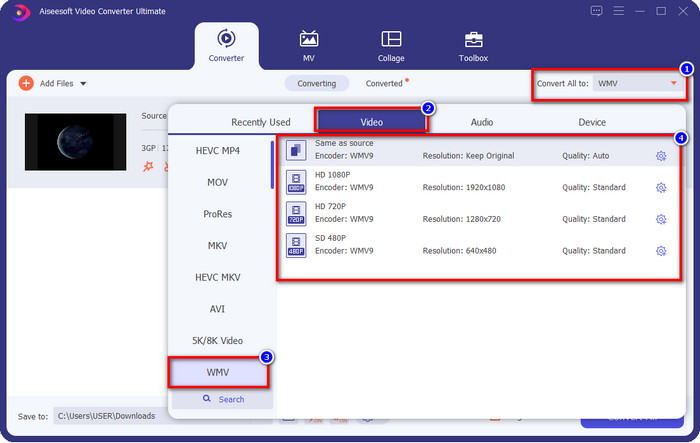
Βήμα 3. Κάντε κλικ στο Convert All to για να επιλέξετε τη μορφή WMV που θέλετε ή το WMV ως τελικό αποτέλεσμα.
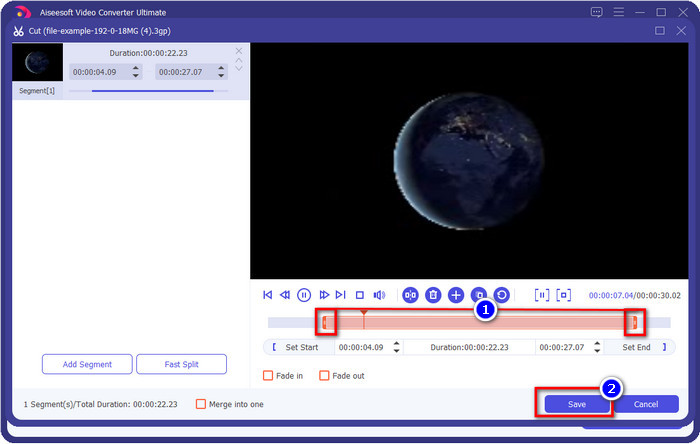
Προαιρετικό. Πριν μετατρέψουμε το αρχείο 3GP σε WMV, ας αναφέρουμε σύντομα τις άλλες δυνατότητες που προσφέρει αυτό το εργαλείο. Χρειάζεται να κόψετε το βίντεο; Κανένα πρόβλημα. Πατήστε το κουμπί με το ψαλίδι, σύρετε τη μπάρα κύλισης και από τις δύο πλευρές αν θέλετε και πατήστε Save για να εφαρμόσετε το κόψιμο που κάνατε.
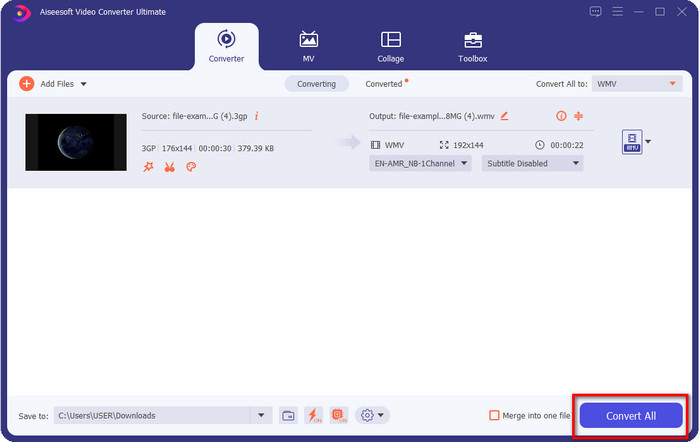
Βήμα 4. Ξεκινήστε τη διαδικασία μετατροπής κάνοντας κλικ στο κουμπί Convert All. Η μετατροπή θα ολοκληρωθεί σε σύντομο χρονικό διάστημα και, voilà, το αρχείο WMV θα αποθηκευτεί στον δίσκο του υπολογιστή σας.
Μέρος 4. Διαδικτυακός τρόπος για να μετατρέψετε MXF σε WMV με το Δωρεάν Online Video Converter
Ένα ακόμη προϊόν FVC, αυτή τη φορά ως online λύση, είναι το FVC Free Video Converter Online. Αυτός ο επαγγελματικός online μετατροπέας προσφέρει μια καθαρή και λιτή διεπαφή σε σύγκριση με άλλους διαδικτυακούς μετατροπείς. Επιπλέον, δεν χρειάζεται να κατεβάσετε τον μετατροπέα στη συσκευή σας για να τον χρησιμοποιήσετε· αρκεί να ανοίξετε το πρόγραμμα περιήγησης και να μεταβείτε στον μετατροπέα. Αν και ο web μετατροπέας είναι εξαιρετικός, υπάρχουν πολλές εξειδικευμένες λειτουργίες που δεν μπορεί να προσφέρει. Ωστόσο, αυτή είναι η κατάλληλη επιλογή αν θέλετε να μετατρέψετε 3GP σε WMV online· αντιγράψτε τα παρακάτω βήματα για να χρησιμοποιήσετε αυτό το εργαλείο.
Βήματα για το πώς να μετατρέψετε 3GP σε WMV online και δωρεάν με το FVC Free Video Converter Online
Βήμα 1. Κάντε κλικ σε αυτό το link για να ανοίξετε τον online μετατροπέα.
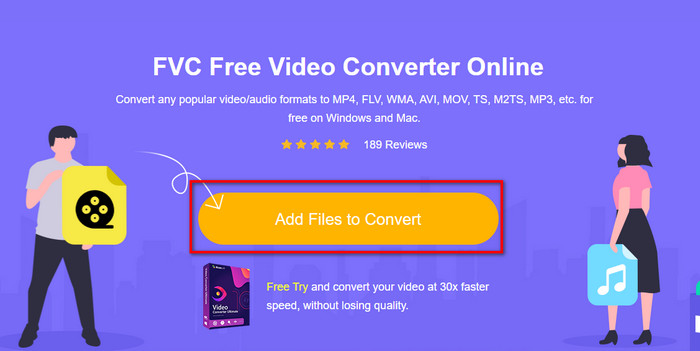
Βήμα 2. Αφού κάνετε κλικ, πατήστε Add Files to Convert για να εκκινήσετε τον μετατροπέα. Αν είναι η πρώτη φορά που χρησιμοποιείτε αυτόν τον μετατροπέα, θα πρέπει να εγκαταστήσετε τον launcher κάνοντας κλικ στο Add Files to Convert, αλλά δεν είναι τόσο «βαρύς» όσο το Ultimate εργαλείο. Βρείτε το αρχείο 3gp που θέλετε να μετατρέψετε και πατήστε Open.
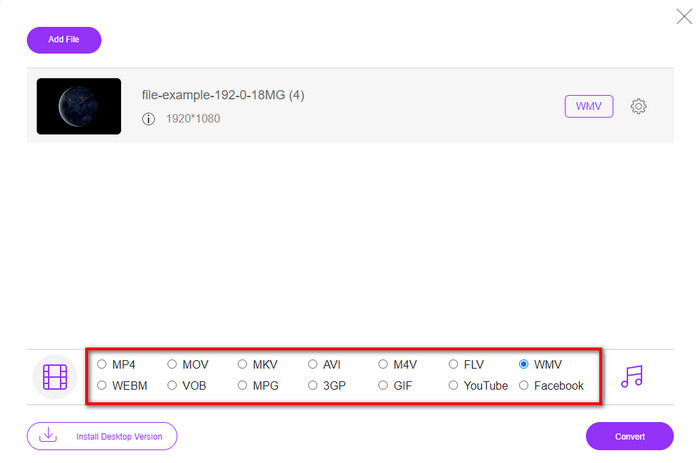
Βήμα 3. Αφού ανεβάσετε το αρχείο 3GP, ήρθε η ώρα να επιλέξετε μία από τις μορφές που παρουσιάζονται παρακάτω ή να κάνετε κλικ στο WMV.
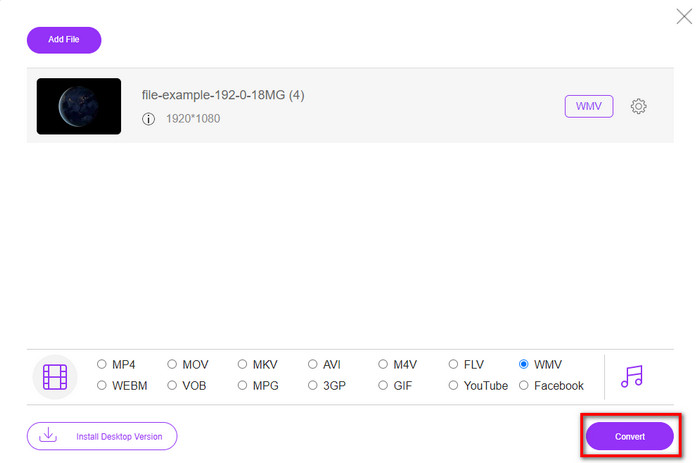
Βήμα 4. Επιλέξατε ήδη μια μορφή; Αν ναι, κάντε κλικ στο Convert για να ξεκινήσει η διαδικασία μετατροπής του αρχείου.
Μέρος 5. Συχνές ερωτήσεις σχετικά με τη μετατροπή 3GP σε WMV
Είναι καλή ιδέα να χρησιμοποιήσετε διαδικτυακό μετατροπέα 3GP σε WMV;
Εάν δεν θέλετε να κάνετε λήψη ενός μετατροπέα στη συσκευή σας, είναι ιδανικό να χρησιμοποιήσετε έναν διαδικτυακό μετατροπέα. Αλλά θυμηθείτε, δεν είναι ασφαλείς στη χρήση όλοι οι μετατροπείς online ή εκτός σύνδεσης. Τις περισσότερες φορές, έχουν ιούς εάν τους εγκαταστήσετε ή δεν κάνετε την εργασία αποτελεσματικά. Ωστόσο, εάν θέλετε σιγουριά για τη μετατροπή σας, σας συνιστούμε να χρησιμοποιήσετε τα προϊόντα μετατροπέα FVC, επειδή αυτό δεν περιέχει κακόβουλο λογισμικό 101% και εγγυάται την επιτυχία της διαδικασίας μετατροπής.
Είναι δυνατή η συγχώνευση πολλών βίντεο 3GP;
Ναι, με τη βοήθεια των εργαλείων συγχώνευσης της FVC, μπορείτε να συνδυάσετε πολλαπλά βίντεο σε μορφή 3GP. Λοιπόν, αν τώρα θέλετε να μάθετε πώς να συγχωνεύσετε τα πολλά 3GP βίντεό σας, πρέπει να διαβάσετε αυτό το άρθρο για να μάθετε τη διαδικασία.
Τα βίντεο 3GP έχουν καλή ποιότητα;
Το 3GP έχει καλή ποιότητα, αλλά δεν μπορεί να αποθηκεύσει ποιότητα υψηλής ευκρίνειας, επομένως περιμένετε ότι η ποιότητα βίντεο ενός 3GP είναι χαμηλή.
συμπέρασμα
Συνοψίζοντας, οι μετατροπείς που παρατίθενται σε αυτό το άρθρο επιλέχθηκαν προσεκτικά, ακολουθώντας ένα συγκεκριμένο πρότυπο επαγγελματικού αποτελέσματος. Επιπλέον, χρησιμοποιήσαμε κι εμείς τα εργαλεία αυτά ώστε να παρουσιάσουμε και να διατυπώσουμε μόνο τεκμηριωμένα στοιχεία σχετικά με τα χαρακτηριστικά τους. Αν, λοιπόν, δεν θέλετε να κατεβάσετε έναν μετατροπέα στον υπολογιστή σας για να εξοικονομήσετε χώρο και παρ’ όλα αυτά θέλετε επαγγελματικό αποτέλεσμα, σας προτείνουμε ανεπιφύλακτα να χρησιμοποιήσετε το FVC Free Video Converter Online. Αν όμως θέλετε να κάνετε μετατροπή των 3GP αρχείων σας με ακόμη πιο επαγγελματικό τρόπο, σας συνιστούμε θερμά να χρησιμοποιήσετε το FVC Video Converter Ultimate. Δεν έχετε πειστεί ακόμη από όσα αναφέραμε; Τότε θα πρέπει να το δοκιμάσετε μόνοι σας για να βιώσετε την επαγγελματικού επιπέδου μετατροπή που προσφέρει αυτό το εργαλείο και να μάθετε πώς να μετατρέπετε 3GP σε WMV.
-
 Κορυφαίοι 4 πιο αποτελεσματικοί τρόποι για τη μετατροπή 3GP σε μορφή AVI [2025]
 Μπορώ να μετατρέψω τα αρχεία 3GP σε AVI; Λοιπόν, μπορείτε να το μετατρέψετε εύκολα εάν δοκιμάσετε αυτά τα διαθέσιμα εργαλεία, καθώς συγκεντρώσαμε όλες τις πιθανές λύσεις για το πρόβλημα μετατροπής 3GP σε AVI.
-
 Ο καλύτερος μετατροπέας 3GP σε FLV για χρήση στη μετατροπή 3GP σε FLV [2025]
 Έχετε προσπαθήσει ποτέ να μετατρέψετε 3GP σε FLV, αλλά δεν ξέρετε τι είδους μετατροπέα θα χρησιμοποιήσετε; Διαβάστε αυτό το άρθρο για να μάθετε όλες τις λεπτομέρειες σχετικά με τη μετατροπή 3GP σε FLV.
-
 2 καλύτεροι δυνατοί τρόποι για τη μετατροπή μη υποστηριζόμενων 3GP σε DivX [2025]
 Πολλοί χρήστες ρωτούν πώς να μετατρέψουν 3GP σε DivX. Τώρα λοιπόν, παρέχουμε ένα άρθρο για αυτό για να σας βοηθήσουμε να μετατρέψετε το αρχείο σας .3gp χωρίς προβλήματα.
