


 Video Converter Ultimate
 Εγγραφή οθόνης
 Επισκευή βίντεο
Περιεκτικός οδηγός σχετικά με τον τρόπο μετατροπής AMV σε WMV με βήματα [Επίλυση]
Θέλετε να απολαμβάνετε αρχεία βίντεο AMV στα Windows σας ή να τα χρησιμοποιείτε για online streaming; Αν ναι, πρέπει να διαβάσετε αυτό το άρθρο για να μάθετε πώς να μετατρέψετε AMV σε WMV, να βελτιώσετε την ποιότητα και να τα κάνετε συμβατά. Σε αυτή τη λίστα, θα μάθετε ποιο λογισμικό μπορείτε να χρησιμοποιήσετε για να μετατρέψετε τα αρχεία AMV. Λοιπόν, χωρίς άλλη καθυστέρηση, φορέστε τη ζώνη ασφαλείας σας και μάθετε πολλά περισσότερα για τις μορφές AMV και WMV.

Μέρος 1. Μετατροπή AMV σε WMV με το FVC Video Converter Ultimate
Το FVC Video Converter Ultimate είναι η πρώτη μας επιλογή για τη μετατροπή AMV σε WMV, επειδή σας επιτρέπει να κωδικοποιείτε εκ νέου πολυμέσα και μορφές ειδικές για συσκευές. Επιπλέον, είναι ικανό να μετατρέπει όχι μόνο ένα, δύο ή τρία αρχεία ταυτόχρονα, αλλά ακόμη περισσότερα. Περαιτέρω, αυτός ο μετατροπέας είναι αφιερωμένος στους χρήστες του ώστε να προσφέρει μόνο εξαιρετικά αποτελέσματα στη μετατροπή τους. Θέλετε να μάθετε γιατί; Τότε διαβάστε τα βασικά χαρακτηριστικά παρακάτω.

FVC Video Converter Ultimate
4.355.888+ λήψεις- Μπορεί να σας βοηθήσει με το πρόβλημα μετατροπής AMV σε WMV, AVI, FLV, SWF, MP4, AVI.
- Υποστηρίζει εξαιρετικά γρήγορη μετατροπή για τη μετατροπή της μορφής ακόμη πιο γρήγορα.
- Επεξεργαστείτε τα βίντεό σας AMV με τις μοναδικές δυνατότητες επεξεργασίας που παρέχει αυτό το εργαλείο.
- Σας βοηθά να γίνετε ειδικός μέσα σε λίγα κλικ.
- Υποστηρίζει όλες τις πλατφόρμες όπως τα Windows και το macOS.
Δωρεάν ΛήψηΓια Windows 7 ή νεότεραΑσφαλής λήψη
Δωρεάν ΛήψηΓια MacOS 10.7 ή νεότεροΑσφαλής λήψη
Είστε έκπληκτοι με τα χαρακτηριστικά του εργαλείου; Αν ναι, ας διαβάσουμε τη διαδικασία μετατροπής αρχείων AMV και ας αντιγράψουμε τα βήματα για να πετύχουμε τη μετατροπή.
Βήμα 1. Κατεβάστε το FVC Video Converter Ultimate στον δίσκο του υπολογιστή σας κάνοντας κλικ στο κουμπί λήψης που παρουσιάζεται παρακάτω. Συνεχίστε κάνοντας κλικ στο πρόγραμμα εγκατάστασης για εγκατάσταση και πατήστε Start Now για να εκκινήσετε το εργαλείο.
Δωρεάν ΛήψηΓια Windows 7 ή νεότεραΑσφαλής λήψη
Δωρεάν ΛήψηΓια MacOS 10.7 ή νεότεροΑσφαλής λήψη
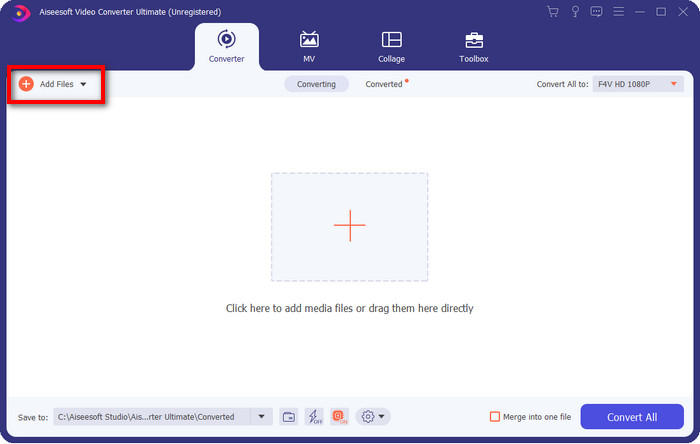
Βήμα 2. Αφού εκκινήσετε το λογισμικό, μπορείτε να προσθέσετε ένα ή περισσότερα αρχεία κάνοντας κλικ στην επιλογή Add Files. Ο φάκελος του υπολογιστή θα εμφανιστεί στην οθόνη σας, επιλέξτε το αρχείο AMV και πατήστε Open για να το ανεβάσετε.
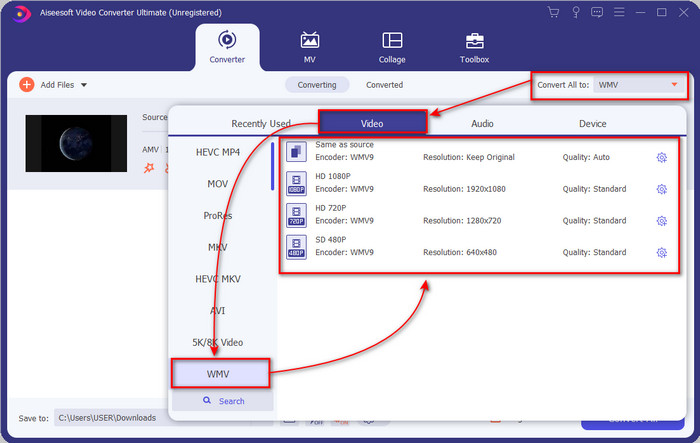
Βήμα 3. Κάνοντας κλικ στην επιλογή Convert All to, θα εμφανιστεί μια λίστα μορφών. Βρείτε τη μορφή WMV και επιλέξτε την ανάλυση, τον κωδικοποιητή και την ποιότητα που θέλετε να έχετε.
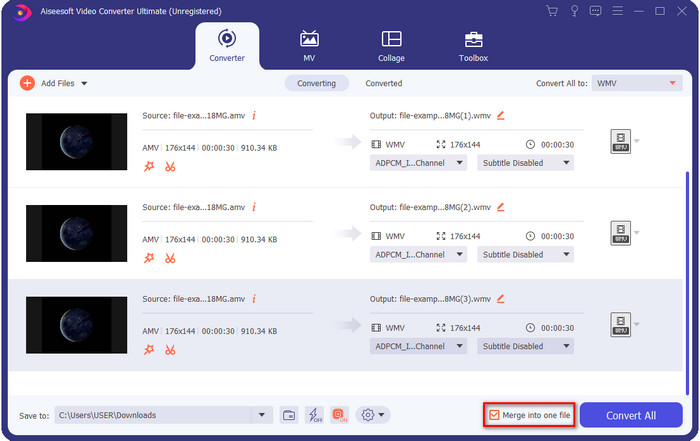
Προαιρετικό. Θέλετε να μετατρέψετε τα αρχεία AMV σας σε ένα ενιαίο αρχείο WMV; Τότε πρέπει να τικάρετε το κουτάκι που λέει merge into one file (συγχώνευση σε ένα αρχείο).
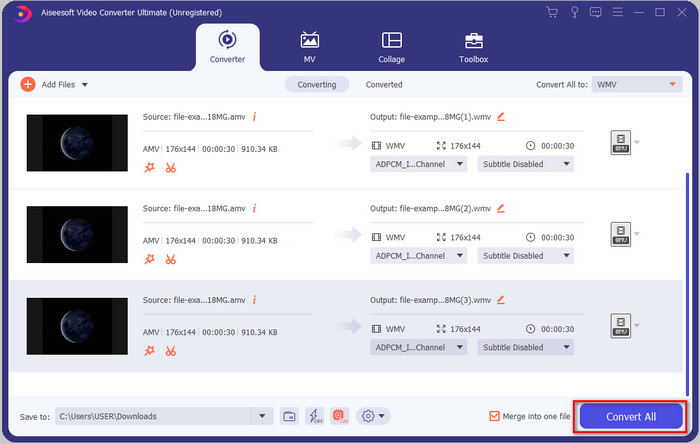
Βήμα 4. Πατήστε το Convert All για να ξεκινήσει η διαδικασία μετατροπής. Μετά το τέλος της διαδικασίας, ένας φάκελος θα εμφανιστεί στην οθόνη σας με το μετατρεπόμενο αρχείο WMV.
Μέρος 2. Μετατροπή AMV σε WMV Online
Δεν θέλετε να κατεβάσετε έναν offline μετατροπέα επειδή δεν έχετε αρκετό χώρο αποθήκευσης; Τότε χρησιμοποιήστε το FVC Free Online Video Converter. Δεν θα χρειαστεί να κατεβάσετε ολόκληρο το πρόγραμμα· αντίθετα, θα χρειαστείτε μόνο τον launcher, ο οποίος είναι πολύ μικρός και δεν θα επηρεάσει τον χώρο του υπολογιστή σας. Επιπλέον, αυτός ο online μετατροπέας μετατρέπει AMV σε WMV, προσαρμόζοντας την ανάλυση. Ωστόσο, η διάρκεια της μετατροπής του αρχείου θα εξαρτηθεί από την ταχύτητα του διαδικτύου σας. Έχετε σύνδεση στο διαδίκτυο; Τότε πρέπει να το δοκιμάσετε και να ζήσετε την εμπειρία της online μετατροπής.
Βήμα 1. Πατήστε αυτό το link για να ανοίξετε την κύρια ιστοσελίδα του μετατροπέα.
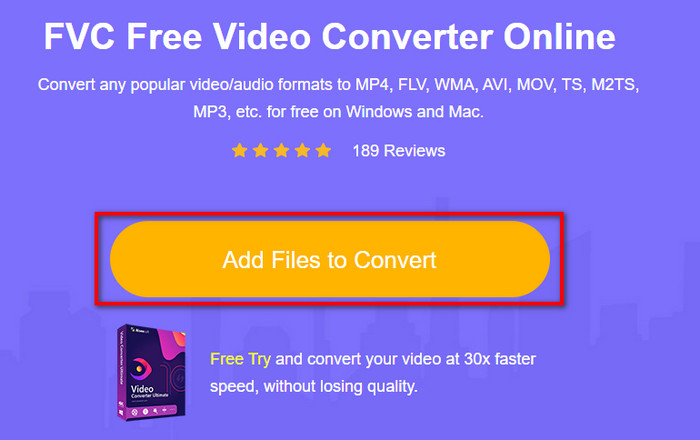
Βήμα 2. Κάνοντας κλικ στο Add Files to Convert, θα εμφανιστεί ένας φάκελος όπου μπορείτε να βρείτε το αρχείο AMV και να πατήσετε Open.
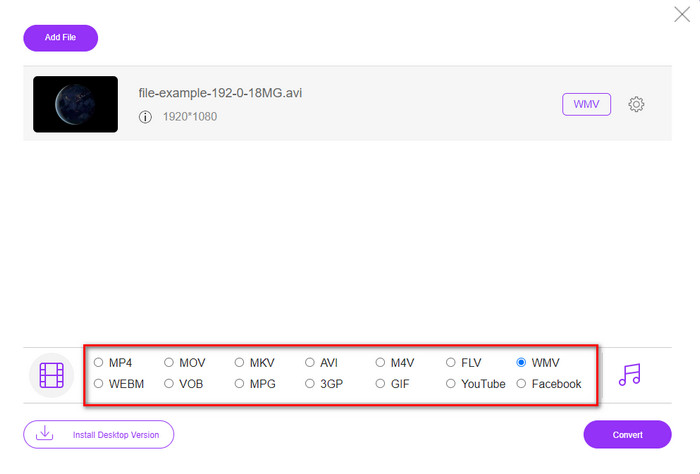
Βήμα 3. Επιλέξτε τη μορφή WMV που θα εμφανιστεί στην οθόνη.
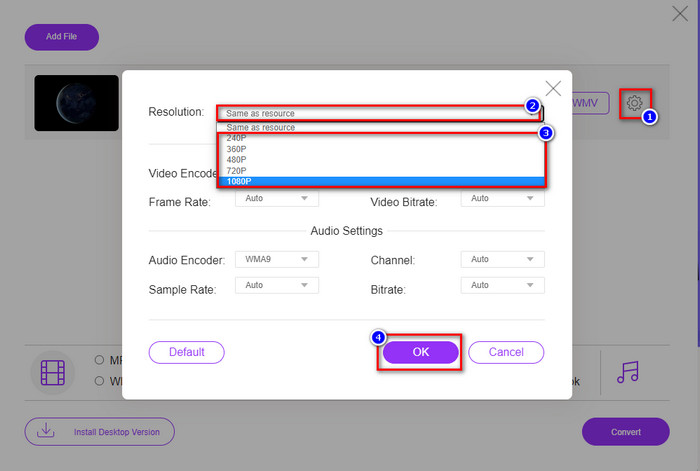
Προαιρετικό. Όπως είπαμε νωρίτερα, μπορείτε να προσαρμόσετε την ανάλυση εδώ. Τώρα, ας τροποποιήσουμε την ανάλυση κάνοντας κλικ στο εικονίδιο με το γρανάζι. Στο επάνω μέρος, κάντε κλικ στο κουμπί drop-down και θα εμφανιστεί μια λίστα αναλύσεων· επιλέξτε μία και πατήστε OK για να συνεχίσετε.
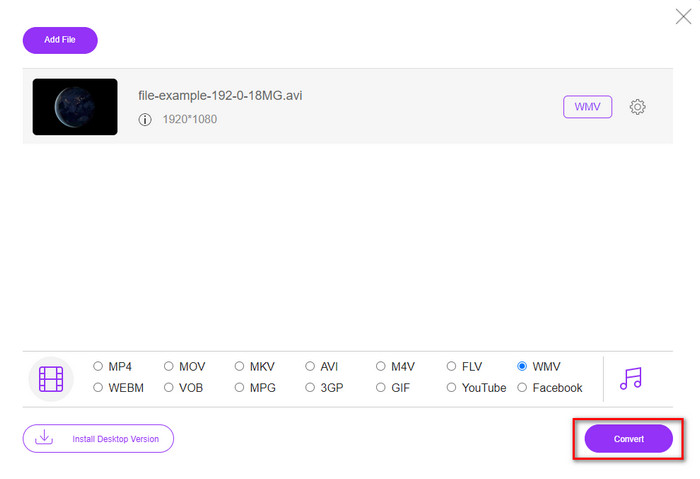
Βήμα 4. Τώρα, αν θέλετε να ξεκινήσει η μετατροπή, μπορείτε να κάνετε κλικ στο κουμπί Convert και η διαδικασία θα αρχίσει.
Μέρος 3. Ποια είναι η διαφορά μεταξύ AMV και WMV
Πρώτα απ 'όλα, αυτά τα δύο δοχεία πολυμέσων έγιναν δημοφιλή λόγω των μοναδικών δυνατοτήτων τους ως μορφή. Αλλά σήμερα, θα μελετήσουμε ποια είναι τα πλεονεκτήματα και τα μειονεκτήματα της ίδιας της μορφής. Επιπλέον, θα προσδιορίσουμε τρεις πτυχές θέτοντας ως ερώτημα να μάθετε περισσότερα για το AMV και το WMV.
Ποια μορφή έχει καλύτερη ανάλυση πολυμέσων;
Μεταξύ των δύο μορφών, χωρίς καμία αμφιβολία, το WMV έχει καλύτερη ποιότητα. Ένα αρχείο WMV μπορεί να αποθηκεύσει και να μεταδώσει ροή βίντεο ανάλυσης έως και 300.000 pixel για πιο λεπτομερή οπτική έξοδο. Αλλά μπορείτε να ρυθμίσετε το ρυθμό σε ανάλυση οθόνης 528x576. Και για το AMV, η ποιότητα που μπορεί να περιέχει είναι 96x96 έως 320x240, η οποία είναι αρκετά χαμηλή σε σύγκριση με τη χαμηλή ανάλυση του WMV. Ένας λόγος που το AMV έχει μικρότερη ανάλυση είναι ότι πρέπει να ταιριάζει στην οθόνη του κινεζικού media player.
Ποια μορφή έχει μικρότερο μέγεθος αρχείου;
Αυτή η νίκη θα πάει με το AMV επειδή αυτή η μορφή είναι εξαιρετικά συμπιεσμένη. Παρόλο που το WMV διαθέτει συμπιεστή, το μέγεθος του AMV είναι πιο φιλικό οικονομικά, ειδικά στη μονάδα δίσκου του υπολογιστή σας, από το WMV.
Ποια μορφή είναι πιο συμβατή;
Μπορούμε να πούμε ότι έχουν διαφορετικά πλεονεκτήματα όσον αφορά τη συμβατότητα, επειδή το WMV προορίζεται μόνο για προγράμματα Windows. Αν είστε χρήστης Mac, δεν μπορείτε απλώς να χρησιμοποιήσετε αυτήν τη μορφή και να την αναπαράγετε στο QuickTime ή να την επεξεργαστείτε στο iMovie. Αντίθετα, θα χρειαστεί να μετατρέψετε WMV σε MOV για να την κάνετε συμβατή. Στην περίπτωση του AMV, αυτή η μορφή χρησιμοποιείται από φορητούς κινεζικούς media players για αναπαραγωγή. Σήμερα όμως μπορείτε να χρησιμοποιήσετε έναν γενικό φορητό media player αντί να αγοράσετε ειδικό AMV media player. Ωστόσο, το να βρείτε έναν AMV media player είναι πραγματικός μπελάς, γιατί υπάρχουν ελάχιστοι players που υποστηρίζουν αυτόν τον τύπο μορφής και τον συγκεκριμένο κωδικοποιητή. Μπορούμε να πούμε ότι το WMV έχει κερδίσει πολύ μεγαλύτερη συμβατότητα από το AMV, ειδικά όταν μεταφέρουμε το αρχείο σε Windows.
Και τώρα που γνωρίζουμε τον λόγο, η μετατροπή του αρχείου σε νέα μορφή είναι απαραίτητη σε αυτήν την περίπτωση. Για αυτόν τον λόγο, πρέπει να μάθετε πώς να μετατρέπετε το AMV σε WMV για να κάνετε το αρχείο πολυμέσων συμβατό με το λογισμικό των Windows.
Μέρος 4. Συχνές ερωτήσεις σχετικά με τη μετατροπή AMV και WMV
Πώς να μετατρέψω το AMV μου σε MOV;
Υπάρχουν πολλές τεχνικές και μέθοδοι που μπορούμε να αναζητήσουμε και να δοκιμάσουμε, διαθέσιμες αν τις ψάξουμε στο διαδίκτυο. Όμως, είναι δύσκολο να επιλέξουμε ποιο εργαλείο είναι καλύτερο για να μετατρέψουμε AMV σε MOV. Για να το κάνουμε σύντομο, κάντε κλικ σε αυτόν τον σύνδεσμο και κατανοήστε πώς να μετατρέψετε AMV σε MOV και να το κάνετε συμβατό με το macOS.
Μπορώ να χρησιμοποιήσω ένα πρόγραμμα αναπαραγωγής πολυμέσων VLC για να παρακολουθήσω και να παίξω AMV;
Φυσικά, μπορείτε να κατεβάσετε το VLC media player στον υπολογιστή σας για να αναπαράγετε τα αρχεία AMV χωρίς να χρειαστεί να εγκαταστήσετε επιπλέον codec. Αλλά αν θέλετε να μάθετε περισσότερα για το VLC και τις εναλλακτικές του, δοκιμάστε να διαβάσετε αυτό το άρθρο κάνοντας κλικ σε αυτό το link.
Γιατί πρέπει να συμπιέσω το AMV;
Συμπιέζουμε τα αρχεία πολυμέσων και τα AMV επειδή θέλουμε να ελευθερώσουμε λίγο χώρο στον σκληρό δίσκο μας. Θέλετε λοιπόν να μάθετε πώς να συμπιέσετε αρχεία AMV; Τότε κάντε κλικ σε αυτόν τον σύνδεσμο.
συμπέρασμα
Αυτές οι δύο λύσεις παρέχουν αριστεία για να κάνουν τη μετατροπή σας από AMV σε WMV εύκολη και επιτυχημένη. Επιπλέον, αυτές είναι οι καλύτερες λύσεις που μπορούμε να βρούμε στον Ιστό. Τώρα λοιπόν, είναι στο χέρι σας να επιλέξετε ποιον μετατροπέα θα χρησιμοποιήσετε για να μετατρέψετε το αρχείο AMV σας σε WMV. Για να πετύχετε, πρέπει να χρησιμοποιήσετε τα εργαλεία FVC που παρέχονται παραπάνω.
-
 Η καλύτερη μέθοδος χρήσης για τη μετατροπή AMV σε AVI [Εγκρίθηκε]
 Δυσκολεύεστε να μετατρέψετε το αρχείο βίντεο σε μορφή AMV σε AVI; Ακολουθούν ορισμένες συμβουλές που μπορείτε να βρείτε μόνο σε αυτό το άρθρο.
-
 [Αποδεδειγμένα] 2 τρόποι μετατροπής AMV σε FLV Offline & Online
 Έχετε σκεφτεί ποτέ να δοκιμάσετε έναν μετατροπέα για να μετατρέψει τα αρχεία AMV σας σε μορφή αρχείου FLV. Για να λύσετε το πρόβλημά σας με την παρακολούθηση βίντεο AMV, Διαβάστε αυτό το άρθρο για να μάθετε τους κατάλληλους μετατροπείς που πρέπει να χρησιμοποιήσετε.
-
 Δωρεάν | 3 καλύτερες μέθοδοι για τη μετατροπή MP4 σε WMV χωρίς απώλεια ποιότητας
 Αυτή η ανάρτηση μοιράζεται τον τρόπο μετατροπής βίντεο MP4 σε μορφή WMV σε Mac ή Windows. Θα σας προσφέρουμε επίσης διάφορες επιλογές, όπως λογισμικό επιτραπέζιου υπολογιστή και διαδικτυακούς μετατροπείς που βασίζονται στον Ιστό. Είστε έτοιμοι να μάθετε τα καλύτερα εργαλεία μετατροπής MP4 σε WMV;
