


 Video Converter Ultimate
 Εγγραφή οθόνης
 Επισκευή βίντεο
 Ασφαλές κατέβασμα
Γρήγοροι τρόποι μετατροπής FLAC και WAV (Εκτός σύνδεσης / Διαδικτυακός)
Το Free Lossless Audio Codec, πιο γνωστό ως FLAC, είναι μια μορφή αρχείου ήχου που μοιάζει εντυπωσιακά με το MP3. Προσφέρει εξαιρετική ποιότητα ήχου, ενώ καταλαμβάνει σχετικά μικρό χώρο στον δίσκο σας. Επιπλέον, αυτός ο τύπος μορφής είναι lossless (χωρίς απώλειες), που σημαίνει ότι διατηρείται μεγάλο μέρος των δεδομένων του ήχου σας παρά τη διαδικασία συμπίεσης. Από την άλλη, υπάρχουν περιπτώσεις όπου χρειάζεται να μετατρέψετε αρχεία FLAC σε άλλη μορφή, όπως WAV, αν θέλετε να απολαύσετε την ακρόαση στη μέγιστη και ανώτερη δυνατή ποιότητα. Πρέπει να διαλέξετε ανάμεσα στα δύο; Δείτε παρακάτω πώς μπορείτε ουσιαστικά να έχετε και τα δύο, χρησιμοποιώντας τα καλύτερα εργαλεία μετατροπής FLAC σε WAV που κυκλοφορούν.

Μέρος 1. Μετατροπή FLAC και WAV εκτός σύνδεσης
Το Video Converter Ultimate είναι ένα κορυφαίο εργαλείο για τη μετατροπή αρχείων σε οποιαδήποτε μορφή ήχου, συμπεριλαμβανομένων των WAV και FLAC. Το πρόγραμμα προσφέρει λειτουργία μαζικής μετατροπής, που σας επιτρέπει να μετατρέπετε μια συλλογή αρχείων ήχου σε μία διαδικασία. Επιπλέον, μπορείτε να μεγιστοποιήσετε την ποιότητα κάθε τραγουδιού στο οποίο εργάζεστε, καθώς το πρόγραμμα επιτρέπει στους χρήστες να ρυθμίζουν τεχνικές παραμέτρους εξόδου, όπως το sample rate και το bitrate. Αν θέλετε να κάνετε μαζική μετατροπή WAV σε FLAC ή το αντίστροφο, διαβάστε τον σύντομο οδηγό που ετοιμάσαμε παρακάτω.
Βήμα 1. Εκκινήστε το πρόγραμμα στη συσκευή σας επιλέγοντας το κατάλληλο κουμπί Δωρεάν λήψη παρακάτω. Στη συνέχεια, ακολουθήστε τις οδηγίες στην οθόνη για να εκκινήσετε το πρόγραμμα. Μόλις εγκατασταθεί, μπορείτε να εξοικειωθείτε με το περιβάλλον εργασίας του.
Δωρεάν ΛήψηΓια Windows 7 ή νεότεραΑσφαλής λήψη
Δωρεάν ΛήψηΓια MacOS 10.7 ή νεότεροΑσφαλής λήψη
Βήμα 2. Πατήστε το εικονίδιο Προσθήκη στην κεντρική οθόνη και εισαγάγετε το αρχείο ήχου με το οποίο θέλετε να εργαστείτε. Έπειτα θα μεταφερθείτε σε μια προεπισκόπηση του εισαγόμενου αρχείου. Μπορείτε επίσης να ανεβάσετε έναν φάκελο, αν θέλετε να κάνετε μετατροπή μαζικά. Επιλέξτε από τον κατάλογό σας τον φάκελο που περιέχει όλα τα αρχεία ήχου που χρειάζεστε.
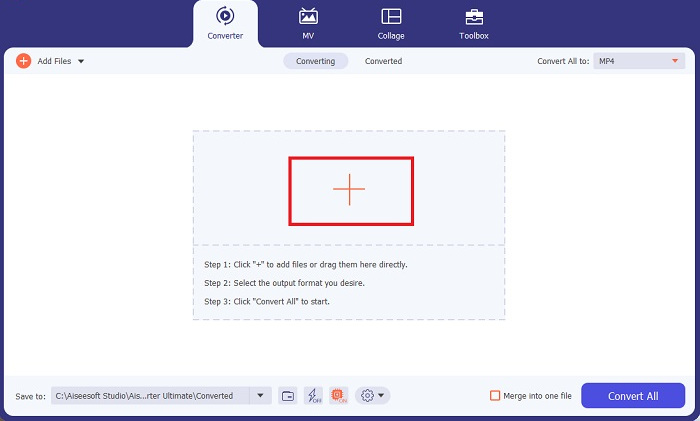
Βήμα 3. Τώρα μπορείτε να αλλάξετε τη μορφή εξόδου κάνοντας κλικ στο κουμπί Converter επάνω στην οθόνη του προγράμματος. Από εκεί, επιλέξτε WAV από την καρτέλα επιλογής Audio Output. Παράλληλα, μπορείτε να ρυθμίσετε το sample rate και το bitrate του αρχείου εξόδου ώστε να ταιριάζει με την ποιότητα που προτιμάτε.
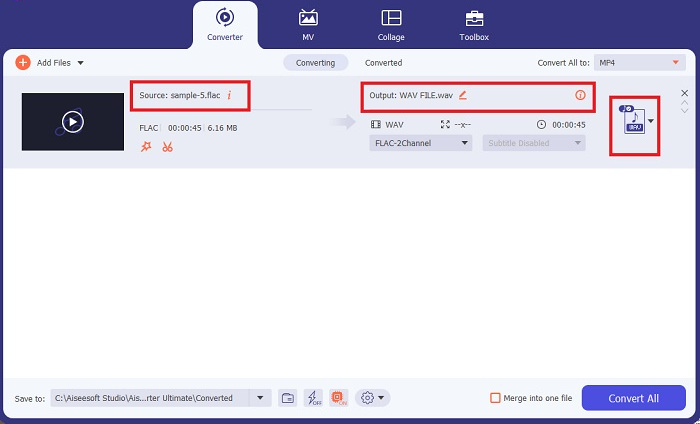
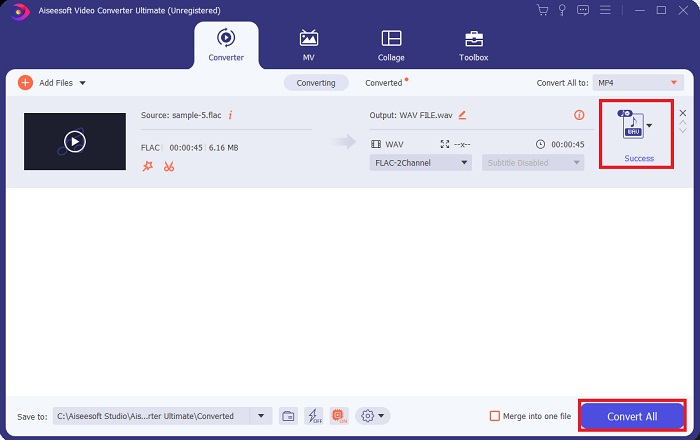
Βήμα 4. Για το τελικό βήμα, ξεκινήστε τη διαδικασία μετατροπής κάνοντας κλικ στο κουμπί Convert All στο κάτω μέρος. Στη συνέχεια, το πρόγραμμα θα ανοίξει αυτόματα τον φάκελο εξόδου για να ελέγξετε τη νέα μορφή του αρχείου σας.
Πλεονεκτήματα
- Μπορεί να μετατρέψει ομαδικά FLAC σε μορφή αρχείου ήχου WAV.
- Το πρόγραμμα λειτουργεί καλά τόσο με Windows όσο και με Mac OS.
- Έχει γρήγορη ταχύτητα μετατροπής.
Μειονεκτήματα
- Απαιτεί μια πληρωμένη συνδρομή μετά τη δωρεάν δοκιμή.
- Το πρόγραμμα δεν λειτουργεί σε συσκευές Linux OS.
Μέρος 2. Μετατροπή FLAC σε WAV ή WAV σε FLAC Online
Ενώ η μηχανή αναζήτησής σας μπορεί να εμφανίσει άφθονους online μετατροπείς FLAC σε WAV ή WAV σε FLAC, εδώ είναι τι μπορούμε να προτείνουμε για να σας διευκολύνουμε. Το Free Audio Converter Online είναι μια εξαιρετική επιλογή αν θέλετε να αποφύγετε την εγκατάσταση προγράμματος σε υπολογιστή. Αυτός ο online μετατροπέας λειτουργεί ομαλά, προσφέροντας ασφάλεια και προστασία για τα προσωπικά σας δεδομένα, ενώ ολοκληρώνει τη μετατροπή. Επιπλέον, μπορείτε να εκμεταλλευτείτε τη δυνατότητα μαζικής μετατροπής του λογισμικού, σαν να χρησιμοποιούσατε πρόγραμμα για υπολογιστή.
Βήμα 1. Κάντε κλικ στον παραπάνω σύνδεσμο για να μεταβείτε στην κεντρική ιστοσελίδα του Free Online Video Converter. Επιλέξτε το Add Files to Convert στην κεντρική οθόνη και ανεβάστε το αρχείο ήχου σας.
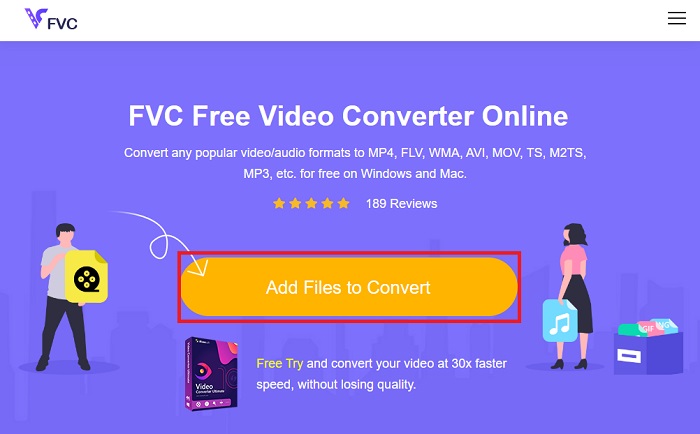
Βήμα 2. Η προεπισκόπηση του αρχικού σας αρχείου θα εμφανιστεί στην οθόνη. Από το ίδιο πάνελ, μετακινηθείτε προς τα κάτω και επιλέξτε τη μορφή εξόδου που επιθυμείτε.
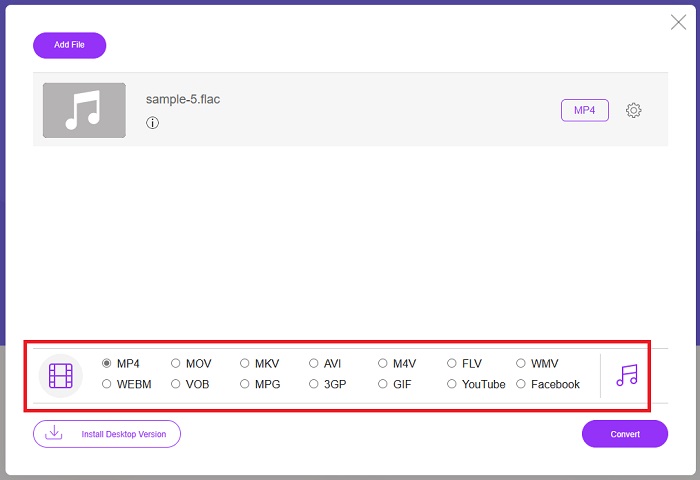
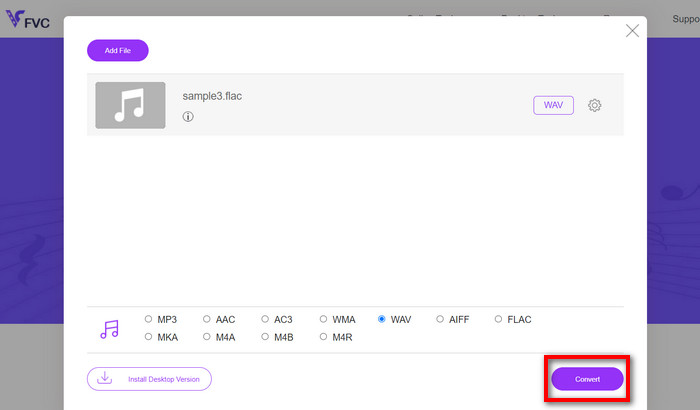
Βήμα 3. Πατήστε το κουμπί Convert για να αλλάξετε τη μορφή από FLAC σε WAV. Αν θέλετε να μετατρέψετε κάποιο άλλο αρχείο, επαναλάβετε αυτόν τον οδηγό από την αρχή.
Πλεονεκτήματα
- Λειτουργεί σε οποιαδήποτε μηχανή αναζήτησης όπως το Google Chrome, το Safari, το Firefox και άλλα.
- Προσφέρει διάφορες δημοφιλείς μορφές αρχείων ήχου όπως MP3, AAC και WMA.
- Οι χρήστες μπορούν να απολαμβάνουν απεριόριστες μετατροπές ανά ημέρα.
Μειονεκτήματα
- Η ταχύτητα μετατροπής εξαρτάται από την ισχύ της σύνδεσης στο διαδίκτυο.
Περαιτέρω ανάγνωση:
Μετατροπή FLAC σε MP3 για Διατήρηση της Ποιότητας Ήχου
Εύκολα βήματα για τη μετατροπή WAV σε OGG για βέλτιστο μέγεθος ήχου
Μέρος 3. Συχνές ερωτήσεις σχετικά με τη μετατροπή FLAC και WAV
Η μετατροπή ενός αρχείου από FLAC σε WAV θα μειώσει την ποιότητα;
Η μετατροπή των αρχείων ήχου σας από FLAC σε WAV δεν θα υποβαθμίσει την ποιότητα αφού η ανάλυσή του δεν είναι συμπιεσμένη. Ωστόσο, ας υποθέσουμε ότι μετατρέπετε ένα αρχείο από WAV σε FLAC. Σε αυτή την περίπτωση, μπορεί να παρατηρήσετε μικρές αλλαγές, ειδικά για εκείνους των οποίων τα αυτιά είναι αρκετά σε λεπτομέρειες. Εάν χρειάζεστε βοήθεια για να αποφασίσετε ποια να διατηρήσετε, εδώ είναι μια προοπτική που μπορείτε να δείτε. Οι μορφές ήχου FLAC είναι μια καλή επιλογή για την αποθήκευση ενός θησαυρού τραγουδιών, ενώ το μέγεθος των αρχείων WAV είναι μεγαλύτερο αλλά κατάλληλο για επεξεργασία ήχου.
Είναι το WAV το φορμά ήχου υψηλότερης ανάλυσης;
Το WAV είναι η συντομογραφία Waveform Audio File Format που αναπτύχθηκε από την IBM και τη Microsoft. Αυτή η μορφή θεωρείται η μορφή με την υψηλότερη ανάλυση στην ψηφιακή μουσική βιομηχανία, επειδή περιέχει ακατέργαστες και ασυμβίβαστες συχνότητες ήχου.
Ποιος είναι ο καλύτερος online μετατροπέας FLAC σε WAV;
Χωρίς αμφιβολία, το FVC Free Online Video Converter είναι ο καλύτερος δωρεάν διαδικτυακός μετατροπέας FLAC σε WAV. Δεν χρειάζεται να αποκτήσετε τεχνική ικανότητα για να μετατρέψετε αρχεία βίντεο και ήχου χρησιμοποιώντας το λογισμικό. Μπορεί να κάνει τη δουλειά σας αποτελεσματικά επειδή είναι φιλικό προς το χρήστη και έχει απαράμιλλη ταχύτητα μετατροπής. Επιπλέον, αυτό το διαδικτυακό πρόγραμμα παρέχει, αν όχι όλες, αλλά τις περισσότερες από τις δημοφιλείς μορφές ήχου που γνωρίζουμε.
συμπέρασμα
Η μετατροπή μπορεί να γίνει και προς τις δύο κατευθύνσεις, από FLAC σε WAV και από WAV σε FLAC. Καθώς και οι δύο μορφές αρχείων είναι ιδιαίτερα διαδεδομένες στη σύγχρονη ψηφιακή μουσική, η επιλογή του κατάλληλου τύπου μπορεί να εξαρτηθεί από τη χρήση για την οποία τις χρειάζεστε. Με τα εργαλεία που αναφέρθηκαν παραπάνω, μπορείτε να εναλλάσσετε τις μορφές όποτε θέλετε. Ακολουθήστε τα παραπάνω βήματα για να αλλάξετε από FLAC σε WAV ή από WAV σε FLAC και δεν θα αντιμετωπίσετε καμία δυσκολία.
-
 Μάθετε πώς μπορείτε να μετατρέψετε MP3 σε μορφή WAV
 Θέλετε να μάθετε πώς να μετατρέψετε MP3 σε WAV; Προσδιορίστε ποιο από τα εργαλεία παράγει την καλύτερη ποιότητα μετατροπής που μπορείτε να λάβετε.
-
 WAV Player - Κορυφαίες 5 εφαρμογές WAV Player για Android, iPhone, PC και Mac
 Πώς να παίξετε αρχεία WAV σε τηλέφωνο Android; Ποιος παίκτης μπορεί να παίξει WAV; Αυτή η ανάρτηση μοιράζεται 5 καλύτερες δωρεάν συσκευές αναπαραγωγής WAV για Android, iPhone, Mac και PC.
-
 Οι 3 κορυφαίοι επεξεργαστές μεταδεδομένων FLAC σε Mac και Windows [Ενημερώθηκε 2023]
 Θέλετε να αλλάξετε τα μεταδεδομένα FLAC; Σε αυτήν την περίπτωση, πρέπει να διαβάσετε αυτό το άρθρο, καθώς παρέχουμε επαρκείς γνώσεις σχετικά με τον πιο πρόσφατο επεξεργαστή μεταδεδομένων FLAC που μπορείτε να χρησιμοποιήσετε.
