


 Video Converter Ultimate
 Εγγραφή οθόνης
 Επισκευή βίντεο
 Ασφαλές κατέβασμα
Συρρίκνωση ήχου: Πώς να μετατρέψετε τη μορφή WAV σε OGG για μικρότερα μεγέθη αρχείων
Large audio files may eat up a lot of memory on your computer or mobile device if you're dealing with them. Converting these files from WAV to OGGw format reduces their size greatly, making them easier to manage and transmit. In this post, we'll look at the advantages of converting WAV files to OGG format and show you how to do it step by step. We'll also go through some of the greatest programs for the job to ensure you get the best audio possible. So, whether you're a musician, podcaster, or simply someone who wants to organize their audio recordings, this article is for you.

Μέρος 1. Σύγκριση OGG έναντι WAV
Ακολουθεί ένα γράφημα σύγκρισης που περιγράφει τις διαφορές μεταξύ της μετατροπής WAV σε OGG. Μπορείτε να τα ελέγξετε για αναφορά.
| WAV | OGG | |
| Μέγεθος αρχείου | Μεγάλο | Μικρό |
| Συμπίεση | Ασυμπίεστος | Συμπιεσμένο |
| Ποιότητα ήχου | Υψηλή ποιότητα | Υψηλή ποιότητα |
| Συμβατότητα | Ευρέως συμβατό | Λιγότερο συμβατό |
| Υποστήριξη πλατφόρμας | Υποστηρίζεται σε όλες τις πλατφόρμες | Περιορισμένη υποστήριξη σε ορισμένες πλατφόρμες |
| Επεξεργασία | Εύκολο στην επεξεργασία | Λίγο πιο δύσκολη η επεξεργασία |
Μέρος 2. Ο καλύτερος τρόπος για να μετατρέψετε WAV σε OGG ή OGG σε WAV
1. FVC Video Converter Ultimate
FVC Video Converter Ultimate is a powerful video conversion software that can help you convert your WAV audio files to the compressed OGG format quickly and easily. With its intuitive and user-friendly interface, you can easily select your WAV files, choose the OGG format, and initiate the conversion process with just a few clicks.
Επιπλέον, το FVC Video Converter Ultimate περιλαμβάνει προηγμένες λειτουργίες επεξεργασίας βίντεο, που σας επιτρέπουν να περικόψετε, να περικόψετε, να προσθέσετε υδατογραφήματα και να εφαρμόσετε διάφορα φίλτρα στα αρχεία ήχου σας πριν από τη μετατροπή. Αυτή η δυνατότητα μπορεί να είναι χρήσιμη εάν χρειάζεται να κάνετε μικρές προσαρμογές ή να βελτιώσετε την ποιότητα των αρχείων ήχου σας πριν τα μετατρέψετε σε μορφή OGG. Επομένως, εάν θέλετε να μετατρέψετε ομαδικά το OGG σε WAV ή το αντίστροφο, ακολουθήστε τα παρακάτω βήματα:
Step 1. Install the program and import OGG or WAV files
FVC Video Converter can be downloaded and installed from the official website. Launch the application and select the Plus sign button to import the audio file to be converted.
Δωρεάν λήψηΓια Windows 7 ή νεότεραΑσφαλής λήψη
Δωρεάν λήψηΓια MacOS 10.7 ή νεότεροΑσφαλής λήψη
Step 2. Select OGG as the output format
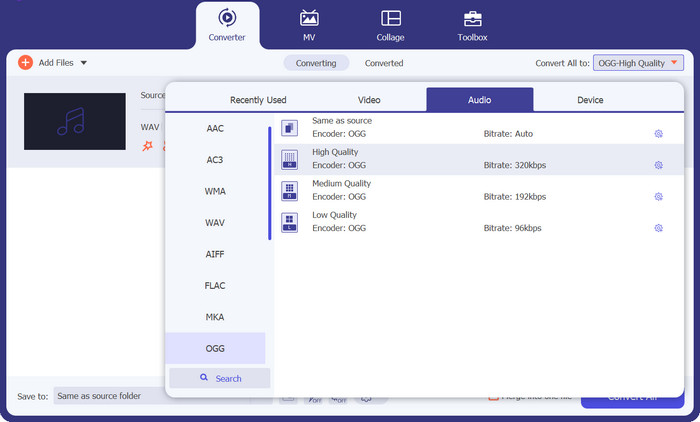
By clicking on the Profile dropdown menu and selecting OGG from the list of available formats, you can choose OGG as the output format. You can also change the output settings by selecting the Settings button if necessary. This allows you to change parameters like bit rate, sampling rate, and channels.
Step 3. Enter the output location
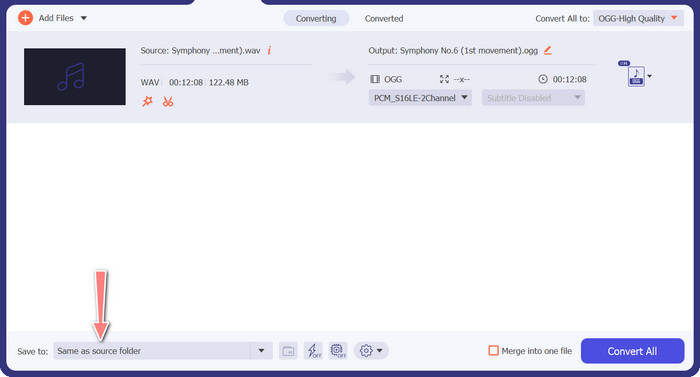
By selecting the Browse button next to the Output Folder field, you can select the output folder where you wish to save the converted file.
Step 4. WAV to OGG file conversion
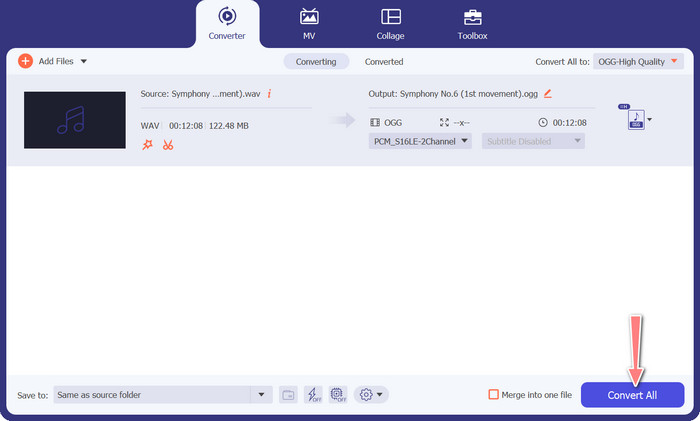
Once you're happy with your options, click the Convert All button to start the conversion. FVC Free Video Converter will start converting your WAV file to OGG format. The progress bar indicates how far along the conversion process is, as well as the projected time remaining.
2. Δωρεάν Online Converter Audio
The Free Audio Converter Online is a powerful tool for converting WAV to OGG online. Users can rapidly add WAV or OGG files and convert them to OGG format using its simple interface. The converter also allows users to alter the output settings, such as the bit rate and sampling rate, to achieve the desired quality of OGG files. The conversion process is quick and simple, and consumers may download their modified files directly from the website.
Step 1. Navigate to the Free Video Converter Online website using your favorite web browser.
Step 2. Upload the OGG file you want to convert to WAV by clicking the Add Files to Convert button.
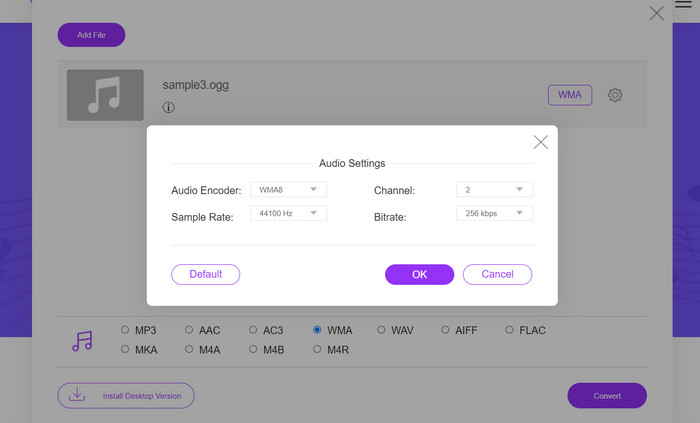
Step 3. Select OGG as the output format from the Audio format menu's list of supported formats. You can also specify the bitrate and output quality for the OGG file.
Step 4. To begin the conversion process, click the Convert button. That is how you convert OGG to WAV online.
Μέρος 2. Μετατρέψτε το OGG σε WAV ή το WAV σε OGG με το Audacity
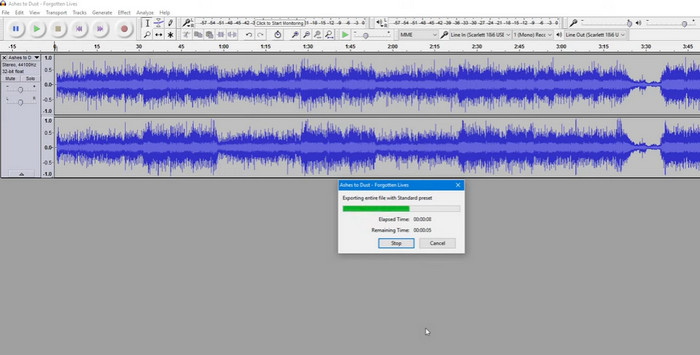
Αυτό το εργαλείο είναι ένα λογισμικό επεξεργασίας ήχου ανοιχτού κώδικα που μπορεί να μετατρέψει αρχεία MP3 σε αρχεία OGG. Το Audacity προσφέρει μια ποικιλία εργαλείων επεξεργασίας και εφέ εκτός από τη μετατροπή, επιτρέποντας στους χρήστες να τροποποιούν και να βελτιώνουν τα αρχεία ήχου τους, καθιστώντας το ένα ευέλικτο εργαλείο για λειτουργίες επεξεργασίας ήχου και μετατροπής.
Επιπλέον, το Audacity είναι διαθέσιμο για Windows, macOS και Linux, καθιστώντας το ευρέως διαθέσιμο. Το Audacity είναι μια καλή εναλλακτική για όποιον επιθυμεί να μετατρέψει αρχεία WAV σε μορφή OGG λόγω των εξελιγμένων δυνατοτήτων και της ευκολίας χρήσης του. Εξετάστε τον παρακάτω οδηγό για να μάθετε πώς λειτουργεί αυτό το πρόγραμμα.
Step 1. Download and install Audacity on your PC. Open Audacity, then the OGG or WAV file you want to edit. You can do this by selecting File > Open, then navigating to and selecting the WAV file on your computer.
Step 2. Once the WAV file is open in Audacity, click File, then Export. In the Export Audio dialog box, select OGG Vorbis Files as the file type.
Step 3. You can adjust the quality of your OGG file by dragging the Quality slider. Higher quality settings will increase file size, while lower quality settings will decrease file size but may reduce song quality.
Πλεονεκτήματα
- Έχει τη δυνατότητα μαζικής μετατροπής WAV σε OGG.
- Μετατρέψτε το OGG σε WAV σε Windows, macOS και Linux.
Μειονεκτήματα
- Το πρόγραμμα δεν διαθέτει ειδική κοινότητα υποστήριξης.
Μέρος 3. Μετατροπή OGG σε WAV ή WAV σε OGG με VLC
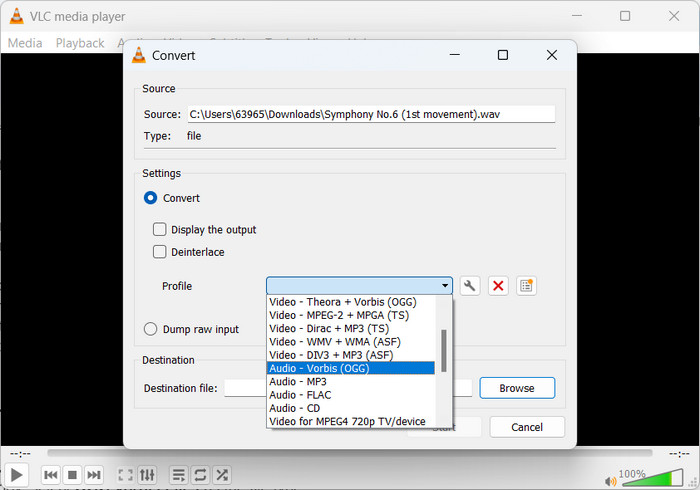
Το πρόγραμμα αναπαραγωγής πολυμέσων VLC είναι ένα ισχυρό εργαλείο πολυμέσων που χρησιμοποιείται ευρέως για την αναπαραγωγή διαφόρων τύπων αρχείων πολυμέσων. Πολλοί χρήστες μπορεί να μην γνωρίζουν ότι αυτό το πρόγραμμα λειτουργεί επίσης καλά καθώς μετατρέπει το OGG σε WAV για Mac εργαλείο, ωστόσο. Με το ενσωματωμένο εργαλείο μετατροπέα, το πρόγραμμα αναπαραγωγής πολυμέσων VLC μπορεί γρήγορα και εύκολα να μετατρέψει αρχεία WAV σε μορφή OGG, επιτρέποντας στους χρήστες να απολαμβάνουν την αγαπημένη τους μουσική σε διάφορες μορφές. Για όλες τις ανάγκες μετατροπής ήχου, το πρόγραμμα αναπαραγωγής πολυμέσων VLC προσφέρει μια απλή και φιλική προς το χρήστη λύση είτε θέλετε να μετατρέψετε ένα μόνο αρχείο είτε μια παρτίδα αρχείων. Ακολουθήστε αυτά τα βήματα για να μάθετε πώς να μετατρέπετε ένα αρχείο MP3 σε αρχείο OGG:
Step 1. To play a video, run VLC and pick from the player's menu bar. The Convert / Save option will appear in a dropdown menu; select it.
Step 2. By clicking the Add button, choose the WAV file you wish to convert from the File Selection area. It's time to click the Convert / Save button when you're ready to convert or save the file.
Step 3. Click the Profile dropdown menu and choose Audio - Vorbis (OGG) as your preferred profile.
Step 4. Click the Browse button to the right of the Destination file section to specify a new location and filename for the converted file. The conversion can be kicked off by clicking the Start button at the window's bottom.
Πλεονεκτήματα
- Φιλική προς το χρήστη διεπαφή.
- Υποστηρίζει πολλές μορφές βίντεο και ήχου.
Μειονεκτήματα
- Πιθανή απώλεια ποιότητας ήχου.
Περαιτέρω ανάγνωση:
Convert MP3 to OGG and Enjoy Superior Sound Quality
Πώς να μετατρέψετε δωρεάν MP4 σε WAV σε υπολογιστή ή online [2023]
Μέρος 4. Συχνές ερωτήσεις σχετικά με τη μετατροπή OGG σε WAV
Μπορώ να μετατρέψω πολλά αρχεία WAV σε μορφή OGG ταυτόχρονα;
Ναι, πολλά λογισμικά μετατροπής ήχου, συμπεριλαμβανομένου του FVC Video Converter Ultimate, υποστηρίζουν τη μαζική μετατροπή που σας επιτρέπει να μετατρέπετε ομαδικά WAV σε μορφή OGG ταυτόχρονα.
Είναι δυνατή η μετατροπή των αρχείων OGG σε μορφή WAV;
Ναι, είναι δυνατή η μετατροπή αρχείων OGG σε μορφή WAV χρησιμοποιώντας λογισμικό μετατροπής ήχου. Ωστόσο, λάβετε υπόψη ότι η ποιότητα του ήχου μπορεί να επηρεαστεί εάν το αρχικό αρχείο WAV συμπιέστηκε σε μορφή OGG.
Μπορώ να μετατρέψω τα αρχεία WAV μου σε άλλες μορφές ήχου εκτός από το OGG;
Ναι, τα περισσότερα λογισμικά μετατροπής ήχου υποστηρίζουν ένα ευρύ φάσμα μορφών ήχου, συμπεριλαμβανομένων των MP3, AAC, FLAC και άλλων.
συμπέρασμα
Converting your WAV to OGG format can offer several benefits, such as reducing file size and maintaining high-quality audio. Meanwhile, with the right audio conversion tools and a bit of know-how, you can easily convert your audio files to the format that best suits your needs.
-
 Εξαιρετικές συσκευές αναπαραγωγής OGG για Windows και Mac που δεν πρέπει να χάσετε
 Όταν θέλετε να αναπαράγετε τον αγαπημένο σας ήχο σε μορφή OGG, ειδικά όταν υπάρχει λιγότερος αποθηκευτικός χώρος. Μπορείτε να μάθετε περισσότερα για τους 5 καλύτερους παίκτες OGG από αυτό το άρθρο.
-
 Μάθετε πώς μπορείτε να μετατρέψετε MP3 σε μορφή WAV
 Θέλετε να μάθετε πώς να μετατρέψετε MP3 σε WAV; Προσδιορίστε ποιο από τα εργαλεία παράγει την καλύτερη ποιότητα μετατροπής που μπορείτε να λάβετε.
-
 2 Καλύτεροι Τρόποι Επεξεργασίας Μεταδεδομένων OGG που πρέπει να δοκιμάσετε δωρεάν
 Θέλετε να επεξεργαστείτε τα μεταδεδομένα OGG; Λοιπόν, μπορείτε εύκολα να χειριστείτε την επεξεργασία των ετικετών χρησιμοποιώντας το σωστό λογισμικό. Εάν δεν έχετε κανέναν, πρέπει να διαβάσετε αυτό το άρθρο.
