


 Video Converter Ultimate
 Εγγραφή οθόνης
 Επισκευή βίντεο
 Ασφαλές κατέβασμα
Μετατρέψτε το DIVX σε 3GP με τις πιο αποτελεσματικές διαδικασίες
Δεν μπορείτε να αναπαράγετε το DIVX βίντεό σας στη συσκευή σας επειδή δεν υποστηρίζεται; Οι περισσότεροι άνθρωποι αντιμετωπίζουν το ίδιο πρόβλημα. Αλλά είστε τυχεροί, γιατί θα συζητήσουμε την πιο αποτελεσματική και εύκολη μέθοδο για να μετατρέψετε DIVX σε 3GP. Μην χάσετε αυτή την ευκαιρία και μάθετε περισσότερα για τη μετατροπή διαφορετικών αρχείων, χρησιμοποιώντας διάφορες αξιόπιστες και δοκιμασμένες εφαρμογές που θα παρουσιάσουμε.

Μέρος 1: Το καλύτερο λογισμικό για τη μετατροπή DIVX σε 3GP
Θέλετε να μετατρέψετε DIVX σε 3GP στις συσκευές σας, όπως υπολογιστές Windows και Mac; Τότε το πρόβλημά σας έχει ήδη λυθεί. Για να μετατρέψετε το αρχείο DIVX σας, μπορείτε να χρησιμοποιήσετε το Video Converter Ultimate. Όπως υποδηλώνει και το όνομα του εργαλείου, είναι μια ολοκληρωμένη εφαρμογή με την οποία μπορείτε να μετατρέψετε πάνω από 1000 μορφές αρχείων βίντεο, όπως DIVX, 3GP, MP4, MOV, MTS, WEBM και άλλες. Μπορείτε επίσης να μετατρέψετε δύο ή περισσότερα αρχεία ταυτόχρονα, επειδή αυτό το εργαλείο προσφέρει μαζική μετατροπή (batch conversion). Επιπλέον, το Video Converter Ultimate διαθέτει γρήγορη διαδικασία μετατροπής, κάτι που είναι εξαιρετικό αν σκοπεύετε να μετατρέψετε πολλά διαφορετικά αρχεία.
Επιπλέον, μπορείτε να χρησιμοποιήσετε αυτήν την εφαρμογή εκτός σύνδεσης εάν σας ενδιαφέρει να επεξεργαστείτε το αρχείο DIVX πριν το μετατρέψετε. Υποθέτοντας ότι θέλετε να διορθώσετε το χρώμα του βίντεό σας, μπορείτε να προχωρήσετε στον πίνακα Εργαλειοθήκη και να επιλέξετε το εργαλείο Διόρθωσης χρώματος για να προσαρμόσετε τη φωτεινότητα, την αντίθεση και τον κορεσμό του βίντεό σας. Επιπλέον, ας υποθέσουμε ότι θέλετε να συγχρονίσετε τον ήχο στο αρχείο βίντεο DIVX πριν το μετατρέψετε. Σε αυτήν την περίπτωση, μπορείτε να το κάνετε επειδή προσφέρει μια λειτουργία Συγχρονισμού ήχου, επομένως ο συγχρονισμός ήχου με βίντεο είναι εύκολος για εσάς.
Χαρακτηριστικά:
◆ Μετατρέψτε μορφές αρχείων βίντεο, συμπεριλαμβανομένων MP4, M4V, FLV, AVI κ.λπ.
◆ Μπορεί να δημιουργήσει μουσικά βίντεο με διάφορα θέματα.
◆ Η Εργαλειοθήκη περιέχει ενισχυτή βίντεο, αφαίρεση υδατογραφήματος, συμπιεστή και άλλα.
◆ Ικανότητα κατασκευής κολάζ.
Πλεονεκτήματα
- Υποστηρίζει διάφορες μορφές αρχείων, όπως MP4, AVI, FLV, MOV, MTS, DIVX, 3GP κ.λπ.
- Διαθέτει φιλική διεπαφή χρήστη που είναι κατάλληλη για αρχάριους.
- Έχει 30 φορές ταχύτερη διαδικασία μετατροπής
- Προσβάσιμο τόσο σε Windows όσο και σε Mac.
- Μπορεί να μετατρέψει πολλά βίντεο με μία μόνο κίνηση.
Μειονεκτήματα
- Αγοράστε το Video Converter Ultimate για να απολαύσετε περισσότερες μοναδικές δυνατότητες.
Για να μετατρέψετε εύκολα το DIVX σε 3GP, πρέπει να ακολουθήσετε αυτούς τους απλούς οδηγούς παρακάτω.
Βήμα 1: Πρώτα, απλώς χρειάζεται να κατεβάσετε το Video Converter Ultimate στις συσκευές σας, όπως υπολογιστές Windows ή Mac. Έπειτα, προχωρήστε στη διαδικασία εγκατάστασης και ανοίξτε την εφαρμογή.
Δωρεάν ΛήψηΓια Windows 7 ή νεότεραΑσφαλής λήψη
Δωρεάν ΛήψηΓια MacOS 10.7 ή νεότεροΑσφαλής λήψη
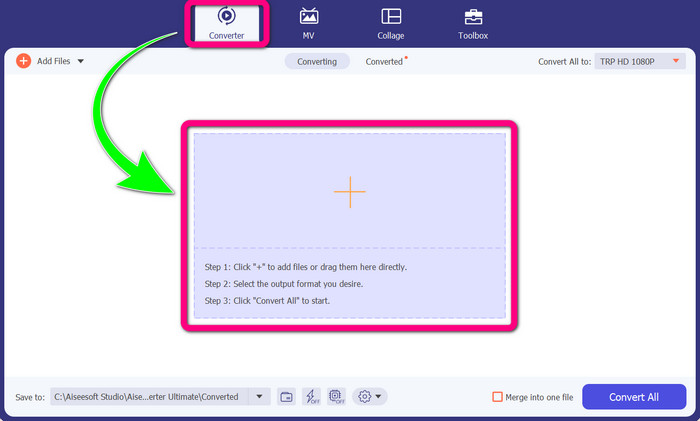
Βήμα 2: Όταν ανοίξετε ήδη το Video Converter Ultimate στη συσκευή σας, επιλέξτε τον πίνακα Converter. Έπειτα, κάντε κλικ στο εικονίδιο + για να προσθέσετε το DIVX βίντεο αρχείο σας.
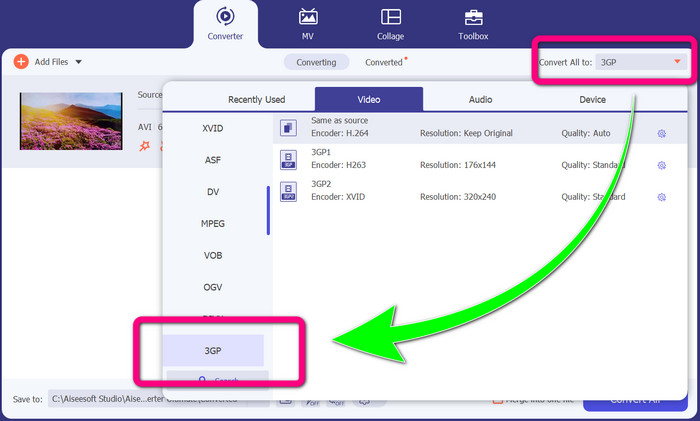
Βήμα 3: Αφού προσθέσετε το βίντεο αρχείο σας, κάντε κλικ στην επιλογή Convert all to, βρείτε τη μορφή αρχείου 3GP και επιλέξτε την.
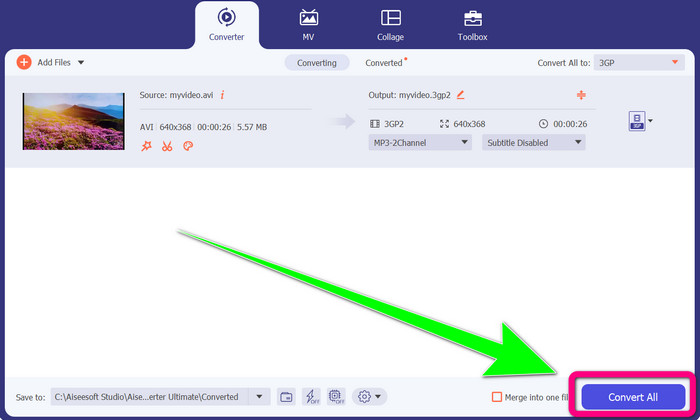
Βήμα 4: Αφού τελειώσετε με την επιλογή της μορφής αρχείου 3GP, κάντε κλικ στο Convert All button. Περιμένετε να ολοκληρωθεί η διαδικασία μετατροπής και αποθηκεύστε το τελικό βίντεό σας στη συσκευή σας.
Μέρος 2: Εξαιρετικοί διαδικτυακοί μετατροπείς για μετατροπή DIVX σε 3GP
Χρήση του FVC Free Video Converter Online
Ένα από τα καλύτερα διαδικτυακά εργαλεία για να μετατρέψετε DIVX σε 3GP είναι το FVC Free Video Converter Online. Αυτό το εργαλείο μπορεί να σας βοηθήσει να μετατρέψετε διάφορες μορφές αρχείων μόνο με λίγα κλικ. Υποστηρίζει σχεδόν όλα τα δημοφιλή βίντεο και ήχο σε MP4, MOV, MKV, FLV, VOB, MP3, AAC και άλλα. Το FVC Free Video Converter Online είναι απλό και εύκολο στη χρήση. Ακόμα και οι αρχάριοι μπορούν να αξιοποιήσουν αυτή την εφαρμογή. Επίσης, είτε είστε χρήστης Windows είτε Mac, μπορείτε να βασιστείτε σε αυτό το εργαλείο, επειδή είναι διαθέσιμο και στα δύο συστήματα. Ακολουθήστε τις απλές μεθόδους παρακάτω για να μετατρέψετε DIVX σε 3GP.
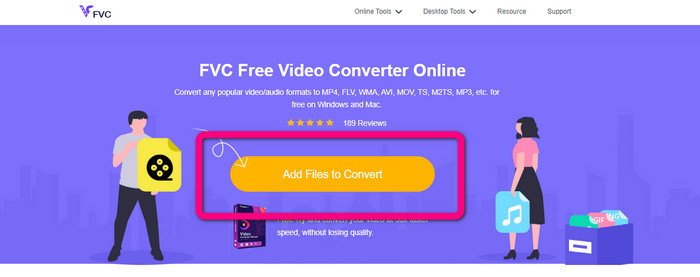
Βήμα 1: Επισκεφθείτε το FVC Free Video Converter Online. Έπειτα, επιλέξτε το κουμπί Add Files to Convert για να εισαγάγετε το αρχείο DIVX που θέλετε να μετατρέψετε.
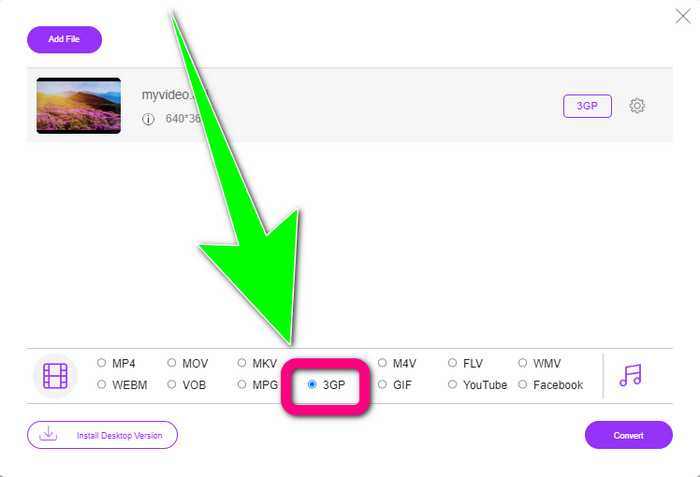
Βήμα 2: Αφού προσθέσετε το αρχείο DIVX σας, κάντε κλικ στη μορφή αρχείου 3GP από τις επιλογές μορφών παρακάτω.
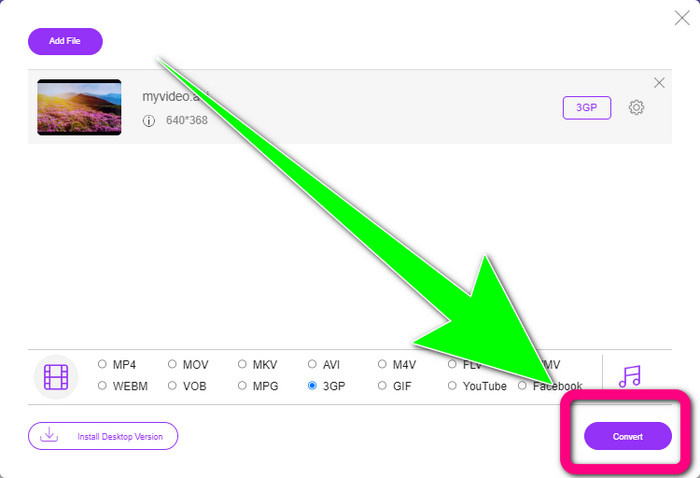
Βήμα 3: Συνεχίστε κάνοντας κλικ στο κουμπί Convert. Περιμένετε τη διαδικασία μετατροπής και αποθηκεύστε το μετατρεπόμενο βίντεό σας.
Χρήση του Convertio
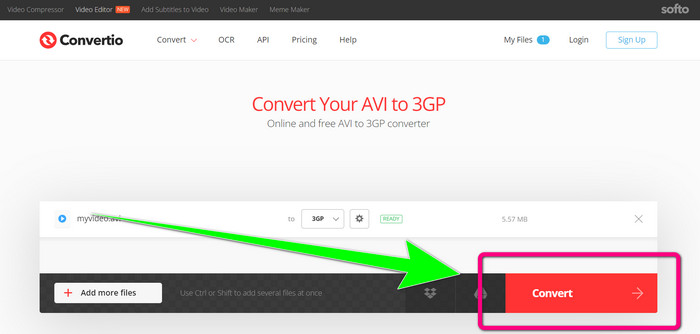
Αν θέλετε να μετατρέψετε DIVX σε 3GP online, το Convertio είναι ένα από τα εργαλεία που μπορείτε να χρησιμοποιήσετε. Υποστηρίζει πολλές μορφές, όπως 3GP, DIVX, XVID, AVID, MP4, M4V, ASF, HEVC και άλλες. Εκτός από τη μετατροπή βίντεο αρχείων, μπορείτε να μετατρέψετε εικόνες, ήχο, έγγραφα, αρχεία συμπίεσης και άλλα αρχεία. Το Convertio είναι επίσης ένα απλό εργαλείο, επειδή μπορείτε να κάνετε μετατροπή σε λίγα βήματα, ώστε να μην ταλαιπωρείστε για να μετατρέψετε το DIVX αρχείο σας σε 3GP. Ωστόσο, όπως και με άλλα online εργαλεία, δεν μπορείτε να χρησιμοποιήσετε αυτό το λογισμικό αν δεν έχετε πρόσβαση στο διαδίκτυο. Επίσης, υπάρχουν περιπτώσεις όπου αυτό το online εργαλείο δεν αποδίδει πολύ καλά. Η δωρεάν έκδοση του Convertio έχει όριο. Μπορείτε να μετατρέψετε μόνο με μέγιστο μέγεθος αρχείου 100Mb. Πρέπει να αγοράσετε το λογισμικό για να αυξήσετε το μέγιστο μέγεθος αρχείου και να απολαύσετε καλύτερη απόδοση. Ακολουθήστε τα παρακάτω βήματα για να μετατρέψετε ένα αρχείο DIVX σε μορφή αρχείου 3GP.
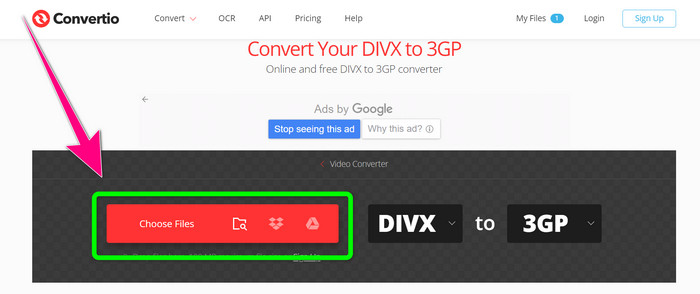
Βήμα 1: Μεταβείτε στον ιστότοπο του Convertio. Κάντε κλικ στο κουμπί Choose Files και προσθέστε το βίντεό σας με μορφή αρχείου DIVX.
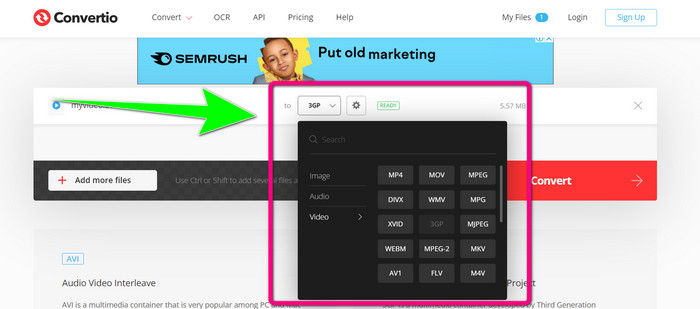
Βήμα 2: Αφού προσθέσετε το βίντεό σας, πηγαίνετε στις επιλογές μορφής και επιλέξτε τη μορφή αρχείου 3GP.
Βήμα 3: Αφού επιλέξετε τη μορφή αρχείου 3GP, κάντε κλικ στο κουμπί Convert, περιμένετε τη διαδικασία μετατροπής και αποθηκεύστε το 3GP βίντεο αρχείο σας.
Μέρος 3: Επισκόπηση των μορφών αρχείων DIVX και 3GP
DIVX
Το DIVX είναι λογισμικό συμπίεσης βίντεο, ικανό να συμπιέζει αρχεία βίντεο έως και στο ένα δωδέκατο του αρχικού βίντεο με ελάχιστη απώλεια ποιότητας. Αυτή η μορφή βίντεο είναι συνηθισμένη σε μεγάλες κινηματογραφικές εταιρείες, όπως οι Disney, Dreamworks SKG, Universal και Paramount.
3GP
Το 3GP είναι ένα πολυμεσικό κοντέινερ. Αναπτύχθηκε το 1998 από το Third Generation Partnership Project για τηλέφωνα βασισμένα σε GSM (Global System for Mobile Communications). Το κοντέινερ 3GP απαιτεί λίγο χώρο αποθήκευσης, χαμηλή χρήση δεδομένων και μικρό εύρος ζώνης, κάτι που είναι ιδανικό για κινητά τηλέφωνα.
Περαιτέρω ανάγνωση
Εύκολη μετατροπή MTV σε MKV με τη βοήθεια αυτών των κορυφαίων μετατροπέων
Πώς να μετατρέψετε TRP σε MKV χωρίς απώλεια ποιότητας
Μέρος 4: Συχνές ερωτήσεις σχετικά με τη μετατροπή DIVX σε 3GP
Τι είναι ένας μετατροπέας DIVX;
Είναι ένα εξαιρετικό εργαλείο, ικανό να μετατρέπει διάφορους τύπους αρχείων σε πολλές άλλες μορφές. Αυτές περιλαμβάνουν AVI, MP4, MPEG, MOV, FLV και άλλες. Μόλις ολοκληρώσετε τη μετατροπή, μπορείτε πλέον να αναπαράγετε το βίντεό σας σε οποιονδήποτε άλλο πρόγραμμα αναπαραγωγής πολυμέσων υποστηρίζει τη συγκεκριμένη μορφή. Το FVC Free Video Converter Online είναι ένας από τους καλύτερους μετατροπείς που μπορείτε να χρησιμοποιήσετε.
Είναι η μορφή αρχείου DIVX ίδια με το AVI;
Η μορφή αρχείου DIVX βασίζεται στο κοντέινερ AVI, αλλά μπορεί να περιέχει εξαιρετικές δυνατότητες όπως κεφάλαια και υπότιτλους. Επιπλέον, και οι δύο μορφές αρχείων AVI και DIVX μπορούν να αναπαραχθούν σε συσκευές με πιστοποίηση DIVX.
Μπορώ να μετατρέψω το αρχείο DIVX σε 3GP χωρίς να χάσω την ποιότητα;
Ναι, φυσικά μπορείτε. Χρησιμοποιώντας το Video Converter Ultimate, μπορείτε να μετατρέψετε το αρχείο DIVX σε 3GP χωρίς να ανησυχείτε αν θα αλλάξει η ποιότητα. Αυτός ο εξαιρετικός μετατροπέας μπορεί να μετατρέπει διάφορα αρχεία χωρίς να χάνεται η ποιότητα του βίντεό σας.
συμπέρασμα
Όπως μπορείτε να δείτε, υπάρχουν διάφορες αποτελεσματικές μέθοδοι για να μετατρέψετε DIVX σε 3GP χρησιμοποιώντας offline και online εργαλεία. Όμως, μερικές φορές, κάποια online εργαλεία είναι άβολα, ειδικά αν έχετε χαμηλή σύνδεση στο διαδίκτυο, οπότε μπορείτε να χρησιμοποιήσετε μια λήψιμη (downloadable) εφαρμογή. Αν αναζητάτε ένα εξαιρετικό offline εργαλείο, μπορείτε να δοκιμάσετε το Video Converter Ultimate.
-
 4 από τους καλύτερους μετατροπείς MKV σε 3GP για Windows και Mac
 Αν ψάχνετε για μετατροπείς MKV σε 3GP που είναι εύκολοι στη χρήση, είστε τυχεροί! Βρήκαμε τους καλύτερους και δωρεάν μετατροπείς MKV σε 3GP που πρέπει να δοκιμάσετε.
-
 5 καλύτεροι τελευταίοι μετατροπείς MOV σε 3GP που δεν πρέπει να χάσετε
 Αν ψάχνετε για τους καλύτερους online και offline μετατροπείς MOV σε 3GP, τότε είστε στο σωστό δρόμο. Διαβάστε αυτό το άρθρο για να μετατρέψετε το MOV σας σε αρχείο 3GP.
-
 3 τρόποι μετατροπής MPG σε 3GP σε Windows και Mac [Δωρεάν]
 Εάν αναζητάτε τρόπους μετατροπής MPG σε 3GP, διαβάστε αυτό το άρθρο για να μάθετε τους καλύτερους τρόπους μετατροπής MPG σε 3GP σε Windows και Mac.
