


 Video Converter Ultimate
 Εγγραφή οθόνης
 Επισκευή βίντεο
Κατανοήστε ποιοι είναι οι μετατροπείς που μπορούν να χρησιμοποιηθούν για τη μετατροπή DivX σε AVI
Το DivX και το AVI δεν είναι ανταγωνιστικά μεταξύ τους, παρόλο που συνδέονται και τα δύο με αρχεία βίντεο· εξακολουθούν όμως να έχουν πολλές διαφορές. Για παράδειγμα, το DivX χρησιμοποιείται για τη συμπίεση του περιεχομένου μεγάλων βίντεο και τη μείωση του μεγέθους τους όσο γίνεται, χωρίς να χάνεται η αξιοπιστία/ποιότητα του ίδιου του βίντεο. Αντίθετα, το AVI είναι ένα από τα παραδείγματα δοχείων (containers) βίντεο που μπορείτε να χρησιμοποιήσετε για να αποθηκεύσετε βίντεο υψηλής ανάλυσης, αλλά με μεγαλύτερο μέγεθος αρχείου. Τώρα λοιπόν έχουμε μια σύντομη εισαγωγή για τα δύο. Ας εμβαθύνουμε για να καταλάβουμε περισσότερα για αυτά και να μάθουμε πώς να μετατρέψετε DivX σε AVI δωρεάν συνεχίζοντας να διαβάζετε αυτό το άρθρο.
Μέρος 1. DivX εναντίον AVI
Όπως αναφέρθηκε προηγουμένως, το DivX και το AVI δεν είναι πραγματικά ανταγωνιστές από μόνοι τους, επειδή μπορούν να χρησιμοποιηθούν τόσο σε ένα αρχείο όσο και στο άλλο. Επιπλέον, το DivX είναι ένας συμπιεστής αρχείων που αναπτύχθηκε από την ίδια την DivX, Inc. Αυτός ο συμπιεστής είναι ιδιόκτητος και λέγεται ότι είναι η επόμενη γενιά ενοικίασης βίντεο DVD. Αλλά τώρα το DivX έχει κλείσει λόγω της αποτυχημένης προσπάθειας αντικατάστασης των DVD. Αλλά τώρα, μπορείτε ακόμα να έχετε πρόσβαση στο εργαλείο και να το παρακολουθήσετε σε ορισμένες παλιές συσκευές αναπαραγωγής πολυμέσων που υποστηρίζουν τον τύπο συμπίεσης που παρέχει το DivX.
Το AVI είναι μια μορφή αρχείου πολυμέσων που χρησιμοποιείται για να «περιέχει» οποιοδήποτε αρχείο βίντεο και ήχου με διαφορετικά codecs. Αυτή η μορφή αναπτύχθηκε από τη Microsoft για να χρησιμοποιείται ως αναπαραγωγή για κάθε ροή βίντεο ή ήχου. Στα τέλη του 1992, δημιουργήθηκε το AVI ώστε να δώσει ώθηση και μια «φουτουριστική» εμπειρία βίντεο και ήχου που προοριζόταν μόνο για λειτουργικά συστήματα Windows. Σήμερα όμως μπορείτε να χρησιμοποιήσετε αρχεία AVI σε Mac ή Linux, ακόμη και στα τηλέφωνά σας. Ωστόσο, υπάρχει ακόμα ένα σημείο στο οποίο η μορφή AVI δεν έχει βελτιωθεί, και αυτό είναι η συμπίεση και το μέγεθος αρχείου.
DivX
◆ Συμπιεστές που χρησιμοποιούνται για να κάνουν το μέγεθος αρχείου ενός κοντέινερ μικρότερο χωρίς να αγγίζει την ποιότητά του.
◆ Είναι αποκλειστικός συμπιεστής της DivX Inc.
◆ Λέγεται ότι ήταν η καλύτερη έκδοση των DVD, αλλά απέτυχε στην προσπάθειά του.
◆ Οι περισσότερες από τις νέες συσκευές αναπαραγωγής πολυμέσων στις μέρες μας δεν υποστηρίζουν DivX.
AVI
◆ Είναι γνωστό ως ένα από τα επαναστατικά δοχεία βίντεο και ήχου σε αυτή τη σύγχρονη εποχή.
◆ Αυτή η μορφή υποστηρίζεται στις περισσότερες πλατφόρμες και λογισμικό.
◆ Δεν υποστηρίζεται ακριβής συμπίεση επειδή είναι χωρίς απώλειες.
Και τώρα που γνωρίζουμε τη διαφορά μεταξύ των δύο, είναι τώρα η κατάλληλη στιγμή να γνωρίσετε τον μετατροπέα DivX σε AVI online και offline που μπορείτε να χρησιμοποιήσετε για να παρακολουθήσετε το αρχείο DivX.
Μέρος 2. 4 από τους καλύτερους μετατροπείς και μάθετε πώς να μετατρέπετε το DivX σε AVI
Κορυφή 1. FVC Video Converter Ultimate
Αν η μετατροπή του DivX σας είναι πρόβλημα, τότε το FVC Video Converter Ultimate είναι η λύση. Σε αντίθεση με πολλούς άλλους converters, αυτό το λογισμικό έχει βελτιωθεί μέσα στα χρόνια και έχει γίνει ένας από τους εντυπωσιακούς μετατροπείς. Εκτός από το ότι είναι από τους καλύτερους, προσφέρει επίσης την πιο γρήγορη διαδικασία μετατροπής που θα ζήσετε, επειδή υποστηρίζει επιτάχυνση υλικού (hardware acceleration) και γρήγορη μετατροπή. Και χάρη στις ενσωματωμένες λειτουργίες του, βρέθηκε εύκολα στην κορυφή. Αν και είναι επί πληρωμή, δεν θα χρειαστεί να ξοδέψετε πολλά για να το χρησιμοποιήσετε. Τώρα λοιπόν, αν θέλετε να μάθετε πώς να μετατρέψετε DivX σε AVI σε Mac ή PC, ακολουθήστε τα βήματα που αναφέρονται παρακάτω καθώς το δοκιμάζουμε κι εμείς.
Βήμα 1. Πρώτα απ’ όλα, πριν καν χρησιμοποιήσετε αυτό το εργαλείο, θα πρέπει να το κατεβάσετε στον υπολογιστή σας. Έπειτα εγκαταστήστε το, κάντε τις ρυθμίσεις και πατήστε Start Now για να συνεχίσετε.
Δωρεάν ΛήψηΓια Windows 7 ή νεότεραΑσφαλής λήψη
Δωρεάν ΛήψηΓια MacOS 10.7 ή νεότεροΑσφαλής λήψη
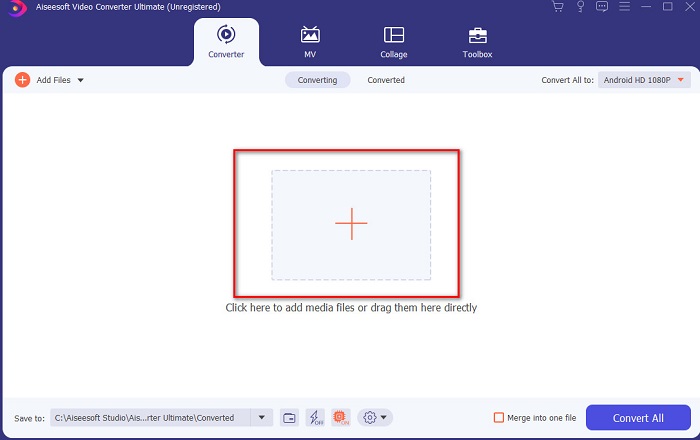
Βήμα 2. Εκκινήστε το εργαλείο για να προχωρήσετε και θα εμφανιστεί μια παρόμοια διεπαφή. Στο κεντρικό μέρος κάντε κλικ στο κουμπί +, εντοπίστε το αρχείο DivX που θέλετε να εισαγάγετε και πατήστε Open.
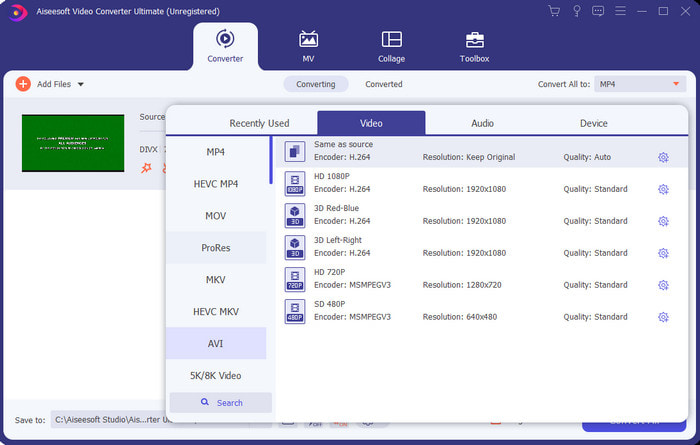
Βήμα 3. Για να αλλάξετε το DivX σε AVI, κάντε κλικ στο Convert All to, εντοπίστε τη μορφή AVI και πατήστε επάνω της.
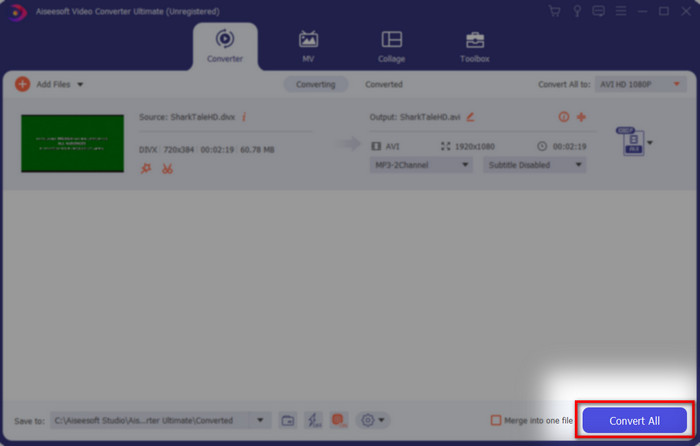
Βήμα 4. Για να ξεκινήσει η διαδικασία μετατροπής, κάντε κλικ στο Convert All και περιμένετε να ολοκληρωθεί.
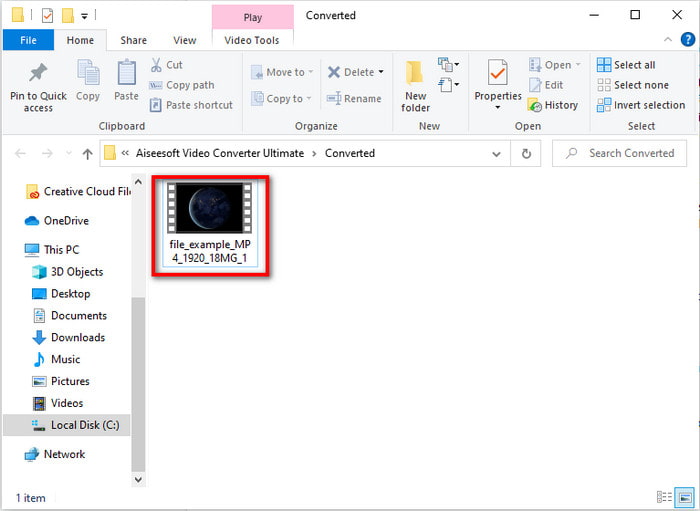
Βήμα 5. Περιμένετε να ολοκληρωθεί η διαδικασία μετατροπής· όταν τελειώσει, θα εμφανιστεί ένας φάκελος στην οθόνη σας με το μετατρεμμένο αρχείο. Πατήστε επάνω του για να το παρακολουθήσετε και να το απολαύσετε.
Top 2. Freemake Video Converter
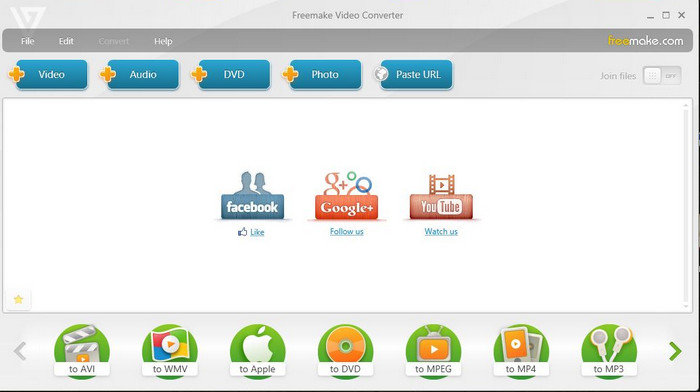
Ένα ακόμη λογισμικό που μπορείτε να κατεβάσετε και να χρησιμοποιήσετε για μετατροπή μορφών είναι το Freemake Video Converter. Αυτό το εργαλείο έχει ήδη βοηθήσει πολλούς χρήστες να μετατρέψουν οποιοδήποτε αρχείο πολυμέσων σε νέα μορφή. Επίσης, θεωρείται ευρέως ως ένα από τα καλύτερα προγράμματα που μπορείτε να κατεβάσετε και να εμπιστευτείτε. Παρότι το εργαλείο είναι καλό, εξακολουθεί να υστερεί σε ορισμένες υποστηριζόμενες μορφές και η διαδικασία μετατροπής του είναι πολύ αργή. Αυτό συμβαίνει επειδή δεν διαθέτει επιτάχυνση υλικού, όπως το FVC Video Converter Ultimate. Επομένως, αν θέλετε να μετατρέψετε DivX σε AVI δωρεάν, αυτό θα μπορούσε να είναι το κατάλληλο λογισμικό για εσάς.
Πλεονεκτήματα
- Δωρεάν λήψη οποιουδήποτε λογισμικού.
- Η εμφάνιση είναι απλή.
Μειονεκτήματα
- Δεν έχει επιτάχυνση υλικού.
- Ορισμένες μορφές δεν υποστηρίζονται εδώ.
Κορυφή 3. Δωρεάν μετατροπέας βίντεο FVC
Τι γίνεται αν θέλετε να μετατρέψετε ένα αρχείο πολυμέσων σε νέα μορφή αλλά δεν θέλετε να κάνετε λήψη προγράμματος; Τότε το FVC Free Video Converter είναι εδώ για να σας βοηθήσει. Σε αντίθεση με τα δύο προηγούμενα εργαλεία, αυτό το εργαλείο είναι προσβάσιμο χωρίς να χρειάζεται να το κατεβάσετε. Αν και το λογισμικό είναι δωρεάν στη χρήση, ορισμένες μορφές δεν υποστηρίζονται. Επίσης, έχετε μόνο περιορισμένες επιλογές μορφών για μετατροπή. Ωστόσο, η διαδικασία μετατροπής είναι πολύ πιο γρήγορη σε σύγκριση με το Freemake Video Converter. Τώρα λοιπόν, αν θέλετε να μάθετε πώς να μετατρέψετε DivX σε AVI online, ακολουθήστε τα παρακάτω βήματα.
Βήμα 1. Μεταβείτε στην κύρια ιστοσελίδα του FVC Free Video Converter κάνοντας κλικ σε αυτόν τον σύνδεσμο.
Βήμα 2. Πατήστε Add Files to Convert για να κατεβάσετε τον εκκινητή (launcher) αν είναι η πρώτη σας φορά. Κι αν ο εκκινητής έχει ήδη εγκατασταθεί, ξαναπατήστε Add Files to Convert, εντοπίστε το αρχείο στο φάκελο, κάντε κλικ πάνω του και πατήστε Open.
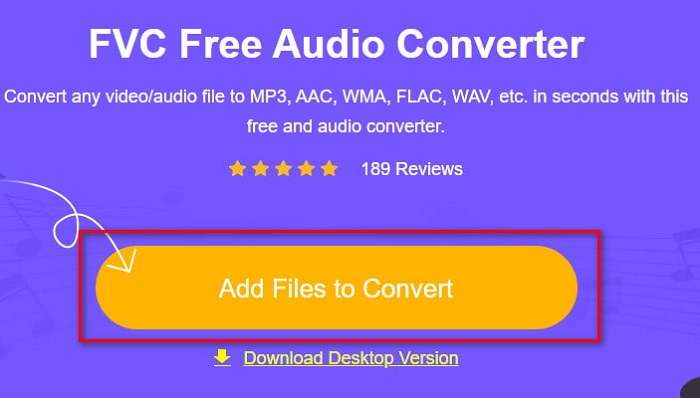
Βήμα 3. Επιλέξτε τη μορφή AVI από τις επιλογές που εμφανίζονται παρακάτω ή όποια άλλη μορφή θέλετε να προκύψει.
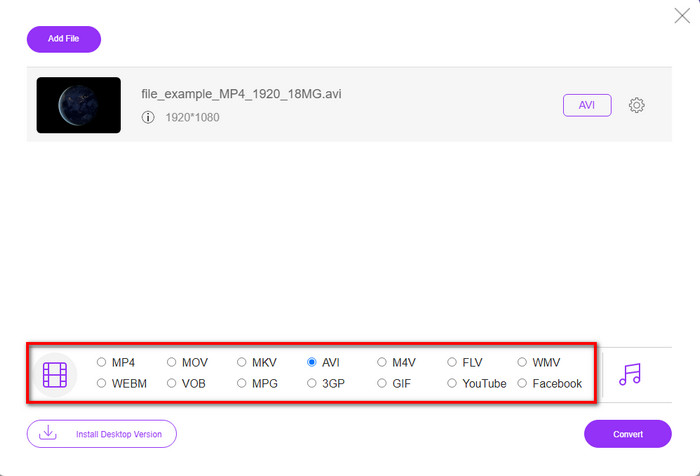
Βήμα 4. Αφού τελειώσετε με την επιλογή της μορφής, ήρθε η ώρα να την αποθηκεύσετε στον δίσκο σας πατώντας Convert.
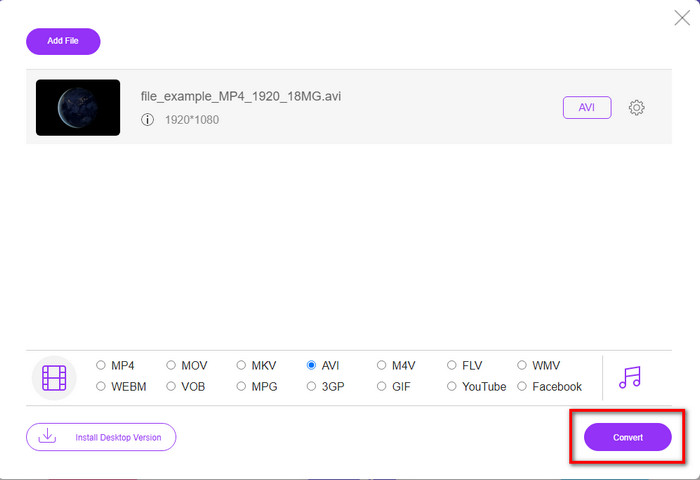
Βήμα 5. Μόλις ολοκληρωθεί η διαδικασία, περιμένετε να εμφανιστεί ο φάκελος του αρχείου στην οθόνη σας. Ανοίξτε το αρχείο κάνοντας κλικ επάνω του και παρακολουθήστε το μετατρεμμένο πολυμεσικό αρχείο.
Top 4. Online-Convert.com
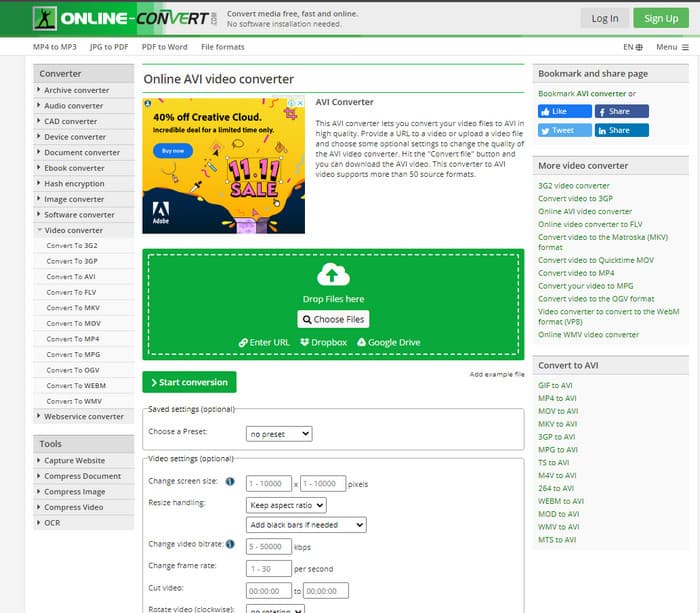
Ένα ακόμη online εργαλείο που μπορείτε να χρησιμοποιήσετε για να μετατρέψετε οποιοδήποτε αρχείο πολυμέσων είναι το Online-Convert.com. Όπως και διάφορα άλλα online εργαλεία, αυτός ο μετατροπέας υποστηρίζει ένα σχετικά μικρό εύρος μορφών. Ωστόσο, διαθέτει ενσωματωμένες ρυθμίσεις επεξεργασίας βίντεο που μπορείτε να χρησιμοποιήσετε, αλλά είναι δύσκολο να τις διαχειριστείτε, ειδικά αν δεν έχετε σχετική εμπειρία. Επιπλέον, το ανέβασμα και το κατέβασμα των αρχείων εδώ είναι πολύ αργό σε σύγκριση με το FVC Free Video Converter.
Πλεονεκτήματα
- Δωρεάν πρόσβαση στον Ιστό.
- Η διεπαφή του εργαλείου είναι εξαιρετική και έχει ελάχιστες έως καθόλου διαφημίσεις.
- Η διαδικασία μετατροπής θα εξαρτηθεί από τη σύνδεση στο διαδίκτυο.
Μειονεκτήματα
- Δεν είναι δυνατή η πρόσβαση χωρίς internet.
- Η διαδικασία εισαγωγής και εξαγωγής θα πάρει πολύ χρόνο σε σύγκριση με τα άλλα εργαλεία.
Μέρος 3. Ποιο είναι το καλύτερο για μετατροπή DivX σε AVI;
| Χαρακτηριστικά | FVC Video Converter Ultimate | Μετατροπέας βίντεο Freemake | Δωρεάν μετατροπέας βίντεο FVC | Online-Convert.com |
| Μετατροπή βίντεο και ήχου |  | | | |
| Μαζική μετατροπή | |  | | |
| Επιτάχυνση υλικού | | | | |
| Εργαλείο που βασίζεται σε πρόγραμμα | Εργαλείο που βασίζεται στην επιφάνεια εργασίας | Εργαλείο που βασίζεται στην επιφάνεια εργασίας | Εργαλείο που βασίζεται στο Web | Εργαλείο που βασίζεται στο Web |
| Συνδεσιμότητα δικτύου | Δεν απαιτείται | Δεν απαιτείται | Απαιτείται | Απαιτείται |
Μέρος 4. Συχνές ερωτήσεις σχετικά με τους μετατροπείς DivX σε AVI
Ποιό είναι καλύτερο? DivX και XviD;
Το DivX είναι ένας πολύ γνωστός ιδιόκτητος κωδικοποιητής για το αρχείο κοντέινερ βίντεο και ήχου και επίσης ειδικεύεται στην αντιγραφή του αρχείου στο δίσκο ενώ συμπιέζεται χωρίς απώλεια ποιότητας. Ενώ το XviD είναι η κορυφαία έκδοση του DivX και είναι κάπως πολύ καλύτερο από το DivX. Επίσης, δεν είναι ιδιόκτητο, πράγμα που σημαίνει ότι ο καθένας μπορεί να το χρησιμοποιήσει όποτε ή ό,τι θέλει.
Τι είναι οι κωδικοποιητές;
Ένας κωδικοποιητής χρησιμοποιείται για τη συμπίεση ενός αρχείου και τη διανομή οποιουδήποτε από τα αρχεία ήχου και βίντεο πολύ πιο γρήγορα σε μικρότερο μέγεθος αρχείου. Επίσης, χρησιμοποιείται για την αποσυμπίεση ενός αρχείου που είναι συνδεδεμένο με τον εν λόγω κωδικοποιητή για να ανοίξει το συμπιεσμένο αρχείο που δημιουργήσατε χωρίς να καταστρέψει την αξιοπιστία του.
Για να έχετε μικρότερο μέγεθος αρχείου, είναι ιδανικό για συμπίεση ή μετατροπή;
Αν θέλετε να διατηρήσετε την ποιότητα ενός βίντεο και να το κάνετε μικρότερο, τότε είναι ιδανικό να το συμπιέσετε με τη βοήθεια αυτού του συνδέσμου. Αν όμως θέλετε έναν πολύ πιο εύκολο τρόπο, τότε θα πρέπει να σκεφτείτε να μετατρέψετε τα βίντεο σε MP4 διαβάζοντας αυτό το άρθρο για να πάρετε μια ιδέα για το πώς να το κάνετε.
συμπέρασμα
Καθώς ολοκληρώνουμε αυτό το άρθρο, είναι πλέον πιο εύκολο για εμάς να γνωρίζουμε τι είναι το DivX και επίσης τι είναι ένα AVI. Επιπλέον, σας παρουσιάσαμε τα 4 χρήσιμα εργαλεία που μπορείτε να χρησιμοποιήσετε για να αναπαράγετε το αρχείο DivX μετατρέποντάς το σε μορφή AVI. Τώρα λοιπόν, αν θέλετε να ζήσετε μια επιτυχία «100%», χρησιμοποιήστε το FVC Video Converter Ultimate για να διασφαλίσετε την επιτυχία.
Δωρεάν ΛήψηΓια Windows 7 ή νεότεραΑσφαλής λήψη
Δωρεάν ΛήψηΓια MacOS 10.7 ή νεότεροΑσφαλής λήψη
-
 [Δωρεάν & Διαδίκτυο] 7 τρόποι για να μετατρέψετε MTS σε AVI σε υπολογιστή Mac/Windows
 Πώς να μετατρέψετε το MTS σε AVI με ευκολία; Σε αυτόν τον οδηγό, θα βρείτε 7 δωρεάν και εύκολους τρόπους μετατροπής αρχείων MTS σε AVI σε Windows ή Mac χωρίς απώλεια ποιότητας.
-
 Εκμάθηση για τη μετατροπή αρχείων MP4 σε αρχεία AVI με 7 δωρεάν μετατροπείς βίντεο
 Θέλετε να αποκτήσετε όλους τους δωρεάν τρόπους μετατροπής βίντεο AVI σε MP4; Δεν πρέπει να χάσετε αυτό το άρθρο. Ακολουθούν 7 τρόποι για να μετατρέψετε αρχεία AVI σε MP4 δωρεάν σε Windows, Mac, iPhone, Android και στο διαδίκτυο.
-
 3 εύκολες μέθοδοι για τη μετατροπή FLV σε AVI σε επιτραπέζιο υπολογιστή και σε απευθείας σύνδεση
 Ακολουθούν τρεις μέθοδοι που θα σας βοηθήσουν να μετατρέψετε αποτελεσματικά τα αρχεία βίντεο FLV σε μορφή AVI σε Windows και Mac, ώστε να μπορείτε να τα παρακολουθείτε με υψηλή ποιότητα.
