


 Video Converter Ultimate
 Εγγραφή οθόνης
 Επισκευή βίντεο
 Ασφαλές κατέβασμα
Οι ευκολότεροι τρόποι για να μετατρέψετε MPG σε DivX στην επιφάνεια εργασίας σας
Θέλετε να μετατρέψετε γρήγορα το αρχείο MPG σας σε DivX; Τότε υπάρχουν εφαρμογές που μπορείτε να χρησιμοποιήσετε για να μετατρέψετε διάφορες μορφές αρχείων. Στις μέρες μας, όπως παρατηρούμε, τα διαφορετικά βίντεο έχουν ποικίλες μορφές αρχείων. Ωστόσο, υπάρχουν περιπτώσεις όπου ορισμένες μορφές δεν είναι συμβατές με άλλες συσκευές. Έτσι, αυτό που πρέπει να κάνετε είναι να βρείτε έναν μετατροπέα που να είναι ικανός να μετατρέπει ένα συγκεκριμένο αρχείο σε άλλη μορφή. Με αυτόν τον τρόπο, μπορείτε να βεβαιωθείτε ότι το βίντεό σας μπορεί να αναπαραχθεί στη συσκευή σας, επειδή πλέον είναι συμβατό και ιδανικό. Για να μετατρέψετε το αρχείο MPG σε αρχείο DivX, πρέπει να διαβάσετε προσεκτικά αυτό το άρθρο, ώστε να αποκτήσετε μια ιδέα ποια εφαρμογή ή ποιον μετατροπέα πρέπει να χρησιμοποιήσετε.

Μέρος 1: Μετατροπή MPG σε DivX χωρίς απώλεια ποιότητας
Αν αναζητάτε μια εξαιρετική και αξιόπιστη εφαρμογή για να μετατρέψετε MPG σε DivX, τότε το Video Converter Ultimate είναι η εφαρμογή που μπορείτε να αξιοποιήσετε. Αυτή η εφαρμογή σάς επιτρέπει να μετατρέψετε το αρχείο MPG σε μορφή αρχείου DivX. Αλλά δεν περιορίζεται μόνο σε αυτές τις δύο μορφές. Μπορεί επίσης να μετατρέψει διάφορες μορφές αρχείων, όπως FLV, MP4, MKV, MOV, VOB, DIVX, OGV, XVID και πολλές ακόμη. Επίσης, το Video Converter Ultimate είναι διαθέσιμο τόσο για Mac όσο και για Windows. Επιπλέον, δεν χρειάζεται να ανησυχείτε για την ποιότητα του βίντεό σας, επειδή μπορείτε να μετατρέπετε τα αρχεία σας χωρίς απώλεια ποιότητας με αυτή την εφαρμογή. Ακόμη, είναι μια απλή και εύχρηστη εφαρμογή, ιδανική και κατάλληλη για αρχάριους που θέλουν να μετατρέπουν αρχεία. Όσον αφορά τη διαδικασία μετατροπής, η εφαρμογή αυτή μπορεί να μετατρέψει το αρχείο σας πολύ γρήγορα, ώστε να μην χρειάζεται να περιμένετε πολλή ώρα. Μπορείτε, επίσης, να χρησιμοποιήσετε αυτό το λογισμικό για μαζική μετατροπή πολλών αρχείων. Επιπλέον, δεν είναι μόνο αξιόπιστη στη μετατροπή διαφορετικών αρχείων. Αυτή η εφαρμογή διαθέτει και πολλά εργαλεία επεξεργασίας, όπως ενίσχυση έντασης ήχου, αντιστροφή βίντεο, περικοπή βίντεο, διόρθωση χρωμάτων, συγχώνευση βίντεο, αφαίρεση υδατογραφήματος, δημιουργία GIF και πολλά άλλα. Αν θέλετε να μετατρέψετε MPG σε DivX στα Windows και στο Mac, ακολουθήστε τα απλά βήματα παρακάτω.
Βήμα 1: Μεταβείτε στην ιστοσελίδα του Video Converter Ultimate και κατεβάστε την εφαρμογή. Στη συνέχεια, προχωρήστε στη διαδικασία εγκατάστασης και εκκινήστε την εφαρμογή.
Δωρεάν ΛήψηΓια Windows 7 ή νεότεραΑσφαλής λήψη
Δωρεάν ΛήψηΓια MacOS 10.7 ή νεότεροΑσφαλής λήψη
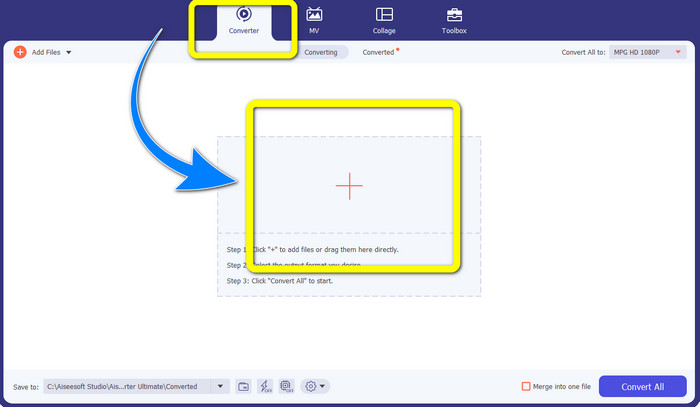
Βήμα 2: Αφού ανοίξετε το Video Converter Ultimate, μεταβείτε στην καρτέλα Converter. Έπειτα, επιλέξτε το κουμπί με το σύμβολο Plus και επισυνάψτε το αρχείο MPG που θέλετε να μετατρέψετε σε αρχείο DivX.
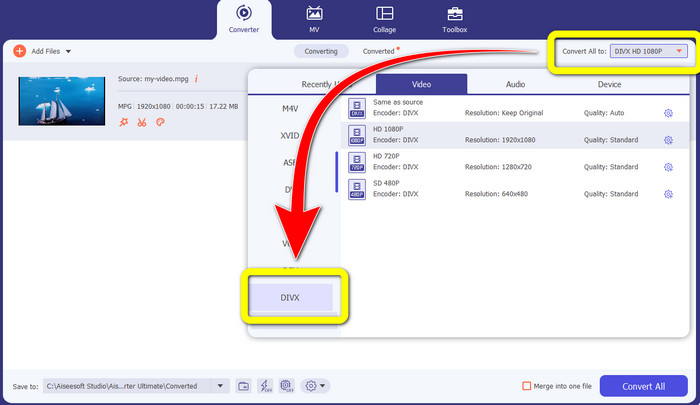
Βήμα 3: Αφού εισαγάγετε το αρχείο MPG, προχωρήστε στο κουμπί Convert All to και επιλέξτε το αρχείο DIVX από τις επιλογές μορφής. Μπορείτε επίσης να διαλέξετε την ποιότητα που προτιμάτε.
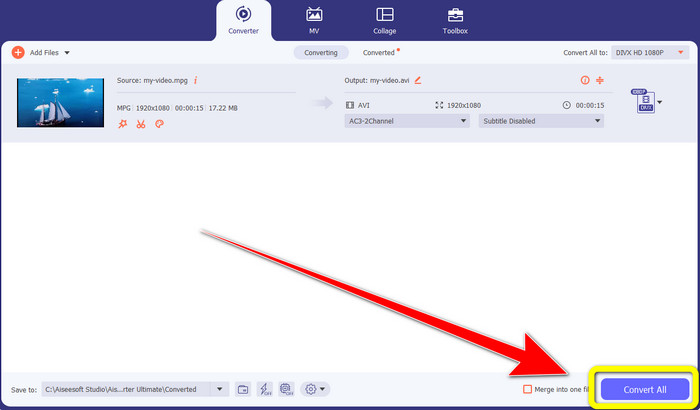
Βήμα 4: Όταν ολοκληρώσετε την επιλογή της μορφής αρχείου DIVX, κάντε κλικ στο κουμπί Convert All και αποθηκεύστε το βίντεό σας σε μορφή DIVX. Αυτός είναι ο πιο εύκολος τρόπος για να μετατρέψετε το αρχείο MPG σας σε αρχείο DIVX σε Mac και Windows.
Μέρος 2: Μετατροπή MPG σε DivX Online δωρεάν
Χρησιμοποιώντας το Media.io
Αν σας ενδιαφέρει να αναζητήσετε δωρεάν online μετατροπείς από MPG σε DIVX, τότε ένα από τα διαδικτυακά εργαλεία που μπορείτε να χρησιμοποιήσετε είναι το Media.io. Αυτό το λογισμικό μπορεί να μετατρέψει διάφορους τύπους αρχείων, όπως βίντεο, ήχο, εικόνες και άλλα. Υποστηρίζει διαφορετικές μορφές αρχείων βίντεο, όπως MP4, AVI, MKV, WMV, MPEG2, FLV, XVID, M4V κ.λπ. Επομένως, μπορείτε να το χρησιμοποιήσετε και ως μετατροπέα MPEG σε DivX. Επιπλέον, το Media.io δεν είναι μόνο ικανό να μετατρέπει διαφορετικές μορφές αρχείων. Διαθέτει επίσης πολλά εργαλεία για την επεξεργασία των βίντεό σας, όπως αφαίρεση υδατογραφήματος, περικοπή βίντεο, περικοπή κάδρου, συγχώνευση βίντεο, αλλαγή ταχύτητας, δημιουργία slideshow και άλλα. Δυστυχώς, αυτή η δωρεάν έκδοση έχει περιορισμούς. Κατά τη μετατροπή διαφορετικών αρχείων, μπορείτε να ανεβάσετε μόνο μέχρι το μέγιστο μέγεθος των 100 Mb, κάτι που δεν είναι καλό αν θέλετε να μετατρέψετε πολλά αρχεία. Αν θέλετε να μετατρέπετε περισσότερα και να απολαμβάνετε πιο ικανοποιητικές λειτουργίες αυτής της εφαρμογής, πρέπει να αγοράσετε συνδρομή. Επίσης, η διαδικασία μετατροπής είναι αργή και χρειάζονται λίγα λεπτά για να μετατραπεί το αρχείο σας, κάτι που δεν είναι βολικό για άτομα που θέλουν να μετατρέψουν πολλά αρχεία. Αν θέλετε να μετατρέψετε MPG σε DIVX online δωρεάν, ακολουθήστε τα παρακάτω εύκολα βήματα.
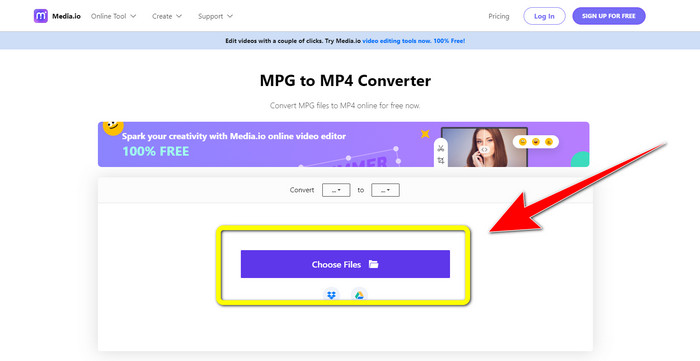
Βήμα 1: Επισκεφθείτε την ιστοσελίδα του Media.io. Έπειτα, κάντε κλικ στο κουμπί Choose Files για να εισαγάγετε το βίντεό σας με αρχείο MPG.
Βήμα 2: Αφού επισυνάψετε το αρχείο MPG, μεταβείτε στο Convert και αναζητήστε το αρχείο DIVX στις επιλογές μορφής και επιλέξτε το.
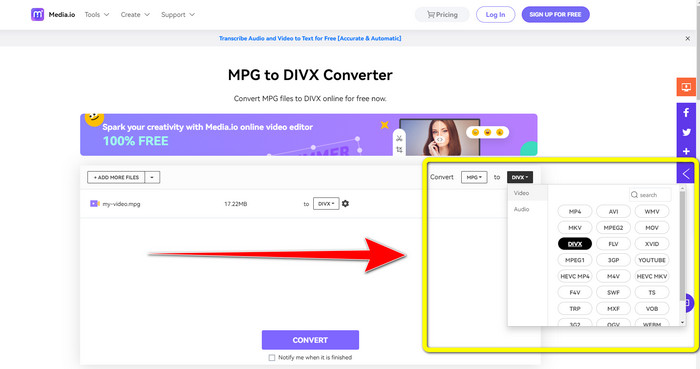
Βήμα 3: Όταν επιλέξετε τη μορφή αρχείου DIVX για το βίντεό σας, κάντε κλικ στο κουμπί Convert και αποθηκεύστε το τελικό αποτέλεσμα.
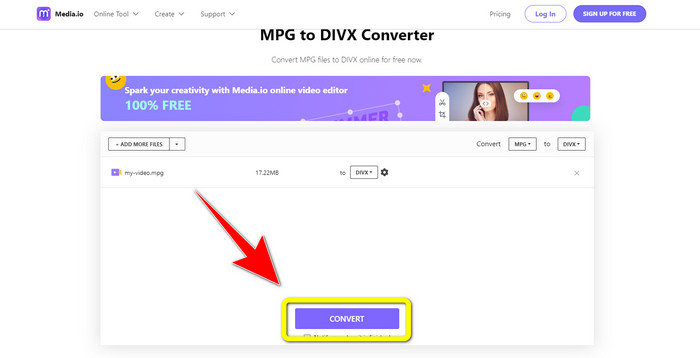
Χρησιμοποιώντας το FileProInfo
Μια ακόμη εφαρμογή που μπορείτε να χρησιμοποιήσετε για να μετατρέψετε MPG σε DIVX online είναι το FileProInfo. Αυτή η διαδικτυακή εφαρμογή μπορεί να σας βοηθήσει να μετατρέψετε το βίντεό σας με αρχείο MPG σε αρχείο DIVX. Υποστηρίζει επίσης διάφορες μορφές αρχείων, όπως 3GP, AAC, M4A, M4R, M4V, AVI, AMR, MP4, VOC, VOB και πολλές ακόμη μορφές βίντεο. Έτσι, μπορείτε να το χρησιμοποιήσετε για να μετατρέψετε 3GP σε DivX. Επιπλέον, μπορείτε να μετατρέπετε αρχεία δωρεάν. Είναι απλό και εύκολο στη χρήση για μετατροπές. Ακόμη, το FileProInfo είναι ένα εργαλείο που μπορείτε να χρησιμοποιείτε online, ενώ μπορείτε επίσης να κατεβάσετε την εφαρμογή στον υπολογιστή σας. Επιπλέον, μπορείτε να κάνετε περισσότερα πράγματα με αυτή την εφαρμογή, όπως έλεγχο λογοκλοπής, προβολή αρχείων, συγχώνευση, διαχωρισμό, επεξεργασία και άλλα. Το FileProInfo είναι κατάλληλο για αρχάριους, ειδικά για τη μετατροπή διαφορετικών μορφών αρχείων. Ωστόσο, αυτό το online εργαλείο είναι αρκετά περίπλοκο όσον αφορά την επεξεργασία βίντεο. Διαθέτει ορισμένες λειτουργίες που είναι προχωρημένες και δύσκολες στην κατανόηση, κάτι που δεν είναι ιδανικό για αρχάριους. Επίσης, η διαδικασία μετατροπής από MPG σε Div είναι πολύ χρονοβόρα. Αν θέλετε να μετατρέψετε online το βίντεό σας με αρχείο MPG σε αρχείο DIVX, ακολουθήστε τα απλά βήματα παρακάτω.
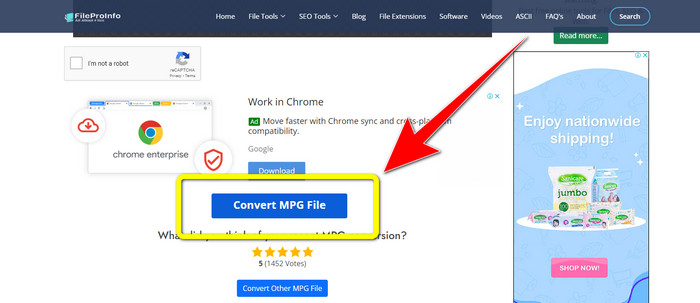
Βήμα 1: Επισκεφτείτε την ιστοσελίδα του FileProInfo. Έπειτα, κάντε κλικ στο κουμπί Select MPG File για να επισυνάψετε το βίντεό σας με αρχείο MPG.
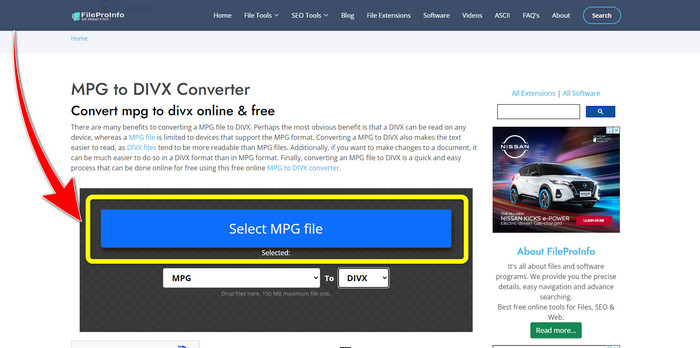
Βήμα 2: Αφού προσθέσετε το βίντεο MPG, αναζητήστε τις format options και κάντε κλικ στο αρχείο DIVX.
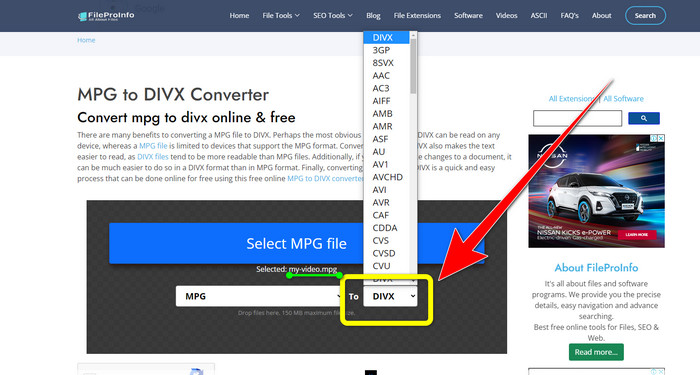
Βήμα 3: Αφού κάνετε κλικ στο αρχείο DIVX, μετακινηθείτε λίγο πιο κάτω και κάντε κλικ στο κουμπί Convert MPG File.
Μέρος 3: Εκτεταμένη γνώση MPG και DivX
Τι είναι το MPG;
Το αρχείο MPG είναι μια μορφή που χρησιμοποιεί μια ψηφιακή μορφή αρχείου. Επίσης, τυποποιήθηκε από το Moving Pictures Expert Group. Τέλος, αυτή η μορφή αρχείου χρησιμοποιήθηκε συνήθως σε ταινίες και διανεμήθηκε στο Διαδίκτυο.
Τι είναι το DIVX;
Το DIVX είναι ένας κωδικοποιητής βίντεο υψηλής ποιότητας και υψηλής συμπίεσης που μπορείτε να χρησιμοποιήσετε για τον ψηφιακό κωδικοποιητή. Επίσης, ταξινομήθηκε ως αρχείο βίντεο. Είναι επίσης ακατάλληλο για προγράμματα Windows. Επιπλέον, συμπιέζει ένα βίντεο σε ένα κλάσμα του αρχικού του μεγέθους με μικρή απώλεια ποιότητας.
Μέρος 4: Συχνές ερωτήσεις σχετικά με τη μετατροπή MPG σε DivX
Ποιο είναι το πλεονέκτημα της μετατροπής ενός αρχείου MPG σε αρχείο DIVX;
Ένα από τα πλεονεκτήματα της μετατροπής ενός αρχείου MPG σε αρχείο DIVX είναι ότι η μορφή DIVX είναι ευρύτερα αποδεκτή στα προγράμματα από το αρχείο MPG.
Τι πρόγραμμα περιήγησης μπορώ να χρησιμοποιήσω για να μετατρέψω MPG σε DIVX;
Δεν χρειάζεται να ταλαιπωρηθείτε γιατί πλέον μπορείτε να χρησιμοποιήσετε σχεδόν όλα τα προγράμματα περιήγησης για να μετατρέψετε αρχεία MPG σε DIVX στο Google Chrome, Firefox, Safari, Opera και πολλά άλλα.
Υπάρχει μετατροπέας που έχει διαδικασία μετατροπής ταχύτητας;
Ναι υπάρχει! Αν ψάχνετε για μια εφαρμογή ή μετατροπέα με διαδικασία μετατροπής ταχύτητας, μπορείτε να χρησιμοποιήσετε το Video Converter Ultimate. Μπορείτε να μετατρέψετε αρχεία σε λίγα δευτερόλεπτα, σε αντίθεση με τις άλλες εφαρμογές που χρειάζονται πολύ χρόνο για τη μετατροπή.
συμπεράσματα
Όπως φαίνεται παραπάνω, μπορείτε εύκολα να μετατρέψετε MPG σε DivX χρησιμοποιώντας προγράμματα που κατεβάζετε ή online εργαλεία. Η μετατροπή αρχείων σε άλλες μορφές είναι απαραίτητη, ειδικά όταν το αρχείο δεν είναι κατάλληλο για κάποιο πρόγραμμα ή συσκευή. Αν θέλετε να μετατρέψετε διάφορους τύπους αρχείων, μπορείτε να χρησιμοποιήσετε το Video Converter Ultimate.
-
 Πώς να μετατρέψετε το GIF σε DivX με έναν απλό και ευκολότερο τρόπο
 Θέλετε να μετατρέψετε το GIF σας σε μορφή αρχείου Divx; Θα δείξουμε έναν εξαιρετικό μετατροπέα που μπορείτε να χρησιμοποιήσετε για να μετατρέψετε GIF σε DivX.
-
 Εύκολες στην εκμάθηση μέθοδοι για το πώς να μετατρέψετε το Xvid σε DivX
 Αναζητάτε την καλύτερη λύση για να μετατρέψετε το Xvid σε DivX δωρεάν; Αυτό το άρθρο θα σας βοηθήσει να λύσετε το πρόβλημά σας. Διαβάστε λοιπόν την ανάρτηση συνέχεια.
-
 Πώς να μετατρέψετε το M4V σε DivX δωρεάν σε Mac [Best Tools&93;
 Ψάχνετε τρόπους για να μετατρέψετε το M4V σε DivX δωρεάν; Παραθέσαμε τους καλύτερους μετατροπείς για να μετατρέψετε το αρχείο M4V σε DivX σε Mac.
