


 Video Converter Ultimate
 Εγγραφή οθόνης
 Επισκευή βίντεο
Πώς να μετατρέψετε το MTV σε AVI με υψηλή ποιότητα: Καλύτερες προσεγγίσεις που πρέπει να γνωρίζετε
AVI (Audio Video Interleave) είναι ένα δοχείο βίντεο που περιέχει και κωδικοποιεί τόσο δεδομένα ήχου όσο και βίντεο. Παρόλο που προσφέρει μικρότερη ισχύ συμπίεσης από ορισμένους ανταγωνιστές του, τα περισσότερα DVD players μπορούν να αναπαράγουν αρχεία σε αυτό το δοχείο. Ο κωδικοποιητής AVI είναι απαραίτητος για να μπορούν τα προγράμματα αναπαραγωγής πολυμέσων να απο-κωδικοποιούν δεδομένα AVI. Αυτός ο τύπος αρχείου βίντεο υποστηρίζεται σχεδόν από κάθε video player και πρόγραμμα επεξεργασίας βίντεο. Ωστόσο, η μορφή βίντεο MTV δεν είναι τόσο διαδεδομένη στη χρήση ούτε και στις μετατροπές σε άλλες μορφές. Αν αναρωτιέστε πώς μπορείτε να μετατρέψετε αρχεία MTV σε AVI, συνεχίστε να διαβάζετε το άρθρο για να μάθετε περισσότερα για αυτές τις δύο μορφές.

Μέρος 1. Πώς να μετατρέψετε το MTV σε AVI σε Windows και Mac
Υπάρχουν πολλοί διαφορετικοί τρόποι για να μετατρέψετε αρχεία MTV σε AVI και αυτό διαφέρει ανάλογα με τον σκοπό. Μπορείτε να κατεβάσετε μια εφαρμογή, να χρησιμοποιήσετε ένα online εργαλείο ή να εγκαταστήσετε ένα πρόγραμμα. Αλλά έχετε σκεφτεί ποτέ ένα λογισμικό που να μπορεί να μετατρέπει πολλαπλές μορφές βίντεο με τον πιο γρήγορο τρόπο; Το Video Converter Ultimate είναι το λογισμικό που σας προτείνει αυτό το άρθρο, όχι μόνο επειδή είναι ο πιο γρήγορος μετατροπέας που διατίθεται δωρεάν για λήψη. Διαθέτει πολλά ενσωματωμένα εργαλεία που μπορούν να φανούν χρήσιμα στην επεξεργασία βίντεο. Ένα από τα κύρια χαρακτηριστικά του, που δύσκολα θα βρείτε σε άλλες εφαρμογές ή online εργαλεία, είναι ότι υποστηρίζει ποικιλία μορφών, συμπεριλαμβανομένης της μετατροπής από MTV σε AVI. Αν ακόμη δεν σας έχει κεντρίσει το ενδιαφέρον, διαβάστε τις παρακάτω πληροφορίες για να μάθετε περισσότερα για το λογισμικό:
Βήμα 1. Για να ξεκινήσετε, κάντε κλικ στο κουμπί Free Download παρακάτω για να αρχίσει η διαδικασία λήψης. Έχετε τη δυνατότητα να κατεβάσετε το λογισμικό για Windows ή Mac, αν το προτιμάτε, μόλις ολοκληρωθεί η λήψη. Πριν απλώς εκτελέσετε το πρόγραμμα, πρέπει να το εγκαταστήσετε στην επιφάνεια εργασίας του υπολογιστή σας και να κάνετε κλικ στο Start Now για να ξεκινήσετε.
Δωρεάν ΛήψηΓια Windows 7 ή νεότεραΑσφαλής λήψη
Δωρεάν ΛήψηΓια MacOS 10.7 ή νεότεροΑσφαλής λήψη
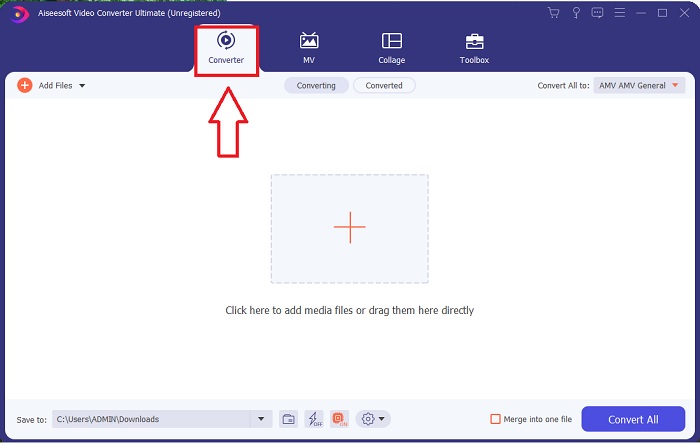
Βήμα 2. Εκκινήστε την εφαρμογή που κατεβάσατε. Όταν ανοίξετε για πρώτη φορά το πρόγραμμα, θα εμφανιστεί ένα παράθυρο με την διεπαφή Converter. Εκεί θα εισάγετε το αρχείο βίντεο και θα ξεκινήσετε τη μετατροπή.
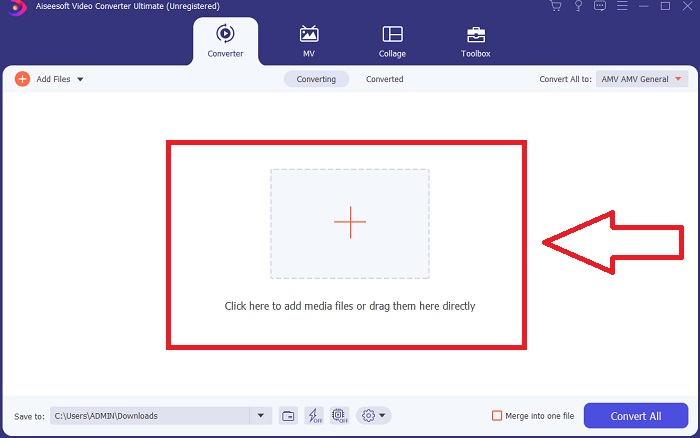
Βήμα 3. Εισαγάγετε τα αρχεία σας στον μετατροπέα για να ξεκινήσει η διαδικασία μετατροπής. Σύρετε και αποθέστε το αρχείο βίντεο που θέλετε να μετατρέψετε επάνω στο εικονίδιο +.
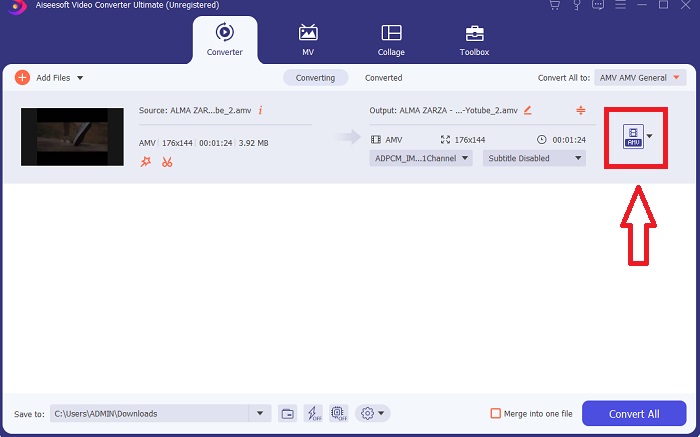
Βήμα 4. Επιλέξτε μια μορφή βίντεο από τη λίστα στην επάνω δεξιά γωνία της οθόνης. Βρείτε και ανοίξτε το αναπτυσσόμενο μενού Convert All to και στη συνέχεια επιλέξτε τη μορφή AVI από τη λίστα κατηγοριών βίντεο. Ωστόσο, αν η προτιμώμενη έξοδος βίντεο δεν εμφανίζεται, μπορείτε να αλλάξετε τις ρυθμίσεις ποιότητας ώστε να καλύπτουν τις ανάγκες σας. Μπορείτε να τροποποιήσετε την ανάλυση προβολής, τον ρυθμό καρέ και ακόμη και την ποιότητα ήχου κάνοντας κλικ στο εικονίδιο με το γρανάζι. Για να αποθηκεύσετε τις αλλαγές σας, κάντε κλικ στο κουμπί Create New.
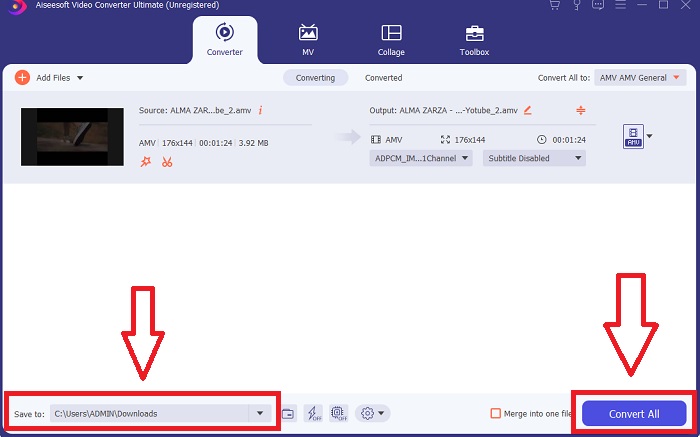
Βήμα 5. Μόλις ολοκληρώσετε την επεξεργασία του βίντεο και είναι έτοιμο για μετατροπή, κάντε κλικ στο Convert All για να ξεκινήσει η διαδικασία αποθήκευσής του στον υπολογιστή σας.
Μέρος 2. Πώς να μετατρέψετε το MTV σε AVI Online
Μέθοδος 1: Online-Convert.com
Χρησιμοποιώντας αυτόν τον δωρεάν διαδικτυακό μετατροπέα αρχείων, μπορείτε εύκολα και γρήγορα να μετατρέψετε τα πολυμέσα σας από τη μια μορφή στην άλλη. Μπορούν να μετατραπούν πολλές μορφές χρησιμοποιώντας αυτό το εργαλείο web, καθώς και ένα ευρύ φάσμα προορισμών. Για περαιτέρω εξηγήσεις, ακολουθούν τα βήματα που παρέχονται για εσάς:
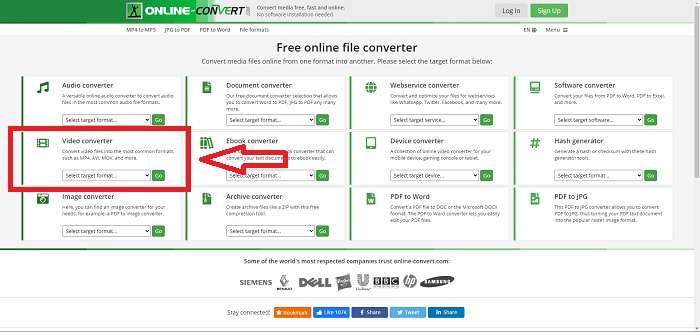
Βήμα 1. Αναζητήστε το online-convert σε οποιαδήποτε μηχανή αναζήτησης και κάντε κλικ στο web tool. Αφού κάνετε κλικ στο web tool, θα εμφανιστεί η διεπαφή του. Οι διαφορετικές διαδικασίες μετατροπής αρχείων θα αποτελούν τις επιλογές σας. Επιλέξτε Video Converter αν θέλετε να μετατρέψετε MTV σε AVI· αφού αποφασίσετε, επιλέξτε Convert to AVI και συνεχίστε κάνοντας κλικ στο Go.
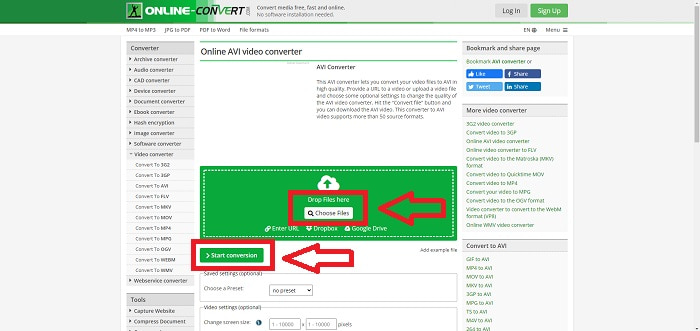
Βήμα 2. Μετά τη συνέχεια της διαδικασίας, θα εμφανιστεί μια ακόμη διεπαφή. Κάντε κλικ στο Choose Files για να ανεβάσετε το αρχείο που θέλετε να μετατρέψετε. Περιμένετε για λίγο – ανάλογα με το μέγεθος του αρχείου – για να επεξεργαστεί το βίντεό σας. Στη συνέχεια, κάντε κλικ στο Start Conversion για να μετατρέψετε το αρχείο σας σε AVI.
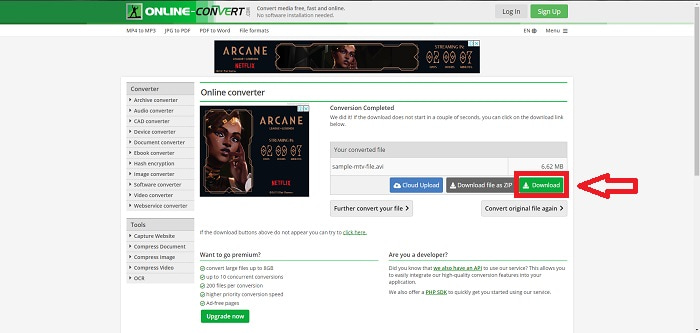
Βήμα 3. Για να ξεκινήσει η λήψη του μετατρεμένου αρχείου, κάντε κλικ στο Download.
Μέθοδος 2: Video-Converter.com
Χρησιμοποιήστε αυτόν τον δωρεάν διαδικτυακό μετατροπέα βίντεο για να τροποποιήσετε τις ρυθμίσεις βίντεο όπως η μορφή, η ανάλυση και το μέγεθος βίντεο στο πρόγραμμα περιήγησής σας. Για να μάθετε περισσότερα σχετικά με αυτό το διαδικτυακό εργαλείο ιστού, ακολουθούν οι διαδικασίες που πρέπει να γνωρίζετε:
Βήμα 1. Ανοίξτε τον video converter σε οποιαδήποτε μηχανή αναζήτησης. Κάντε κλικ στο κύριο web tool και θα εμφανιστεί ένα νέο παράθυρο. Στην κεντρική διεπαφή θα δείτε ήδη ολόκληρη τη διαδικασία μετατροπής. Για να ξεκινήσετε, κάντε κλικ στο Open File για να εισαγάγετε οποιοδήποτε αρχείο βίντεο θέλετε να μετατρέψετε.
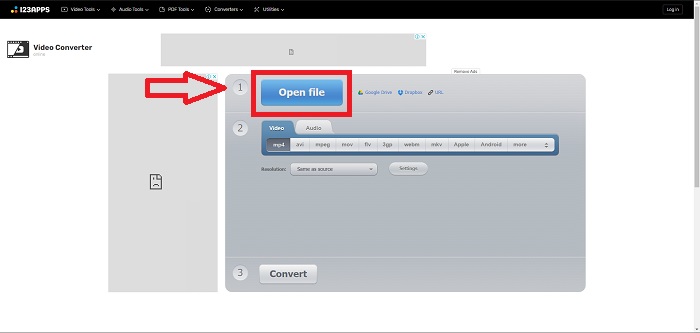
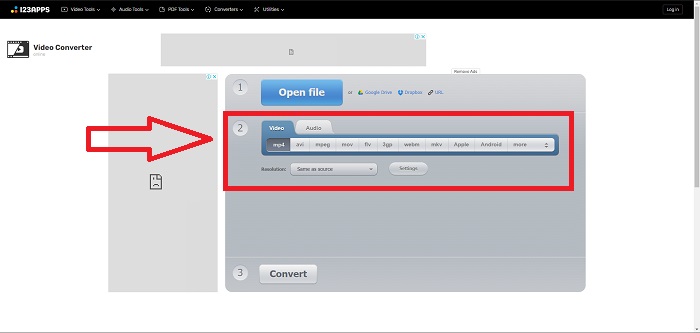
Βήμα 2. Επιλέξτε τη μορφή στην οποία θέλετε να μετατρέψετε το βίντεό σας από όλες τις διαθέσιμες μορφές βίντεο. Εφόσον θα μετατρέψετε MTV σε AVI, επιλέξτε AVI. Μπορείτε να επεξεργαστείτε την ανάλυση και την έξοδο του βίντεο κάνοντας κλικ στο Same as Source ή στο Settings.
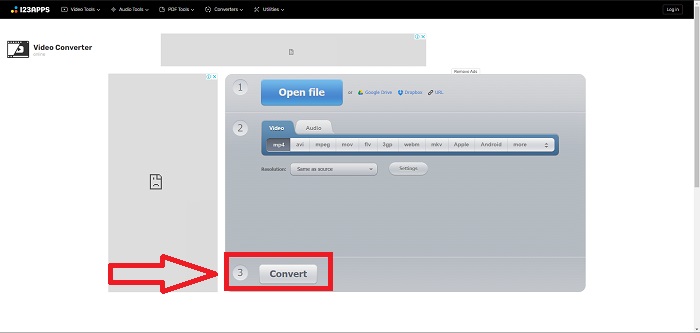
Βήμα 3. Μετατρέψτε το αρχείο κάνοντας κλικ στο Convert. Αφού μετατρέψετε το αρχείο, μπορείτε πλέον να το κατεβάσετε κάνοντας κλικ στο κουμπί Download μετά τη μετατροπή.
Μέρος 3. Ενδιαφέροντα γεγονότα για το MTV και το AVI
Τι είναι το AVI;
Αυτός ο τύπος αρχείου, επίσης γνωστός ως Audio Video Interleaved (AVI), συνδυάζει δεδομένα ήχου και βίντεο σε ένα ενιαίο αρχείο ώστε να αναπαράγονται ταυτόχρονα. Χρησιμοποιείται κυρίως ως χώρος αποθήκευσης για ηλεκτρονικά μέσα, όπως τηλεοπτικά προγράμματα, ταινίες και άλλες βιντεοσκοπήσεις. Μετά την κυκλοφορία των Windows 3.1, το AVI άρχισε να χρησιμοποιείται ευρέως. Το βίντεο και ο ήχος συνδυάζονται με ένα ισχυρό αλγόριθμο συμπίεσης, που σήμερα αποτελεί το συμβατικό πρότυπο για την αποθήκευση ταινιών σε υπολογιστές με Windows. Οι εικόνες και ο ήχος μπορούν να διατηρηθούν σε υψηλή πιστότητα, παρόλο που το βίντεο AVI δεν είναι απολύτως χωρίς απώλειες. Αντίθετα, το AVI καταναλώνει πολύ χώρο μνήμης, μερικές φορές όσο και ένα DVD για αποθήκευση. Πιθανότατα γι’ αυτό εμφανίστηκε στη συνέχεια το MPEG-1 και στη συνέχεια, μέχρι σήμερα, το MPEG-4.
Τι είναι το MTV;
Η συντριπτική πλειοψηφία των αρχείων MTV είναι ιδιοκτησία του MTV. Η μορφή αρχείου MTV δημιουργήθηκε για να επιτρέπει την αναπαραγωγή βίντεο σε χαμηλού κόστους φορητές συσκευές αναπαραγωγής MP4 κινεζικής κατασκευής χωρίς αύξηση της τιμής αυτών των συσκευών με δικαιώματα άδειας χρήσης και περισσότερη ισχύ επεξεργαστή. Το MP4 Watch είναι ένα προϊόν που χρησιμοποιεί αυτή τη μορφή αρχείου.
Μέρος 4. Συχνές ερωτήσεις σχετικά με το MTV και το AVI
Είναι το AVI υψηλής ποιότητας;
Το AVI είναι μια μορφή βίντεο υψηλής ευκρίνειας που αναπτύχθηκε από τη Microsoft. Υποστηρίζεται από το YouTube και σας επιτρέπει να παρακολουθείτε τηλεόραση στον υπολογιστή σας. Το βίντεο υψηλής ευκρίνειας απαιτεί μια συγκεκριμένη μορφή κωδικοποίησης βίντεο που ονομάζεται Advanced Video Coding HD.
Πού χρησιμοποιείται συνήθως το AVI;
Από τη δημιουργία της Microsoft τον Νοέμβριο του 1992, η μορφή αρχείου AVI χρησιμοποιείται ευρέως για τη μετάδοση και αποθήκευση δεδομένων βίντεο και ήχου. Τα αρχεία AVI μπορούν να αναπαραχθούν σε ένα ευρύ φάσμα λειτουργικών συστημάτων, συμπεριλαμβανομένων των Windows, Mac OS X, Linux και Unix, χάρη στον υψηλό βαθμό συμβατότητάς τους.
Πώς μπορώ να μετατρέψω ένα βίντεο σε μορφή MTV;
Χρησιμοποιώντας το AVS Video Converter, μπορείτε να μεταβείτε στο Main Toolbar, να μεταβείτε στην καρτέλα Formats και να κάνετε κλικ στο κουμπί To MTV. Μπορείτε να αναζητήσετε ένα αρχείο εισόδου κάνοντας κλικ στο κουμπί Αναζήτηση στη γραμμή εργαλείων στο επάνω μέρος. Κάντε κλικ στο κάτω κουμπί Αναζήτηση και πληκτρολογήστε το όνομα του αρχείου εξόδου που θέλετε να δημιουργήσετε. Αποφασίστε για την εμφάνιση και την αίσθηση του MTV δημιουργώντας έναν λογαριασμό στο MTV.
συμπέρασμα
Συμπερασματικά, υπάρχει πάντα μια διαφορά μεταξύ διαδικτυακού και λογισμικού που πρέπει να κατεβάσετε πρώτα πριν το χρησιμοποιήσετε. Υπάρχουν πλεονεκτήματα και μειονεκτήματα στις διάφορες πλευρές, αλλά συνιστούμε να χρησιμοποιήσετε το Video Converter Ultimate για την ευκολία και την ποιότητα της βασικής γραμμής εξόδου. Με αυτό, μπορείτε να δοκιμάσετε τον επαγγελματικό μετατροπέα και τον επεξεργαστή ταυτόχρονα σε ένα λογισμικό.
-
 Πώς να μετατρέψετε TS σε AVI / MKV / MOV / WMV Online & Δωρεάν σε Win / Mac
 Θέλετε να μετατρέψετε γρήγορα αρχεία TS σε AVI / MKV / MOV / WMV; Αυτό το άρθρο εμφανίζει μετατροπείς βίντεο στο διαδίκτυο και εκτός σύνδεσης με πλήρη οδηγό. Ίσως μπορείτε να αποκτήσετε τον καλύτερο δωρεάν μετατροπέα TS εδώ.
-
 4 αποτελεσματικοί τρόποι μετατροπής MOV σε AVI σε PC και Mac [2021]
 Θέλετε να μάθετε ποιος είναι ο καλύτερος μετατροπέας MOV σε AVI στον Ιστό; Και γιατί το FVC Ultimate Video Converter μπορεί να είναι το κατάλληλο για εσάς.
-
 Εξαιρετική επιλογή για τη μετατροπή MKV σε μορφή AVI
 Μάθετε πώς να μετατρέπετε βίντεο MKV με εύκολα βήματα που παρέχονται αποκλειστικά για εσάς. Θέλετε να μάθετε πώς; Στη συνέχεια, κάντε κλικ σε αυτόν τον σύνδεσμο για να μάθετε περισσότερα.
