


 Video Converter Ultimate
 Εγγραφή οθόνης
 Επισκευή βίντεο
2 Προτεινόμενοι μετατροπείς MXF σε WMV Διαθέσιμοι online και εκτός σύνδεσης
Πολλοί χρήστες ρωτούν πώς να μετατρέψουν αρχεία MXF σε WMV γιατί θέλουν να κάνουν streaming το βίντεο στο διαδίκτυο. Σε αντίθεση με τα αρχεία MXF, το WMV χρησιμοποιείται συχνότερα για τη διανομή βιντεοσκοπημένου υλικού και την αποθήκευσή του σε HD DVD ή Blu-ray. Αντί να διαβάζετε αμέτρητα άρθρα για μετατροπείς MXF, γιατί δεν συνεχίζετε πρώτα με αυτό εδώ; Για να μάθετε πώς να μετατρέπετε τα αρχεία MXF χωρίς απώλεια ποιότητας με τη βοήθεια των δύο παρακάτω επιλογών, συνεχίστε την ανάγνωση.

Μέρος 1. Σύντομη εισαγωγή του MXF και του WMV
Πριν προχωρήσουμε στη μετατροπή του MXF σε WMV, ας ρίξουμε μια κλεφτή ματιά σε αυτές τις δύο μορφές και ας μάθουμε τον λόγο για τη μετατροπή της μορφής.
Το Material eXchange Format, γνωστό ως MXF, είναι μια μορφή πολυμέσων που περιέχει μια εναλλακτική βιντεοκασέτα. Αντίθετα όμως, σε κασέτα, είναι πλέον ψηφιοποιημένο. Αυτή η μορφή λειτουργεί καλύτερα με τη συμπερίληψη μεταδεδομένων και χρονικού κώδικα σχετικά με τις λεπτομέρειες βίντεο και ήχου. Χρησιμοποιείται πιο συχνά για τη μεταφορά διαφημίσεων σε τηλεοπτικούς σταθμούς ή για την αρχειοθέτηση τηλεοπτικών προγραμμάτων.
Ενώ το αρχείο WMV ή Windows Media Video έχει την ίδια ομοιότητα με τη μορφή ASF καθώς αναδιπλώνει τη ροή bit του αρχείου πολυμέσων. Αυτή η μορφή είναι αναμφίβολα μικρότερη από την MXF επειδή χρησιμοποιεί συμπίεση χωρίς απώλειες για τη συμπίεση του μεγέθους του αρχείου. Ωστόσο, η ποιότητά του δεν θα επηρεαστεί. Επιπλέον, το WMV κατασκευάστηκε αρχικά για online streaming, αλλά με τη νέα έκδοση, το WMV9, προσαρμόστηκε για HD DVD και δίσκους Blu-ray.
Πρέπει να μετατρέψετε το αρχείο MXF γιατί είναι πολύ πιο εύκολο να αναπαράγετε βίντεο σε μορφή WMV, ειδικά σε Windows, παρά σε MXF. Για διαδικτυακή διανομή, το WMV είναι καλύτερο από το αρχείο MXF. Αλλά αν θέλετε να έχετε έναν κωδικό χρόνου και μια εγγραφή μεταδεδομένων, τότε η MXF θα σας παρέχει αυτήν την επιλογή.
Μέρος 2. Μετατροπή MXF σε WMV με τον Amazingly Ultimate Converter σε Windows & Mac
Το FVC Video Converter Ultimate προσφέρει την καλύτερη διαδικασία μετατροπής από MXF σε WMV με μηδενική απώλεια ποιότητας. Επιπλέον, μπορείτε να κωδικοποιήσετε το MXF σε AVI, MOV, MKV, MP4 ή άλλες μορφές χωρίς να υποβαθμίζεται η ποιότητα του αρχικού αρχείου MXF. Αυτό το εργαλείο είναι κάτι πολύ περισσότερο από απλός μετατροπέας, καθώς μπορείτε να κάνετε εδώ πολλά εντυπωσιακά πράγματα, όπως επεξεργασία κ.λπ. Επίσης, είναι συμβατό με όλα τα προγράμματα επιτραπέζιου υπολογιστή, όπως Windows και Mac, με τα ίδια χαρακτηριστικά. Λοιπόν, θέλετε τώρα να μάθετε πώς να χρησιμοποιήσετε αυτόν τον εξαιρετικό μετατροπέα; Αν ναι, ακολουθήστε τα παρακάτω βήματα και μάθετε πώς να κάνετε τη μετατροπή.
Βήματα για τη μετατροπή MXF σε WMV με το FVC Video Converter Ultimate:
Βήμα 1. Πρώτα απ’ όλα, πρέπει να κατεβάσετε το λογισμικό στον υπολογιστή σας κάνοντας κλικ στο κουμπί λήψης. Ακολουθήστε προσεκτικά την εγκατάσταση και εκκινήστε το πρόγραμμα.
Δωρεάν ΛήψηΓια Windows 7 ή νεότεραΑσφαλής λήψη
Δωρεάν ΛήψηΓια MacOS 10.7 ή νεότεροΑσφαλής λήψη
Βήμα 2. Ανεβάστε το αρχείο πατώντας το Add Files. Στον φάκελο, επιλέξτε το αρχείο MXF που θέλετε να μετατρέψετε και πατήστε Open.
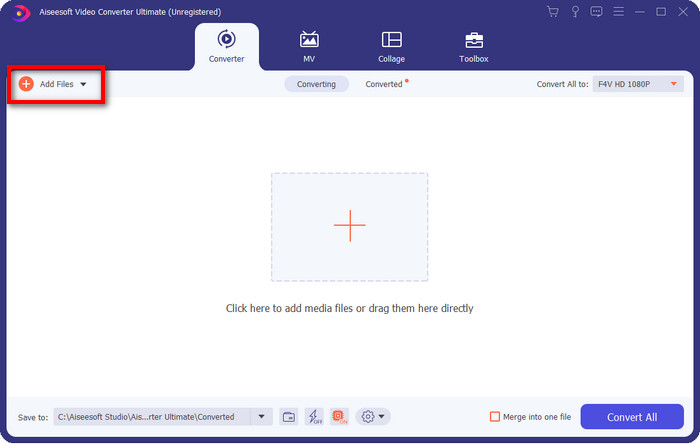
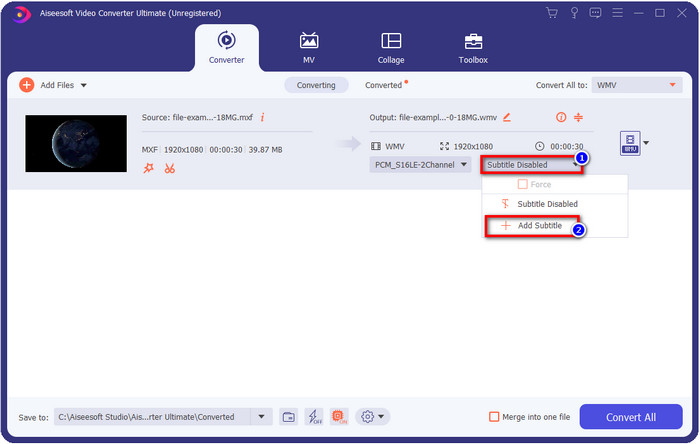
Θέλετε να προσθέσετε υπότιτλους στο βίντεό σας; Αν ναι, κάντε κλικ στο κουμπί drop-down και πατήστε Add Subtitle. Βρείτε το αρχείο υποτίτλων στον φάκελο του υπολογιστή σας και πατήστε Open.
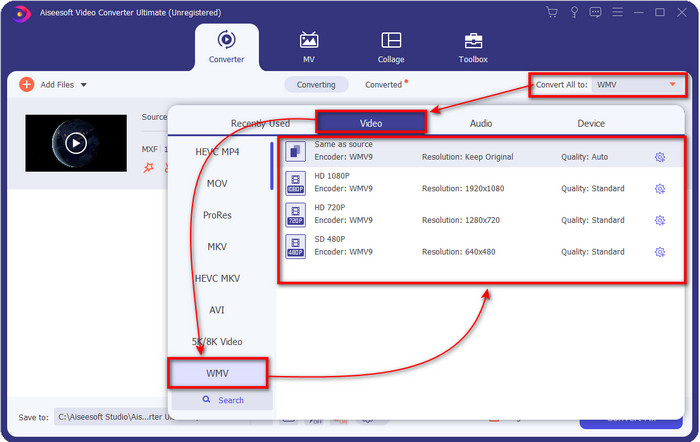
Βήμα 3. Ας αλλάξουμε τη μορφή σε WMV κάνοντας κλικ στο Convert All to.
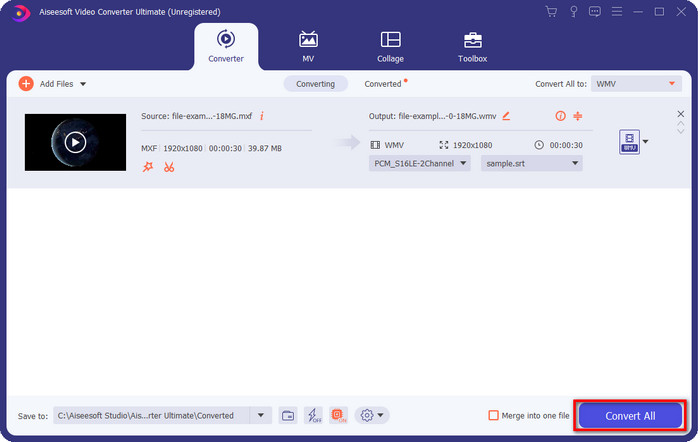
Βήμα 4. Αφού ολοκληρώσετε όλα τα βήματα, ήρθε η ώρα να μετατρέψετε το αρχείο σε WMV κάνοντας κλικ στο Convert All.
Πλεονεκτήματα
- Υποστηρίζει μεγάλη μορφή για μετατροπή MXF σε WMV, FLV, MKV, AVI, MOV και άλλα.
- Διατίθεται σε όλα τα λειτουργικά συστήματα για λήψη σε Windows και Mac.
- Υποστηρίζει μοναδικές λειτουργίες επεξεργασίας για να κάνει το βίντεό σας μοναδικό και πιο ελκυστικό από άλλα.
- Ζήστε την πιο γρήγορη και εκπληκτική διαδικασία μετατροπής με το FVC Video Converter Ultimate.
Μειονεκτήματα
- Απαιτείται η αγορά του λογισμικού.
- Πραγματοποιήστε λήψη του λογισμικού στην επιφάνεια εργασίας σας πριν μπορέσετε να το χρησιμοποιήσετε.
Μέρος 3. Γρήγορη και ευκολότερη μετατροπή MXF σε WMV με την ηλεκτρονική υπηρεσία
Το FVC Free Online Video Converter είναι ένας κορυφαίος διαδικτυακός μετατροπέας βίντεο στον οποίο μπορείτε να έχετε εύκολη πρόσβαση μέσω browser. Μπορείτε να ανεβάσετε έναν ικανοποιητικό αριθμό μορφών εδώ, όπως MP4, MOV, MKV, FLV, AVI και άλλα είδη βίντεο. Σε αντίθεση με άλλους online μετατροπείς βίντεο, δεν υπάρχουν περιορισμοί ως προς το πόσα αρχεία ή πόσο μεγάλο μέγεθος αρχείου θέλετε να μετατρέψετε. Ωστόσο, δεν μπορείτε να κάνετε μαζική μετατροπή, καθώς αυτή η λειτουργία δεν υποστηρίζεται. Ας εφαρμόσουμε τα παρακάτω βήματα για να μετατρέψουμε MXF σε WMV.
Βήματα για τη μετατροπή MXF σε WMV με το FVC Free Video Converter Online:
Βήμα 1. Κάντε κλικ σε αυτόν τον σύνδεσμο για να ανοίξετε την κεντρική σελίδα της ιστοσελίδας.
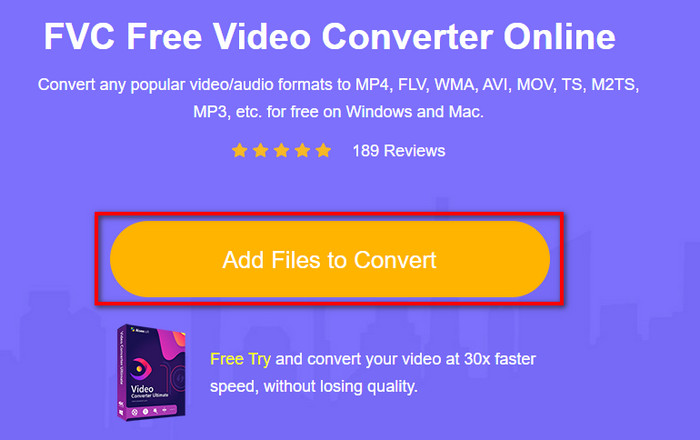
Βήμα 2. Πατήστε το Add Files to Convert για να ανοίξετε τον φάκελο όπου βρίσκεται το αρχείο MXF. Κάντε κλικ στο αρχείο και πατήστε Open.
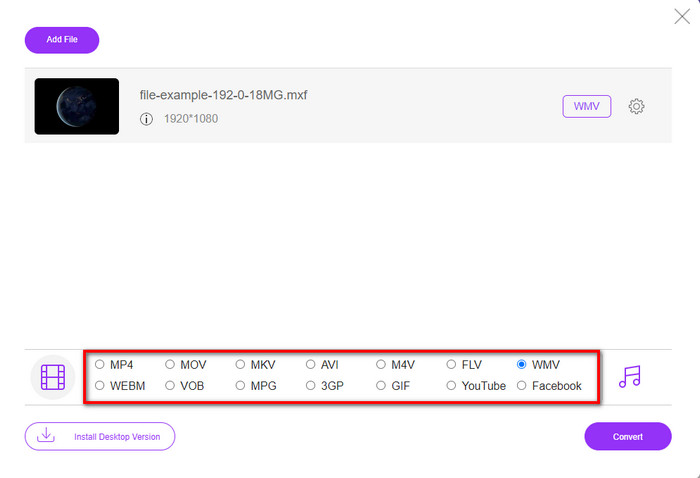
Βήμα 3. Επιλέξτε τη μορφή στην οποία θέλετε να γίνει η μετατροπή από τη λίστα που εμφανίζεται στο νέο web UI ή κάντε κλικ στο WMV.
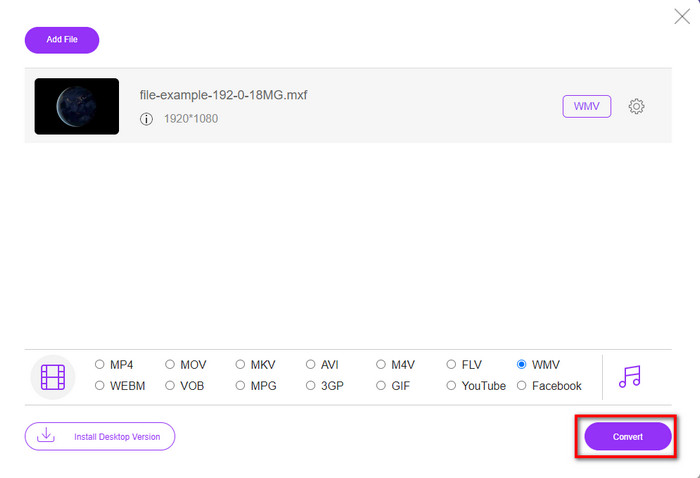
Βήμα 4. Ξεκινήστε τη μετατροπή της μορφής κάνοντας κλικ στο Convert, και η διαδικασία θα αρχίσει.
Πλεονεκτήματα
- Είναι ένας από τους ασφαλέστερους τρόπους μετατροπής MXF σε WMV, AVI, MOV, MP4 και άλλες διάσημες μορφές.
- Αποκτήστε πρόσβαση στο αγαπημένο σας πρόγραμμα περιήγησης οποιαδήποτε στιγμή και οπουδήποτε.
- Δωρεάν και είναι ελαφρύ.
Μειονεκτήματα
- Θα χρειαστείτε σύνδεση στο διαδίκτυο για χρήση.
- Δεν υποστηρίζει μαζική και γρήγορη μετατροπή
Μέρος 4. Συχνές ερωτήσεις σχετικά με τη μετατροπή MXF σε WMV
Γιατί τα αρχεία MXF είναι πολύ μεγάλα;
Ένας από τους λόγους που τα αρχεία MXF είναι μεγάλα είναι τα μεταδεδομένα που περιέχουν, τα οποία αυξάνουν το μέγεθος του αρχείου. Μπορείτε όμως να συμπιέσετε το αρχείο για να το κάνετε μικρότερο διαβάζοντας αυτό το άρθρο και μαθαίνοντας πώς να συμπιέζετε αρχεία MXF.
Η μετατροπή αρχείων MXF διαρκεί πολύ;
Εξαρτάται από τον μετατροπέα που χρησιμοποιείτε. Για παράδειγμα, αν χρησιμοποιείτε αυτή τη στιγμή ένα online εργαλείο, η ταχύτητα θα εξαρτηθεί από τη σύνδεσή σας στο διαδίκτυο. Η χρήση ενός online μετατροπέα MXF απαιτεί πολύ περισσότερο χρόνο σε σύγκριση με έναν μετατροπέα για υπολογιστή που μπορείτε να κατεβάσετε σε PC ή Mac. Άρα, αν θέλετε να έχετε εμπειρία μετατροπής με αστραπιαία ταχύτητα, πρέπει να χρησιμοποιήσετε το FVC Video Converter Ultimate.
Είναι οι μορφές MOV και MXF το ίδιο;
Αν μιλήσουμε για το τι περιέχουν, τα MXF και MOV έχουν σχεδόν τα ίδια στοιχεία. Για παράδειγμα, βίντεο, ήχο και μεταδεδομένα, αλλά το MXF παρέχει πολύ πιο λεπτομερείς πληροφορίες για το αρχείο από ό,τι το MOV, ιδιαίτερα ως προς τα μεταδεδομένα και το time-code. Ωστόσο, το MOV είναι πολύ πιο εύκολο στη χρήση από το MXF. Σε πολλές περιπτώσεις, πολλοί χρήστες ρωτούν αν μπορούν να μετατρέψουν τα MXF σε MOV. Αν είστε ένας από αυτούς, κάντε κλικ σε αυτόν τον σύνδεσμο και διαβάστε όλες τις λεπτομέρειες σχετικά με τους μετατροπείς MXF σε MOV.
συμπέρασμα
Κλείνοντας την ενότητα, είναι πλέον ευκολότερο να γνωρίζουμε τους μετατροπείς, είτε web-based είτε για επιτραπέζιο υπολογιστή, που μπορούν να μετατρέψουν MXF σε WMV. Και οι δύο μετατροπείς προσφέρουν εξαιρετικό αποτέλεσμα, αλλά αν θέλετε πιο επαγγελματικό αποτέλεσμα, πρέπει να επιλέξετε το FVC Video Converter Ultimate. Δεν υπάρχει αμφιβολία ότι αυτό το εργαλείο θα σας βοηθήσει σε όλα τα προβλήματα μετατροπής. Και αν χρειαστεί ποτέ να αντιστρέψετε ένα βίντεο, να το συγχωνεύσετε, να το βελτιώσετε και πολλά άλλα, αυτή είναι η ιδανική λύση για όλα τα παραπάνω προβλήματα.
-
 4 δωρεάν τρόποι μετατροπής της βιντεοκάμερας MXF σε MP4 για καθολική αναπαραγωγή
 Αυτή η ανάρτηση είναι ο αναλυτικός οδηγός για τη μετατροπή MXF σε MP4 στον υπολογιστή. Μπορείτε να λάβετε 4 δωρεάν μετατροπείς MXF σε MP4 σε βιντεοκάμερα transcode MXF σε MP4 με απλά βήματα.
-
 4 κορυφαίοι μετατροπείς MXF για μετατροπή MXF σε AVI [Δωρεάν και επί πληρωμή]
 Τι είναι ένα αρχείο MXF; Πώς να μετατρέψετε MXF σε AVI; Αυτές είναι οι λίγες ερωτήσεις που απαντάμε. Έτσι, αν έχετε την ίδια ερώτηση, διαβάστε αυτό το άρθρο.
-
 Πώς να μετατρέψετε MXF σε FLV χρησιμοποιώντας διαφορετικές μεθόδους [Αποδεδειγμένη]
 Έχετε προσπαθήσει να μετατρέψετε MXF σε FLV σε κάποιον περίεργο μετατροπέα που είναι διαθέσιμος στο διαδίκτυο. Ωστόσο, δεν μπορείτε να έχετε την ποιότητα που θέλετε στο βίντεό σας; Σας συνιστούμε να διαβάσετε αυτό το άρθρο για να μάθετε περισσότερα σχετικά με τη μετατροπή από MXF σε FLV.
