


 Video Converter Ultimate
 Εγγραφή οθόνης
 Επισκευή βίντεο
Στη Λεπτομερή Ανασκόπηση Σχετικά με τους 5 κορυφαίους μετατροπείς για μετατροπή OGV σε WMV
Δεν έχετε ιδέα πώς να μετατρέψετε OGV σε WMV και να το αναπαράγετε στο Windows Media Player; Τότε είστε τυχεροί, γιατί σήμερα θα θέλαμε να σας παρουσιάσουμε τα διάφορα εργαλεία που μπορείτε να χρησιμοποιήσετε για να μετατρέψετε το αρχείο OGV. Θέλετε να μάθετε ποια είναι αυτά τα πέντε εργαλεία; Στο τελευταίο μέρος, θα μάθετε επίσης πώς να μετατρέπετε το αρχείο OGV σε WMV. Οπότε, καλύτερα να ετοιμαστείτε, γιατί δεν θέλουμε να σας κάνουμε να περιμένετε άλλο· ας ξεκινήσουμε αμέσως την εξερεύνησή μας.

Μέρος 1. Κορυφαίοι 5 μετατροπείς OGV σε WMV Online και Offline
Κορυφή 1. FVC Video Converter Ultimate
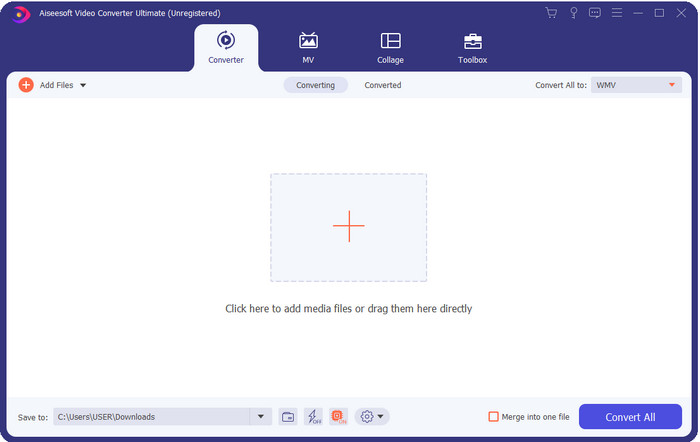
Το FVC Video Converter Ultimate είναι ένας από τους καλύτερους μετατροπείς OGV σε WMV που μπορείτε να κατεβάσετε στον υπολογιστή σας. Αυτό το εργαλείο προσφέρει απίστευτη ταχύτητα μετατροπής, που έχει ήδη εντυπωσιάσει πολλούς από τους χρήστες του. Επιπλέον, η μετατροπή δεν είναι το μόνο δυνατό σημείο του. Μπορείτε να χρησιμοποιήσετε τις προηγμένες λειτουργίες επεξεργασίας για να κάνετε το βίντεό σας εντυπωσιακό, να το κάνετε μικρότερο ή να τα συγχωνεύσετε. Συνολικά, αν είστε αρχάριοι στη μετατροπή μορφών, αυτή είναι η καλύτερη επιλογή, γιατί μπορείτε να κάνετε τη μετατροπή σας χωρίς καθόλου κόπο, τόσο εύκολα όσο ένα-δύο-τρία, ενώ στο τέλος παίρνετε επαγγελματικό αποτέλεσμα.
Δωρεάν ΛήψηΓια Windows 7 ή νεότεραΑσφαλής λήψη
Δωρεάν ΛήψηΓια MacOS 10.7 ή νεότεροΑσφαλής λήψη
Πλεονεκτήματα
- Μετατρέψτε το OGV σας σε μορφές WMV, AVI, MOV, MP4 και 200+ διαθέσιμες σε λιγότερο από ένα λεπτό.
- Το δυνατό του χρώμα είναι η μετατροπή και οι προηγμένες δυνατότητες επεξεργασίας που θα χρειαστείτε.
- Ένας απίστευτος μετατροπέας που μπορεί να χρησιμοποιήσει ο καθένας ακόμα και χωρίς εμπειρία είναι αλάνθαστος και ελαφρύς.
- Διατίθεται σε όλα τα λειτουργικά συστήματα για λήψη σε Windows & Mac.
Μειονεκτήματα
- Για να αποκτήσετε αυτό το λογισμικό, θα πρέπει πρώτα να το αγοράσετε.
- Κατεβάστε το στη μονάδα δίσκου του υπολογιστή σας.
Κορυφή 2. VLC Media Player
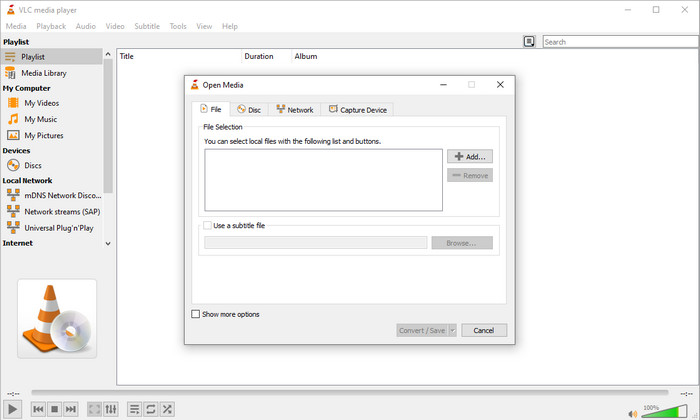
Το VLC Media Player είναι από τα πιο δημοφιλή και εύκολα προσβάσιμα προγράμματα αναπαραγωγής σε όλες τις συσκευές. Αυτό το πρόγραμμα αναπαραγωγής βίντεο μπορεί επίσης να μετατρέψει το OGV σας σε WMV ή σε κάποια άλλη μορφή που θέλετε. Αν και το πρόγραμμα αναπαραγωγής μπορεί να κάνει μετατροπή, εξακολουθεί να υστερεί σε υποστηριζόμενες μορφές, ειδικά όταν θέλετε να μετατρέψετε το αρχείο σας σε μια συγκεκριμένη μορφή. Ωστόσο, αν έχετε ήδη το VLC στον υπολογιστή σας, γιατί να μην δοκιμάσετε να χρησιμοποιήσετε αυτό το πρόγραμμα αναπαραγωγής–μετατροπέα στον υπολογιστή σας για να αλλάξετε τη μορφή;.
Πλεονεκτήματα
- Δωρεάν λήψη και υποστηρίζει διαφορετικές μορφές για αναπαραγωγή και μετατροπή.
- Διατίθεται σε όλες τις συσκευές προς χρήση.
- Γρήγορη διαδικασία μετατροπής.
Μειονεκτήματα
- Υποστηρίζει μια περιορισμένη μορφή από την οποία μπορείτε να επιλέξετε.
- Δεν είναι ο τυπικός μετατροπέας σας.
- Απαιτούνται πολλά βήματα για να μπορέσετε να κάνετε μετατροπή.
Κορυφή 3. Aconvert
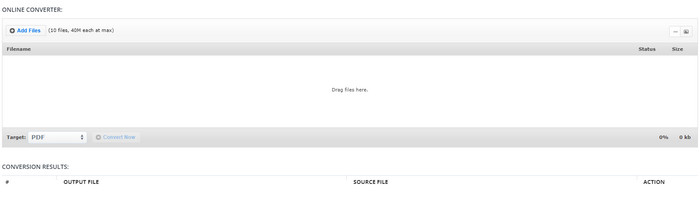
Το Aconvert θα σας βοηθήσει στην εργασία μετατροπής αρχείων OGV. Αυτός ο online μετατροπέας OGV σε WMV προσφέρει μια αποτελεσματική διαδικασία μετατροπής, ώστε να αντιμετωπίζετε λιγότερες δυσκολίες. Ωστόσο, αυτός ο μετατροπέας έχει πολλές διαφημίσεις στη διαδικτυακή διεπαφή, που μπορεί να είναι αρκετά ενοχλητικές με πολλούς τρόπους. Επίσης, αυτό το εργαλείο περιορίζει την εμπειρία μετατροπής σε μόλις δέκα μετατροπές και μέγιστο μέγεθος αρχείου 40 MB για κάθε αρχείο. Αλλά δεν χρειάζεται να ανησυχείτε, γιατί αυτό το εργαλείο είναι δωρεάν για όλους τους χρήστες του διαδικτύου που θέλουν να μετατρέπουν αρχεία online.
Πλεονεκτήματα
- Διαθέσιμο στον Ιστό για χρήση.
- Υποστηρίζει μια γνωστή μορφή που μπορείτε να εισαγάγετε.
- Φιλικό προς το χρήστη.
Μειονεκτήματα
- Η μορφή επιλογών για την τελική έξοδο είχε πολλές ελλείψεις.
- Υπάρχουν πολλές ενοχλητικές διαφημίσεις στον ιστότοπο.
Κορυφή 4. Video2Edit.com
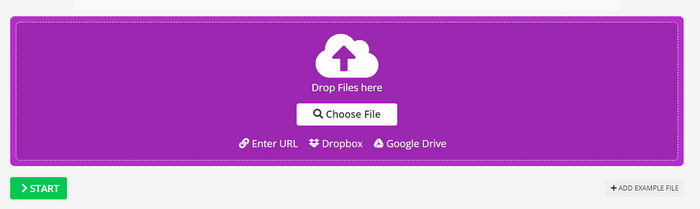
Το Video2Edit.com είναι παρόμοιο με το Aconvert, αλλά αυτό το εργαλείο είναι ακόμη καλύτερο, γιατί μπορείτε να τροποποιήσετε το βίντεο πριν μετατρέψετε το OGV σε WMV. Επίσης, μπορείτε να αλλάξετε τον κωδικοποιητή του ήχου σας επιλέγοντας ανάμεσα σε τρεις επιλογές. Επιπλέον, υπάρχουν πολλά πράγματα που μπορείτε να κάνετε με αυτόν τον μετατροπέα. Ωστόσο, το μειονέκτημα αυτού του διαδικτυακού εργαλείου είναι ότι οι διαθέσιμες μορφές είναι περιορισμένες. Έχει επίσης διαφημίσεις και η διαδικασία μετατροπής είναι αργή.
Πλεονεκτήματα
- Μετατροπέας πολλαπλών λειτουργιών.
- Διαθέσιμο σε όλο τον Ιστό για πρόσβαση σε οποιονδήποτε.
- Μπορεί να τροποποιήσει κωδικοποιητές βίντεο και ήχου.
Μειονεκτήματα
- Διαφημίσεις στη διεπαφή.
- Η διαδικασία μετατροπής διαρκεί πολύ.
Top 5. Δωρεάν μετατροπέας βίντεο FVC Online
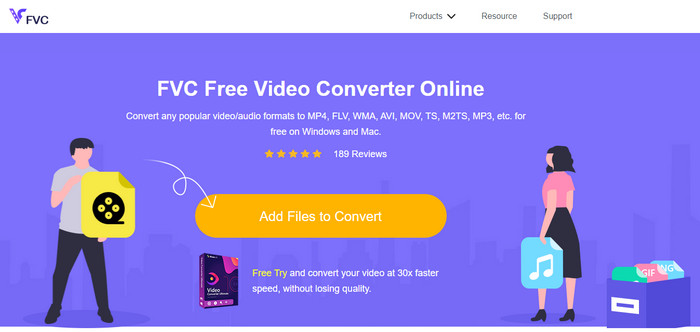
Το FVC Free Video Converter Online προσφέρει καλύτερη διαδικασία μετατροπής από OGV σε WMV σε σύγκριση με τα VLC, Aconvert και Video2Edit.com. Αυτό συμβαίνει επειδή αυτό το διαδικτυακό εργαλείο παρέχει επαγγελματικό αποτέλεσμα, όπως το FVC Video Converter Ultimate, αν και δεν υποστηρίζει όλες τις μορφές που υποστηρίζει το Ultimate. Επιπλέον, μπορείτε να προσαρμόσετε την ποιότητα και να την ορίσετε σε υψηλότερη ανάλυση για καλύτερο αποτέλεσμα. Άλλο ένα πλεονέκτημα είναι ότι δεν θα σας ενοχλούν εκνευριστικές διαφημίσεις κατά τη διάρκεια της μετατροπής. Έτσι, μπορείτε να απολαμβάνετε τη μετατροπή χωρίς αναδυόμενες διαφημίσεις και χωρίς όριο, ούτε ως προς τον αριθμό μετατροπών ούτε ως προς το μέγεθος αρχείου.
Πλεονεκτήματα
- Υποστηρίζει περισσότερες μορφές από το VLC, το Adconvert και το Video2Edit.
- Μπορεί να τροποποιήσει τις προδιαγραφές βίντεο και ήχου.
- Εύκολη πρόσβαση στον μετατροπέα Ιστού οποιαδήποτε στιγμή και οπουδήποτε με σύνδεση στο Διαδίκτυο.
- Δεν υπάρχουν διαφημίσεις στη διεπαφή και φαίνεται πιο επαγγελματικό.
Μειονεκτήματα
- Εάν δεν έχετε διαδίκτυο, δεν μπορείτε να χρησιμοποιήσετε αυτόν τον μετατροπέα όπως οι άλλοι δύο διαδικτυακοί μετατροπείς.
- Δεν υπάρχουν δυνατότητες επεξεργασίας.
Μέρος 2. Πώς να μετατρέψετε το OGV σε WMV με το FVC Video Converter Ultimate
Τώρα λοιπόν, αν σας εντυπωσίασαν οι άλλες δυνατότητες του FVC Video Converter Ultimate, πρέπει να διαβάσετε αυτό. Για να πάρετε μια ιδέα για το πώς να μετατρέπετε OGV σε WMV με το Ultimate εργαλείο, πρέπει να ακολουθήσετε τα παρακάτω βήματα.
Βήματα για το πώς να μετατρέψετε OGV σε WMV με το FVC Video Converter Ultimate:
Βήμα 1. Κατεβάστε το λογισμικό μετατροπέα στα Windows ή το Mac σας, ακολουθήστε τις οδηγίες εγκατάστασης και ανοίξτε τον μετατροπέα.
Δωρεάν ΛήψηΓια Windows 7 ή νεότεραΑσφαλής λήψη
Δωρεάν ΛήψηΓια MacOS 10.7 ή νεότεροΑσφαλής λήψη
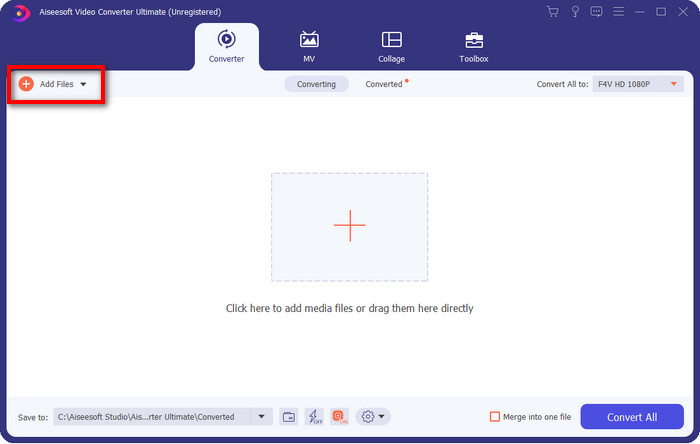
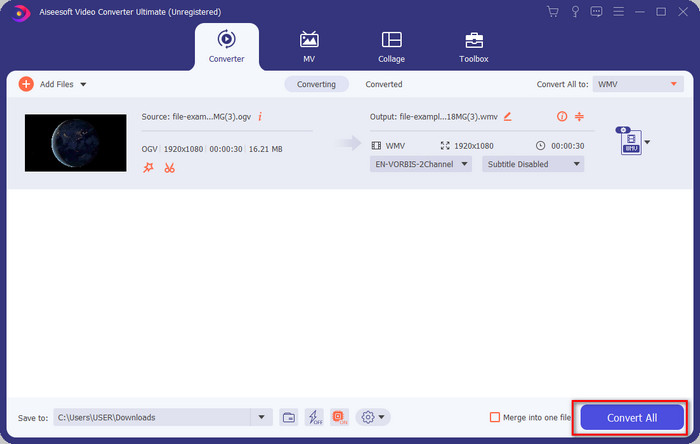
Βήμα 2. Αφού ανοίξετε τον μετατροπέα, μπορείτε να ανεβάσετε το αρχείο OGV κάνοντας κλικ στο κουμπί Add Files επάνω αριστερά στη διεπαφή και έπειτα στο Open.
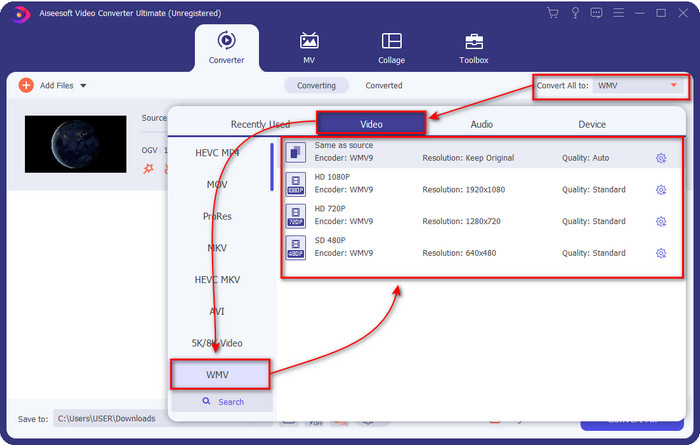
Βήμα 3. Μόλις ανεβάσετε το αρχείο OGV, επιλέξτε τη μορφή WMV που θέλετε, κάτω από την επιλογή Convert All to.
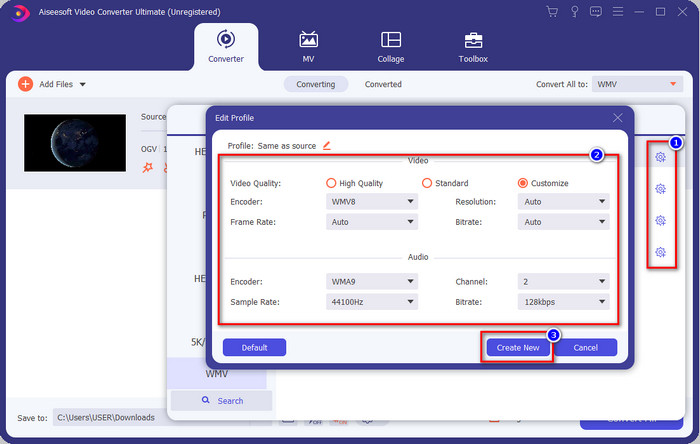
Προαιρετικό: Θέλετε να τροποποιήσετε το ίδιο το προφίλ βίντεο; Τότε κάντε κλικ στο εικονίδιο με το γρανάζι, ρυθμίστε τον κωδικοποιητή, τον ρυθμό καρέ ή τον ρυθμό δειγματοληψίας για βίντεο και ήχο. Για να αποθηκεύσετε τις αλλαγές, κάντε κλικ στο Create New. Αφού τις προσαρμόσετε, θα παρατηρήσετε ένα εικονίδιο γραναζιού επάνω στη μορφή που έχετε επιλέξει.
Βήμα 4. Κάντε κλικ στο Convert All για να ξεκινήσει η διαδικασία. Μετά τη διαδικασία μετατροπής, θα ανοίξει ένα παράθυρο φακέλου στον υπολογιστή με το αρχείο WMV.
Μέρος 3. Διάγραμμα σύγκρισης
| Χαρακτηριστικά των μετατροπέων | FVC Video Converter Ultimate | VLC Media Player | Μετατροπή | Video2Edit.com | FVC Free Video Converter Online |
| Μετατροπή μορφών |  | | | | |
| Λειτουργίες επεξεργασίας | |  | | | |
| Τροποποίηση ρυθμίσεων βίντεο και ήχου | | | | | |
| Εξαρτημένο από το Διαδίκτυο | | | | | |
| Διαφημίσεις Δωρεάν | | | | | |
Μέρος 4. Συχνές ερωτήσεις σχετικά με τη μετατροπή OGV σε WMV
Μπορώ να χρησιμοποιήσω τον μετατροπέα FFmpeg OGV σε WMV;
Ναι, μπορείτε να χρησιμοποιήσετε το FFmpeg για να μετατρέψετε OGV σε WMV, αλλά αυτός ο μετατροπέας δεν είναι ιδιαίτερα φιλικός προς τον χρήστη, όπως οι περισσότεροι κοινοί μετατροπείς. Αν λοιπόν θέλετε να χρησιμοποιήσετε αυτό το εργαλείο, ακολουθήστε τα βήματα. Εκκινήστε το εργαλείο και τρέξτε τη διαδρομή του FFmpeg.exe στο σύστημά σας. Ανοίξτε τη Γραμμή Εντολών (Command Prompt) και μεταβείτε στο αρχείο OGV που θέλετε να μετατρέψετε με το CLI. Στη συνέχεια, εισαγάγετε αυτήν την εντολή: ffmpeg -i input.ogv -vn -ar 44100 -ac 2 -b:a 192k output.wmv και πατήστε Enter για να ξεκινήσει η επεξεργασία.
Υπάρχει δυνατότητα αναπαραγωγής του OGV σε Mac;
Δεν μπορείτε να το κάνετε αν θέλετε να αναπαράγετε αρχεία OGV στο QuickTime, επειδή ο κωδικοποιητής της μορφής δεν υποστηρίζεται. Υπάρχει όμως τρόπος να γίνει συμβατό σε Mac, και αυτός είναι η μετατροπή του σε MOV. Θέλετε να μάθετε πώς να μετατρέψετε τα αρχεία OGV σε MOV; Τότε κάντε κλικ σε αυτόν τον σύνδεσμο.
Είναι το OGV και το OGG το ίδιο σχήμα;
Το OGV και το OGG είναι τα ακριβή δοχεία, αλλά έχουν διαφορές ως προς το τι περιέχουν. Για παράδειγμα, τα αρχεία OGG μπορούν να αποθηκεύσουν ήχο υψηλής ποιότητας αλλά όχι με βίντεο. Αντίθετα, το OGV μπορεί να διατηρήσει περιεχόμενο ήχου και βίντεο υψηλής ποιότητας.
συμπέρασμα
Και τώρα που γνωρίζουμε τους μετατροπείς OGV σε WMV που μπορείτε να χρησιμοποιήσετε, ήρθε η ώρα να επιλέξετε το εργαλείο που θα χρησιμοποιήσετε. Αν και όλα τα εργαλεία που παρουσιάστηκαν εδώ θα σας βοηθήσουν, διαπιστώσαμε ότι το FVC Video Converter Ultimate υπόσχεται εξαιρετική ποιότητα στους χρήστες του. Είναι σχεδόν απίστευτο το τι μπορεί να κάνει αυτό το εργαλείο. Τώρα, λοιπόν, η επιλογή είναι στα χέρια σας· αν όμως δεν έχετε ακόμα αποφασίσει, σας προτείνουμε να επιλέξετε το FVC Video Converter Ultimate. Θέλετε να μάθετε περισσότερα για το ίδιο το εργαλείο; Τότε πρέπει πρώτα να το κατεβάσετε και να το χρησιμοποιήσετε χωρίς κανέναν περιορισμό.
-
 Οι 2 περισσότεροι επιλεγμένοι μετατροπείς που είναι προσβάσιμοι για τη μετατροπή αρχείου OGV σε AVI [2021]
 Θέλετε να μετατρέψετε αρχεία OGV σε AVI; Αυτό το άρθρο παρέχει δύο από τις καλύτερες λύσεις που μπορείτε να χρησιμοποιήσετε για να κάνετε τη μετατροπή σας ασφαλή και γρήγορη χωρίς να χάσετε την αξιοπιστία του βίντεο.
-
 Εξαιρετικός μετατροπέας OGV σε FLV που δεν πρέπει να χάσετε [Αποδεδειγμένο]
 Αν αναρωτιέστε πώς να μετατρέψετε γρήγορα αρχεία OGV σε FLV, αυτό το άρθρο θα σας δείξει τον μόνο μετατροπέα που θα χρειαστείτε ποτέ.
-
 3 τρόποι μετατροπής αρχείων M2TS σε WMV δωρεάν σε Windows / Mac / Online
 Εδώ είναι 3 εύκολοι τρόποι μετατροπής M2TS σε βίντεο WMV. Μπορείτε να αλλάξετε τη μορφή βίντεο από M2TS σε WMV δωρεάν σε Windows, Mac και online γρήγορα. Υποστηρίζεται η μετατροπή παρτίδας.
