


 Video Converter Ultimate
 Εγγραφή οθόνης
 Επισκευή βίντεο
Οι καλύτεροι διαδικτυακοί και εκτός σύνδεσης μετατροπείς στη μετατροπή αρχείων SWF σε MKV
Το αρχείο SWF είναι μια μορφή για το Adobe Flash που περιέχει βίντεο και διανυσματικές κινήσεις. Και αυτός ο τύπος αρχείου συνήθως δεν μπορεί να χειριστεί διάφορα ρεύματα υποτίτλων. Πολλοί άνθρωποι αναζητούν μια μορφή αρχείου που να μπορεί να διαχειριστεί πολλαπλά ρεύματα υποτίτλων και κομμάτια ήχου σε διάφορες γλώσσες. Επομένως, αν είστε ένας από αυτούς που αναζητούν λύση για να αλλάξουν από SWF σε MKV, σας παρουσιάζουμε τους καλύτερους μετατροπείς!

Μέρος 1. Μετατροπή SWF σε MKV εκτός σύνδεσης χρησιμοποιώντας το FVC Video Converter Ultimate
Το FVC Video Converter Ultimate είναι ένα δωρεάν εργαλείο χωρίς σύνδεση που σας επιτρέπει να μετατρέπετε διάφορες μορφές αρχείων, όπως SWF σε MKV, MP4, WMV, MOV, AVI, FLV και πολλές ακόμη. Αυτός ο μετατροπέας διαθέτει πολλές εξαιρετικές λειτουργίες που μπορούν να σας βοηθήσουν να βελτιώσετε τα αρχεία σας. Μπορείτε να κόψετε τμήματα, να προσθέσετε εφέ, υδατογράφημα και υπότιτλους. Το εντυπωσιακό είναι ότι μπορείτε επίσης να μετατρέπετε μαζικά (batch) τα αρχεία SWF σας. Επιπλέον, υποστηρίζει εξαιρετικά γρήγορη μετατροπή, με την οποία μπορείτε να μετατρέπετε αρχεία μέσα σε λίγα δευτερόλεπτα. Τα βήματα που παρατίθενται παρακάτω θα σας βοηθήσουν σίγουρα να μετατρέψετε το SWF αρχείο σας σε MKV.
Βήμα 1. Για αρχή, κατεβάστε τον μετατροπέα κάνοντας κλικ στο κουμπί Download παρακάτω για Windows ή Mac. Στη συνέχεια, μετά τη λήψη, ανοίξτε την εφαρμογή για να ξεκινήσει η διαδικασία.
Δωρεάν ΛήψηΓια Windows 7 ή νεότεραΑσφαλής λήψη
Δωρεάν ΛήψηΓια MacOS 10.7 ή νεότεροΑσφαλής λήψη
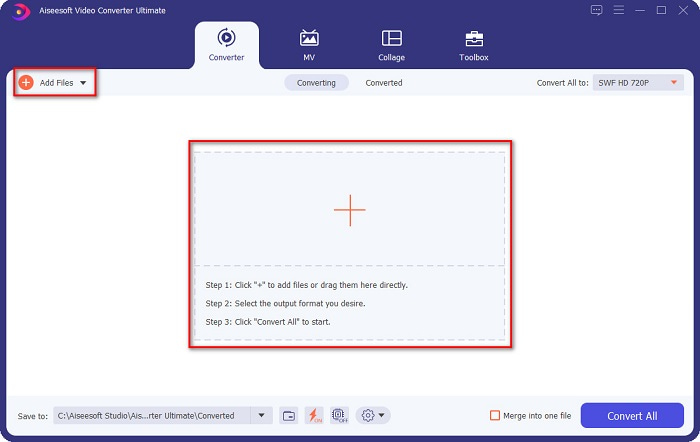
Βήμα 2. Αφού ανοίξετε τον μετατροπέα, κάντε κλικ στο κουμπί Add Files ή στο κουμπί με το σύμβολο + για να ανεβάσετε το αρχείο SWF στην πρώτη διεπαφή του λογισμικού.
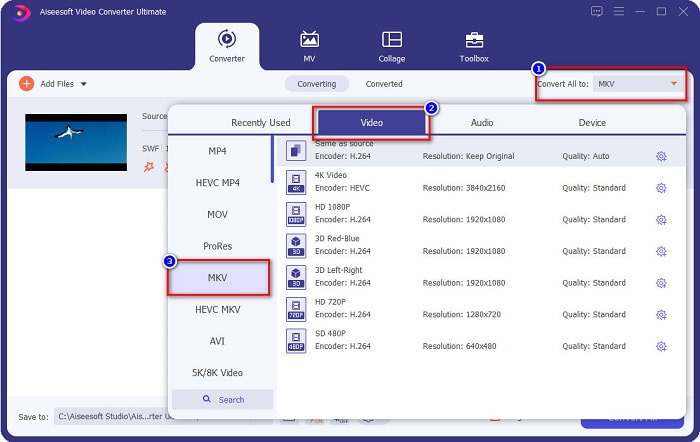
Βήμα 3. Έπειτα, κάντε κλικ στο κουμπί Convert All to. Αφού κάνετε κλικ στο Convert All to, θα εμφανιστεί μια λίστα με μορφές αρχείων. Έπειτα επιλέξτε τη μορφή αρχείου MKV.
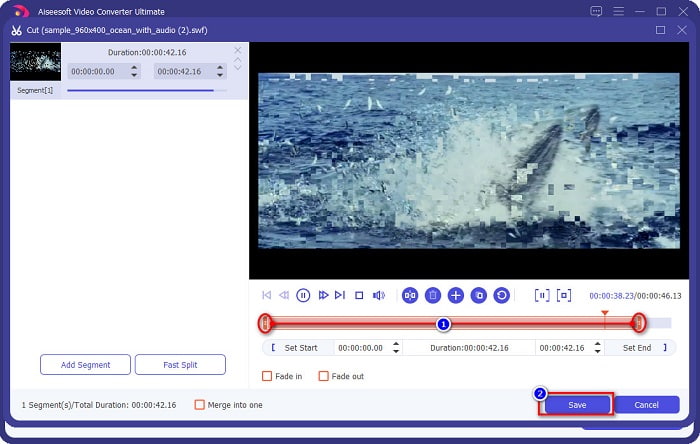
Προαιρετικό. Αν θέλετε να κόψετε τη διάρκεια του αρχείου σας, κάντε κλικ στο κουμπί με το ψαλίδι. Μπορείτε να περικόψετε τη διάρκεια ρυθμίζοντας τις κεφαλές αναπαραγωγής στο επιθυμητό μήκος. Έπειτα κάντε κλικ στο κουμπί Save για να αποθηκεύσετε τις αλλαγές.
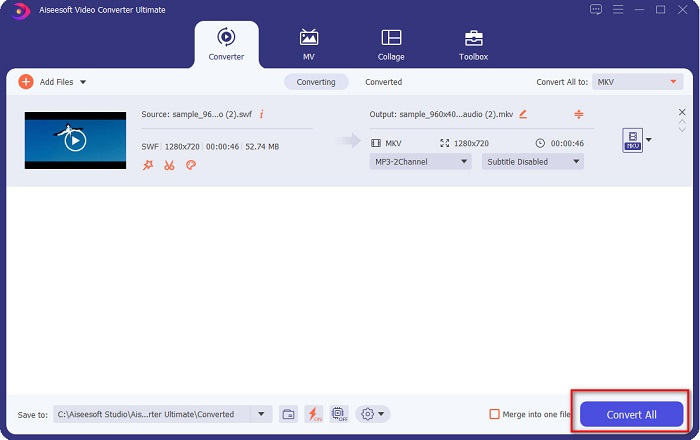
Βήμα 4. Και τέλος, κάντε κλικ στο κουμπί Convert All για να μετατρέψετε το αρχείο SWF σε αρχείο MKV. Κι αυτό ήταν! Μετά από λίγα δευτερόλεπτα, το αρχείο σας θα είναι έτοιμο.
Μέρος 2. Μετατροπή SWF σε MKV Online χρησιμοποιώντας δωρεάν διαδικτυακούς μετατροπείς
Δεν υπάρχει αμφιβολία ότι η μετατροπή αρχείων χρησιμοποιώντας ένα διαδικτυακό εργαλείο είναι πιο βολική, επειδή δεν θα χρειαστεί να κατεβάσετε τίποτα. Ως εκ τούτου, παρέχουμε δωρεάν διαδικτυακά εργαλεία που είναι από τα καλύτερα στις μέρες μας.
Δωρεάν μετατροπέας βίντεο FVC
Βήματα για το πώς να μετατρέψετε χρησιμοποιώντας το FVC Free Online Video Converter:
Βήμα 1. Για να χρησιμοποιήσετε αυτόν τον μετατροπέα, αναζητήστε το FVC Free Online Video Converter ή κάντε κλικ σε αυτόν τον σύνδεσμο, και θα μεταφερθείτε στον ιστότοπό τους.
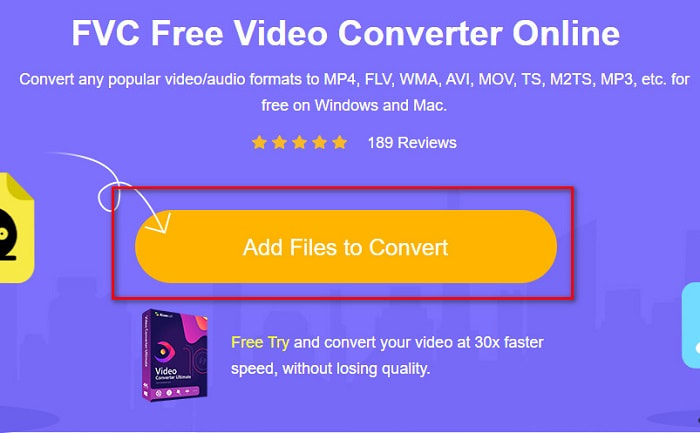
Βήμα 2. Αφού μεταβείτε στον ιστότοπο, κάντε κλικ στο Add Files to Convert. Έπειτα εκκινήστε τον μετατροπέα και επιλέξτε το αρχείο SWF όταν εμφανιστούν τα αρχεία του υπολογιστή σας.
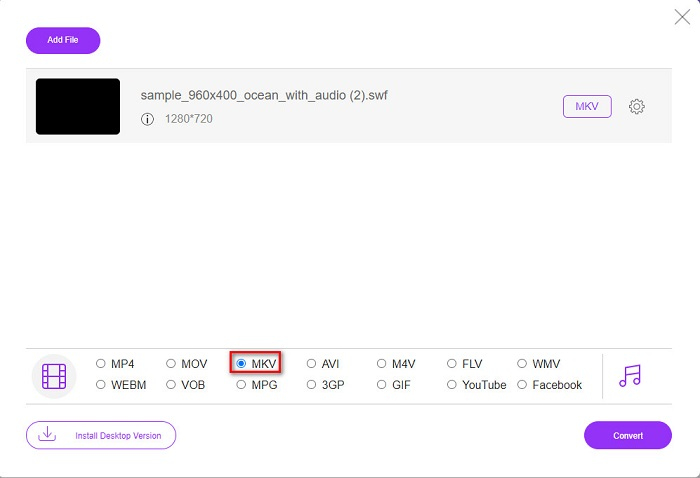
Βήμα 3. Οι διαθέσιμες μορφές αρχείων παρατίθενται κάτω από τη δεύτερη διεπαφή του λογισμικού. Κάντε κλικ στο αρχείο MKV και προχωρήστε στο επόμενο βήμα.
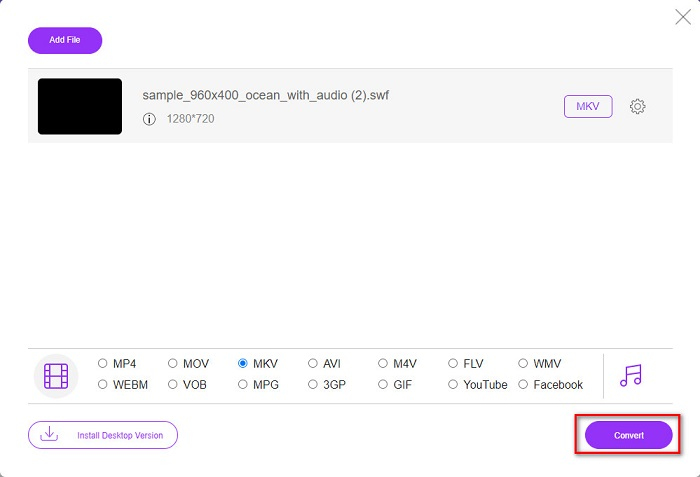
Βήμα 4. Για να ολοκληρώσετε, κάντε κλικ στο κουμπί Convert για να ξεκινήσει η μετατροπή. Έπειτα περιμένετε να τελειώσει η διαδικασία.
Aconvert.com
Ένας ακόμη δωρεάν online μετατροπέας που πρέπει να δοκιμάσετε είναι το Aconvert.com. Αυτό το εργαλείο μπορεί να μετατρέψει διάφορα αρχεία στο διαδίκτυο. Είναι επίσης εύχρηστο και σας επιτρέπει να μετατρέπετε γρήγορα, ανάλογα με την ταχύτητα της σύνδεσής σας. Δεδομένου ότι αυτός ο μετατροπέας είναι online εργαλείο, μπορεί να τύχει να έχετε αργή μετατροπή και διαφημίσεις που ίσως σας ενοχλήσουν. Παρ’ όλα αυτά, αυτός ο μετατροπέας σας επιτρέπει να μετατρέπετε SWF σε MKV με ευκολία.
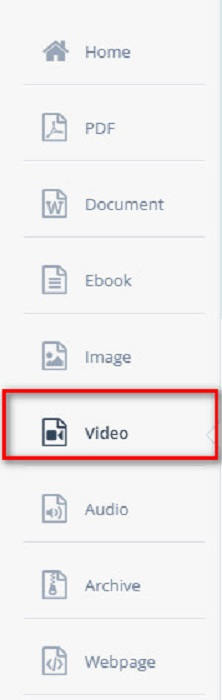
Βήμα 1. Στον περιηγητή σας, αναζητήστε το Aconvert.com. Έπειτα κάντε κλικ στο πάνελ Video στην αριστερή πλευρά της διεπαφής του λογισμικού.
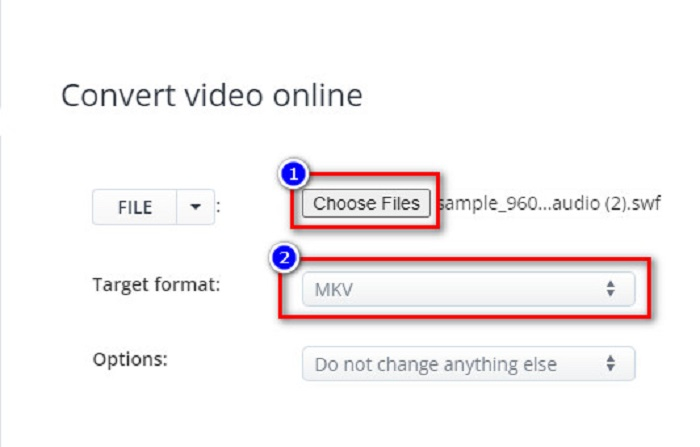
Βήμα 2. Στη συνέχεια, κάντε κλικ στο κουμπί Choose Files και επιλέξτε το αρχείο σας SWF. Έπειτα, στο Target Format, κάντε κλικ στο αρχείο MKV.
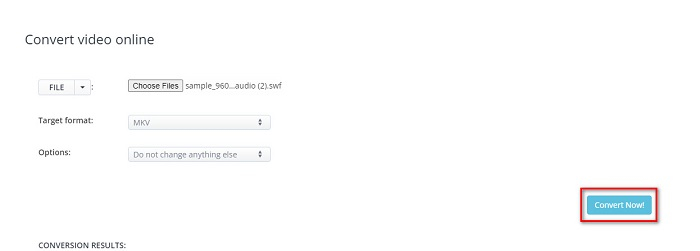
Βήμα 3. Για το τελευταίο βήμα, κάντε κλικ στο κουμπί Convert Now! για να ξεκινήσει η μετατροπή του αρχείου SWF σε MKV.
ΔωρεάνConvert.com
Το FreeConvert.com είναι ένας online μετατροπέας για να μετατρέψετε το αρχείο SWF σας σε μορφή αρχείου MKV. Είναι εύχρηστος· παρ’ όλα αυτά, περιέχει πολλές ενοχλητικές διαφημίσεις. Παρ’ όλα αυτά, αυτός ο μετατροπέας υποστηρίζει διάφορες μορφές αρχείων που είναι διαθέσιμες στο διαδίκτυο.
Βήμα 1. Αναζητήστε το FreeConvert.com στον περιηγητή σας για να μεταβείτε στον ιστότοπό τους. Έπειτα κάντε κλικ στο κουμπί Choose Files. Θα εμφανιστούν τα αρχεία του υπολογιστή σας, και στη συνέχεια επιλέξτε το αρχείο σας SWF.

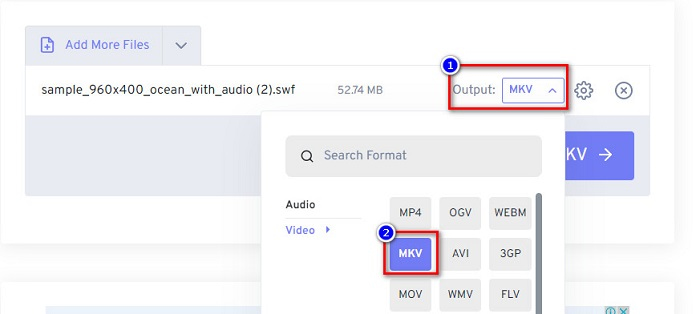
Βήμα 2. Κάντε κλικ στο κουμπί drop-down δίπλα στη λέξη Output για να επιλέξετε το αποτέλεσμα της μετατροπής σας. Κάντε κλικ στο MKV ως μορφή εξόδου του αρχείου σας.
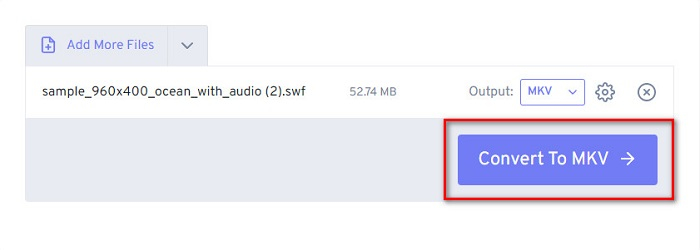
Βήμα 3. Έπειτα, κάντε κλικ στο κουμπί Convert to MKV για να ξεκινήσει η μετατροπή του αρχείου σας.
Μέρος 3. Εκτεταμένη γνώση SWF και MKV
Το αρχείο SWF ή Shock Wave είναι μια μορφή αρχείου Adobe Flash. Η Macromedia το ανέπτυξε, αλλά αργότερα, ανήκε στην Adobe. Αυτή η μορφή αρχείου χρησιμοποιείται συνήθως μέσω του δικτύου, αλλά μπορείτε να την ανοίξετε ενεργοποιώντας το adobe flash στο πρόγραμμα περιήγησής σας. Τα αρχεία SWF δεν περιέχουν μόνο βίντεο αλλά και κινούμενα σχέδια που βασίζονται σε διανύσματα. Επιπλέον, αυτός ο τύπος μορφής αρχείου έχει συμπιεσμένο ήχο, βίντεο και κινούμενα σχέδια, έτσι ώστε να μπορεί να είναι διαθέσιμο στον Ιστό.
Συγκριτικά, το αρχείο MKV ή Matroska είναι μια μορφή αρχείου που υποστηρίζεται από διάφορους κωδικοποιητές ήχου και βίντεο. Συνήθως χρησιμοποιείται για την αποθήκευση σύντομων βίντεο κλιπ και ταινιών. Παρόλο που το μέγεθος αρχείου του MKV είναι μεγαλύτερο, το αρχείο MKV είναι ένα αρχείο με προστασία στο μέλλον και αυτό σημαίνει ότι αυτός ο τύπος αρχείου σχεδιάστηκε για να μην είναι παλιό.
Μέρος 4. Συχνές ερωτήσεις σχετικά με τη μετατροπή SWF σε MKV
Μπορείτε να μετατρέψετε SWF σε MKV χωρίς απώλειες;
Ναί. Μπορείτε να μετατρέψετε τα αρχεία SWF σε αρχεία MKV χωρίς να χάσετε την ποιότητα. Ορισμένοι μετατροπείς μπορούν να αλλάξουν SWF σε MKV χωρίς απώλειες, όπως το FVC Video Converter Ultimate. Αυτός ο μετατροπέας μπορεί να μετατρέψει αρχεία χωρίς να επηρεαστεί η ποιότητα.
Μπορείτε να παίξετε SWF στα Windows;
Ναι μπορείς. Ωστόσο, εξακολουθείτε να χρειάζεται να κάνετε λήψη ενός κρυφού flash player για την adobe επειδή το adobe flash καταργείται σταδιακά.
Το Windows Media Player υποστηρίζει αρχεία SWF;
Όχι. Το Windows Media Player δεν υποστηρίζει αρχεία SWF. Παρ' όλα αυτά, πρέπει να έχετε κάποιον κωδικοποιητή .swf για να τα αναπαράγετε στο Windows Media Player. Ή η πιο εύκολη επιλογή είναι να μετατρέψετε το αρχείο SWF σε αρχείο όπως το MP4, το οποίο υποστηρίζεται ευρέως από διάφορους media players. Για περισσότερες πληροφορίες σχετικά με τη μετατροπή SWF σε MP4, διαβάστε αυτό το άρθρο SWF to MP4: Free Convert SWF to MP4 Online and PC.
συμπέρασμα
Αυτό το άρθρο σας δείχνει πώς να μετατρέψετε SWF σε MKV χρησιμοποιώντας τους μετατροπείς χωρίς σύνδεση και online που παρουσιάστηκαν παραπάνω. Και δεν χωρά αμφιβολία ότι τα online εργαλεία είναι πιο βολικά στη χρήση· ωστόσο, μπορεί να αντιμετωπίσετε αργή μετατροπή όταν τα χρησιμοποιείτε. Επιπλέον, το FVC Video Converter Ultimate διαθέτει περισσότερες λειτουργίες που είναι ωφέλιμες για το αρχείο σας και για τη διαδικασία μετατροπής σας — ακόμα έχετε αμφιβολίες; Κατεβάστε το τώρα και ανακαλύψτε τις μοναδικές δυνατότητες που μπορεί να σας προσφέρει αυτός ο μετατροπέας!
-
 [Δωρεάν & Εύκολα] Εξαιρετικά εργαλεία για χρήση στη μετατροπή SWF σε MOV
 Έχετε δοκιμάσει να μετατρέψετε SWF σε MOV επειδή δεν μπορείτε να επεξεργαστείτε βίντεο; Ποιος φταίει για την ασυμβατότητα του προγράμματος επεξεργασίας βίντεο; Συνεχίστε να διαβάζετε για τη λύση σας.
-
 4 κρυφοί μετατροπείς που χρησιμοποιούνται για τη μετατροπή SWF σε FLV Online & Offline δωρεάν
 Θέλετε να μάθετε περισσότερα για τους κρυφούς μετατροπείς που μπορείτε να χρησιμοποιήσετε για να μετατρέψετε το αρχείο .swf σε .flv; Εάν συμβαίνει αυτό, τότε πρέπει να διαβάσετε αυτό το άρθρο για να έχετε μια ιδέα να το κάνετε.
-
 Τα πιο χρήσιμα εργαλεία για τη μετατροπή SWF σε WMV (Online και Offline)
 Δυσκολεύεστε να βρείτε μια συσκευή αναπαραγωγής για τα αρχεία SWF σας; Δεν χρειάζεται να ανησυχείτε γιατί μπορείτε απλώς να το μετατρέψετε σε μορφή WMV για καλύτερη εμπειρία που καταναλώνει βίντεο. Διαβάστε αυτό το άρθρο για να μάθετε περισσότερα σχετικά με αυτήν τη διαδικασία μετατροπής.
