


 Video Converter Ultimate
 Εγγραφή οθόνης
 Επισκευή βίντεο
Πώς να μετατρέψετε VOB σε MKV δωρεάν με αυτούς τους 3 μετατροπείς [Τα καλύτερα εργαλεία]
VOB or Video Object is a file format that DVDs usually use. This file is commonly kept in the VIDEO_TS folder, which is at the root of the DVD. However, a lot of media files are now available on the internet. And the use of DVDs is not common nowadays and is not supported by many devices. Therefore, you need a file format that is supported by a lot of devices. MKV is a file format that is widely supported by numerous devices. Below are the best ways to convert VOB to MKV for free.

Μέρος 1. Μετατροπή VOB σε MKV χωρίς απώλειες
To convert your VOB files to MKV, you need a converter that is well suited for that job. FVC Video Converter Ultimate is a converter that is popular in the market nowadays. This converter has many special features where you can edit, enhance, compress, and do batch conversion of your VOB file. Moreover, this tool also supports ultra-fast conversion so that you can convert your VOB file to MKV real quick, without losing its quality.

FVC Video Converter Ultimate
5.689.200+ λήψεις- Προσφέρει ομαδική μετατροπή για συγχώνευση πολλών αρχείων σε ένα.
- Διαθέτει ένα εύχρηστο GUI, το οποίο είναι φιλικό για αρχάριους.
- Έχει τη δυνατότητα δημιουργίας GIF και δημιουργίας τρισδιάστατων βίντεο.
- Σας επιτρέπει να κάνετε γρήγορη μετατροπή λόγω της ενσωματωμένης εξαιρετικά γρήγορης διαδικασίας μετατροπής.
- Διατίθεται σε διάφορες πλατφόρμες, συμπεριλαμβανομένων των Windows και Mac.
Δωρεάν ΛήψηΓια Windows 7 ή νεότεραΑσφαλής λήψη
Δωρεάν ΛήψηΓια MacOS 10.7 ή νεότεροΑσφαλής λήψη
Ακολουθούν τα βήματα για το πώς να μετατρέψετε VOB σε MKV χρησιμοποιώντας το FVC Video Converter Ultimate:
Step 1. Download this application by clicking the Download button below for Windows or Mac. Follow the installation process, then proceed to the next step.
Δωρεάν ΛήψηΓια Windows 7 ή νεότεραΑσφαλής λήψη
Δωρεάν ΛήψηΓια MacOS 10.7 ή νεότεροΑσφαλής λήψη
Step 2. After downloading the converter, click the Add Files button or the + button to upload your VOB file in the queue.
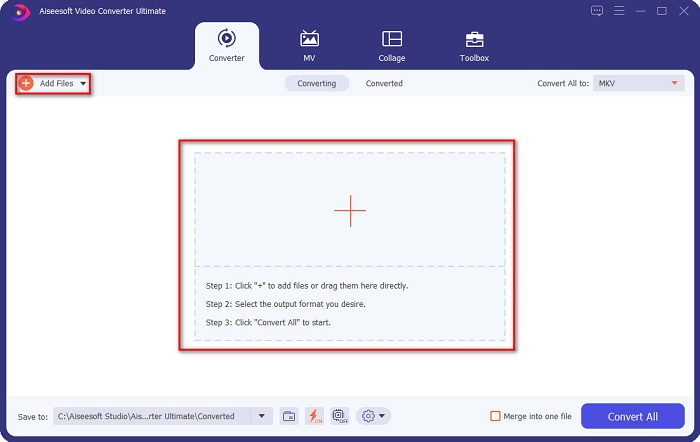
Step 3. And then click the Convert All to button located at the upper right corner of the software’s interface. A list of file formats will appear, then choose your desired file output.
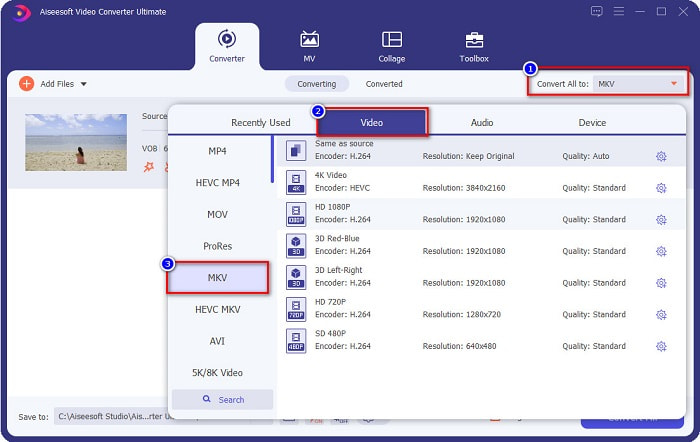
Step 4. After selecting MKV as your output file, click the Convert All button to convert your VOB to the MKV file. Then wait for a few seconds for your conversion to finish.
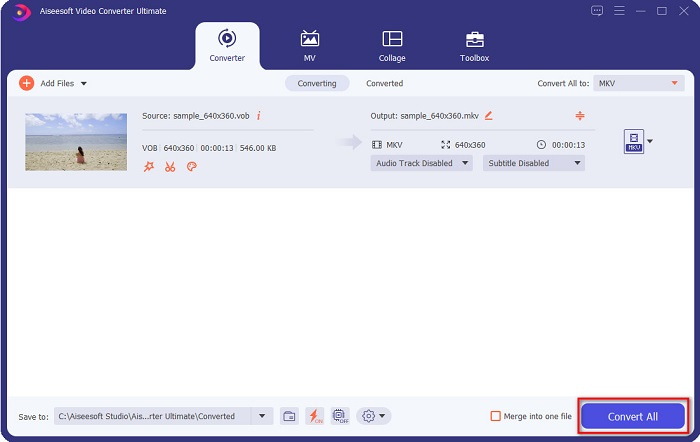
Ακολουθώντας αυτά τα απλά βήματα, μπορείτε να μετατρέψετε VOB σε MKV χωρίς απώλειες.
Μέρος 2. Μετατροπή VOB σε MKV χρησιμοποιώντας μετατροπείς δωρεάν λογισμικού
Μπορείτε επίσης να μετατρέψετε VOB σε MKV χρησιμοποιώντας δωρεάν λογισμικό. Η χρήση δωρεάν λογισμικού ως μετατροπέα θα μπορούσε να σας εξοικονομήσει πολύ χρόνο, επειδή δεν θα χρειαστείτε σύνδεση στο διαδίκτυο για να το χρησιμοποιήσετε. Και όταν πρόκειται για τη λήψη μετατροπέων δωρεάν λογισμικού, δεν χρειάζεται να αγοράσετε τίποτα. Εδώ είναι οι καλύτεροι μετατροπείς δωρεάν λογισμικού που μπορείτε να δοκιμάσετε.
VLC Media Player
Όταν επιλέγετε τον καλύτερο μετατροπέα δωρεάν λογισμικού, δεν υπάρχει αμφιβολία ότι θα είναι το VLC Media Player. Πολλοί άνθρωποι χρησιμοποιούν αυτόν τον μετατροπέα δωρεάν λογισμικού λόγω της ευκολίας χρήσης του. Αυτό το πρόγραμμα αναπαραγωγής πολυμέσων είναι πολύ διάσημο για τους χρήστες των Windows και έχει αποδειχθεί ένας εξαιρετικός τρόπος μετατροπής αρχείων.
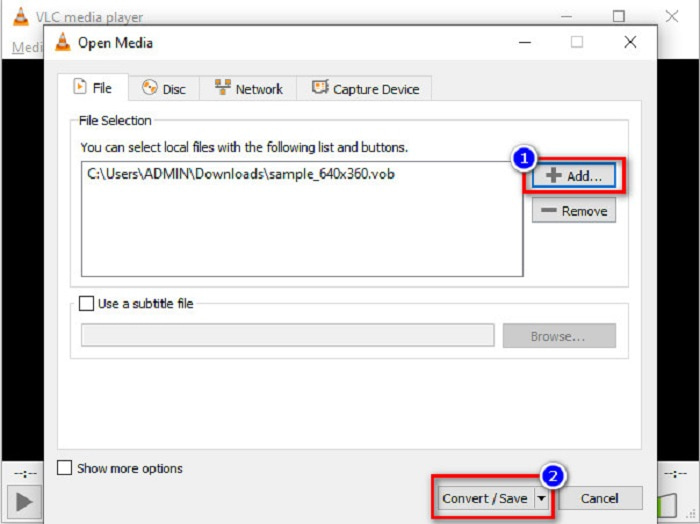
Step 1. First, if you do not have VLC Media Player on your device, download it by searching it in your browser. After downloading it, open the application. After opening the app, click the Media button, then select the Convert/Save button. Then you will be led to another interface.
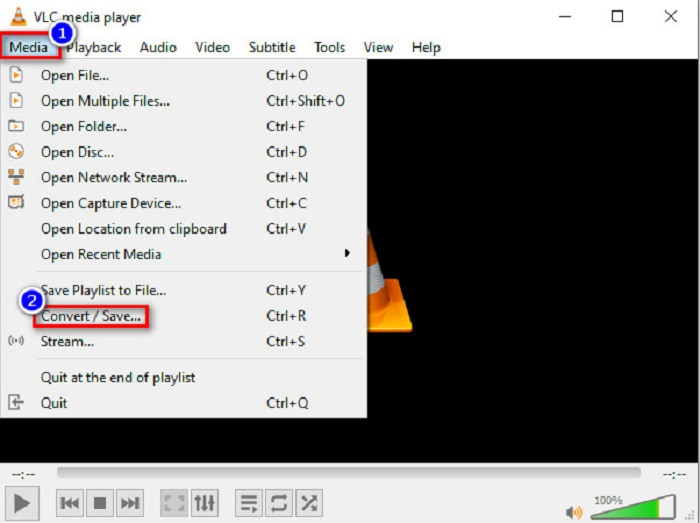
Step 2. And then, click the + Add button to upload your VOB file. Then, click the Convert/Save button. Then proceed to the next step.
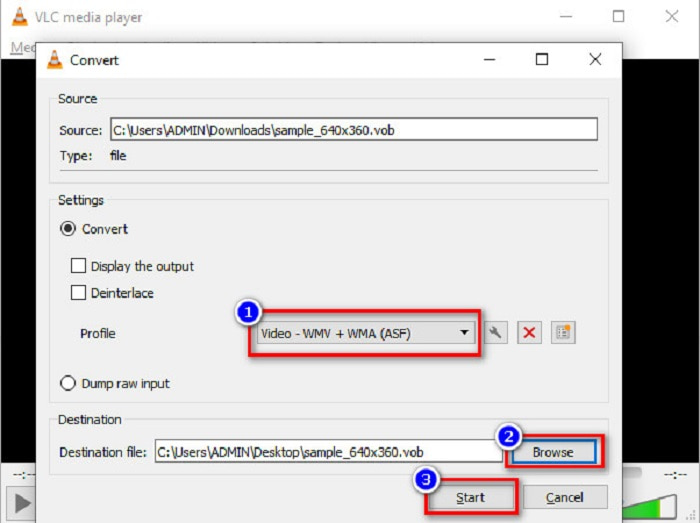
Step 3. Lastly, by clicking the drop-down button beside the Profile, select the MKV file as your output format. To choose your file destination, click the Browse button. And finally, tick the Start button to begin your conversion.
Χειρόφρενο
Another freeware converter that you can use to convert DVD VOB to MKV files is by using HandBrake. This converter is free when downloading. It also supports varieties of formats that are available on the web. However, its interface is complicated to understand for beginners. Still, this converter offers you distinct features that help convert your VOB file to MKV.
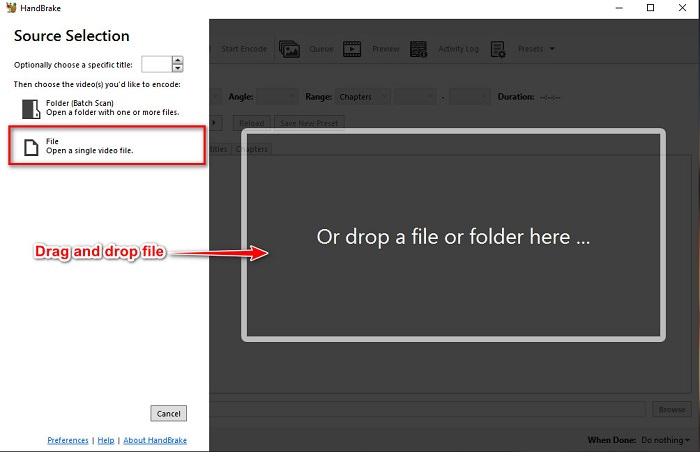
Step 1. Download the app by searching HandBrake in the browser that you use. After downloading, open the application. Then, click File, or drop your VOB file in the rectangular box in the middle of the software’s interface to upload it.
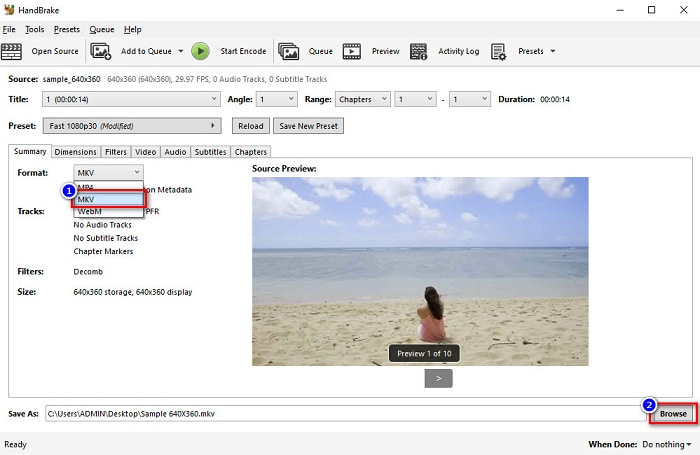
Step 2. After uploading your VOB file, choose MKV as your output file format by clicking the drop-down button beside Format. And for you to change the destination of your file on your computer files, click the Browse button.
Step 3. For the last step, click on the Start Encode button to convert your VOB to MKV using HandBrake.
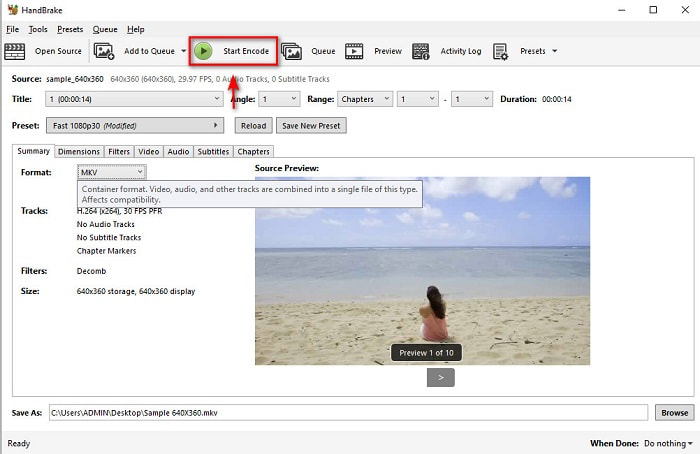
Και έτσι μετατρέπετε το VOB σε MKV χρησιμοποιώντας δωρεάν λογισμικό.
Μέρος 3. Μετατροπή αρχείου VOB σε αρχείο MKV χρησιμοποιώντας ένα διαδικτυακό εργαλείο
Online converters are more convenient because you do not need to download anything. While there are many free online converters available on the web, Onlinefreeconvert.com is what we know as one of the best. This online converter is easy to use and free. Although you may experience slow conversion because it is web-based, many still use it for its convenience in using.
Βήματα για το πώς να μετατρέψετε το αρχείο VOB σε αρχείο MKV online:
Step 1. To convert a VOB file to MKV file format, search Onlinefreeconvert.com on your browser, then you will be directed to the converter’s website.
Step 2. Drag and drop your VOB file or select files from your computer by clicking the + button.
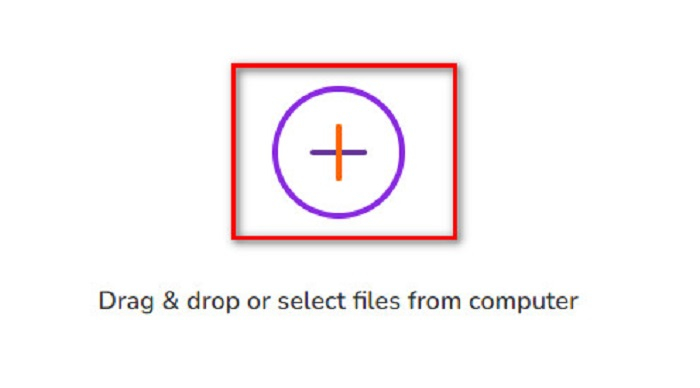
Step 3. Then beside the Output Format, click the drop-down button to select MKV as your output file format. Lastly, click the Start Now button to convert your VOB file to MKV.
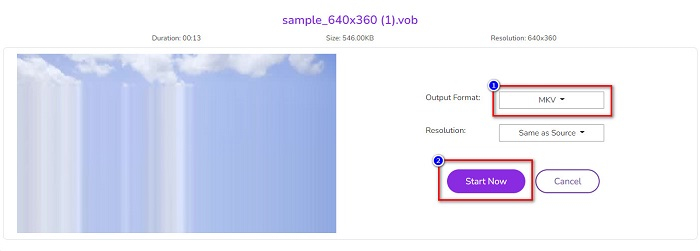
Και αυτός είναι ο τρόπος με τον οποίο μετατρέπετε το VOB σε MKV online χρησιμοποιώντας έναν διαδικτυακό μετατροπέα.
Μέρος 4. Περισσότερες γνώσεις για το VOB και το MKV
VOB ή Αντικείμενο βίντεο είναι η μορφή αρχείου που αναπαράγουν τα βίντεο DVD. Περιέχει δεδομένα που περιλαμβάνουν ήχο, βίντεο και υπότιτλους. Αυτός ο τύπος μορφής αρχείου έχει προστασία πνευματικών δικαιωμάτων για την προστασία τους από την απευθείας αντιγραφή. Αντίθετα, τα αρχεία MKV ή Matroska είναι μια μορφή αρχείου που χρησιμοποιείται συνήθως για την αποθήκευση σύντομων βίντεο κλιπ και ταινιών. Υποστηρίζεται επίσης από πολλούς κωδικοποιητές βίντεο και ήχου. Επιπλέον, είναι ένα μελλοντικό αρχείο. Ως εκ τούτου, είναι φτιαγμένο για να μην είναι ξεπερασμένο στο μέλλον.
Μέρος 5. Συχνές ερωτήσεις σχετικά με τη μετατροπή VOB σε MKV
Ποιο έχει μεγαλύτερο μέγεθος αρχείου, VOB ή MKV;
Τα αρχεία MKV έχουν μεγαλύτερα μεγέθη αρχείων σε σύγκριση με το VOB. Αν και δεν υπάρχει μεγάλη διαφορά, το MKV είναι ελαφρώς μεγαλύτερο.
Μπορείτε να αναπαράγετε αρχεία βίντεο VOB σε Mac;
macOS does not support VOB files; therefore, you cannot play it directly on Mac. However, you can use a converter to convert your VOB file to a file supported by macOS. MOV file is a file format that is widely supported by it. Moreover, read this article to know more about converting VOB to MOV.
Θα επηρεαστεί το μέγεθος του αρχείου κατά τη μετατροπή VOB σε MKV;
Not necessarily. When converting VOB to MKV, the file size will not be affected, especially if you use FVC Video Converter Ultimate as your tool to convert.
συμπέρασμα
Όλοι οι μετατροπείς online, δωρεάν λογισμικού και εκτός σύνδεσης που παρουσιάζονται παραπάνω παρουσιάζουν υποσχόμενες επιδόσεις. Αν και έχουν διαφορετικά χαρακτηριστικά μεταξύ τους, εξακολουθούν να είναι ένα αποτελεσματικό και αποδοτικό εργαλείο για τη μετατροπή VOB σε MKV-free. Αλλά αν θέλετε να δοκιμάσετε έναν εξαιρετικά γρήγορο μετατροπέα με πολλές εξαιρετικές δυνατότητες, το FVC Video Converter Ultimate είναι το καλύτερο εργαλείο που ταιριάζει. Έτσι, εάν ενδιαφέρεστε να δοκιμάσετε αυτόν τον μετατροπέα, κατεβάστε τον τώρα!
-
 Οι καλύτεροι τρόποι μετατροπής VOB σε FLV [Περιλαμβάνεται δωρεάν και διαδικτυακά]
 Θέλετε να μετατρέψετε ένα αρχείο VOB σε ένα αρχείο FLV; Μπορείτε να ολοκληρώσετε εύκολα την εργασία είτε με επιτραπέζιο είτε σε απευθείας σύνδεση μετατροπείς. Διαβάστε αυτόν τον οδηγό και μάθετε πώς μπορείτε να μετατρέψετε VOB σε FLV εύκολα και γρήγορα.
-
 Τι είναι το αρχείο VOB και πώς να μετατρέψετε το αρχείο VOB σε GIF δωρεάν
 Θέλετε να μάθετε περισσότερα για τα αρχεία VOB και πώς να τα μοιραστείτε μετά την αντιγραφή; ή Γιατί πρέπει να μετατρέψετε το VOB σε GIF; Στη συνέχεια, διαβάστε αυτό το άρθρο προσεκτικά.
-
 3 εύχρηστοι μετατροπείς διαθέσιμοι για αλλαγή του αρχείου VOB σε μορφή AVI [2021]
 Έχετε πρόβλημα επειδή τα αρχεία VOB δεν υποστηρίζονται για αναπαραγωγή; Στη συνέχεια, ας προσπαθήσουμε να το μετατρέψουμε με τους 3 τρόπους που παρουσιάζονται παρακάτω με αναλυτικά βήματα σε κάθε μετατροπέα.
