


 Video Converter Ultimate
 Εγγραφή οθόνης
 Επισκευή βίντεο
 Ασφαλές κατέβασμα
Αλλάξτε γρήγορα τα μεταδεδομένα βίντεο στο iPhone σαν επαγγελματίας σε λιγότερο από ένα λεπτό
Σήμερα, η τακτοποίηση των αρχείων μας έχει γίνει απαραίτητη για πολλούς, ειδικά για τους χρήστες iPhone. Με τη σωστή ετικέτα μπορούμε να καθορίσουμε τη θέση του αρχείου και να οργανώσουμε τα πολυμέσα μας στη βιβλιοθήκη ή τον φάκελό μας. Σε ορισμένες περιπτώσεις, οι χρήστες iOS θεωρούν ότι είναι άβολο να αναζητούν ένα αρχείο στο iPhone όταν έχει λανθασμένα μεταδεδομένα, επειδή δεν είναι εύκολο να το εντοπίσουν. Θέλετε να μάθετε πώς μπορούμε να το διορθώσουμε; Η κατάλληλη λύση για τη διόρθωση των μεταδεδομένων στο iPhone είναι να τα αλλάξετε σύμφωνα με τις δικές σας προδιαγραφές, ώστε να γίνουν ορατά και καλοοργανωμένα. Ενημερωθείτε και μάθετε πώς να αλλάζετε τα μεταδεδομένα βίντεο στο iPhone διαβάζοντας αυτό το άρθρο.

Μέρος 1. 2 από τις καλύτερες εφαρμογές για αλλαγή μεταδεδομένων βίντεο στο iPhone
Metapho – Επεξεργαστής ετικετών βίντεο και φωτογραφιών στο iPhone
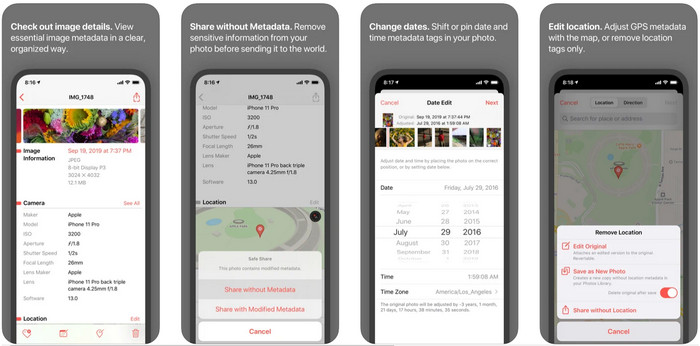
Το Metapho είναι ένας από τους καλύτερους επεξεργαστές ετικετών που μπορείτε να κατεβάσετε και να χρησιμοποιήσετε για να αλλάξετε τα μεταδεδομένα βίντεο σε iPhone. Η εφαρμογή είναι ένας απλός επεξεργαστής που σας επιτρέπει να αλλάζετε την ημερομηνία, το όνομα αρχείου, το μέγεθος, το μοντέλο συσκευής, την ταχύτητα κλείστρου και την τοποθεσία. Με αυτή την εφαρμογή μπορείτε επίσης να βλέπετε τα μεταδεδομένα σε κάθε ζωντανή φωτογραφία που τραβάτε και να τα επεξεργάζεστε σωστά, αν το επιθυμείτε. Αν και η εφαρμογή φαίνεται πολλά υποσχόμενη, θα χρειαστεί να την αγοράσετε για να επεξεργάζεστε τα μεταδεδομένα σας· αν δεν το κάνετε, τότε μπορείτε μόνο να προβάλλετε δωρεάν τα μεταδεδομένα και τίποτε άλλο. Ωστόσο, δεν χρειάζεται να ανησυχείτε, επειδή πρόκειται για εφάπαξ αγορά, οπότε θα απολαμβάνετε την εφαρμογή από τη στιγμή που θα την αποκτήσετε.
Βήμα 1. Ανοίξτε το App Store και κατεβάστε το Metapho στο iPhone σας.
Βήμα 2. Ανοίξτε την εφαρμογή, επιλέξτε ένα από τα αρχεία που θέλετε από τις Φωτογραφίες σας και πατήστε το για να συνεχίσετε. Έπειτα, θα εμφανιστεί μια λίστα με δυνατότητες επεξεργασίας για την ετικέτα σας· επεξεργαστείτε τες ανάλογα με τις ανάγκες σας.
Βήμα 3. Πατήστε το κουμπί Save όταν ολοκληρώσετε την επεξεργασία των ετικετών.
Exif Metadata – Επεξεργασία ετικετών φωτογραφιών και ζωντανών φωτογραφιών στο iPhone
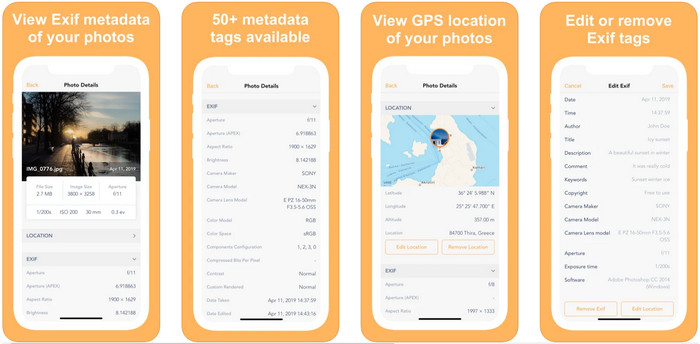
Το EXIF Metadata κάνει ό,τι θα έκανε ένας επεξεργαστής μεταδεδομένων για να βοηθήσει τους χρήστες iPhone να επεξεργαστούν τις ετικέτες τους. Αυτό το εργαλείο έχει ένα ιδιαίτερο γραφικό περιβάλλον και είναι πιο ελκυστικό από το Metapho. Με αυτή την εφαρμογή μπορείτε να δείτε πολύ πιο αναλυτικές πληροφορίες για την εικόνα σας δωρεάν. Αν και η εφαρμογή προσφέρει έκδοση pro, οι δυνατότητες επεξεργασίας που χρειάζεστε υπάρχουν ήδη στη δωρεάν έκδοση, ενώ μπορείτε να αποκτήσετε την pro έκδοση για να προσθέσετε ακόμη περισσότερες πληροφορίες στα μεταδεδομένα σας. Ένα από τα μειονεκτήματα της εφαρμογής είναι ότι υποστηρίζει μόνο αρχεία εικόνας, οπότε η αλλαγή μεταδεδομένων σε βίντεο είναι αδύνατη. Αν, λοιπόν, θέλετε να αλλάξετε μεταδεδομένα εικόνας σε iPhone, ακολουθήστε τα παρακάτω βήματα.
Βήμα 1. Κατεβάστε και εγκαταστήστε την εφαρμογή στο iPhone σας.
Βήμα 2. Ανοίξτε το εργαλείο, πατήστε το κουμπί + και επιλέξτε ποια ετικέτα εικόνας θέλετε να αλλάξετε.
Βήμα 3. Πατήστε Edit, προσθέστε τις πληροφορίες που χρειάζεστε και έπειτα πατήστε Save.
Μέρος 2. Καλύτερος επεξεργαστής μεταδεδομένων πολυμέσων για Windows & Mac – FVC Video Converter Ultimate
Δεν υποστηρίζονται όλες οι πληροφορίες που ίσως θέλετε να αλλάξετε στα μεταδεδομένα σας από τις εφαρμογές που αναφέρθηκαν παραπάνω. Αν θέλετε να έχετε πιο αναλυτικές πληροφορίες στην ετικέτα σας, προτείνουμε να επιλέξετε τον καλύτερο επεξεργαστή ετικετών για Windows και Mac, το FVC Video Converter Ultimate. Το λογισμικό μπορεί να σας βοηθήσει να προσθέσετε περισσότερες πληροφορίες ετικέτας στο αρχείο πολυμέσων σας με λίγα μόνο κλικ. Είτε είστε επαγγελματίας είτε όχι, η προσθήκη μεταδεδομένων στο αρχείο σας παύει να αποτελεί πρόβλημα με αυτό το κορυφαίο λογισμικό.
Ίσως ανησυχείτε εάν το αρχείο σας υποστηρίζεται εδώ. Αυτό το εργαλείο υποστηρίζει περισσότερες από 1000 μορφές και όντως υποστηρίζεται η μορφή που έχετε. Για να σας δώσουμε μια αρχή σχετικά με τον τρόπο αλλαγής των μεταδεδομένων βίντεο του iPhone σας, διαβάστε ευγενικά τις λεπτομερείς πληροφορίες που παραθέτουμε παρακάτω για να τις ακολουθήσετε αναλόγως, επειδή η επιτυχία είναι στο δρόμο της.
Βήμα 1. Πατώντας το κουμπί λήψης παρακάτω, μπορείτε να αποκτήσετε το απόλυτο αυτό εργαλείο και για τα δύο συστήματα, Windows και Mac. Κάντε κλικ στο αρχείο που κατεβάσατε για να εγκαταστήσετε το εργαλείο στον δίσκο σας και στη συνέχεια εκκινήστε το.
Δωρεάν ΛήψηΓια Windows 7 ή νεότεραΑσφαλής λήψη
Δωρεάν ΛήψηΓια MacOS 10.7 ή νεότεροΑσφαλής λήψη
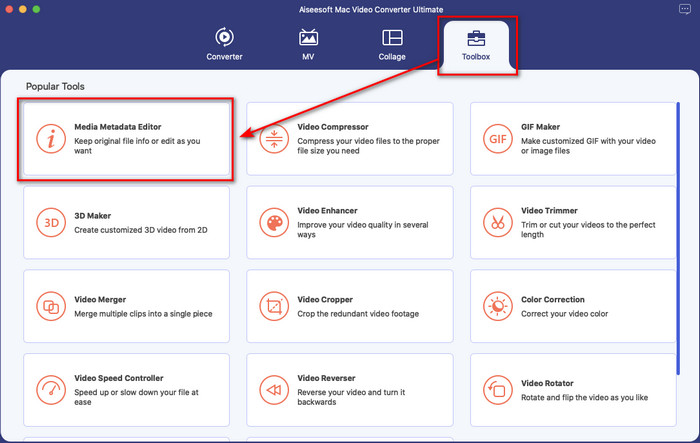
Βήμα 2. Μεταβείτε στην ενότητα Toolbox και, από το σύνολο των λειτουργιών, κάντε κλικ στο Media Metadata Editor.
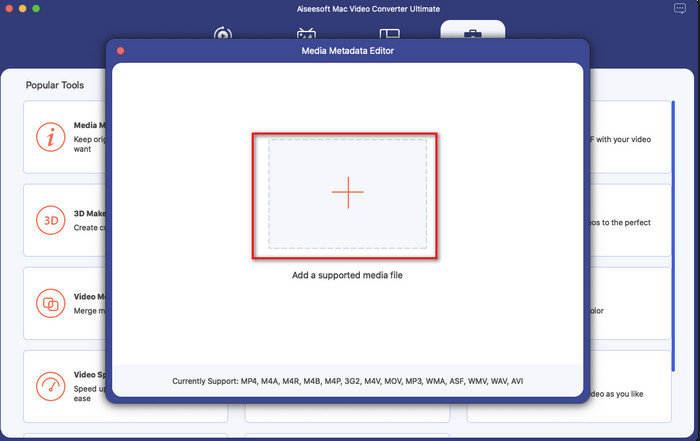
Βήμα 3. Πατήστε το κουμπί + και θα εμφανιστεί ένας φάκελος αρχείων στην οθόνη σας· βρείτε το αρχείο στο οποίο θέλετε να προσθέσετε μεταδεδομένα και πατήστε Open για να το ανεβάσετε.
Βήμα 4. Στο νέο παράθυρο μπορείτε πλέον να επεξεργαστείτε ή να αφαιρέσετε τα μεταδεδομένα από το αρχείο σας· κάντε κλικ σε κάθε πεδίο κειμένου και πληκτρολογήστε τις πληροφορίες που θέλετε να προσθέσετε ως μεταδεδομένα. Επιπλέον, μπορείτε, αν θέλετε, να προσθέσετε εξώφυλλο άλμπουμ στο αρχείο πολυμέσων σας πατώντας το κουμπί +, έπειτα βρείτε την εικόνα του άλμπουμ στο αρχείο σας και πατήστε Open για να την εισαγάγετε.
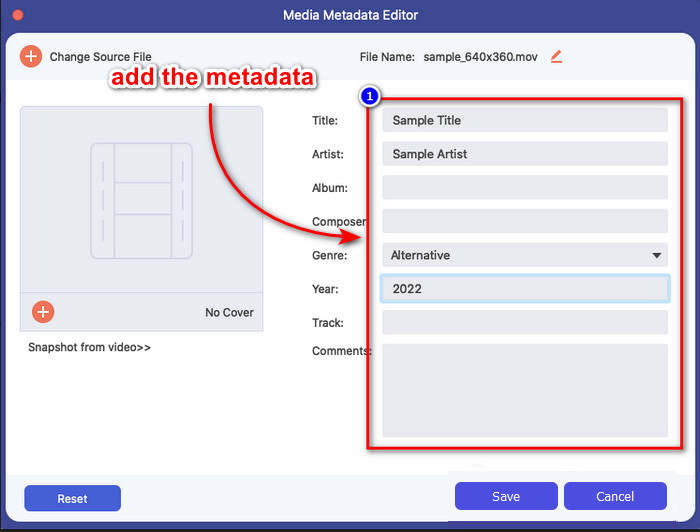
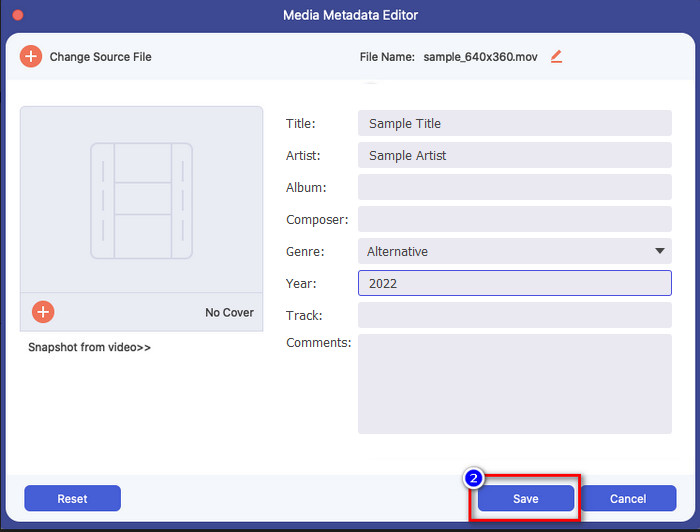
Βήμα 5. Αφού ολοκληρώσετε όλη την επεξεργασία και τις αλλαγές στο αρχείο πολυμέσων σας, μπορείτε πλέον να πατήσετε Save. Σε ελάχιστο χρόνο θα έχετε αλλάξει τα μεταδεδομένα του αρχείου πολυμέσων σας· με λίγα απλά κλικ και με τη βοήθεια του εργαλείου, όλα γίνονται εφικτά.
Μέρος 3. Συχνές ερωτήσεις σχετικά με τον επεξεργαστή μεταδεδομένων iPhone
Μπορώ να επεξεργαστώ μεταδεδομένα στο iPhone;
Ναι, μπορείτε να επεξεργαστείτε μεταδεδομένα στο iPhone σας, αλλά επιτρέπεται μόνο να επεξεργαστείτε την τοποθεσία και να προβάλετε τις βασικές ετικέτες του αρχείου, αλλά όχι να τις επεξεργαστείτε. Εάν θέλετε να αλλάξετε λεπτομερώς τα μεταδεδομένα του αρχείου, σας προτείνουμε να χρησιμοποιήσετε μια εφαρμογή τρίτου κατασκευαστή που θα καλύψει τις ανάγκες σας για το πρόβλημα μεταδεδομένων σας.
Γιατί πρέπει να αφαιρέσω τα μεταδεδομένα;
Αφαιρούμε τα μεταδεδομένα για λόγους ιδιωτικότητας. Κάποιοι άνθρωποι μπορεί να αποκτήσουν πολύ αναλυτικές πληροφορίες για εμάς μέσω των μεταδεδομένων· χωρίς να το γνωρίζετε, τα μεταδεδομένα μπορούν να αποθηκεύσουν την ακριβή σας τοποθεσία, ημερομηνία, ώρα, συντεταγμένες, ακόμη και αριθμούς κινητού. Αν δεν θέλετε να αποκαλύπτετε πληροφορίες για τον εαυτό σας, προτείνουμε να αφαιρείτε τα μεταδεδομένα από τα αρχεία σας. Θέλετε να μάθετε πώς; Αν ναι, αυτό το άρθρο θα σας βοηθήσει να αφαιρέσετε τα μεταδεδομένα από το αρχείο σας σε λιγότερο από ένα λεπτό.
Είναι εύκολη η αλλαγή μεταδεδομένων στο iPhone;
Απολύτως, ναι, η αλλαγή μεταδεδομένων στο iPhone είναι εύκολη με τη βοήθεια του σωστού επεξεργαστή μεταδεδομένων. Αν και η εργασία φαίνεται λίγο δύσκολη, εξακολουθεί να είναι διαχειρίσιμη για κάθε χρήστη. Εάν θέλετε να μάθετε το καλύτερο εργαλείο για να ολοκληρώσετε αυτήν την εργασία, πρέπει να διαβάσετε τις πληροφορίες σχετικά με τα δύο εργαλεία που παρέχουμε παραπάνω. Για να σας βοηθήσει να ολοκληρώσετε την αλλαγή της ετικέτας στο iPhone σαν επαγγελματίας.
συμπέρασμα
Τώρα που φτάσατε στο τέλος, έχουμε δει ότι η αλλαγή των μεταδεδομένων βίντεο σε iPhone είναι μια εύκολη διαδικασία. Με τη βοήθεια αυτού του άρθρου και τη δική σας προσήλωση, έγινε εφικτή. Τώρα μένει να επιλέξετε ποιος τρόπος σας ταιριάζει καλύτερα. Παρόλο που το FVC Video Converter Ultimate δεν είναι διαθέσιμο σε iPhone, εξακολουθεί να είναι από τα καλύτερα προγράμματα που μπορείτε να έχετε σε Mac ή Windows για να επεξεργάζεστε ετικέτες. Αυτό το εργαλείο υποστηρίζει την προσθήκη αναλυτικών πληροφοριών για το αρχείο πολυμέσων σας, ώστε να σας βοηθήσει να το οργανώσετε και να το κάνετε πιο ορατό. Θέλετε να μάθετε ποιες είναι οι άλλες λειτουργίες και δυνατότητες του λογισμικού; Πατήστε το κουμπί λήψης παραπάνω για να ρίξετε μια ματιά σε αυτές.
-
 Οι 3 κορυφαίοι επεξεργαστές μεταδεδομένων FLAC σε Mac και Windows [Ενημερώθηκε 2022]
 Θέλετε να αλλάξετε τα μεταδεδομένα FLAC; Σε αυτήν την περίπτωση, πρέπει να διαβάσετε αυτό το άρθρο, καθώς παρέχουμε επαρκείς γνώσεις σχετικά με τον πιο πρόσφατο επεξεργαστή μεταδεδομένων FLAC που μπορείτε να χρησιμοποιήσετε.
-
 Οι καλύτεροι τρόποι για να επεξεργαστείτε τα μεταδεδομένα του MKV σαν επαγγελματίας [Easy]
 Δεν έχετε ιδέα πώς να επεξεργαστείτε τα μεταδεδομένα του MKV; Ορισμένοι χρήστες δυσκολεύονται να επεξεργαστούν τις ετικέτες στο MKV, αν είστε ένας από αυτούς, διαβάστε αυτό το άρθρο.
-
 Η καλύτερη τεχνική για το πώς να επεξεργάζεστε τα μεταδεδομένα WebM γρήγορα
 Διαβάστε όλες τις πλήρεις λεπτομέρειες που παρέχουμε παρακάτω καθώς εισάγουμε έναν οδηγό σχετικά με τον τρόπο επεξεργασίας των μεταδεδομένων WebM. Κάντε κλικ σε αυτόν τον σύνδεσμο για να μάθετε περισσότερα σχετικά με αυτό.
