


 Video Converter Ultimate
 Εγγραφή οθόνης
 Επισκευή βίντεο
 Ασφαλές κατέβασμα
2 γρήγοροι τρόποι συρρίκνωσης μεγάλων αρχείων OGV [Δωρεάν & Διαδικτυακά]
OGV files are often used for playing webpage video content using the HTML5 < video > tag. When you are going to send large OGV files to partners, clients, or friends, compressing those files becomes incredibly useful. Since there are many file size limitations of many email and file transfer platforms, compressed videos can greatly prevent the file transfer failure, at least in most cases. So, we’ll take a look at two online ways to compress your OGV files and make them smaller in this post.

Μέρος 1. Διαδικτυακός τρόπος συμπίεσης αρχείων OGV με συμπιεστή OGV
Free Video Compressor is a popular and useful free online OGV compressor tool available for users. Unlike many other common free online tools, Free Video Compressor comes without restrictions on either the number or size of the files uploaded. More importantly, there will be no watermark on your exported video files. Also, it allows you to compress MP4, AVI, WMV, MOV, and many other common video files without destroying quality.
Πώς να συμπιέσετε τα αρχεία OGV χρησιμοποιώντας τον δωρεάν συμπιεστή βίντεο
Step 1. Go to the online OGV video compressor website by entering https://www.free-videoconverter.net/free-video-compressor/.
Step 2. Locate and click Add Files to Compress button, and then download its launcher to activate the service. In the window that pops up, go and find your OGV files and hit Open to confirm.

Step 3. Next, you should define the compression settings to make the file smaller. You can set the size of your video, change the resolution, select the bitrate, and more.

Step 4. Hit on the Compress button to commence the process. After it’s finished, the file will be downloaded to your computer automatically.

Εκτός αυτού, αυτός ο δωρεάν συμπιεστής βίντεο μπορεί να σας βοηθήσει να επιλύσετε άλλα προβλήματα συμπίεσης βίντεο. Απλώς ελέγξτε τα ακόλουθα άρθρα:
How to Compress a Video for Email
How to Compress AVCHD Video Files for Free on Windows and Mac
Μέρος 2. Πώς να συμπιέσετε και να βελτιστοποιήσετε ένα αρχείο OGV με το Clideo
Το Clideo είναι μια δωρεάν εργαλειοθήκη βίντεο all-in-one. Λειτουργεί με όλες τις δημοφιλείς μορφές και συμπιέζει γρήγορα και δεν απαιτεί λήψη. Σας επιτρέπει να συμπιέσετε ένα αρχείο OGV έως 500MB δωρεάν, αλλά δεν έχει όριο ποσότητας. Τώρα μπορείτε να ακολουθήσετε τα παρακάτω βήματα για να μειώσετε το μέγεθος του αρχείου OGV.
Step 1. Visit https://clideo.com/compress-video and then hit on the Choose file button.
Step 2. Upload an OGV file you want to compress from your computer. You can also select the file from Dropbox or Google Drive by clicking the blue downward arrow.
Step 3. When the file is uploaded, the tool will start processing the video. The processing time depends on the size of the video.
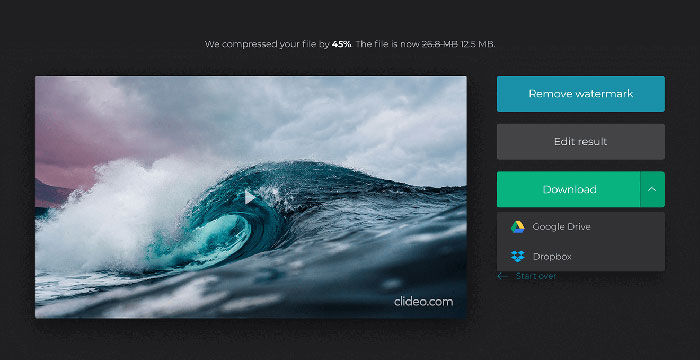
Step 4. Once the compression is over, you can see the initial file size and the compressed one. Now, you can preview the result to make sure it looks good. If you’re satisfied with it, you can click on the Download button to save it to your device or cloud storage.
Μέρος 3. Συχνές ερωτήσεις για τη συμπίεση αρχείων OGV
Τι είναι ένα αρχείο OGV;
Ένα αρχείο OGV είναι ένα αρχείο βίντεο που έχει αποθηκευτεί σε μορφή κοντέινερ Xiph.Org ανοιχτού κώδικα Ogg. Περιέχει ροές βίντεο που μπορούν να χρησιμοποιούν έναν ή περισσότερους διαφορετικούς κωδικοποιητές, όπως Theora, Dirac ή Daala. Τα αρχεία OGV μπορούν να αναπαραχθούν χρησιμοποιώντας μια ποικιλία προγραμμάτων αναπαραγωγής πολυμέσων.
Πώς λειτουργεί η συμπίεση OGV;
Όσον αφορά τη συμπίεση αρχείων OGV, είναι η συμπίεση μεταξύ πλαισίων που οδηγεί στη μείωση του μεγέθους του αρχείου αφαιρώντας τις ομοιότητες που εμφανίζονται μεταξύ των πλαισίων βίντεο.
Πώς μπορώ να συμπιέσω τη μορφή MP4 σε OGV;
Μπορείτε να χρησιμοποιήσετε το παραπάνω εργαλείο - Δωρεάν Συμπιεστής βίντεο για να συμπιέσετε τα αρχεία MP4 σε OGV. Ή μπορείτε να επιλέξετε μια εφαρμογή μετατροπής βίντεο που θα σας βοηθήσει να το κάνετε.
συμπέρασμα
Οι παραπάνω διαδικτυακές μέθοδοι μπορούν να σας βοηθήσουν να συμπιέσετε αποτελεσματικά τη συρρίκνωση ενός βίντεο OGV. Ποιο προτιμούσατε να χρησιμοποιήσετε; Μπορείτε να μοιραστείτε τις προτάσεις σας στα παρακάτω σχόλια!
-
 Από 50MB έως 5MB - Πώς να συμπιέσετε το αρχείο MP4 σε δευτερόλεπτα
 Το βίντεο MP4 είναι πολύ μεγάλο για μεταφόρτωση; Θέλετε να μειώσετε το μέγεθος του βίντεο; Εδώ είναι 3 αποτελεσματικοί τρόποι συμπίεσης ενός αρχείου MP4 σε μικρότερο μέγεθος χωρίς όριο.
-
 Tutorial - 7 τρόποι συμπίεσης βίντεο δωρεάν χωρίς απώλεια ποιότητας
 Διαβάστε και λάβετε 7 τρόπους συμπίεσης βίντεο δωρεάν στον υπολογιστή ή στο τηλέφωνό σας. Μπορείτε να μειώσετε τα μεγάλα βίντεο σε μικρά μεγέθη αρχείων για email, Twitter, Instagram, YouTube, WhatsApp και άλλα με ευκολία.
-
 Πώς να συμπιέσετε αρχεία MOV σε Windows, Mac, iPhone και Android
 Αυτό το άρθρο δείχνει τον τρόπο συμπίεσης των βίντεο QuickTime MOV στο τηλέφωνο ή τον υπολογιστή σας με λεπτομέρειες. Εάν το βίντεο MOV σας είναι πολύ μεγάλο για αποστολή, κοινή χρήση ή αποθήκευση, μπορείτε να λάβετε εδώ 4 λύσεις που μπορούν να εφαρμοστούν.
