


 Video Converter Ultimate
 Εγγραφή οθόνης
 Επισκευή βίντεο
2 Μέθοδοι συμπίεσης βίντεο για το Instagram Online και σε επιτραπέζιο υπολογιστή
Πώς να συμπιέσετε βίντεο για το Instagram; Είστε απελπισμένοι όταν ανακαλύψατε ότι το βίντεο που εργαζόσασταν για ώρες δεν μπορούσε να μεταφορτωθεί στο Instagram για το μεγάλο του μέγεθος; Μην πανικοβληθείτε. Μόλις ήρθες στο σωστό μέρος. Αυτό το άρθρο θα σας δώσει τους 2 ευκολότερους τρόπους συμπίεσης βίντεο για μεταφόρτωση στο Instagram.

Μέρος 1: Γιατί πρέπει να συμπιέσω βίντεο για το Instagram
Ακριβώς όπως αναφέρθηκε παραπάνω, δεν είναι δυνατή η μεταφόρτωση μεγάλων αρχείων βίντεο στο Instagram. Πρέπει να συμπιέσετε τα βίντεο Instagram σε αρχεία MP4 κάτω των 20 MB. Ο ρυθμός καρέ βίντεο πρέπει να είναι 30 καρέ ανά δευτερόλεπτο, με ρυθμό bit 3500KBPS. Το μέγεθος του βίντεο έχει συνήθως πλάτος 1080 pixel. Συνιστάται ανάλυση 4: 5. Επιπλέον, τα βίντεό σας πρέπει να είναι πάνω από 3 δευτερόλεπτα και κάτω από 60 δευτερόλεπτα.
Μέρος 2: Πώς να συμπιέσετε αρχεία βίντεο για το Instagram Online
Το FVC Free Video Compressor είναι ένα έξυπνο online εργαλείο για τη συμπίεση βίντεο σε διάφορες μορφές. Δεν χρειάζεται να κατεβάσετε το πρόγραμμα. Όλη η διαδικασία συμπίεσης ολοκληρώνεται σε μια ιστοσελίδα. Με αυτό, μπορείτε να μικρύνετε τα βίντεό σας σε οποιοδήποτε μέγεθος θέλετε.
Βασικά χαρακτηριστικά:
- 1. Συμπιέστε διάφορα μεγάλα βίντεο όπως MKV, FLV, WMV, AVI, TS, MOV κ.λπ.
- 2. Εύχρηστη διεπαφή για αρχάριους για να προσαρμόσετε τις ρυθμίσεις
- 3. Εργαστείτε με ταχύτερη ταχύτητα 30x και μην αφήνετε υδατογράφημα στις εξόδους
- 4. Χειριστείτε βίντεο 4K Ultra HD χωρίς απώλεια ποιότητας
Ακολουθούν τα βήματα για τη συμπίεση αρχείων βίντεο για το Instagram στο διαδίκτυο με αυτό το εργαλείο:
Βήμα 1: Φορτώστε το FVC Free Video Compressor στον browser σας.
Κάντε κλικ στο κουμπί Add Files to Compress στο κέντρο. Την πρώτη φορά που θα χρησιμοποιήσετε αυτό το εργαλείο, πρέπει να κατεβάσετε ένα αρχείο με όνομα fvc-launcher και να το εκτελέσετε πριν συνεχίσετε. Στη συνέχεια, κάντε ξανά κλικ στο κουμπί Add Files to Compress. Έπειτα μπορείτε να επιλέξετε τα αρχεία βίντεο που θέλετε να συμπιέσετε για το Instagram.

Βήμα 2: Προσαρμόστε τις ρυθμίσεις του βίντεο που θέλετε να συμπιέσετε για το Instagram
Μέγεθος: Μπορείτε να ρυθμίσετε τη γραμμή ποσοστού σύροντάς την. Για να συμπιέσετε ένα βίντεο για το Instagram, βεβαιωθείτε ότι το τελικό μέγεθος είναι κάτω από 20 MB. Οι αλλαγές στο μέγεθος εξόδου θα επηρεάσουν ταυτόχρονα και το Bitrate εξόδου.
Μορφή: Προς το παρόν, μπορείτε να μετατρέψετε το βίντεο σε 12 μορφές συμπεριλαμβανομένων των MP4, MKV, AVI, FLV κ.λπ. Για να συμπιέσετε ένα βίντεο για το Instagram, απλώς επιλέξτε μορφή MP4.
Ανάλυση: Μπορείτε να μειώσετε την ανάλυση σε χαμηλότερες, όπως 320*240, 480*360 και άλλες. Ή μπορείτε να διατηρήσετε την αρχική ανάλυση και να συμπιέσετε το βίντεο για το Instagram απλώς μειώνοντας το bitrate.

Βήμα 3: Ξεκινήστε τη συμπίεση και περιμένετε μέχρι το εργαλείο να ολοκληρώσει την εργασία.
Κάντε κλικ στο μοβ κουμπί Compress και επιλέξτε τον φάκελο όπου θέλετε να αποθηκεύσετε το τελικό βίντεο. Μην κλείσετε τον browser ή την ιστοσελίδα όσο το βίντεο επεξεργάζεται. Διαφορετικά, θα χρειαστεί να συμπιέσετε ξανά το βίντεο για το Instagram από την αρχή. Η ταχύτητα της διαδικασίας εξαρτάται σε μεγάλο βαθμό από το hardware σας.
Μέρος 3: Πώς να συμπιέσετε αρχεία βίντεο για το Instagram στην επιφάνεια εργασίας
Πέρα από το μέγεθος, η διάρκεια του βίντεό σας πρέπει να είναι από 3 έως 60 δευτερόλεπτα. Ωστόσο, οι λειτουργίες του online εργαλείου είναι αρκετά απλές επειδή λειτουργεί σε ιστοσελίδα. Δεν υποστηρίζεται το κόψιμο (trim) του βίντεο με το online εργαλείο. Ποιο εργαλείο μπορείτε να χρησιμοποιήσετε αν θέλετε όχι μόνο να συμπιέσετε αλλά και να επεξεργαστείτε το βίντεο; Το Aiseesoft Video Converter Ultimate είναι πιθανότατα η καλύτερη επιλογή σας.
Βασικά χαρακτηριστικά:
- 1. Συμβατό με περισσότερες από 1.000 μορφές, συμπεριλαμβανομένων των WMA, MP4, AVI, MOV, WMV, MP3, FLAC κ.λπ.
- 2. Η προηγμένη τεχνολογία επιτάχυνσης υλικού εξασφαλίζει πρωτοφανή ταχύτητα
- 3. Περικοπή και συγχώνευση βίντεο κλιπ με ουράνιο τόξο φίλτρων και βασικών εφέ.
- 4. Το εργαλείο 3D Maker σάς επιτρέπει να απολαμβάνετε απίστευτα τρισδιάστατα βίντεο στα τρισδιάστατα γυαλιά σας
- 5. Δημιουργήστε σχεδόν επαγγελματικά βίντεο split-screen
- 6. Ενσωματωμένοι τέσσερις απόλυτοι τρόποι για να βελτιώσετε το βίντεό σας
Δωρεάν ΛήψηΓια Windows 7 ή νεότεραΑσφαλής λήψη
Δωρεάν ΛήψηΓια MacOS 10.7 ή νεότεροΑσφαλής λήψη
Βήματα για τη συμπίεση βίντεο για το Instagram με το Video Converter Ultimate:
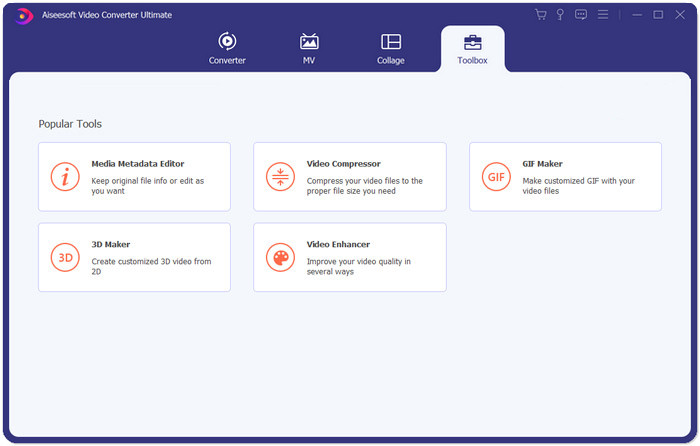
Βήμα 1: Κατεβάστε, εγκαταστήστε και εκκινήστε το Aiseesoft Video Converter Ultimate. Μεταβείτε στην καρτέλα Toolbox και κάντε κλικ στο κουμπί “+” για να προσθέσετε το βίντεο που θέλετε να συμπιέσετε για το Instagram.
Βήμα 2: Αφού προσθέσετε το βίντεο, θα βρεθείτε στη διεπαφή του Video Compressor. Σύρετε τη γραμμή μεγέθους για να ρυθμίσετε το μέγεθος του αρχείου εξόδου και επιλέξτε την επιθυμητή ανάλυση και μορφή εξόδου.
Σημείωση: Μπορείτε να αλλάξετε το bitrate μόνο έμμεσα δοκιμάζοντας διαφορετικούς συνδυασμούς ανάλυσης και μεγέθους εξόδου.
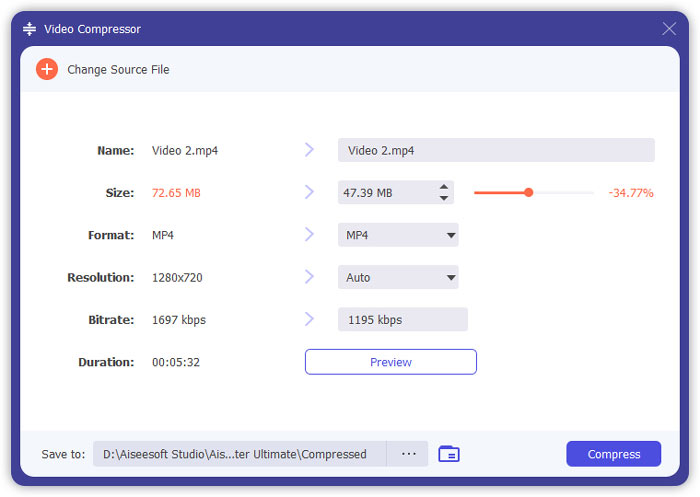
Βήμα 3: Κάντε κλικ στο κουμπί Compress κάτω δεξιά για να ξεκινήσει η συμπίεση βίντεο για το Instagram.
Περαιτέρω ανάγνωση:
Πώς να συμπιέσετε βίντεο online για το WhatsApp (100MB/500MB/1GB…)
Πώς να συμπιέσετε ένα βίντεο για email και να το κάνετε μικρότερο από 25MB
Μέρος 4: Συνήθεις ερωτήσεις σχετικά με τη μεταφόρτωση βίντεο στο Instagram
Ποιες είναι οι απαιτήσεις της μεταφόρτωσης βίντεο Instagram;
Μορφή: MP4
Κωδικοποίηση (Codec): H.264
Bitrate: κάτω από 3500 kbps
Ρυθμός καρέ (Frame rate): λιγότερο από 30 καρέ ανά δευτερόλεπτο.
Ποια είναι η καλύτερη αναλογία διαστάσεων για βίντεο Instagram;
Η καλύτερη αναλογία διαστάσεων είναι 9:16, η οποία είναι επίσης η τυπική αναλογία των περισσότερων smartphone.
Ποια μορφή ήχου πρέπει να χρησιμοποιεί το βίντεό μου για μεταφόρτωση στο Instagram;
Ήχος AAC.
συμπέρασμα
Από αυτό το άρθρο, έχετε δύο εύχρηστα εργαλεία για τη συμπίεση του βίντεό σας για το Instagram. Είναι FVC Free Video Compressor και Video Converter Ultimate. Όταν συμπιέζετε το βίντεο για το Instagram, μην ξεχάσετε να βεβαιωθείτε ότι το βίντεό σας είναι 3 έως 60 δευτερόλεπτα και κάτω από 20 MB.
-
 Ο καλύτερος τρόπος για να μειώσετε το μέγεθος βίντεο Vimeo για μεταφόρτωση
 Σε αυτήν την ανάρτηση, θα σας δείξουμε πώς να συμπιέσετε το αρχείο βίντεο για τη μεταφόρτωση του αρχείου στο Vimeo, μαζί με τις οδηγίες που μπορεί να χρειαστείτε για συμπίεση βίντεο και ήχου.
-
 Πώς να μειώσετε το μέγεθος του αρχείου βίντεο για το YouTube με 2 τρόπους
 Τα βίντεο YouTube είναι μεγάλα και αργά για μεταφόρτωση; Απλώς συμπιέστε το μέγεθος του αρχείου βίντεο σε μικρότερο για το YouTube με 2 τρόπους στο διαδίκτυο και στον υπολογιστή.
-
 Πώς να συμπιέσετε βίντεο για Facebook δωρεάν και online
 Εάν σας απαγορεύεται να ανεβάσετε ένα μεγάλο βίντεο στο Facebook, μην ανησυχείτε. Απλώς συμπιέστε το μεγάλο μέγεθος βίντεο από GB σε MB με τον δωρεάν συμπιεστή βίντεο.
