


 Video Converter Ultimate
 Εγγραφή οθόνης
 Επισκευή βίντεο
 Ασφαλές κατέβασμα
Πώς να συμπιέσετε το βίντεο στο διαδίκτυο χρησιμοποιώντας 3 αξιοσημείωτα εργαλεία
Μία από τις προκλήσεις της εγγραφής ενός μεγάλου σε διάρκεια βίντεο σε φορητή συσκευή με υψηλή ανάλυση εμφανίζεται όταν χρειάζεται να το μεταφέρετε σε άλλα άτομα μέσω διαδικτύου. Αυτό συμβαίνει επειδή οι λογαριασμοί κοινωνικών δικτύων έχουν περιορισμό στο μέγεθος των αρχείων που μπορούν να δεχτούν. Γι’ αυτό πολλοί έχουν στο μυαλό τους μόνο μία λύση: να κόψουν ή να περικόψουν το βίντεο. Από σήμερα, όμως, οι χρήστες δεν χρειάζεται να ανησυχούν για την εγγραφή βίντεο μεγάλης διάρκειας, χάρη στους παρακάτω online συμπιεστές βίντεο.

Μέρος 1. 3 τρόποι συμπίεσης βίντεο στο διαδίκτυο
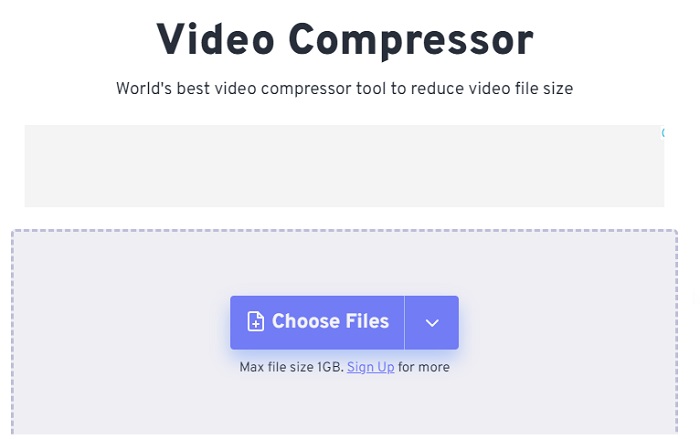
1. FVC Video Compressor Online
Το FVC Video Compressor Online είναι η απόλυτη επιλογή για τους χρήστες που αναζητούν μια χωρίς κόπο εμπειρία συμπίεσης βίντεο. Ανακαλύψτε την ασύγκριτη ευκολία και απλότητά του, που το κάνει να ξεχωρίζει ανάμεσα σε άλλα online εργαλεία συμπίεσης βίντεο. Μετακινώντας το ρυθμιστικό από τα αριστερά προς τα δεξιά, μπορείτε εύκολα να ορίσετε το επίπεδο συμπίεσης που επιθυμείτε για τα αρχεία σας. Επιπλέον, αυτός ο εντυπωσιακός online συμπιεστής βίντεο σάς δίνει τη δυνατότητα να επιλέξετε την ακριβή μορφή που ταιριάζει ιδανικά στο επιθυμητό αποτέλεσμα του βίντεο σας. Μπορείτε να απολαύσετε την ευελιξία και την άνεση πολλών μορφών, όπως τα δημοφιλή MP4, MOV, MKV, AVI, WMV και πολλά άλλα. Με τόσες διαθέσιμες επιλογές, θα μπορείτε να απολαμβάνετε τα πολυμέσα σας στη μορφή που σας εξυπηρετεί καλύτερα. Επιπλέον, έχετε την εξαιρετική δυνατότητα να βελτιώσετε την ανάλυση και το bitrate του αρχείου σας.
Πλεονεκτήματα
- Οι χρήστες μπορούν να βιώσουν την ευκολία και την απλότητα της διεπαφής χρήστη του.
- Επιτρέπει την απρόσκοπτη συμπίεση βίντεο χωρίς υδατογραφήματα.
- Εξουσιοδοτεί τους χρήστες να επιλέγουν το βέλτιστο bitrate και την ανάλυση για τα αρχεία βίντεο τους.
- Μετατρέπει αβίαστα τα βίντεό τους σε ένα ευρύ φάσμα μορφών.
Μειονεκτήματα
- Η διαδικασία συμπίεσης εξαρτάται από την ταχύτητα του Διαδικτύου.
Βήμα 1: Μόλις φτάσετε στην κύρια διεπαφή του FVC Free Video Compressor, κάντε κλικ στο κουμπί Add Files to Compress και προχωρήστε στη λήψη του launcher. Αφού ολοκληρωθεί η εγκατάσταση, κάντε ξανά κλικ στο κουμπί και προσθέστε το βίντεο που θέλετε να συμπιέσετε.
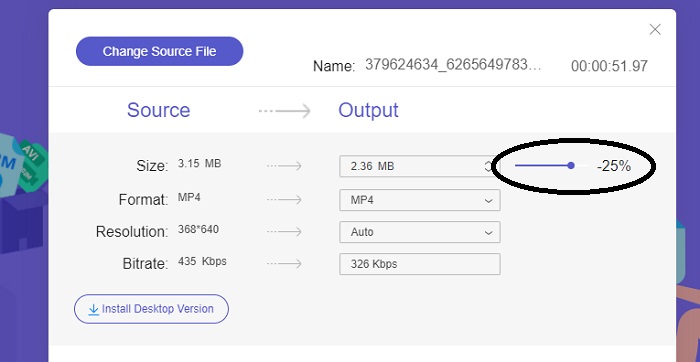
Βήμα 2: Για να ξεκινήσετε τη συμπίεση του βίντεο, μετακινήστε τη γραμμή Slider από τα δεξιά προς τα αριστερά αφού το προσθέσετε. Μπορείτε να αλλάξετε τη μορφή του βίντεό σας επιλέγοντας από τις διαθέσιμες μορφές.
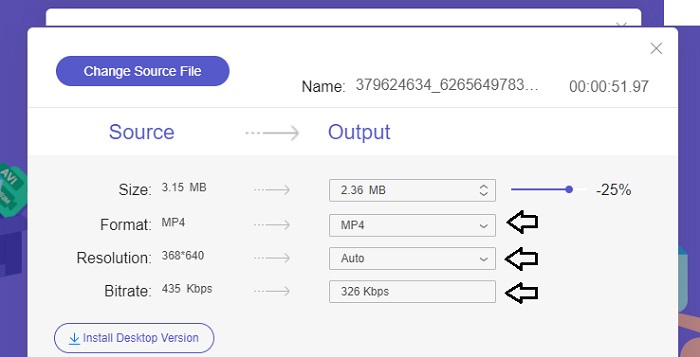
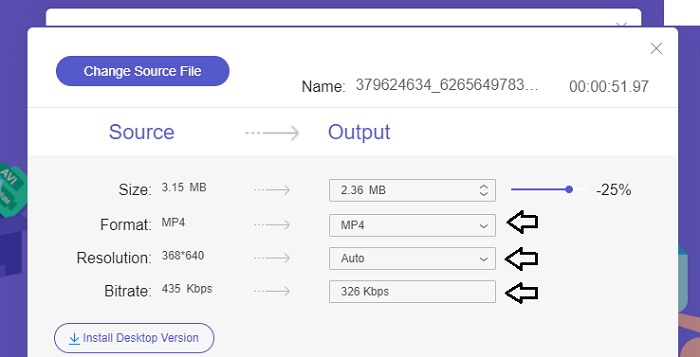
Επιπλέον, μπορείτε να προσαρμόσετε το Bitrate και την Resolution του βίντεό σας επιλέγοντας από τις διαθέσιμες επιλογές.
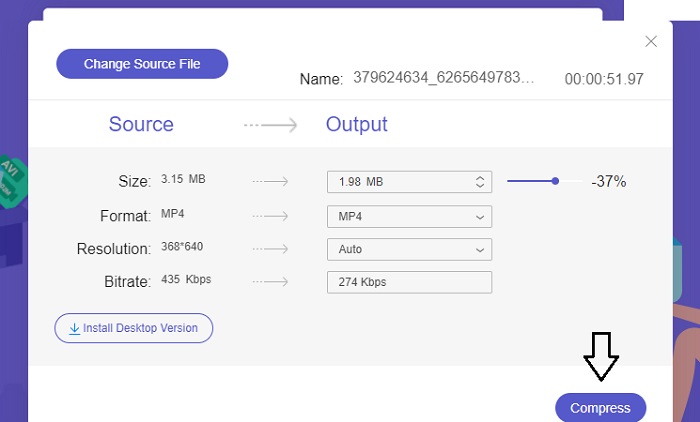
Βήμα 3: Αφού πραγματοποιήσετε όλες τις απαραίτητες τροποποιήσεις, μπορείτε να αποθηκεύσετε το βίντεο κάνοντας κλικ στο κουμπί Compress. Στη συνέχεια, επιλέξτε τον φάκελο όπου θέλετε να αποθηκευτεί το τελικό βίντεο. Και αυτό ήταν όλο!
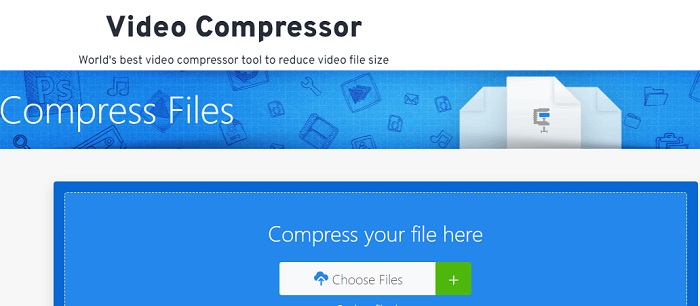
2. FreeConvert
Το FreeConvert είναι ένα εύχρηστο διαδικτυακό εργαλείο για τη συμπίεση βίντεο. Οι χρήστες μπορούν να στοχεύσουν συγκεκριμένες πτυχές, όπως το μέγεθος του αρχείου, την ποιότητα του βίντεο, την ανάλυση ή το ρυθμό μετάδοσης bit για συμπίεση. Η διαδικασία συμπίεσης είναι γρήγορη και εύκολη και αποτελείται από μερικά απλά βήματα που είναι εύκολο να ακολουθηθούν. Ωστόσο, δεδομένου ότι αυτό το εργαλείο είναι αποκλειστικά διαθέσιμο στο διαδίκτυο, οι χρήστες θα απαιτήσουν σημαντικό εύρος ζώνης τόσο για τη μεταφόρτωση όσο και για τη λήψη. Η δωρεάν έκδοση του FreeConvert έχει ορισμένους περιορισμούς στα μεγέθη των αρχείων και στον αριθμό των αρχείων που μπορούν να μετατραπούν μηνιαία.
Πλεονεκτήματα
- Η διεπαφή είναι φιλική για αρχάριους.
- Έχει γρήγορη ταχύτητα λήψης.
Μειονεκτήματα
- Για τη συμπίεση μεγάλων μεγεθών αρχείων, οι χρήστες πρέπει να πληρώσουν για έναν premium λογαριασμό.
- Η δωρεάν έκδοση έχει ημερήσιο όριο για μετατροπές.
Βήμα 1: Αναζητήστε στο πρόγραμμα αναζήτησής σας το FreeConvert Video Compressor. Αφού μεταβείτε στην κύρια διεπαφή, πατήστε το κουμπί Choose Files για να ανεβάσετε το βίντεο που θέλετε να συμπιέσετε.
Βήμα 2: Αφού ανεβάσετε το βίντεο, κάντε κλικ στο κουμπί Compress και περιμένετε υπομονετικά μέχρι να ολοκληρωθεί η διαδικασία.
Βήμα 3: Για να αποθηκεύσετε το συμπιεσμένο βίντεο, πατήστε το κουμπί Download και επιλέξτε τον φάκελο όπου θέλετε να αποθηκεύσετε το βίντεο.
3. Ζαμάρ
Το Zamzar είναι ένα βολικό διαδικτυακό εργαλείο που σας επιτρέπει να μετατρέπετε και να συμπιέσετε αρχεία δωρεάν. Είναι προσβάσιμο σε οποιονδήποτε υπολογιστή με σύνδεση στο Διαδίκτυο. Αυτός ο διαδικτυακός μειωτήρας μεγέθους βίντεο επιτρέπει στους χρήστες, είτε είναι αρχάριοι είτε επαγγελματίες, να συμπιέζουν τα βίντεο κλιπ τους γρήγορα και χωρίς κόπο. Το λογισμικό έχει τη δυνατότητα να υποστηρίζει μια ποικιλία τύπων αρχείων. Ωστόσο, είναι σημαντικό να σημειωθεί ότι η δωρεάν έκδοση περιορίζει μόνο δύο συμπιέσεις ή μετατροπές μέσα σε μια περίοδο 24 ωρών.
Πλεονεκτήματα
- Σε περίπτωση τεχνικών προβλημάτων, υπάρχει διαθέσιμη υποστήριξη μέσω email.
- Τα αρχεία αποθηκεύονται το πολύ για 24 ώρες.
- Η πλοήγηση είναι πολύ φιλική προς το χρήστη.
Μειονεκτήματα
- Στη δωρεάν έκδοση, οι χρήστες περιορίζονται σε δύο αρχεία το πολύ εντός 24 ωρών.
- Για πρόσβαση σε αρχεία μεγαλύτερα από 400 MB, είναι απαραίτητη η αναβάθμιση στην έκδοση premium.
Βήμα 1: Για να ξεκινήσετε, μεταβείτε στην κεντρική σελίδα του Zamzar, όπου θα βρείτε ολόκληρη τη διεπαφή. Για να προσθέσετε το βίντεο από την επιφάνεια εργασίας σας, κάντε κλικ στο κουμπί Choose Files.
Βήμα 2: Αφού ανεβάσετε το βίντεο, πρέπει να περιμένετε μερικά δευτερόλεπτα μέχρι να ολοκληρωθεί η διαδικασία συμπίεσης και να ενημερωθεί η κατάστασή του.
Βήμα 3: Τέλος, μπορείτε να κατεβάσετε το συμπιεσμένο αρχείο στην επιφάνεια εργασίας σας.
Μέρος 2. Καλύτερος συμπιεστής βίντεο εκτός σύνδεσης
Αν θέλετε ένα λογισμικό που συνδυάζει δυνατότητες συμπίεσης, μετατροπής και επεξεργασίας βίντεο, σκεφτείτε να στραφείτε στο Video Converter Ultimate. Το λογισμικό προσφέρει μια ολοκληρωμένη λύση που περιλαμβάνει βασικές λειτουργίες επεξεργασίας, μετατροπής και συμπίεσης βίντεο. Επιπλέον, παρέχει προηγμένες δυνατότητες που επιτρέπουν στους χρήστες να δημιουργούν εύκολα βίντεο υψηλής ποιότητας και επαγγελματικού επιπέδου. Διαθέτει μια ευρεία γκάμα ισχυρών λειτουργιών. Η λύση περιλαμβάνει επίσης ένα εργαλείο που επιτρέπει στους χρήστες να δημιουργούν εντυπωσιακά βίντεο, γρήγορα και αποτελεσματικά. Η μετατροπή ενός βίντεο με αυτό το εργαλείο είναι μια απλή διαδικασία τριών βημάτων.
Βήμα 1: Για να αξιοποιήσετε αυτό το ισχυρό λογισμικό συμπίεσης βίντεο, κατεβάστε το και εγκαταστήστε το στον υπολογιστή σας. Στη συνέχεια, εκκινήστε το πρόγραμμα για να αρχίσετε να χρησιμοποιείτε τις λειτουργίες του.
Δωρεάν λήψηΓια Windows 7 ή νεότεραΑσφαλής λήψη
Δωρεάν λήψηΓια MacOS 10.7 ή νεότεροΑσφαλής λήψη
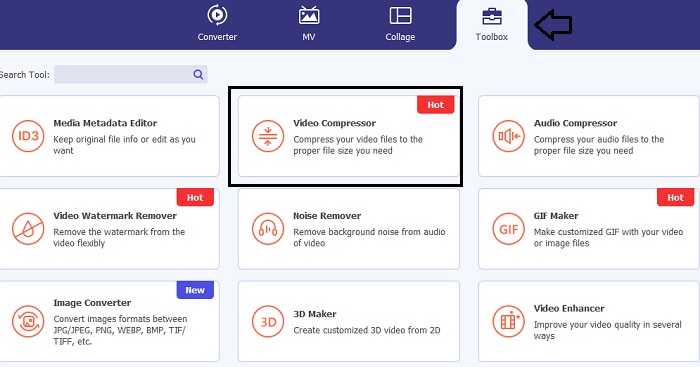
Βήμα 2: Για να ξεκινήσετε, μεταβείτε στην ενότητα Toolbox και κάντε κλικ στην επιλογή Video Compressor. Έπειτα, μπορείτε να ανεβάσετε το βίντεό σας.
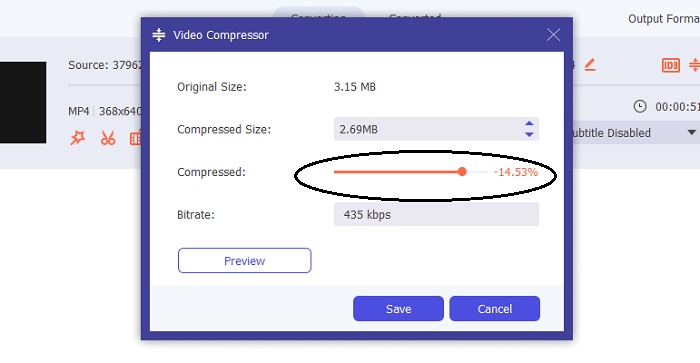
Μόλις μπείτε στη ρύθμιση Video Compressor, μετακινήστε τη γραμμή Slider μέχρι να πετύχετε το επιθυμητό μέγεθος. Έπειτα, κάντε κλικ στο κουμπί Save για να εφαρμόσετε τις αλλαγές.
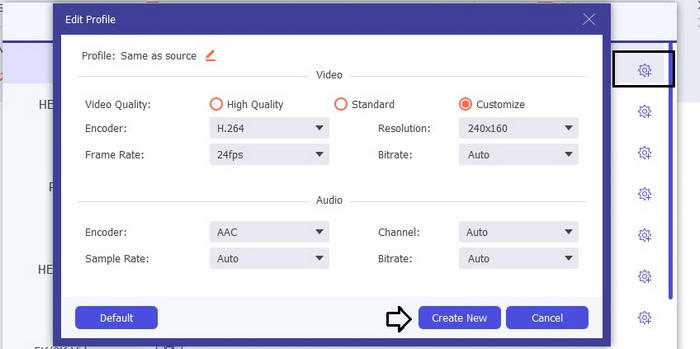
Για να επιλέξετε την κατάλληλη μορφή βίντεο, κάντε κλικ στην επιλογή Profile και επιλέξτε από τις διαθέσιμες μορφές στη λίστα που αναδιπλώνεται. Μπορείτε επίσης να προσαρμόσετε ρυθμίσεις όπως Encoder, Resolution, Bitrate και διάφορες ρυθμίσεις ήχου. Θυμηθείτε να κάνετε κλικ στο κουμπί Create New για να επιβεβαιώσετε αυτές τις ρυθμίσεις.
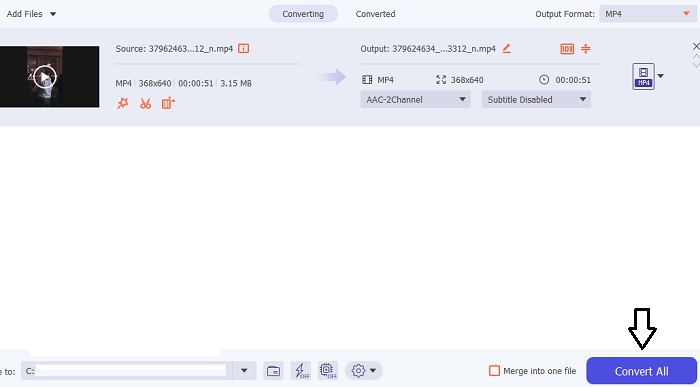
Βήμα 3: Για να ξεκινήσετε τη συμπίεση του βίντεο, κάντε κλικ στο κουμπί Compress.
Περαιτέρω ανάγνωση:
Πώς να συμπιέσετε βίντεο για τον ιστό αποτελεσματικά χωρίς απώλεια ποιότητας
Συμπιέζει το Google Drive τα βίντεο; Μάθετε και ανακαλύψτε εδώ
Μέρος 3. Συχνές ερωτήσεις σχετικά με το Video Compressor Online
Πώς μπορώ να μειώσω το μέγεθος MB ενός βίντεο;
Διατηρήστε την ανάλυση εικόνας και τον ρυθμό καρέ χαμηλά όποτε είναι δυνατόν. Για να μειώσετε το μέγεθος MB του αρχείου σας, εξετάστε το ενδεχόμενο μείωσης του ρυθμού bit και της ανάλυσης του βίντεό σας. Αλλά να έχετε κατά νου ότι καθώς μειώνετε τα MB, η ποιότητα τίθεται επίσης σε κίνδυνο.
Πώς μπορώ να μειώσω το μέγεθος ενός βίντεο χωρίς απώλεια ποιότητας;
Πολλές μέθοδοι είναι διαθέσιμες για να μειώσετε το μέγεθος ενός αρχείου βίντεο χωρίς να θυσιάσετε την ποιότητά του. Μπορείτε να βελτιώσετε το βίντεό σας χρησιμοποιώντας έναν συμπιεστή βίντεο, περικόπτοντας το μήκος του, προσαρμόζοντας το bitrate ή μετατρέποντάς το σε μορφή κατάλληλη για τον Ιστό.
Η μείωση του μεγέθους του βίντεο μειώνει την ποιότητα;
Να θυμάστε ότι η συμπίεση του βίντεό σας θα έχει αντίκτυπο στην ποιότητά του. Επομένως, είναι σημαντικό να έχετε το κατάλληλο εργαλείο στη διάθεσή σας. Μπορείτε να χρησιμοποιήσετε είτε το Video Converter Ultimate είτε το FVC Video Compressor Online.
συμπέρασμα
Υπάρχουν αμέτρητες μέθοδοι για να συμπιέσετε βίντεο, συμπεριλαμβανομένης της χρήσης online συμπιεστών μεγέθους βίντεο. Αν θέλετε να διασφαλίσετε ότι η ποιότητα των βίντεο αρχείων σας παραμένει άθικτη ακόμη και μετά τη συμπίεση, η χρήση του Video Converter Ultimate είναι κάτι που αξίζει οπωσδήποτε να δοκιμάσετε.
-
 Πώς να συμπιέσετε ένα βίντεο MP4 σε μικρότερο μέγεθος
 Το βίντεο MP4 είναι πολύ μεγάλο για μεταφόρτωση; Θέλετε να μειώσετε το μέγεθος του βίντεο; Εδώ είναι 3 αποτελεσματικοί τρόποι συμπίεσης ενός αρχείου MP4 σε μικρότερο μέγεθος χωρίς όριο.
-
 Εκμάθηση για τη συμπίεση ενός βίντεο για ηλεκτρονικό ταχυδρομείο σε iPhone / Android / Online
 Δεν μπορείτε να στείλετε ένα βίντεο μέσω email που είναι πολύ μεγάλο; Εάν αντιμετωπίζετε αυτό το πρόβλημα, μπορείτε να βρείτε λειτουργικούς τρόπους για να συμπιέσετε ένα βίντεο για email εδώ. Αυτό το άρθρο θα σας δείξει πώς μπορείτε να συρρικνώσετε μεγάλα αρχεία βίντεο δωρεάν.
-
 2 τρόποι συμπίεσης βίντεο για το YouTube
 Τα βίντεο YouTube είναι μεγάλα και αργά για μεταφόρτωση; Απλώς συμπιέστε το μέγεθος του αρχείου βίντεο σε μικρότερο για το YouTube με 2 τρόπους στο διαδίκτυο και στον υπολογιστή.
