


 Video Converter Ultimate
 Εγγραφή οθόνης
 Επισκευή βίντεο
Αξιολόγηση σχετικά με τη σημασία του επεξεργαστή ετικετών ID3 το 2022
Τα τραγούδια που έχετε κατεβάσει από ιστοσελίδες μουσικής διαθέτουν πράγματι μεταδεδομένα, γνωστά και ως ετικέτες ID3. Συνήθως, όλες οι πληροφορίες που χρειάζεστε για ένα τραγούδι βρίσκονται μέσα στις πληροφορίες της ετικέτας. Ωστόσο, κάποιες φορές τα μουσικά αρχεία δεν συνοδεύονται από ετικέτες ή περιέχουν λανθασμένες πληροφορίες. Σε αυτή την περίπτωση, θα χρειαστείτε λογισμικό που να σας βοηθά να διαχειριστείτε εύκολα αυτή την εργασία. Γι’ αυτόν τον λόγο, σας παρουσιάζουμε με χαρά τον καλύτερο επεξεργαστή ετικετών ID3 που μπορείτε να κατεβάσετε σε Windows, Mac, iOS και Android για να επεξεργάζεστε τις ετικέτες στα τραγούδια σας.

Μέρος 1. Τι είναι η ετικέτα ID3
Οι ετικέτες ID3 είναι απαραίτητες για κάθε χρήστη που θέλει να γνωρίζει πιο αναλυτικές πληροφορίες για ένα τραγούδι. Ένα χαρακτηριστικό παράδειγμα ετικετών που μπορείτε να δείτε χωρίς να ανοίξετε τα ίδια τα tags είναι το όνομα του καλλιτέχνη και ο τίτλος του τραγουδιού. Αν και δεν τα προσθέτουμε εμείς οι ίδιοι στο αρχείο ήχου, είναι παρ’ όλα αυτά ενσωματωμένα, ώστε να γνωρίζουμε ότι αναπαράγουμε το σωστό μουσικό κομμάτι.
Ωστόσο, εάν δεν έχετε ετικέτα στα τραγούδια ή το podcast σας, τότε υπάρχει πιθανότητα τα αρχεία να είναι κωδικοποιημένα σε ολόκληρη τη βιβλιοθήκη ή το φάκελο όπου είναι αποθηκευμένα. Η προσθήκη των ετικετών στο αρχείο σας μπορεί να σας βοηθήσει να προσδιορίσετε το αρχείο και να το κανονίσετε ώστε να φαίνεται οργανωμένο. Εάν το αρχείο σας δεν έχει, τότε πρέπει να προσθέσετε δεδομένα. Κρατήστε την μπάλα να κυλάει για να σας βοηθήσει να αναζητήσετε το πρόγραμμα επεξεργασίας ετικετών ID3 που θα πρέπει να χρησιμοποιήσετε και να ταιριάζει στις ανάγκες σας.
Αλλά πριν ξεκινήσουμε, προετοιμάστε ευγενικά τα μεταδεδομένα που θέλετε να προσθέσετε στο αρχείο ήχου σας. Αυτά περιλαμβάνουν τίτλο, συγγραφέα, κεφάλαιο, σελίδες, σχόλια, στίχους και άλλα. Αφού διαβάσετε αυτό, θα εκπλαγείτε από την κριτική μας σχετικά με τους κορυφαίους επεξεργαστές ετικετών που μπορείτε να χρησιμοποιήσετε σε όλες τις συσκευές.
Μέρος 2. Καλύτερος επεξεργαστής ετικετών ID3 σε Windows/Mac για εύκολη αλλαγή μεταδεδομένων
FVC Video Converter Ultimate – Καλύτερος επεξεργαστής ετικετών ID3
Ένα από τα βασικά πράγματα που πρέπει να γνωρίζετε όταν επιλέγετε έναν επεξεργαστή ετικετών ID3 σε Mac ή Windows είναι ότι πρέπει να είναι ακριβής, φιλικός προς τον χρήστη και εύκολα προσβάσιμος· όλα αυτά τα χαρακτηριστικά θα τα βρείτε στο FVC Video Converter Ultimate. Είναι γνωστό ως ένας υψηλής κλάσης επεξεργαστής μεταδεδομένων, ο οποίος είναι εύκολος στη χρήση, ακόμη και για όσους δεν ξέρουν πώς να ρυθμίσουν σωστά τις ετικέτες. Σε αντίθεση με πολλούς άλλους επεξεργαστές ετικετών, δεν θα χρειαστεί να κάνετε περίπλοκες διαδικασίες για να προσθέσετε ή να διορθώσετε τις ετικέτες ήχου ή βίντεο. Άρα, αν είστε νέοι στον χώρο της επεξεργασίας ή διόρθωσης ετικετών ID3, χωρίς αμφιβολία αυτό είναι το ολοκληρωμένο λογισμικό που χρειάζεστε.
Επιπλέον, δεν το ονομάσαμε one-stop editor χωρίς λόγο. ίσως σκέφτεσαι γιατί. Εάν εξερευνήσουμε περισσότερα για το εργαλείο, θα δείτε ότι μπορείτε να κάνετε εκ των προτέρων και βασική επεξεργασία βίντεο εδώ για να κάνετε το βίντεό σας να φαίνεται εξαιρετικό προσθέτοντας εφέ και φίλτρα. Υπάρχουν ακόμα πάρα πολλές μη αναφερόμενες λειτουργίες που μπορείτε να αποκαλύψετε εάν κάνετε λήψη του εργαλείου. Αλλά σήμερα, θα επικεντρωθούμε στη χρήση αυτού του λογισμικού επεξεργασίας ετικετών ID3 για να σας βοηθήσουμε να επεξεργαστείτε και να διορθώσετε γρήγορα τις ετικέτες των τραγουδιών σας.
Βήμα 1. Πρώτα, κατεβάστε το λογισμικό στο λειτουργικό σύστημα που έχετε επιλέξει· υπάρχουν δύο διαθέσιμες επιλογές, Windows και Mac. Στη συνέχεια εγκαταστήστε το σωστά, ακολουθήστε τη διαδικασία ρύθμισης και ανοίξτε το εργαλείο μόλις ολοκληρώσετε όλα αυτά.
Δωρεάν ΛήψηΓια Windows 7 ή νεότεραΑσφαλής λήψη
Δωρεάν ΛήψηΓια MacOS 10.7 ή νεότεροΑσφαλής λήψη
Βήμα 2. Μόλις ανοίξετε το εργαλείο, πρέπει να μεταβείτε στην ενότητα Toolbox και να ανοίξετε το Media Metadata Editor κάνοντας κλικ σε αυτό.
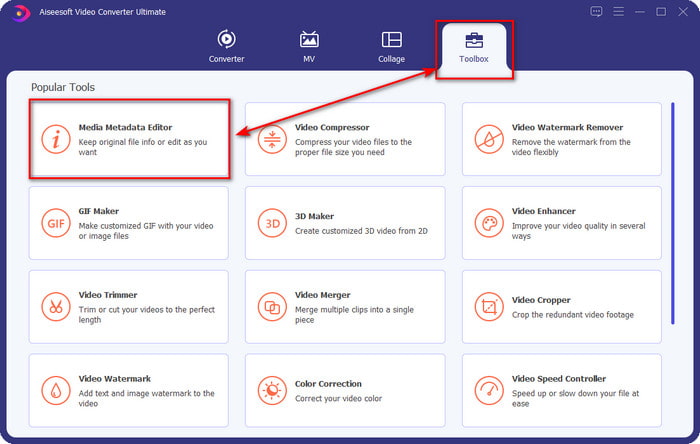
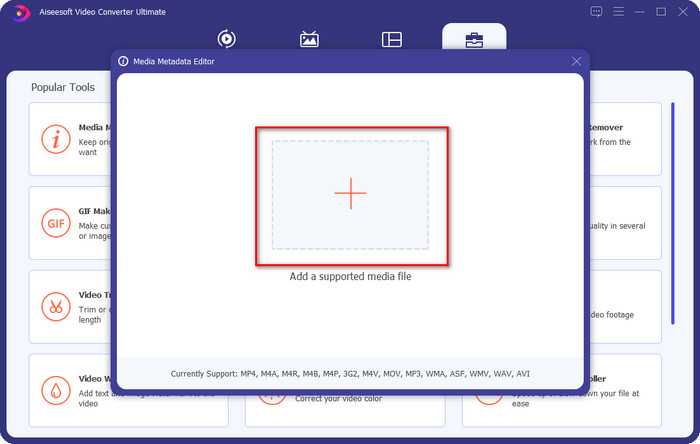
Βήμα 3. Πατήστε το εικονίδιο + στο νέο παράθυρο που θα εμφανιστεί στην οθόνη σας, επιλέξτε το αρχείο ήχου του οποίου θέλετε να αλλάξετε τις ετικέτες ID3 και πατήστε Open για να το ανεβάσετε.
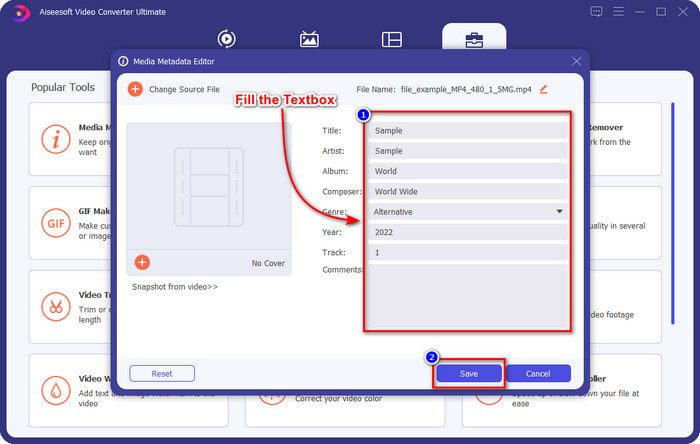
Βήμα 4. Τώρα μπορείτε να πληκτρολογήσετε τις πληροφορίες που θέλετε να προσθέσετε στο αρχείο ήχου σας και να κάνετε κλικ στο Save όταν τελειώσετε με κάθε textbox. Τόσο απλά· έχετε πλέον προσθέσει ετικέτες στο αρχείο ήχου με τη βοήθεια αυτού του λογισμικού.
Πλεονεκτήματα
- Υποστηρίζει την αλλαγή MP3, WMA, WAV και 1000+ μεταδεδομένων χωρίς κόπο.
- Η εξαιρετικά γρήγορη μετατροπή και η επιτάχυνση υλικού υποστηρίζονται για μια διαδικασία αστραπιαίας ταχύτητας.
- Οι κύριες έως προηγμένες λειτουργίες επεξεργασίας βίντεο είναι διαθέσιμες στο Toolbox.
- Είναι η πρώτη επιλογή εκατομμυρίων χρηστών παγκοσμίως για να αναλάβουν αυτήν την εργασία.
Μειονεκτήματα
- Η αγορά του εργαλείου είναι απαραίτητη για να έχετε όλες τις φανταχτερές δυνατότητες επεξεργασίας.
- Δεν είναι διαθέσιμο σε Android και iOS.
VLC Media Player
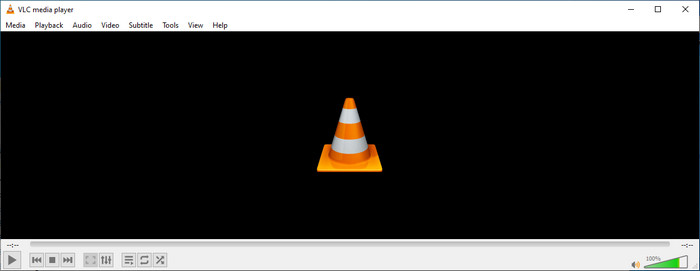
Το VLC Media Player είναι ένας κορυφαίος media player που μπορείτε να κατεβάσετε σε Windows και Mac. Αυτό το εργαλείο μπορεί να σας βοηθήσει να αναπαράγετε βίντεο χωρίς να κατεβάζετε επιπλέον codecs στο σύστημά σας, αλλά μπορείτε επίσης να το χρησιμοποιήσετε για να επεξεργαστείτε τις ετικέτες ID3 του αρχείου ήχου σας. Αν και το εργαλείο δεν είναι ειδικευμένος επεξεργαστής μεταδεδομένων, μπορεί παρ’ όλα αυτά να διορθώσει λανθασμένες ετικέτες. Επομένως, αν έχετε ήδη αυτό το εργαλείο, μπορείτε εύκολα να προσαρμόσετε τα μεταδεδομένα του τραγουδιού σας, αλλά μην περιμένετε πάρα πολλά, καθώς δεν είναι τόσο ισχυρό όσο ένας κορυφαίος επεξεργαστής ετικετών ID3 για υπολογιστή.
Πλεονεκτήματα
- Ένα πρόγραμμα αναπαραγωγής πολυμέσων και ένα πρόγραμμα επεξεργασίας μεταδεδομένων που μπορείτε να χρησιμοποιήσετε σε οποιαδήποτε συσκευή.
- Υποστηρίζει μια μέση μορφή πολυμέσων για την αλλαγή των ετικετών.
- Το GUI είναι απλό και απλό.
Μειονεκτήματα
- Δεν είναι επαγγελματίας επεξεργασίας μεταδεδομένων.
- Υποστηρίζει περιορισμένες λειτουργίες σχετικά με την επεξεργασία των ετικετών.
Μέρος 3. Κορυφαίοι 3 επεξεργαστές ετικετών ID3 σε φορητές συσκευές iOS/Android
Επεξεργαστής ετικετών μουσικής Star
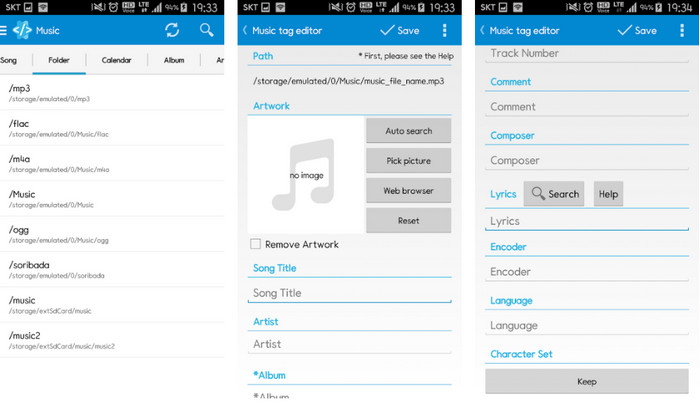
Το Star Music Tag Editor είναι ένας από τους πιο δημοφιλείς επεξεργαστές ετικετών ID3 σε Android. Αυτή η εφαρμογή μπορεί να σας εμφανίσει διάφορες πληροφορίες για τη μουσική σας και μπορείτε να τις αλλάξετε αν χρειαστεί. Το περιβάλλον εργασίας της (GUI) είναι πολύ απλό, ώστε να μάθετε γρήγορα πώς να τη χρησιμοποιείτε, ακόμη κι αν δεν είστε εξοικειωμένοι με εργαλεία επεξεργασίας ετικετών. Παρόλο που η εφαρμογή είναι εξαιρετική, εξακολουθεί να έχει ορισμένες αδυναμίες στην προσθήκη μεταδεδομένων, ειδικά ως προς το εξώφυλλο του άλμπουμ. Αν και μπορεί να προκύψουν προβλήματα, παραμένει ένας αξιόπιστος επεξεργαστής ετικετών που μπορείτε να κατεβάσετε στο τηλέφωνό σας με Android.
Πλεονεκτήματα
- Δωρεάν λήψη του προγράμματος επεξεργασίας μεταδεδομένων στο Android.
- Το GUI είναι απλό και κατανοητό.
- Προσθέστε εύκολα τις ετικέτες στο αρχείο ήχου.
Μειονεκτήματα
- Έχει πρόβλημα με την προσθήκη εξωφύλλου εικόνας στο αρχείο ήχου.
- Μερικές φορές τα σφάλματα εξακολουθούν να συμβαίνουν.
Clouds Music Player για Σύννεφα
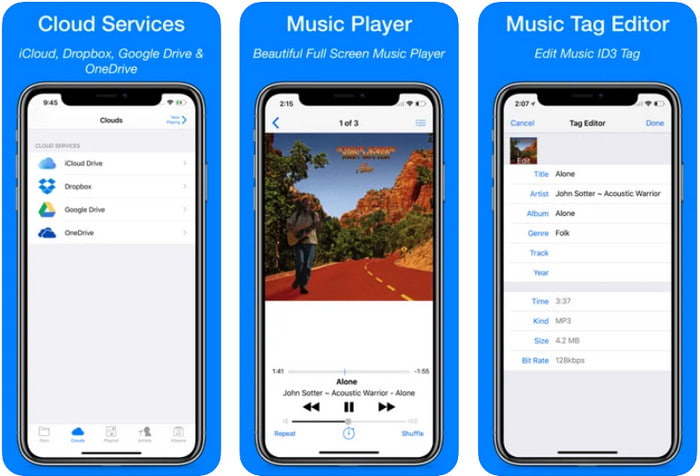
Το Clouds Music Player for Clouds είναι μια πολυχρηστική εφαρμογή που μπορείτε να κατεβάσετε στις συσκευές iOS σας. Μπορεί να επεξεργάζεται ετικέτες ID3 σε iPhone, να αναπαράγει μουσική και να δημιουργεί ringtone από τα τραγούδια σας. Παρά τα πλούσια χαρακτηριστικά του, το περιβάλλον εργασίας (GUI) είναι λιτό και απλό και μπορείτε να έχετε πρόσβαση στην υπηρεσία cloud σας μέσα από την εφαρμογή. Παρότι η διεπαφή είναι φιλική προς τον χρήστη, ορισμένα στοιχεία που μπορείτε να προσθέσετε ως μεταδεδομένα στο αρχείο ήχου δεν είναι διαθέσιμα· αυτό σημαίνει ότι μπορείτε να επεξεργαστείτε μόνο τις βασικές ετικέτες. Παρ’ όλα αυτά, είναι μια εξαιρετική επιλογή για κατέβασμα αν είστε χρήστης iOS.
Πλεονεκτήματα
- Διατίθεται σε οποιαδήποτε συσκευή iOS για λήψη.
- Πολυλειτουργικό πρόγραμμα επεξεργασίας μουσικής και επεξεργασίας ετικετών.
- Διαισθητικός επεξεργαστής μεταδεδομένων στο iOS.
Μειονεκτήματα
- Δεν υποστηρίζει την προσθήκη περισσότερων μεταδεδομένων.
- Σφάλματα και προβλήματα αλλαγής μεταδεδομένων συμβαίνουν αλλά όχι συχνά.
Εφαρμογή Dash-Infotainment
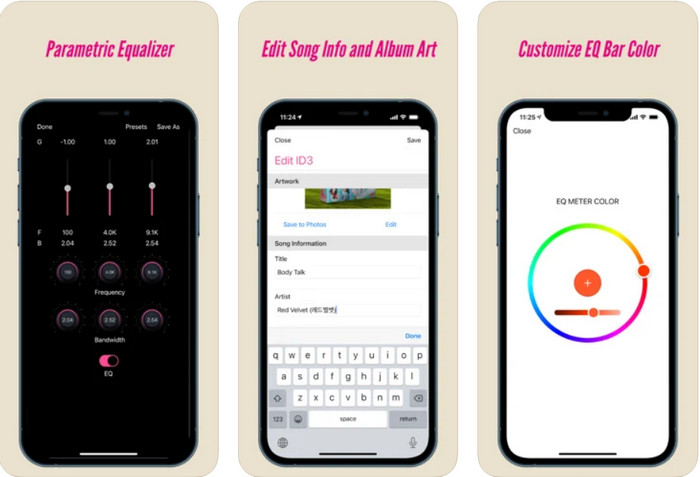
Η εφαρμογή Dash- Infotainment App είναι ένα ακόμη εργαλείο που μπορείτε να κατεβάσετε για να επεξεργάζεστε ετικέτες ID3 σε iPhone, όποτε το χρειάζεστε. Δεν θα χρειαστεί να μάθετε πολλά πριν τη χρησιμοποιήσετε, χάρη στο απλό και καλοσχεδιασμένο περιβάλλον χρήστη. Μπορείτε να χρησιμοποιήσετε αυτό το εργαλείο για να αλλάξετε τις παραμέτρους αρχείων FLAC και ALAC εύκολα, με τον εύχρηστο ισοσταθμιστή (equalizer) που διαθέτει. Επιπλέον, μπορείτε να δείτε την ταχύτητα (tempo) και την πυξίδα (κατεύθυνση) του τραγουδιού που ανεβάζετε εδώ. Όπως και με τον πρώτο επεξεργαστή ετικετών για iPhone, μπορείτε να προσθέσετε μόνο τίτλο, καλλιτέχνη και εξώφυλλο άλμπουμ, αλλά να θυμάστε ότι η μορφή πρέπει να είναι αποκλειστικά FLAC ή ALAC· αν δεν είναι σε μία από αυτές τις μορφές, δεν μπορείτε να την ανεβάσετε.
Πλεονεκτήματα
- Η καμπύλη μάθησης δεν είναι τόσο σκληρή.
- Διατίθεται ένας πολυάριθμος ισοσταθμιστής ήχου.
- Το GUI δεν είναι πολύ, και δεν είναι λιγότερο.
Μειονεκτήματα
- Υποστηρίζει μόνο μορφή FLAC και ALAC.
- Δεν υπάρχει τίποτα να προσφέρουμε σε σχέση με την επεξεργασία μεταδεδομένων.
Μέρος 4. Συχνές ερωτήσεις σχετικά με τον επεξεργαστή ετικετών ID3
Ποιος είναι ο καλύτερος επεξεργαστής ετικέτας ID3 γραμμής εντολών που μπορώ να χρησιμοποιήσω;
Αν αναζητάτε έναν επεξεργαστή ετικετών ID3 μέσω γραμμής εντολών, πρέπει να γνωρίζετε ότι το FFmpeg είναι ένας επεξεργαστής που λειτουργεί στη γραμμή εντολών. Με αυτό το εργαλείο, μπορείτε να μετατρέψετε, να περιστρέψετε, να κόψετε, να περικόψετε και να επεξεργαστείτε τα μεταδεδομένα σας. Αν θέλετε να μάθετε περισσότερα για το FFmpeg, μπορείτε να διαβάσετε πώς να το χρησιμοποιείτε κάνοντας κλικ στον σύνδεσμο για να επεξεργαστείτε εύκολα τα μεταδεδομένα στο FFmpeg.
Ποιοι είναι οι άλλοι τύποι μεταδεδομένων;
Υπάρχουν έξι τύποι μεταδεδομένων: περιγραφικά, διαχειριστικά, αναφοράς ή επεξηγηματικά, στατιστικά, νομικά και δομικά μεταδεδομένα. Αν θέλετε να μάθετε περισσότερα για αυτούς τους τύπους και τις πληροφορίες τους, μπορείτε να κάνετε κλικ σε αυτόν τον σύνδεσμο και να διαβάσετε περισσότερα.
Είναι δυνατή η προβολή ετικετών χωρίς εφαρμογή;
Ναι, αντί να κατεβάσετε λογισμικό, μπορείτε να χρησιμοποιήσετε ένα online εργαλείο για να δείτε τις ετικέτες του αρχείου σας. Κάντε κλικ σε αυτόν τον σύνδεσμο για να δείτε τα μεταδεδομένα στην επιφάνεια εργασίας σας online, αλλά θα σας παρουσιάσουμε επίσης ορισμένα εργαλεία που αξίζει να κατεβάσετε.
συμπέρασμα
Με τις πληροφορίες που παραθέτουμε παραπάνω, κατέστη δυνατή η επεξεργασία των ετικετών ID3 χρησιμοποιώντας τους επεξεργαστές που παρουσιάσαμε παραπάνω, ανεξάρτητα από τη συσκευή που χρησιμοποιείτε αυτήν τη στιγμή. Επιπλέον, η εφαρμογή και το λογισμικό είναι τέλεια για χρήστες που πρέπει να επεξεργαστούν τα μεταδεδομένα τους. Παρόλο που τα εργαλεία ανοίγουν μια εξαιρετική ευκαιρία στους χρήστες να επεξεργαστούν τα μεταδεδομένα, δεν υπάρχει αμφιβολία ότι το απόλυτο εργαλείο παρουσιάζει έναν αποτελεσματικό τρόπο επεξεργασίας ετικετών ID3 σε οποιοδήποτε αρχείο μουσικής. Εάν θέλετε να έχετε τον καλύτερο επεξεργαστή ετικετών ID3 σε Windows και Mac, μπορείτε να το κατεβάσετε απευθείας κάνοντας κλικ στο κουμπί λήψης που παρουσιάζεται παραπάνω και, στη συνέχεια, να απολαύσετε το μεγαλείο του.
-
 2 Καλύτεροι Τρόποι Επεξεργασίας Μεταδεδομένων OGG που πρέπει να δοκιμάσετε δωρεάν
 Θέλετε να επεξεργαστείτε τα μεταδεδομένα OGG; Λοιπόν, μπορείτε εύκολα να χειριστείτε την επεξεργασία των ετικετών χρησιμοποιώντας το σωστό λογισμικό. Εάν δεν έχετε κανέναν, πρέπει να διαβάσετε αυτό το άρθρο.
-
 Μια απόλυτη επισκόπηση σχετικά με τον επεξεργαστή μεταδεδομένων Pentaho [Ενημερώθηκε 2022]
 Δεν βρίσκετε ένα αξιόπιστο άρθρο σχετικά με το Pentaho Metadata Editor; Ευτυχώς, εξετάσαμε μόνοι μας το εργαλείο για να παρέχουμε τα στοιχεία που θα γνωρίζετε για το εργαλείο.
-
 Συμβουλές και κόλπα για τον επεξεργαστή μεταδεδομένων VLC που πρέπει να γνωρίζετε το 2022
 Θέλετε να χρησιμοποιήσετε το VLC ως επεξεργαστή μεταδεδομένων; Σε αυτήν την περίπτωση, μπορείτε να διαβάσετε αυτό το άρθρο καθώς παρέχουμε μια αμερόληπτη επισκόπηση του επεξεργαστή μεταδεδομένων VLC.
