


 Video Converter Ultimate
 Εγγραφή οθόνης
 Επισκευή βίντεο
 Ασφαλές κατέβασμα
2 βέλτιστες μέθοδοι για συμμετοχή σε πολλά αρχεία ASF σε Windows / Mac
Συχνά συμβαίνει μια μεγάλη ιστορία, που κανονικά θα έπρεπε να είναι αποθηκευμένη σε ένα πλήρες αρχείο βίντεο, να είναι διασκορπισμένη σε αποσπασματικά video clips. Ίσως κατεβάσατε ένα UHD βίντεο από μια ιστοσελίδα ταινιών και διαπιστώσατε ότι το βίντεο έχει «σπάσει» σε ξεχωριστά αρχεία ASF μέσα σε ZIP πακέτα. Πώς μπορείτε να συνδυάσετε τα αρχεία ASF ώστε το βίντεο να γίνει ξανά πλήρες και να παίζει χωρίς διακοπές; Αυτό το άρθρο μπορεί να σας βοηθήσει. Συγκεντρώσαμε 2 καλύτερες μεθόδους για να ενώσετε κλιπ βίντεο ASF σε ένα ολοκληρωμένο αρχείο.

Μέρος 1: Συνδυάστε πολλαπλά αρχεία ASF online δωρεάν
Η πιο γρήγορη λύση είναι να χρησιμοποιήσετε το FVC Free Online Video Merger, ένα ελαφρύ online εργαλείο για να ενώσετε αρχεία ASF δωρεάν. Δεν χρειάζεται να κατεβάσετε ή να εγκαταστήσετε κανένα πρόγραμμα. Απλώς ανεβάστε τα αρχεία βίντεο και ξεκινήστε να τα ενώνετε με ένα κλικ.
Βασικά χαρακτηριστικά
- • Συμμετοχή σε αρχεία βίντεο ASF χωρίς απώλεια ποιότητας βίντεο
- • Μην αφήνετε υδατογράφημα στο συνδυασμένο βίντεο
- • Αποθηκεύστε το συγχωνευμένο βίντεο ως 9 μορφές
- • Προσθέστε τα βίντεό σας σε 1 δευτερόλεπτο και δεν χρειάζεται να ανεβάσετε τα αρχεία στο διακομιστή
Βήμα 1. Ανοίξτε το FVC Free Online Video Merger στον browser σας. Θα δείτε ένα μεγάλο κουμπί Upload Videos to Merge στο κέντρο της ιστοσελίδας. Κάντε κλικ σε αυτό.
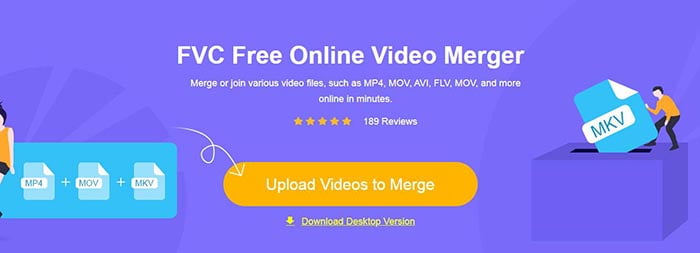
Σημείωση: Την πρώτη φορά που θα χρησιμοποιήσετε αυτό το εργαλείο, θα χρειαστεί να κατεβάσετε και να εγκαταστήσετε ένα launcher.
Βήμα 2. Θα εμφανιστεί ένα παράθυρο εξερεύνησης αρχείων. Εκεί μπορείτε να επιλέξετε τα αρχεία ASF και να τα ανεβάσετε. Για να επιλέξετε πολλά αρχεία, απλώς κρατήστε πατημένο το πλήκτρο Ctrl στο πληκτρολόγιό σας και κάντε κλικ σε κάθε αρχείο ξεχωριστά.
Βήμα 3. Κάντε κλικ στο κουμπί Open για να προσθέσετε τα επιλεγμένα αρχεία και στη συνέχεια θα δείτε τη διεπαφή ASF merging. Εδώ μπορείτε να ρυθμίσετε τη σειρά των βίντεο αφαιρώντας υπάρχοντα κλιπ και εισάγοντας καινούρια.
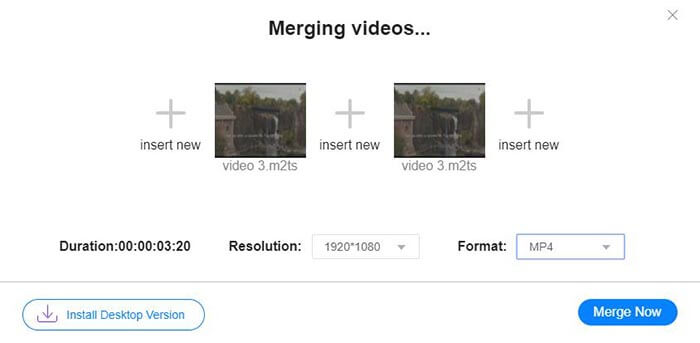
Βήμα 4. Στη συνέχεια μπορείτε να επιλέξετε τη μορφή εξόδου και την ανάλυση. Μπορείτε να αφήσετε την ανάλυση ως έχει, στην αρχική της τιμή. Ωστόσο, αυτός ο online συγχωνευτής ASF δεν υποστηρίζει εξαγωγή του ενωμένου αρχείου σε μορφή ASF. Έτσι μπορείτε μόνο να διαλέξετε κάποια άλλη μορφή από τη λίστα για να μετατρέψετε το βίντεο.
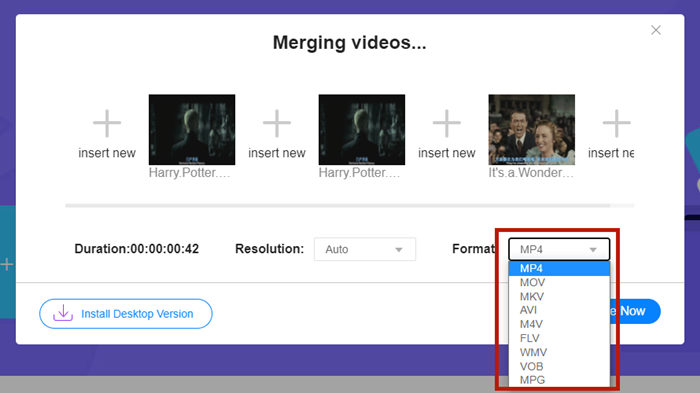
Βήμα 5. Κάντε κλικ στο κουμπί Merge Now στην κάτω δεξιά γωνία της διεπαφής για να ενώσετε τα αρχεία ASF. Το εργαλείο θα σας ζητήσει να ορίσετε έναν φάκελο προορισμού για το αρχείο εξόδου.
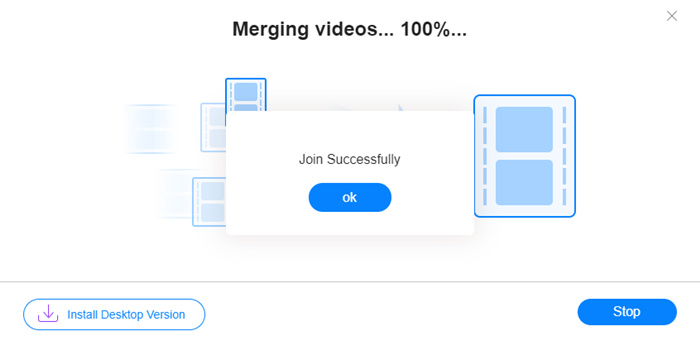
Όταν δείτε την ειδοποίηση Join Successfully, μπορείτε να ανοίξετε τον φάκελο προορισμού και να βρείτε το ενωμένο αρχείο.
Αυτή η μέθοδος είναι πραγματικά ο γρηγορότερος τρόπος σύνδεσης των αρχείων ASF. Η όλη διαδικασία είναι τόσο απλή όσο είδατε. Ωστόσο, το ότι είναι εύκολο στη χρήση και το φως περιόρισε τα χαρακτηριστικά του. Δεν μπορείτε να τακτοποιήσετε τη σειρά των βολικών βίντεο. Ενδέχεται να μην εφαρμόσετε την επιθυμητή ανάλυση ή μορφή εξόδου. Το χειρότερο είναι ότι, όταν θέλετε να συνδυάσετε βίντεο ASF με διαφορετικές αναλύσεις και προσανατολισμούς, αυτό το εργαλείο μπορεί να βλάψει το όλο θέμα. Τότε ίσως χρειαστείτε ένα άλλο εργαλείο για να το κάνετε.
Μέρος 2: Συγχώνευση αρχείων ASF απρόσκοπτα και ταχύτερα
Το Video Converter Ultimate μπορεί να σας βοηθήσει να περιστρέψετε, να περικόψετε, να κόψετε και – το σημαντικότερο – να ενώσετε αρχεία ASF. Με αυτό μπορείτε να αποθηκεύσετε το ενωμένο αρχείο ASF σε οποιαδήποτε μορφή και ανάλυση. Η διαδικασία συγχώνευσης στο Video Converter Ultimate είναι επίσης εξαιρετικά γρήγορη.
Βασικά χαρακτηριστικά
- • Περικοπή των ανεπιθύμητων εκκινήσεων και λήξεων πριν εγγραφείτε σε αρχεία ASF.
- • Περιστρέψτε τα βίντεο σε διαφορετικούς προσανατολισμούς.
- • Περικοπή για να κάνετε όλα τα βίντεο κλιπ στην ίδια ανάλυση.
- • Συμπίεση του αρχείου ASF σε μικρότερο μέγεθος για το YouTube, το Facebook κ.λπ.
- • Η επιτάχυνση υλικού σάς προσφέρει 70x ταχύτερη ταχύτητα συγχώνευσης βίντεο.
Δωρεάν ΛήψηΓια Windows 7 ή νεότεραΑσφαλής λήψη
Δωρεάν ΛήψηΓια MacOS 10.7 ή νεότεροΑσφαλής λήψη
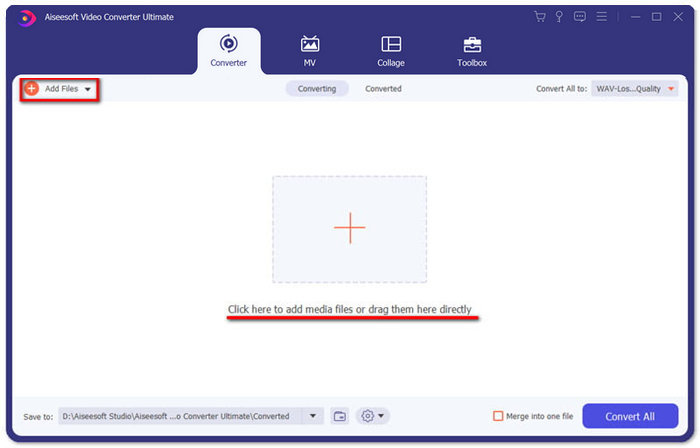
Βήμα 1. Κατεβάστε, εγκαταστήστε και εκκινήστε το Video Converter Ultimate. Κάντε κλικ στο μεγάλο κουμπί + στο κέντρο της κύριας διεπαφής για να προσθέσετε τα αρχεία ASF που θέλετε να ενώσετε. Αφού τα προσθέσετε, μπορείτε να σύρετε τα εισαγμένα κλιπ για να ρυθμίσετε τη σειρά τους.
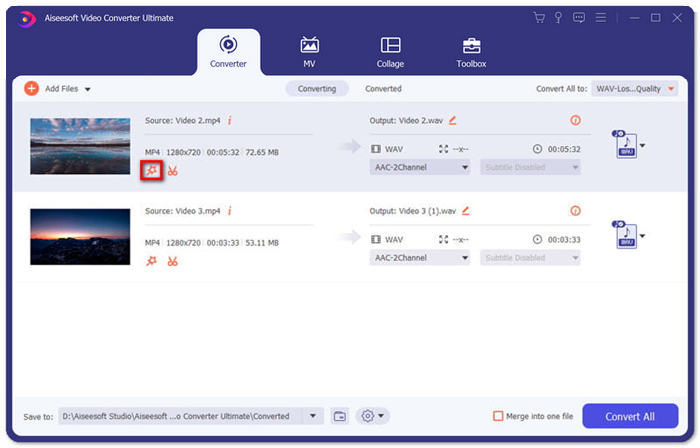
Βήμα 2. Για τα κλιπ που θέλετε να περικόψετε, να περιστρέψετε ή να αλλάξετε τον λόγο διαστάσεων, μπορείτε να κάνετε κλικ στο κουμπί Edit για το συγκεκριμένο κλιπ. Τότε θα μεταβείτε στη σελίδα Rotate & Crop.
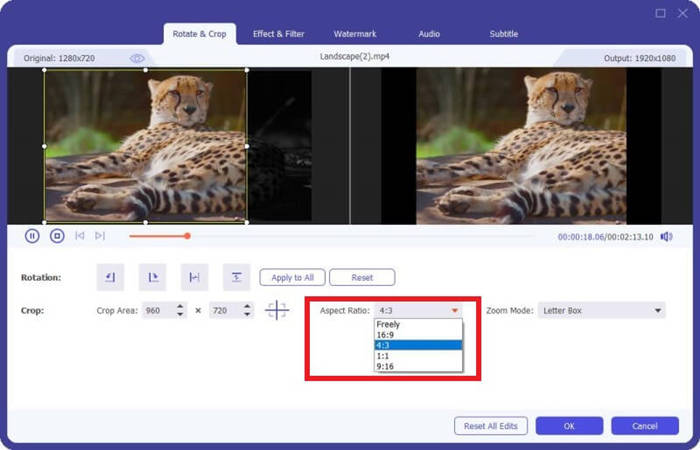
Εδώ μπορείτε να αλλάξετε τον λόγο διαστάσεων στην ενότητα Aspect Ratio. Για να αλλάξετε την ανάλυση, μπορείτε ελεύθερα να σύρετε το πλαίσιο της οθόνης προεπισκόπησης στα αριστερά. Η περιστροφή είναι επίσης διαθέσιμη εδώ. Μην ξεχάσετε να κάνετε κλικ στο κουμπί OK για να αποθηκεύσετε τις ρυθμίσεις.
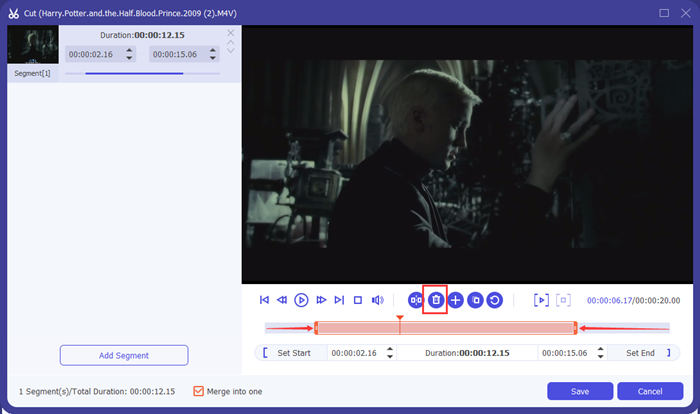
Βήμα 3. Για να κόψετε τα ανεπιθύμητα τμήματα, θα χρησιμοποιήσετε τη λειτουργία Cut. Κάντε κλικ στο κουμπί Cut για να μεταβείτε στη σελίδα Cut.
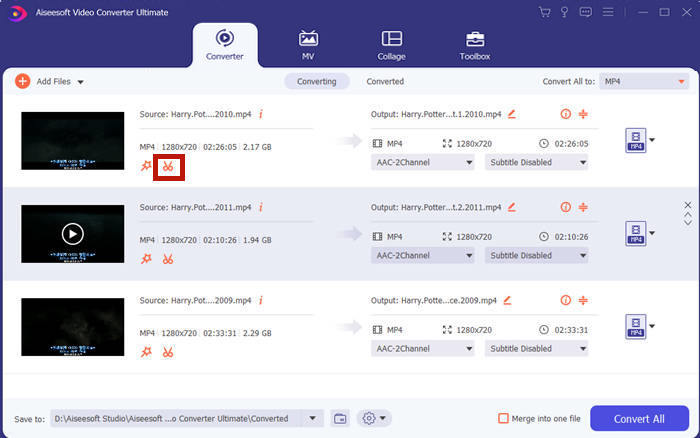
Εκεί μπορείτε να επιλέξετε ένα τμήμα και να κάνετε κλικ στο κουμπί Delete (το εικονίδιο του κάδου απορριμμάτων) για να το αφαιρέσετε. Τέλος, κάντε κλικ στην αποθήκευση για να επιστρέψετε πίσω.
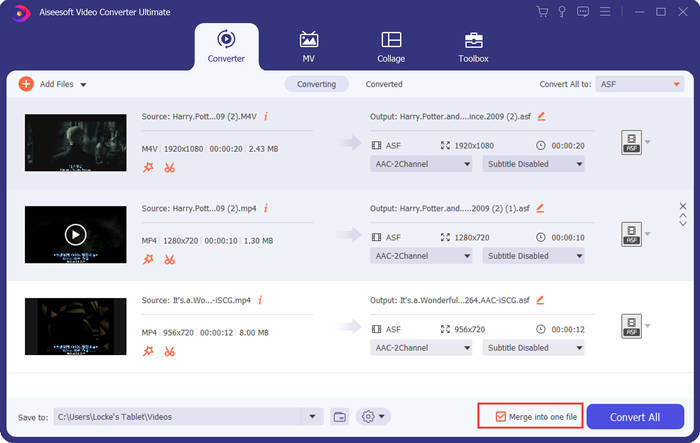
Βήμα 4. Στην κύρια διεπαφή, επιλέξτε το πλαίσιο Merge into one file στην κάτω δεξιά γωνία.
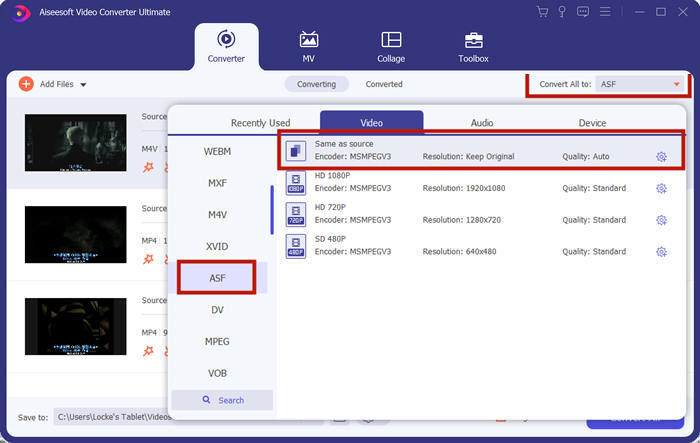
Βήμα 5. Στη συνέχεια μπορείτε να επιλέξετε τη μορφή εξόδου χρησιμοποιώντας την επιλογή Convert All to στην πάνω δεξιά γωνία της διεπαφής. Βρείτε το ASF και κάντε κλικ σε αυτό.
Τέλος, μπορείτε να κάνετε κλικ στο κουμπί Convert All για να ξεκινήσει η συγχώνευση των αρχείων ASF. Όταν ολοκληρωθεί, το αποτέλεσμα θα αποθηκευτεί στον φάκελο που έχετε ορίσει στην κάτω αριστερή γωνία της κύριας διεπαφής. Τέλος, συγκεντρώσαμε 3 συχνές ερωτήσεις σχετικά με τον συνδυασμό αρχείων ASF.
Μέρος 3: Συχνές ερωτήσεις σχετικά με τη συμμετοχή σε αρχεία ASF
Γιατί δεν μπορώ να παίξω ένα αρχείο ASF σε καμία εφαρμογή αναπαραγωγής;
Υπάρχουν τρία είδη αρχείων που χρησιμοποιούν την επέκταση ASF. Πρόκειται για Advanced System Format, Acclaim Skeleton File και Electronic Arts Sound File. Ίσως το ASF σας να μην είναι καθόλου αρχείο βίντεο Advanced System Format.
Γιατί δεν μπορώ να δω καμία εικόνα κατά την αναπαραγωγή ενός αρχείου ASF;
Γιατί δεν μπορώ να δω καμία εικόνα κατά την αναπαραγωγή ενός αρχείου ASF; Δεν περιέχει κάθε αρχείο ASF τουλάχιστον ένα βίντεο. Μερικές φορές ένα ASF μπορεί να περιέχει μόνο ένα κομμάτι ήχου WMA. Ακούστε τα ηχεία ή τα ακουστικά σας και βρείτε αν υπάρχει ήχος από την αναπαραγωγή του αρχείου.
Μπορώ να παίξω ένα αρχείο ASF στην έξυπνη μου τηλεόραση;
Εξαρτάται. Κάποιες smart TV υποστηρίζουν αρχεία ASF, ενώ κάποιες άλλες όχι. Αν η smart TV σας δεν αναπαράγει το αρχείο ASF, μπορείτε να μετατρέψετε το αρχείο σε MP4 εκ των προτέρων.
συμπέρασμα
Ένα αρχείο ASF συχνά περιέχει αρχείο WMV ή WMA. Υποστηρίζεται ευρέως από πολλές συσκευές και προγράμματα. Αυτό το άρθρο σάς προσφέρει τους δύο πιο αποτελεσματικούς τρόπους για να ενώσετε πολλά αρχεία ASF σε ένα, χωρίς μείωση της ποιότητας ή προσθήκη υδατογραφήματος. Το FVC Free Online Video Merger είναι αναμφίβολα η πιο γρήγορη λύση. Όμως αν θέλετε να κόψετε ή να περιστρέψετε τα βίντεο ώστε να τα συνδυάσετε πιο ομαλά, είναι προτιμότερο να χρησιμοποιήσετε το Video Converter Ultimate. Αν αντιμετωπίζετε οποιαδήποτε δυσκολία στη συγχώνευση αρχείων ASF, πείτε μας στα σχόλιά σας.
-
 Πώς να συγχωνεύσετε βίντεο στο iPhone με ή χωρίς iMovie (Δωρεάν για χρήση)
 Tutorial - 4 δωρεάν τρόποι συγχώνευσης βίντεο στο iPhone σε νέο
-
 2 καλύτεροι τρόποι συμμετοχής στα αρχεία MKV για να παρακολουθείτε αδιάκοπα την ταινία
 Συγχώνευση MKV Movie Files: Πώς να ενώσετε πολλά αρχεία MKV σε ένα
-
 Πώς να εγγραφείτε στο WMV Clips Online; Εδώ είναι 3 αποδεδειγμένες μέθοδοι
 3 βέλτιστες μέθοδοι για να λάβετε μέρος δωρεάν στο WMV Files (2021 Ενημέρωση)
