


 Video Converter Ultimate
 Εγγραφή οθόνης
 Επισκευή βίντεο
[Πλήρης ανασκόπηση] 5 πιο πρόσφατοι κόφτες MP3 που διατίθενται σε Windows/Mac/Online
We often wish to cut the audio we listen to and set it as a ringtone, highlighting the vital part or trim the unnecessary detail of the sound. Although there are sets of cutters you can use on all platforms still some aren't trustworthy. So today, we will present to you the cutters we found on the market where you can trust because we try all of these tools ourselves to ensure that it is malware-free and reliable. Before we pick them out, we follow a strictly high standard for the audience who needs a dependable cutter. To make your browsing on the internet at full tilt, we presented below the five MP3 cutters we found ready to take the task of cutting any audio format.

Μέρος 1. 2 Λογισμικά κοπής MP3 εκτός σύνδεσης Windows & Mac
1. Video Converter Ultimate – Καλύτερος κόφτης MP3 [Συνιστάται ανεπιφύλακτα]
The best audio MP3 cutter in this list is the Video Converter Ultimate, which lets users cut any audio effortlessly. With the help of this ultimate tool, you can trim the sound to remove the unwanted audio, even merge multiple cut audio files into a single file and boost the audio if you feel that the sound is a bit low. Furthermore, this software provides an ultra-fast process while taking care of the original quality of the sounds.
Σε αντίθεση με οποιονδήποτε κόφτη, αυτό το εργαλείο υποστηρίζει ένα ευρύ φάσμα μορφών, όχι μόνο MP3 αλλά και FLAC, M4R, M4A, OGG, MKA, WAV, WMA και άλλα, και πράγματι το αρχείο ήχου σας υποστηρίζεται εδώ για κοπή. Ίσως δεν ξέρετε πώς να κόψετε το αρχείο ήχου σας και να το χρησιμοποιήσετε για τις ανάγκες σας αυτή τη στιγμή. Σήμερα είναι η τυχερή σας μέρα γιατί θα σας μάθουμε πώς να χρησιμοποιείτε δωρεάν τον κόφτη MP3 και τον δημιουργό ήχου κλήσης ακολουθώντας το παρακάτω σεμινάριο.
Step 1. Download the audio cutter on your desktop by clicking the download button below. Pick whether you are using a Windows or Mac, install the software promptly, and launch it. Remember, you will need to be familiarized with the tool's interface to be easy for you to follow the following steps.
Δωρεάν ΛήψηΓια Windows 7 ή νεότεραΑσφαλής λήψη
Δωρεάν ΛήψηΓια MacOS 10.7 ή νεότεροΑσφαλής λήψη
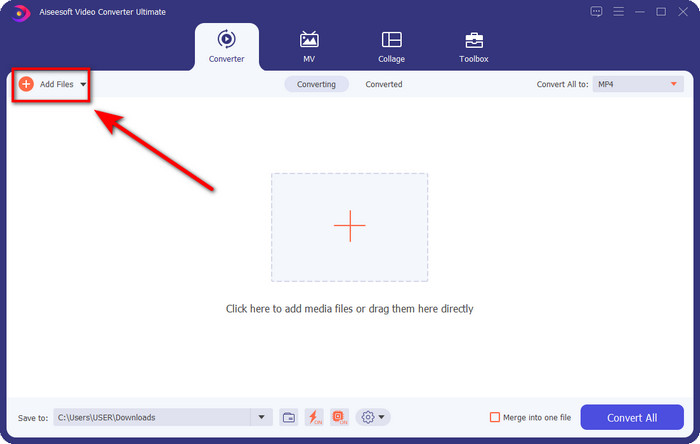
Step 2. Drag the audio file you want to cut on the interface, or you can click Add Files and locate the audio on the computer folder that will show. Hit Open to proceed to the next step.
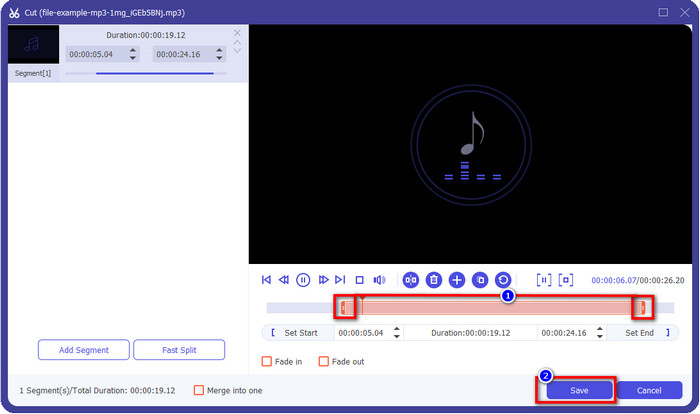
Step 3. After inserting the audio file, it is now time to click the scissor-like button. Drag the play in and out to your desired length of the audio you want. Remember that the highlighted audio in the middle of play in and out is the only audio kept. Then press Save to cut the audio.
Optional. Need to boost your audio? If that is the case, click the wand button, adjust the volume slider by dragging it up, and press OK to save.
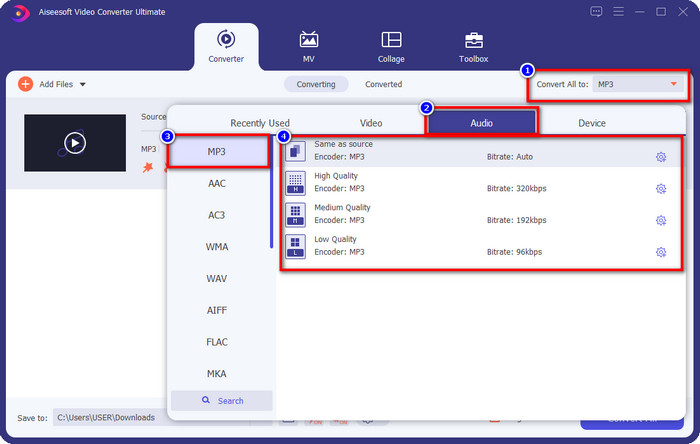
Step 4. Go to Convert All to, Audio and set the format to MP3. Although you aren’t converting, make sure that the name under Convert All to is MP3 or not another format to avoid changing the format to another format.
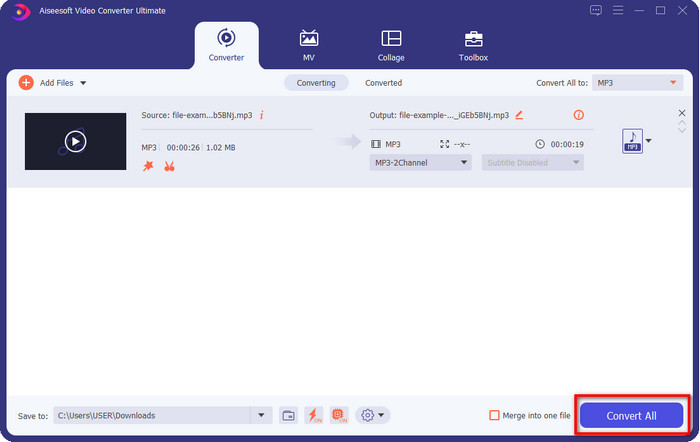
Step 5. By clicking Convert All, saving the audio cut will begin. You now have the audio cut with the best free MP3 cutter as easy as that.
Πλεονεκτήματα
- Μπορεί να κόψει τον ήχο σας όσο το δυνατόν πιο γρήγορα και να τον επεξεργαστεί σε λιγότερο από ένα δευτερόλεπτο.
- Προηγμένες λειτουργίες είναι διαθέσιμες για ενίσχυση της έντασης του ήχου.
- Υποστηρίζει όλα τα λειτουργικά συστήματα όπως Windows ή Mac.
- Η συγχώνευση πολλών αρχείων ήχου είναι δυνατή με τη συγχώνευση ήχου αυτού του εργαλείου.
Μειονεκτήματα
- Απαιτείται η αγορά του εργαλείου.
2. Θράσος
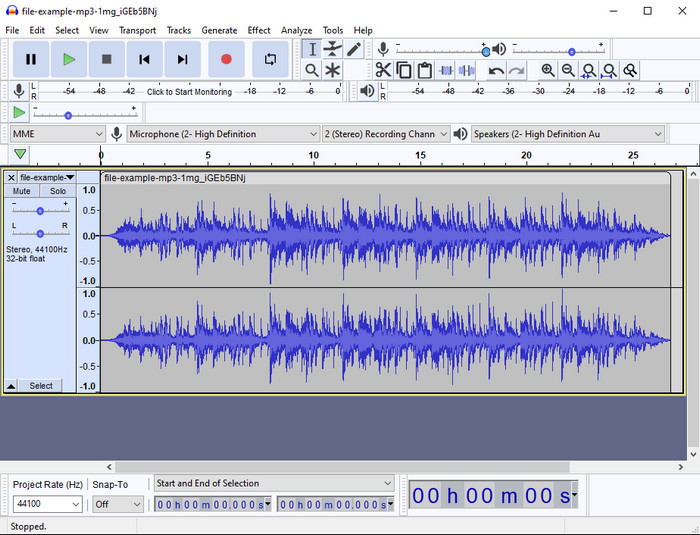
Audacity has provided pro editing features for your audio thru the years. This app is free to download and offers users do a multiple-track mixing. It is known to be used by podcasters to edit and record podcasts easily. However, some of its features are hard to understand, especially if you are not fond of using specialized software like this one.
Αν και μπορείτε ακόμα να μάθετε πώς να το χρησιμοποιείτε, θα χρειαστεί χρόνος για να αξιοποιήσετε πλήρως τις δυνατότητες αυτού του ψαλιδιού ήχου MP3 και για την κοπή ήχου, είναι δίκαιο να πούμε ότι κόβεται αμέσως και χωρίς κόπο, αν το χρειάζεστε.
Πλεονεκτήματα
- Δωρεάν λήψη σε όλα τα προγράμματα όπως Windows και Mac.
- Διατίθενται προηγμένοι και επαγγελματικοί επεξεργαστές ήχου για να κάνουν τον ήχο σας υπέροχο.
- Είναι καλύτερο για την εγγραφή podcast και πολλά άλλα.
Μειονεκτήματα
- Πολλοί ανταγωνιστές παρέχουν ένα φιλικό προς τον χρήστη διεπαφή χρήστη.
- Δεν είναι η καλύτερη επιλογή για αρχάριους για άμεσο αποτέλεσμα κοπής και άλλους σκοπούς επεξεργασίας.
- Ορισμένες αναφορές δείχνουν ότι τα δεδομένα σας συλλέγονται εάν χρησιμοποιείτε αυτό το εργαλείο, αλλά δεν υπάρχουν ακόμη ισχυρά στοιχεία.
Μέρος 2. 3 Προσβάσιμοι διαδικτυακοί κόφτες MP3 στον Ιστό
1. mp3cut.net
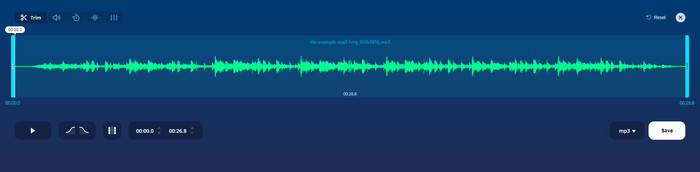
Μπορείτε να χρησιμοποιήσετε το mp3cut.net εάν χρειάζεστε έναν διαδικτυακό κόφτη MP3 για την εργασία. Αφού ανεβάσετε το αρχείο σε αυτό το διαδικτυακό κόφτη, μπορείτε τώρα να αφαιρέσετε τον ήχο που θέλετε να σχεδιάσετε στο αρχείο ήχου σας. Επιπλέον, το εργαλείο διαθέτει επίσης κάποιες μικρές λειτουργίες επεξεργασίας για να αλλάξετε την ταχύτητα και τον τόνο του ήχου, εάν χρειάζεται.
Αν και έχει αυτό το είδος ικανότητας, το εργαλείο κολλάει τις περισσότερες φορές και δεν μπορεί να παίξει τον ήχο για ακρόαση εάν τον κόψετε σωστά. Έτσι, για να το χρησιμοποιήσετε ξανά, θα χρειαστεί να ανανεώσετε το πρόγραμμα περιήγησής σας και να επαναλάβετε την προσαρμογή που κάνατε ξανά.
Πλεονεκτήματα
- Φιλικό προς τον χρήστη και προσβάσιμο μέσω του διαδικτύου.
- Στο σημείο, δυνατότητες που θα σας βοηθήσουν να κόψετε τον ήχο.
- Διατίθενται βασικές λειτουργίες επεξεργασίας.
Μειονεκτήματα
- Διαθέτει διαφημίσεις στη διεπαφή ιστού.
- Μερικές φορές κολλάει και χρειάζεται να φορτωθεί ξανά για να το χρησιμοποιήσετε.
2. audiotrimmer.com
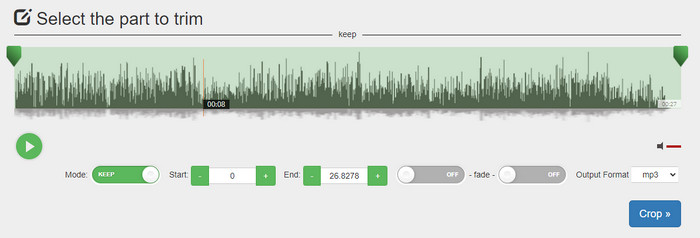
Another free mp3 cutter online is audiotrimmer.com. This tool provides easy-to-understand and straightforward trimming features; all of the function of this tool is on point. With it, you can choose whether you want to keep the audio or remove the audio. Also, it has a fade-in and out effect like the other trimmer mentioned here. However, when we did try to use the fade-in and out the effect, it didn't work; there were no added effects to our audio. But if you want to do easy cutting, this is a must-try web tool.
Πλεονεκτήματα
- Δωρεάν και διαθέσιμο σε όλα τα προγράμματα περιήγησης για πρόσβαση.
- Εύκολο στη χρήση για περικοπή ήχου.
- Έχει εφέ fade-in και out.
Μειονεκτήματα
- Το Fade-in και το Out δεν λειτουργούν καλά.
- Υπάρχουν πολλές ενοχλητικές διαφημίσεις εάν έχετε πρόσβαση σε αυτές. Επομένως, προσέξτε να μην κάνετε κλικ σε αυτά.
3. Clideo

One of the best online MP3 cutters and joiners you can use is the Clideo. Most users enjoy and prefer using this tool because of its editing capabilities. Moreover, you can also add fade in and out on your audio file if you need it. But after exporting it and listening to it, there is no fade in and out added to our audio file. We encounter one slight problem with this tool: uploading and downloading the file. Unlike the first-mentioned tool, uploading audio on its cutter takes time, and there are times that we failed to upload the audio file here because of unknown reasons.
Αν και αντιμετωπίζουμε κάποια προβλήματα, εξακολουθεί να είναι ο καλύτερος κόφτης στο διαδίκτυο και είναι επίσης ασφαλής στη χρήση.
Πλεονεκτήματα
- Ο καλύτερος διαδικτυακός κόφτης στο διαδίκτυο.
- Επαγγελματικό περιβάλλον χρήστη.
- Εύχρηστος.
Μειονεκτήματα
- Η διαδικασία μεταφόρτωσης και λήψης θα πάρει πάρα πολύ χρόνο.
- Το Fade in and out λειτουργεί αλλά όχι καλά.
Μέρος 3. Συχνές ερωτήσεις σχετικά με τα MP3 Cutters
Ποιο είναι το καλύτερο τρίμερ MP3 σε Mac;
FVC Video Converter Ultimate is available on Mac as well. So, if you need to trim your audio on Mac, you better download the ultimate tool to handle your audio file appropriately. The ultimate tool presents not only best for cutting your audio, but you can also enhance the audio by boosting it. Moreover, if you need help in converting, merging, syncing the audio, etc. ultimate tool is to the rescue. If you need to know more about the ultimate tool, you better read the details presented above.
Η περικοπή του ήχου μειώνει το μέγεθός του;
Το μέγεθος του αρχείου του ήχου μειώνεται αφού τον περικόψετε. Καθώς συγκρίναμε το αρχικό αρχείο ήχου με το αποκομμένο αρχείο, είδαμε κάποιες αλλαγές στο υψόμετρο. Έτσι, σημαίνει ότι όσο πιο μικρό είναι το αρχείο ήχου, τόσο μικρότερο είναι το μέγεθός του, αλλά αν το αρχείο ήχου σας είναι πολύ μεγάλο, τότε περιμένετε ότι το μέγεθος είναι επίσης σημαντικό.
Μπορώ να χρησιμοποιήσω το Audacity για να συγχωνεύσω πολλούς ήχους;
Yes, you can, Audacity supports merging multiple-audio tracks into one file. However, it is hard, especially if you don't have a relevant tutorial to follow. So, if you need to merge audio via Audacity, you can click this link and learn from it.
συμπέρασμα
The MP3 cutters presented here already pass the standards we set to provide only the best trimmer for you. This article shows how important to choose the right and suitable cutter based on your needs. Even though the trimmers here do the same function, the FVC Video Converter Ultimate provides a much more efficient cutting audio. According to our research, the ultimate tool surpasses all the standards we set. So, if you want to have a top cutter on your hand, this is the best choice among the rest cutters available on the market. Too good to not believe? Well, you better download the tool and test it out yourself.
-
 Πώς να κόψετε και να συγχωνεύσετε τραγούδια στο Διαδίκτυο - 4 καλύτεροι τρόποι που πρέπει να γνωρίζετε
 Όταν θέλετε να κόψετε και να συγχωνεύσετε τραγούδια στο διαδίκτυο για να δημιουργήσετε ένα κομμάτι μουσικής, μπορείτε να μάθετε περισσότερα σχετικά με τα 4 καλύτερα διαδικτυακά εργαλεία για να τραβήξετε τα τραγούδια και να συνδυάσετε αρχεία από το άρθρο.
-
 Ανακαλύψτε το καλύτερο MP4 Trimmer με διαδικασία και πληροφορίες
 Θέλετε να μάθετε πώς να κόβετε βίντεο όπως τα vlogger που παρακολουθείτε; Στη συνέχεια, συνεχίστε να διαβάζετε αυτήν την ανάρτηση για να μάθετε ποια κοπτικά MP4 μπορείτε να χρησιμοποιήσετε.
-
 Λήψη προγράμματος αναπαραγωγής MP3 – 10 καλύτερες δωρεάν συσκευές αναπαραγωγής μουσικής MP3 του 2025
 Ποια είναι η καλύτερη συσκευή αναπαραγωγής μουσικής MP3; Πώς μπορώ να βάλω μουσική σε συσκευή αναπαραγωγής MP3; Πώς να κάνετε τη λήψη της συσκευής αναπαραγωγής μουσικής MP3; Αυτή η ανάρτηση σάς παρέχει μια λεπτομερή κριτική για τις 10 καλύτερες δωρεάν συσκευές αναπαραγωγής MP3 για Windows PC και Mac
