


 Video Converter Ultimate
 Εγγραφή οθόνης
 Επισκευή βίντεο
 Ασφαλές κατέβασμα
Απρόκλητες μέθοδοι για το πώς να αφαιρέσετε το λογότυπο iSkysoft από το βίντεο
Το iSkysoft είναι μια εξαιρετική εφαρμογή με πολλές θαυμάσιες λειτουργίες, γεγονός που το κάνει να ξεχωρίζει από άλλες εφαρμογές. Είναι μια απλή εφαρμογή που σας επιτρέπει να μετατρέπετε τη μορφή βίντεο σε άλλη μορφή και να κάνετε βασική επεξεργασία βίντεο. Ωστόσο, το πιο δυσάρεστο μέρος αυτού του λογισμικού είναι ότι εμφανίζεται ένα μεγάλο υδατογράφημα iSkysoft στα βίντεό σας μετά τη χρήση της εφαρμογής. Το να υπάρχει ένα μεγάλο υδατογράφημα/λογότυπο στο βίντεό σας δεν είναι καθόλου ευχάριστο στην παρακολούθηση. Ευτυχώς, υπάρχουν αξιόπιστες εφαρμογές που μπορείτε να χρησιμοποιήσετε για να αφαιρέσετε ενοχλητικά αντικείμενα όπως το λογότυπο/υδατογράφημα iSkysoft. Πρέπει οπωσδήποτε να διαβάσετε αυτό το άρθρο αν ανυπομονείτε να μάθετε τις καλύτερες μεθόδους για να αφαιρέσετε το λογότυπο iSkysoft από το βίντεό σας.

Μέρος 1: Καταργήστε το λογότυπο iSkysoft από το βίντεο στην επιφάνεια εργασίας
Το λογότυπο του iSkysoft στην οθόνη σας είναι πραγματικά ενοχλητικό, ειδικά όταν παρακολουθείτε τα αγαπημένα σας βίντεο. Όμως δεν χρειάζεται πλέον να ανησυχείτε. Μπορείτε να απαλλαγείτε από αυτό το λογότυπο χρησιμοποιώντας το Video Converter Ultimate. Αυτό το αξιόπιστο λογισμικό μπορεί να σας βοηθήσει να αφαιρέσετε το λογότυπο iSkysoft από τα βίντεό σας με δύο εύκολους τρόπους: με το εργαλείο αφαίρεσης υδατογραφήματος βίντεο (Video Watermark Remover) και το εργαλείο περικοπής βίντεο (Video Cropper). Με αυτά τα εργαλεία μπορείτε εύκολα να αφαιρέσετε το λογότυπο iSkysoft από το βίντεό σας. Αν το λογότυπο iSkysoft βρίσκεται σε κάποια γωνία του βίντεο, συνιστάται να χρησιμοποιήσετε το εργαλείο Video Cropper. Αν όμως το λογότυπο είναι τοποθετημένο στο κεντρικό μέρος, μπορείτε να χρησιμοποιήσετε το εργαλείο Video Watermark Remover. Έτσι θα μπορείτε να παρακολουθείτε τις αγαπημένες σας ταινίες ή βίντεο χωρίς να ενοχλείστε από το λογότυπο.
Επιπλέον, εκτός από την αφαίρεση υδατογραφημάτων από τα βίντεό σας, το Video Converter Ultimate έχει περισσότερες δυνατότητες. Διαθέτει ενισχυτή βίντεο, συγχώνευση βίντεο, κοπής, κοπτήρα, περιστροφέα, μετατροπέα και πολλά άλλα. Επιπλέον, μία από τις κύριες λειτουργίες αυτής της εφαρμογής είναι η μετατροπή διαφόρων μορφών αρχείων βίντεο. Οι μη επαγγελματίες χρήστες μπορούν επίσης να χρησιμοποιήσουν αυτήν την εφαρμογή επειδή έχει απλή διεπαφή. Εάν θέλετε να μάθετε πώς να αφαιρείτε το λογότυπο iSkysoft από το βίντεό σας, θα σας δείξουμε τους δύο εύκολους τρόπους που παρέχει αυτή η εφαρμογή.
Χρήση του Video Watermark Remover
Βήμα 1: Πρέπει πρώτα να κατεβάσετε το Video Converter Ultimate στον υπολογιστή σας για να χρησιμοποιήσετε αυτό το εξαιρετικό λογισμικό. Αφού το κατεβάσετε, ακολουθήστε τη διαδικασία εγκατάστασης και ανοίξτε την εφαρμογή.
Δωρεάν ΛήψηΓια Windows 7 ή νεότεραΑσφαλής λήψη
Δωρεάν ΛήψηΓια MacOS 10.7 ή νεότεροΑσφαλής λήψη
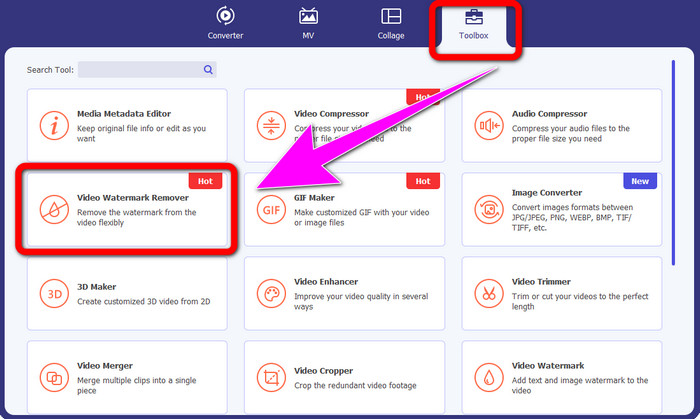
Βήμα 2: Όταν ανοίξετε το λογισμικό, μεταβείτε στην καρτέλα Toolbox και επιλέξτε το εργαλείο Video Watermark Remover. Να περιμένετε ότι θα εμφανιστεί ένα νέο περιβάλλον εργασίας στην οθόνη σας.
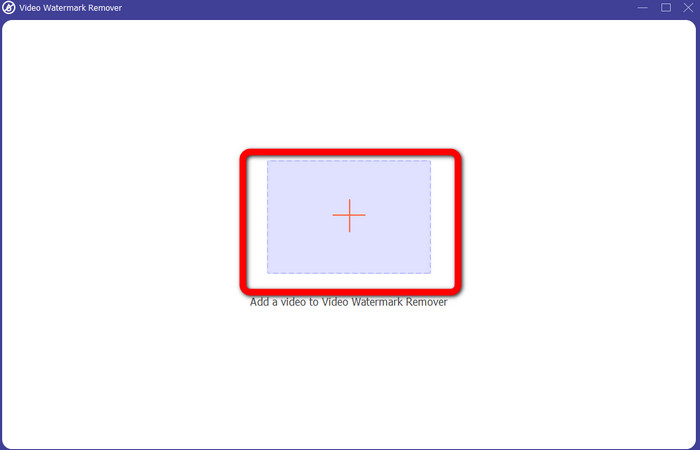
Βήμα 3: Όταν εμφανιστεί το νέο περιβάλλον εργασίας, κάντε κλικ στο εικονίδιο συν και επισυνάψτε το βίντεο με το λογότυπο iSkysoft που θέλετε να αφαιρέσετε.
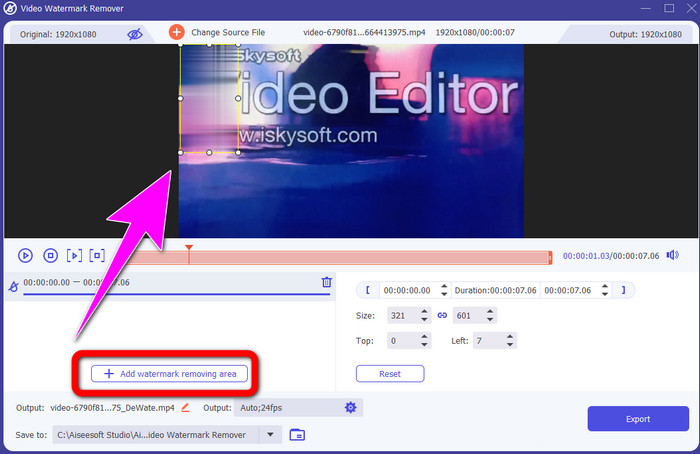
Βήμα 4: Στη συνέχεια, κάντε κλικ στο κουμπί Add Watermark Removing Area. Μετακινήστε το πλαίσιο επάνω στο βίντεό σας και καλύψτε το λογότυπο iSkysoft.
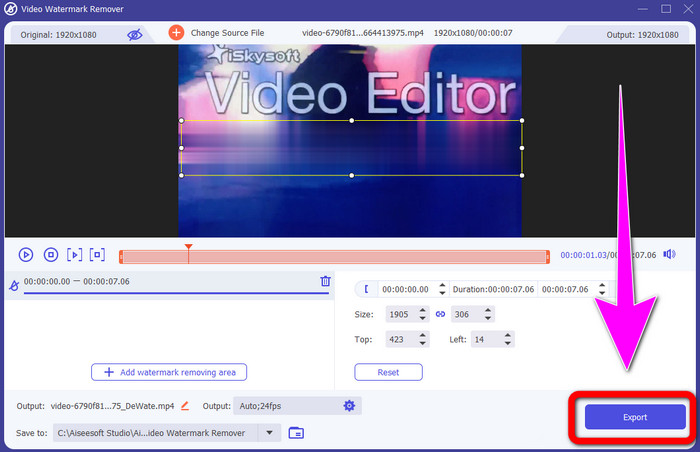
Βήμα 5: Τέλος, κάντε κλικ στο κουμπί Export για να αποθηκεύσετε το τελικό σας βίντεο.
Χρήση του Video Cropper
Σε αυτό το μέρος, θα σας δείξουμε πώς να αφαιρέσετε το λογότυπο iSkysoft από το βίντεό σας χρησιμοποιώντας το εργαλείο Video Cropper.
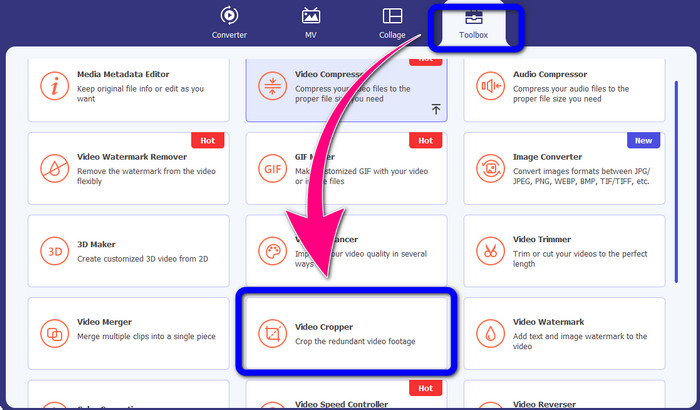
Βήμα 1: Εκτελέστε την εφαρμογή στον υπολογιστή σας. Στην καρτέλα Toolbox πρέπει να κάνετε κλικ στο εργαλείο Video Cropper. Όπως και με το προηγούμενο εργαλείο, να περιμένετε ότι θα εμφανιστεί ένα νέο περιβάλλον εργασίας στην οθόνη σας.
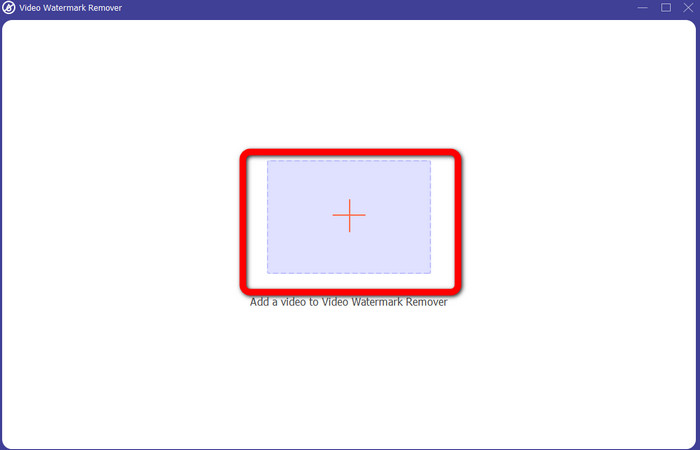
Βήμα 2: Κάντε κλικ στο κουμπί με το σύμβολο συν για να εισαγάγετε το βίντεό σας με το λογότυπο iSkysoft.
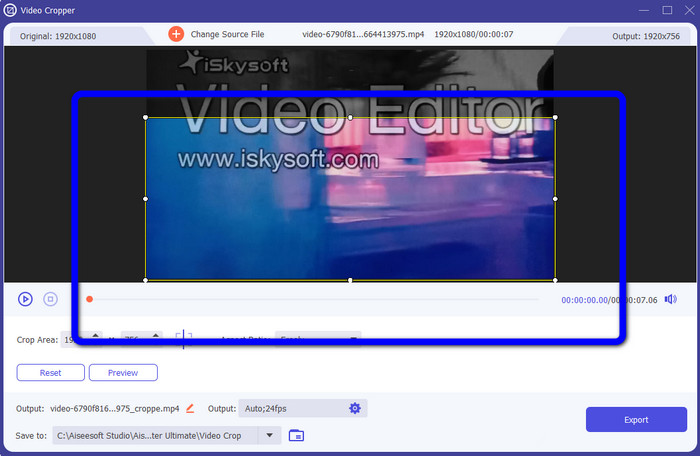
Βήμα 3: Σε αυτό το σημείο, μπορείτε πλέον να περικόψετε το βίντεο για να αφαιρέσετε το λογότυπο iSkysoft από το βίντεό σας. Χρησιμοποιήστε το ποντίκι σας για να μετακινήσετε τα άκρα του βίντεο.
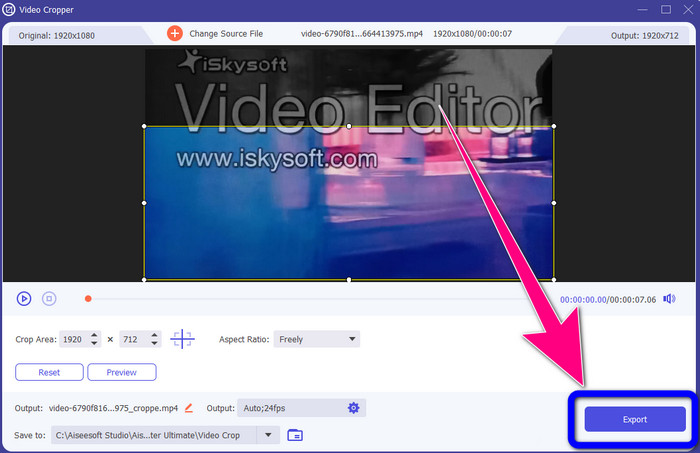
Βήμα 4: Για το τελικό βήμα, κάντε κλικ στο κουμπί Export και αποθηκεύστε το αποτέλεσμα στον υπολογιστή σας.
Μέρος 2: Πώς να αφαιρέσετε το λογότυπο iSkysoft από το Video Online
Χρησιμοποιώντας το HitPaw
Μπορείτε επίσης να αφαιρέσετε το λογότυπο iSkysoft διαδικτυακά. Ένα από τα καλύτερα εργαλεία που μπορείτε να χρησιμοποιήσετε είναι το HitPaw. Αυτή η online εφαρμογή μπορεί να αφαιρέσει εύκολα το λογότυπο από το βίντεό σας. Μπορείτε να το χρησιμοποιήσετε τόσο σε υπολογιστή όσο και διαδικτυακά, κάτι που είναι βολικό για όλους. Επίσης, το HitPaw είναι ασφαλές στη χρήση. Διασφαλίζει ότι τα βίντεο μπορούν να επεξεργάζονται και να τα βλέπετε μόνο εσείς. Επιπλέον, δεν χρειάζεται να ανησυχείτε για τους περιορισμούς αυτού του λογισμικού. Δεν έχει όρια όσον αφορά την αφαίρεση λογοτύπων από τα βίντεό σας. Δεν χρειάζεται να αγοράσετε αυτήν την εφαρμογή, επειδή είναι δωρεάν. Ωστόσο, αν αφαιρείτε το λογότυπο ή οποιοδήποτε
περιττά στοιχεία από το βίντεό σας, πρέπει να περιμένετε λίγο ακόμα. Αυτή η εφαρμογή έχει μια αργή διαδικασία αφαίρεσης, η οποία είναι χρονοβόρα για τους χρήστες. Επίσης, εξαρτάται από τη σύνδεσή σας στο Διαδίκτυο. Θα έχει καλή απόδοση εάν έχετε γρήγορη σύνδεση. Αλλά, εάν έχετε αργή σύνδεση, τότε περιμένετε κάποια καθυστέρηση. Ακολουθήστε τα παρακάτω απλά βήματα για να εξαλείψετε το λογότυπο iSkysoft από τα βίντεό σας.
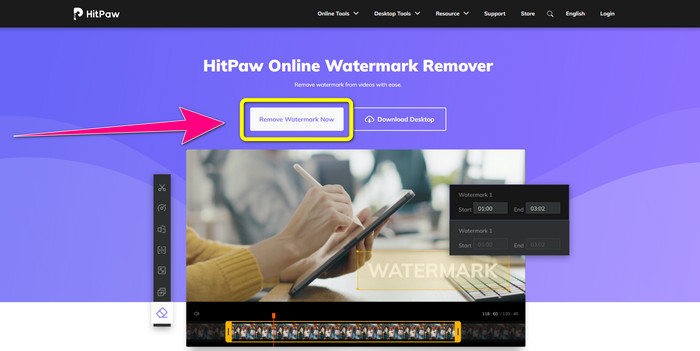
Βήμα 1: Επισκεφθείτε τον ιστότοπο του HitPaw. Κάντε κλικ στο κουμπί Remove Watermark Now - Choose File για να εισαγάγετε το βίντεό σας με το λογότυπο iSkysoft που θέλετε να αφαιρέσετε.
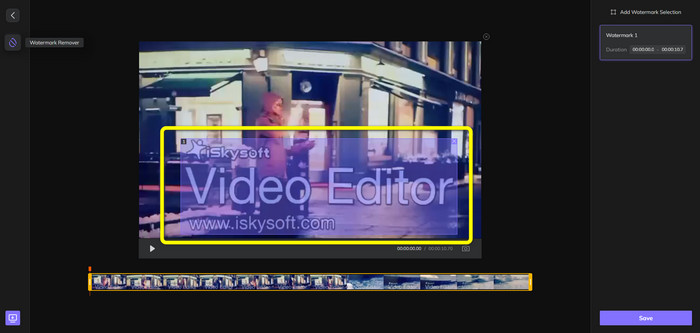
Βήμα 2: Μόλις επισυνάψετε το αρχείο βίντεο, ένα μπλε πλαίσιο θα εμφανιστεί στην οθόνη σας. Χρησιμοποιήστε αυτό το πλαίσιο για να καλύψετε το λογότυπο iSkysoft. Μπορείτε να αλλάξετε το μέγεθος του πλαισίου.
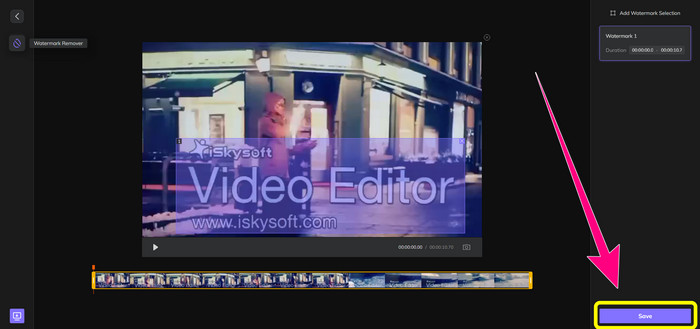
Βήμα 3: Όταν ολοκληρώσετε την κάλυψη του λογότυπου iSkysoft στο βίντεό σας, κάντε κλικ στο κουμπί Save. Περιμένετε να ολοκληρωθεί η διαδικασία αφαίρεσης και αποθηκεύστε το βίντεό σας.
Χρήση του Video Watermark Remover Online
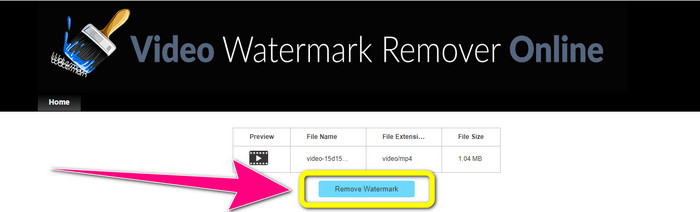
Ένα ακόμη διαδικτυακό εργαλείο που μπορείτε να χρησιμοποιήσετε είναι το Video Watermark Remover Online. Χρησιμοποιώντας αυτήν την εφαρμογή, μπορείτε να αφαιρέσετε το λογότυπο iSkysoft από τα βίντεό σας. Είναι επίσης ένα εύχρηστο λογισμικό, κατάλληλο για μη επαγγελματίες χρήστες. Μπορείτε επίσης να αφαιρέσετε οποιαδήποτε ενοχλητικά στοιχεία από τα βίντεό σας χωρίς να χάσετε την ποιότητα των βίντεο. Ωστόσο, χρησιμοποιώντας τη δωρεάν έκδοση, υπάρχει περιορισμός στην αφαίρεση λογοτύπων από τα βίντεό σας. Μπορείτε να αφαιρέσετε λογότυπα ή υδατογραφήματα μόνο από 5 βίντεο. Πρέπει να αγοράσετε συνδρομή αν θέλετε να επεξεργαστείτε περισσότερα βίντεο με το Video Watermark Remover Online. Επίσης, δεν μπορείτε να αποθηκεύσετε το αποτέλεσμα σε άλλη μορφή. Μπορείτε να το αποθηκεύσετε μόνο στην ίδια μορφή, κάτι που δεν είναι ιδανικό. Τέλος, έχει αργή επεξεργασία αρχείων. Ακολουθήστε τις απλές οδηγίες παρακάτω για να αφαιρέσετε το λογότυπο iSkysoft από τα βίντεό σας.
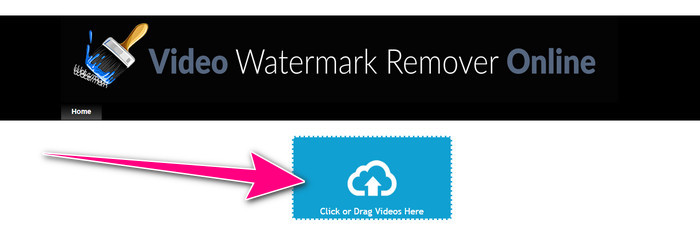
Βήμα 1: Μεταβείτε στον ιστότοπο του Video Watermark Remover Online. Επιλέξτε το κουμπί Click or Drag Videos Here για να εισαγάγετε το αρχείο βίντεο με το λογότυπο iSkysoft που θέλετε να διαγράψετε.
Βήμα 2: Στη συνέχεια, κάντε κλικ στο κουμπί Remove Watermark και περιμένετε να ολοκληρωθεί η διαδικασία αφαίρεσης.
Σχετικά με:
Η πιο γρήγορη μέθοδος για να αφαιρέσετε λογότυπο από βίντεο στο Adobe Premiere Pro
Πώς να αφαιρέσετε λογότυπο από βίντεο χρησιμοποιώντας το Windows Movie Maker
Μέρος 3: Συχνές ερωτήσεις σχετικά με την κατάργηση του λογότυπου iSkysoft
Μπορείτε να αφαιρέσετε ένα λογότυπο από μια εικόνα;
Ναι, μπορείτε να χρησιμοποιήσετε το FVC Free Watermark Remover για να διαγράψετε το λογότυπο από την εικόνα σας εύκολα και γρήγορα.
Είναι παράνομη η αφαίρεση του υδατογραφήματος;
Σύμφωνα με τον Νόμο περί πνευματικών δικαιωμάτων των ΗΠΑ, ενότητα 1202, η αφαίρεση υδατογραφημάτων χωρίς την άδεια του ιδιοκτήτη είναι παράνομη.
Πώς μπορώ να αφαιρέσω το λογότυπο δωρεάν;
Μπορείτε να χρησιμοποιήσετε τη δωρεάν δοκιμή του Video Converter Ultimate για να αφαιρέσετε ένα λογότυπο από το βίντεό σας δωρεάν.
συμπέρασμα
Αυτό το άρθρο παρουσίασε εξαιρετικές μεθόδους για να αφαιρέσετε το λογότυπο iSkysoft από το βίντεό σας χρησιμοποιώντας εργαλεία για υπολογιστή και διαδικτυακά. Αλλά αν θέλετε να βρείτε ένα εξαιρετικό εργαλείο αφαίρεσης λογοτύπων που μπορείτε να χρησιμοποιήσετε, τότε μπορείτε να κατεβάσετε το Video Converter Ultimate. Αυτή η εφαρμογή προσφέρει γρήγορη διαδικασία αφαίρεσης. Είναι επίσης προσιτή και εύχρηστη για όλους τους χρήστες.
-
 8 εξαιρετικές συσκευές αφαίρεσης υδατογραφημάτων βίντεο σε απευθείας σύνδεση και εκτός σύνδεσης
 Αν ψάχνετε για το καλύτερο δωρεάν λογισμικό αφαίρεσης υδατογραφήματος βίντεο που μπορείτε να χρησιμοποιήσετε στα τηλέφωνά σας Windows, Mac, iPhone και Android, αυτό το άρθρο είναι για εσάς
-
 Οι καλύτερες μέθοδοι για το πώς να αφαιρέσετε το Biteable Watermark από το βίντεο
 Αυτό το άρθρο θα σας δείξει ένα πιο αξιόπιστο και φανταστικό εργαλείο αφαίρεσης υδατογραφήματος που μπορεί να δαγκωθεί. Αυτές οι υπέροχες εφαρμογές θα σας βοηθήσουν να λύσετε αυτού του είδους το πρόβλημα
-
 Εύκολες στην εκμάθηση Διαδικασίες για την αφαίρεση του λογότυπου από το βίντεο
 Ψάχνετε για το καλύτερο και εύκολο εργαλείο αφαίρεσης λογότυπου βίντεο; Τότε, αυτό το άρθρο είναι καλό για εσάς. Εκμεταλλευτείτε την ευκαιρία για να μάθετε σχετικά με την κατάργηση ενός λογότυπου από ένα βίντεο.
