


 Video Converter Ultimate
 Εγγραφή οθόνης
 Επισκευή βίντεο
Βαθιά κατανόηση σχετικά με τα 5 διαθέσιμα προγράμματα επεξεργασίας βίντεο αργής κίνησης
Σας αρέσει να παρακολουθείτε αθλήματα με χτυπήματα σε υψηλές ταχύτητες, όπως αγώνες ταχύτητας, πυγμαχία, μπέιζμπολ, βόλεϊ και πολλά άλλα; Όλα τα παραπάνω αθλήματα χρειάζονται μια κάμερα υψηλής ταχύτητας μόνο και μόνο για να γίνει ανάλυση κίνησης. Αν λοιπόν θέλετε να αναλύσετε κάθε κίνηση του κάθε αθλητή, τότε δοκιμάστε να διαβάσετε για το καλύτερο εργαλείο δημιουργίας βίντεο σε αργή κίνηση που μπορείτε να χρησιμοποιήσετε. Επίσης, με τη βοήθεια του παρακάτω εργαλείου, δεν θα χρειαστείτε επιπλέον εξοπλισμό πέρα από τον επιτραπέζιο υπολογιστή σας, το διαδίκτυο ή το κινητό σας. Καθώς προχωράμε, διαβάστε προσεκτικά τα εργαλεία και επιλέξτε ποιο είναι το καλύτερο για εσάς.

Μέρος 1. 3 Το καλύτερο πρόγραμμα δημιουργίας βίντεο αργής κίνησης για Windows PC, Mac και Online
1. Video Converter Ultimate
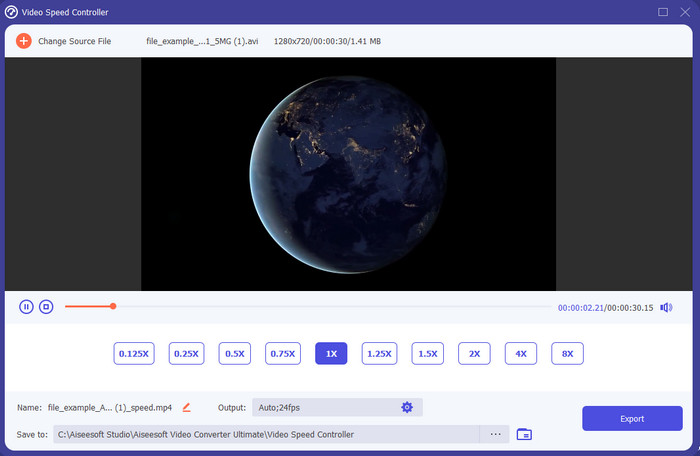
Θέλετε να μάθετε ποιο από τα προγράμματα επεξεργασίας βίντεο σε αργή κίνηση είναι το καλύτερο για να μετατρέψετε την αναπαραγωγή σας σε slow motion; Τότε δοκιμάστε να χρησιμοποιήσετε το Video Converter Ultimate, γιατί αυτό το εργαλείο δεν είναι μόνο το καλύτερο, είναι εξαιρετικό. Αυτό το εργαλείο διαθέτει ήδη πολλές προηγμένες λειτουργίες που θα θέλατε να χρησιμοποιήσετε, ακόμη κι αν δεν είστε επαγγελματίας στο μοντάζ. Ακόμη κι αν είστε επαγγελματίας, αυτό το λογισμικό είναι η καλύτερη επιλογή, ανεξάρτητα από το επίπεδο των δεξιοτήτων σας στο μοντάζ. Επιπλέον, μπορείτε πολύ γρήγορα να προσθέσετε εφέ αργής κίνησης στο βίντεό σας χωρίς να διαβάζετε εγχειρίδια ή να παρακολουθείτε βίντεο για το πώς γίνεται. Διότι το εργαλείο παρέχει πολύ πιο απλές οδηγίες σε σχέση με το παρακάτω εργαλείο. Παρόλο που το εργαλείο πρέπει να πληρωθεί πριν το χρησιμοποιήσετε, η τιμή του δεν είναι τόσο υψηλή. Αν θέλετε να μάθετε περισσότερα γι’ αυτό το εργαλείο, τότε διαβάστε τα βασικά χαρακτηριστικά παρακάτω.
Βασικά χαρακτηριστικά του Video Converter Ultimate:
◆ Προηγμένη εφαρμογή δημιουργίας βίντεο σε αργή κίνηση με βασικές οδηγίες.
◆ Φιλική προς το χρήστη διεπαφή εργαλείου.
◆ Ρυθμίστε την ταχύτητα του βίντεο εύκολα στον ελεγκτή ταχύτητας βίντεο.
◆ Υποστηρίζει περισσότερες από 200+ μορφές βίντεο και ήχου.
◆ Μπορεί να γίνει λήψη και πρόσβαση σε λειτουργικά συστήματα PC και Mac.
Δωρεάν ΛήψηΓια Windows 7 ή νεότεραΑσφαλής λήψη
Δωρεάν ΛήψηΓια MacOS 10.7 ή νεότεροΑσφαλής λήψη
2. Boris Continuum Time Unit
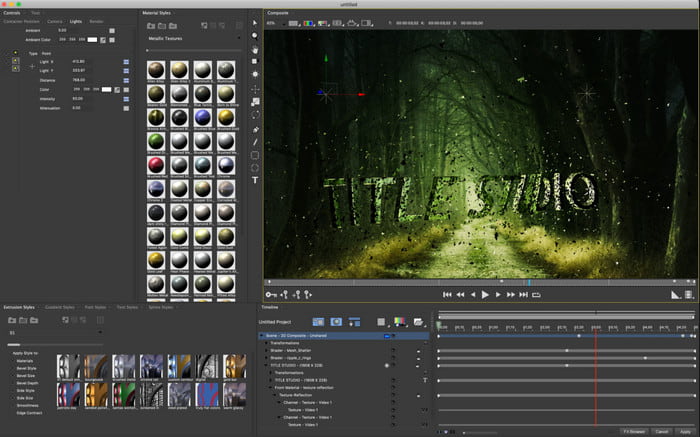
Το Boris Continuum Time Unit είναι η καλύτερη επιλογή αν θέλετε μια «βαριάς χρήσης» εφαρμογή δημιουργίας βίντεο σε αργή κίνηση. Δεν υπάρχει άλλο εργαλείο που να μπορεί να προσφέρει ό,τι προσφέρει αυτό, ώστε να έχετε ένα επαγγελματικό αποτέλεσμα. Επιπλέον, αυτό το εργαλείο διαθέτει τις καλύτερες, λεπτομερείς λειτουργίες επεξεργασίας που θα θέλατε να δοκιμάσετε. Αν και το εργαλείο είναι ανώτερο από τα υπόλοιπα, είναι κυριολεκτικά υπερβολικά ακριβό. Επίσης, αν θέλετε να το χρησιμοποιήσετε, πρέπει να διαθέτετε σύστημα επιτραπέζιου υπολογιστή υψηλών προδιαγραφών, γιατί δεν θα μπορέσετε να το τρέξετε σε παλαιότερες εκδόσεις υπολογιστών.
Πλεονεκτήματα
- Το καλύτερο εργαλείο για χρήση για βαριά επεξεργασία.
- Είναι συμβατό με όλες τις πλατφόρμες.
- Η διεπαφή του εργαλείου μοιάζει περισσότερο με ένα επαγγελματικό εργαλείο.
Μειονεκτήματα
- Αυτό το λογισμικό είναι το πιο ακριβό σε αυτήν την εγγραφή.
- Χρειαζόταν μια μονάδα συστήματος υψηλής ποιότητας.
- Δεν είναι η καλύτερη επιλογή για έναν αρχάριο που δεν έχει ένα υπόβαθρο στο μοντάζ.
3. ΒΕΕΔ.ΙΟ
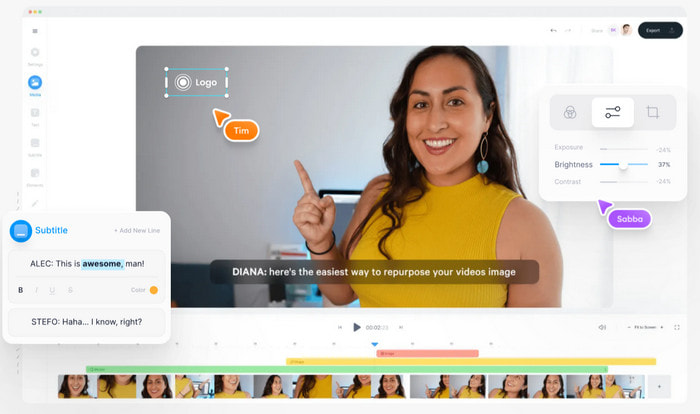
Αν, λοιπόν, δεν θέλετε να ξοδέψετε ούτε ένα ευρώ και έχετε σύνδεση στο διαδίκτυο, τότε δοκιμάστε να μπείτε στο VEED.IO. Αυτό είναι το καλύτερο λογισμικό για δημιουργία βίντεο σε αργή κίνηση online, επειδή είναι απλό και εύκολα προσβάσιμο. Η συνολική διεπαφή του εργαλείου είναι πολύ καθαρή, με ξεκάθαρες οδηγίες, οπότε είναι πολύ βολικό για όλους. Ωστόσο, μπορείτε να ανεβάζετε αρχεία μόνο κάτω των 50 MB και αν θέλετε να προσθέσετε αρχείο με μεγαλύτερο μέγεθος, τότε το εργαλείο θα σας ζητήσει να κάνετε αναβάθμιση. Επίσης, αν δεν αγοράσετε την υπηρεσία, να περιμένετε ότι το τελικό αποτέλεσμα θα έχει υδατογράφημα.
Πλεονεκτήματα
- Μπορεί να είναι εύκολα προσβάσιμο από οποιονδήποτε έχει συνδεσιμότητα στο Διαδίκτυο.
- Δεν υπάρχουν ενοχλητικές διαφημίσεις στον ιστότοπο.
- Εύκολο να αντιμετωπιστεί από τους αρχάριους στο μοντάζ.
Μειονεκτήματα
- Οι δυνατότητες του εργαλείου είναι πολύ περιορισμένες στη δωρεάν έκδοση του εργαλείου.
- Εξαρτάται από το Διαδίκτυο. Έτσι, εάν το διαδίκτυο σας είναι αργό, τότε περιμένετε αργό ρυθμό μεταφόρτωσης, λήψης και επεξεργασίας. Επίσης, δεν μπορείτε να αποκτήσετε πρόσβαση σε αυτό το εργαλείο εάν δεν έχετε σύνδεση στο Διαδίκτυο.
Μέρος 2. 2 της καλύτερης εφαρμογής βίντεο αργής κίνησης σε Android και iOS
1 SloPro
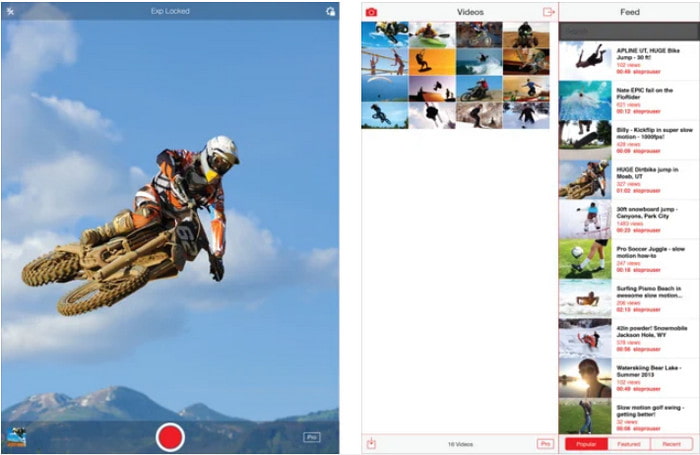
Το SloPro είναι η καλύτερη εφαρμογή βίντεο σε αργή κίνηση που μπορείτε να κατεβάσετε δωρεάν σε iOS. Η εφαρμογή μπορεί να αναπαράγει βίντεο σε αργή κίνηση μέχρι και 500 έως 1000 fps. Επιπλέον, μπορείτε να μεταβάλλετε το βίντεο από γρήγορη σε αργή αναπαραγωγή ή το αντίστροφο. Αν και το εργαλείο μπορεί να είναι εξαιρετική επιλογή, υπάρχουν ακόμα αρκετά μειονεκτήματα στην εφαρμογή. Για παράδειγμα, το τελικό βίντεο θα αποθηκεύεται στη συλλογή της εφαρμογής και όχι στο film roll της κάμερας. Επίσης, αν προσπαθήσετε να χρησιμοποιήσετε τα 1000 fps, το βίντεο γίνεται προβληματικό, σύμφωνα με χρήστες που το έχουν ήδη δοκιμάσει. Παρ’ όλα αυτά, αυτό το εργαλείο παραμένει πολύ καλό, γιατί είναι δωρεάν και η επιβράδυνση του βίντεο μπορεί να γίνει εδώ πολύ εύκολα.
Πλεονεκτήματα
- Η καλύτερη αναπαραγωγή αργής κίνησης που μπορείτε να χρησιμοποιήσετε στο iOS δωρεάν.
- Έχει ήδη λάβει δίκαιη βαθμολογία και 3,3 αστέρια.
- Απλό και εύκολο στη χρήση.
Μειονεκτήματα
- Το τελικό αποτέλεσμα δεν αποθηκεύεται απευθείας στη συλλογή.
- Όλα τα βίντεο που είναι αποθηκευμένα στη συλλογή SloPro είναι τυχαία και δεν έχουν κατηγοριοποιηθεί σωστά.
- Εάν χρησιμοποιείτε 1000 fps, τότε περιμένετε μια έξοδο βίντεο με σφάλματα.
2. Slow Motion Video Maker
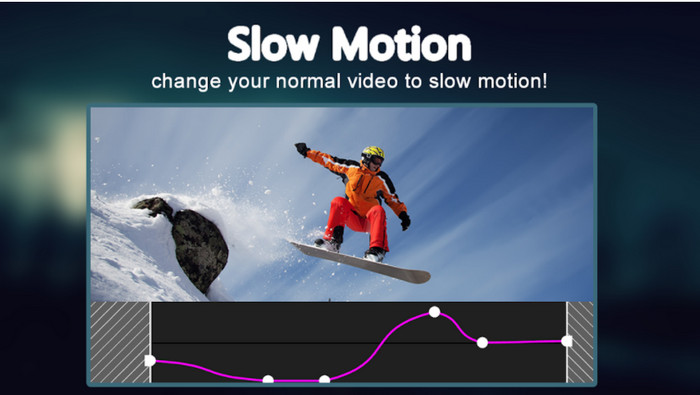
Μία από τις καλύτερες εφαρμογές δημιουργίας βίντεο σε αργή κίνηση που μπορείτε να κατεβάσετε δωρεάν στο Android τηλέφωνό σας είναι το Slow Motion Video Maker. Με τη βοήθεια αυτής της εφαρμογής, μπορείτε εύκολα να κάνετε γρήγορη προώθηση και αναπαραγωγή σε αργή κίνηση στα βίντεό σας. Ωστόσο, η εφαρμογή έχει πολλές ενοχλητικές διαφημίσεις που εμφανίζονται ξαφνικά. Επίσης, την αργή αναπαραγωγή μπορείτε να τη ρυθμίσετε μόνο στο 0,5. Παρ’ όλα αυτά, είναι μια πολύ καλή επιλογή για να επιβραδύνετε ένα βίντεο στο Android, αλλά οι διαφημίσεις επηρεάζουν αρνητικά την εφαρμογή.
Πλεονεκτήματα
- Η εφαρμογή είναι δωρεάν για λήψη στο Play store.
- Είναι υπέροχο να χρησιμοποιείται για να επιβραδύνει ομαλά το βίντεο.
- Η εφαρμογή είναι εύκολη στη διαχείριση.
Μειονεκτήματα
- Έχει πολλές ενοχλητικές διαφημίσεις που εμφανίζονται από το πουθενά.
- Η λήψη του βίντεο ενδέχεται να διαρκέσει πολύ, επειδή δεν επιταχύνει την επεξεργασία.
Μέρος 3. Συχνές ερωτήσεις σχετικά με το Slow Motion Video Maker
Ποιος είναι ο ρόλος του FPS;
Χρησιμοποιείται για τον υπολογισμό της διαδοχικής σειράς καρέ που εμφανίζονται στην οθόνη σας. Αυτό παρατηρείται πιο συχνά σε κάθε λήψη κίνησης, όπως σε βιντεοπαιχνίδια, κάμερες, ταινίες, ακόμα και το μάτι μας μπορεί να δει 30 έως 60 fps.
Ποιος είναι ο καλύτερος ρυθμός FPS σε αργή κίνηση;
Το ιδανικό FPS που μπορείτε να χρησιμοποιήσετε για να παρακολουθήσετε βίντεο σε αναπαραγωγή αργής κίνησης είναι μεταξύ 120 και 240 fps. Επομένως, εάν θέλετε να έχετε μια πιο λεπτομερή αναπαραγωγή αργής κίνησης, κάντε το FPS υψηλότερο.
Πώς να παίξετε ένα βίντεο σε αναπαραγωγή γρήγορης κίνησης;
Για να πάρετε μια ιδέα για το πώς να αναπαράγετε ένα βίντεο σε γρήγορη κίνηση, δοκιμάστε να κάνετε κλικ σε αυτόν τον σύνδεσμο. Μάθετε ποια είναι τα 5 καλύτερα εργαλεία που μπορείτε να χρησιμοποιήσετε για να επιταχύνετε ένα βίντεο.
συμπέρασμα
Συνοψίζοντας, όλα τα εργαλεία που παρουσιάστηκαν εδώ είναι οι καλύτεροι δημιουργοί βίντεο σε αργή κίνηση που μπορείτε να βρείτε στο διαδίκτυο. Επιπλέον, αυτό το άρθρο ήδη σας βοήθησε και έκανε την αναζήτησή σας ευκολότερη από ποτέ. Ωστόσο, υπάρχει ένα συγκεκριμένο εργαλείο που ίσως θελήσετε να χρησιμοποιήσετε για να κάνετε το βίντεό σας καλύτερο, με τη βοήθεια του Video Converter Ultimate. Όλες οι προηγμένες λειτουργίες που μπορείτε να χρησιμοποιήσετε εδώ είναι εντυπωσιακές και όμως εύχρηστες. Εξάλλου, αν ακόμη δεν έχετε πειστεί, δοκιμάστε πρώτα να κατεβάσετε το εργαλείο και να το δοκιμάσετε μόνοι σας.
-
 Καλύτερη εφαρμογή Android για αναπαραγωγή αρχείων MOV στα κινητά σας τηλέφωνα
 Δυσκολεύεστε επειδή δεν ήταν δυνατή η αναπαραγωγή της εγγραφής σας MOV στο Android σας; Έτσι, σε αυτήν την περίπτωση ψάχνετε για το ποιο είναι το καλύτερο πρόγραμμα αναπαραγωγής MOV για android.
-
 5 ισχυρά προγράμματα αναπαραγωγής AVI για παρακολούθηση και αναπαραγωγή αρχείων AVI [Web & Desktop]
 Μάθετε ποιες συσκευές αναπαραγωγής AVI μπορείτε να χρησιμοποιήσετε για να παίξετε και να παρακολουθήσετε τα αρχεία .avi. Συνεχίστε να διαβάζετε παρακάτω και επιλέξτε ποιο είναι το καλύτερο πρόγραμμα αναπαραγωγής πολυμέσων από το άλλο.
-
 Αποτελεσματικοί τρόποι για τον τρόπο δημιουργίας αρχείων MKV στο Xbox One S 2021
 Ανακαλύψτε τρόπους που μπορούν να σας βοηθήσουν να αναπαράγετε αρχεία MKV στο Xbox One S σας χρησιμοποιώντας μερικούς από τους καλύτερους μετατροπείς.
