


 Video Converter Ultimate
 Εγγραφή οθόνης
 Επισκευή βίντεο
Επιταχύνετε τα βίντεο στο Android με χρήσιμες εφαρμογές στο Android [2025]
Στις μέρες μας τα τηλέφωνα είναι η πιο πολυχρηστική τεχνολογία που χρησιμοποιούμε καθημερινά. Αυτή η συσκευή μάς βοηθά να επικοινωνούμε, να καταγράφουμε, να επεξεργαζόμαστε πράγματα όπως περικοπή, κόψιμο, επιτάχυνση και πολλά άλλα, ακόμη κι αν δεν διαθέτουμε πολύ εξοπλισμό για στήσιμο. Έτσι, σήμερα θα μάθουμε πώς να επιταχύνετε ένα βίντεο σε Android με τη βοήθεια μιας εφαρμογής τρίτου μέρους που μπορείτε να κατεβάσετε. Επιπλέον, το Android τηλέφωνό σας δεν έχει ενσωματωμένη λειτουργία επιτάχυνσης βίντεο που να μπορείτε να χρησιμοποιήσετε για να κάνετε την αναπαραγωγή ενός βίντεο πιο γρήγορη. Αν λοιπόν θέλετε να έχετε μια τέτοια δυνατότητα, συνεχίστε να διαβάζετε αυτό το άρθρο, καθώς συγκεντρώνουμε διαφορετικές εφαρμογές στις οποίες μπορείτε να βασιστείτε.

Μέρος 1. Πώς να επιταχύνετε το βίντεο στο Android
1. FilmoraGo
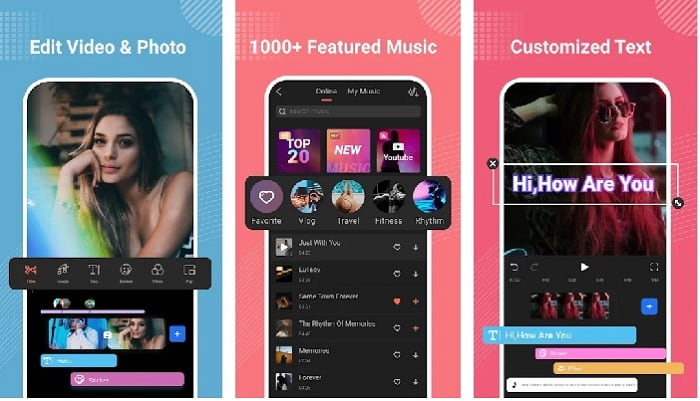
Η Filmora ανέπτυξε μια εφαρμογή που μπορεί να ληφθεί στο Android σας, ώστε να ζήσετε σχεδόν τις ίδιες λειτουργίες που προσφέρει το εργαλείο στην έκδοση για υπολογιστή. Το Filmora Go είναι ένα από τα καλύτερα δωρεάν προγράμματα επεξεργασίας βίντεο που μπορείτε να χρησιμοποιήσετε για να δημιουργήσετε ένα εντυπωσιακό βίντεο. Επιπλέον, αυτό το εργαλείο διαθέτει ένα πλήρες σετ δυνατοτήτων που είναι πολύ πιθανό να χρησιμοποιήσετε, ακόμη κι αν δεν έχετε εμπειρία στην επεξεργασία βίντεο. Ωστόσο, η δωρεάν έκδοση υποστηρίζει μόνο δοκιμαστικές λειτουργίες που μπορείτε να χρησιμοποιήσετε. Όπως η λειτουργία επιτάχυνσης βίντεο σε Android, η οποία είναι δωρεάν αλλά έχει περιορισμούς. Παρόλο που το εργαλείο φαίνεται τέλειο, υπάρχουν ορισμένα ζητήματα που οι χρήστες θα ήθελαν να λυθούν, σύμφωνα με τις κριτικές της εφαρμογής.
Πλεονεκτήματα
- Είναι ένα δωρεάν αλλά ισχυρό πρόγραμμα επεξεργασίας βίντεο που μπορείτε να χρησιμοποιήσετε στις συσκευές σας Android.
- Το εργαλείο λαμβάνει μία από τις καλύτερες κριτικές που έχουμε δει ποτέ και λαμβάνει 4,6 αστέρια.
- Το εργαλείο χτίζει ήδη τη φήμη ενός από τους καλύτερους συντάκτες στην επιφάνεια εργασίας.
Μειονεκτήματα
- Η απώλεια αρχείων συμβαίνει μερικές φορές εδώ.
- Μερικές φορές η εξαγωγή των αρχείων είναι μπερδεμένη ακόμα κι αν τα επεξεργαστείτε.
- Τις περισσότερες φορές ο ήχος και το βίντεο δεν συγχρονίζονται.
2. Hyper Timelapse
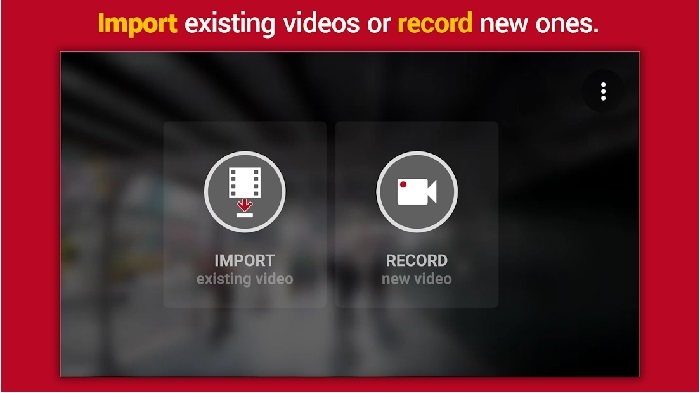
Το Hyper Timelapse είναι μία από τις εφαρμογές που επιταχύνουν την αναπαραγωγή βίντεο σε Android και μπορείτε να την κατεβάσετε δωρεάν. Αυτή η εφαρμογή έχει ήδη φτάσει σε βαθμολογία 4,1 αστέρων, κάτι που είναι πολύ καλό. Ωστόσο, οι κριτικές για αυτή την εφαρμογή είναι δυσάρεστο να τις διαβάζει κανείς, επειδή περιέχουν πολλά παράπονα. Όταν τη δοκιμάσαμε, η διεπαφή δεν ήταν και τόσο κακή, η επιτάχυνση λειτουργούσε πολύ καλά, αλλά όταν κάναμε εξαγωγή, η εφαρμογή κρασάριζε. Έπειτα δοκιμάσαμε τη λειτουργία time lapse και το μέγεθος του αρχείου του βίντεο γινόταν μεγαλύτερο κάθε λεπτό που περνούσε. Ουσιαστικά, δεν μπορείτε να τραβήξετε ένα μακρύ time lapse βίντεο εδώ.
Πλεονεκτήματα
- Η εφαρμογή είναι πολύ απλή στη χρήση ακόμα κι αν είστε αρχάριος.
- Διαθέτει ενσωματωμένο time lapse.
- Η διεπαφή του εργαλείου δεν είναι εντάξει.
Μειονεκτήματα
- Τα σφάλματα και τα σφάλματα εξακολουθούν να συμβαίνουν σε αυτό το εργαλείο.
- Δεν αποθηκεύει την τελική έξοδο γιατί κάθε φορά που το κάνετε κολλάει.
3. Lapse It
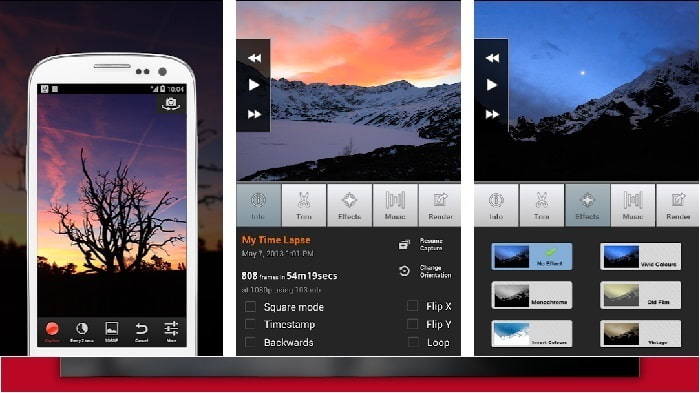
Αν ψάχνετε για μια εφαρμογή για να επιταχύνετε βίντεο σε Android, τότε δοκιμάστε το Lapse It. Αυτό το εργαλείο είναι ο συνδυασμός των δύο παραπάνω, γιατί μπορείτε να κάνετε time lapse, stop motion και επεξεργασία. Αν και το εργαλείο ακούγεται ιδανικό για χρήση σε Android, έχει την χαμηλότερη βαθμολογία σε αυτό το άρθρο. Η εφαρμογή έχει μόνο 3,5 αστέρια και πολλά σχόλια στις κριτικές θεωρούν ότι η εφαρμογή δεν αξίζει τίποτα. Κάποια άλλα σχόλια λένε ότι αυτό το εργαλείο ήταν η αγαπημένη τους εφαρμογή για τη δημιουργία εντυπωσιακών βίντεο, αλλά τώρα υπάρχουν πολλές εφαρμογές καλύτερες από αυτήν.
Πλεονεκτήματα
- Έχει ένα μοναδικό και ισχυρό χαρακτηριστικό που αρέσει σε πολλούς χρήστες να χρησιμοποιούν.
- Αυτή η εφαρμογή μπορεί να έχει την καλύτερη απόδοση στο Android.
- Η προσαρμογή του βίντεο μπορεί να γίνει εύκολα με τη βοήθεια αυτής της εφαρμογής στο Android.
Μειονεκτήματα
- Το εργαλείο άλλαξε από την κατηγορία S σε D επειδή εξακολουθούν να συμβαίνουν σφάλματα και σφάλματα ακόμα και μετά την πραγματοποίηση της ενημέρωσης.
- Οι οδηγίες δεν είναι σαφείς για το πώς να το εκτελέσετε.
- Σε κάθε βίντεο που τελειώνει υπάρχει πάντα μια αναδυόμενη διαφήμιση.
Μέρος 2. Θέλετε έναν πιο επαγγελματικό ελεγκτή ταχύτητας; Δοκιμάστε το Video Converter Ultimate!
Το Video Converter Ultimate είναι το πιο ξεχωριστό εργαλείο που είναι πολύ πιθανό να χρησιμοποιήσετε αν θέλετε να έχετε ένα εκπληκτικό αποτέλεσμα. Η επιτάχυνση ενός βίντεο εδώ μπορεί να γίνει εύκολα με τη βοήθεια αυτού του εργαλείου. Επίσης, οι συνολικές δυνατότητες αυτού του εργαλείου είναι ανώτερες από αυτές των εφαρμογών Android. Ωστόσο, αυτό το λογισμικό δεν μπορεί να χρησιμοποιηθεί σε συσκευές Android, επειδή δεν υποστηρίζεται. Αν και μπορεί να χρησιμοποιηθεί στο τηλέφωνό σας (μέσω υπολογιστή), δεν θα αντιμετωπίσετε κολλήματα, κρασαρίσματα και σφάλματα κατά τη χρήση του. Επομένως, αν θέλετε να μάθετε πώς να επιταχύνετε ένα βίντεο σε Android, ακολουθήστε τα παρακάτω βήματα.
Βήμα 1. Το πρώτο πράγμα που πρέπει να κάνετε είναι να κατεβάσετε το εργαλείο. Αφού ολοκληρωθεί η διαδικασία λήψης, εγκαταστήστε το, κάντε τη γρήγορη ρύθμιση και κάντε κλικ στο Finish για να συνεχίσετε.
Δωρεάν ΛήψηΓια Windows 7 ή νεότεραΑσφαλής λήψη
Δωρεάν ΛήψηΓια MacOS 10.7 ή νεότεροΑσφαλής λήψη
Βήμα 2. Στη συνέχεια, μεταβείτε στην καρτέλα Toolbox και εντοπίστε το Video Speed Controller, κάντε κλικ πάνω του για να ανοίξει.
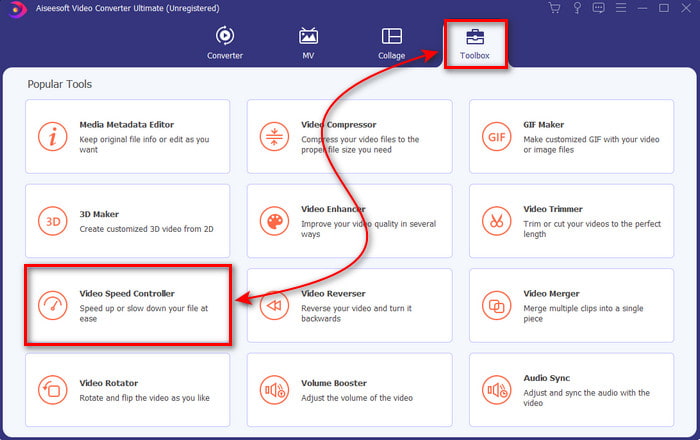
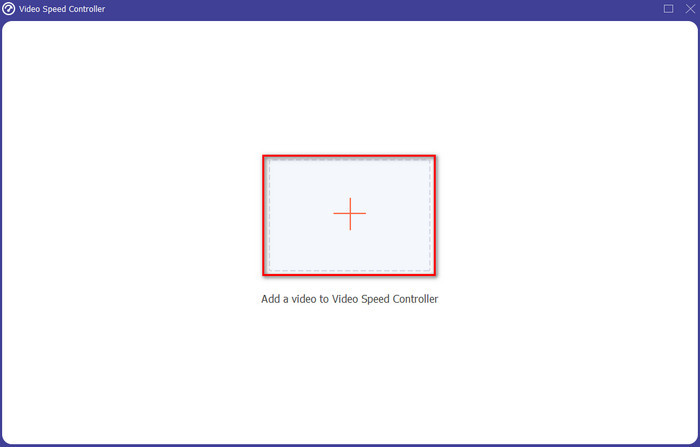
Βήμα 3. Θα εμφανιστεί στη συνέχεια μία διεπαφή· κάντε κλικ στο κουμπί + για να εισαγάγετε το αρχείο. Αφού το πατήσετε, θα εμφανιστεί ένας φάκελος· επιλέξτε το αρχείο που θέλετε να επιταχύνετε και κάντε κλικ στο Open.
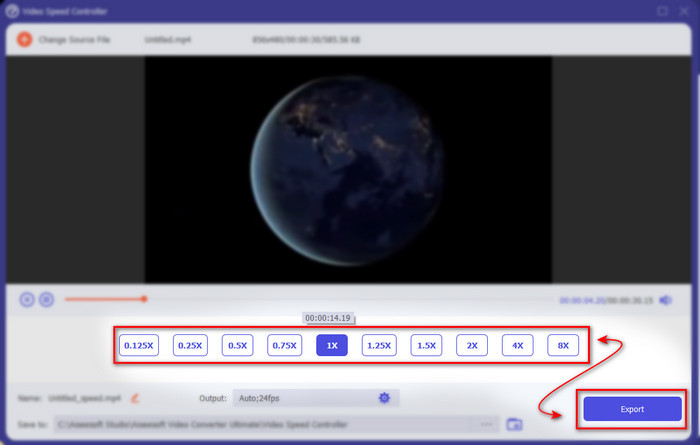
Βήμα 4. Θα εμφανιστεί πάλι μια νέα διεπαφή και μετά επιλέξτε την ταχύτητα που θέλετε μέσα από αυτά τα μικρά κουτιά. Αν είστε πλέον έτοιμοι να εξάγετε το επιταχυνόμενο αρχείο, τότε κάντε κλικ στο Export.
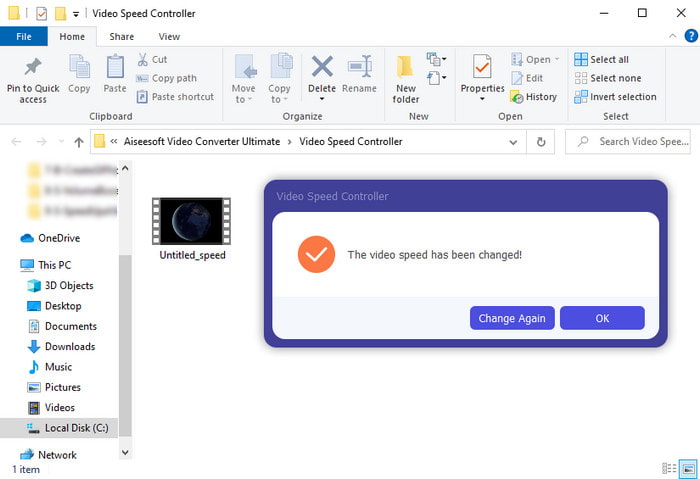
Βήμα 5. Περιμένετε λίγο και, όταν ολοκληρωθεί το βίντεο, θα εμφανιστεί ένας φάκελος που θα περιέχει το επιταχυνόμενο αρχείο που μόλις δημιουργήσατε. Κάντε κλικ στο αρχείο βίντεο για να παρακολουθήσετε την επιταχυνόμενη έκδοση.
Μέρος 3. Συχνές ερωτήσεις σχετικά με την επιτάχυνση ενός βίντεο στο Android
Η επιτάχυνση του βίντεό μου καταστρέφει την ποιότητά του;
Εάν πρόκειται να επιταχύνετε ένα βίντεο, τότε δεν περιμένετε καμία αλλαγή στην ποιότητα του βίντεο. Ωστόσο, εάν η εφαρμογή που χρησιμοποιείτε δεν υποστηρίζει έξοδο βίντεο υψηλής ποιότητας, τότε περιμένετε ότι η έξοδος βίντεο θα μειωθεί αυτόματα.
Μπορώ να δω ένα βίντεο σε αργή κίνηση;
Φυσικά και ναι! Με τη βοήθεια των 5 Καλύτερων Slow Motion Video Players κάντε κλικ σε αυτόν τον σύνδεσμο για να μεταβείτε σε ένα νέο άρθρο.
Γιατί πρέπει να επιταχύνω το βίντεό μου;
Υπάρχουν πολλοί λόγοι για τους οποίους χρειάζεται να αναπαράγετε ένα βίντεο σε ταχύτητα 2x ή και παραπάνω. Αν λοιπόν θέλετε να ανακαλύψετε αυτούς τους λόγους, διαβάστε αυτό το άρθρο που μιλά για το τι είναι το βίντεο 2x.
συμπέρασμα
Κλείνοντας, όλα όσα παρουσιάστηκαν εδώ είναι πολύ καλά για χρήση αν έχετε τηλέφωνο Android, ωστόσο υπάρχει ένα εργαλείο που ξεχωρίζει περισσότερο. Και αυτό το εξαιρετικό εργαλείο είναι το Video Converter Ultimate, γιατί αν το χρησιμοποιήσετε, δεν θα αντιμετωπίσετε σφάλματα και προβλήματα. Όμως αυτό το εργαλείο δεν είναι διαθέσιμο σε τηλέφωνα Android, οπότε αν θέλετε να το δοκιμάσετε, κατεβάστε το τώρα στον υπολογιστή σας, για να απολαύσετε όλες τις δυνατότητες αυτού του εξαιρετικού λογισμικού.
-
 Πώς να παίξετε αρχεία MKV στο iPad 2025
 Πώς να παίξετε αρχεία MKV στο iPad 2; Μπορώ να μετατρέψω το MKV σε MP4 για αναπαραγωγή στο iPad Pro / Air / 2; Αυτή η ανάρτηση μοιράζεται 2 εύκολους τρόπους αναπαραγωγής MKV σε iPad.
-
 [Επιλύθηκε] Το VLC δεν παίζει DVD, πώς να το διορθώσετε
 Μπορεί το VLC να αναπαράγει ένα DVD; Γιατί δεν έπαιξε το VLC το 1LC3T039; Πώς μπορώ να κάνω VLC για αναπαραγωγή DVD στα Windows 10; Αυτή η ανάρτηση μοιράζεται 3 συμβουλές για να διορθώσετε το VLC να μην παίζει DVD.
-
 [Επιλύθηκε] Αναπαραγωγή αρχείων MP4 στο Chromebook 2025
 Μπορείτε να παίξετε βίντεο στο Chromebook; Πώς να παίξετε αρχεία MP4 από USB σε Chromebook; Αυτή η ανάρτηση μοιράζεται 3 τρόπους αναπαραγωγής του MP4 στο Chromebook.
