


 Video Converter Ultimate
 Εγγραφή οθόνης
 Επισκευή βίντεο
Πώς να επιταχύνετε το βίντεο στο Διαδίκτυο: Διαθέσιμες εκτενείς προσεγγίσεις στο Διαδίκτυο
Το διαδικτυακό μάθημα είναι μια ακόμη διδακτική μέθοδος που χρησιμοποιείται σε ένα μικτό πρόγραμμα σπουδών, ιδιαίτερα αυτή την περίοδο της πανδημίας, και η χρήση βιντεοπ παρουσιάσεων ως εναλλακτική λύση για σύγχρονα μαθήματα. Ωστόσο, οι περισσότερες βιντεοπ παρουσιάσεις που διαρκούν μία ώρα για να ολοκληρωθούν είναι πολύ βαρετές για παρακολούθηση. Ορισμένοι φοιτητές δεν έχουν άλλη επιλογή από το να αυξήσουν την ταχύτητα ή να προωθήσουν γρήγορα τη βιντεοπ παρουσίαση για να εντοπίσουν τα βασικά σημεία του μαθήματος. Αυτό το άρθρο είναι ιδανικό για να αντιμετωπίσει αυτό το είδος προβλήματος που έχουν οι περισσότεροι φοιτητές. Ακολουθούν παραδείγματα για το πώς να επιταχύνετε ένα βίντεο online.

Μέρος 1. Διαφορετικοί τρόποι που είναι διαθέσιμοι για την αύξηση της ταχύτητας αναπαραγωγής βίντεο
Το να επιταχύνετε τα βίντεο μπορεί να ακούγεται ασυνήθιστο, επειδή όλα τα βίντεο αναπαράγονται σε κανονική ταχύτητα. Όμως κάποιοι θέλουν να παρακολουθήσουν ένα βίντεο 2x πιο γρήγορα από το συνηθισμένο. Για παράδειγμα, για ορισμένους, ο λόγος είναι να παραλείψουν τα μη ουσιώδη σημεία ενός βίντεο που μπορούν να κάνουν μια ταινία βαρετή, ειδικά αν την ξαναβλέπετε. Θέλετε μόνο να παραλείψετε τη σκηνή του διαλόγου και να προχωρήσετε στο σημείο με τη δράση ή την κορύφωση. Άλλοι, αντίθετα, θέλουν γενικά να παρακολουθούν βίντεο με γρήγορο ρυθμό. Υπάρχουν εφαρμογές επεξεργασίας που πρέπει συνήθως να αγοράσετε πριν τις χρησιμοποιήσετε, και οι οποίες μπορούν να σας βοηθήσουν σε αυτό το ζήτημα. Ωστόσο, το παρακάτω λογισμικό και τα διαδικτυακά εργαλεία θα σας βοηθήσουν να επιταχύνετε ένα βίντεο online δωρεάν.
Μέθοδος 1. Χρησιμοποιήστε το Clideo
Το λογισμικό βίντεο μάρκετινγκ Clideo περιλαμβάνει δημιουργία, επεξεργασία, συμπίεση και πακετάρισμα βίντεο για διανομή σε σχεδόν οποιοδήποτε διαδικτυακό κοινό. Διαθέτει πολλές λειτουργίες, όπως εργαλειοθήκη επεξεργασίας, μηχανή προσαρμογής και διάφορες διαθέσιμες μορφές. Ένα από τα εργαλεία μπορεί να προωθήσει γρήγορα και να επιταχύνει το βίντεο. Κι αν αναρωτιέστε πώς θα το χρησιμοποιήσετε, ακολουθούν τα βήματα για να χρησιμοποιήσετε το Clideo:
Βήμα 1: Κάντε κλικ στο Choose File στη διεπαφή του Clideo και ανεβάστε το βίντεο που θέλετε να επιταχύνετε.
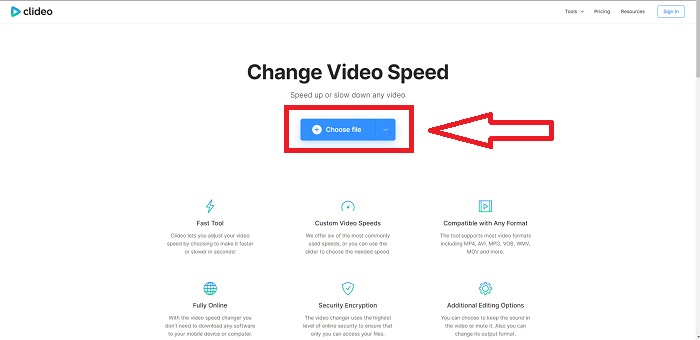
Βήμα 2: Αφού ανεβάσετε το βίντεό σας, επιλέξτε την επιθυμητή ταχύτητα για να την εφαρμόσετε στο αρχείο βίντεο στη δεξιά γωνία της διεπαφής. Μπορείτε να επιλέξετε αν θέλετε να κάνετε ένα βίντεο πιο γρήγορο ή πιο αργό από την αρχική ταχύτητα του κλιπ σας. Μπορείτε επίσης να επιλέξετε να κάνετε σίγαση σε όλο το βίντεο.
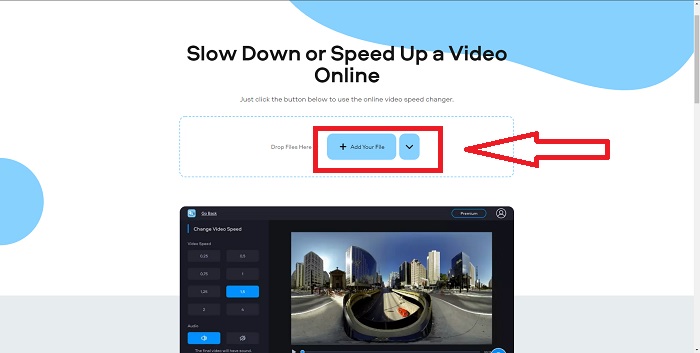
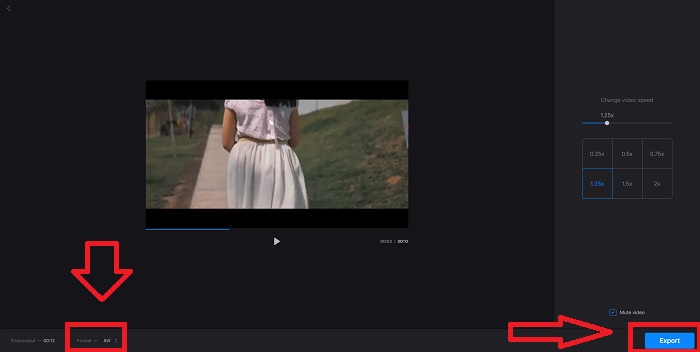
Βήμα 3: Αν είστε ήδη ικανοποιημένοι με την ταχύτητα του βίντεο, επιλέξτε τη συμβατή μορφή για το αρχείο σας. Οι διαθέσιμες μορφές είναι AVI, 3G2, 3GP, F4V, ASF, FLV και M2TS. Έπειτα, αν όλα είναι έτοιμα για ανέβασμα, ανεβάστε το αρχείο σας κάνοντας κλικ στο Export και πατήστε Download για να αποθηκεύσετε το αρχείο στον υπολογιστή σας.
Μέθοδος 2. Χρησιμοποιήστε το Fastreel
Το εργαλείο επεξεργασίας βίντεο Fastreel σάς επιτρέπει να δημιουργείτε σύντομα κλιπ, να επεξεργάζεστε βίντεο και να χρησιμοποιείτε έτοιμα πρότυπα ώστε η διαδικασία να γίνεται πιο γρήγορα και αποτελεσματικά. Μία από τις εταιρείες πίσω από αυτή την υπηρεσία είναι η Movavi, γνωστή επίσης για το λογισμικό επεξεργασίας και μετατροπής βίντεο. Επειδή λειτουργεί σε οποιοδήποτε πρόγραμμα περιήγησης – Firefox, Google Chrome, Opera και Safari – το Fastreel αποτελεί μια εξαιρετική εναλλακτική λύση σε επιτραπέζιο λογισμικό για χρήστες Windows και Mac. Όπως και το πρώτο διαδικτυακό εργαλείο, το Fastreel διαθέτει λειτουργίες που μπορούν να σας βοηθήσουν να επιταχύνετε ένα βίντεο online. Ακολουθήστε τα βήματα παρακάτω:
Βήμα 1: Στη διεπαφή του Fastreel, κάντε κλικ στο Use Online Tools για να ανοίξετε όλα τα διαθέσιμα εργαλεία.
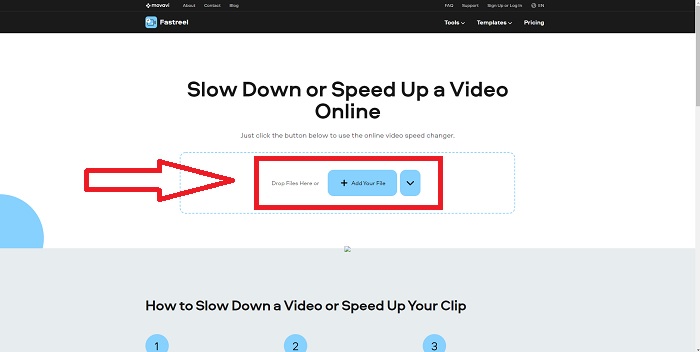
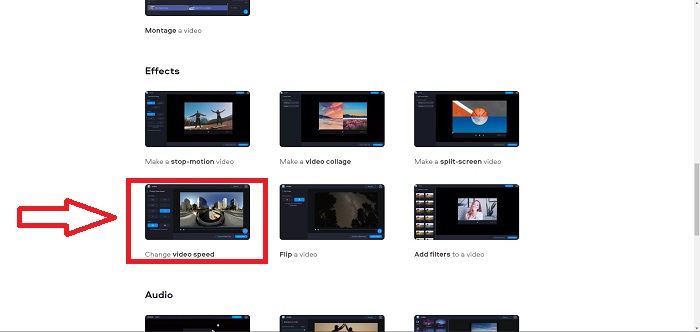
Βήμα 2: Στη συνέχεια, θα δείτε μια επισκόπηση όλων των λειτουργιών του Fastreel. Κάντε κύλιση προς τα κάτω και εντοπίστε την ενότητα Effects και κάντε κλικ στο Change Video Speed για να ξεκινήσετε την επεξεργασία του βίντεο. Συνεχίστε κάνοντας κλικ στο Add file και προχωρήστε στην επεξεργασία.
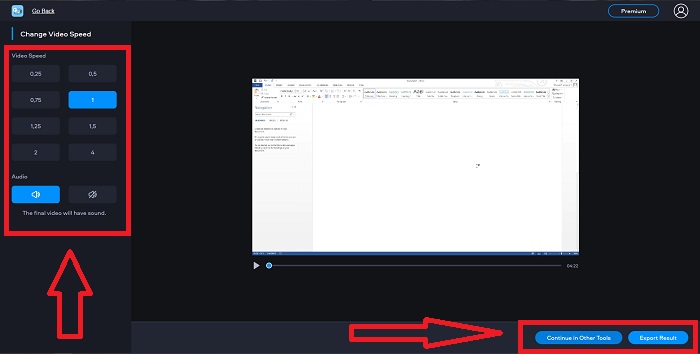
Βήμα 3: Τέλος, ρυθμίστε την ταχύτητα αναπαραγωγής, είτε αυξάνοντάς την είτε μειώνοντάς την. Μπορείτε να επιλέξετε αν θα εξαγάγετε το αρχείο σας ή αν θα χρησιμοποιήσετε κάποιο άλλο εργαλείο του Fastreel. Ωστόσο, μπορείτε να ξεκλειδώσετε όλες τις υπόλοιπες λειτουργίες αν κάνετε κλικ στο Premium.
Μέθοδος 3. Χρησιμοποιήστε το Flixier
Το παρακάτω διαδικτυακό εργαλείο δεν έχει κανέναν περιορισμό στο μέγεθος αρχείου όταν επεξεργάζεστε την ταχύτητα αναπαραγωγής, επειδή μπορεί να επιταχύνει ένα μεγάλο βίντεο online. Δοκιμάστε το Flixier, τον online επεξεργαστή βίντεο που δημιουργεί βίντεο απευθείας στο πρόγραμμα περιήγησής σας με τον πιο απλό τρόπο. Η προσθήκη κειμένου και εικόνων σε βίντεο είναι τόσο εύκολη όσο το drag and drop μέσα στον επεξεργαστή. Δεν χρειάζεται να κατεβάσετε ή να εγκαταστήσετε κάποιο λογισμικό για να περικόψετε, κόψετε ή περικόψετε βίντεο μέσα σε λίγα λεπτά. Ανεξάρτητα από το επίπεδο εμπειρίας σας, μπορείτε να παράγετε γρήγορα περιεχόμενο υψηλής ποιότητας. Δείτε τα παρακάτω βήματα:
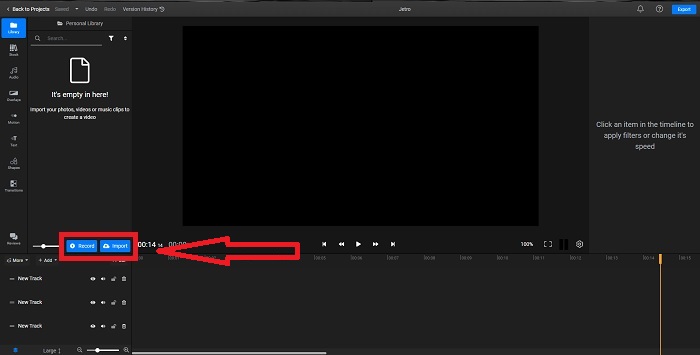
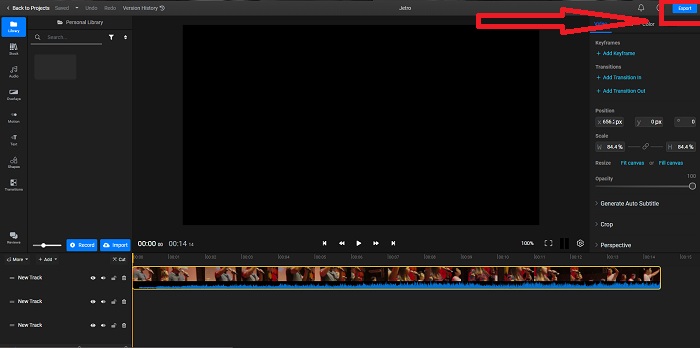
Βήμα 1: Ανοίξτε το Flixier σε νέα καρτέλα και ξεκινήστε να εισάγετε το βίντεό σας από τον υπολογιστή κάνοντας κλικ στο Import ή ξεκινήστε εγγραφή κάνοντας κλικ στο Record. Σύρετε το εισαγόμενο βίντεο στο track και ξεκινήστε την επεξεργασία.
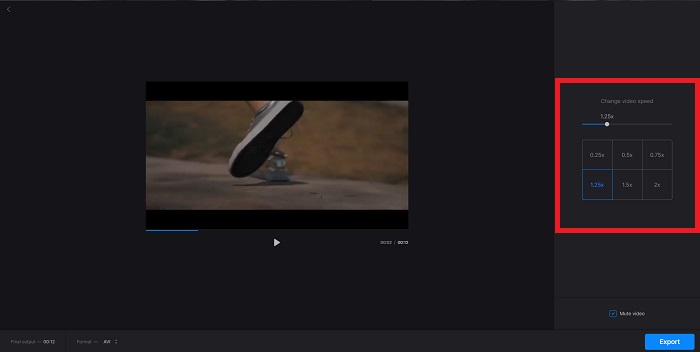
Βήμα 2: Στη δεξιά γωνία θα δείτε την καρτέλα Video στα εργαλεία επεξεργασίας. Κάντε κύλιση προς τα κάτω και κάντε κλικ στο Video Speed για να ρυθμίσετε την ταχύτητα αναπαραγωγής του εισαγόμενου βίντεο. Επιλέξτε αν θέλετε να μειώσετε ή να αυξήσετε την ταχύτητα σε .5x, 1.5x, 2x ή μπορείτε να σύρετε το Slider αν θέλετε ένα συγκεκριμένο επίπεδο ταχύτητας που θα εφαρμόσετε στο κλιπ σας.
Βήμα 3: Εξαγάγετε το κλιπ κάνοντας κλικ στο Export επάνω δεξιά στη διεπαφή. Στη συνέχεια θα εμφανιστεί μια νέα οθόνη. Σε αυτή τη διεπαφή μπορείτε να μετονομάσετε το αρχείο εξαγωγής και να επιλέξετε διαφορετικά μέσα κοινωνικής δικτύωσης και υπηρεσίες cloud αποθήκευσης.
Μέθοδος 4. Χρησιμοποιήστε το Video Converter Ultimate - Ο ευκολότερος τρόπος
Αν διστάζετε ανάμεσα στις καλύτερες επιλογές για να κάνετε το βίντεο πιο γρήγορο, δεν θέλετε πια να χρησιμοποιείτε online επεξεργαστή και προτιμάτε εγκατεστημένο λογισμικό, δοκιμάστε το Video Converter Ultimate για την επεξεργασία του βίντεό σας και ακόμη και για την προσαρμογή της ταχύτητας αναπαραγωγής.
Βήμα 1: Κάντε κλικ στην επιλογή Free Download για να αποθηκεύσετε το λογισμικό στον σκληρό δίσκο του υπολογιστή σας. Στη συνέχεια, μπορείτε να προσαρμόσετε το σύστημά σας εγκαθιστώντας και ρυθμίζοντας το λογισμικό.
Δωρεάν ΛήψηΓια Windows 7 ή νεότεραΑσφαλής λήψη
Δωρεάν ΛήψηΓια MacOS 10.7 ή νεότεροΑσφαλής λήψη
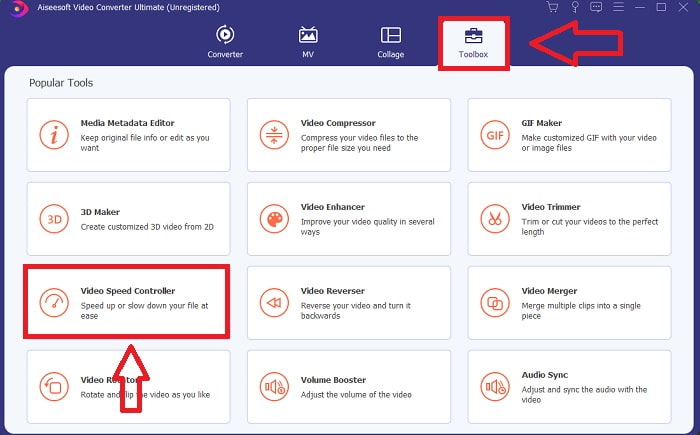
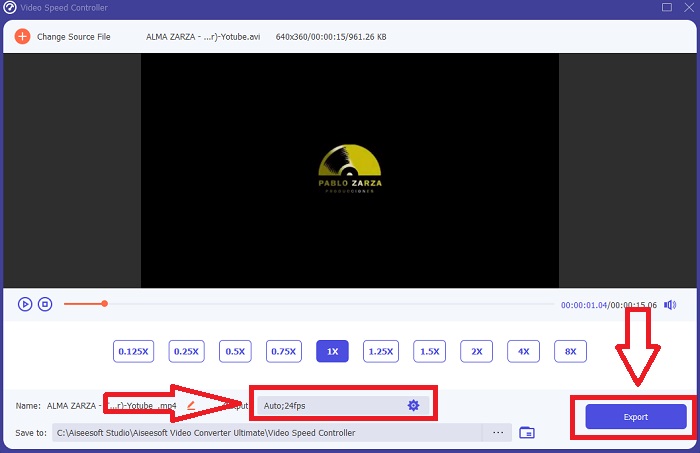
Βήμα 2: Μόλις εγκατασταθεί το λογισμικό, εκτελέστε το επιλέγοντας την επιλογή Toolbox από τη γραμμή μενού και έπειτα επιλέγοντας Video Speed Controller από τη λίστα που εμφανίζεται.
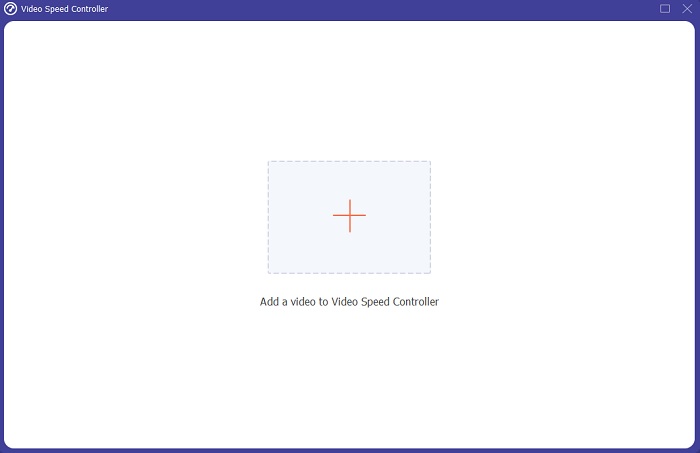
Βήμα 3: Κάντε κλικ στο κουμπί + όπως προτιμάτε για να προσθέσετε ένα αρχείο και συνεχίστε να τροποποιείτε το βίντεο.
Βήμα 4: Ρυθμίστε την ταχύτητα αναπαραγωγής επιλέγοντας πόσες φορές θα αυξηθεί ή θα μειωθεί η ταχύτητα του βίντεο.
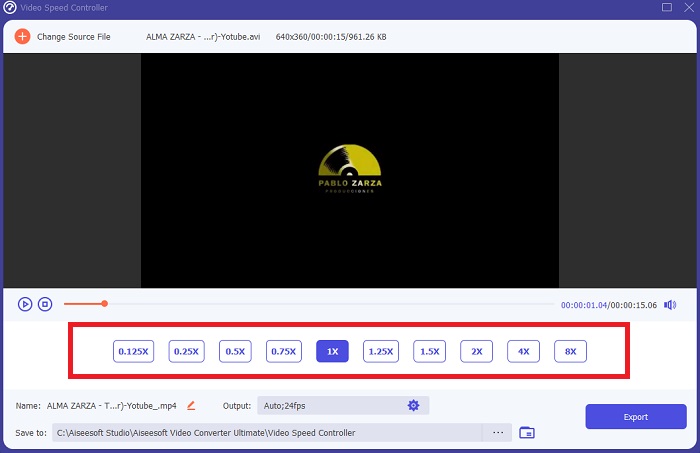
Βήμα 5: Αφού ολοκληρώσετε την επεξεργασία της ταχύτητας αναπαραγωγής του βίντεο, μπορείτε να επιλέξετε την έξοδο που θέλετε, τροποποιώντας τη μορφή, την ανάλυση, την ποιότητα κ.λπ. Κάντε κλικ στο Export και ορίστε πού θα αποθηκευτεί το αρχείο σας.
Σχετικά:
Καλύτερο VOB Player για Android
Καλύτερο Video Player για iPhone
Μέρος 2. Συχνές ερωτήσεις σχετικά με το πώς να επιταχύνετε το βίντεο στο Διαδίκτυο
Το μέγεθος του αρχείου του βίντεο γίνεται μικρότερο αν αυξήσετε την ταχύτητα αναπαραγωγής;
Μόνο το καρέ θα χωρίζεται κάθε φορά που αυξάνετε ή μειώνετε την ταχύτητα αναπαραγωγής του βίντεό σας. Εάν το αυξήσετε 0,5 φορές πιο γρήγορα, το καρέ θα είναι 60 καρέ ανά 1/120 δευτερόλεπτα. Εν ολίγοις, δεν μπορεί να επηρεάσει το βίντεο εκτός εάν το βίντεο έχει ήδη χαμηλό ρυθμό καρέ.
Ποιο εργαλείο είναι πολύ πιο εύκολο στη χρήση για τη γρήγορη δημιουργία βίντεο;
Όλα τα εργαλεία είναι δωρεάν για χρήση ή δωρεάν λήψη. Ωστόσο, το Video Converter Ultimate είναι η καλύτερη εναλλακτική λύση για κάθε εργαλείο web που έχει συζητηθεί στο προηγούμενο μέρος του άρθρου. Αυτό το εργαλείο έχει επίσης πολλές διαθέσιμες λειτουργίες και μπορεί να σας βοηθήσει να βελτιώσετε το βίντεό σας με τους προσβάσιμους τρόπους.
Το εργαλείο δέχεται όλες τις μορφές;
Όχι, ορισμένα από τα εργαλεία που δίνονται μπορούν να υποστηρίξουν μόνο περιορισμένο αριθμό μορφών. Ορισμένα από αυτά μπορούν να μετατρέψουν την έξοδο σε διαφορετική μορφή. Ωστόσο, το Video Converter Ultimate μπορεί να υποστηρίξει διάφορες μορφές και είναι επίσης διαθέσιμο σε κάθε συσκευή. Μπορεί επίσης να επιταχύνει το βίντεο mp4 στο διαδίκτυο, καθώς οι περισσότερες συσκευές αναπαραγωγής πολυμέσων μπορούν να υποστηρίξουν μορφή mp4.
συμπέρασμα
Η επιτάχυνση των βίντεο μπορεί να είναι μια περίεργη ιδέα για τους περισσότερους ανθρώπους και οδήγησε μόνο σε ορισμένους ασυνήθιστους σκοπούς. Ωστόσο, εξακολουθεί να ωφελεί τους ανθρώπους που θέλουν την ιδέα να μετατρέψουν τα βίντεό τους με γρήγορο τρόπο. Αυτό το άρθρο μπορεί να είναι ένα χρήσιμο κείμενο γραφής σε άτομα που είναι λίγα για την εξερεύνηση της επεξεργασίας βίντεο και την απάντηση σε όλες τις ερωτήσεις σχετικά με την επιτάχυνση ενός βίντεο κλιπ.
-
 Πώς να μετατρέψετε αρχεία MKV για αναπαραγωγή στο PS3 ομαλά [Λύθηκε]
 Θέλετε να παίξετε βίντεο MKV στο PS3 σας; Ωστόσο, το PS3 δεν μπορεί να αναπαράγει αρχεία MKV απευθείας. Αυτό το άρθρο θα σας δείξει τρόπους μετατροπής βίντεο MKV σε μορφές βίντεο που υποστηρίζονται από PS3 για αναπαραγωγή στο PS3 χωρίς καμία ταλαιπωρία.
-
 Android DVD Player - Πώς να αναπαράγετε βίντεο DVD σε κινητά Android
 Πώς να παίξετε αρχεία DVD σε κινητά Android; Υπάρχουν συσκευές αναπαραγωγής DVD Android; Σε αυτό το άρθρο, θα μάθετε για 3 τρόπους αναπαραγωγής βίντεο DVD σε κινητά Android με ή χωρίς το εξωτερικό πρόγραμμα οδήγησης.
-
 Οι καλύτερες 10 δωρεάν συσκευές αναπαραγωγής Android MP4 για αναπαραγωγή βίντεο HD/4K
 Αν και τα κινητά Android διαθέτουν τα προεπιλεγμένα προγράμματα αναπαραγωγής βίντεο MP4, δεν υποστηρίζουν την προσαρμογή των ρυθμίσεων αναπαραγωγής και άλλων λειτουργιών. Έτσι, μπορείτε να μάθετε για τις καλύτερες 10 συσκευές αναπαραγωγής MP4 Android από αυτό το άρθρο.
