


 Video Converter Ultimate
 Grabador de pantalla
 Reparación de vídeo
 Descarga segura
Cómo convertir MP4 a WMV para Mac / Windows
Antes de presentar una lista sugerida de conversores de MP4 a WMV, permíteme preguntarte algo sobre formatos de vídeo.
Para guardar datos de vídeo digital en un sistema informático, necesitamos utilizar un formato de archivo diseñado para vídeo. Entonces, ¿qué tipos de formatos de vídeo conoces? ¿MP4? ¿WMV? ¿FLV? ¿AVI? Bien, estos son formatos de vídeo muy utilizados para almacenar datos de vídeo digital. Pero, ¿alguna vez te has preguntado por qué hay tantos formatos de archivo de vídeo? ¿Cuál es la diferencia entre MP4 y WMV?
Generalmente, MP4 es compatible con casi todos los tipos de dispositivos del mercado, lo que significa que puede reproducir MP4 en cualquier lugar, incluso en el reproductor de video predeterminado de su computadora o teléfono. Sin embargo, si usa dispositivos Windows, creo que WMV puede brindarle un mejor servicio. No solo porque está desarrollado por Microsoft, sino porque puede guardar el video HQ en un pequeño espacio de disco.
Así que hoy vas a aprender cómo cambiar un archivo MP4 a WMV con los mejores conversores de vídeo que te recomendamos.

Parte 1. Cómo convertir MP4 a WMV en línea gratis
Además de instalar software de escritorio clásico, el uso de convertidores basados en web también es una opción hoy en día. Aunque son simples, muchos convertidores en línea son un poco lentos durante la conversión. Algunos incluso limitan el tamaño y la cantidad de los archivos que carga y no pueden garantizar la calidad de los videos de salida.
Por lo tanto, aquí te presentamos FVC Free Online Video Converter, un conversor de vídeo gratuito, rápido y eficaz que puede ayudarte a convertir una gran cantidad de vídeos o audios sin pérdida de calidad.
Como un conversor online gratuito de MP4 a WMV multifuncional, FVC Video Converter admite casi todo tipo de formatos de vídeo. Puedes convertir archivos MP4 de gran tamaño a/desde MKV, MOV, WMV, AVI, TS, etc. También puedes editar tu vídeo según tus necesidades. Es muy fácil ajustar la tasa de bits del vídeo, la frecuencia de muestreo, la velocidad de fotogramas, la resolución y el volumen en FVC. Y no habrá marca de agua en tu vídeo después de la conversión.
Ahora puede que le preocupe que con todas estas características, le resulte difícil entender cómo operar este convertidor. De hecho, la verdad es bastante contraria. Solo se necesitan unos pocos pasos para dominar este convertidor de MP4 a WMV.
Paso 1. Haz clic aquí para ir a FVC Free Online Video Converter. Luego haz clic en Add Files to Convert para descargar primero el FVC Launcher.
Descarga la versión de escritorio para convertir archivos por lotes.
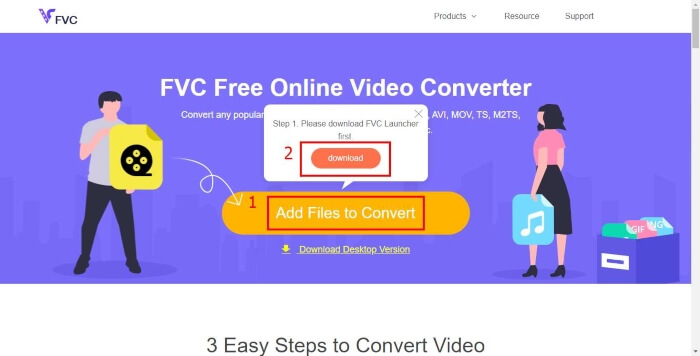
Paso 2. Después de instalar el lanzador, aparecerá la ventana Open File. Solo tienes que buscar el archivo MP4 que quieres cambiar.
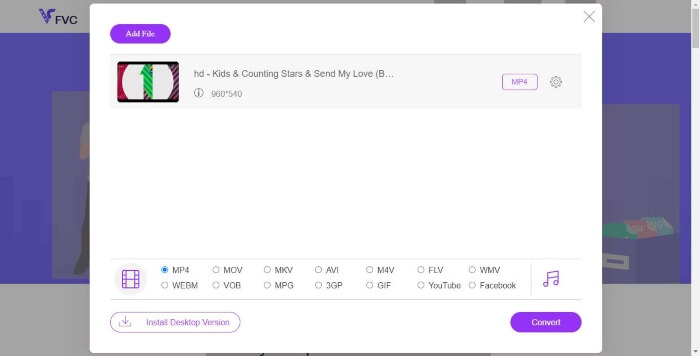
Paso 3. Luego, en la página de conversión, elige el formato de salida WMV. Por cierto, si quieres cambiar los parámetros del vídeo, solo abre la ventana de configuración haciendo clic en el icono de Setting. Haz clic en el botón Convert y elige una carpeta de destino para guardar el vídeo convertido.
Parte 2. Convierta MP4 a WMV con software de escritorio
1. RealPlayer
RealPlayer se ha convertido en uno de los reproductores multimedia más populares desde 1995. No solo te ayuda a gestionar fácilmente tus vídeos, música e imágenes, sino que también convierte vídeos a múltiples formatos y los transfiere a otros dispositivos móviles.
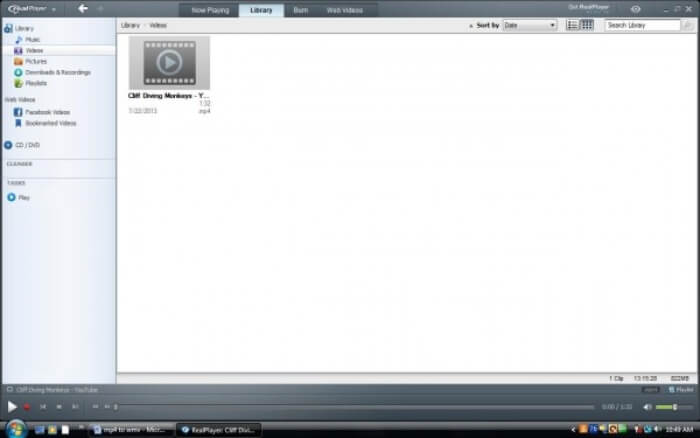
Paso 1. Si RealPlayer ya está instalado en tu ordenador, guarda el archivo MP4 en la biblioteca de RealPlayer. Selecciona Library después de iniciar RealPlayer. Encuentra tu archivo en la lista de Video.
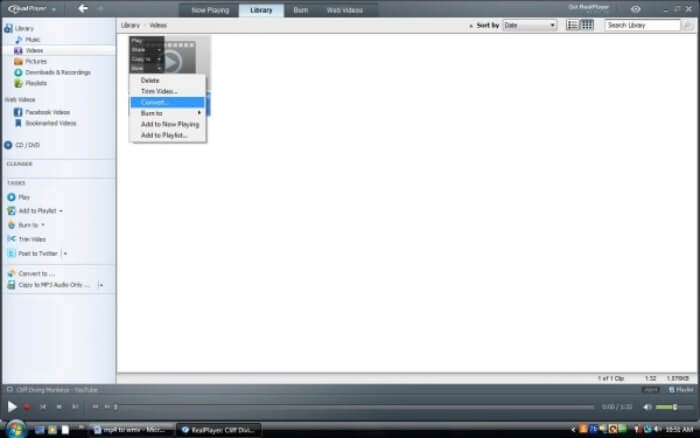
Paso 2. Haz clic en el archivo y selecciona la opción More en el menú emergente. Luego selecciona la opción Convert.
Paso 3. Elige WMV en el menú Select a Device y haz clic en OK. Ahora haz clic en el botón Start. En pocos segundos, tu vídeo estará en la biblioteca de RealPlayer.
2. VLC Media Player
VLC es un reproductor de código abierto y multiplataforma que puede reproducir vídeos en diferentes formatos. También permite la conversión de archivos a muchos formatos populares. Sigue estos pasos para exportar un archivo WMV a partir de un MP4.
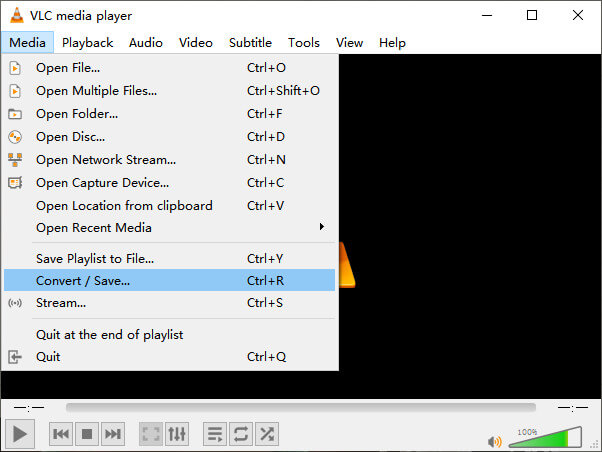
Paso 1. Abre VLC Media Player y haz clic en Convert / Save en el menú Media.
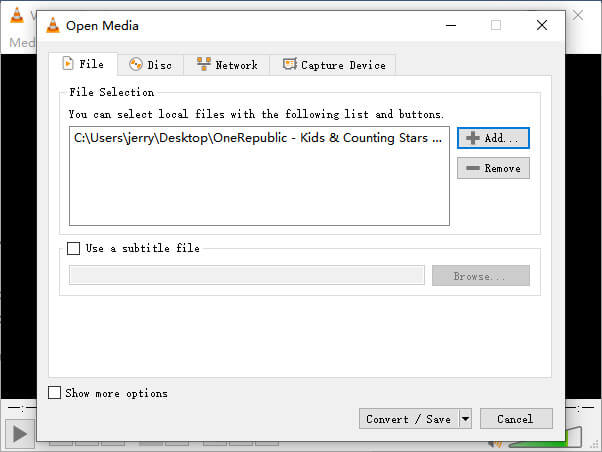
Paso 2. Añade el archivo a VLC. Luego haz clic en el botón Convert / Save.
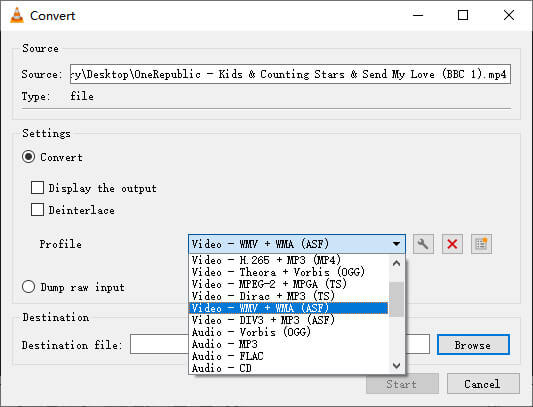
Paso 3. Busca WMV en Profile y selecciona una carpeta como destino para guardar el archivo de salida. Luego haz clic en Start.
MP4 frente a WMV
Lanzado por el Grupo de expertos en imágenes en movimiento (MPEG) en 2001, el formato MP4 puede ayudarlo a guardar datos de video, audio, subtítulos e imágenes en pistas separadas. Es la abreviatura de MPEG-4 Parte 14. Además, es uno de los formatos más populares utilizados para transmitir y compartir videos.
Producido por Microsoft, WMV fue uno de los formatos de video más comunes en la década de 2000. Puede verse en la web y reproducirse en varios reproductores multimedia en Windows. Y también es el formato de archivo de video predeterminado de Windows Media Player. Pero recientemente ha sido absorbido por otros formatos.
Parte 3. Preguntas frecuentes sobre la conversión de MP4 a WMV
1. ¿Puede Handbrake convertir MP4 a WMV?
Tras investigar un poco, por desgracia la última versión de HandBrake no puede convertir MP4 a WMV. Es cierto que HandBrake admite la mayoría de los archivos multimedia comunes, pero eso es en cuanto a las fuentes de entrada. Las opciones de formato de salida son MP4(.M4V) y MKV.
2. ¿Puedo convertir un archivo MP4 de más de 100 MB a WMV en línea de forma gratuita?
Depende. Los distintos conversores de vídeo online gratuitos tienen diferentes limitaciones. Algunos conversores como FVC Free Online Video Converter te permiten convertir archivos de más de 100 MB. Pero otros conversores pueden cobrarte por ello.
3. ¿Puede Windows Media Player convertir MP4 a WMV?
No puedes convertir un archivo MP4 a WMV con Windows Media Player. Eso se debe a que es solo un reproductor, no un conversor. Si quieres convertir MP4 a WMV, deberías utilizar un conversor de vídeo eficaz.
4. ¿Puedo reproducir archivos WMV en Mac?
Las herramientas de vídeo integradas en Mac no pueden reproducir archivos WMV. Pero tienes otras formas de reproducir vídeos WMV en macOS. Puedes convertir WMV a otro formato compatible con Mac. O instalar Windows Media Player for Mac para reproducir archivos WMV.
Conclusión
Aunque MP4 y WMV tengan similitudes, también cuentan con sus propias características. Por ello, deberías decidir en función de las condiciones concretas. Esperamos que, después de leer este artículo, los problemas de convertir MP4 a WMV dejen de ser un inconveniente para ti. La próxima vez que necesites un archivo WMV, solo tienes que seguir la guía anterior y convertir el archivo fácilmente.
-
 Cómo convertir sus archivos de video MP4 en imágenes GIF animadas sin pérdida de calidad
 ¿Está buscando la mejor manera de convertir su video MP4 en GIF animados? Aquí hay una guía detallada para hacerlo en Photoshop, Windows Movie Maker, convertidor de video en línea y más.
-
 Cómo convertir sus archivos de video FLV a MP4 sin pagar un centavo
 Esta guía comparte cuatro métodos gratuitos para convertir sus archivos de video FLV a formato MP4 en Windows 10/8/7 / XP y Mac OS X, para que pueda disfrutar de los videos en cualquier dispositivo.
-
 Cómo convertir MOV a MP4 sin perder calidad
 ¿Quiere convertir archivos MOV (Apple QuickTime Movie) a MP4? Esta publicación comparte 4 métodos gratuitos para convertir sus archivos de video MOV a formato MP4 en Windows 10/8/7 / XP y Mac OS X.

