


 Video Converter Ultimate
 Grabador de pantalla
 Reparación de vídeo
Aprenda a convertir AMV a MOV sin degradar la calidad
AMV es un formato de vídeo propietario que se utiliza para almacenar reproducciones de vídeo en reproductores multimedia S1 MP3 y MP4. Esta extensión de archivo .amv es de baja resolución y está comprimida para poder guardar el archivo en este reproductor multimedia portátil. Aunque el formato todavía existe, es difícil encontrar un reproductor multimedia compatible para el móvil porque este formato es antiguo. En lugar de buscar un reproductor multimedia compatible, ¿por qué no conviertes los archivos AMV a un formato nuevo que cuente con mucho soporte, como MOV? Por lo tanto, si quieres saber la mejor manera de convertir AMV a MOV, empecemos con la investigación.

Parte 1. Breve introducción sobre AMV y MOV
La idea de Action Media Video o AMV es reemplazar MP4 como formato universal porque este formato es mejor y mucho más comprimido. Además, este formato es la mejor versión del formato AVI. Pero el formato se ha ignorado durante esta nueva era porque no recibe ninguna actualización para mejorar la calidad de la resolución. Y ahora, si almacena este formato en nuestros dispositivos móviles y lo reproduce, es de esperar que no pueda reproducirlo porque el formato no es compatible. Entonces, si desea reproducir un video en este formato, debe descargar un reproductor multimedia de terceros para AMV. Mientras que MOV, este formato gana mucho apoyo porque es el formato de archivo nativo que desarrolla QuickTime.
Parte 2. Convierta AMV a MOV con el software de escritorio definitivo
FVC Video Converter Ultimate
Convierte AMV a MOV con la ayuda de este conversor de vídeo profesional que produce un resultado fenomenal que nadie puede igualar, FVC Video Converter Ultimate. Este conversor está disponible en PC y Mac, y ambos cuentan con las mismas funciones avanzadas que ofrece esta herramienta. Además, la conversión rápida y la aceleración por hardware disponibles en PC también lo están en Mac. Muchos usuarios ya han elegido este software como su conversor de primera elección para resolver sus problemas. Asimismo, antes de poder usar esta herramienta, tendrás que comprarla en FVC. Aunque es de pago, no vas a gastar cientos de dólares y el precio merecerá la pena. Sin más preámbulos, probemos esta herramienta para ver si podemos lograr la conversión definitiva, tal y como promete su nombre.
Pasos para convertir AMV a MOV con FVC Video Converter Ultimate:
Paso 1. Descarga FVC Video Converter Ultimate en tu ordenador haciendo clic en el botón de abajo; instala el software después de que termine la descarga.
Descarga gratuitaPara Windows 7 o posteriorDescarga segura
Descarga gratuitaPara macOS 10.7 o posteriorDescarga segura
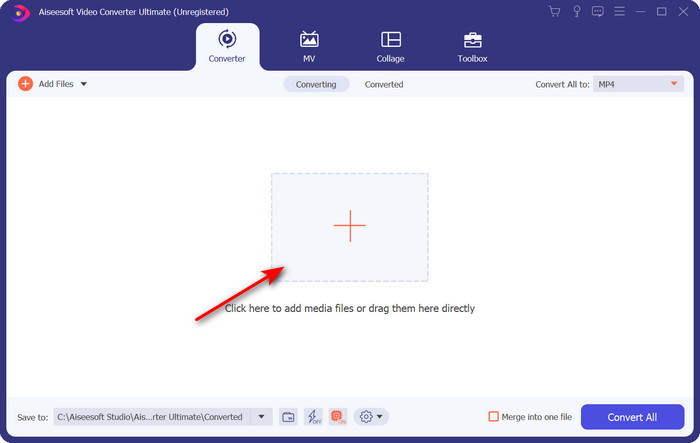
Paso 2. Abre el software para usarlo y, para cargar el archivo .amv, haz clic en el signo +. Busca el archivo en la carpeta y pulsa Open para insertarlo.
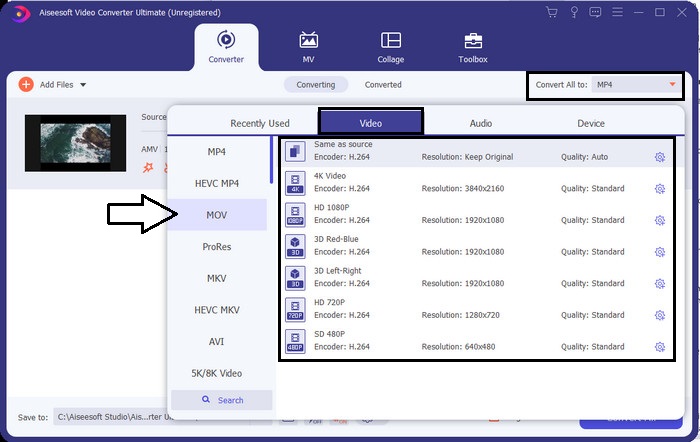
Paso 3. Para cambiar el formato a MOV, haz clic en Convert All to: y elige MOV o el formato que desees.
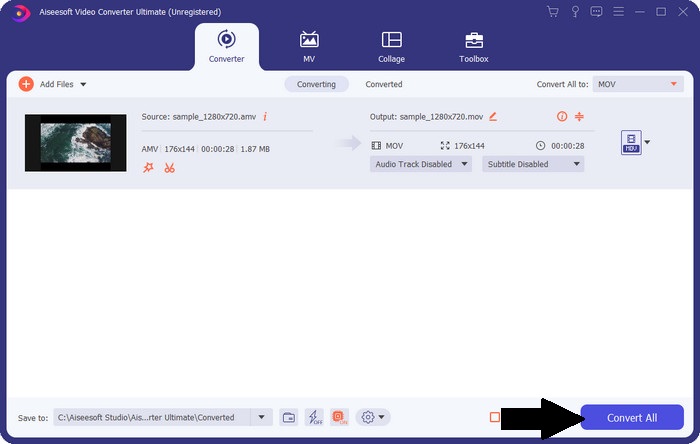
Paso 4. Para convertir el archivo AMV a MOV, haz clic en Convert All para iniciar el proceso de conversión.
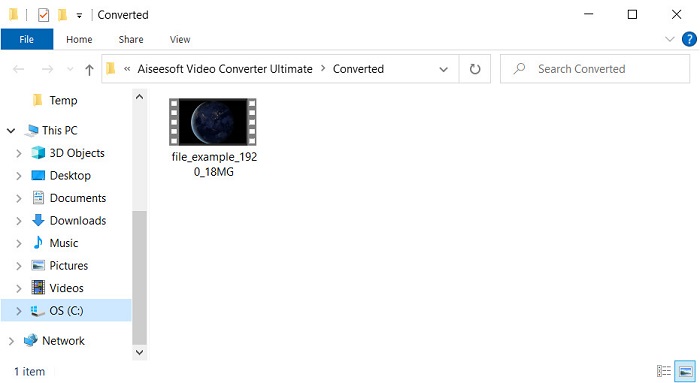
Paso 5. La conversión del archivo solo tardará unos segundos. Luego espera a que se abra la carpeta con el archivo .mov que has creado anteriormente; haz clic en el archivo para verlo en tu reproductor multimedia nativo.
Parte 3. Convierta AMV a MOV con el convertidor de servicios en línea 2 disponible
1. ConvertFiles
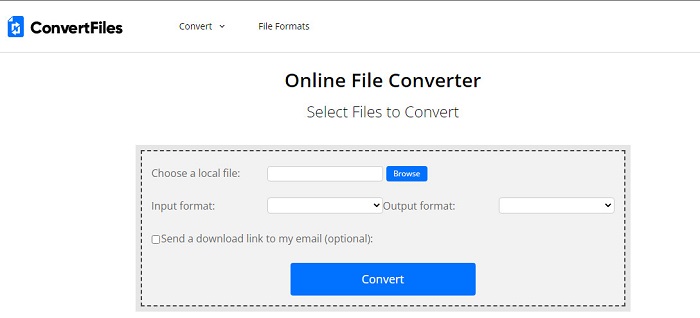
Uno de los mejores conversores online a los que puedes acceder desde tu navegador favorito es ConvertFiles. Esta herramienta online puede convertir tu formato a uno nuevo sin dificultad. Además, esta herramienta admite un pequeño conjunto de formatos entre los que puedes elegir. Sin embargo, la descarga del archivo convertido aquí lleva mucho tiempo porque no ofrece una conversión rápida. Otro punto negativo son los anuncios: hay muchos en la interfaz. A pesar de los problemas con el proceso de descarga y la publicidad, esta herramienta funciona bien como conversor online gratuito.
Pasos para convertir AMV a MOV con ConvertFiles:
Paso 1. Abre tu navegador favorito y busca ConvertFiles.
Paso 2. Una vez que la página web esté abierta, haz clic en Browse para localizar el archivo en la carpeta; en Output Format, busca MOV y haz clic en Convert.
Paso 3. Cuando termine la conversión, haz clic en el texto resaltado en azul para descargar el archivo en tu ordenador.
2. MConverter
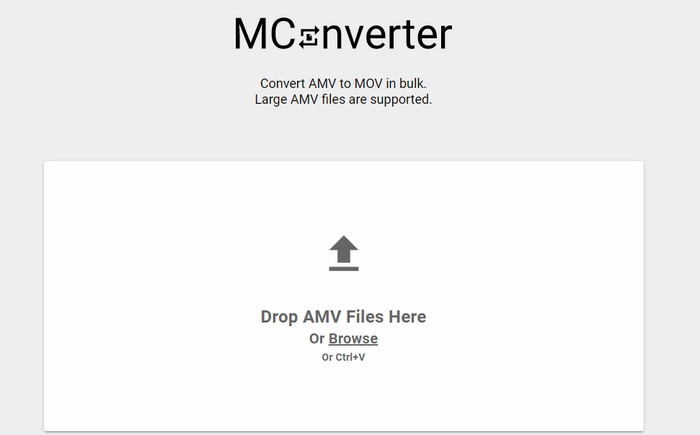
¿No quieres anuncios en la interfaz para convertir AMV a MOV con tranquilidad? Entonces intenta usar MConverter, disponible en tu navegador. Además, esta herramienta admite la conversión por lotes para que tu conversión sea eficiente, igual que FVC Video Converter Ultimate. Sin embargo, la desventaja de esta herramienta online es que no puedes superar un tamaño de archivo de 200 MB. Así que, si quieres convertir un vídeo largo y el tamaño del archivo supera el tamaño permitido, entonces esta no es la opción que deberías usar. Pero si quieres disfrutar de una experiencia de conversión mejor que con ConvertFiles, sigue los pasos que aparecen a continuación.
Pasos para convertir AMV a MOV con MConverter:
Paso 1. Busca MConverter en tu motor de búsqueda y ábrelo.
Paso 2. Haz clic en el botón Upload para insertar el archivo, espera un momento a que la herramienta web cargue, busca MOV y haz clic en él. La conversión del archivo comenzará después de que hagas clic en el formato MOV.
Paso 3. Pulsa Download All para guardar el archivo.
Parte 4. Preguntas frecuentes sobre AMV y MOV
¿Puedo convertir mi MP4 en AMV?
Puedes convertir tu MP4 a AMV para transferir el archivo rápidamente online. Especialmente si el vídeo dura una hora, te recomendamos convertir los archivos .mp4 a .amv porque su tamaño es mucho menor si comparamos ambos formatos.
¿VLC es compatible con AMV?
Por suerte, puedes usar VLC Media Player para reproducir los archivos .amv en este reproductor multimedia aunque esté desfasado. Pero ¿sabías que hay reproductores multimedia que superan a este? Así que, si quieres saber cuáles son estos reproductores, haz clic en este enlace para descubrir las 5 alternativas de reproductor multimedia a VLC.
¿Cómo convierto mi AMV a AVI?
AMV es la versión mejorada de AVI; sin embargo, si hablamos de calidad, AVI ofrece un rendimiento fenomenal en comparación con este formato antiguo. Además, AVI es muy compatible con todas las plataformas. Así que ahora, si quieres ver tu AMV en una versión mejor y en todas las plataformas, debes aprender cómo convertir AMV a AVI.
Conclusión
La discusión debe llegar a su fin aquí; aunque queremos almacenar un archivo AMV en nuestro disco, el problema de compatibilidad es una de las razones por las que necesitamos convertirlo. Después de todo, se dice que AMV era popular antes debido a cómo este contenedor comprime el archivo. Sin embargo, hoy debe considerar convertirlo a un nuevo formato para seguir utilizándolo. Además, las soluciones proporcionadas aquí se convierten de manera efectiva. Aún así, FVC Video Converter Ultimate funciona fenomenalmente en comparación con las otras dos herramientas. Entonces, si desea experimentar la mejor herramienta, entonces es imprescindible descargarla en su computadora y copiar los pasos proporcionados anteriormente.
-
 4 mejores métodos para convertir MOV a MP3 en Windows y Mac fácilmente
 Cuando desee extraer los archivos de audio MP3 de los archivos MOV, puede obtener más información sobre los 4 convertidores de MOV a MP3 más eficientes para obtener los archivos deseados del artículo.
-
 MKV a MOV - Cómo convertir MKV a MOV
 ¿Cómo convierto MKV a MOV en Mac? ¿Puede iMovie leer MKV? ¿Qué significa el formato MOV? Esta publicación cuenta 2 formas sencillas de ayudarlo a convertir MKV a MOV con convertidores de video profesionales y en línea gratuitos.
-
 FLV a MOV - Cómo convertir FLV a MOV en Mac / PC / Online Gratis
 ¿Cómo convertir FLV a MOV? ¿Cómo convierto FLV a MOV en Mac? ¿Existe alguna forma gratuita de convertir YouTube FLV a MOV en línea? Esta publicación comparte 3 convertidores FLV a MOV para cambiar archivos FLV a MOV.
