


 Video Converter Ultimate
 Grabador de pantalla
 Reparación de vídeo
 Descarga segura
Procedimiento sin esfuerzo para eliminar marcas de agua de videos MP4
¿Te encuentras con problemas como no tener idea de cómo eliminar marcas de agua de tus vídeos MP4 usando dispositivos como Mac y Windows? Entonces, este artículo tiene la mejor solución para ti. Si eres de esas personas a las que les encanta ver películas, clips y más, quizá también te identifiques con lo molesto e irritante que resulta ver tus vídeos favoritos con marcas de agua u otros objetos innecesarios en tus vídeos MP4. Además, ni siquiera puedes ver toda la pantalla porque esas marcas de agua la están tapando. Y la parte más frustrante es que algunos vídeos tienen marcas de agua enormes y ni siquiera puedes disfrutar de ver tus vídeos favoritos.
Afortunadamente, ya existe una aplicación de software tremenda y notable con un eliminador de marcas de agua de video que puede usar para eliminar esos objetos innecesarios en sus videos, como marcas de agua, logotipos, textos, imágenes y más. Puede borrar o eliminar rápidamente estos objetos y disfrutar viendo o reproduciendo sus videos con estas aplicaciones. Con estas aplicaciones, nunca más te sentirás frustrado o irritado. Entonces, si está cautivado por este tema, debe leer este artículo para brindarle suficiente información, especialmente para eliminar las marcas de agua en sus videos MP4 fácilmente.

Parte 1: la mejor manera de eliminar la marca de agua de un video MP4
Si estás buscando la aplicación más destacada y sorprendente para eliminar marcas de agua de vídeos MP4, Video Converter Ultimate es la mejor herramienta. Esta aplicación es capaz de eliminar objetos molestos de tus vídeos, como marcas de agua, logotipos, textos o imágenes. Además, no tendrás que esperar demasiado durante el proceso de guardado, ya que puedes guardar tus vídeos rápidamente después de eliminar las marcas de agua.
Además, Video Converter Ultimate tiene muchas herramientas de edición que puede utilizar, como un mejorador de video, eliminación de marcas de agua, adición de marcas de agua, un controlador de velocidad de video, creador de GIF, creador de collage, grabador de video y audio, compresor de video/audio, convertir varios archivos formatos, como MP4, FLV, MOV, TRP, MTS, M2TS, MKV, AAC, MP3 y más. Además, la mejor parte es que ya no tienes que adquirir o comprar esta aplicación. Puede operar esto de forma gratuita. Además, esta aplicación es muy simple y fácil de usar. Si desea eliminar marcas de agua en sus videos MP4, Video Converter Ultimate puede ofrecerle dos formas. Lea continuamente para aprender estas dos formas de borrar marcas de agua en sus videos.
1. Uso del eliminador de marcas de agua de video
Paso 1: Visita la página web de Video Converter Ultimate. Descarga la aplicación de forma gratuita. Después, procede con el proceso de instalación.
Descarga gratuitaPara Windows 7 o posteriorDescarga segura
Descarga gratuitaPara macOS 10.7 o posteriorDescarga segura
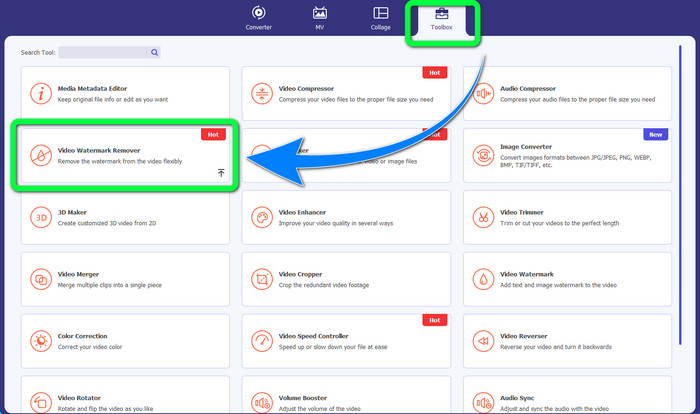
Paso 2: Inicia la aplicación. Selecciona Toolbox > Video Watermark Remover.
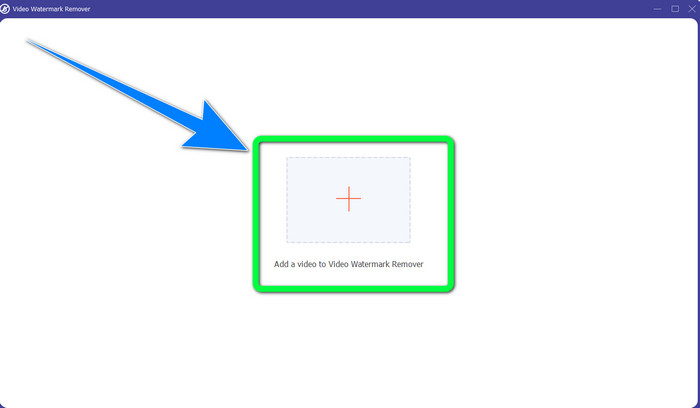
Paso 3: Aparecerá otra interfaz. Selecciona el botón con el signo Más y añade tu vídeo MP4 con marca de agua.
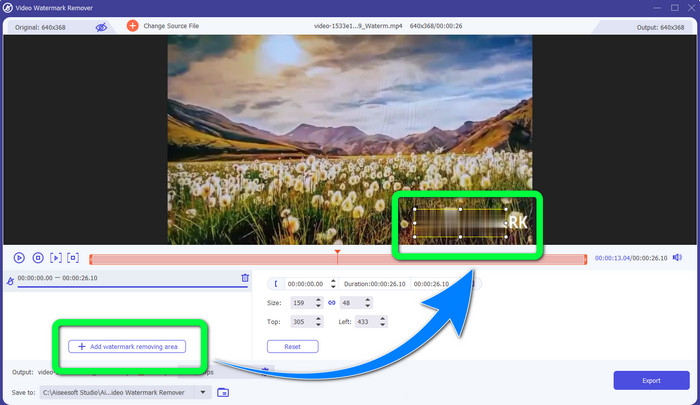
Paso 4: Haz clic en el botón Add Watermark Removing Area. A continuación, aparecerá un pequeño recuadro en tu vídeo; arrástralo y utilízalo para cubrir las marcas de agua de tu vídeo.
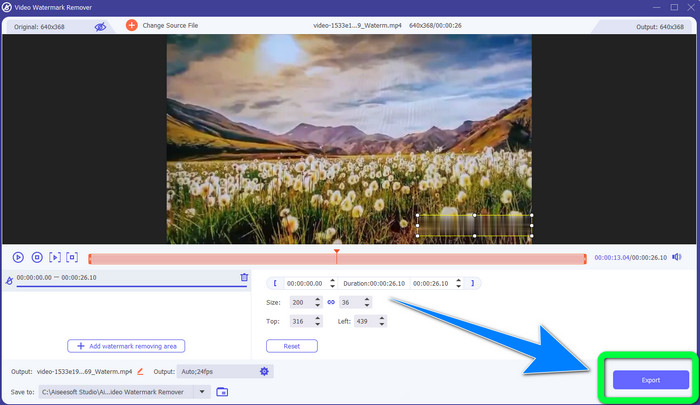
Paso 5: Cuando hayas terminado de eliminar la marca de agua, haz clic en el botón Export para guardar tus vídeos. Ahora puedes disfrutar del momento viendo tus películas favoritas sin marcas de agua.
2. Usando el recortador de video
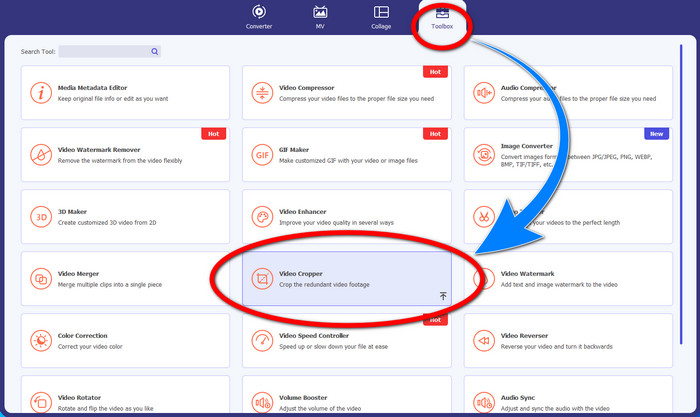
Paso 1: Inicia Video Converter Ultimate. Luego haz clic en Toolbox > Video Cropper.
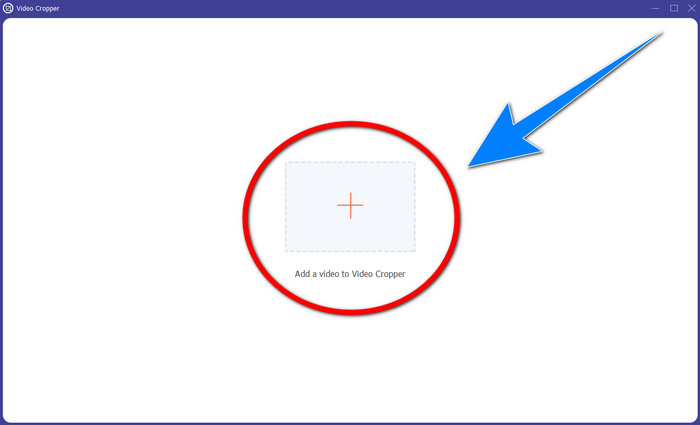
Paso 2: Otra interfaz aparecerá después de hacer clic en Video Cropper. Haz clic en el símbolo Más para añadir tu vídeo MP4 con marca de agua.
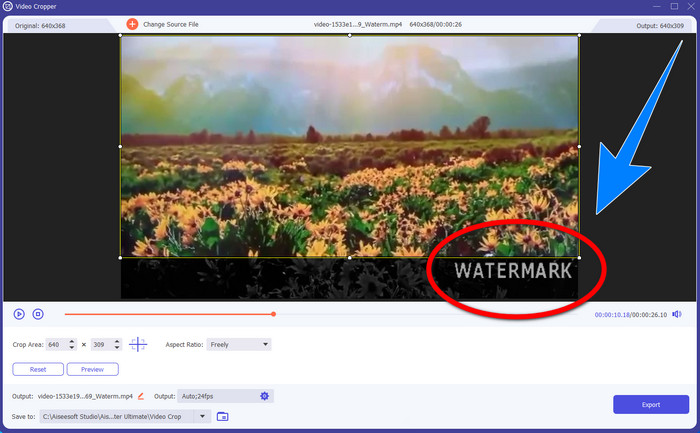
Paso 3: Cuando ya hayas añadido tu vídeo, puedes recortar tu vídeo MP4 y eliminar la marca de agua.
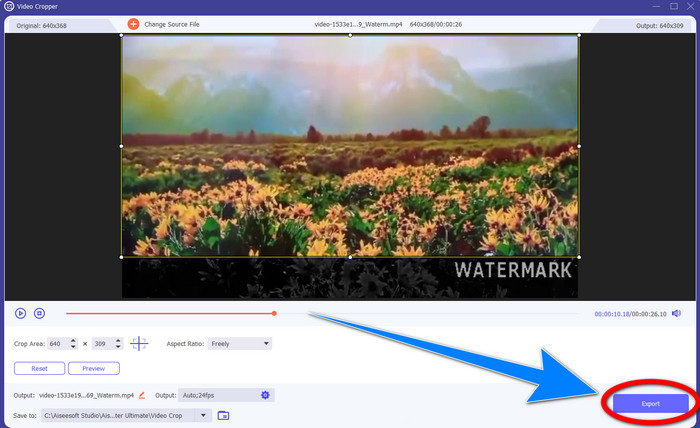
Paso 4: Si ya has terminado de recortar tu vídeo para eliminar la marca de agua, haz clic en el botón Export para guardar tu vídeo. De este modo, podrás ver tu vídeo sin marca de agua.
Parte 2: Eliminar marca de agua de video MP4 en línea
¿Buscas una aplicación sobresaliente que puedas usar para eliminar marcas de agua de tu vídeo MP4 online y gratis? Entonces, HitPaw Online Watermark Remover es la aplicación en la que puedes confiar. Además, puedes utilizar esta aplicación sin comprar nada porque es completamente gratuita. Asimismo, puedes eliminar marcas de agua, logotipos y firmas sin ningún límite y no tiene anuncios. También es sencilla y fácil de usar. Puedes eliminar las marcas de agua de tus vídeos en solo tres pasos, lo cual es perfecto para principiantes.
HitPaw Online Watermark Remover es accesible para cualquier dispositivo, como Windows, Mac, iPhone y Android. Esta aplicación también es segura y garantiza que usted es el único que puede ver y editar sus videos. Sin embargo, si elimina las marcas de agua de sus videos, el área se volverá borrosa y perturbadora a veces. Además, el proceso de guardado es lento. Si desea eliminar marcas de agua en sus videos MP4 en línea, siga los sencillos pasos a continuación.
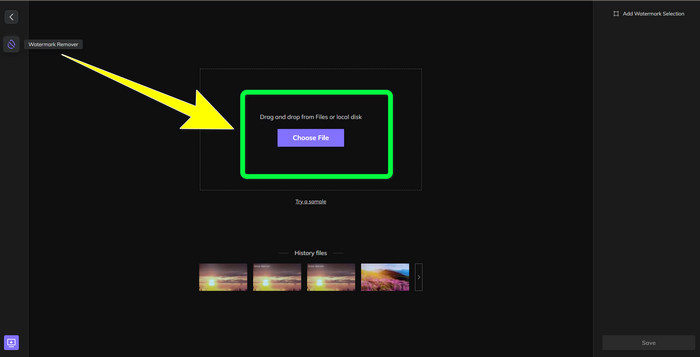
Paso 1: Ve al sitio web de HitPaw Online Watermark Remover. Haz clic en Remove Watermark Now y luego selecciona Choose File para añadir tu vídeo MP4 con marcas de agua.
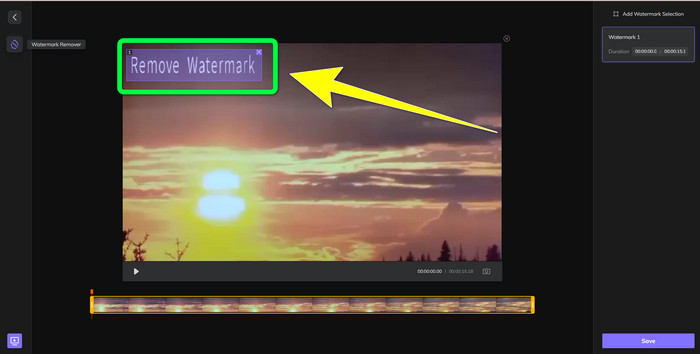
Paso 2: Después de añadir tu vídeo, aparecerá un rectángulo en tu vídeo. Arrástralo para cubrir y eliminar tus marcas de agua.
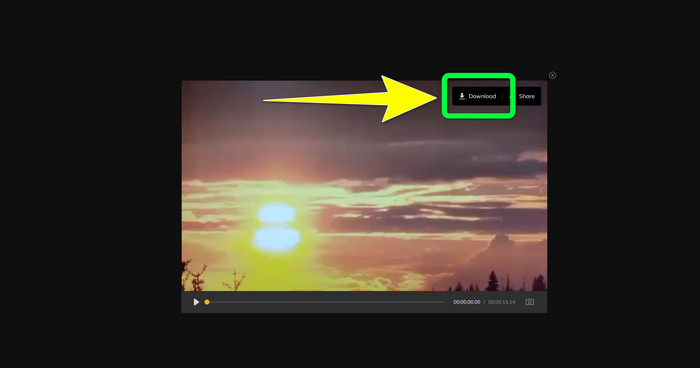
Paso 3: Después de eliminar las marcas de agua de tu vídeo, haz clic en el botón Save. Espera al proceso de guardado y luego haz clic en el botón Download para conservarlo en tu dispositivo.
Parte 3: Preguntas frecuentes sobre la eliminación de marcas de agua de MP4
¿También es posible eliminar firmas en mis videos?
Sí, es posible. Video Converter Ultimate también es capaz de eliminar firmas de tus vídeos. Cualquier objeto innecesario que resulte molesto en tus vídeos puede eliminarse fácilmente con esta aplicación.
¿Toma mucho tiempo eliminar las marcas de agua de los videos MP4?
Depende de las aplicaciones que estés usando. Si desea eliminar marcas de agua en sus videos MP4, use Video Converter Ultimate. Puede eliminar las marcas de agua al instante.
¿Cuál es el mejor eliminador de marcas de agua de video que puedo usar?
Si estás buscando una aplicación fiable que pueda eliminar marcas de agua de tu vídeo, Video Converter Ultimate es un excelente software que puedes utilizar. Puedes eliminar marcas de agua y guardar tus vídeos sin perder calidad.
¿Puedo usar la herramienta de recorte en HitPaw Online Watermark Remover para eliminar las marcas de agua?
¡Absolutamente sí! También puede usar la herramienta de recorte de esta aplicación si desea eliminar las marcas de agua de sus videos, especialmente si las marcas de agua estaban en la esquina o en el borde de sus videos.
Además de eliminar marcas de agua, ¿es posible agregar marcas de agua usando Video Converter Ultimate en mis videos?
¡Definitivamente sí! Video Converter Ultimate no solo se limita a eliminar marcas de agua en sus videos. Esta aplicación también puede agregar marcas de agua a tus videos, especialmente si quieres poner algún texto, logos, firmas, etc.
Conclusión
Como se ha indicado arriba, puedes eliminar fácilmente las marcas de agua de tus vídeos MP4 usando Video Converter Ultimate. Además, este artículo te muestra algunos programas que puedes usar para eliminar objetos innecesarios de los vídeos MP4 online.
-
 Cómo eliminar la marca de agua de Filmora en tus videos o proyectos de forma gratuita
 ¿Cómo eliminar la marca de agua de Filmora? ¡Esta pregunta circula por la web, y aquí enumeramos diferentes enfoques que puede usar!
-
 El truco más rápido para eliminar la marca de agua de Adobe Stock de un video [Tutorial]
 ¿Tiene algún problema con la marca de agua de Adobe Stock? Lea esto y aprenda cómo eliminar la marca de agua de Adobe Stock del video.
-
 5 formas de eliminar una marca de agua de un video de manera profesional
 ¿Necesita eliminar una marca de agua de un video para que se vea profesional? ¡Bueno, lea este artículo mientras agregamos un tutorial sobre cómo hacerlo!
