


 Video Converter Ultimate
 Grabador de pantalla
 Reparación de vídeo
 Descarga segura
Conversión de MP4 a MPG: cambie fácilmente los formatos de video con los mejores convertidores
Ever found yourself in a pickle when your awesome MP4 videos won't play on certain devices? We feel you! But fear not, because we've got a neat solution: MP4 to MPG conversion. Yep, it's the key to unlocking universal playability for your precious videos. Well, imagine this scenario: you want to show off your travel adventures on your aunt's old TV during a family gathering. But alas, the TV only supports MPG files, leaving you with disappointment written all over your face. That's where the magic of MP4 to MPG comes in!
Ahora, aquí está la mejor parte. Lo guiaremos a través de algunos programas de primer nivel que hacen el trabajo a la perfección.

Parte 1. MPG frente a MP4
Muy bien, hablemos de los formatos de video: ¡MP4 y MPG! Ambos tienen sus ventajas, pero a veces es posible que deba hacer un pequeño cambio de formato. Aquí hay una tabla para su lectura:
| MP4 | MPG | |
| Calidad de video | Video de alta calidad con compresión eficiente | Buena calidad de video, pero tamaños de archivo más grandes |
| Compatibilidad | Ampliamente compatible con dispositivos y aplicaciones modernos | Altamente compatible con dispositivos más antiguos |
| Tamaño del archivo | Tamaños de archivo más pequeños para compartirlos fácilmente en línea | Tamaños de archivo más grandes, pueden requerir más almacenamiento |
| Transmisión web | Excelente para transmitir y compartir en la web | Soporte limitado para transmisión en línea |
| Soporte de dispositivos | Puede que no funcione en algunos dispositivos más antiguos | Funciona bien en la mayoría de los dispositivos, incluidos los antiguos. |
| Edición | Permite la edición con una pérdida de calidad mínima | La edición puede causar cierta pérdida de calidad. |
| Uso | Ideal para contenido en línea y redes sociales. | Adecuado para DVD, dispositivos heredados y reproducción de TV |
Parte 2. Convierta MP4 a MPG con alta calidad
We've got a real gem for you – the ultimate MP4 to MPEG converter: Video Converter Ultimate! If you're tired of hitting roadblocks when your MP4 videos refuse to play on certain devices, this tool is your savior. It's a conversion wizard that effortlessly turns your MP4 files into MPG format, ensuring smooth playback on any gadget, new or old.
Esta pequeña potencia no es solo un pony de un solo truco. Junto con la magia de MP4 a MPG, hace alarde de una serie de otros trucos bajo la manga. ¿Necesita convertir entre diferentes formatos de video? Ningún problema. ¿Quieres extraer audio de un video? Pedazo de pastel. Y oye, incluso te permite editar videos básicos para darle ese toque personal. ¿Mejor parte? Está diseñado con la simplicidad en mente. Sin dolores de cabeza tecnológicos ni jerga complicada. Simplemente genialidad que cualquiera puede manejar.
Ahora, estos son los sencillos pasos para trabajar su magia de video.
Step 1. Download and Install
Head over to the official website or your favorite app store to grab Video Converter Ultimate. For your convenience, we have inserted the download links below. Simply hit the Free Download button. Once it's downloaded, follow the simple installation instructions – you know the drill. In a blink, you'll have the tool ready and waiting on your device.
Descarga gratuitaPara Windows 7 o posteriorDescarga segura
Descarga gratuitaPara macOS 10.7 o posteriorDescarga segura
Step 2. Add Your MP4 Files
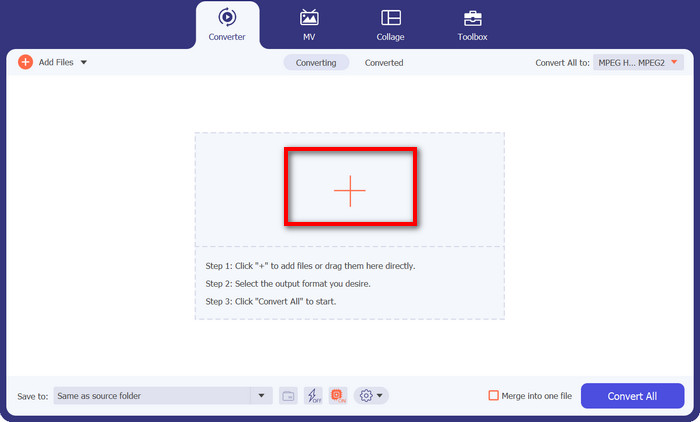
Launch the program, and you'll see a clean, user-friendly interface. No fancy jargon to scare you off! Now, hit that plus sign button. You can choose one or multiple MP4 files – whatever floats your boat.
Step 3. Choose MPG as Output
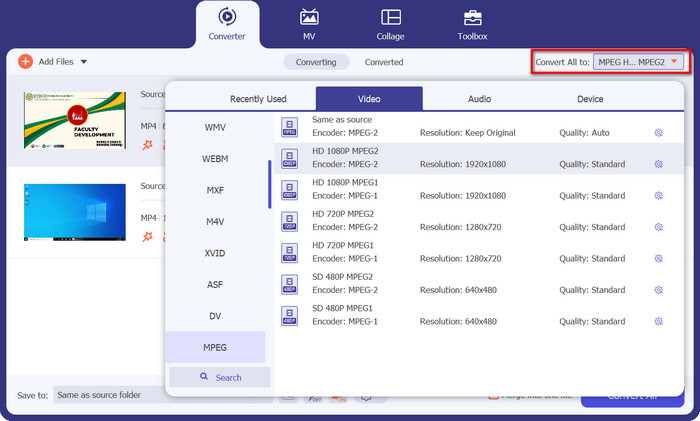
Time to pick your desired output format. Go to the Convert All to section and locate MPEG from the drop-down option. You'll see MPG right there, and that's your magic ticket to compatibility bliss.
Step 4: Hit Convert, and Voilà!
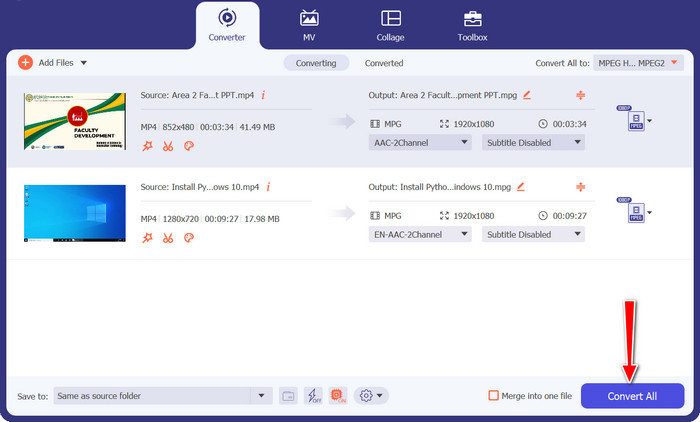
Ready to see the magic happen? Awesome! Just click the big, friendly Convert All button, and watch as Video Converter Ultimate works its charm. Sit back, relax, and in no time, your MP4 videos will be magically converted to MPG format.
Parte 3. Convierta MP4 a MPG gratis en línea
Get ready to experience a world of seamless video conversions without the need for any software downloads or complicated setups. This powerful online converter is designed with simplicity in mind, making it a breeze to convert your MP4 videos to MPG format and beyond. Whether you're on a Windows PC, Mac, or even a mobile device, the Free MP4 Converter Online is accessible from any browser. Convert MP4 to MPG online, anytime, anywhere.
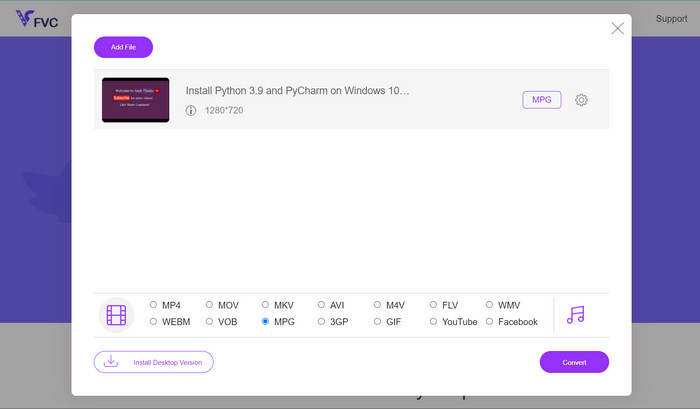
Step 1. First things first, head over to the Free MP4 Converter Online website using your trusty browser. Once you're there, you'll spot the friendly Add Files to Convert button.
Step 2. With your MP4 video in the bag, it's time to pick the desired output format. Look for MPG from the list of available formats, and give it a satisfying click.
Step 3. Ready for the final magic touch? Just hit the Convert button, and let the online converter do its thing. In no time, your MP4 video will be transformed into MPG format.
Parte 4. Convierte MP4 a MPG con Handbrake
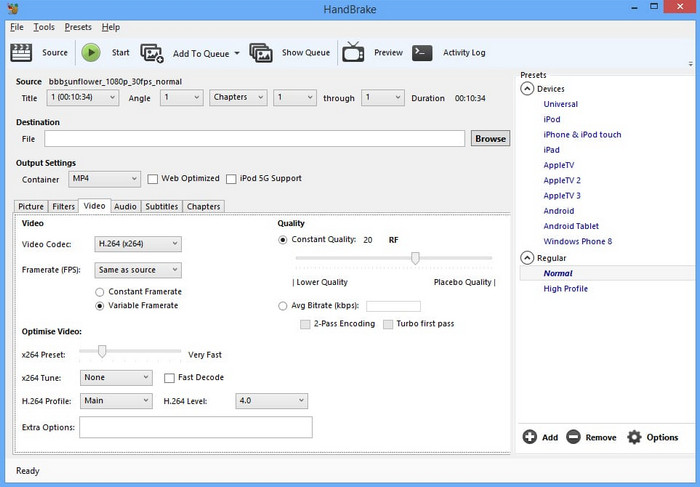
¿Preocupado por la compatibilidad? ¡No seas! Handbrake admite una amplia gama de formatos de salida, lo que lo convierte en un compañero versátil para todas sus necesidades de video. Convierta MP4 a MPG con software gratuito, o incluso al revés. Este convertidor tiene la flexibilidad para manejarlo todo.
Step 1. Launch Handbrake and you'll be greeted with a simple, no-nonsense interface. Click the Open Source button and choose the MP4 video you want to convert from your computer.
Step 2. Look for MPG in the Summary tab under Format. If you need to tweak any settings, you can do that here too.
Step 3. Finally, hit that Start Encode button, and Handbrake will work its magic! Your MP4 video will be converted to MPG format in a jiffy.
Parte 5. Convierte MP4 a MPG en VLC
No es necesario ser un gurú de la tecnología aquí. VLC cuenta con una interfaz simple y directa que no te dejará rascándote la cabeza. Está diseñado pensando en la facilidad de uso, por lo que puede sumergirse directamente en la conversión de video sin problemas. Lo tenemos cubierto con una guía rápida y fácil en solo un momento con este programa para convertir MP4 a MPG gratis.
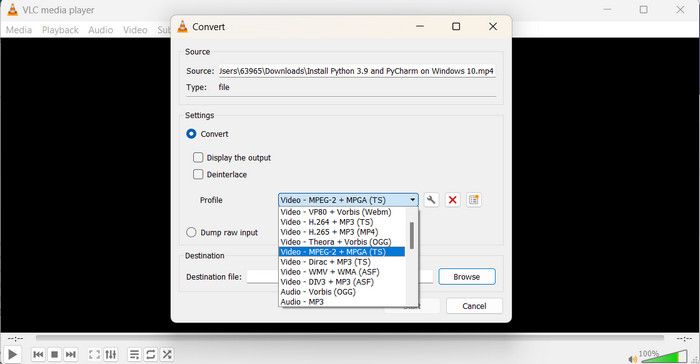
Step 1. Once you've installed VLC, launch the player. Now, click on Media in the top menu and select Convert/Save. In the Open Media window, hit the Add button and choose the MP4 video you want to convert.
Step 2. In the Convert window, click the Profile drop-down menu, and select Video - MPEG-1 as the output format, depending on your preference. Finally, choose the destination folder for your converted video and click Start.
Lecturas recomendadas:
Top 7 Undefeatable MP4 Converter to MOV (PC/Online/Mobile)
FLV to MPG – How to Convert FLV to MPG on Mac, PC and Online Free
Parte 6. Preguntas frecuentes sobre MP4 a MPG
¿Para qué se utiliza el formato MPG?
El formato MPG (MPEG) se usa comúnmente para la reproducción de video en dispositivos más antiguos, como reproductores de DVD y televisores.
¿Puedo convertir videos sin perder calidad?
Algunos convertidores de video ofrecen opciones de conversión sin pérdida, pero la mayoría de las conversiones implican cierta pérdida de calidad.
¿Son seguros los convertidores de video en línea?
La mayoría de los convertidores de video en línea confiables son seguros de usar, pero es esencial usar sitios web confiables y tener cuidado al cargar archivos.
¿Cuál es la diferencia entre un formato contenedor y un códec?
Un formato contenedor (p. ej., MP4) contiene video, audio y otros datos, mientras que un códec (p. ej., H.264) comprime y descomprime los datos de video y audio.
¿Puedo convertir videos a resolución 4K?
Algunos convertidores de video admiten la conversión de videos a una resolución de 4K, pero la calidad de la salida puede variar según el video de origen.
Conclusión
Alright, folks, that's a wrap! We've learned all about video conversion and how it helps us make our videos play nicely on any device. From converting MP4 to MPG to exploring various formats and tools, we've covered it all.
-
 Los 4 mejores reproductores MPG/MPEG para Windows/Mac/Android/iPhone [2023]
 Si desea reproducir su archivo MPG o MPEG favorito sin problemas, puede obtener más información sobre los 4 mejores reproductores MPG / MPEG para computadoras y teléfonos móviles en este artículo.
-
 AVI VS MP4: diferencias y similitudes entre los formatos AVI y MP4
 ¿Cuál es mejor formato de video, AVI o MP4? Si desea obtener la comparación detallada, puede consultar este artículo de AVI VS MP4. Puede conocer las diferencias y similitudes entre AVI y MP4 en muchos aspectos.
-
 Cómo convertir MOV a MPG fácilmente (sin conexión y en línea)
 En este tutorial, está a punto de descubrir la forma más rápida de convertir MOV a MPG. Hemos creado las mejores soluciones offline y online para ti.
