


 Video Converter Ultimate
 Grabador de pantalla
 Reparación de vídeo
 Descarga segura
Repare videos pixelados en línea gratis: dominar la reparación de píxeles
La pixelación se produce cuando los píxeles individuales se vuelven visibles, creando una apariencia de vídeo bloqueada y distorsionada. Entre las causas más comunes se encuentran la baja resolución, los artefactos de compresión y la transcodificación de vídeo. La pixelación en los vídeos puede ser un obstáculo frustrante, ya que afecta a la experiencia de visualización en general y reduce la calidad de tu contenido. La buena noticia es que no necesitas ser un experto en edición de vídeo ni invertir en un software costoso para solucionar los problemas de pixelación. En este artículo, te guiaremos para arreglar vídeos pixelados online de forma gratuita, ayudándote a dominar el arte de la reparación de píxeles. Repara vídeos pixelados y descubre hoy mismo nuestro método cristalino para obtener un resultado profesional.

Parte 1. ¿Qué causa el video pixelado?
La pixelación en los vídeos puede ocurrir debido a varios factores, y comprender estas causas es esencial para abordar y prevenir el problema de manera efectiva. A continuación se detallan algunas razones comunes por las que puede ocurrir pixelación en videos:
1. Baja resolución. Los vídeos de baja resolución carecen de detalle porque tienen menos píxeles. La pixelación se produce cuando estos vídeos se estiran o se ven en tamaños más grandes, lo que hace que los píxeles individuales sean más evidentes. (Aprende aquí cómo cambiar la resolución de un vídeo.)
2. Códec o formato incorrecto. La pixelación puede producirse al grabar o exportar un vídeo con un códec o formato inadecuado. La pixelación puede hacerse más evidente cuando se utilizan ciertos códecs que sacrifican la calidad de imagen en favor de tamaños de archivo más reducidos.
3. Tasa de bits deficiente. La tasa de bits es la cantidad de datos procesados en un segundo. Una tasa de bits insuficiente durante la compresión o reducción de vídeo puede provocar pixelación, especialmente en escenas con mucho movimiento o muchos detalles.
4. Compresión al subir/descargar. La pixelación puede producirse en plataformas que comprimen los vídeos al subirlos o descargarlos. Por ejemplo, las redes sociales utilizan con frecuencia sus propios métodos de compresión.
5. Calidad de la cámara. Un factor importante es la calidad de la cámara utilizada para grabar el vídeo. Los vídeos grabados con cámaras de baja calidad pueden presentar una pixelación intrínseca, más evidente en pantallas grandes.
Parte 2. Reparar vídeos pixelados online gratis
Reparar películas pixeladas online de forma gratuita es posible con varias herramientas y plataformas. Sin necesidad de software costoso, sigue estos pasos para mejorar la calidad de tus videos pixelados:
◆ Vídeo Flixier más claro
◆ Vídeo Clideo más claro
◆ Vídeo más claro VEED.IO
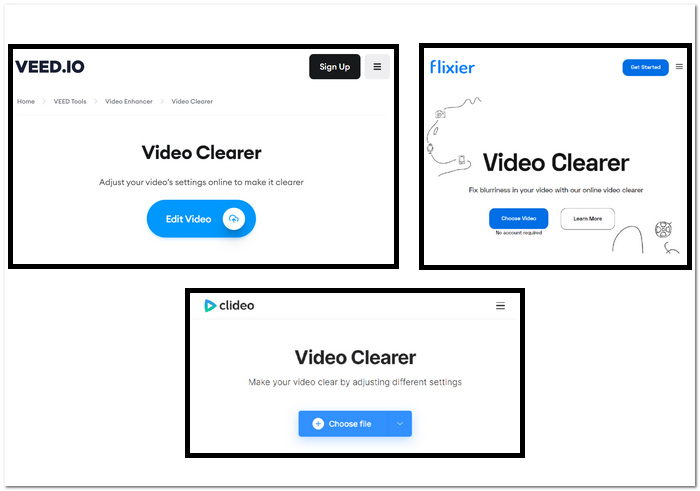
Pasos para arreglar vídeos pixelados con herramientas web:
Paso 1. Elige tus herramientas web de la lista anterior y entra en su página web.
Paso 2. Arrastra y suelta tu vídeo MOV o MP4, o súbelo desde tus carpetas locales.
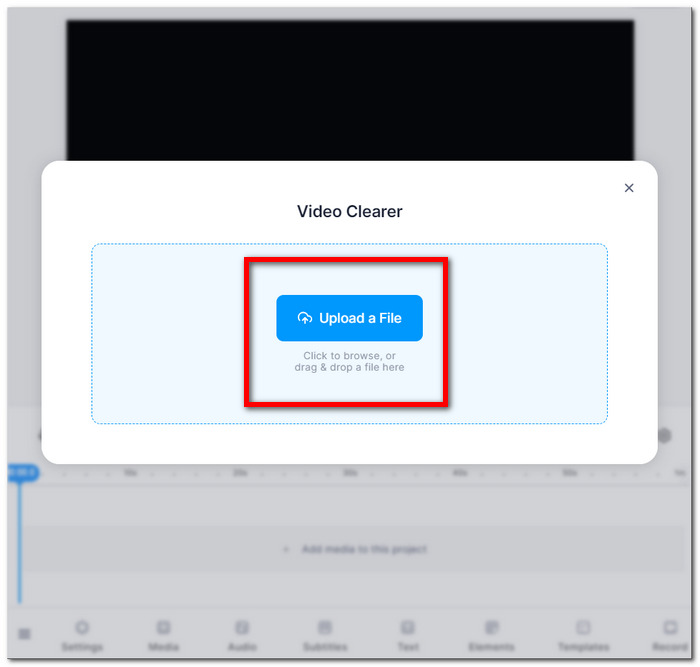
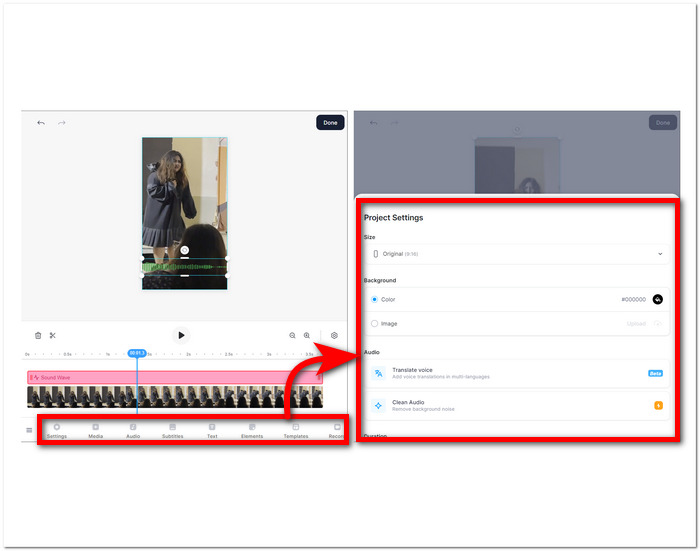
Paso 3. Ajusta la configuración de tu vídeo: brillo, contraste, saturación, etc.
Paso 4. Cuando estés satisfecho con las ediciones, haz clic en Hecho y luego en el botón Exportar o Descargar para guardar tu vídeo.
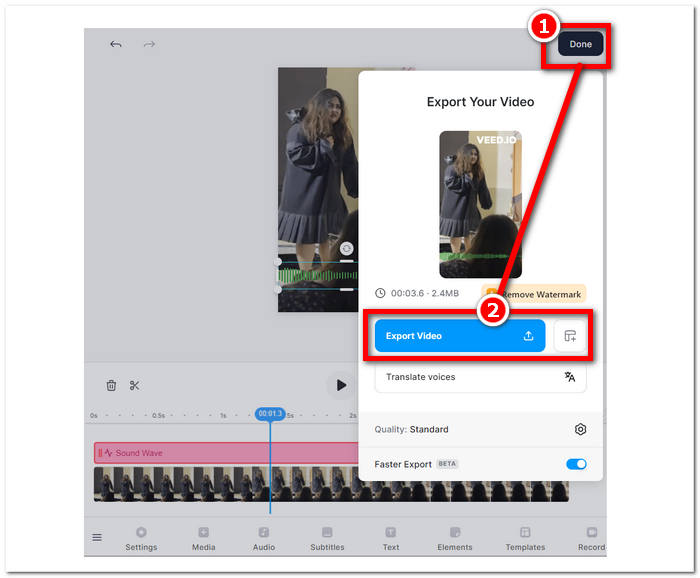
Estas instrucciones te ayudarán a mejorar la calidad de tus películas pixeladas sin pagar por software adicional. Pruebe varias técnicas para ver cuál se adapta mejor a sus objetivos de mejorar la calidad y especificidad de sus videos.
Parte 3. Cómo hacer que los videos estén menos pixelados en Windows y Mac
1. Video Converter Ultimate
Te presentamos Video Converter Ultimate, una caja de herramientas de vídeo todo en uno diseñada para revolucionar tu experiencia multimedia. Esta potente herramienta te permite convertir, mejorar, comprimir y editar archivos de vídeo y audio de forma fluida y a una velocidad ultrarrápida. Tanto si quieres transformar el formato de tus vídeos, mejorar la calidad de imagen y sonido, reducir el tamaño de los archivos sin comprometer la calidad, como dar un toque profesional mediante una edición fluida, nuestra completa caja de herramientas de vídeo te cubre todas las necesidades. Disfruta de la comodidad de una única y versátil plataforma que atiende todas tus necesidades multimedia, garantizando eficacia sin sacrificar velocidad ni calidad.
Pasos para usar Video Converter Ultimate:
Paso 1. Instala y ejecuta el programa en tu ordenador.
Descarga gratuitaPara Windows 7 o posteriorDescarga segura
Descarga gratuitaPara macOS 10.7 o posteriorDescarga segura
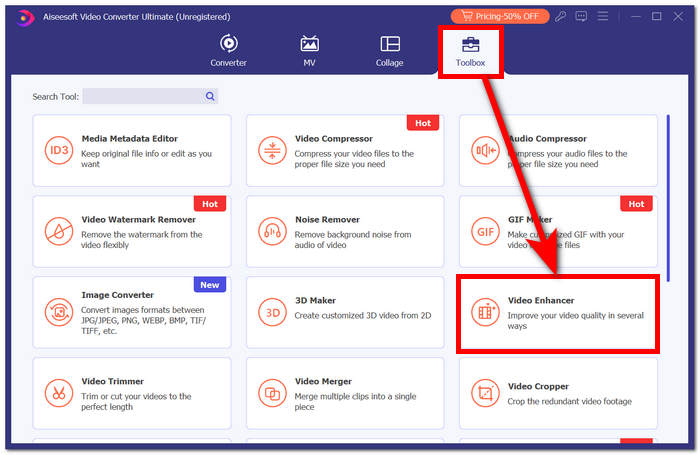
Paso 2. En la interfaz principal, ve a la sección Toolbox y, dentro de ella, haz clic en Video Enhancer.
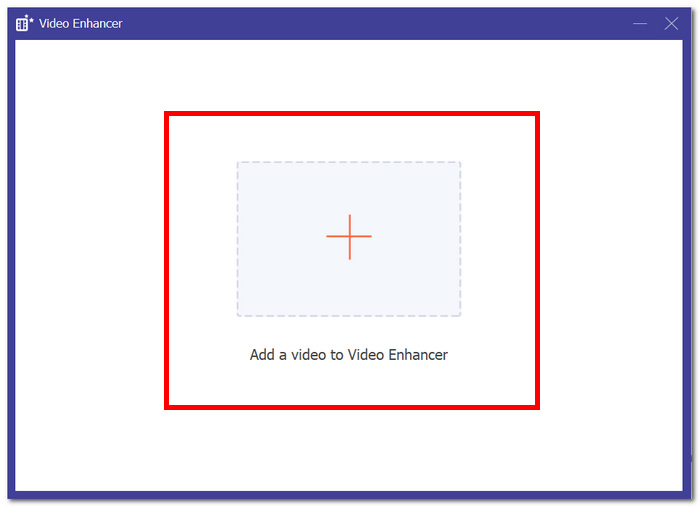
Paso 3. Haz clic en + para añadir un vídeo a Video Enhancer.
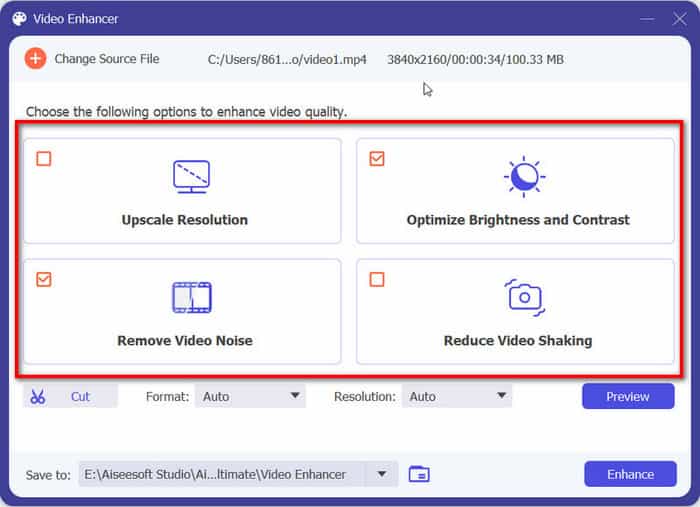
Paso 4. El último paso consiste en ajustar la configuración para mejorar tu vídeo. Puedes Upscale Resolution y Preview. Cuando estés satisfecho con los cambios, haz clic en el botón Enhance para exportar y guardar en tu ordenador el vídeo ya sin pixelación.
Con la experiencia FVC Video Converter Ultimate, la comodidad de una plataforma única y versátil satisface todas sus necesidades multimedia, garantizando eficiencia sin comprometer la velocidad o la calidad.
2. Reparación de vídeo Aiseesoft
Aiseesoft Video Repair es una solución sólida para recuperar vídeos afectados por pérdida de datos, archivos dañados y vídeo pixelado. Este potente programa solo necesita un vídeo de muestra en el mismo formato para llevar a cabo la restauración. El software es fácil de usar y puede reparar una gran variedad de formatos de vídeo, como MP4, MOV, AVI, WMV y FLV. También puede reparar vídeos dañados, pixelados, afectados por virus y errores del sistema de archivos. Aiseesoft Video Repair es una excelente herramienta para cualquiera que haya dañado un vídeo por accidente o necesite reparar un vídeo estropeado por un problema de hardware o software.
Pasos para usar Aiseesoft Video Repair:
Paso 1. Desde su página web, descarga el programa e instálalo, luego ejecútalo en tu ordenador.
Descarga gratuitaPara Windows 7 o posteriorDescarga segura
Descarga gratuitaPara macOS 10.7 o posteriorDescarga segura
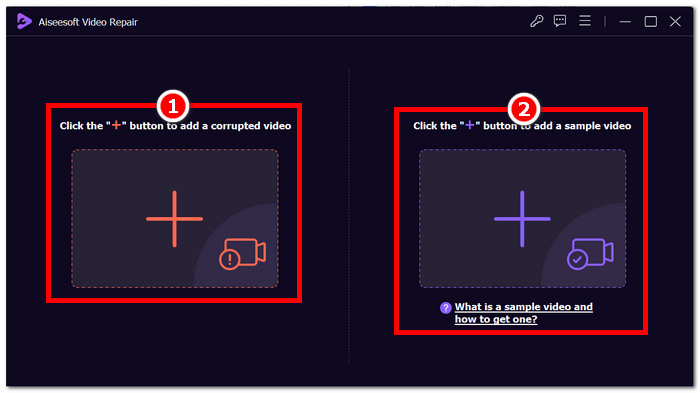
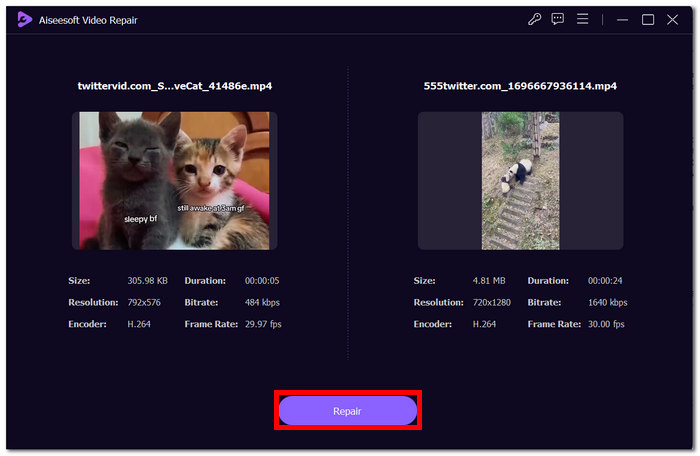
Paso 2. En la interfaz del programa, añade tu vídeo pixelado haciendo clic en el botón rojo + de la izquierda y, a continuación, añade un vídeo de muestra haciendo clic en el botón morado + de la derecha.
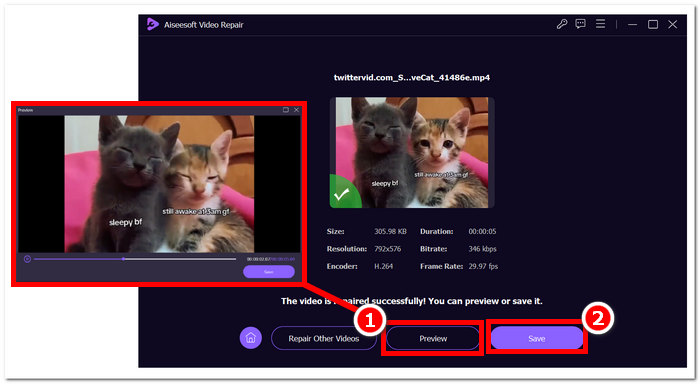
Paso 3. Tras añadir tu vídeo pixelado y el vídeo de muestra, haz clic en Repair para iniciar el proceso y luego en Preview para comprobar la calidad.
Paso 4. Cuando estés satisfecho con el resultado, haz clic en Save para guardar tu vídeo ya reparado.
Su interfaz fácil de usar y sus capacidades avanzadas ofrecen una forma rápida y eficiente de revivir videos comprometidos, lo que la convierte en una herramienta de referencia para la reparación de videos.
Parte 4. Preguntas frecuentes sobre cómo arreglar videos pixelados
¿Se puede arreglar la pixelación?
Sí, la pixelación a menudo se puede solucionar utilizando varios métodos y herramientas. Ya sea a través de plataformas en línea, software de edición de video o algoritmos especializados, existen formas de abordar la pixelación y mejorar la calidad general de un video. La eficacia de la solución puede depender de la gravedad y la causa raíz de la pixelación.
¿Por qué ocurre la pixelación?
La pixelación se produce debido a varios factores, entre ellos, los vídeos con resoluciones más bajas tienen menos píxeles, lo que hace que los píxeles individuales sean más notorios, especialmente cuando se estiran o se ven en formatos más grandes. Los vídeos con resoluciones más bajas tienen menos píxeles, lo que hace que los píxeles individuales sean más notorios, especialmente cuando se estiran o se ven en formatos más grandes. La conversión de vídeos entre diferentes formatos o códecs puede provocar pixelación si no se realiza correctamente, ya que se puede perder parte de la información. Comprender la causa específica de la pixelación es crucial para determinar el método más eficaz para solucionarla.
¿Mejorar la calidad del video soluciona la pixelación del video?
Sí, mejorar la calidad general del vídeo a menudo puede ayudar a solucionar los problemas de pixelación. Al abordar factores como la resolución, la compresión y la transcodificación, puedes aumentar la nitidez y reducir la visibilidad de los píxeles individuales. Aumentar la resolución del vídeo, ajustar la configuración de compresión y utilizar equipos de grabación de mayor calidad durante la producción son estrategias eficaces para mejorar la calidad del vídeo y mitigar la pixelación. Sin embargo, el éxito de estos métodos depende de la calidad inicial del vídeo y del grado de pixelación presente.
Conclusión
Reparar videos pixelados en línea de forma gratuita es una habilidad accesible que puede elevar la calidad de su contenido. Ya sea que elijas plataformas fáciles de usar como Google Photos o herramientas especializadas como Fix. La reparación de píxeles de video masterización le permite producir videos con imágenes nítidas. Recuerde comprender las causas de la pixelación, explorar varias herramientas en línea e implementar técnicas manuales para garantizar una calidad de video óptima en proyectos futuros. ¡Diga adiós a la pixelación y hola a una experiencia visual más fluida y agradable!
-
 Las 7 mejores reparaciones de videos gratuitas: restaure sus videos dañados
 Descubra las 7 mejores reparaciones de video gratuitas en línea para reparar archivos de video corruptos o dañados. Reviva sus preciados recuerdos con estas herramientas de reparación de videos de primera categoría.
-
 Cómo arreglar videos borrosos: te esperan videos nítidos
 ¿Cómo aclarar un vídeo borroso? No permita que los vídeos borrosos opaquen su contenido; Encuentre soluciones para una visualización nítida y lograr imágenes de aspecto profesional.
-
 Guía sobre cómo reparar videos que no se reproducen en teléfonos Android
 ¿Quiere saber las razones por las que no se pueden reproducir vídeos en su dispositivo Android? Si es así, para solucionar el problema por tu cuenta puedes seguir leyendo para saber más.
