


 Video Converter Ultimate
 Grabador de pantalla
 Reparación de vídeo
 Descarga segura
Las 4 mejores formas gratuitas de convertir MTS a MOV
Capturé algunos videos con mi videocámara Sony que exportaba archivos MTS. Noto que MTS no puede ser compatible con mi reproductor multimedia e iMovie. Estoy usando una Mac y quiero editar estos videos MTS capturados. ¿Alguna ayuda? ¿Existe alguna forma sencilla, especialmente gratuita, de convertir MTS a MOV?
MTS es un formato de vídeo en alta definición muy utilizado por las videocámaras Sony y Panasonic, como extensión de archivo de AVCHD (Advanced Video Coding High Definition). Después de grabar vídeo con tu cámara digital, es muy probable que obtengas un archivo MTS. Admite HD 720p/1080i y puede ofrecer una mayor calidad de vídeo. Sin embargo, MTS no es un formato popular compatible con la mayoría de reproductores o editores multimedia.

Cuando necesites editar MTS en iMovie o reproducirlo con un reproductor multimedia, deberías convertir MTS a MOV o MP4 para conseguir una mejor compatibilidad. En este artículo te mostraremos 4 conversores MTS gratuitos para ayudarte a convertir MTS a MOV fácilmente.
Parte 1. La mejor forma gratuita de convertir MTS a MOV sin pérdida de calidad
En Internet hay una gran cantidad de herramientas para convertir MTS que pueden ayudarte a pasar MTS a MOV con alta calidad. En primer lugar, queremos recomendarte el mejor software gratuito para convertir MTS a MOV, Free MTS Converter.
Está especialmente diseñado para hacer frente a todo tipo de conversiones. Es compatible con casi todos los formatos de video y audio como MP4, MOV, MKV, MTS, AVI, FLV, WMV, MP3, AAC, FLAC y más. Puede descargarlo gratis y tomar la siguiente guía para convertir MTS a MOV gratis.
Descarga gratisPara Windows 7 o posteriorDescarga segura
Descarga gratisPara macOS 10.7 o posteriorDescarga segura
Paso 1. Primero, debe instalar y ejecutar este convertidor gratuito de MTS a MOV en su computadora. Ofrece versiones para Windows y Mac para descargar.
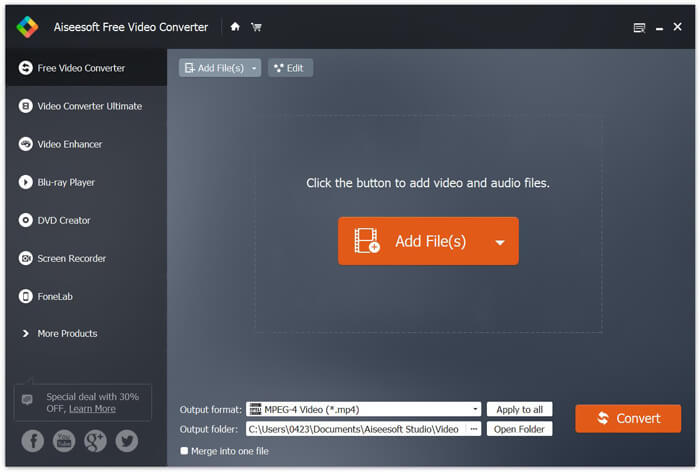
Paso 2. Haz clic en Add File(s) para importar el o los archivos MTS que quieras convertir. Puedes convertir uno o varios archivos MTS a la vez.
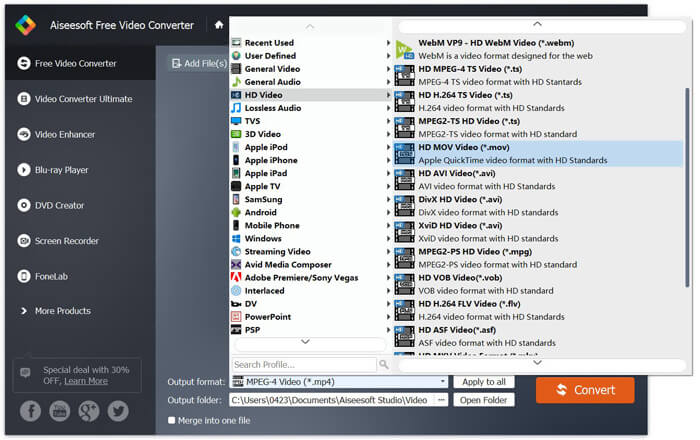
Paso 3. Selecciona MOV como formato de salida en la lista de Output format. Luego haz clic en el botón Convert para iniciar la conversión de MTS a MOV.
Como puede ver desde arriba, este convertidor gratuito de MTS a MOV también incluye algunas funciones básicas de edición. Antes de la conversión final, puede usarlos para personalizar su archivo MTS. En comparación con los convertidores en línea, este Free Video Converter puede brindarle una velocidad de conversión más rápida y una mayor calidad de video de salida. Por eso lo hacemos nuestra primera recomendación.
Parte 2. Convertidor en línea gratuito le ayuda a convertir videos fácilmente
Cuando buscas en Google cómo convertir MTS a MOV, verás muchos resultados de conversores online gratuitos. Aquí te presentamos un conversor online gratuito de MTS a MOV fácil de usar, FVC Free Online Video Converter. Sin instalar ningún software, puedes convertir gratis cualquier formato de vídeo popular a MP4, AVI, MOV, etc. Y no tienes que preocuparte por nada, porque la conversión es segura y estable. No se perderán datos durante el proceso de conversión.
Paso 1. Abre el enlace anterior y haz clic en el botón Add Files to Convert. Antes de convertir, descarga e instala el FVC launcher. Solo tarda unos segundos.

Paso 2. Después de instalar y actualizar el launcher, simplemente elige el vídeo que quieras convertir. Luego selecciona el formato que necesites y pulsa Convert.

Paso 3. Abre el enlace anterior y haz clic en el botón Add Files to Convert. Antes de convertir, descarga e instala el FVC launcher. Solo tarda unos segundos.
Parte 3. Cómo convertir MTS a MOV en línea gratis con ZAMZAR
ZAMZAR es uno de los programas de conversión de video en línea más populares que puede ayudarlo a convertir MTS a MOV de forma gratuita. Está diseñado con una interfaz concisa y una función de conversión simple. Puede tomar la siguiente guía para realizar la conversión de video MTS.
Paso 1. Abra su navegador y navegue hasta el sitio oficial de ZAMZAR. Aquí puede ir directamente a la página https://www.zamzar.com/convert/mts-to-mov/. Aquí puede convertir directamente MTS a MOV sin realizar otras configuraciones.
Paso 2. Haga clic en el botón Agregar archivos para cargar el archivo MTS que desea convertir. Puede arrastrar y soltar para cargar el archivo MTS. Una cosa que debe saber es que este convertidor MTS en línea gratuito solo le permite convertir un archivo MTS de menos de 150 MB.
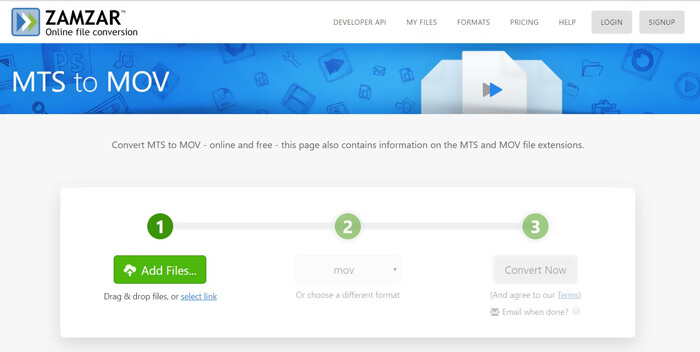
Paso 3. Después de subir el archivo, puedes hacer clic en el botón Convert Now para empezar a convertir MTS a MOV gratis online.
Parte 4. Manera en línea de convertir MTS a MOV con FreeConvert
FreeConvert es otro conversor de vídeo online muy popular que permite realizar gratis la conversión de vídeo de MTS a MOV. Este conversor gratuito de MTS a MOV admite plenamente MTS y M2TS. Te permite subir un archivo MTS de hasta 1 GB. Además, te permite subir 20 archivos MTS a la vez para convertirlos. Ahora puedes seguir los pasos de abajo para convertir tu MTS a MOV.
Paso 1. Primero, tienes que ir a FreeConvert.com en tu navegador. Aquí puedes ir directamente a https://www.freeconvert.com/mts-to-mov para hacer la conversión.
Paso 2. Haz clic en el gran botón azul Choose MTS Files para subir el archivo MTS que quieras convertir a MOV. Como se ha mencionado antes, aquí puedes subir uno o varios archivos MTS para la conversión.
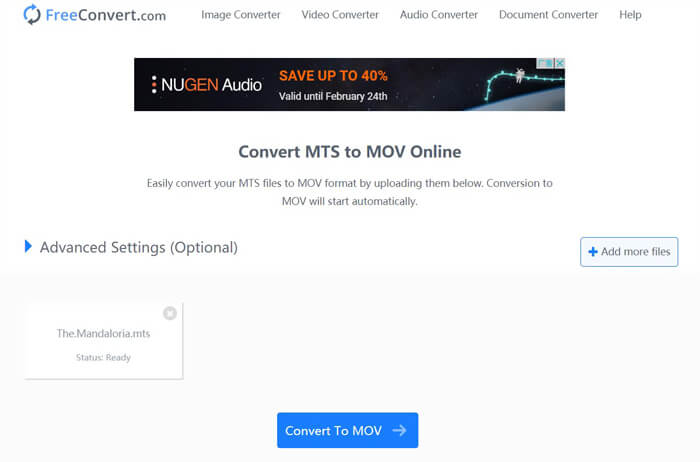
Paso 3. Haz clic en el botón Convert To MOV para iniciar el proceso de subida y conversión. Después, tendrás que hacer clic en el botón Download para guardar el archivo convertido en tu ordenador.
Cuando eliges conversores online gratuitos para convertir MTS a MOV, necesitarás bastante tiempo para la subida y la conversión. Por eso es mejor convertir archivos MTS de pequeño tamaño con software de conversión online. Si quieres convertir un vídeo MTS o M2TS grande, deberías recurrir al Free Video Converter altamente recomendado.
-
 6 formas sencillas de convertir TS a AVI / MKV / MOV / WMV en Windows / Mac
 ¿Quiere convertir archivos TS a AVI / MKV / MOV / WMV rápidamente? Este artículo muestra convertidores de video en línea y fuera de línea con una guía completa. Tal vez puedas obtener el mejor conversor TS gratuito aquí.
-
 MOV VS MP4 - Cuál es mejor
 MOV VS MP4, ¿cuál es mejor? Esta publicación indica la diferencia entre MP4 y MOV, para que pueda obtener la mejor opción para usar en sus archivos de video.
-
 Cómo unir archivos MOV (QuickTime) gratis
 Puede resultar difícil para los principiantes unir varios clips de vídeo MOV. Entonces, ¿existe una forma simple y rápida de combinar archivos MOV? Si lo hay, ¿cómo usarlo? Esta publicación te ayudará a obtener estas respuestas.
