


 Video Converter Ultimate
 Grabador de pantalla
 Reparación de vídeo
Los 5 mejores cortadores de MP4: aprenda a recortar videos en PC, Mac y dispositivos móviles
Si eres un vlogger o un aspirante a uno, tomar un video de ti mismo es muy común. Esto requeriría mucho esfuerzo y confianza, además de disparar frente a una cámara. Además, lo más común que todos los profesionales y nuevos en vlogging son los errores que cometen. En lugar de volver a grabar el video, tienden a cortarlo y fusionarlo con los videos originales. Para hacer un video completamente nuevo que consta de diferentes ángulos, vistas, montajes y más, lo cortan de diferentes videos y lo agregan a uno. Pero como nuevo en este tipo de trabajo o incluso profesional, elegir la recortadora adecuada es difícil. Porque no todas las funciones como decían en el anuncio de la herramienta no están en las herramientas. En lugar de ir al otro artículo y leer la recomendación, ¿por qué no aprendes de este primero? Como reunimos solo la evidencia real para su propio beneficio. Entonces, aquí en la lista están los cortadores de MP4 que puede usar para comenzar a hacer vlogs. Manténgase enfocado para saber cuáles son los mejores recortadores que puede usar que brindan una perspectiva simple pero profesional a sus videos.

Parte 1. Descargue el mejor software de corte de video MP4 en PC y Mac
Si vamos a hablar de lo mejor, entonces debes dar prioridad a leer esto primero. Como se dijo antes, crear vlogs es mucho más difícil de lo que esperábamos, no se trata solo de tener confianza para ponerse delante de la cámara y publicarlo. También debes plantearte contar con una herramienta polivalente. Una que proporcione un vídeo más atractivo a los ojos de cada espectador. FVC Video Converter Ultimate ofrece fantásticas funciones de edición y conversión que cualquiera puede utilizar. Tanto si eres principiante como profesional, debemos tener en cuenta lo mejor de lo mejor del mercado. Aunque es una versión de pago, sigue ofreciendo lo máximo que puedes desear. Y si lo eliges como tu opción personal, entonces tienes un futuro prometedor por delante. ¿Quieres empezar a hacer vlogs hoy? Entonces sigue estos pasos para aprender a usar este cortador de vídeo MP4.
Paso 1. Haz clic en el botón de descarga que aparece abajo e instálalo en tu PC o Mac. Sigue el asistente de instalación de la herramienta y haz clic en finalizar para iniciar el software.
Descarga gratuitaPara Windows 7 o posteriorDescarga segura
Descarga gratuitaPara macOS 10.7 o posteriorDescarga segura
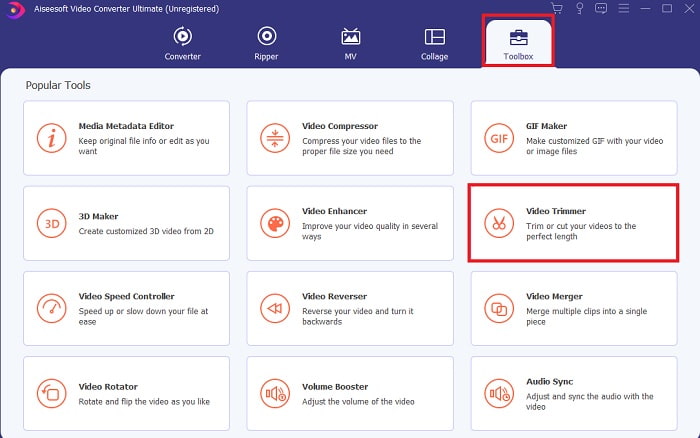
Paso 2. Si esto aparece en tu pantalla, haz clic en la Barra de herramientas y busca el Video Trimmer debajo.
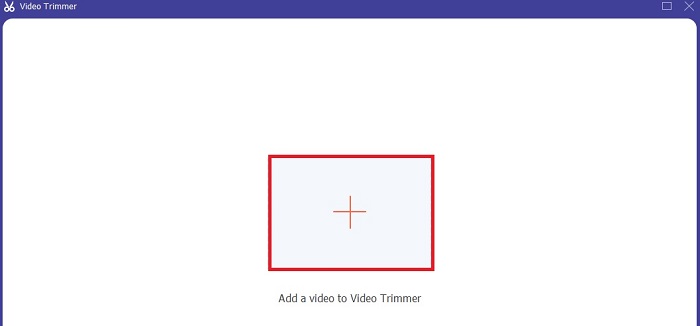
Paso 3. Haz clic en el botón más para añadir el archivo. Selecciona el archivo de tu unidad que quieras recortar y haz clic en abrir para insertar el vídeo.
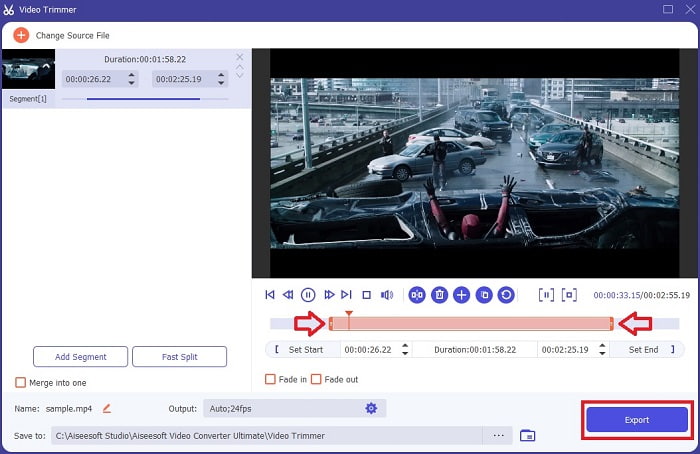
Paso 4. Ajusta el punto inicial y final de tu vídeo manipulando el punto de entrada y salida de reproducción para establecer la duración que desees. Añade fundido de entrada y salida si quieres. Además, puedes cambiar también el formato de salida del archivo si haces clic en el botón engranaje. Cuando hayas terminado, haz clic en el botón Exportar para iniciar el proceso de recorte.
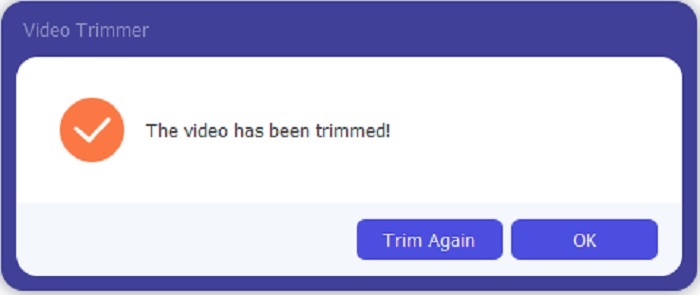
Paso 5. Espera apenas unos segundos y tu vídeo ya estará recortado. Luego haz clic en OK o en Trim Again si necesitas recortar otro. Si quieres mejorar el vídeo que acabas de hacer, haz clic de nuevo en la barra de herramientas y busca el mejorador de vídeo.
Ventaja de tener una herramienta de fusión proporcionada por FVC Video Converter Ultimate con pasos
A diferencia de cualquier otra aplicación, fusionar videos en FVC Video Converter Ultimate es muy fácil de hacer. Esta es una función adicional si adquiere esta herramienta. Como se ha dicho, esta herramienta es multipropósito, así que sin más preámbulos, comencemos a fusionar diferentes videos en uno.
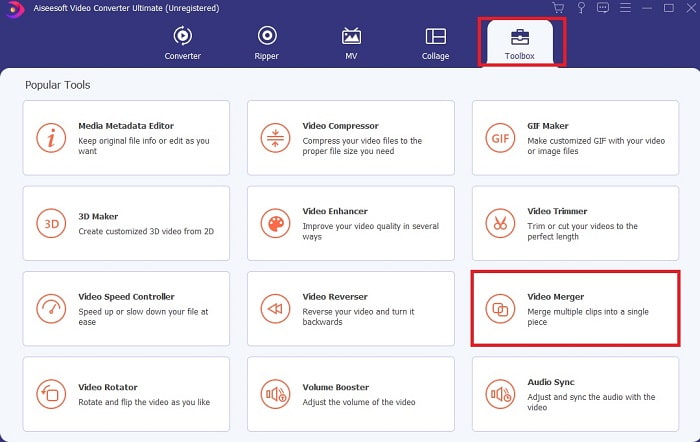
Paso 1. Abre el software, ve a la barra de herramientas y localiza Video Merger, luego haz clic en él.
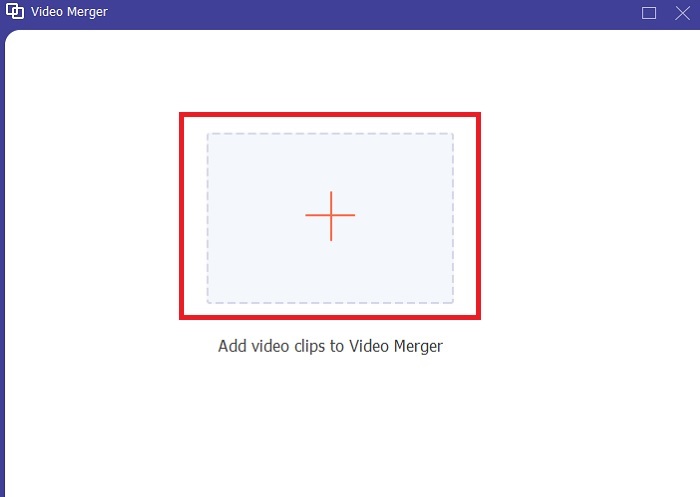
Paso 2. Haz clic en el botón add y selecciona el vídeo que quieres unir, después haz clic en abrir para continuar. Tras seleccionar el primer archivo, haz clic en el signo más para añadir el otro archivo que quieras combinar.
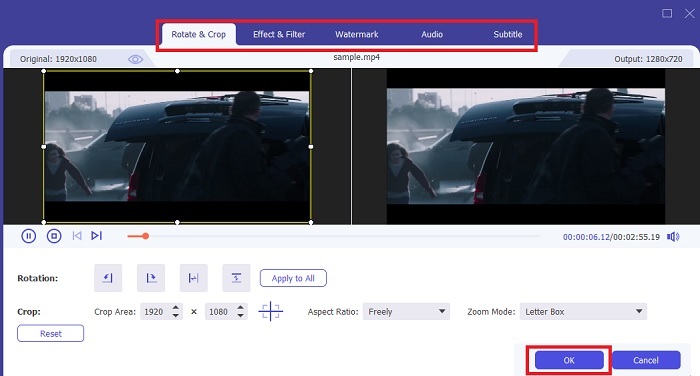
Paso 3. En la interfaz, haz clic en el botón varita para añadir efectos, mejorar el audio, rotar o recortar y añadir subtítulos también. Para guardar la edición que acabas de hacer, haz clic en OK. Si quieres, realiza el mismo procedimiento con los otros vídeos.
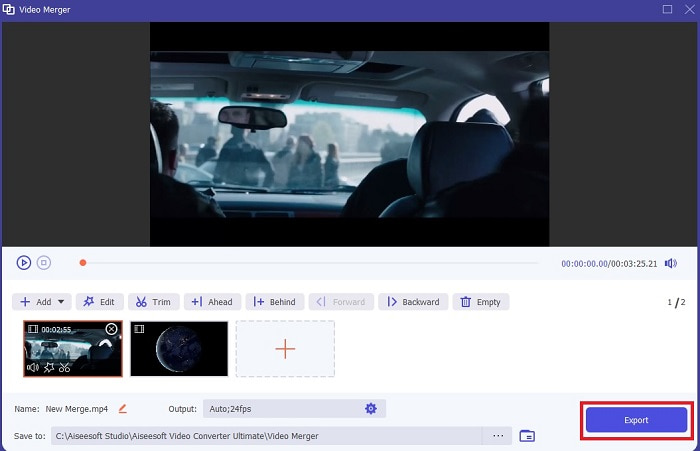
Paso 4. Si ya estás listo para iniciar el proceso, haz clic en Export. Cuando termine la exportación, aparecerá un gestor de archivos en tu pantalla. Para ver el vídeo exportado solo tienes que hacer clic en él y disfrutar.
Parte 2. Los mejores cortadores MP4 en línea
Este debe de ser un buen recortador, pero no es tan bueno como FVC Video Converter Ultimate. Pero al menos merece la pena probar estos cortadores MP4 en línea.
1. Cortador de video en línea 123Apps
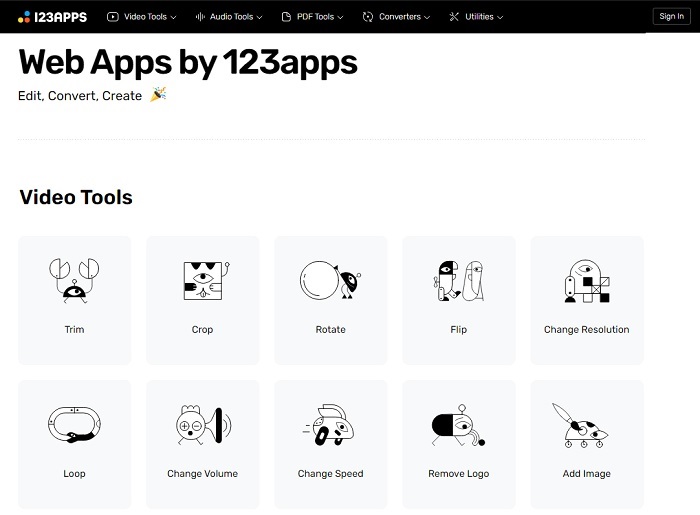
Esta primera herramienta en línea está destinada a mejorar sus videos. Puede ajustar la duración del video, recortar, agregar texto y más. Pero esta herramienta requiere mucho tiempo para ser exportada. Después de exportar, debe descargarlo, y este proceso dependerá de su velocidad de Internet. Además, no puedes ajustar la calidad de tus videos. Entonces, si su video está un poco borroso y necesita ajustar los fps, no puede hacerlo aquí. Pero aún así, vale la pena intentarlo.
2. Clideo
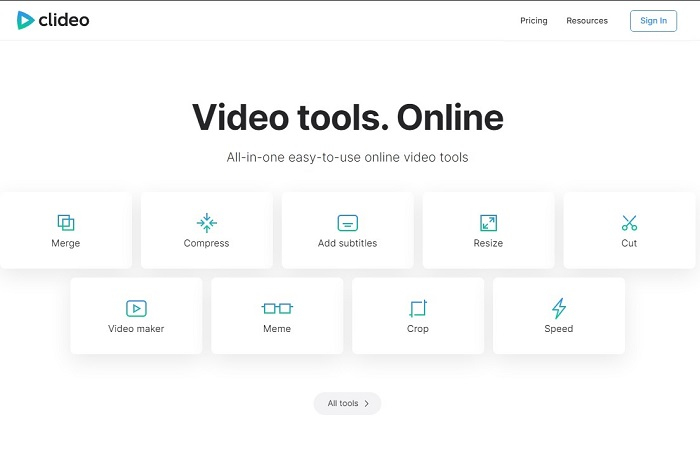
Si hablamos de recortar, esta también puede ser una buena opción. Clideo es uno de los mejores recortadores MP4 en línea que puedes encontrar. Igual que la primera herramienta online mencionada antes, esta también ofrece funciones básicas de edición. Aunque admite edición básica, sigue sin ser suficiente si quieres hacer un vídeo que llame realmente la atención. Pero puedes probarla online sin preocuparte, es gratis y también segura.
Parte 3. Las 3 mejores aplicaciones para cortar MP4 en Android e iOS
¿Qué pasa si no tienes una computadora de escritorio para usar las herramientas anteriores y quieres ser un vlogger, todavía es posible? Si tiene un teléfono como Android o iOS, puede usar estas aplicaciones para editar en sus teléfonos. Pero hay algunas funciones que están disponibles arriba que no están aquí. Entonces, continúa leyendo a continuación para saber cuáles son estas herramientas y elegir entre ellas.
1. iMovie para iOS
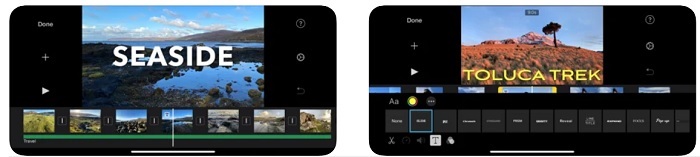
Si quieres añadir un toque al estilo Hollywood a tu vídeo, entonces iMovie es el software adecuado. Esta aplicación cortadora de MP4 fue creada solo para usuarios de iOS. Pero aunque la herramienta ofrece funciones de edición de alto nivel, algunos de sus errores todavía no se han corregido. En algunos casos, la app se bloquea cada vez que intentas editar y la pantalla se queda en negro. A veces el vídeo y el audio no están sincronizados debido a los fallos. Estos son algunos ejemplos de errores; pueden parecer simples, pero resultan muy molestos la mayor parte del tiempo. Así que, si quieres probar iMovie, aún puedes descargarlo en la App Store.
2. Creador y editor de video: Viva Video para Android
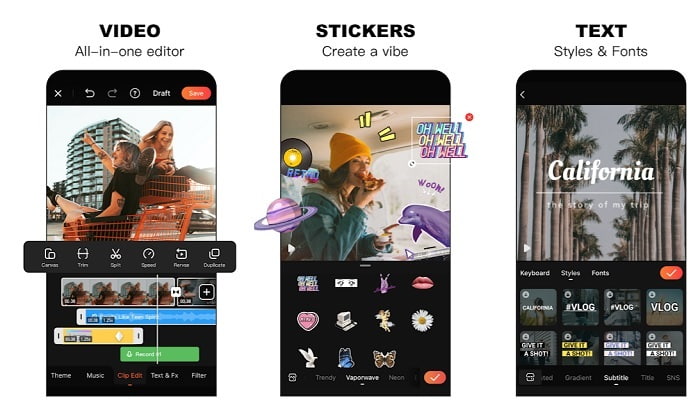
Uno de los mejores cortadores MP4 gratuitos en Android es Video Editor & Maker – Viva Video. Igual que la herramienta anterior, ambas ofrecen las mejores funciones de edición en el móvil, como transiciones para el vídeo, efecto glitch y más, pero es una herramienta de pago. Hay un problema que hace que no sea excelente: no hay un botón de cancelar suscripción para detener la app. Así que la mejor forma que quizá pienses es borrar la aplicación para acabar con la suscripción, pero esta no terminará. Seguirá cobrando en tu tarjeta de crédito si eliges este método de pago. Pero, en general, la herramienta es de primera categoría, ni más ni menos.
Parte 4. Preguntas frecuentes sobre MP4 Cutter
¿Qué es un MP4?
MP4 también se conoce como el formato de medios multipropósito. En lugar de almacenar un código, almacena datos de los videos, imágenes fijas, subtítulos o textos. Además, es el formato de video más utilizado en todo el mundo.
¿MP4 es con pérdidas o sin pérdidas?
Al ser un formato multipropósito, MP4 es una compresión con pérdida.
¿Cuál es el mejor formato aparte de MP4?
Hay algunos formatos que ofrecen mejor calidad de salida que el MP4, pero no son tan flexibles como este formato. Por ejemplo, WMV, que genera archivos de menor tamaño que MP4, pero no es compatible con los dispositivos de Apple, porque está pensado como formato nativo para Windows Media Player. Puedes optar por convertir tus archivos MP4 a WMV para una mejor reproducción.
Conclusión
Para finalizar, ahora es más fácil entender la diferencia entre cada herramienta para que puedas usarlas. Pero, como se dijo antes, no todas ofrecen las excelentes funciones de corte que puede realizar FVC Video Converter Ultimate. Especialmente si quieres crear un vídeo más atractivo para conseguir más visualizaciones y también beneficios. Así que, en lugar de conformarte con algo temporal, ¿por qué no eliges FVC Video Converter Ultimate para afrontar el futuro y conseguir la mejor versión de ti mismo?.
-
 Guía sobre cómo convertir RMVB a MP4 en Windows / Mac (3 formas gratuitas)
 ¿Quiere convertir RMVB a MP4 para una fácil reproducción en su computadora o teléfono móvil? Encontrará formas sencillas de convertir sus archivos RMVB a MP4 en esta guía.
-
 4 mejores convertidores MP4 a M4V para convertir videos MP4 en M4V con facilidad
 Cuando necesite cambiar archivos MP4 a M4V, debe obtener más detalles sobre las diferencias entre los dos formatos, así como los mejores convertidores MP4 a M4V del artículo.
-
 AMV Converter: los 3 mejores métodos para convertir MP4 a AMV en Win / Mac
 ¿Cuáles son los mejores convertidores de MP4 a AMV para convertir los videos en Amine Music Video? Puede obtener más información sobre los 3 métodos más eficientes para obtener los videos deseados con facilidad en el artículo.
