


 Video Converter Ultimate
 Grabador de pantalla
 Reparación de vídeo
 Descarga segura
Cómo convertir M2TS a MP4 sin reducir la calidad
“Cuando coloco los videos de mi cámara Sony en la computadora, son archivos M2TS, que no se pueden compartir en Facebook o YouTube. ¿Dónde puedo encontrar un convertidor de video para convertir los archivos a MP4 y mirarlos en mi computadora? "
A veces quieres reproducir archivos M2TS en algunos dispositivos portátiles o subirlos a YouTube o Facebook. Lo más recomendable es convertirlos a un formato de vídeo común como MP4. En esta publicación, compartiremos contigo 5 formas gratuitas de convertir M2TS a MP4 en Windows y Mac.

Parte 1. La mejor manera de convertir M2TS a MP4 gratis
No todos los reproductores multimedia son compatibles con archivos M2TS. Para disfrutar mejor del vídeo M2TS de videocámaras HD, es preferible cambiar M2TS al habitual MP4 para la reproducción. FVC Free M2TS Converter es un conversor y editor M2TS todo en uno. No solo puedes convertir archivos M2TS a MP4, MKV, AVI, MOV, etc., sino también editar los archivos M2TS, por ejemplo comprimir, combinar, aplicar temas y más.
Descarga gratuitaPara Windows 7 o posteriorDescarga segura
Descarga gratuitaPara macOS 10.7 o posteriorDescarga segura
Paso 1.Al hacer clic en el botón Descarga gratuita, puedes descargar rápidamente Free M2TS Converter. Luego instálalo y ejecútalo en tu ordenador con Windows. Haz clic en el botón Add File(s) para importar el archivo M2TS al programa.
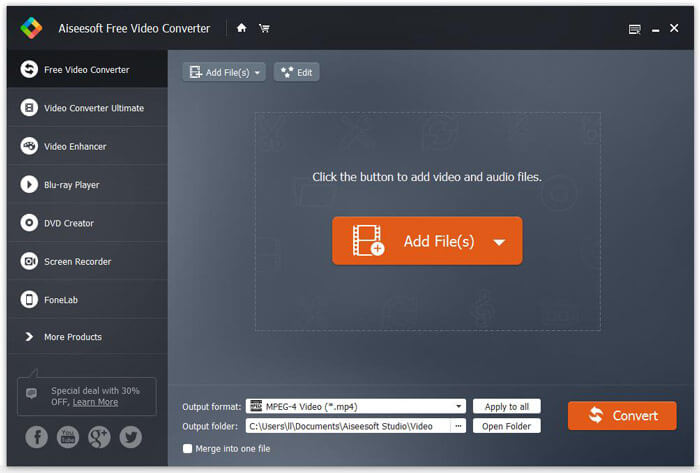
Paso 2.Haz clic en el botón desplegable de Output format y elige MPEG-4 Video (*.mp4) como formato de salida. También puedes establecer la carpeta de salida para guardar el archivo convertido.

Paso 3.Si quieres añadir un tema específico al vídeo, puedes hacer clic en el botón Edit en el menú superior para elegir un tema adecuado. Cuando hayas terminado todos los ajustes, haz clic en el botón Convert para empezar a cambiar el archivo M2TS a MP4.

Parte 2. Cómo cambiar M2TS a MP4 en línea
Si quieres convertir M2TS a MP4 gratis en línea, FVC Free Online Video Converter será una gran elección. Como conversor multimedia en línea gratuito, admite la conversión de casi todos los vídeos y audios más comunes a MP4, FLV, MKV, MOV, M4V, MTS, TS, M2TS, WMV, ASF, VOB, MP3, AAC, etc. Además, es muy fácil de usar.
Paso 1. Ve al sitio web de FVC Free Online Video Converter. Haz clic en Add Files to Convert en la parte superior. Luego descarga e instala el FVC launcher.

Paso 2. Selecciona el vídeo que quieres convertir. Si quieres un vídeo MP4, simplemente haz clic en MP4. Luego en Convert.

Paso 3. Puedes guardar el vídeo MP4 directamente en el escritorio. Después de eso, la conversión se iniciará automáticamente.
Parte 3. Cómo convertir M2TS a MP4 con ConvertFiles
ConvertFiles es el convertidor M2TS a MP4 basado en la web que admite más de 200 formatos de videos, audio, imágenes, documentos, presentaciones y archivos. Siga los sencillos pasos a continuación para comenzar a convertir archivos M2TS a MP4 en línea.
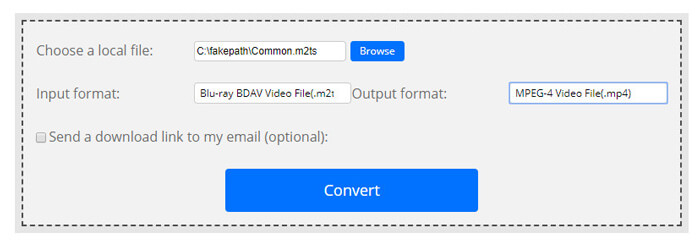
Paso 1.Ve a la página oficial de ConvertFiles. Haz clic en el botón Browse para subir tu archivo M2TS local.
Paso 2.Haz clic en el cuadro Input format y selecciona HDV Video File(.m2ts), y haz clic en el cuadro Output format para seleccionar MPEG-4 Video File(.mp4) como formato de salida.
Paso 3.Haz clic en el botón Convert para empezar a transformar M2TS a MP4 gratis. La conversión puede tardar unos minutos. Después, podrás hacer clic en el enlace de descarga para bajar el archivo MP4 convertido.
A veces, la conversión puede fallar debido al formato de entrada no válido. Para lograr una alta tasa de éxito, puede probar Free M2TS Converter.
Parte 4. Cómo transformar M2TS a MP4 con VLC
VLC Media Player es un reproductor multimedia de código abierto para Windows, Mac, Linux, iOS y Android. También funciona como un gran conversor de M2TS a MP4 para convertir archivos M2TS a MP4, MOV, AVI y más. Además, puede editar los archivos M2TS como recortar, cortar, rotar, agregar efectos de imagen y más.
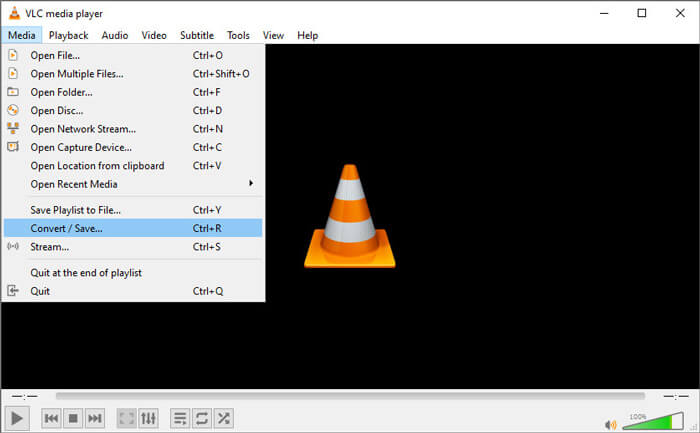
Paso 1.Descarga y ejecuta VLC Media Player en tu ordenador. Haz clic en Media > Convert / Save... para continuar. Luego haz clic en el botón Add... para añadir tu archivo M2TS.
Paso 2.Haz clic en el botón Convert / Save para entrar en la ventana de conversión. Haz clic en el botón desplegable Profile y selecciona Video - H.264 + MP3 (MP4) como formato de salida.
Paso 3.Haz clic en el botón Browse para elegir una carpeta de destino. Luego haz clic en el botón Start para comenzar a convertir M2TS a MP4.
Parte 5. Cómo exportar MP4 desde M2TS con Handbrake
HandBrake es otro transcodificador de video gratuito y de código abierto que puede convertir video desde casi cualquier formato. Puede probar Handbrake para convertir el archivo M2TS a MP4 con los siguientes pasos.
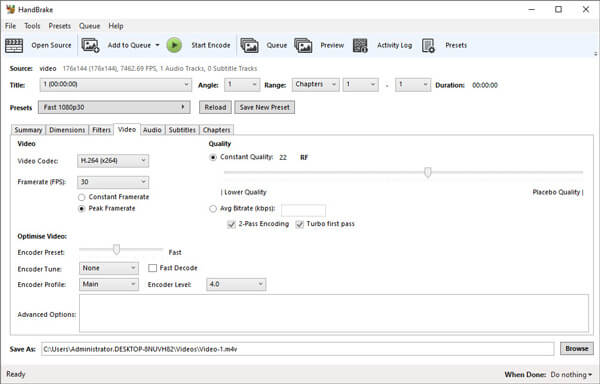
Paso 1.Descarga gratis, instala y ejecuta HandBrake en tu Windows/Mac. Haz clic en Open Source en la esquina izquierda para importar el archivo M2TS desde tu carpeta local.
Paso 2.Puedes ajustar la configuración del archivo M2TS. Selecciona MP4 en el botón desplegable de Format en la pestaña Summary. En la pestaña Video, puedes ajustar el códec de vídeo, la calidad de vídeo, la velocidad de fotogramas y optimizar el vídeo.
Paso 3.Haz clic en el botón Browse para establecer la carpeta de destino. Luego haz clic en el botón Start Encode para empezar a convertir M2TS a MP4 gratis.
Parte 6. Preguntas frecuentes sobre la conversión de M2TS a MP4
¿Cuál es la diferencia entre M2TS y MP4?
M2TS son las siglas de MPEG-2 Transport System. Es un formato de archivo contenedor de Blu-ray Disc Audio Video y se utiliza para multiplexar video, audio y otras transmisiones. Generalmente, los archivos M2TS son más grandes que los archivos MP4 con la misma calidad. Los archivos MP4 son compatibles con casi todos los reproductores multimedia, pero los archivos M2TS solo se pueden reproducir en unos pocos reproductores.
¿Cómo reproduzco archivos M2TS en mi PC?
Puede abrir archivos M2TS directamente en algunas aplicaciones populares de reproducción de medios, como Windows Media Player, VLC Media Player, 5K Player, SMPlayer, Splash, etc. También puede reproducir archivos M2TS con el software Sony Picture Motion Browser.
¿Puede VLC reproducir archivos M2TS?
Si. Puede reproducir archivos M2TS con VLC Media Player en Windows y Mac. Simplemente ejecute el reproductor multimedia VLC y haga clic en Medios para abrir archivo para reproducir el archivo M2TS en VLC. Si eso no funciona para el problema del códec, primero debe convertir M2TS a formato de video compatible con VLC.
Conclusión
Con los 5 métodos gratuitos anteriores, puede convertir archivos M2TS a MP4 a gusto. Después de la comparación, FVC Free M2TS Converter debería ser el mejor convertidor de M2TS a MP4. Con la tecnología de aceleración de hardware, exporta archivos MP4 en alta calidad en minutos. Puede probar este convertidor gratuito a la vez.
-
 Guía completa sobre cómo convertir TS a MP4
 ¿Qué son los archivos TS y desea convertir TS a MP4? En esta publicación, le compartiremos métodos gratuitos y en línea para convertir TS a MP4.
-
 Cómo convertir archivos MTS a MP4
 ¿No sabe cómo convertir un archivo MTS a MP4? En esta guía, encontrará 6 formas fáciles y gratuitas de cambiar el formato MTS a MP4 en Windows o Mac sin pérdida de calidad.
-
 2 formas sencillas de convertir gratis MTS a MP3
 ¿Necesita extraer audio MP3 de un archivo MTS pero no sabe cómo? Esta publicación comparte 2 formas fáciles de ayudarlo a convertir MTS / M2TS a MP3 con alta calidad de audio.
