


 Video Converter Ultimate
 Grabador de pantalla
 Reparación de vídeo
 Descarga segura
¿Qué es el convertidor HEIC gratuito de Apowersoft y los convertidores HEIC alternativos para usar?
Desde que Apple introdujo el nuevo y avanzado formato de imagen HEIC, a muchos nos ha encantado porque puede contener una imagen en alta resolución con un tamaño de archivo reducido. Aunque la capacidad de comprimir el tamaño del archivo es impresionante, no debemos olvidar que se trata de un formato nuevo y que todas las plataformas ajenas a Apple no lo admiten. Por ello, si quieres que el archivo HEIC se adapte bien al destinatario, tendrás que convertir el formato a JPEG, especialmente si la persona que lo recibe no usa iOS ni Mac. Con la ayuda de Apowersoft Free HEIC Converter, puedes realizar esta tarea rápidamente, pero antes de descargarlo, aquí tienes un análisis del conversor que deberías leer primero para ayudarte a decidirte con rapidez.

Parte 1. Revisión completa del convertidor HEIC gratuito de Apowersoft
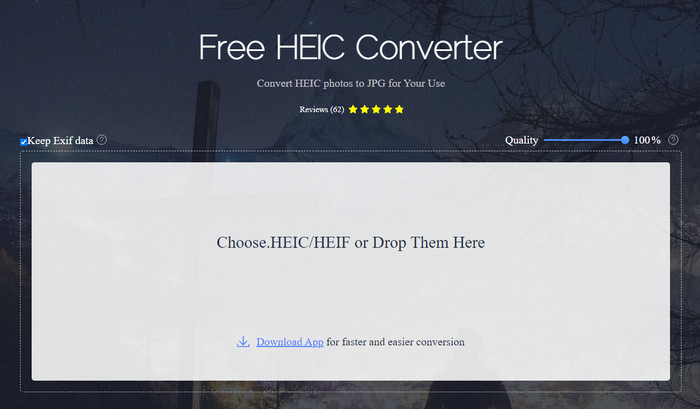
Como indica su nombre, Apowersoft HEIC Converter te ofrece la posibilidad de convertir gratis tu archivo HEIC a un formato JPEG compatible. En lugar de descargar en tu ordenador un conversor poco fiable, puedes usar este de inmediato sin necesidad de descargar ni instalar recursos adicionales. El acceso a la herramienta web es seguro porque tu conexión está protegida mientras te encuentras en su sitio oficial. Y puedes subir fácilmente el archivo HEIC arrastrándolo y soltándolo aquí. Pero ¿qué es lo que hace que este conversor online sea diferente de los demás conversores que puedes usar en la web o en el escritorio? Estas son las funciones clave que puedes obtener si decides utilizarlo.
Funciones clave de Apowersoft Free HEIC Converter:
◆ No es necesario descargar el convertidor porque puede acceder al software en la web.
◆ Admite la conversión de archivos HEIC por lotes o individualmente al formato JPEG.
◆ Manipule la calidad de la imagen antes de que la conversión esté disponible.
◆ Después de convertir, puede guardar el mismo archivo EXIF en el archivo JPEG.
◆ Convierta el archivo HEIC automáticamente sin realizar pasos adicionales.
Pros
- La interfaz de la herramienta web es bastante decente y tiene una perspectiva general.
- Queda una imagen de alta calidad después de convertir el archivo a JPEG.
- La conversión de archivos por lotes es fácil porque admite la conversión del archivo simultáneamente.
Contras
- Aunque dice que mantiene los metadatos, a veces los metadatos se pierden después de convertir el formato.
- El formato de salida está limitado a uno, y ese es JPEG.
- Las funciones son limitadas.
Parte 2. 3 de las mejores alternativas de convertidor HEIC gratuito de Apowersoft en línea y fuera de línea
Convertidor HEIC a JPG gratuito de FVC
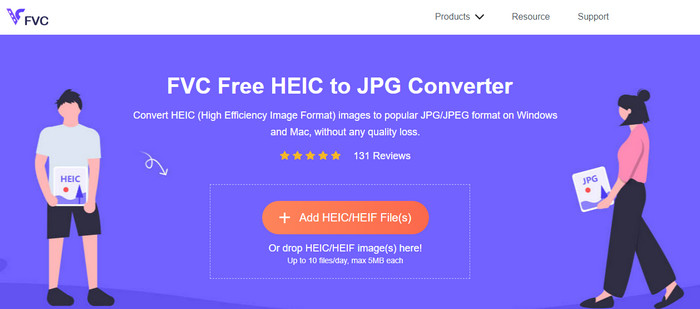
FVC Free HEIC to JPG Converter es el mejor sustituto de Apowersoft Free HEIC to JPG Converter porque cuenta con una interfaz intuitiva que te ayudará a terminar la tarea en cuestión de segundos. Con un conversor online como este, no tendrás que descargar la herramienta completa para usarla, aunque sí tendrás que descargar su lanzador. Aunque el lanzador sea necesario, sigue teniendo ventaja en cuanto a velocidad de conversión. Aunque no tengas experiencia convirtiendo HEIC a JPG, con esta herramienta podrás realizar la tarea fácilmente y de forma eficaz sin necesidad de tutoriales que te guíen.
Hasta ahora, la herramienta web ha manejado la tarea como ningún otro convertidor en línea. Pero no podemos ignorar el hecho de que esta herramienta web tiene limitaciones, como el tamaño de archivo de cada archivo y los archivos permitidos que puede cargar por día. Pero si no desea tener estas limitaciones, le recomendamos que descargue su versión de escritorio: Aiseesoft HEIC Converter. Este software está disponible para ambos sistemas operativos, como Windows y Mac.
HEICtoJPEG.com
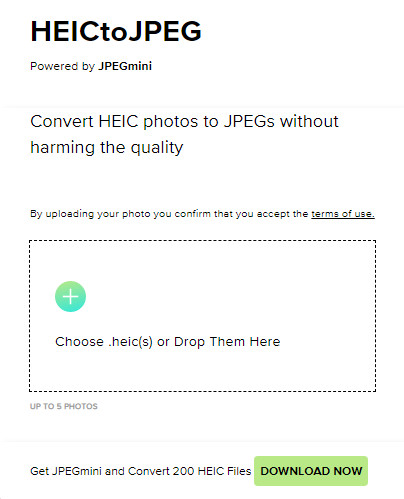
HEICtoJPEG.com es otra alternativa a Apowersoft HEIC Converter a la que puedes acceder en la web de forma gratuita y segura. Al igual que la herramienta que analizamos, aquí solo puedes convertir tus archivos HEIC a JPEG. Así que, si quieres convertir directamente el formato HEIC a JPEG sin ajustar la calidad, deberías usar esta opción. Tras abrir la herramienta web, puedes arrastrar y soltar el archivo aquí y la conversión se iniciará automáticamente. Además, puedes realizar conversiones HEIC por lotes con esta herramienta online, y no está limitada por un uso diario.
En general, la herramienta web es excelente porque admite la conversión por lotes para un proceso rápido. Sin embargo, no puede maniobrar manualmente la configuración avanzada antes de convertir el formato a JPEG como lo puede hacer la otra herramienta en línea. Aunque la herramienta web no es una opción profesional, sigue siendo la mejor para principiantes como nosotros que queremos hacer una conversión simple en nuestro HEIC.
Convertidor de imágenes de píxeles
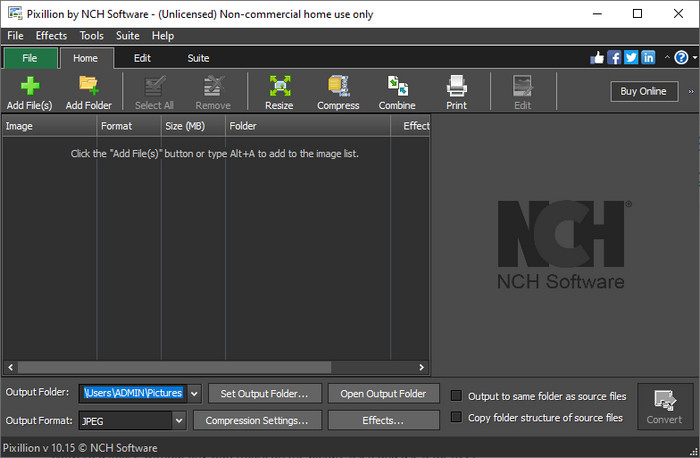
Supongamos que tu conexión a internet no es estable y por ello no puedes utilizar Apowersoft Free HEIC Converter, ya que esta herramienta es online. ¿Es posible convertir igualmente? Sí, con Pixillion Image Converter. Este software de escritorio te permite convertir tu imagen a múltiples formatos de salida como JPG, BMP, PNG, etc. Con una herramienta como esta, puedes ajustar tu imagen HEIC antes de exportarla: puedes cambiar su tamaño, comprimirla, editarla y hacer más cosas que las que ofrecen las herramientas web que hemos presentado.
No importa el archivo de imagen que cargue, puede convertir fácilmente el formato en la salida deseada y hacerlo compatible con su dispositivo actual. Genial, ¿no? Sí, lo es. Pero antes de que pueda usarlo, deberá descargar el software e instalarlo, lo cual es un poco complicado porque este es otro paso, especialmente si desea convertir un solo archivo HEIC a JPG u otro formato. No obstante, la herramienta es excelente y se puede descargar gratis en su sistema operativo Windows.
Relacionado:
Parte 3. Preguntas frecuentes sobre la revisión del convertidor HEIC de Apowersoft
¿La exportación del archivo HEIC convertido en Apowersoft Free HEIC Converter tiene una marca de agua?
Afortunadamente, el archivo que convierta aquí no dejará una marca de agua en su imagen. Por lo tanto, puede disfrutar de la imagen convertida sin ninguna marca de agua en la imagen y usarla de forma gratuita.
¿Necesito iniciar sesión para usar el convertidor HEIC de Apowersoft?
Puede iniciar sesión para verificar su cuenta, pero no necesitará iniciar sesión si desea utilizar el convertidor en línea. Por lo tanto, puede usarlo de inmediato arrastrándolo y soltándolo en el sitio web oficial de la herramienta y convirtiéndolo automáticamente.
Conclusión
Después de la revisión del convertidor HEIC de Apowersoft, ahora sabemos si es el mejor convertidor que debemos usar para resolver nuestro problema HEIC al convertir el formato a JPG. Aunque la herramienta web es de uso gratuito y accesible en la web, todavía incluimos algunos inconvenientes en este artículo. Entonces, si cree que esta no es la herramienta para usted, entonces las tres alternativas pueden llenar el vacío que necesitará en su convertidor que el convertidor que revisamos no puede brindarle. Pero si todo esto no es suficiente, le sugerimos que descargue la última herramienta que puede convertir su archivo HEIC en JPEG o PNG. ¿Quieres saber qué es? Luego debe hacer clic en el botón de descarga que agregamos arriba para tenerlo a su alcance, ya sea que esté usando Windows o Mac.
-
 Las mejores maneras de editar metadatos MKV como un profesional [Fácil]
 ¿No tiene idea de cómo editar metadatos MKV? A algunos usuarios les resulta difícil editar las etiquetas en MKV, si usted es uno de ellos, lea este artículo.
-
 Los 3 mejores editores de metadatos FLAC en Mac y Windows [Actualizado en 2023]
 ¿Quieres cambiar los metadatos de FLAC? En este caso, debe leer este artículo, ya que proporcionamos suficiente conocimiento sobre el último editor de metadatos de FLAC que puede usar.
-
 La mejor técnica sobre cómo editar metadatos de WebM rápidamente
 Lea todos los detalles que proporcionamos a continuación mientras insertamos un tutorial sobre cómo editar los metadatos de WebM. Haz clic en este enlace para saber más al respecto.
