


 Video Converter Ultimate
 Grabador de pantalla
 Reparación de vídeo
 Descarga segura
7 maneras fáciles de convertir rápidamente HEIC a PNG en segundos
¿Quieres que tu archivo HEIC sea ampliamente compatible con otros dispositivos? ¡Tenemos lo que estás buscando! Este artículo te muestra las mejores formas de convertir tu archivo HEIC a PNG sin complicaciones. Así que prepárate mientras descubrimos las mejores maneras de convertir de HEIC a PNG sin esfuerzo.

Parte 1. ¿Por qué convertir HEIC a formato PNG?
El formato de archivo HEIC es un formato de imagen creado por Apple. Es un formato de imagen que comúnmente usan los dispositivos Apple. Aunque tiene una resolución de alta calidad, no ocupa demasiado espacio en su dispositivo. Sin embargo, los archivos HEIC no son compatibles con dispositivos que no sean de Apple. Por el contrario, PNG, que significa formato de gráficos portátiles, es un formato de archivo de imagen creado para reemplazar los formatos GIF.
Es el formato de imagen más utilizado que no está comprimido, lo que significa que tiene un tamaño de archivo enorme. No obstante, casi todos los dispositivos admiten este formato de archivo de imagen. Entonces, si desea abrir su imagen HEIC en otros dispositivos además de Apple, mejor conviértala a un formato de archivo PNG.
Parte 2. 5 maneras fáciles de convertir su archivo HEIC a archivo PNG en línea
Buscar las mejores formas de convertir HEIC a PNG es bastante difícil. Sin embargo, buscamos los mejores y más simples métodos para cambiar HEIC a un formato de archivo PNG.
Use el convertidor FVC gratuito de HEIC a PNG
La forma más eficaz de convertir HEIC a PNG es usar una herramienta de conversión. Y la mejor herramienta que hemos encontrado en Internet es FVC Free HEIC to PNG Converter. Este conversor es una herramienta en línea que convierte cómodamente tu archivo HEIC al formato de archivo PNG. Además, si quieres convertir por lotes tus archivos HEIC a PNG, esta herramienta también ofrece esa función.
También es accesible en casi todos los navegadores comunes, lo que la convierte en una herramienta sin límite de navegador. Además, tiene una interfaz de software sencilla y no tiene límite de tamaño de archivo, por lo que puede convertir archivos HEIC sin pensar en el tamaño del archivo. Por lo tanto, siga la guía simple a continuación si está interesado en usar este convertidor de HEIC a PNG en línea.
Paso 1. En tu navegador, busca FVC Free HEIC to PNG Converter. También puedes hacer clic en este enlace para ir directamente a su página web. Así es como se ve la primera interfaz:

Paso 2. A continuación, haz clic en el botón Add HEIC/HEIF File(s). Aparecerán las carpetas de tu ordenador, donde seleccionarás tu archivo HEIC.
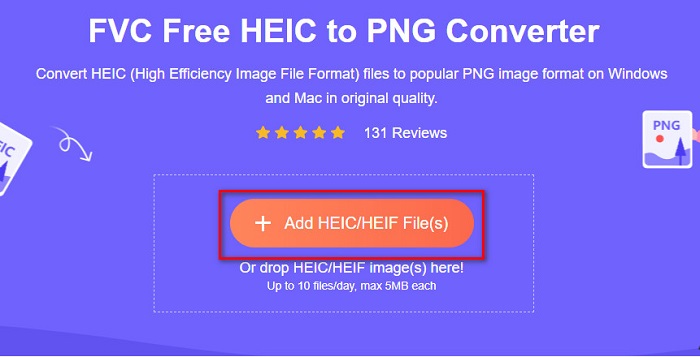
Paso 3. Después, aparecerán las carpetas de tu ordenador, donde seleccionarás tu archivo HEIC. Pulsa Open. Entonces comenzará la conversión de tu HEIC a PNG.

Paso 4. Por último, en la interfaz del software, haz clic en el botón Download para descargar tu archivo PNG.

Sencillo, ¿no? Puede convertir su archivo HEIC en un archivo PNG siguiendo estos sencillos pasos.
Utilice Xconvert.com
Xconvert es un conversor HEIC a PNG en línea y gratuito que convierte fácilmente archivos HEIC a archivos PNG. Este conversor en línea tiene una interfaz de uso sencillo, lo que resulta muy útil para los usuarios principiantes. Además, puedes cambiar la resolución de la imagen cuando uses este conversor en línea. Sin embargo, como es una herramienta que depende de Internet, es posible que experimentes un proceso de conversión lento cuando tu conexión vaya despacio. También contiene anuncios que pueden resultar molestos.
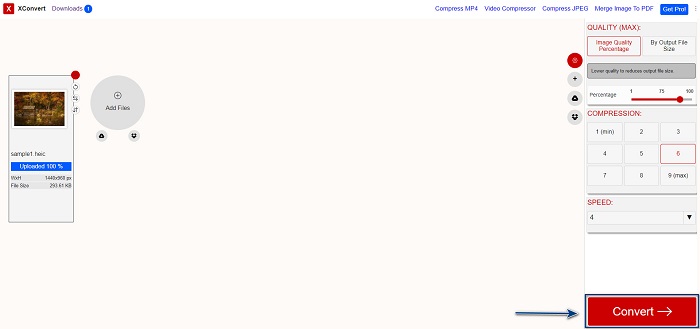
Paso 1. Busca Xconvert.com en tu navegador. En su sitio web, haz clic en el botón Add Files, luego aparecerán los archivos de tu ordenador y, a continuación, selecciona tu archivo HEIC.

Paso 2. Tu imagen se cargará en la interfaz del software. Tras la carga, haz clic en el botón Convert situado en la esquina inferior derecha de la interfaz del programa. Después, espera a que tu archivo esté listo para descargar y pasa al siguiente paso.
Paso 3. Cuando tu archivo esté listo, haz clic en el botón Download para descargar tu archivo PNG; encima del botón de descarga también verás el tamaño de salida y cuánto tiempo ha tardado en convertirse.

Usa Zamzar
Otra manera de convertir HEIC a PNG en línea es utilizar el conversor en línea Zamzar. Probablemente ya hayas visto este conversor cuando buscabas un conversor de HEIC a PNG. Este conversor es accesible desde casi todos los navegadores disponibles. Además, tiene una interfaz sencilla, lo que lo convierte en una herramienta fácil de usar. No obstante, tu archivo podría dañarse si se interrumpe la conexión a Internet durante el proceso de conversión. Aun así, muchos usuarios utilizan este conversor para cambiar HEIC a archivo PNG.
Paso 1. En el navegador que utilices, busca Zamzar. En su sitio web, haz clic en el botón Add Files. Aparecerán los archivos de tu ordenador; a continuación, sube tu imagen HEIC.

Paso 2. Después de subir tu archivo HEIC, haz clic en el botón drop-down y selecciona PNG como formato de salida de tu archivo.

Paso 3. Por último, haz clic en el botón Convert Now para convertir tu archivo HEIC al formato de archivo PNG. Luego descarga tu archivo PNG. Solo espera unos segundos ¡y listo!

Usar herramientas de conversión.io
Conversion Tool es un conversor HEIC a PNG en línea con una interfaz sencilla. Puede convertir tu archivo HEIC a PNG a gran velocidad. Además, no contiene tantos anuncios como otros conversores en línea. Pero la desventaja es que solo puedes convertir diez archivos al día y tiene un límite de tamaño de archivo. Sin embargo, si estás convirtiendo un archivo pequeño, esta herramienta puede ser adecuada para ti.
Paso 1. Busca Conversion Tools.io en tu navegador. Luego haz clic en el botón Browse en la interfaz principal del software, o bien arrastra y suelta tu archivo HEIC sobre el botón Browse.

Paso 2. Después, haz clic en el botón Run Conversion para comenzar a convertir tu archivo HEIC a un archivo PNG. Luego espera a que se cargue tu archivo de imagen y pasa al siguiente paso.

Paso 3. Para terminar, haz clic en el botón Download para descargar tu archivo PNG.

Usar CDKM
La última herramienta que te presentaremos es CDKM. Esta herramienta te permite convertir archivos HEIC a PNG con tan solo unos clics. Sin embargo, usar este conversor en línea puede tardar unos segundos en convertir, dependiendo de la velocidad de tu conexión. También contiene anuncios que pueden resultar irritantes. Aun así, no tiene ningún límite de tamaño de archivo, por lo que merece la pena probarla.
Paso 1. En tu navegador, busca el conversor en línea CDKM. En la interfaz principal del software, haz clic en el botón Choose Files. Aparecerán las carpetas de tu ordenador; a continuación, selecciona tu archivo HEIC para subirlo.

Paso 2. A continuación, haz clic en el botón Start Conversion para iniciar el proceso de conversión.

Paso 3. Por último, desplázate un poco hacia abajo y verás el botón Download. Haz clic en el botón Download para descargar tu archivo PNG.

Parte 3. Convierte HEIC a PNG en Mac
Los dispositivos Apple admiten formatos de archivo HEIC y, al usar Mac, puede abrir un archivo HEIC de forma nativa. Pero si desea convertir su archivo HEIC a PNG, puede cambiarlo usando la aplicación Photo en Mac. En consecuencia, si eres un usuario de Mac, mejor lee esta parte.
Paso 1. Primero, arrastra y suelta tu archivo HEIC en la app Fotos. Después, previsualiza tu foto HEIC y haz clic en Archivo > Exportar > Exportar 1 foto.

Paso 2. Después, en Tipo de foto (Photo Kind), haz clic en el formato de salida que quieras. Selecciona el formato de archivo PNG.

Paso 3. Luego haz clic en el botón Export y selecciona la ubicación de destino de tu archivo de salida. Verás que tu archivo HEIC se ha cambiado al formato de archivo PNG.

Parte 4. Convertir archivo HEIC a PNG en iPhone
Si está utilizando un iPhone, puede abrir un archivo HEIC en su dispositivo. Pero si desea convertir su archivo HEIC a PNG usando un dispositivo iPhone, entonces tenemos una manera para usted. Siguiendo estos sencillos y fáciles pasos a continuación, puede convertir HEIC a PNG sin esfuerzo.
Paso 1. En la app Fotos de tu iPhone, toca el botón Seleccionar situado en la parte superior de la pantalla. Luego selecciona tu archivo HEIC y toca el icono Compartir.
Paso 2. Desliza la pantalla hacia arriba; verás la opción Copiar foto, luego tócala.
Paso 3. Por último, ve a la app Archivos, toca el botón Explorar (browse) y selecciona la ubicación de salida que desees (toca iCloud Drive o En mi iPhone). Luego pega allí tu archivo HEIC.

Después de pegar su archivo, verá que su archivo se convertirá automáticamente en un archivo PNG.
Parte 5. Conocimiento extendido sobre el archivo HEIC y el archivo PNG
Si todavía tienes dudas sobre si quieres convertir tu archivo HEIC a PNG, te proporcionamos una tabla comparativa para ayudarte a distinguir las diferencias entre estos dos archivos. Además, le brinda una descripción general clara de las características de HEIC y PNG. Lea detenidamente para conocer la diferencia entre los archivos HEIC y los archivos PNG.
| HEIC | PNG | |
| Compatibilidad | Solo el dispositivo Apple admite este formato de archivo. | Casi todos los dispositivos admiten este archivo, incluidos los dispositivos Apple. |
| Tamaño del archivo | Tamaño de archivo pequeño. | Puede alcanzar un tamaño de archivo enorme. |
| Calidad de la imagen | Alta calidad de imagen. | Tiene una buena calidad, pero no mejor que el archivo HEIC. |
| Comprimido/Descomprimido | Comprimido | sin comprimir |
| Edición | Conserva la calidad de la imagen al editar. | La calidad puede degradarse al editar. |
Parte 6. Preguntas frecuentes sobre la conversión de HEIC a PNG
¿La conversión de HEIC a PNG afectará el tamaño del archivo?
Sí. Cuando convierta HEIC a PNG, aumentará el tamaño del archivo, aunque no será alto.
¿Se pueden abrir archivos PNG en Adobe Photoshop?
Ciertamente. Puede abrir archivos PNG en Adobe Photoshop porque Adobe Photoshop admite el formato de archivo PNG.
¿Puedes abrir el formato de archivo PNG en dispositivos Apple de forma nativa?
Sí. Cuando tome capturas de pantalla de su iPhone, se guardarán automáticamente en su Camera Roll como un archivo PNG.
Conclusión
¡Por fin! Hemos llegado al final de nuestra aventura. Este artículo te ofrece las mejores soluciones para convertir tu archivo HEIC al formato de archivo PNG. Y todos los conversores HEIC a PNG en línea que se han mostrado arriba pueden convertir tu archivo de forma eficaz y sin esfuerzo. Además, también hay otras opciones que puedes utilizar si eres usuario de Mac o de iPhone. Pero si estás buscando el mejor conversor de HEIC a PNG con unas características sobresalientes, entonces el conversor FVC Free HEIC to PNG es la mejor opción para ti.
-
 Cómo abrir archivos HEIC en Windows, Mac y en línea
 ¿Está buscando una forma de abrir archivos HEIC? Este artículo le brinda las mejores soluciones para abrir archivos HEIC en Windows, Mac y en línea.
-
 JPG VS GIF: 3 formas sencillas de convertir JPG a GIF
 ¿Quieres saber la diferencia entre JPG y un GIF? ¿O quieres cambiar el formato animado JPG a GIF? Entonces lee este artículo para tener una idea.
-
 Las 5 mejores formas de cambiar la imagen a un GIF animado [Actualizado en 2022]
 ¿Necesitas un convertidor de imagen a GIF? Este artículo proporcionará los cinco mejores convertidores que podemos encontrar en el mercado. Entonces, descubramos estas herramientas leyendo este artículo.
