


 Video Converter Ultimate
 Grabador de pantalla
 Reparación de vídeo
Diferentes formas de convertir RMVB a MOV para fuera de línea y en línea
Debido a la gran cantidad de formatos de vídeo confusos disponibles en Internet, muchos usuarios tienen dificultades para elegir qué reproductor multimedia usar para el vídeo concreto que obtienen. Por increíble que parezca, reproducir un vídeo no siempre es tan fácil como descargarlo. Algunos formatos son exclusivos de su creador y otros, en cambio, se pueden reproducir prácticamente en cualquier sitio. Sin embargo, es fundamental saber qué formato de vídeo buscar según los reproductores que tengas disponibles. Pero no deberíamos conformarnos solo con esto. Saber cómo convertir aquellos formatos de archivo que no ves todos los días es la mejor solución. Por eso, te ofrecemos todas las formas posibles de convertir RMVB a MOV para tu comodidad.
Parte 1. Una descripción general: RMVB y MOV
RMVB y MOV son dos formatos de video diferentes de otras dos compañías que los desarrollaron. Debe conocer los archivos RMVB, abreviatura de RealMedia Variable Bitrate, una extensión de tasa de bits variable desarrollada por RealNetworks para el formato de contenedor digital multimedia RealMedia. Algunas personas usan RMVB para material multimedia guardado localmente. Debido a que presentan tamaños de archivo más pequeños y tasas de bits más bajas, pero con una calidad más excelente, los archivos RMVB se han convertido en un formato popular para los títulos de películas asiáticas y de anime. La extensión de archivo '.rmvb' se usa para este formato.
Por otro lado, MOV es un formato de archivo contenedor multimedia desarrollado por Apple que se guarda en el formato de archivo QuickTime (QTFF). El formato contenedor puede manejar varios formatos de medios para facilitar la transmisión multimedia entre dispositivos, sistemas operativos y aplicaciones. Los archivos multimedia QTFF almacenan archivos .mov. Sin embargo, también se pueden guardar como archivos .qt.
| Extensión de archivo | RMVB | MOV |
| Tipo de archivo | Archivo de tasa de bits variable de RealMedia | Película QuickTime de Apple |
| Desarrollador | Redes reales | manzana |
| Ventajas | RMVB es un formato para almacenar y compartir información multimedia. Y es notablemente famoso por distribuir contenido asiático, como episodios de televisión y películas chinas. | Un archivo MOV puede incluir muchas pistas de datos, cada una de las cuales contiene un flujo de medios digitales o se relaciona con un flujo en otro archivo. Como resultado, puede simplemente cambiar archivos sin tener que volver a hacer los datos después. |
| Desventajas | No son frecuentes, debido a su incompatibilidad con otros reproductores multimedia. | Cada archivo MOV puede incluir cualquiera de varios códecs diferentes, lo que dificulta su reproducción. |
| Los programas admiten el archivo. | RealPlayer VLC reproductor multimedia iOrgSoft Video Converter | Microsoft Windows Media Player Apple QuickTime Player VideoLAN VLC reproductor multimedia |
Parte 2. Accesible y el mejor método para convertir RMVB a MOV [sin conexión]
A veces es necesario convertir un video de RMVB a MOV en un día y una hora inesperados. Todo el proceso requiere principalmente una conexión a Internet que no siempre está disponible en ningún lugar. Por lo tanto, Video Converter Ultimate es el camino a seguir si desea convertir su video a un formato que se adapte a la situación en la que se encuentra. Incluso le permite convertir varios videos simultáneamente, ahorrándose la molestia de procesos repetidos. Incluso le brinda varias opciones, como elegir una determinada resolución, velocidad de fotogramas y tasa de bits para su video. Nombre una resolución y Video Converter Ultimate se la dará.
Paso 1: Ve al sitio web y verás un botón que dice Free Download y For Mac OS. Haz clic en él para descargar el archivo .exe. Debes instalar el software y esperar a que termine. Una vez hecho, abre el archivo para continuar con el proceso de instalación.
Descarga gratuitaPara Windows 7 o posteriorDescarga segura
Descarga gratuitaPara macOS 10.7 o posteriorDescarga segura
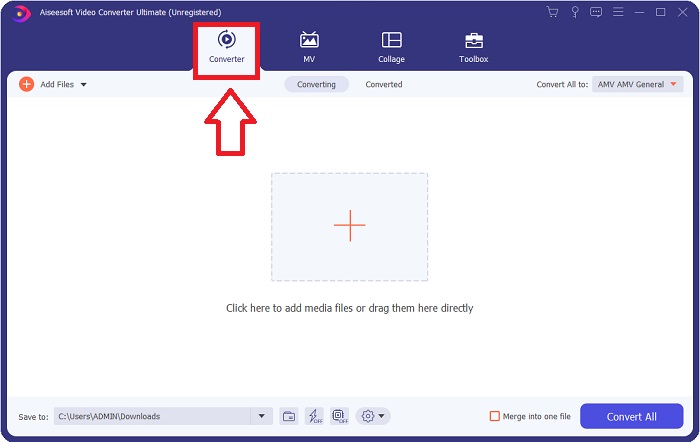
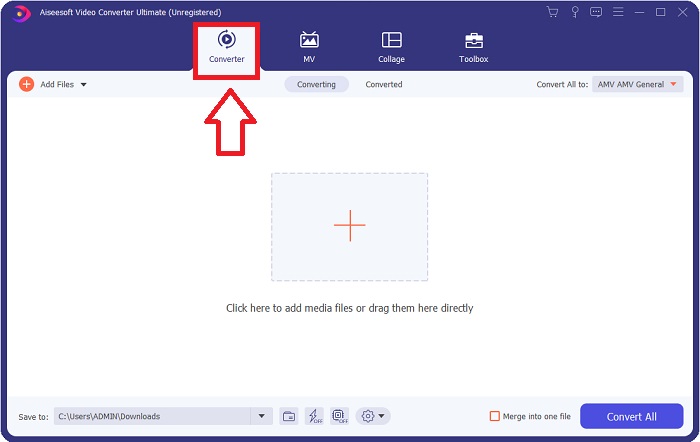
Paso 2: Tras completar la instalación, inicia el software y se abrirá una ventana. Verás una interfaz con pestañas en la parte superior. Inicialmente, estarás en la pestaña Converter y, si no es así, solo tienes que seleccionarla.
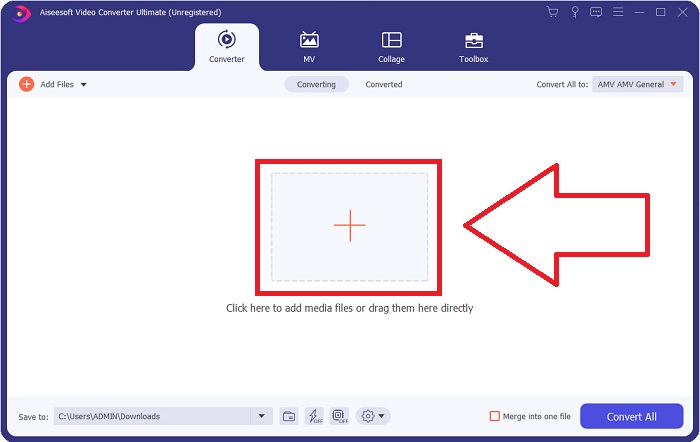
Paso 3: En la interfaz, verás un botón cuadrado con un icono de + en el centro. Haz clic en él para importar el archivo de vídeo que deseas convertir, o simplemente arrástralo y suéltalo sin complicaciones.
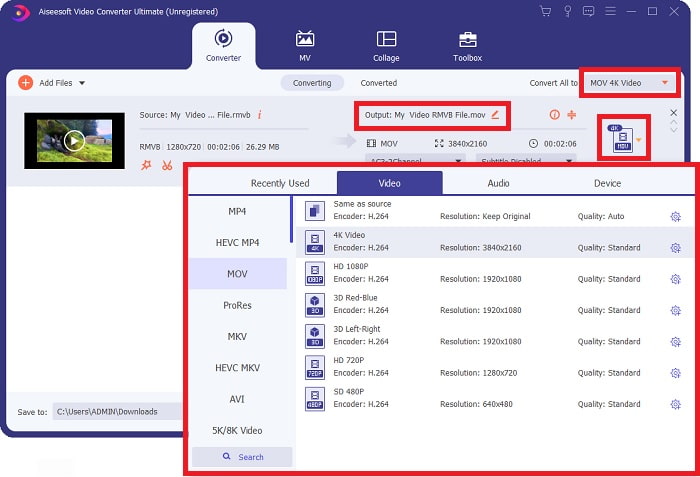
Paso 4: Aparecerá una nueva interfaz que muestra todas las opciones para editar tu vídeo. En la parte derecha es donde eliges el formato que quieres para tu vídeo convertido. Simplemente haz clic en la flecha desplegable y verás todos los formatos disponibles.
En este caso, elige MOV. Además, puedes hacer clic en el icono de engranaje junto a la resolución que hayas seleccionado para editar ajustes como la tasa de fotogramas del vídeo y la frecuencia de muestreo del audio. Para guardar los cambios, haz clic en Create New.
Paso 5: Si has terminado con todas las modificaciones realizadas en tu vídeo, ya puedes iniciar el proceso de conversión haciendo clic en el botón Convert All en la esquina inferior derecha de la ventana.
Parte 3. Otro excelente método para convertir RMVB a MOV [en línea]
Si descargar e instalar software en tu ordenador no es lo tuyo y solo necesitas una conversión puntual para tus películas, aquí tienes una opción totalmente en línea que puedes probar. FVC Free Video Converter Online, una herramienta web que ofrece varias opciones de configuración de vídeo y audio y, al mismo tiempo, te ahorra el tiempo de instalar el programa. Solo son necesarios tres sencillos pasos para terminar el trabajo:
Paso 1: Para comenzar, ve al sitio web, donde encontrarás un botón amarillo en el centro de la página que dice Add Files to Convert. Haz clic en el botón para importar el archivo de vídeo que quieres convertir.
Descarga la versión de escritorio para convertir archivos por lotes.
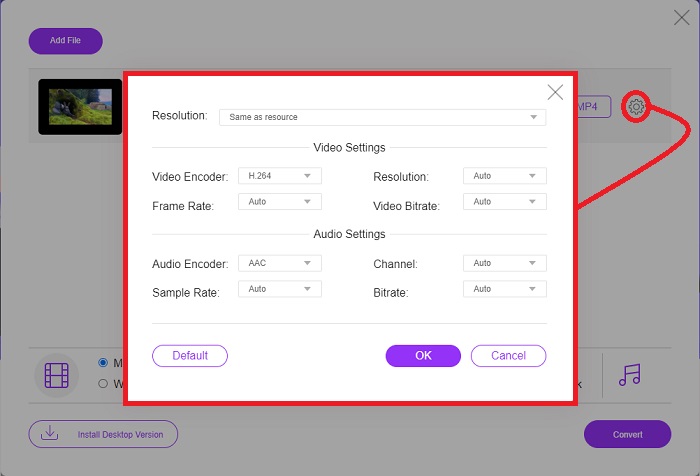
Paso 2: Aparecerá una ventana emergente que muestra el archivo de vídeo que has importado en la parte superior y todos los formatos disponibles en la parte inferior. Como deseas convertir tu archivo RMVB a MOV, selecciona MOV. Para las opciones adicionales, haz clic en el icono de engranaje en el extremo derecho para editar los ajustes de vídeo y audio de las opciones añadidas. Para guardar los cambios, haz clic en OK.
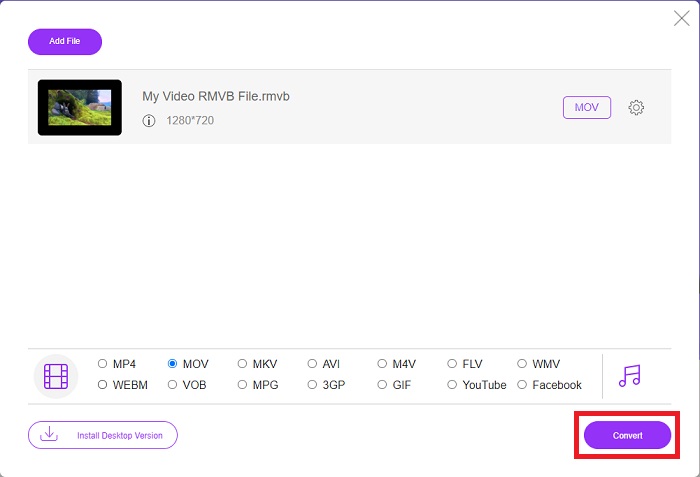
Paso 3: Si todos los cambios realizados se ajustan a lo que necesitas para tu vídeo, ya puedes empezar a convertirlo haciendo clic en el botón Convert en la esquina inferior derecha de la ventana. Selecciona la carpeta en la que quieres que se exporte tu archivo completamente convertido y espera a que finalice.
RMVB frente a MOV
RMVB, una variación más reciente del formato estándar de Real Media (.RM), es un formato de archivo de video de Real Media comprimido con una tasa de bits variable. Es un formato popular para películas asiáticas y anime. Los archivos RMVB son más pequeños y tienen tasas de bits más bajas pero de mejor calidad.
El formato MOV se puede utilizar para almacenar una película, un programa de televisión, un videoclip corto o una película casera. En realidad, se guarda en el formato de archivo QuickTime (QTFF), que fue presentado por Apple en 1991. Los archivos MOV se usan a menudo cuando las personas quieren guardar un video con alta calidad.
Parte 4. Preguntas frecuentes sobre la conversión de RMVB a MOV
¿Qué es exactamente un archivo RMVB?
Cualquier archivo RMVB es un archivo de video de Real Media comprimido con una tasa de bits variable óptima para el contenido del video. Es una versión más nueva del formato de archivo básico Real Media (.RM) que ofrece una mejor compresión.
¿Qué puede reproducir archivos RMVB?
Dado que distintas aplicaciones utilizan archivos con la extensión RMVB por diferentes motivos, necesitarás un software compatible con el tipo concreto de archivo al que intentas acceder. RealNetworks RealPlayer (Windows), VLC media player (multiplataforma) y GRETSCH GOM Player (Windows) son reproductores multimedia gratuitos que pueden reproducir archivos RMVB.
¿Hay algún error posible con los archivos .rmvb?
Si no tiene Real Media Player o cualquier otra herramienta de apertura de archivos adecuada, puede tener problemas para abrir archivos .rmvb si el archivo se corrompe debido a sectores defectuosos en el disco duro o una descarga errónea. Si surgen problemas en el registro del sistema de Windows, donde se almacena la información de asociación de archivos para el archivo .rmvb, puede ocurrir un tercer error.
Conclusión
Elegir si mantener un software o simplemente usar una herramienta en línea para convertir un video no es preocuparse por si se debe usar FVC. Tanto el software como su versión en línea ofrecen las mejores opciones para sus necesidades de conversión. Sin embargo, le recomendamos enfáticamente que descargue Video Converter Ultimate para obtener la caja de herramientas adicional que le proporciona cuando busque más ediciones para su video que no sean solo la conversión. Nunca se sabe cuándo necesita un software para principiantes, por lo que es mejor tenerlo siempre junto a su computadora.
-
 Guía sobre cómo convertir RMVB a MP4 en Windows / Mac (3 formas gratuitas)
 ¿Quiere convertir RMVB a MP4 para una fácil reproducción en su computadora o teléfono móvil? Encontrará formas sencillas de convertir sus archivos RMVB a MP4 en esta guía.
-
 Las 4 mejores aplicaciones gratuitas de conversión de RMVB a FLV en el escritorio o en línea
 Este artículo le dirá el mejor software de conversión de RMVB a FLV y aplicaciones web que pueden convertir archivos RMVB (RealMedia Variable Bitrate) a video FLV.
-
 Cómo convertir MP4 a MOV en Mac / PC / Online
 ¿Cómo convertir MP4 a MOV en Mac? ¿Existe alguna forma gratuita de convertir MP4 a MOV sin pérdida de calidad? Esta publicación comparte 4 formas simples de ayudarlo a realizar la conversión de video de MP4 a MOV en Mac, PC con Windows y en línea.

