


 Video Converter Ultimate
 Grabador de pantalla
 Reparación de vídeo
 Descarga segura
Cómo convertir MP4 a M4A en Windows / Mac (gratis y en línea)
MP4 es un formato de archivo generalizado que se usa con múltiples estaciones y reproductores de video. Los archivos MP4 pueden almacenar video, audio y otros contenidos. Ahora, muchas personas prefieren escuchar la pista de audio del video MP4. Para preservar la calidad, convertir MP4 a M4A es una gran idea. M4A son las siglas de MPEG 4 Audio. La mayoría de los programas pueden reproducir archivos M4A, incluidos iTunes, QuickTime, Windows Media Player y más.

Quizás te preguntes cómo extraer el audio de un archivo MP4. Hay muchas formas de convertir un archivo MP4 en un archivo M4A. Consulta esta publicación para descubrir cómo convertir MP4 a M4A y poder escucharlo más tarde en tus dispositivos móviles.
Parte 1. La mejor forma gratuita en línea de convertir MP4 a M4A sin pérdida de calidad
FVC Free Online Video Converter es un conversor gratuito de archivos MP4 a M4A que puede convertir el formato MP4 no solo a M4A, sino también a otros como MP3, WAV, M4R, WMA, AIFF, AC3, etc. Te permite realizar conversiones por lotes para que puedas convertir varios vídeos MP4 a M4A de forma instantánea. Además, esta herramienta online gratuita también te permite convertir el vídeo MP4 a MOV, AVI, FLV y otros formatos de vídeo.
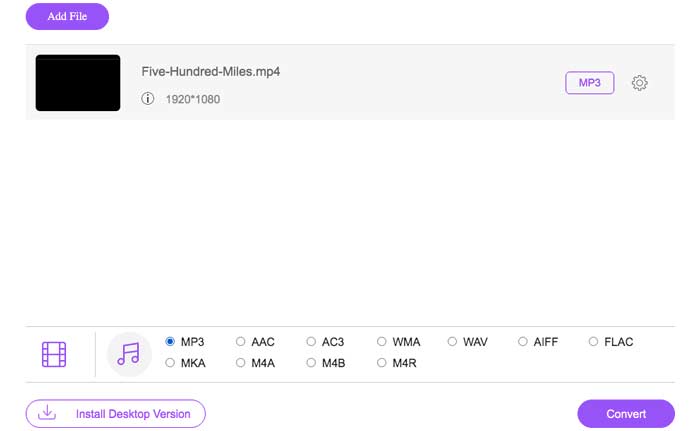
Paso 1. Abre https://www.free-videoconverter.net/free-online-video-converter/ en tu navegador. Haz clic en el botón Add Files to Convert y, a continuación, tendrás que descargar e instalar su lanzador.

Paso 2. Sube el vídeo MP4 que quieres convertir y, después, haz clic en Open para continuar.
Paso 3. Después de subir tus archivos de vídeo a esta aplicación, haz clic en el icono Audio y elige el formato M4A como formato de salida.
Paso 4. Por último, haz clic en el botón Convert en la esquina inferior derecha. Espera un momento y obtendrás tu audio M4A a partir del archivo MP4.
Parte 2. Cómo convertir MP4 a M4A con Free Audio Converter
FVC Free Audio Converter es el software gratuito que le permite convertir archivos MP4 a M4A sin esfuerzo. Es capaz de cambiar cualquier archivo de video o audio a M4A, MP3, WAV, etc. Puede descargarlo e instalarlo en su PC con Windows para iniciar la conversión.
Descarga gratuitaPara Windows 7 o posteriorDescarga segura
Descarga gratuitaPara macOS 10.7 o posteriorDescarga segura
Paso 1. Inicia este conversor de audio en tu ordenador. Haz clic en el botón Add File(s) para subir los archivos MP4 a este programa.

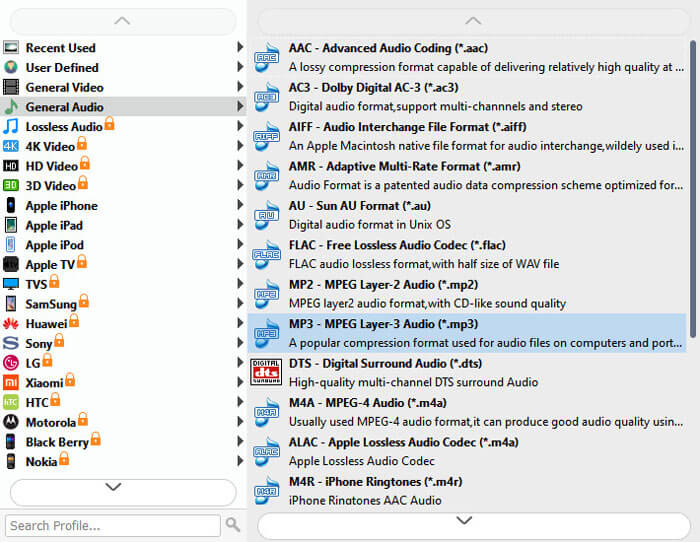
Paso 2. Busca la opción Output formats y elige M4A como formato de salida en la lista desplegable.
Paso 3. Haz clic en el botón Convert para empezar a convertir archivos MP4 a M4A.
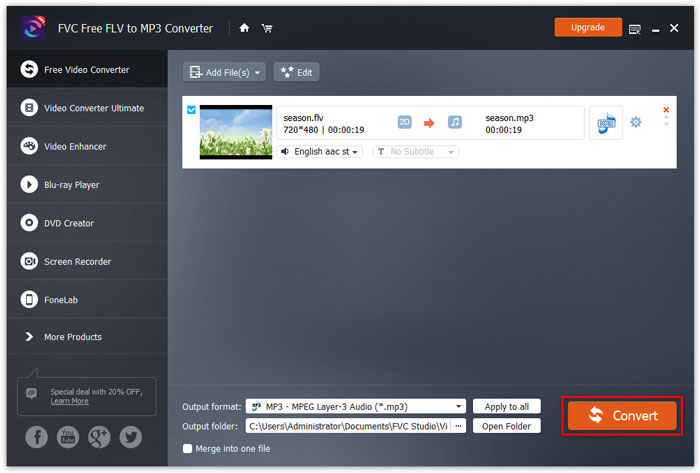
Además de M4A, puedes usarlo para convertir MP4 a MP3, AAC u otros formatos de audio.
Parte 3. Cómo convertir MP4 a M4A usando iTunes
Para convertir MP4 a M4A con iTunes para Windows o Mac, debe cambiar la configuración de importación de iTunes y luego usar la opción de menú Convertir para hacer una copia M4A.
Paso 1. Abre iTunes en tu PC con Windows o en tu Mac.
Paso 2. Elige Edit y, después, haz clic en Preferences en la barra de menús. Luego ve a la pestaña General y haz clic en Import Settings.
Paso 3. Busca y haz clic en el menú junto a Import Using y, a continuación, elige el formato de codificación al que quieres convertir el vídeo. Después, haz clic en OK.
Paso 4. Selecciona las canciones de tu biblioteca que quieras convertir. Después de eso, elige File, luego haz clic en Create New Version y crea la versión en M4A.
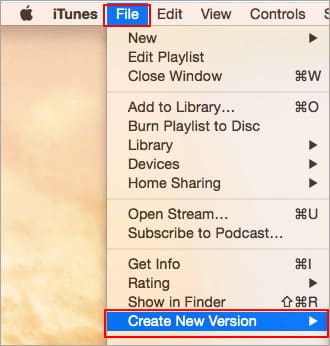
Los archivos de audio convertidos aparecerán en su biblioteca junto a los archivos originales.
Parte 4. Preguntas frecuentes sobre la conversión de MP4 a M4A
1. ¿Qué es el archivo M4A?
Un archivo con la extensión de archivo M4A es un archivo de audio MPEG-4. M4A se puede encontrar a menudo en iTunes Store de Apple como el formato de descarga de canciones.
2. ¿Cómo abrir archivos M4A?
Los programas que abren archivos M4A incluyen iTunes, QuickTime, Windows Media Player, etc. Las tabletas y teléfonos Android, iPhone, iPad y iPod touch también admiten la reproducción de archivos M4A.
3. ¿Cómo fusionar archivos MP4 en línea?
FVC Free Online Video Merger puede ayudarte a fusionar o unir distintos MP4 u otros formatos de vídeo como MOV, AVI, FLV y más, directamente online.
4. ¿Puede Windows Media Player convertir MP4 a M4A?
No. Windows Media Player solo admite la conversión de archivos de video a MP3 o WAV.
Conclusión
Las tres formas anteriores pueden ayudarlo a convertir MP4 en M4A de forma gratuita sin mucho esfuerzo. Si prefiere realizar la conversión en línea, FVC Free Online Video Converter debería ser una excelente opción. Si sus archivos MP4 son de gran tamaño, FVC Free Audio Converter o iTunes serán más confiables para convertir archivos MP4 a M4A.
-
 Cómo convertir MP4 a WMV para Mac / Windows
 Esta publicación comparte cómo convertir videos MP4 a formato WMV en Mac o Windows. También le ofreceremos varias opciones, que incluyen tanto software de escritorio como convertidores en línea basados en la web. ¿Listo para conocer las mejores herramientas de conversión de MP4 a WMV?
-
 Cómo convertir WMV a MP3 en el escritorio y en línea
 Puede encontrar cualquier software de conversión de video gratuito de FVC studio. Se admite cualquier formato de video / audio, incluidos MP4, MOV, TS, AVI, WMV, FLAC, MP3, etc.
-
 Cómo convertir videos AVCHD a MP4 gratis en Windows / Mac / Online
 Hay 5 formas sencillas de convertir videos AVCHD a MP4 en su computadora. Puede convertir por lotes videos AVCHD a MP4 sin perder calidad con cualquier convertidor aquí.
