


 Video Converter Ultimate
 Grabador de pantalla
 Reparación de vídeo
 Descarga segura
MP4 a MXF para reproducir archivos MXF sin problemas en diferentes dispositivos
A veces, ciertos programas de edición de vídeo o sistemas de transmisión prefieren archivos MXF. Si estás lidiando con eso, convertir tus videos MP4 a MXF se vuelve esencial para una reproducción y edición fluidas. Existen algunas herramientas útiles que pueden hacer que esta conversión sea pan comido. Entonces, si tienes curiosidad por abordar esta tarea sin sudar, ¡sigue leyendo!
Vamos a conocer estos fantásticos convertidores de MP4 a MXF y los sencillos pasos que ofrecen para convertir tus archivos MP4 a MXF como un profesional.

Parte 1. Las 5 mejores formas de convertir MP4 a MXF
1. Video Converter Ultimate
Video Converter Ultimate es una herramienta de primer nivel que ofrece una solución fantástica para convertir archivos MP4 a varios formatos de vídeo y dispositivos como iPhone, iPad, Galaxy S6 y muchos más. Su interfaz fácil de usar hace que incluso las personas sin muchos conocimientos técnicos puedan manejarla con total comodidad. Te sorprenderá la velocidad a la que convierte los vídeos, dejando a otros programas muy atrás. Además, el modo por lotes para convertir varios archivos es simplemente increíble. Consulta la guía siguiente para aprender a convertir MP4 a MXF con esta potente herramienta.
Paso 1. Descarga e instala el conversor desde los botones de Descarga gratis que encontrarás más abajo. Una vez instalado, inicia la aplicación en tu ordenador.
Descarga gratuitaPara Windows 7 o posteriorDescarga segura
Descarga gratuitaPara macOS 10.7 o posteriorDescarga segura
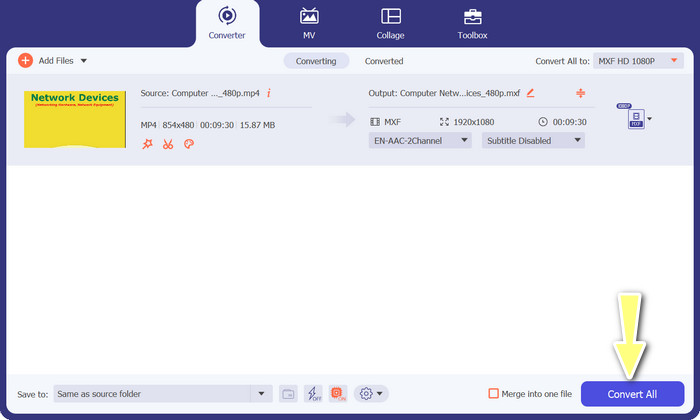
Paso 2. Sube el vídeo MP4 que quieres convertir haciendo clic en el botón con el signo Más o usando la barra espaciadora para abrir la carpeta de tu ordenador. Busca y selecciona el vídeo de destino.
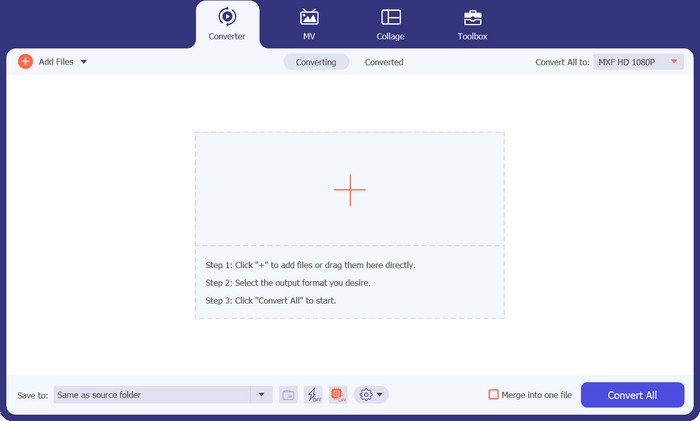
Paso 3. Elige MXF como formato de salida. Simplemente despliega la lista Perfil en la esquina superior derecha, ve a la pestaña Vídeo y busca MXF. También puedes usar la barra de búsqueda para encontrarlo rápidamente. Elige la calidad deseada para tu archivo de salida.
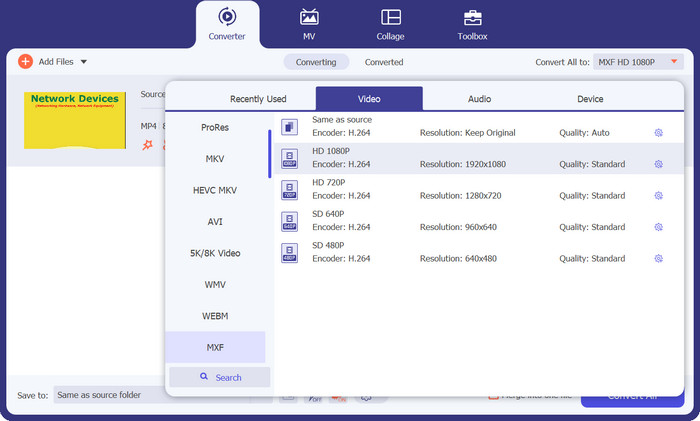
Paso 4. ¡Listo para convertir! Haz clic en el botón Convertir todo en la esquina inferior derecha y ¡voilà! Tu archivo convertido se guardará automáticamente en la carpeta de tu ordenador.
2. Convertidor MP4 gratuito en línea
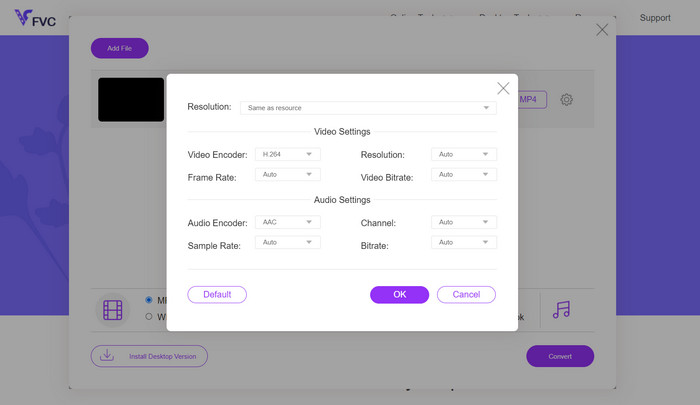
Si estás buscando un conversor MP4 online fiable para convertir MP4 a MXF en línea, prueba Free MP4 Converter Online. Esta página web ofrece una plataforma segura y fiable para subir tus archivos MP4 y convertirlos a MXF u otros muchos formatos. Puedes estar tranquilo: las conversiones mantienen una calidad alta y constante en cada uso. Además, tienes la opción de personalizar la conversión editando el códec de vídeo y el ajuste preestablecido. Pruébalo y podrás adaptar las conversiones exactamente a tus necesidades.
Paso 1. Entra en su página web usando tu navegador. No necesitas descargar nada; simplemente ábrela como cualquier otro sitio web.
Paso 2. Haz clic en el botón Añadir archivos para convertir o arrastra y suelta tu vídeo MP4 sobre la página. Empezará a procesar tu archivo y verás una barra de progreso.
Paso 3. Una vez completada la carga, busca la opción y selecciona MXF en la lista. Si hay un ajuste de calidad, elige el que prefieras. Pulsa el botón Convertir y ¡que empiece la magia!
3. FreeFileConvertir
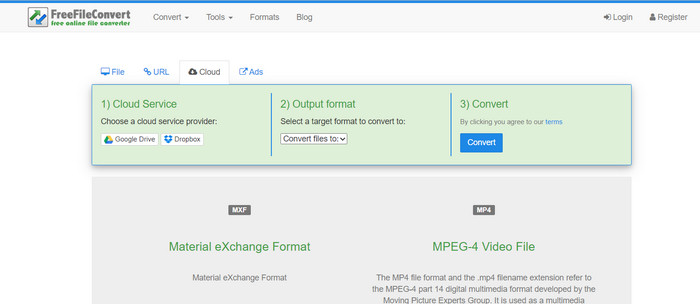
¿Busca otro conversor de MXF a MP4 gratuito? ¡Dale una oportunidad a FreeFileConvert! Esta plataforma fácil de usar sigue un proceso simple de tres pasos y ofrece una interfaz fácil de navegar para ayudarlo a convertir sus videos sin problemas. Simplemente visite su sitio web, cargue su archivo desde su computadora, seleccione el formato de salida deseado y presione convertir. No solo puedes cargar archivos desde tu computadora, sino que también tienes la opción de cargarlos desde tu cuenta de Dropbox o Google Drive.
Paso 1. Abre tu navegador web y ve a la página de FreeFileConvert. No hace falta instalar nada, igual que cuando visitas cualquier sitio web normal.
Paso 2. Haz clic en el botón Elegir archivo. También puedes subir desde Dropbox o Google Drive si te resulta más cómodo.
Paso 3. En el menú desplegable Formato de salida, busca MXF y selecciónalo como formato deseado. Después, haz clic en el botón Convertir y deja que FreeFileConvert haga su magia.
4. Cualquier Conv.
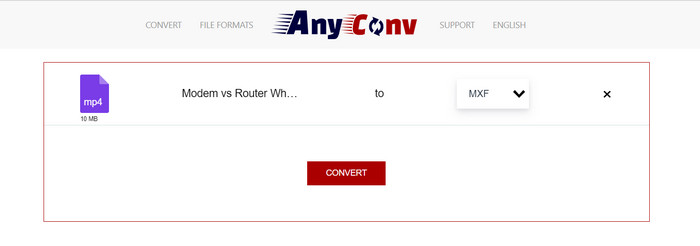
¿Busca una herramienta en línea para convertir MP4 a MXF? ¡No busques más que AnyConv! Como los demás, no requiere ninguna instalación. Además, no se limita sólo a MP4 a MXF; ¡También puede manejar otras conversiones de formatos! ¿La mejor parte? No es necesario registrarse para recibir el servicio completo: es sencillo. Simplemente sigue los pasos a continuación y tendrás tu conversión de MP4 a MXF realizada en poco tiempo. Pan comido.
Paso 1. Abre la página web de AnyConv con cualquier navegador.
Paso 2. Pulsa el botón CHOOSE FILES para subir tu vídeo MP4. Luego despliega el menú Perfil y busca el formato MXF.
Paso 3. ¿Listo para convertir? Haz clic en el botón azul Convert y se iniciará el proceso de conversión.
5. Convertio
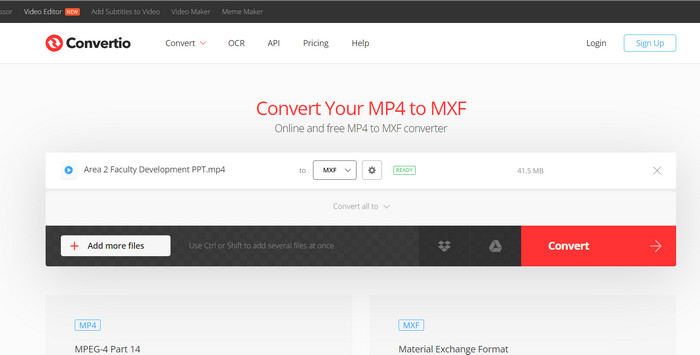
¡Llamando a todos los usuarios que quieran un conversor de archivos sin necesidad de descargar aplicaciones adicionales! Convertio lo tiene cubierto. Con esta herramienta, convertir MP4 a MXF en línea es muy sencillo sin la molestia de modificar configuraciones complicadas. ¿La mejor parte? Admite varios formatos de archivos multimedia, incluidos documentos, archivos, hojas de cálculo, presentaciones y más.
Paso 1. Elige un navegador en tu ordenador y ve a la página oficial de la herramienta.
Paso 2. En la interfaz principal del programa, haz clic en el botón Choose Files para subir tus archivos MP4. Como alternativa, para mayor comodidad, también puedes arrastrar y soltar el archivo de vídeo.
Paso 3. Busca el menú Profile y selecciona el formato MXF en la sección Video. Luego, haz clic en el botón Convert para poner en marcha el proceso de conversión.
Lecturas recomendadas:
4 formas gratuitas de convertir MXF de videocámara a MP4 para una reproducción universal
[Guía] 2 métodos definitivos para unir vídeos MXF de la Sony X70
Parte 2. Preguntas frecuentes sobre MP4 a MXF
¿Qué es un archivo MXF?
Un archivo MXF es una extensión de archivo que representa el formato Material Exchange, que sirve como contenedor para contenido de audio y video profesional estándar. Se utiliza comúnmente en retransmisiones televisivas y teatrales debido a su capacidad para mantener vídeo de alta calidad. En esencia, MXF actúa como una alternativa al almacenamiento de vídeos reales en formato digital, lo que lo convierte en la opción preferida para manejar contenido de vídeo profesional.
¿Puedo convertir MXF a MP4?
¡Absolutamente! Con herramientas como Video Converter Ultimate, convertir MP4 a MXF o viceversa es muy sencillo. Tiene la flexibilidad de probar ambas opciones y ver cuál funciona mejor para usted.
¿Cómo abro un archivo MXF?
Cuando se trata de abrir archivos MXF, VLC Media Player es una opción de primer nivel. Esta utilidad multimedia liviana y multiplataforma se destaca en la visualización de archivos multimedia de todo tipo.
¿Cuáles son los posibles inconvenientes de convertir MP4 a MXF?
La conversión de MP4 a MXF puede generar archivos de mayor tamaño debido a los diferentes métodos de compresión utilizados en MXF. Además, algunas herramientas pueden requerir una conexión a Internet estable para la conversión en línea.
¿Puedo editar los archivos MXF después de la conversión?
Sí, después de convertir MP4 a MXF, puede editar los archivos MXF utilizando un software de edición de video compatible. Los archivos MXF cuentan con el respaldo de herramientas de edición de video profesionales y sistemas de edición no lineal.
Conclusión
Tanto si necesitas convertir MP4 a MXF, abrir archivos MXF o trabajar con cualquier formato de vídeo, hay herramientas fáciles de usar que hacen que el proceso sea muy sencillo. Gracias a estas potentes y versátiles herramientas, puedes moverte por el mundo de las conversiones de vídeo sin esfuerzo y disfrutar de una reproducción multimedia sin complicaciones.
-
 Cómo comprimir MXF con Premiere Pro y Free Online
 ¿Cómo comprimir MXF con un tamaño de archivo más pequeño? ¿Cómo comprimir archivos MXF en Adobe Premiere Pro? Esta publicación comparte 2 formas de comprimir archivos MXF.
-
 Las 4 mejores soluciones para convertir MXF a MKV [resuelto]
 Conozca estos cuatro excelentes métodos para convertir MXF a MKV en línea y fuera de línea fácilmente. Las aplicaciones incluidas en esta publicación pueden ayudarlo a convertir archivos sin problemas.
-
 Cómo convertir MP4 a MPG en el escritorio y en línea fácilmente
 Aprenda cómo convertir su MP4 favorito a MPG con pasos simples. Sin dolores de cabeza tecnológicos, solo transiciones suaves para sus archivos multimedia.
