


 Video Converter Ultimate
 Grabador de pantalla
 Reparación de vídeo
 Descarga segura
Convertidor de WTV a MP4: Cómo convertir WTV a MP4
WTV, como sucesor del formato DVR-MS, es desarrollado por Microsoft para almacenar contenido de TV grabado por Windows Media Center. Codificado con el estándar MPEG-2 y MPEG-4 y MPEG-1 Layer II o Dolby Digital AC-3, WTV es compatible con pocos programas como FFMPEG, Windows Media Center, CyberLink PowerDVD 12, Nero 12, HandBrake, CCextractor, etc.

Si quieres ver o compartir archivos WTV cómodamente, es mejor que conviertas WTV a MP4, el formato más popular y compatible con casi cualquier dispositivo.
Hemos buscado en Internet un conversor de WTV a MP4 y hemos encontrado los 2 mejores conversores WTV a MP4 gratuitos para pasar WTV a MP4.
Parte 1. Convertidor de video gratuito - Convierta WTV a MP4 en línea
Convertir WTV a MP4 es muy sencillo. La forma más fácil de cambiar WTV a MP4 es hacerlo en línea. Free Online Video Converter es un programa gratuito para convertir WTV a MP4 y a otros formatos de vídeo y audio muy utilizados. Esta herramienta online gratuita es compatible con Windows 10/8/7 y Mac OS X 10.7 o superior, y puedes transcodificar WTV a MP4 fácilmente en unos pocos pasos.
Para agilizar el proceso, puede seguir la guía:
1. Haz clic en el botón Add Files to Convert para subir los archivos WTV desde el PC.
2. Selecciona MP4 en la casilla de verificación.
3. Haz clic en Convert para convertir y descargar automáticamente los archivos WTV.
Ahora, estamos aquí para guiarlo en cómo convertir WTV a MP4 en detalle.
Paso 1. Añadir archivos WTV
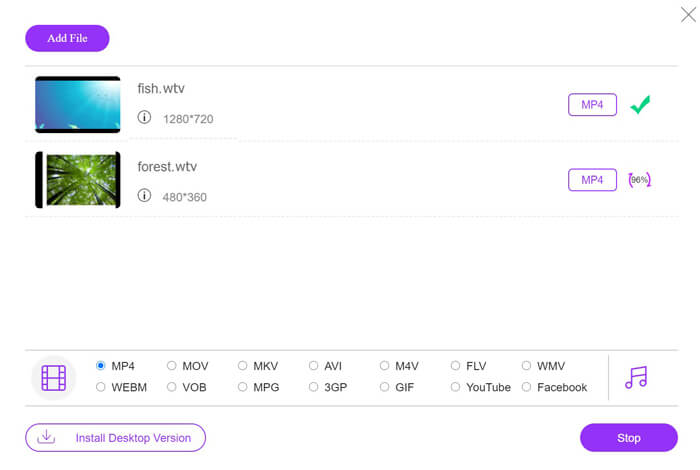
Abre este conversor online gratuito de WTV a MP4 en tu navegador. Haz clic en el botón Add Files to Convert y aparecerá una ventana emergente indicándote que descargues e instales el lanzador. Descárgalo y, tras la instalación correcta, se abrirá la ventana de código abierto. Entonces podrás seleccionar las grabaciones WTV en tu ordenador para subirlas. Este programa gratuito admite la conversión por lotes y puedes añadir más de un archivo WTV en línea.

Paso 2. Seleccionar MP4
Marca la casilla de MP4 en la parte inferior, donde encontrarás varias opciones de salida como MKV, AVI, M4V, FLV, VOB, GIF, YouTube, Facebook, MP3, AAC, WMA, WAV, FLAC, etc.
Además, puedes hacer clic en el icono de Settings junto al panel de salida MP4 para ajustar el códec, la velocidad de fotogramas, la resolución, la tasa de bits y otros parámetros.

Paso 3. Convertir WTV a MP4
Cuando todo esté listo, haz clic en el botón Convert y aparecerá una ventana en la que tendrás que elegir la carpeta de destino para guardar los archivos MP4 convertidos. Elige el destino y vuelve a este conversor online gratuito, haz clic en Convert de nuevo para empezar a convertir y descargar automáticamente los archivos MP4. Podrás ver directamente el porcentaje de progreso de la conversión.
Parte 2. HandBrake - Convertir WTV a MP4 en PC / Mac
Otra forma gratuita de convertir WTV a MP4 es utilizando HandBrake. HandBrake es el único software que puede leer archivos WTV. Además, también puede transcodificar WTV a MP4 / MKV en su computadora Windows y Mac.
HandBrake es el software de escritorio de código abierto, por lo que primero debe descargar este convertidor gratuito en su computadora.
Nuevamente, los sencillos pasos para convertir WTV a MP4 en HandBrake son los siguientes:
1. Agregue los archivos WTF o la carpeta completa en HandBrake.
2. Perfil MP4 personalizado en HandBrake.
2. Obtenga una vista previa y convierta WTV a MP4.
Aquí está la guía completa para cambiar WTV a MP4 en HandBrake.
Paso 1. Añadir archivos WTV a HandBrake
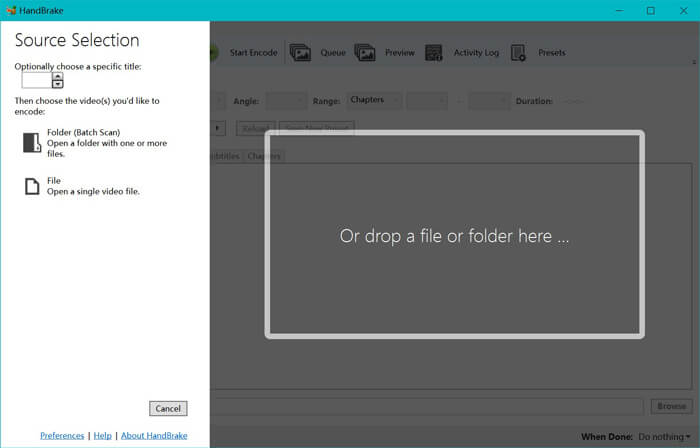
Una vez que hayas instalado HandBrake en tu ordenador, HandBrake mostrará por defecto el cuadro de diálogo de código abierto. Aquí puedes hacer clic en Folder o File para seleccionar los archivos o la carpeta WTV en la ventana principal. Como alternativa, también puedes arrastrar y soltar los archivos WTV en este software.
Paso 2. Seleccionar formato MP4
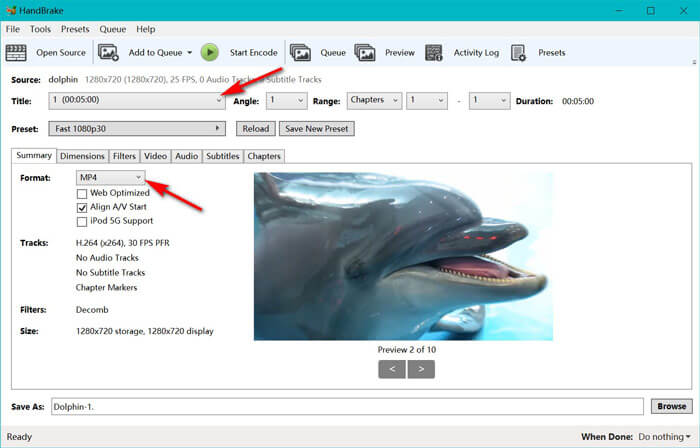
Cuando hayas cargado los archivos WTV, podrás seleccionar el archivo WTV exacto desde la opción desplegable Title. Luego selecciona MP4 en la pestaña Summary como salida para el archivo WTV seleccionado. Además, HandBrake te permite ajustar las dimensiones, filtros, códec/calidad de vídeo, pista de audio, etc. No solo MP4, también puede convertir otros formatos como AVI, MOV, M2TS, etc., a MKV.
Paso 3. Previsualizar y convertir WTV a MP4
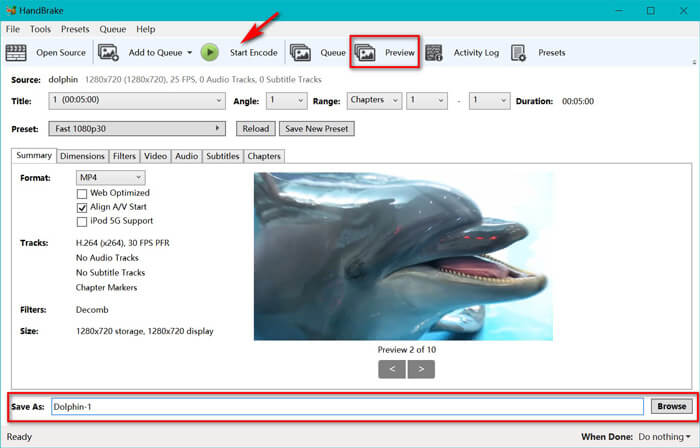
La función Preview de HandBrake en la barra de herramientas te permite ver cómo se verá tu nuevo vídeo MP4 antes de codificarlo. Cuando tengas todos los ajustes a tu gusto, pon un nombre a los archivos MP4 convertidos y selecciona la ubicación de tus nuevos vídeos haciendo clic en el botón Browse en la parte inferior. Por último, solo tienes que hacer clic en el botón Start Encode de la barra de herramientas para convertir WTV a MP4.
Parte 3. Preguntas frecuentes de WTV a MP4
¿Por qué HandBrake guarda MP4 como M4V?
Para archivos MP4, HandBrake utilizará automáticamente los archivos MP4 con la extensión M4V, cuando elija audio AC3 y subtítulos SRT o tenga marcadores de capítulo para personalizar el archivo MP4. Pero puede cambiar la extensión .m4v a .mp4 directamente.
¿Puede el reproductor VLC reproducir archivos WTV?
VLC no puede reproducir archivos WTV directamente. Debe instalar el paquete de códigos K-Lite para instalar el paquete de códigos WTV y luego reproducir archivos WTV en VLC.
¿Puedo convertir archivos WTV protegidos?
Sí tu puedes. Sin embargo, solo MCEBuddy admite la edición y conversión de archivos WTF comerciales protegidos. Debe utilizar este software para copiar y convertir los archivos WTV protegidos.
Conclusión
Para utilizar convenientemente los archivos WTV grabados de Windows Media Center, primero debe convertir WTV a MP4. Esta publicación comparte 2 formas gratuitas de convertir WTV a MP4 en línea a través de Free Online Video Converter y HandBrake. Free Online Video Converter te permite convertir WTV a MP4 y otros formatos populares, mientras que HandBrake te brinda más controles de edición con opciones de formato de salida limitadas.
¿Cuál es tu camino preferido?
¿O tal vez tienes un mejor conversor de WTV a MP4?
De cualquier manera, me gustaría saber de ti. Entonces, continúe y deje un comentario a continuación.
-
 Cómo convertir MXF a MP4 a través de Free Converter
 Esta publicación es la guía detallada para convertir MXF a MP4 en la computadora. Puede obtener 4 convertidores MXF a MP4 gratuitos para transcodificar la videocámara MXF a MP4 en sencillos pasos.
-
 Las 3 mejores formas de convertir gratis MP4 a MOV
 ¿Cómo convertir MP4 a MOV en Mac? ¿Existe alguna forma gratuita de convertir MP4 a MOV sin pérdida de calidad? Esta publicación comparte 3 formas sencillas de ayudarlo a realizar la conversión de video de MP4 a MOV en Mac, PC con Windows y en línea.
-
 Cómo convertir M2TS a WMV en Windows / Mac / Online (de uso totalmente gratuito)
 Aquí hay 3 formas fáciles de convertir videos M2TS a WMV. Puede cambiar el formato de video de M2TS a WMV de forma gratuita en Windows, Mac y en línea rápidamente. Se admite la conversión por lotes.
