


 Video Converter Ultimate
 Grabador de pantalla
 Reparación de vídeo
Revisión exhaustiva del software de grabación de audio para grabar audio de manera efectiva
Si eres un experto o un aficionado, debes contar con un software de grabación de audio para manipular y pulir el audio según el uso que quieras darle. Además, elegir una grabadora de audio adecuada para tu dispositivo puede resultar complicado porque hay muchas opciones disponibles en el mercado. En lugar de probar varios programas de grabación de audio, te presentamos las cuatro grabadoras que hemos considerado más adecuadas para tus necesidades, evitando así que tengas que descargar o usar software malicioso. La siguiente lista de grabadoras de audio se ha filtrado minuciosamente para ofrecerte solo las mejores opciones y no grabadoras de bajo rendimiento.

Parte 1. Los 4 mejores programas de grabación de audio en Windows y macOS
1. Grabador de pantalla FVC
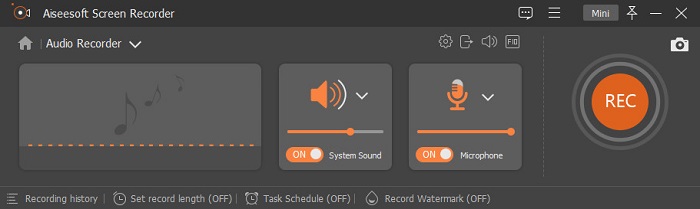
¿Necesitas grabar el audio del ordenador pero no sabes qué usar? Si ese es el caso, te presentamos la mejor y, con diferencia, la grabadora más elegida del mercado, FVC Screen Recorder. Tiene una interfaz de usuario excelente que permite interactuar con el software sin complicaciones. Además, muchos usuarios suelen tener problemas con el ruido de fondo, así que, gracias a su nueva función de cancelación de ruido, podrás grabar sin molestias por pequeños ruidos ambientales. Asimismo, incluye múltiples funciones que te ayudarán a grabar de forma eficaz. ¿Quieres saber cuáles son? En ese caso, hagamos un recorrido por las funciones clave de FVC Screen Recorder.

Grabador de pantalla
4,988,518+ Descargas- Graba sonidos con una calidad de audio ultra alta.
- Grabe audio las 24 horas del día, los 7 días de la semana, siempre que tenga suficiente almacenamiento en el disco de su computadora.
- Puede grabar el sonido del sistema con un micrófono al mismo tiempo.
- La mejora del micrófono está disponible para una experiencia mucho mejor al grabar su voz.
- Puede verificar el audio del micrófono si es necesario.
Descarga gratuitaPara Windows 7 o posteriorDescarga segura
Descarga gratuitaPara macOS 10.7 o posteriorDescarga segura
Pros
- El programa permite a los usuarios experimentar una gran emoción al grabar audio en Mac o Windows.
- Las funciones básicas de edición están disponibles, como cortar o recortar el audio.
- Tiene un historial de grabación incorporado para encontrar fácilmente el audio grabado.
Contras
- No admite la adición de efectos en el audio durante la grabación.
- Compra antes de usar.
2. Audacia
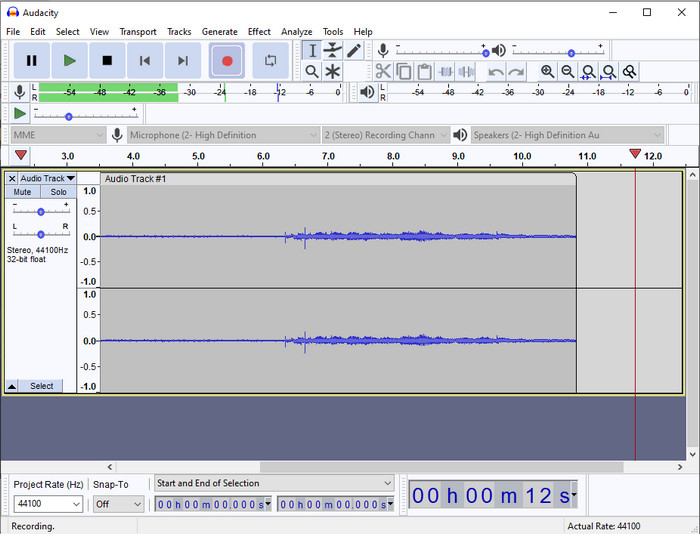
Si necesitas una herramienta profesional para gestionar tus grabaciones de audio, entonces Audacity te será de gran ayuda. Este grabador de audio profesional ya ha ayudado a millones de podcasters en su proceso de grabación. Si necesitas un grabador avanzado y gratuito, este es uno de ellos. Aunque ofrece funciones de grabación profesional, sigue siendo difícil familiarizarse con la herramienta debido a su mala interfaz gráfica. Aunque responde bien a las necesidades de grabación profesional, algunas de sus funciones aún deben mejorarse, como la cancelación de ruido. Aun así, Audacity graba el audio del ordenador de una forma profesional que no todos los grabadores pueden ofrecer.
Pros
- Gratis para descargar en todas las plataformas de escritorio.
- Ofrece funciones de edición expertas para profesionales.
- Tiene algunas funciones avanzadas que necesitará para crear un podcast.
Contras
- La GUI del software está desactualizada.
- Una actualización necesita algunas de sus características.
- No es la mejor opción para aficionados y aquellos que no saben grabar.
3. Reproductor de QuickTime
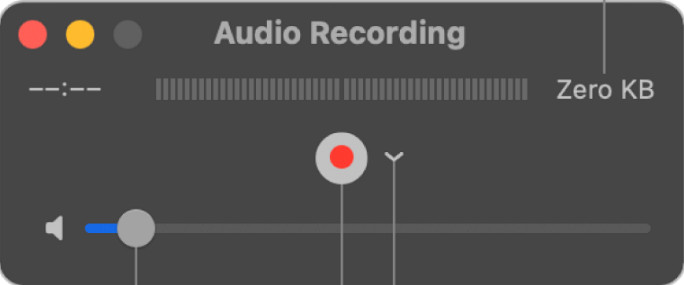
El QuickTime Player también puede utilizarse como grabadora de audio en Mac si lo necesitas. Aunque el reproductor no es tan eficaz ni tan eficiente para grabar, notarás retrasos y una calidad menor en el audio de salida. Sin embargo, si necesitas hacer una grabación rápida de audio en tu Mac, es una opción válida porque no tendrás que descargar nada y es, sin duda, seguro de usar. Pero si eres un profesional que busca el mejor software de grabación de audio, esta no es la herramienta ideal.
Pros
- Ya está disponible en todos los macOS.
- Gratis, seguro y fácil de usar.
Contras
- No es tan eficaz como la otra grabadora de audio de esta lista.
- La calidad de salida final del audio es baja.
- No es la mejor opción para la grabación y edición profesional.
Relacionado:
Cómo grabar la pantalla con audio en Mac usando QuickTime
Cómo convertir QuickTime a MP4
4. Oceanaudio
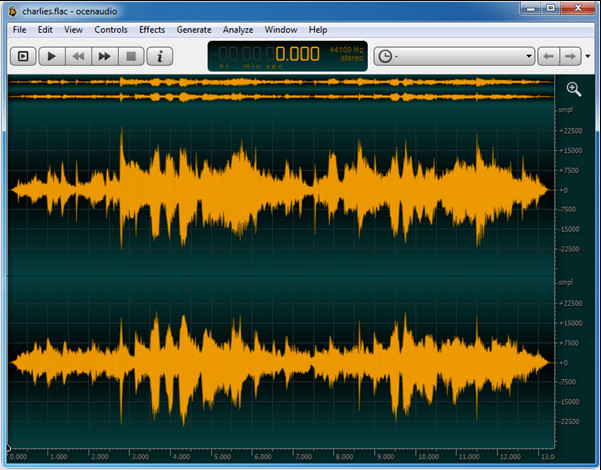
Si necesitas una grabadora multipropósito para grabar audio en Windows 10 o versiones posteriores, entonces Oceanaudio te será de ayuda. Esta herramienta tiene una interfaz muy similar a la de Audacity, pero la GUI de esta aplicación es más fácil de comprender. Para explicarlo mejor, esta grabadora ofrece complejidad y varias funciones que necesitarás al grabar audio. Aunque es algo difícil de usar y será necesario que veas un tutorial para aprender a manejarla, al final del día merece la pena. Así que, si necesitas un editor con una interfaz mejor que la de Audacity, esta debería ser tu elección.
Pros
- Utiliza tecnología avanzada para la grabación.
- Es una opción experta para hacer grabaciones de audio.
- Puede escuchar su voz mientras graba.
Contras
- No es fácil de usar.
- Los principiantes pueden confundirse al usar esta herramienta.
Parte 2. Cuadro comparativo sobre el software de grabación de audio
| Características | Grabador de pantalla FVC | Audacia | Reproductor de Quicktime | Ocenaudio |
| Sistema de grabación de sonido y micrófono |  | | | |
| Edita la grabación | | |  | |
| Aceleracion de hardware | | | | |
| Preescucha en tiempo real | | | | |
| Guarde la calidad original | | | | |
| Mejor interfaz de usuario | | | | |
Parte 3. Preguntas frecuentes sobre el software de grabación de audio
¿Es Cinch Audio Recorder la mejor grabadora de audio?
Recientemente hemos realizado un análisis sobre Cinch Audio Recorder. Así que, si quieres saber más sobre este grabador de audio, debes hacer clic en este enlace y conocer información más detallada sobre la herramienta.
¿Cuáles son las cualidades de una buena grabadora de audio?
Deberá conocer los estándares básicos antes de elegir una buena grabadora de audio. Primero, debería poder capturar el audio en su micrófono con facilidad. En segundo lugar, es seguro y está libre de malware. En tercer lugar, si necesita comprar la herramienta, la herramienta en sí debe brindar excelencia a los usuarios. Cuarto, la tasa de eficacia significa que la herramienta debe ser muy efectiva en una grabación. En quinto lugar, las funciones básicas o avanzadas deben estar disponibles para ayudar a los usuarios a registrar. Antes de elegir una grabadora de audio para ayudarte, puedes confiar en estos estándares.
¿Cómo grabar audio en Windows 10?
Antes de grabar en Windows 10, debes elegir la mejor grabadora, como FVC Video Recorder, descargándola en tu ordenador, instalando la herramienta de inmediato y ejecutándola. A continuación, elige la opción Audio Recorder y haz clic en ella. Ahora puedes añadir fácilmente el sonido del sistema a tu grabación o el micrófono activándolos en la barra de herramientas flotante. Cuando estés listo para grabar, haz clic en el botón rojo redondo para empezar. Si necesitas detener la grabación, haz clic en el botón cuadrado para parar; después de eso, aparecerá una nueva interfaz que te mostrará la lista de grabaciones de audio que has realizado.
Conclusión
Hoy en día ya conocemos el software de grabación de audio disponible en tu ordenador. Todas las herramientas presentadas aquí te ayudarán con tus grabaciones. Sin embargo, si buscas una grabadora que supere al resto, FVC Screen Recorder puede ser la indicada para ti. ¿Sigues dudando de esta grabadora de audio? En ese caso, descargarla es la única manera de probarla y comprobar si funciona tal como explicamos en este artículo.
-
 Los 4 mejores grabadores de sonido AIFF gratuitos que producen audio de alta calidad
 Este artículo habla sobre AIFF y algunas de las herramientas más populares que puede usar para producir un formato AIFF de alta calidad.
-
 3 de las mejores técnicas sobre cómo grabar audio en iPhone
 ¿Tiene dificultades porque no puede grabar audio correctamente en iPhone? Entonces lee este artículo para saber cómo grabar audio en iPhone y cuáles son las herramientas disponibles.
-
 7 de las magníficas grabadoras de voz accesibles en todas las plataformas
 ¿Quieres aprender a hacer grabaciones de audio? Luego vaya a este artículo mientras hablamos sobre la mejor grabadora de audio que puede adaptarse a sus necesidades.
