


 Video Converter Ultimate
 Grabador de pantalla
 Reparación de vídeo
 Descarga segura
100% Formas gratuitas de comprimir el tamaño del archivo M4V de GB a MB
El formato de archivo M4V, similar a MP4, es un gran contenedor de video producido por Apple. Puede reproducir archivos M4V en casi todos los reproductores populares, como iTunes, QuickTime, VLC Media Player, RealPlayer y más. Pero a veces, puede encontrar que su video M4V es demasiado grande para almacenar o compartir. En esta situación, debe reducir el tamaño del archivo.
Si no sabes cómo comprimir M4V, puedes probar las opciones siguientes.

Parte 1. Cómo comprimir M4V online gratis
Como mencionamos, puede ser un poco difícil editar y compartir un archivo de video grande en YouTube, Facebook, Instagram u otros sitios de transmisión. Porque estos sitios suelen tener una limitación estricta de tamaño en el video que subes. Además, los archivos grandes pueden ocupar mucho espacio en su computadora, unidad de disco, teléfono, unidad flash, tarjeta de memoria, etc.
Por lo tanto, cuando tengas un archivo M4V grande, es mejor reducir su tamaño con un compresor de vídeo profesional. Si estás buscando un programa gratuito, ¿por qué no pruebas FVC Free Video Compressor? Es totalmente gratuito. Además, es una herramienta de compresión en línea, lo que significa que puedes comprimir cualquier vídeo al tamaño deseado sin instalar un software pesado en tu ordenador.
Puede usarlo en cualquier navegador convencional como Google Chrome, Mozilla Firefox y Microsoft Edge. Y no se agregará ninguna marca de agua al video comprimido. Incluso puede disfrutar del video con alta calidad de imagen.
Estos son los pasos sobre cómo comprimir archivos M4V grandes en línea.
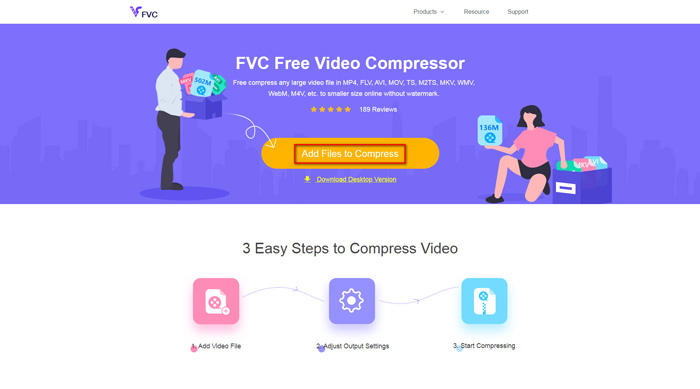
Paso 1. Ve al sitio web de FVC Free Video Compressor en tu navegador. Verás un botón Add Files to Compress en el banner. Haz clic en él y sigue las instrucciones para descargar e instalar el lanzador de FVC en tu ordenador.
Paso 2. Después de eso, tienes que seleccionar el archivo M4V que quieres comprimir. Luego puedes mover el control deslizante que hay detrás del cuadro de Size para ajustar y encontrar fácilmente el tamaño de archivo exacto que deseas. También puedes cambiar la resolución y la tasa de bits por separado según tus necesidades.
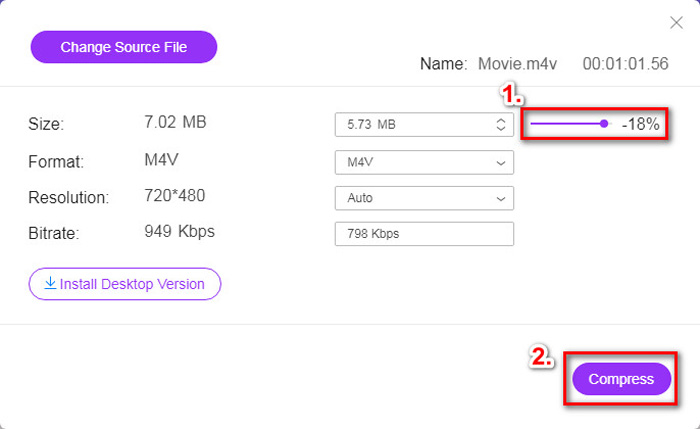
Paso 3. Si quieres comprimir M4V a MP4, entonces debes elegir MP4 como formato de salida aquí. Si no, puedes hacer clic directamente en Compress en la esquina derecha. Elige una carpeta para guardar el vídeo comprimido y espera unos segundos para obtener el vídeo deseado.
Parte 2. Cómo reducir el tamaño del archivo M4V en Mac / Windows
Como M4V es un formato desarrollado por Apple, también puedes usar el reproductor predeterminado de Apple, QuickTime Player, para comprimir archivos M4V en Mac. Además, QuickTime Player ofrece una versión para Windows para usuarios de PC. Pero debes tener en cuenta que la última versión para Windows es QuickTime 7.7.9, que se lanzó en 2016. Así que, si lo que quieres es un programa más reciente, puedes probar FVC Free Video Compressor, que incluso puede manejar vídeos 4K.
De todos modos, siga los pasos a continuación para reducir el tamaño del archivo M4V en QuickTime.
Paso 1. Abre con QuickTime el archivo M4V que está pendiente de comprimir.
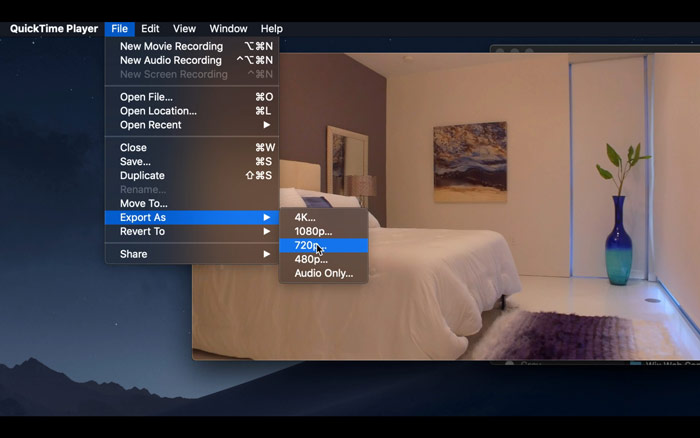
Paso 2. Localiza el menú File en la esquina superior izquierda. Haz clic en él y busca la opción Export As en la lista. Luego elige una resolución más baja que la del vídeo original para comprimir el vídeo. Al fin y al cabo, no queremos aumentar el tamaño aquí.
Paso 3. Si no quieres cambiar la ruta de guardado, puedes hacer clic directamente en Save. Espera pacientemente a que se exporte el vídeo.
Parte 3. Preguntas frecuentes sobre la compresión de M4V
1. ¿Puedo simplemente cambiar el nombre de M4V a MP4?
No, si con eso te refieres a convertir M4V a MP4 cambiando la extensión a .mp4. Porque su codificación no es la misma. Debes recurrir a una herramienta más profesional para convertir M4V a MP4.
2. ¿YouTube acepta el formato M4V?
Lamentablemente, YouTube solo admite una cantidad limitada de formatos de archivo que no incluyen M4V. Por lo tanto, si desea cargar su video M4V a YouTube, debe convertirlo a un formato compatible con YouTube como MP4.
3. ¿Cómo fusionar varios videos M4V en uno?
Si tienes varios archivos de vídeo M4V que necesitas combinar en uno solo, puedes probar FVC Free Online Video Merger para unir varios archivos de vídeo.
Conclusión
Ahora ya tienes 2 formas sencillas y gratuitas de comprimir archivos M4V. Si eres usuario de Mac, puedes usar QuickTime Player para reducir el tamaño del vídeo. Pero si no estás satisfecho con las resoluciones fijas que ofrece QuickTime o utilizas un PC con Windows, puedes darle una oportunidad a FVC Free Video Compressor.
-
 Convertidor de M4V a MP3: 4 mejores métodos para extraer MP3 de archivos M4V
 Cuando desee extraer el audio MP3 de videos M4V con facilidad, puede obtener más información sobre los 4 mejores convertidores M4V a MP3 para obtener los archivos de audio deseados del artículo.
-
 4 formas de convertir películas QuickTime a MP4 gratis en el teléfono / computadora
 Lea y obtenga 4 formas de convertir QuickTime a videos MP4 de forma gratuita en su teléfono o computadora. Puede cambiar el formato de archivo de MOV a MP4 en Windows / Mac / iPhone / Android / en línea con facilidad.
-
 4 mejores convertidores MP4 a M4V para convertir videos MP4 en M4V con facilidad
 Cuando necesite cambiar archivos MP4 a M4V, debe obtener más detalles sobre las diferencias entre los dos formatos, así como los mejores convertidores MP4 a M4V del artículo.
