


 Video Converter Ultimate
 Grabador de pantalla
 Reparación de vídeo
3 formas fáciles y accesibles de cómo aumentar el volumen de MP4
El terror es uno de los géneros de cine más populares que la gente adora ver por el suspense y el ambiente sobrecogedor que crean mientras se está viendo. Uno de los principales factores del suspense o la sorpresa es el pico repentino de sonido que aportan. El terror es conocido por sus giros de guion creativos y numerosos sustos repentinos, pero ¿qué pasa si eres fan de las películas de terror y no consigues percibir el suspense porque el volumen de audio de tu ordenador de sobremesa es tan bajo que no puedes apreciar los sobresaltos? Debido a este problema tan habitual, este artículo ofrece muchas formas de aumentar el volumen de tus vídeos MP4 y presenta distintos programas para solucionar los problemas de volumen de audio bajo.

Parte 1: Cómo aumentar el volumen de MP4 con Video Converter Ultimate
En lo que respecta a los archivos MP4, se clasifican como formatos contenedores multimedia digitales porque contienen grandes cantidades de datos comprimidos: datos no codificados almacenados en archivos pequeños en lugar de direccionarlos directamente. Como los archivos MP4 son un formato de vídeo estándar, muchos reproductores de vídeo pueden abrirlos, pero algunos amortiguan el sonido y lo hacen más bajo que otros reproductores de vídeo. Video Converter Ultimate presenta su función Video Booster, que puede aumentar el volumen de vídeo MP4 para que ahora puedas disfrutar viendo tus películas favoritas. Sigue los pasos que aparecen a continuación para aprender a usar el software.
Paso 1: Para descargar el software, haz clic en el botón Descargar gratis. Después, instala el programa y configúralo según tus preferencias.
Descarga gratuitaPara Windows 7 o posteriorDescarga segura
Descarga gratuitaPara macOS 10.7 o posteriorDescarga segura
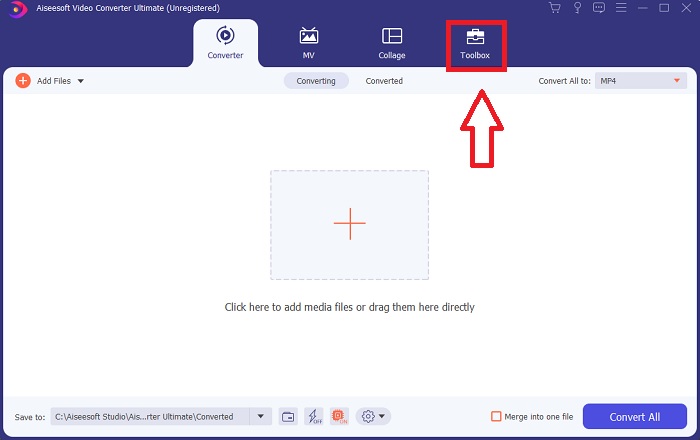
Paso 2: Inicia el software una vez instalado, haz clic en la función Herramientas y continúa con Volume Booster.
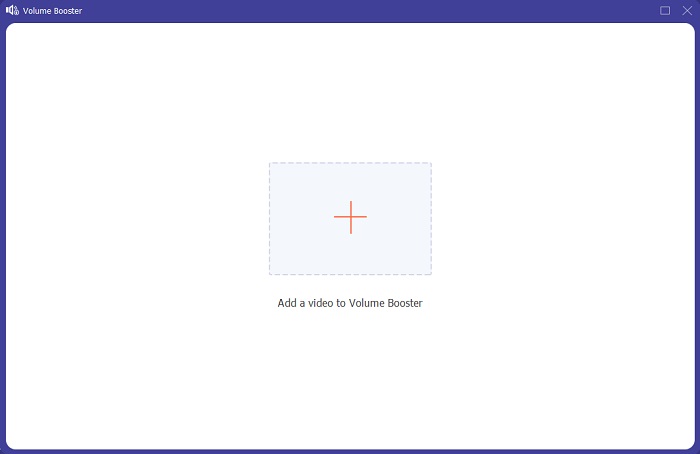
Paso 3: Añade cualquier archivo haciendo clic en el botón + según tu preferencia y continúa editando el videoclip.
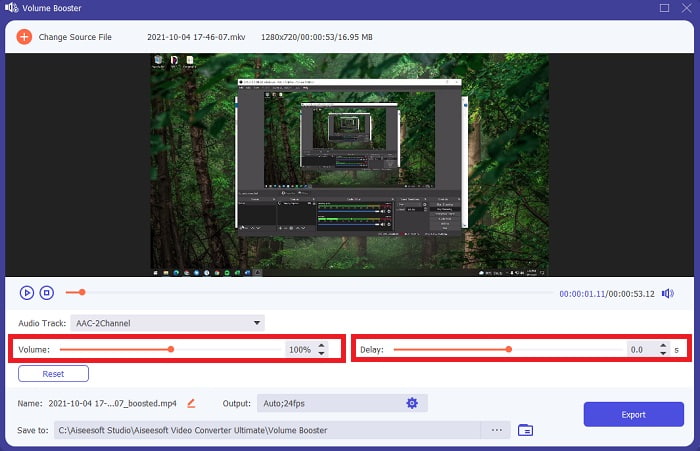
Paso 4: Ajusta el control deslizante del volumen de audio del videoclip. En esta interfaz también puedes ajustar el retardo del audio.
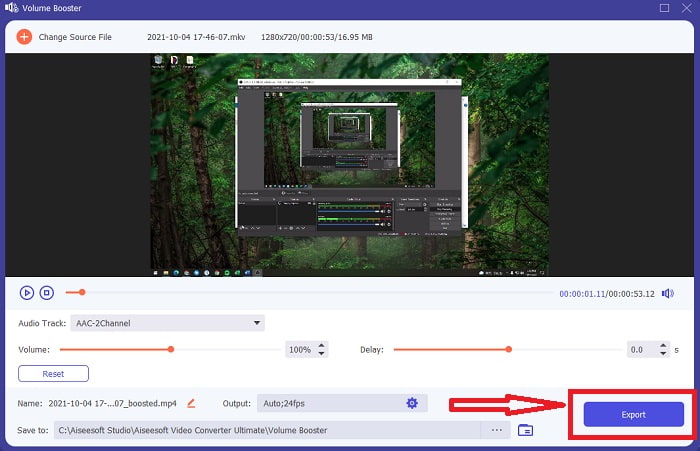
Paso 5: Tras editar la sincronización del videoclip, haz clic en Exportar y elige una ubicación de destino para el archivo.
Relacionado:
Parte 2: Cómo aumentar el volumen de MP4 usando VideoLouder
Si estás buscando un amplificador de volumen para MP4 en sitios web, VideoLouder es una práctica herramienta en línea con la que puedes aumentar el volumen de vídeos y películas gratis directamente desde tu navegador. Puede amplificar el volumen de contenido de vídeo y audio en línea sin necesidad de descargar nada.
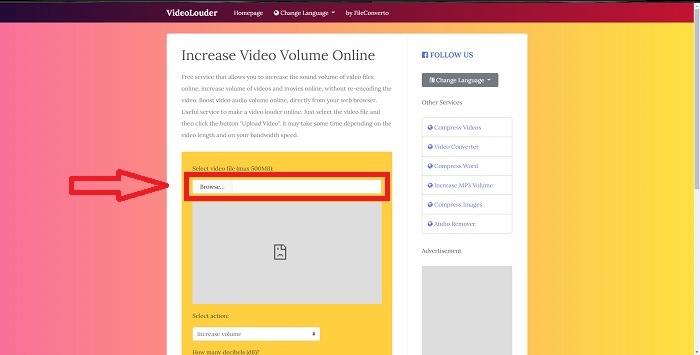
Paso 1: Escribe VideoLouder en el buscador y selecciona tus archivos en tu ordenador haciendo clic en Browse.
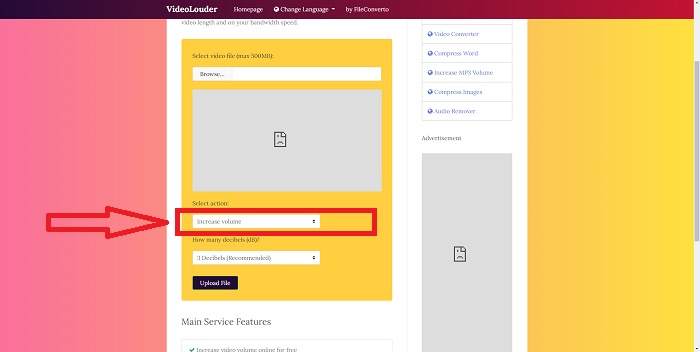
Paso 2: Elige si quieres aumentar o reducir el volumen de tu videoclip.
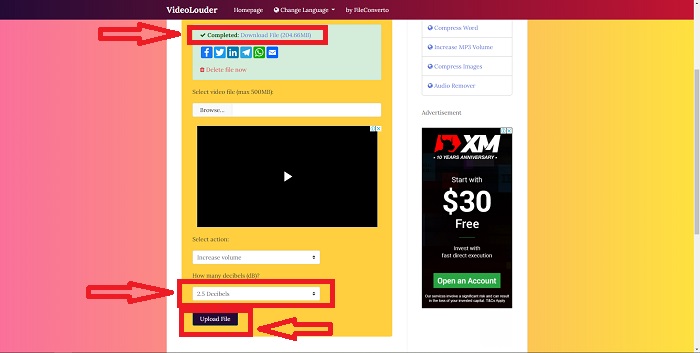
Paso 3: Por último, elige el número de decibelios que quieres aplicar a tu videoclip. Cuantos más decibelios tenga el vídeo, mayor será el volumen. Cuando ya hayas personalizado el ajuste deseado para tu archivo, haz clic en Upload File para convertirlo. Cuando tu archivo esté listo, aparecerá en la parte superior de la pestaña del navegador; descárgalo para exportarlo a tu ordenador.
Parte 3: Cómo aumentar el volumen de MP4 con MAGIX
Los usuarios de PC con Windows que sean semiprofesionales o aficionados avanzados pueden usar Magix Movie Edit Pro, el programa de edición de vídeo de la compañía. Es el software de vídeo más vendido de Europa, y los usuarios lo aprecian por lo fácil que es de aprender y por la estabilidad de su renderizado. Este programa también puede ayudar a aumentar el volumen de MP4 de distintas maneras, pero aquí te enseñaremos el método más sencillo y fácil.
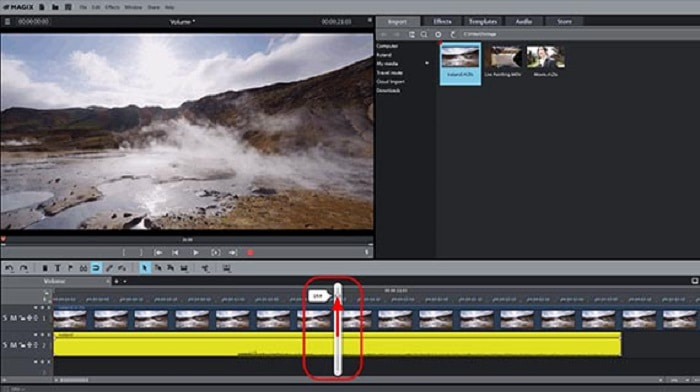
Paso 1: Para mover el objeto de audio, simplemente arrastra el asa hasta el centro del objeto de audio. Cuando se ajuste el volumen, aparecerá un fader en la pantalla.
Paso 2: Aumenta el volumen del vídeo arrastrando el fader hacia la derecha. Es un proceso muy simple. Sin embargo, la saturación (clipping) es demasiado habitual en las secciones más altas. El clipping se puede identificar por un sonido de crujidos en tu audio.
Paso 3: En la reproducción a veces puede escucharse un crujido o chasquido. Si esto sucede, abre el mezclador pulsando 'M' (o mediante el botón del mezclador en la barra de herramientas de la derecha). Comprueba si hay clipping con un medidor de picos. También pueden ayudar los picos de la visualización de forma de onda. En ningún momento la lectura del medidor de picos debe ser superior a 0 dB; si lo es, baja aún más el volumen del objeto de audio.
Parte 4. Preguntas frecuentes sobre el aumento del volumen de MP4
¿Qué son los decibeles?
Las unidades logarítmicas como los decibelios (dB) funcionan para medir los niveles de sonido. Otra aplicación común es la electrónica, donde sirve como canal de señalización o comunicación entre dispositivos. El ruido más fuerte se asocia con un aumento en el nivel de decibelios. Un aumento de diez decibelios en el volumen corresponde a un aumento de diez veces en la intensidad (o potencia) en el volumen de audio.
¿Pierdo la calidad del audio si subo el volumen?
En el hardware puedes reducir el volumen, pero el resultado depende de cómo implementes el control de volumen. Por ello, es poco probable que usar un método u otro tenga un gran impacto en la calidad del audio si utilizas medios digitales. Sin embargo, aumentar el volumen a veces puede estropear la calidad del sonido. En algunas aplicaciones y programas, si subes demasiado el volumen, se escucharán crujidos o sonidos con fallos en el audio. Usa Video Converter Ultimate como amplificador de volumen para MP4, gracias a su función Volume Booster, que puede aumentar el volumen de tu vídeo. Además, también incluye otras funciones útiles y fáciles de usar que te ayudarán a mejorar la calidad de tu vídeo.
¿VideoLouder y MAGIX pueden manejar cualquier tamaño de archivo?
Solo puede convertir archivos de video a VideoLouder hasta un máximo de 500 MB, mientras que puede colocar cualquier clip de video sin ninguna limitación en el tamaño del archivo. VideoLouder es una herramienta web a la que se puede acceder gratis en Internet, mientras que MAGIX Movie Edit Pro debe comprarse primero antes de poder utilizar el software completo.
Conclusión
Ya no tendrás que sufrir al ver películas con un audio de baja calidad gracias a los numerosos métodos que se han presentado en el artículo anterior para solucionar este problema. Algunos son completamente gratuitos en Internet y otros requieren compra antes de usarlos, pero te recomendamos usar Video Converter Ultimate para aumentar el volumen de vídeo MP4, ya que es gratuito y fácil de usar.
-
 [Gratis y en línea] 3 soluciones rápidas para convertir MP4 a OGG
 ¿Quieres convertir MP4 a OGG? Esta publicación muestra 3 formas eficientes de cambiar MP4 a OGG fácilmente. Toda la conversión es 100% gratuita, segura y sin pérdida de calidad.
-
 El mejor editor de MP4 para Windows y Mac en 2021
 Ya sea que esté usando su computadora para la edición de video MP4 o simplemente trabajando en su teléfono, podrá encontrar algunas opciones excelentes aquí, incluido el mejor editor de MP4 para Windows y Mac.
-
 [Totalmente gratis] Los 6 mejores ensambladores de MP4 para principiantes
 Hay muchos ensambladores MP4 disponibles para conectar diferentes clips MP4. En este artículo, hemos elegido algunos ensambladores MP4 gratuitos para Windows 10/8/7 y Mac.
